

dsh-image-skin
Manifest valid★ 1A DeepSeek Harness web plugin: set a background image and adapt the UI's text, background, brand and border colors to the image palette automatically.Built with DeepSeek Harness
dsh-image-skin
English | 中文
A DeepSeek Harness web plugin: set a background image and adapt the UI's text, background, brand and border colors to the image palette automatically.
Built with DeepSeek Harness.
Screenshots
| Effect | Settings page |
|---|---|
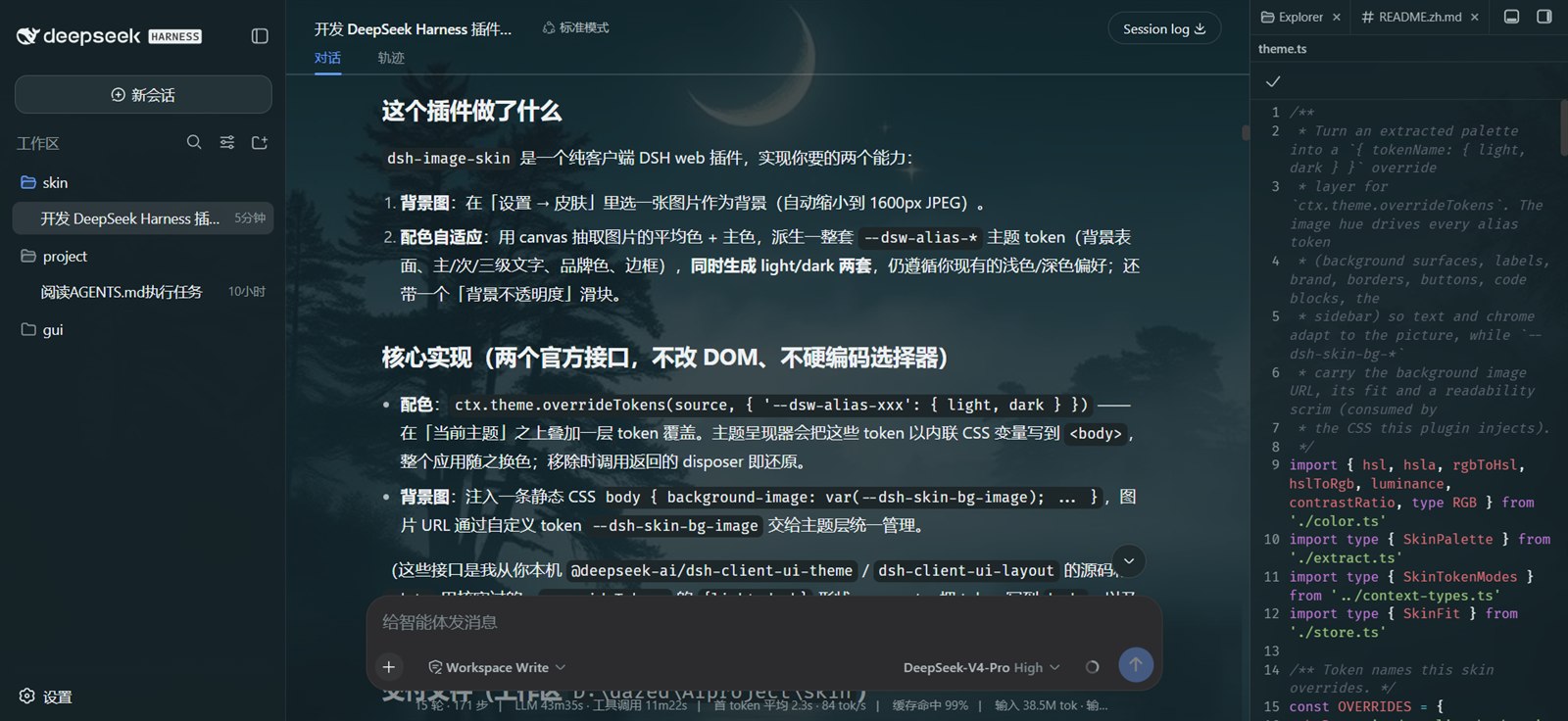 | 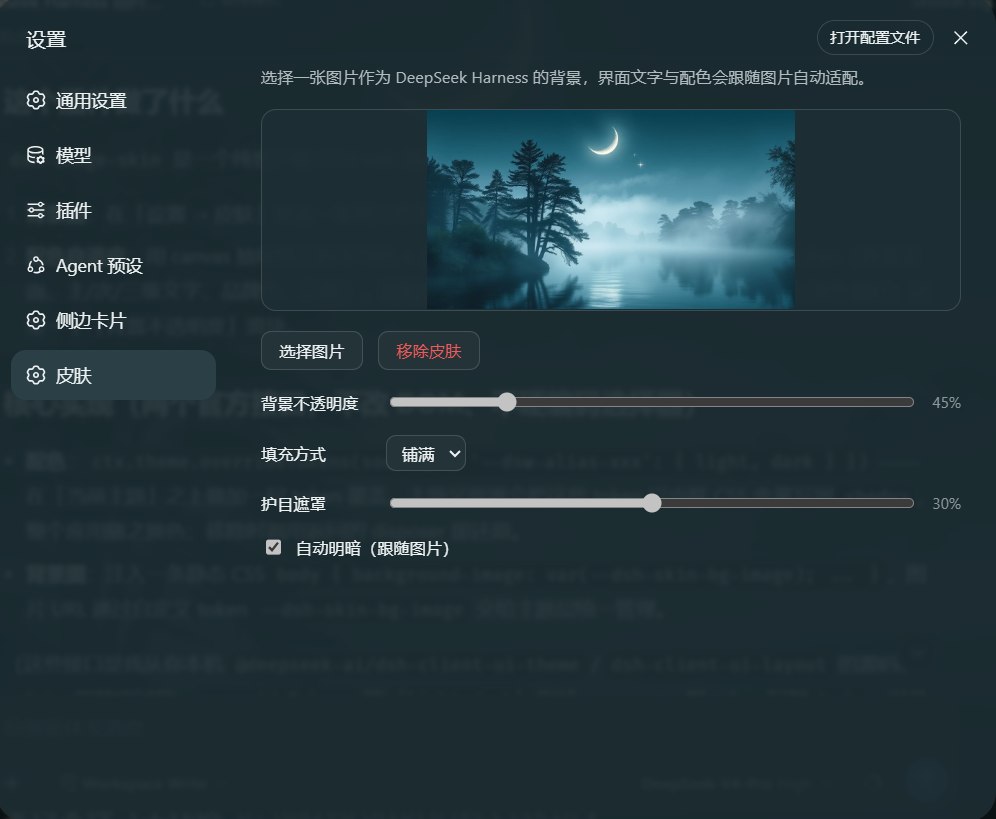 |
Features
- Background image — pick any image (auto-downscaled to a 1600px JPEG for storage).
- Palette adaptation — extracts the image's average + dominant colors and
derives a full set of
--dsw-alias-*/--dsw-specific-*theme tokens (background surfaces, primary/secondary/tertiary labels, brand, borders, buttons, code blocks, the sidebar) in both light and dark modes, respecting your existing light/dark preference. - Contrast guarantee — derived text colors are checked against their surface with WCAG relative luminance (primary/secondary ≥ 4.5:1, tertiary/caption ≥ 3:1) and nudged darker/lighter when short.
- Opacity slider — controls the main surface opacity; layered surfaces (menus/popovers/sidebar) only ease slightly and stay ≥ 80% opaque.
- Image fit — cover / contain / stretch.
- Scrim — a hue-tinted white/black veil over the image for readability on busy pictures.
- Auto light/dark — optional "follow image" switch: bright images get the light scheme, dark images the dark scheme; disabling it or removing the skin restores your previous light/dark/system preference (via a registered empty-token scheme-carrier theme, so your durable preference is never overwritten).
- Persistence — image + options live in
localStorageand restore on refresh. - Settings section — registers a "Skin" page (
settings.section) with zh/en copy that follows the DSH language setting.
How it works
Everything goes through two official seams — no DOM-structure surgery and no hard-coded product selectors:
ctx.theme.overrideTokens(source, tokens)stacks a token layer over the active theme ({ '--dsw-alias-xxx': { light, dark } }). The theme presenter writes those tokens as inline CSS variables on<body>, so the whole app recolors. Removing the skin calls the returned disposer to restore the theme.- One injected static CSS rule —
body { background-image: … }. The image URL, fit and scrim ride custom tokens (--dsh-skin-bg-*), so the theme layer owns them and tears them down with the layer. ctx.theme.register+ctx.theme.setTheme(auto light/dark) — with "follow image" on, a scheme-carrier theme (colorScheme: light|dark, empty tokens) is registered and made active; the real colors still come from the override layer. Only the built-inlight/dark/systempreferences are persisted, so the in-process auto id never overwrites your durable preference, and leaving auto restores the prior one.
Layout
src/index.ts                # host half: no-op mount point
src/context-types.ts        # structural ctx mirror + @deepseek-ai/cordis augmentation
src/client/index.tsx        # client half: overrideTokens + CSS + settings section
src/client/SkinSettings.tsx # settings UI (upload / preview / opacity / remove)
src/client/theme.ts         # palette → token overrides
src/client/extract.ts       # image downscale + palette extraction (canvas)
src/client/color.ts         # pure color math (RGB/HSL/luminance)
src/client/store.ts         # localStorage persistence
cordis.patch.yml            # bundle patch (mounts the plugin into a profile)
scripts/build.mjs           # esbuild build (host ESM + wrapped client bundle)
scripts/smoke.mjs           # smoke test (host exports + client bundle contract)
Development
Requires Node.js ≥ 22.13 (pnpm 11's requirement) and pnpm 11.
pnpm install
pnpm build        # emits lib/index.js and lib/client.js (esbuild + tsc declarations)
pnpm typecheck    # tsc --noEmit
pnpm smoke        # smoke test: host exports + client bundle contract (no browser)
Install into your web profile
Local development (link, recommended)
cd <this repo>
pnpm install && pnpm build

# one step: install AND auto-mount (no manual file edits)
dsh plugin --profile web add link:<absolute path to this repo>
Then restart DSH and hard-refresh the browser (Ctrl/Cmd+Shift+R). dsh plugin
detects dsh.bundle.patch and appends the package to dsh.profile.bundles
automatically.
This repo is not published to npm (package.json has "private": true) — local
use just needs the link flow above. See AGENTS.md if you ever want to publish.
Never mount through both channels at once (that loads two copies). Remove any leftover hand-written
insertline fromcordis.patch.ymlbefore switching to the bundle channel.
Uninstall
Bundle channel (dsh plugin add)
dsh plugin --profile web remove dsh-image-skin
This removes the dependency, uninstalls the package, and drops it from
dsh.profile.bundles. Restart DSH + hard-refresh.
Manual link install: delete the dsh-image-skin dependency from
~/.dsh/profiles/web/package.json, delete the image-skin insert block from
cordis.patch.yml, then pnpm install and restart.
Skin data: the image lives under the dsh-image-skin.v1 localStorage key —
tap "Remove skin" before uninstalling, or delete the key in DevTools →
Application → Local Storage.
Notes
- Client-half changes only need a hard refresh; host-half changes (this plugin's host is empty) need a DSH restart.
- Images are stored as
data:image/jpeg(a few hundred KB), well under the localStorage quota.
Known limitations
- Very high-saturation images could tint surfaces strongly; background
saturation is capped (
sat ≤ 45), and layered surfaces (menus/popovers) stay ≥ 80% opaque to preserve readability.
License
Third-party community plugin — not affiliated with DeepSeek or DeepSeek Harness. Names and logos belong to their respective owners.
Versions
| Latest version | Published | Size |
|---|---|---|
| 0.1.0 | — | — |
| 0.1.1 | — | — |
| 0.2.0 | — | — |
Comments
Loading…
From the same category
by nexu-io
🎨 Best DeepSeek Harness Design Plugin. The open-source Claude Design alternative. 🖥️ Local-first desktop app. 🖼️ Your coding agent becomes the design engine: prototypes, landing pages, dashboards,
★ 98.1k
Apache-2.0
TypeScript
Sep 25, 2026
deepseek-harness-desktop is a interface plugin for DeepSeek Harness. See the repository documentation for its documented capabilities.
★ 28.6k
MIT
by zhu1090093659
DeepSeek Harness (DSH) Web Plugin Aggregation Ecosystem · Everything is a plugin, distributed via the Creative Workshop
★ 8k
Apache-2.0
TypeScript
Sep 25, 2026
dsh plugin --profile web add dsh-webA collection of independent Web UI plugins and skins, including task boards, Git graphs, mobile access, and live token stats.
★ 7.4k
Apache-2.0
TypeScript
dsh plugin --profile web add dsh-webby ZSeven-W
The world's first open-source AI-native vector design tool and the first to feature concurrent Agent Teams. Design-as-Code. Turn prompts into UI directly on the live canvas. A modern alternative to Pe
★ 6k
MIT
Rust
Sep 25, 2026
by omdsh-dev
开放的侧边栏底座,支持三方拓展注册新侧边栏页面。内置文件渲染编辑/终端/侧边对话/Git/子代理页面 | Open sidebar foundation, supports third-party extensions to register new sidebar pages. Built-in file rendering/editing, terminal, side chat, Git,
★ 3.7k
↓ 43.9k/wk
MIT
TypeScript
Sep 24, 2026
dsh plugin --profile web add dsh-better-sidebar