

dsh-web
Manifest valid★ 9.7kDeepSeek Harness (DSH) Web Plugin Aggregation Ecosystem · Everything is a plugin, distributed via the Creative Workshop
dsh-web · DeepSeek Harness Web GUI Plugins & Themes
Chinese | English
dsh-web is a modular plugin ecosystem and desktop workbench for the DeepSeek Harness (DSH) Web GUI, providing AI agent development with a task automation board, mobile and cross-device remote control, SSH terminal operations, Git history visualization, and customizable theme skins. Users can either mount the full plugin suite onto an existing dsh web instance via the official profile mechanism, or directly download DSH Desktop, the macOS and Windows desktop client that bundles a complete Node.js runtime and the full set of plugins.






DeepSeek Harness(DSH)Web 插件生态 · 模块化智能体工作台
创意工坊 · 任务看板 · 移动端远程 · SSH 运维 · Git 图谱 · 使用统计
What is this
Native DeepSeek Harness Web provides core conversation and tool-calling, but multi-task scheduling, long-running background execution, mobile collaboration, and engineering ops still have room for extension.
dsh-web is mounted onto dsh web via the official profile mechanism, with zero invasive modifications to the official source code, providing users with a complete modular extension system:
- Ops & collaboration plugins: long-running scheduled task board, mobile/cross-device remote control, SSH terminal transfer, Git graph & worktree isolation, session archive management, model capability editor, and right-panel resource manager;
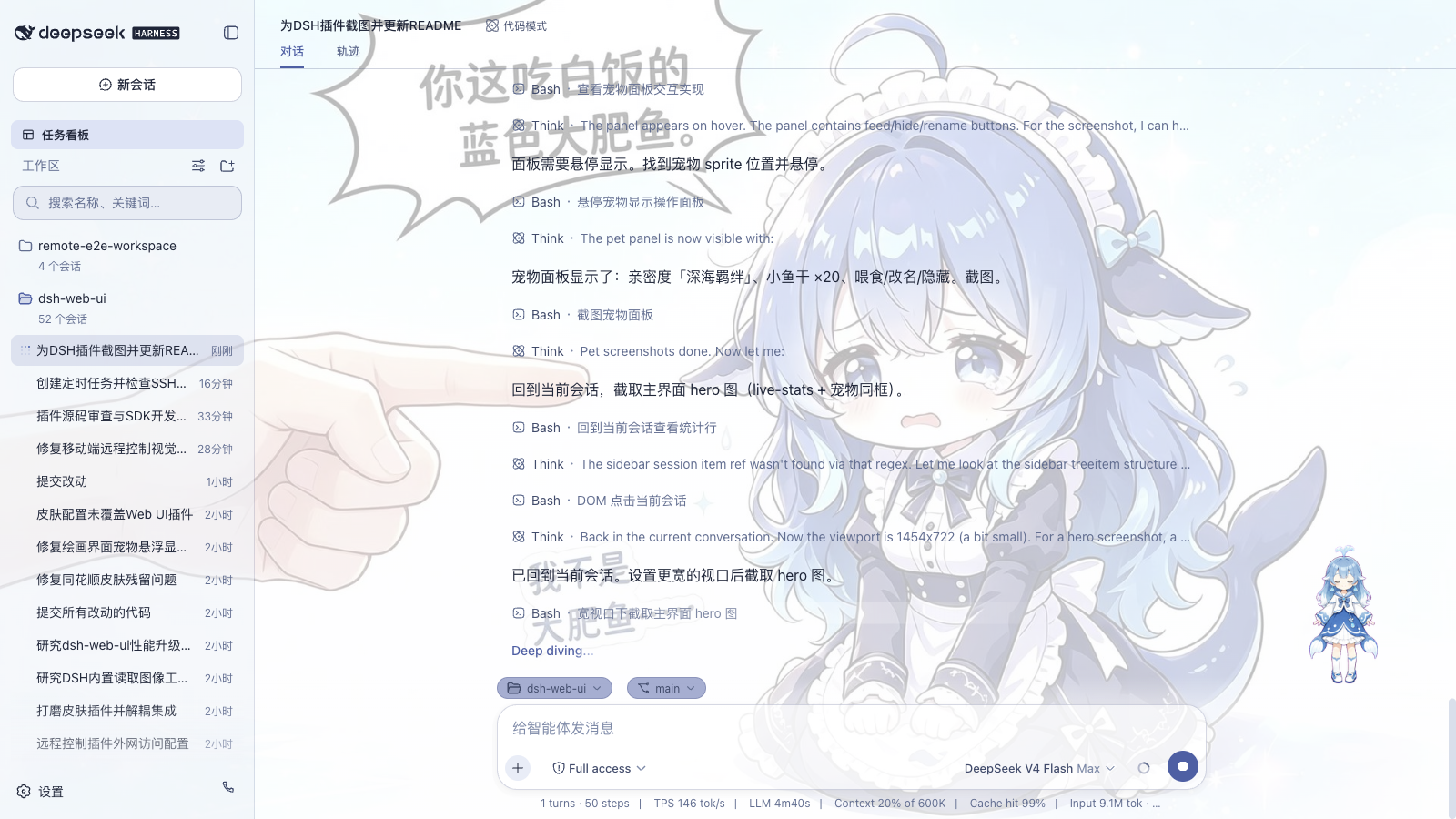
- Decoupled themes & assets: feature plugins are fully separated from style assets. The skin plugin handles rendering; varied theme skins (styles, textures, effects) and desktop pets can be installed freely via the DSH Creative Workshop;
- All-in-one & on-demand: install the full suite via
@linxin666/dsh-web-allin one click, or install individual plugins as needed. The aggregate package pre-integrates community plugins likedsh-better-sidebar. See Plugin Suite Guide for details.
| Capability | Native dsh web | dsh-web suite |
|---|---|---|
| Agent presets | Official presets (Standard / Minimal, etc.) | Official and community presets |
| Custom model capabilities | None | Per-model declaration of image input and reasoning tiers, plus disabling / enabling custom providers |
| Task board | None | Multi-column board + real cron-scheduled execution |
| Mobile remote | None | QR-code pairing, SSE real-time sync; the same link can also pair with a PC browser |
| Remote server ops | None | SSH panel: terminal / transfer / tunnel / cluster |
| Usage stats | None | Token usage, provider balances, plan quotas, and Token Bank |
| File preview & changes | None | Right-side panel: resource manager / editor / terminal / Git / browser |
| Git visualization | None | Branch selector + commit history graph |
| Session archive | None | Centralized view and filtering of all sessions, batch archive / restore / delete, with automated policies |
| Theme skins | Default theme | Blue Fantasy ships with the skin plugin; other skins are installed on demand from the Creative Workshop |
Choosing DSH Extensions by Use Case
| Use case | Quick link |
|---|---|
| Run and schedule AI agent tasks | Task board & cron execution |
| Access DSH from a phone or another PC | Phone & PC browser remote control |
| Manage remote servers via SSH | SSH terminal, transfer & tunnels |
| Customize theme skins and pets | Browse DSH Creative Workshop |
| Use the macOS or Windows desktop app | DSH Desktop download & requirements |
| Install the plugin suite for existing DSH | Plugin installation quick start |
DSH Desktop (Desktop Client)
DSH Desktop packages the DeepSeek Harness Web GUI into a cross-platform desktop application (supporting macOS and Windows). The installer ships with an isolated Node.js runtime environment (including npm and pnpm), the dsh host, and a preconfigured web profile (the official web bundle and the dsh-web suite), so no prior system development environment or separate dsh CLI installation is required. The installers are published with each Release as dsh-desktop-* assets (macOS dmg/zip and Windows exe/zip).
- Isolated host and port separation: the built-in runtime starts a dedicated dsh host on the 3082-3181 port range, fully isolated from the native
dsh webports 3080/3081. The desktop application and a standalone command-line instance can run in parallel, each maintaining independent sessions. - Shared data directory: shares the
~/.dshconfiguration directory (including global config, session history, and keys) with the dsh CLI; profiles auto-initialized by the application carry an identifier and are automatically redeployed with user custom patch layers preserved when the built-in runtime is upgraded, without modifying user-created profiles. - Built-in plugin management: the app forwards
dsh plugin add/removecommands directly to the built-in pnpm, so adding or removing plugins requires no external development toolchain configuration. - Startup diagnostics and fault tolerance: if a component is missing, the host crashes, or startup times out, the UI automatically enters a diagnostic error page and outputs the tail of the host log, with one-click retry or direct log file access.
The installers currently have no commercial code signing. On macOS, if a security prompt appears on first launch, start it via "right-click menu → Open"; on Windows, when a SmartScreen prompt appears, choose "More info → Run anyway". For detailed build steps, configuration, and security guidelines, see the desktop README.
Creative Workshop (dsh-market.com)
The Creative Workshop is a one-stop asset platform for the DSH ecosystem, offering theme skins, desktop pets, feature plugins, and community Agent presets. All items are ranked by real-device like popularity; skins support instant try-on, and plugins provide one-click install commands. Blue Fantasy ships with the skin plugin; other skins and pets can be browsed and installed on demand in the Workshop. In the Web GUI's "Creative Workshop" settings card you can browse the online catalog; skins and pets download to the DSH home directory with one click; community presets go to the local preset library and, once enabled, appear under "Settings → Agent Presets" for new sessions.
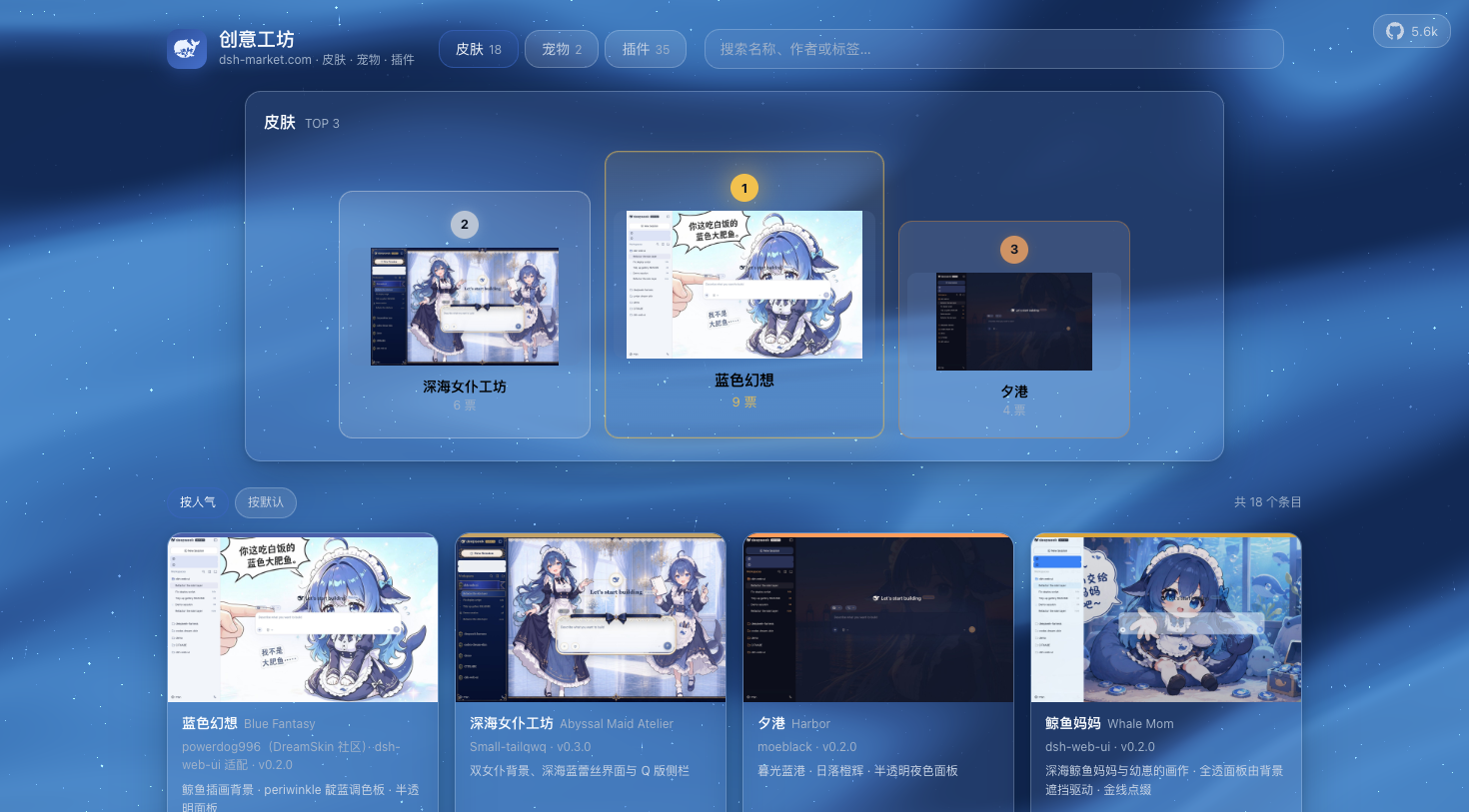
The Creative Workshop site is part of this repository: the frontend is a pure static build, automatically generated by the build script scripts/market-build from data sources such as skin.json, pet.json, and community.json; dynamic capabilities like likes are provided by Cloudflare Workers edge functions and a D1 database (with a one-vote-per-device limit), and continuous-integration deployment is automatically triggered after code is merged into the main branch.
The Creative Workshop builds an open, transparent community where developers share work and users pick their extensions.
Feature Plugins
Task Board
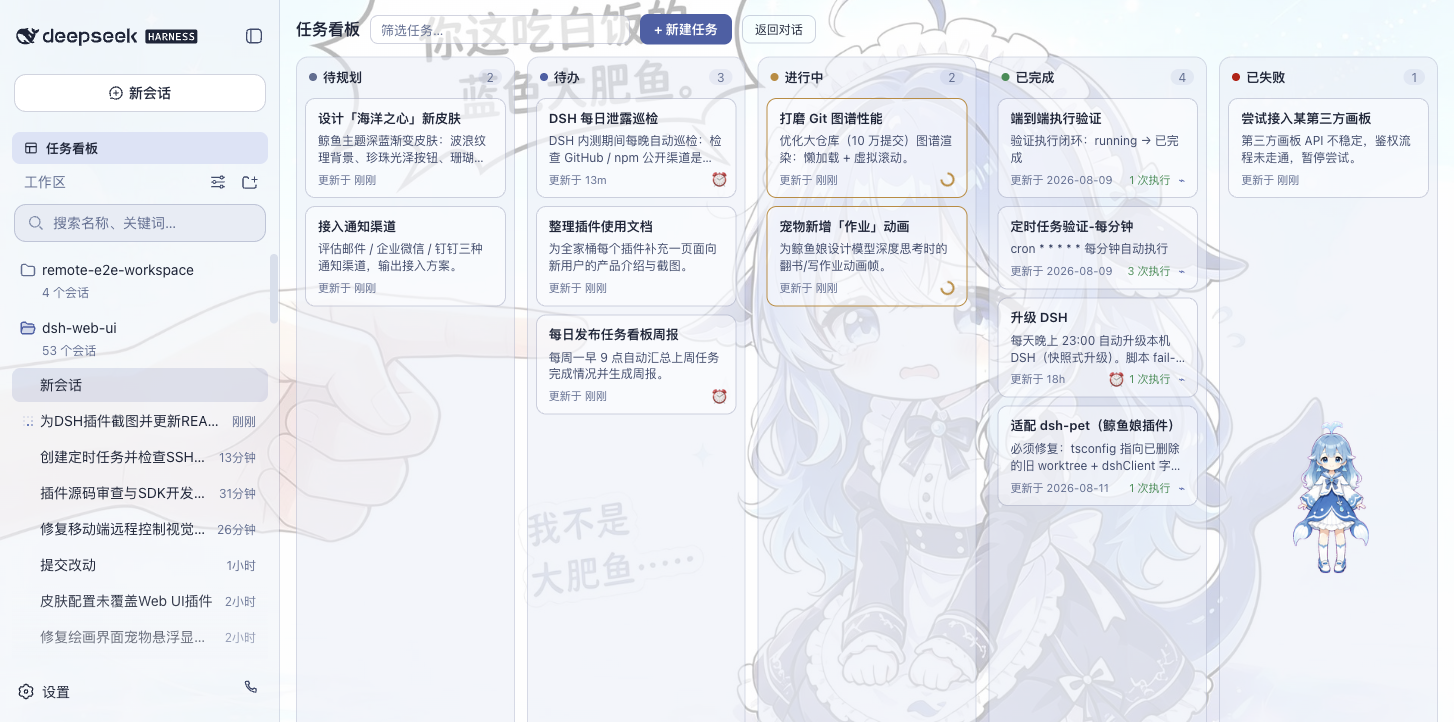
Access via "Task Board" in the sidebar. The board shows five columns: To Plan, To Do, In Progress, Done, and Failed. Click "Run" on a card to execute the task in a real DSH agent session; the status auto-writes back on completion. Click any card to jump to its session and review the full interaction trace.
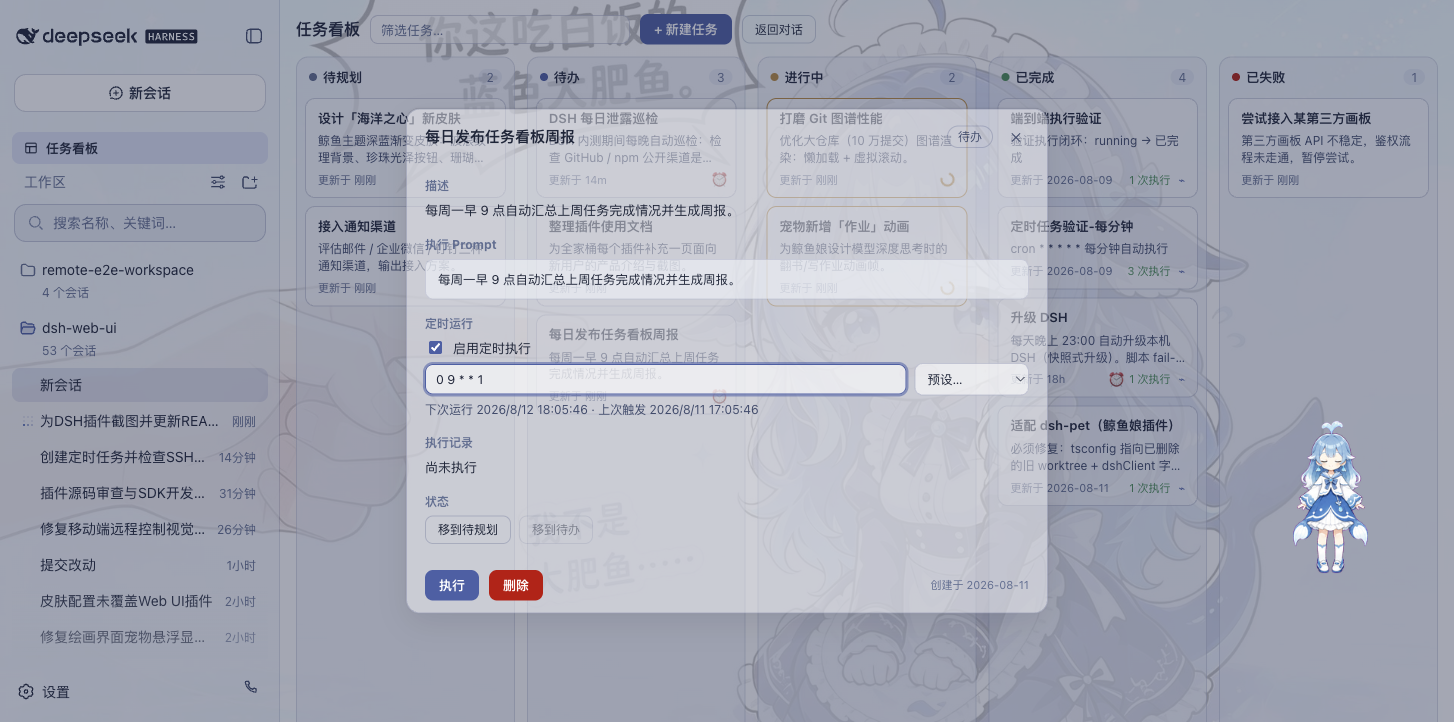
Tasks support backend cron scheduling: set a cron expression in task details (e.g., check DSH upgrades daily at 23:00, generate a weekly report every Monday at 09:00). The host process triggers execution on schedule even after the browser is closed. An optional power-management setting prevents system sleep while allowing the display to turn off (disabled by default), supporting Windows, macOS, and Linux with systemd-logind.
Tasks support a session-reuse mode: when enabled, if the previous run's session is still alive and idle, the host reuses it for subsequent tasks (reapplying the task's permissions and model while preserving context); if the session has closed, a new one is created automatically to keep scheduling running.
| Multi-column board | Scheduled execution |
|---|---|
 |  |
Mobile Remote Control
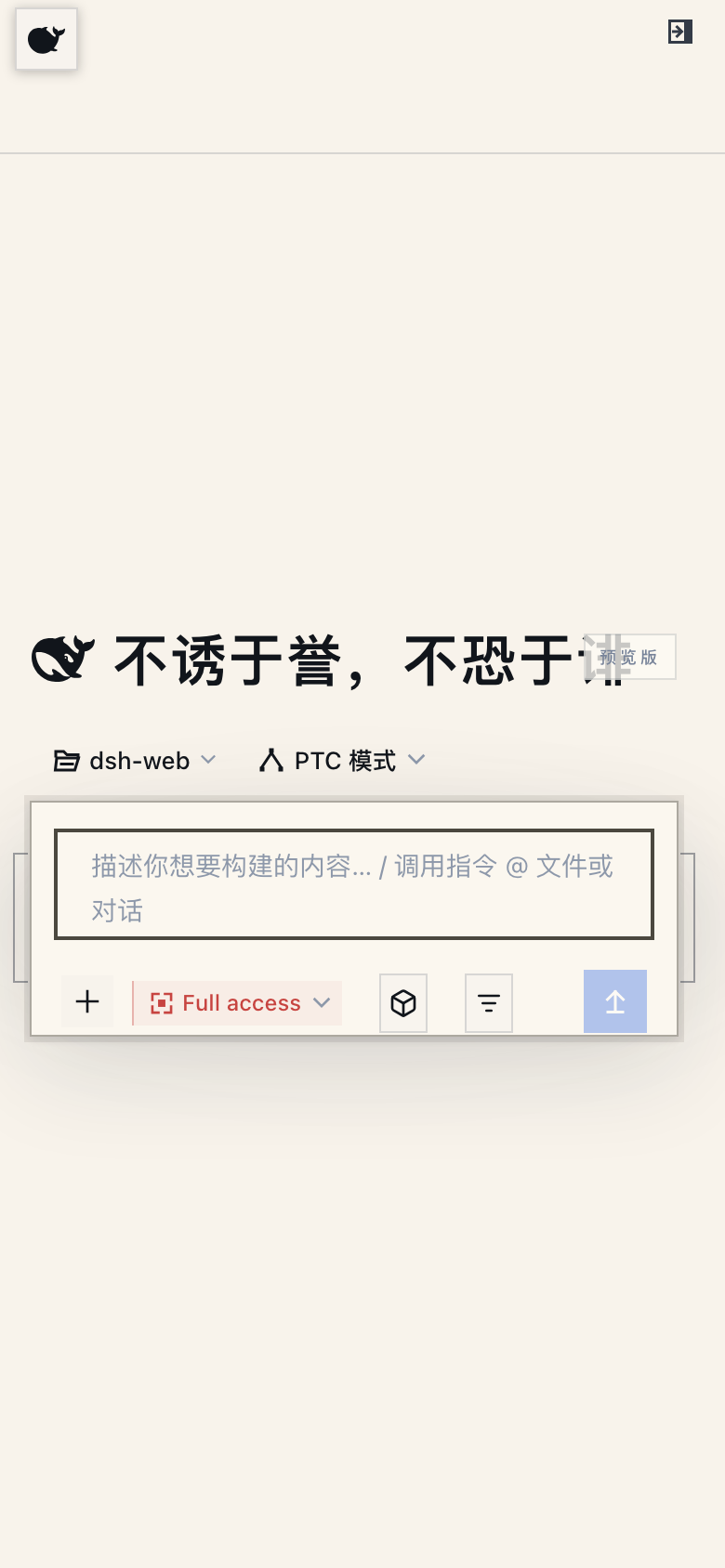
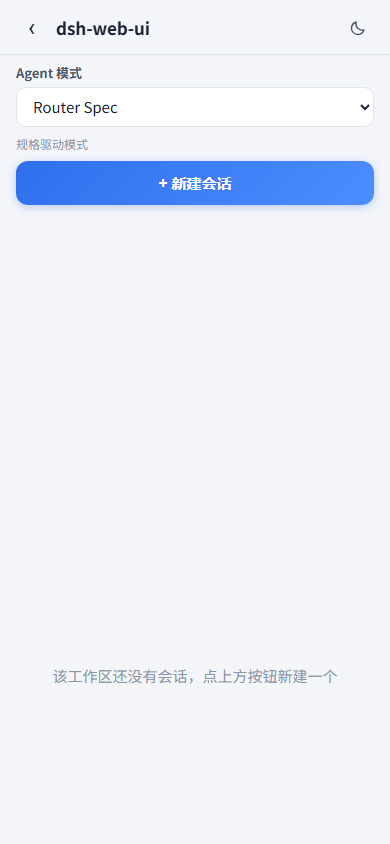
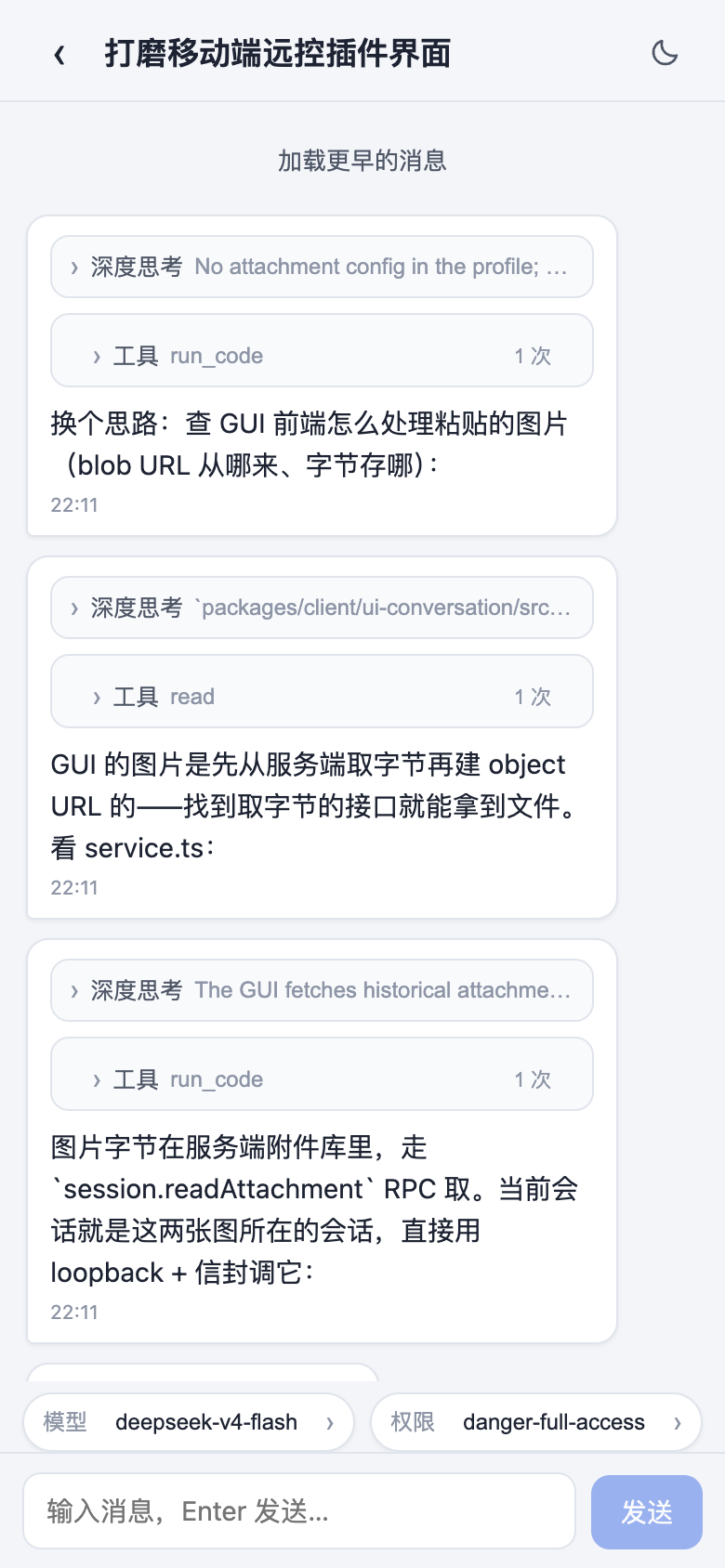
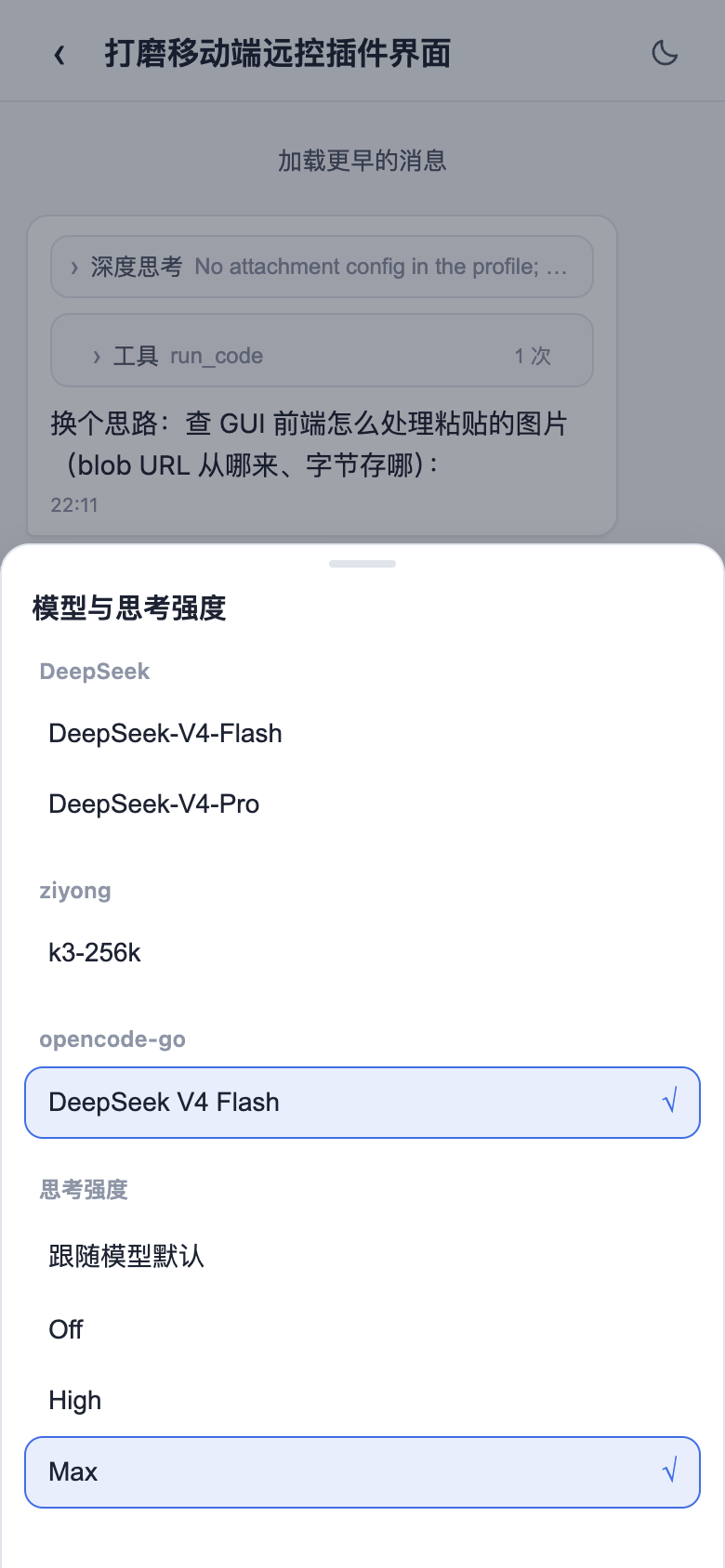
Open the pairing panel via the phone icon at the sidebar bottom. After pairing via phone QR scan or link copy, the phone browser loads the official Web GUI with an auto-activated mobile touch layer: tap the whale icon to toggle the sidebar, swipe left/right to collapse/expand, long-press a session for the action menu, Enter only inserts a newline, and 16px font prevents focus zoom. Desktop-only panels (SSH, Task Board, Git Graph, etc.) are auto-hidden on mobile, keeping focus on sessions, model switching, thinking-level, and messaging, with full context shared in real time across devices.
The same pairing channel also supports another PC browser: open the pairing link on a remote computer to run the full desktop Web GUI. All remote traffic is gated behind pairing (via /remote/api); unverified access is blocked and shows only a notice banner. Pairing tokens are single-use and expire on timeout; clicking "Stop" immediately revokes all connected devices. QR codes default to LAN communication; pairing with tunnel tools like cloudflared enables secure cross-network public access. For security, use the pairing channel when a tunnel is involved, and avoid configuring --trusted-host for the tunnel domain to prevent bypassing device verification (see Remote Control Plugin Notes).
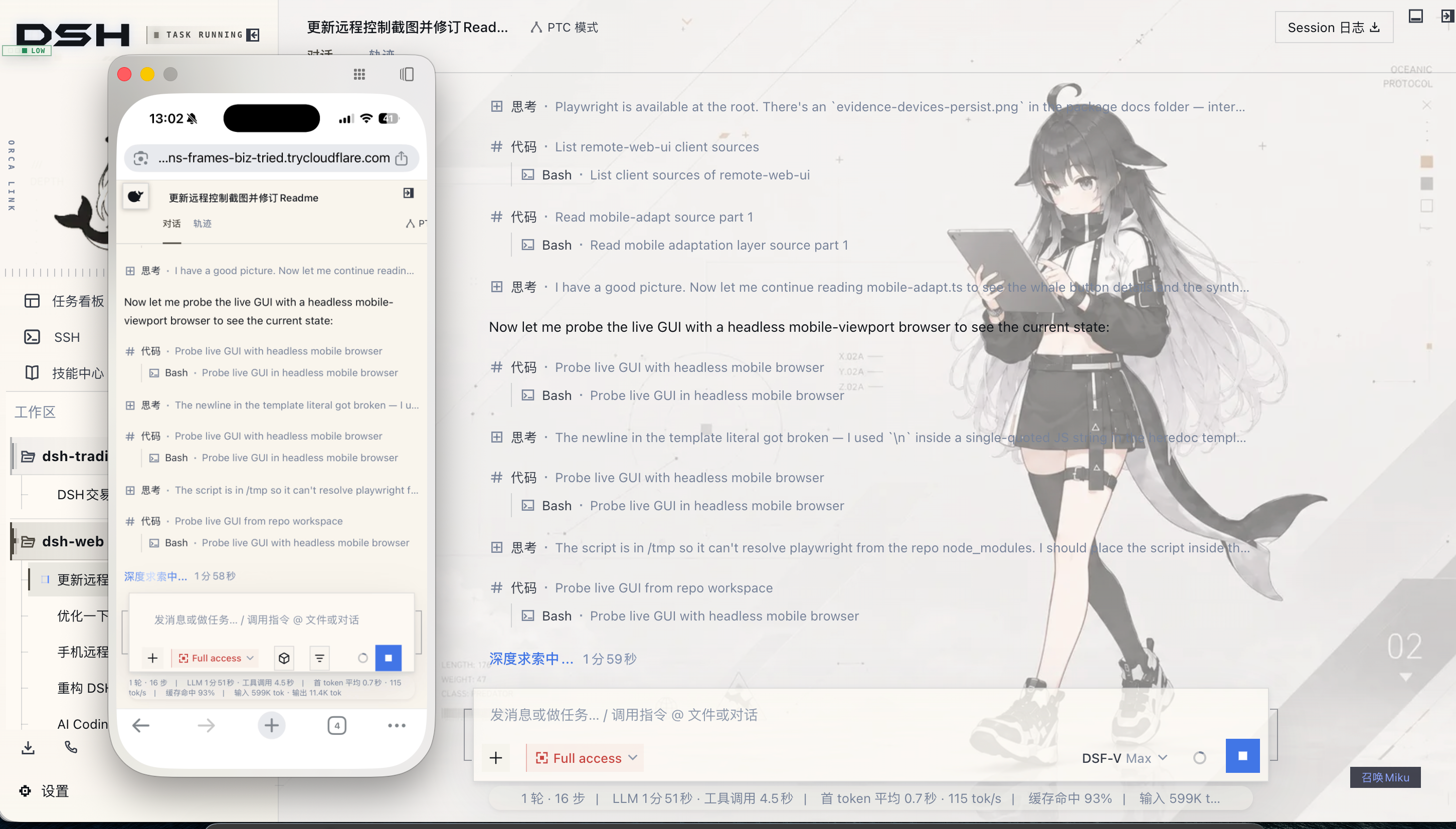
Real-time messages and tunnels: Mobile receives real-time streamed messages via SSE (Server-Sent Events). Cloudflare quick tunnel (trycloudflare.com) and Tailscale Serve do not pass SSE by default; in such networks the plugin automatically falls back to high-frequency polling. Messages are sent and received normally, but new messages may be slightly delayed. For instant streaming, use a tunnel service that supports long-lived connections and SSE (e.g. Cloudflare named tunnel or self-hosted TCP port forwarding).
| Mobile home (whale entry) | Session list |
|---|---|
 |  |
| Chat (thinking & tool calls) | Model selection (bottom sheet) |
 |  |
Remote Connection (SSH Ops)
Open the remote ops panel via the "SSH" entry in the sidebar. Supports key and password authentication, and can import the local ~/.ssh/config host list with one click; configuration is securely stored in ~/.dsh/dsh-ssh.json. The panel offers the following:
- Web terminal: full interactive remote terminal based on xterm.js with real-time output and window auto-fit;
- File transfer: integrated SFTP upload and download with progress indication and visual remote directory browsing;
- Port forwarding: encrypted tunnels from local to remote internal services (e.g. intranet databases, backend APIs), defaulting to listen on 127.0.0.1 only for security;
- Cluster concurrent execution: batch command execution across multiple hosts, filterable by alias, runtime environment, or tag;
- Agent direct invocation: agents and panel share host configuration; issue commands in a session to delegate remote inspection and ops tasks to an Agent.
Usage Statistics
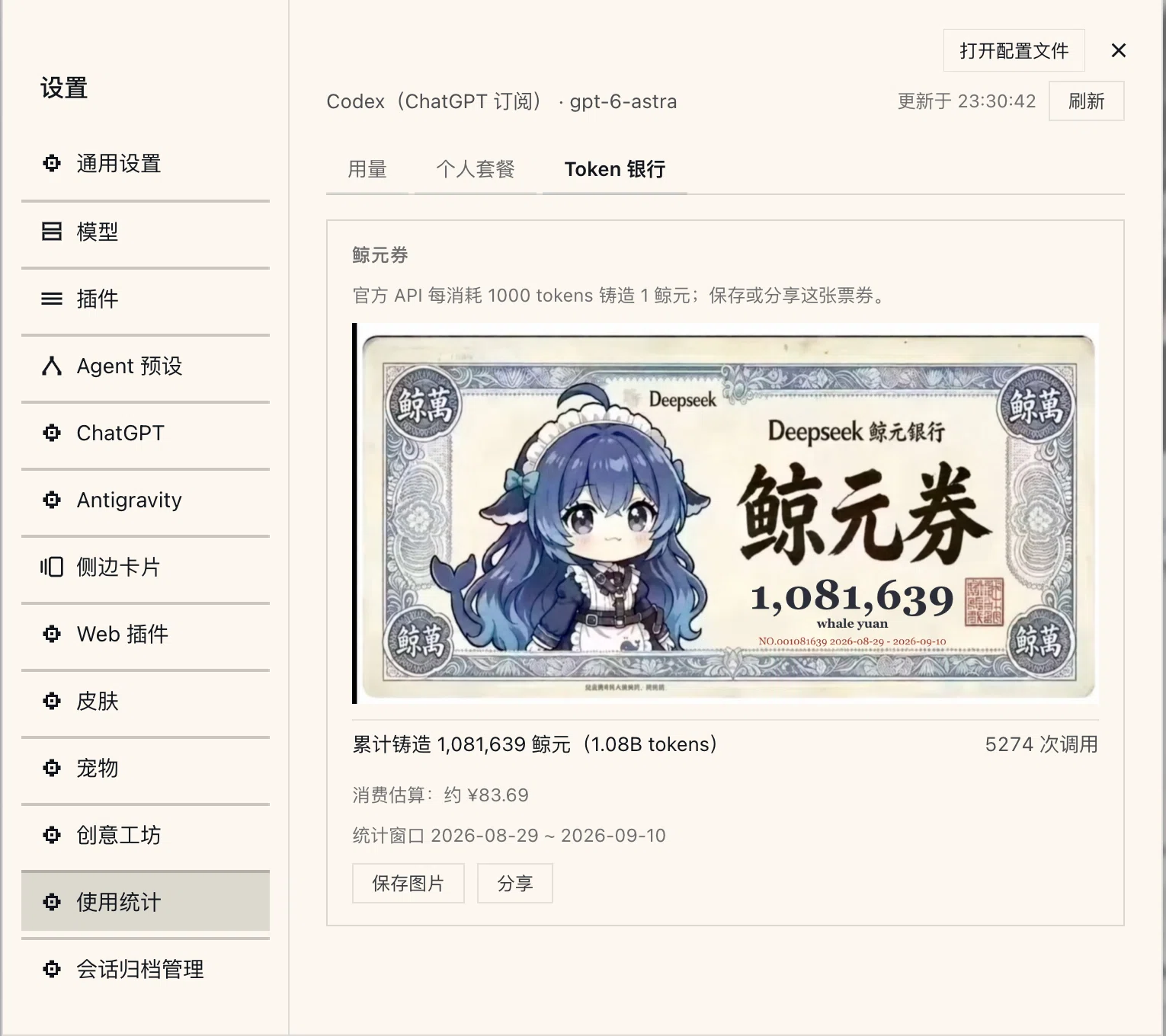
View token consumption, provider balances, and coding plan quotas centrally under "Settings > Usage Statistics", with automatic periodic refresh and manual instant queries.
- Usage details: daily input, output, and cache usage broken down by provider and model, with a 30-day consumption trend; supported providers offer account balance queries, and DeepSeek's official routing provides peak/off-peak billing and bill estimation.
- Personal plan tracking: real-time usage ratio and reset cycle for coding plans from Kimi, GLM, MiniMax, OpenCode Go, Codex / ChatGPT, and other platforms.
- Token Bank: every token consumed via the DeepSeek official channel accumulates 1 Whale Yuan; the "Whale Yuan voucher" displays cumulative call metrics within the ledger period, with card save and system-level share support.
- Desktop pet integration: once the pet plugin is installed, floating-widget bubble notifications show the current session's provider quota, balance, or today's consumption directly.
Statistics count from when the plugin is first enabled; historical data is not backfilled. Whale Yuan vouchers only cover DeepSeek official consumption within the ledger window. For supported providers and configuration details, see the dsh-usage README.
Model Capabilities
Custom provider model capability settings are built into the "Settings > Models" page. For capability fields not exposed in the official UI, this plugin provides a visual configuration editor:
- Image input declaration: expand the "Model Capabilities" panel in a custom provider card to declare per-model image input support (
["text","image"]or["text"]), with the UI showing the effective state at a glance; - Reasoning & thinking tiers: declare a model as non-reasoning (the UI hides the thinking-intensity slider), inherit global config, or customize specific reasoning tiers and low-level request parameters;
- Instant effect and conflict protection: configuration reuses the official storage channel; unedited fields remain unchanged, and changes take effect immediately without restarting the service. Each write includes a config version check to prevent concurrent multi-device overwrites;
- One-click provider disable/enable: temporarily disable a provider route and auto-archive its config; the model selector immediately removes that provider, saved API keys and credentials remain untouched, and you can restore with one click anytime.
Technical note: this configuration is a client-to-gateway protocol declaration; the system does not perform automated remote probing. If a model declares image support but the provider gateway does not handle multimodal, the gateway will still return an error at request time. See dsh-model-capabilities README.
Right Panel
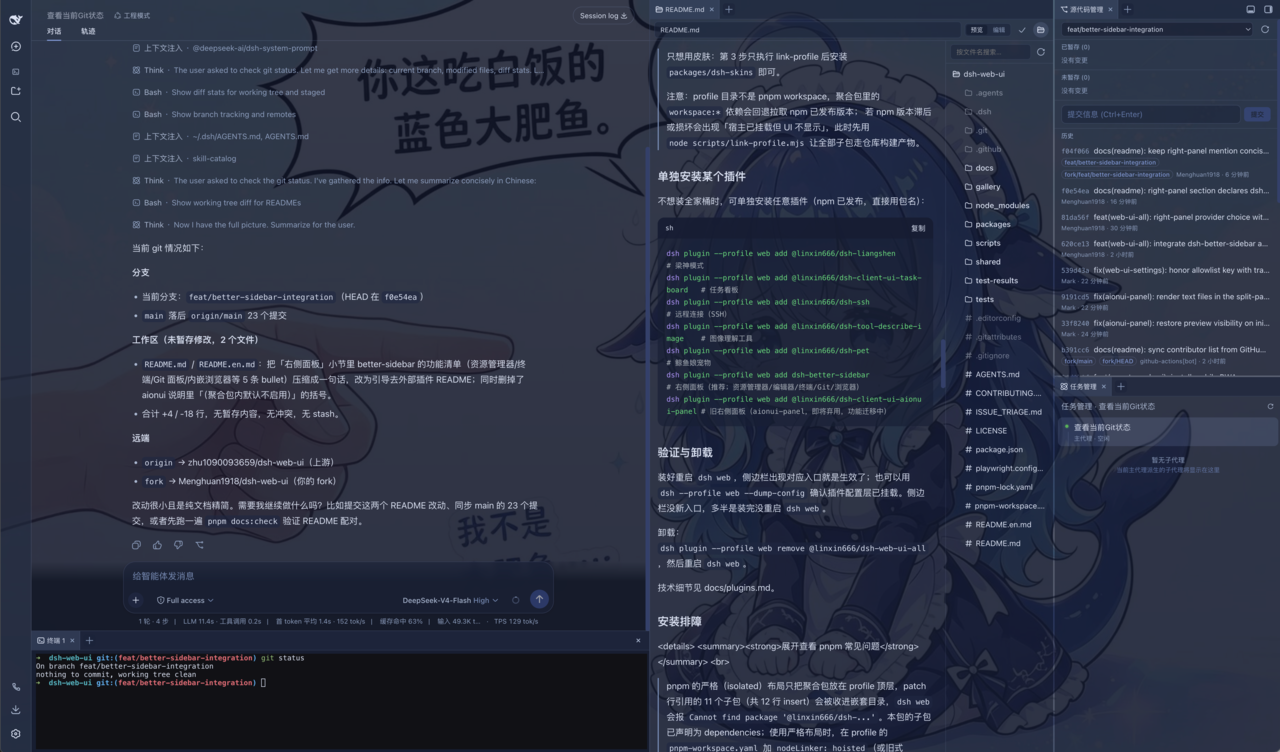
The right panel is powered by the community plugin dsh-better-sidebar (included in the all-in-one bundle and enabled by default). It integrates a file explorer, an inline code editor, an auxiliary terminal, a Git panel, and a built-in web browser, and supports docking for third-party plugins. See its project documentation for related architecture and configuration.
Git Graph
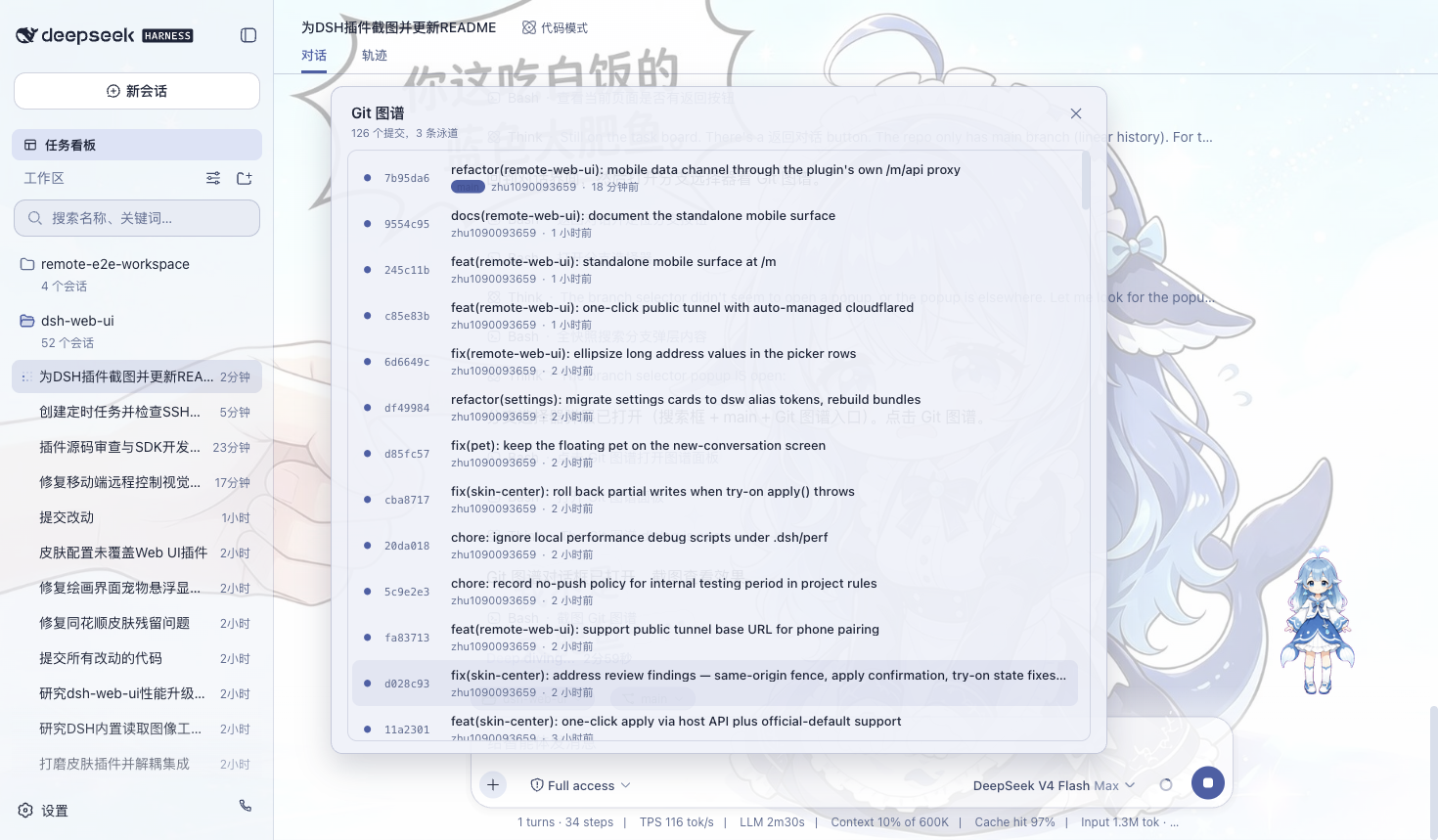
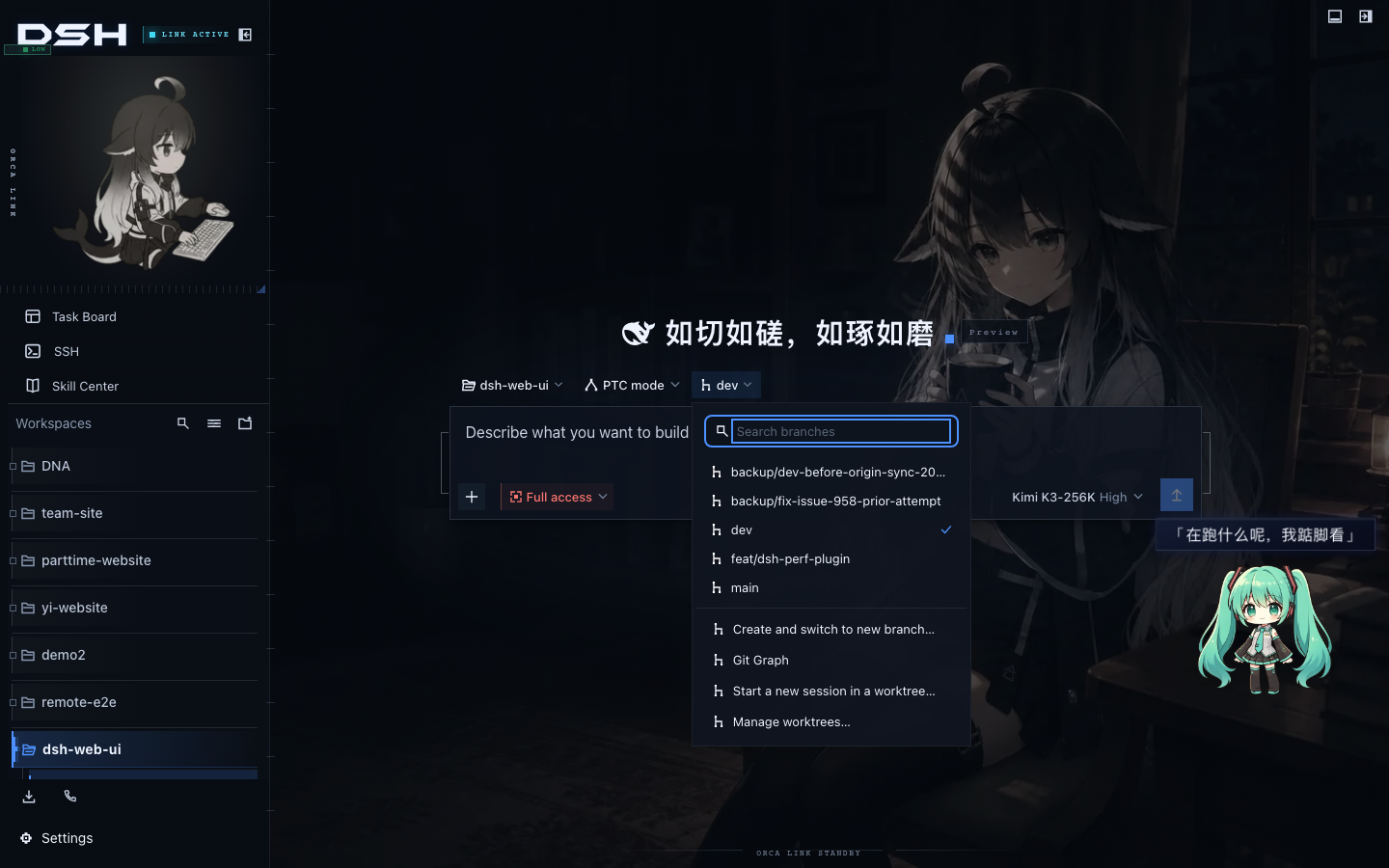
Git ops bar and visual commit history graph integrated above the chat input:
- Branch & commit graph: Visualizes branch forks and merge swimlanes, making it easy to trace code evolution and switch branches in medium-to-large projects.
- Git Worktree isolated sessions: When multiple Agents work concurrently, editing the main branch directly often causes file conflicts and branch pollution. The plugin creates fully independent worktree checkouts and isolated branches under
$DSH_HOME/worktrees/for new sessions, named likewt/<名称>, keeping the main checkout clean; the "Manage worktrees" panel lets you view and clean up temporary checkouts centrally. - Automation policies & Agent integration: An "auto-isolate" option automatically assigns a dedicated worktree to new sessions entering a Git repository; the
git_worktreetool is also exposed to agents, letting them create and manage isolated development environments on their own.
| Git Graph | Git Worktree Parallel Sessions |
|---|---|
 |  |
Session Archive Manager
Session archive management (dsh-session-archive) is a centralized module designed to handle buildup of many short- and long-term sessions, active when installed with the full bundle:
- Centralized search & status filtering: Uniformly displays active, archived, blank, sub-agent spawned, and workspace-less sessions; supports keyword search and multi-dimensional sorting by title, workspace, status, and session ID.
- Safe batch operations: Multi-select batch archiving, batch restore, and cascading physical deletion across filtered results. Physical deletion clearly shows the number of affected descendant sessions and estimated freed space; large deletions require a second confirmation; running sessions or those with running sub-agents are strictly protected.
- Automated lifecycle policies: Two default-off policies: auto-archive by last active time, and auto-cleanup of expired data by archive time, with result preview and one-off manual execution before enabling.
Deletion operations are irreversible; all management routes are strictly restricted to local loopback access. See the dsh-session-archive README for details on the mechanism.
More Plugins
- Skill Center (
dsh-client-ui-skill-explorer): Centrally view and manage loaded agent skills by source; supports real-time search filtering by name and capability description, independent presentation across multiple workspaces, and one-click enable/disable and deletion. - Plugin Manager (
dsh-client-ui-plugin-manager): Install plugins directly from npm or git repositories based on the official host interface, with visual management of plugin running status and custom configurations.
Skins
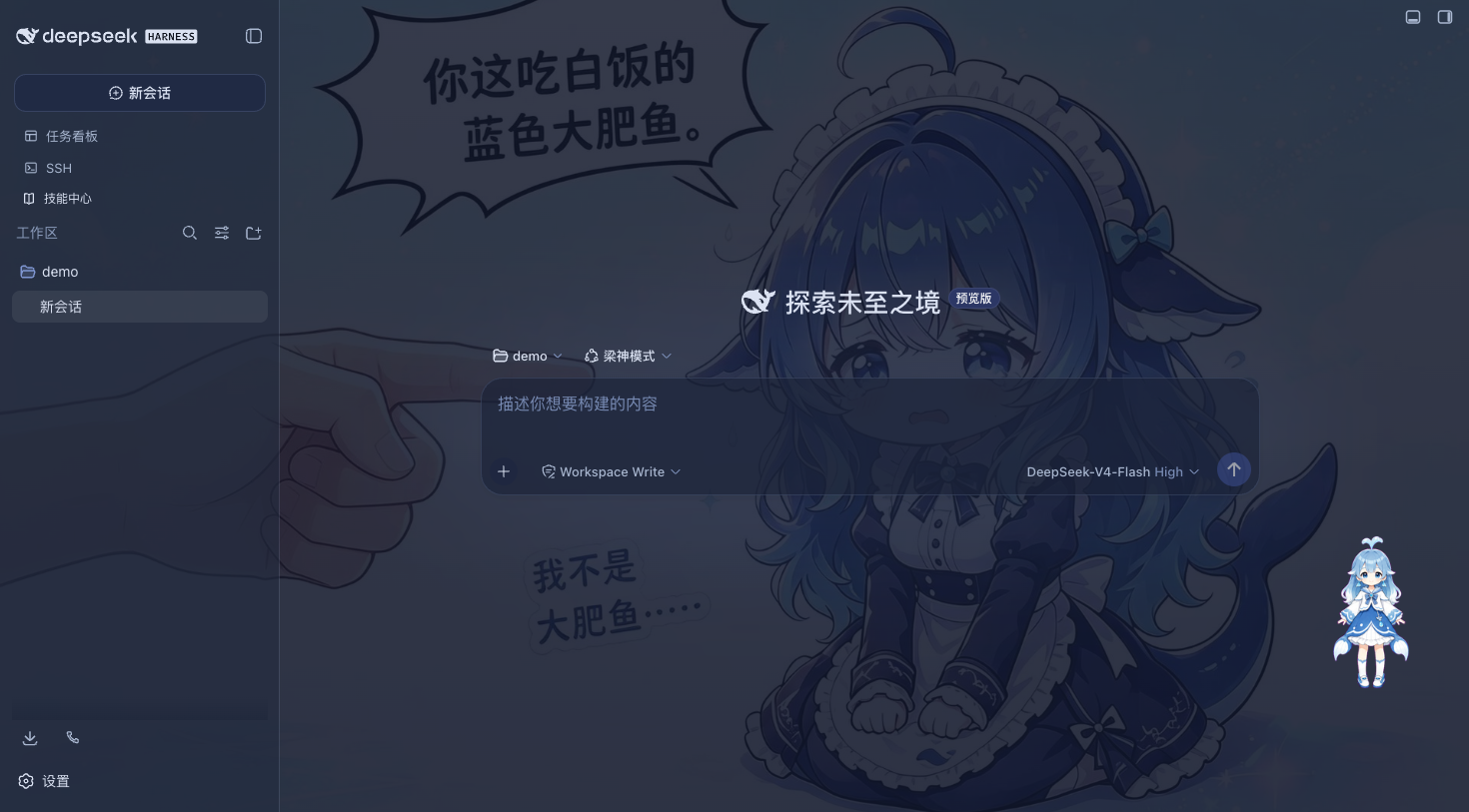
The classic Blue Fantasy is the default theme built into the skin plugin: deep indigo blue tones run through the entire interface, paired with semi-transparent frosted glass panels and custom whale illustrations, offering excellent visual immersion in dark mode. Other exquisite skins and Wallpaper Engine dynamic wallpapers are centrally managed by the skin plugin and can be previewed online, tried on, and installed with one click directly on the Marketplace.
Quick Start
System Requirements
- DeepSeek Harness is installed and
dsh webcan start normally. - No additional environment is required for the npm installation method; if building from the source repository, Node.js >= 22 and pnpm environment are required.
Three-Step Setup (npm installation, recommended)
- DSH Web CLI (existing browser service):
- Install the aggregate package:
dsh plugin --profile web add @linxin666/dsh-web-all@latest - Restart the
dsh webservice; sidebar entries for each plugin will appear automatically - Open "Settings > Plugin Configuration" to toggle plugins on/off as needed, or pick a theme in the skin panel
- Install the aggregate package:
- DSH Desktop (desktop client):
- Download the
dsh-desktop-*installer for your OS from Releases (macOS dmg/zip, Windows exe/zip) - Install and launch the app: the built-in runtime and full bundle are ready out of the box; no extra environment setup needed
- Manage extensions and themes via the app's built-in plugin manager or settings panel
- Download the
若仅需要皮肤功能,可单独安装
@linxin666/dsh-client-ui-skin-center。若因包管理器门禁安装到旧版本,请参阅后文“安装排障”。
从 GitHub 仓库直接安装
仓库根目录声明了标准 dsh.bundle 装配清单,支持直接通过仓库地址安装,无需手动克隆代码与构建:
dsh plugin --profile web add github:zhu1090093659/dsh-web
# 或使用完整 git 地址:dsh plugin --profile web add git+https://github.com/zhu1090093659/dsh-web.git
该方式与直接从 npm 安装聚合包效果等价,二者择其一即可。请勿同时通过两种方式安装,以免出现 entry id 冲突。
从仓库安装(开发调试)
如需二次开发或调试插件,可按以下步骤从源码构建(要求 Node.js >= 22 与 pnpm):
# 1. 克隆源码仓库
git clone https://github.com/zhu1090093659/dsh-web.git
cd dsh-web

# 2. 安装项目依赖并构建全包
pnpm install
pnpm -r build

# 3. 将本地包软链挂载至 web profile(建议先链接所有子包再注册聚合包)
node scripts/link-profile.mjs
dsh plugin --profile web add link:$(pwd)/packages/dsh-web-all

# 4. 重新启动 dsh web 服务
dsh web
提示:profile 目录未配置为 pnpm workspace,聚合包内部的
workspace:*依赖在解析时会尝试回退拉取 npm 线上版本。若线上包存在版本差异,请先运行node scripts/link-profile.mjs确保全部子包均指向本地构建产物。
从旧聚合包升级
若当前环境仍在使用旧版聚合包 @linxin666/dsh-web-ui-all,插件管理器的更新检测机制会自动将该项标记为迁移通道(@linxin666/dsh-web-ui-all → @linxin666/dsh-web-all)。点击更新即可自动执行事务迁移:系统会按原有 bundle 顺序安全替换为新包,并在执行完成后使用 --dump-config 进行预检,任一步骤异常均会自动回滚。
单独安装某个插件
如果不需要安装全家桶,可根据实际需求单独安装各个功能模块:
dsh plugin --profile web add @linxin666/dsh-client-ui-task-board@latest              # 任务看板
dsh plugin --profile web add @linxin666/dsh-ssh@latest                             # 远程连接(SSH)
dsh plugin --profile web add @linxin666/dsh-usage@latest                           # 使用统计
dsh plugin --profile web add @linxin666/dsh-client-ui-model-capabilities@latest    # 模型能力声明
dsh plugin --profile web add @linxin666/dsh-pet@latest                             # 桌面悬浮宠物
dsh plugin --profile web add @linxin666/dsh-session-archive@latest                 # 会话归档管理
dsh plugin --profile web add dsh-better-sidebar@latest                             # 右侧辅助面板
全部 npm 包一览
所有插件均以 @linxin666/dsh-* 命名空间公开发布于 npm:
| npm 包名 | 功能说明 |
|---|---|
| @linxin666/dsh-web-all | 全家桶聚合包:一站式包含全部功能插件与皮肤中心 |
| @linxin666/dsh-client-ui-task-board | 任务看板:支持长程异步任务与 cron 定时调度 |
| @linxin666/dsh-remote-web-ui | 移动端远程控制:扫码配对、跨设备协同与触控优化 |
| @linxin666/dsh-ssh | 远程运维面板:Web 终端、SFTP 传输、端口转发与集群执行 |
| @linxin666/dsh-usage | 用量统计:Token 消耗、余额估算、套餐追踪与 Token 银行 |
| @linxin666/dsh-client-ui-model-capabilities | 模型能力:自定义供应商图片输入声明与推理档位配置 |
| @linxin666/dsh-pet | 桌面宠物:注册表驱动的桌面交互悬浮挂件 |
| @linxin666/dsh-client-ui-git-graph | Git 图谱:可视化提交历史、分支流与 worktree 隔离 |
| @linxin666/dsh-client-ui-skin-center | 皮肤中心:主题与壁纸的加载与运行引擎 |
| @linxin666/dsh-client-ui-market | 创意工坊客户端:线上资产一键下载与管理 |
| @linxin666/dsh-client-ui-preset-center | 预设中心:社区 Agent 预设安装与管理 |
| @linxin666/dsh-client-ui-plugin-manager | 插件管理器:可视化插件状态控制与配置编辑 |
| @linxin666/dsh-client-ui-skill-explorer | Skill 中心:已加载技能的浏览、检索与管理 |
| @linxin666/dsh-session-archive | 会话归档:全量会话检索、批量恢复与级联清理 |
| @linxin666/dsh-client-ui-community-plugins | 社区数据源:创意工坊插件目录权威清单 |
| @linxin666/dsh-client-ui-web-ui-settings | 综合设置面板:dsh-web 全局偏好与样式配置 |
验证与卸载
安装后重启 dsh web 服务,侧边栏出现对应功能图标即代表加载成功;亦可通过执行 dsh --profile web --dump-config 检查配置层挂载状态。若侧边栏未刷新出入口,请确认服务进程已彻底重启。
卸载聚合包:dsh plugin --profile web remove @linxin666/dsh-web-all,完成后重启 dsh web 即可恢复纯净状态。
技术实现细节与挂载原理解析见 docs/plugins.md。
安装排障
展开查看常见安装与构建排障方案
pnpm 严格依赖隔离导致模块找不到:pnpm 的 isolated 模式默认仅将聚合包放置在顶层,部分子包可能被嵌套收敛,导致
dsh web启动时报错Cannot find package '@linxin666/dsh-...'。若遇到此情况,可在 profile 目录的pnpm-workspace.yaml中添加配置nodeLinker: hoisted(或public-hoist-pattern: ['@linxin666/*'])后重新安装。
构建脚本被拦截 (ERR_PNPM_IGNORED_BUILDS):首次安装时若提示第三方包的构建脚本被拦截,可根据终端指引将
cloudflared、cpu-features以及ssh2加入 profile 所在pnpm-workspace.yaml的allowBuilds列表中。
pnpm 11 发布时间门禁问题:在包版本发布后的短时间内,pnpm 11 的默认安全策略(
minimumReleaseAge)可能会尝试回退拉取旧版本。建议在 profile 目录的pnpm-workspace.yaml中排除相关命名空间以确保获取最新版本:minimumReleaseAgeExclude: - '@linxin666/*'
常见问题
安装重启后,侧边栏未显示插件入口?
请首先检查插件是否正确安装至 web profile(命令需包含 --profile web),并通过 dsh --profile web --dump-config 验证配置层是否已成功挂载。注意仅刷新网页无法加载新模块,必须彻底重启 dsh web 后端服务进程。
定时任务为何未能按时触发执行?
任务调度完全由 dsh web 后端宿主进程驱动,无需保持前端浏览器页面打开。若宿主进程退出、系统关机或整机进入深度睡眠,错过的触发时间点将遵循跳过策略处理,不执行回填补跑;若任务到达触发点时上一轮仍在运行,会自动顺延至下一个周期。若需要允许息屏但防止主机自动睡眠,可开启任务看板自带的电源保护选项。
手机端配对后为何没有收到流式推送?
移动端流式传输依赖 SSE 通道。Cloudflare quick tunnel 与 Tailscale Serve 服务默认不转发 SSE 长连接,在此类网络下插件会自动切换为短轮询模式,消息收发功能正常但更新稍有间隔。若需获得平滑的实时流式体验,请搭配支持长连接的隧道方案(如 Cloudflare named tunnel 或自建 TCP 反向代理)。
试穿主题皮肤不满意如何还原?
皮肤面板提供免落盘试穿功能:点击试穿即刻在当前界面生效预览,离开面板或关闭预览会自动恢复初始外观;只有显式点击“应用”按钮才会将主题配置写入磁盘,可放心预览各类主题。
是否可以仅使用主题皮肤或某个单一插件?
完全支持。若仅需要视觉定制,直接安装 @linxin666/dsh-client-ui-skin-center 即可;若仅需特定功能,参考“单独安装某个插件”章节直接安装对应 npm 包即可。
已安装全家桶的前提下,能否额外独立安装某个子插件?
可以。聚合包内部的插件注册标识均统一带有 web-ui- 前缀(例如 web-ui-usage),与独立包的原生标识(如 usage)相互独立,不会产生 loader entry 重复冲突。宿主服务对同类插件会自动去重。通常情况下安装全家桶即可满足完整需求,无需重复安装单个子包。
已知限制
- 任务看板由后端 Host 进程统一调度,关闭前端标签页不影响任务执行;但若宿主进程停止或操作系统关机睡眠,处于离线期间的触发点将直接跳过不补跑。可选的电源保护仅阻止系统闲置睡眠,无法阻止用户主动合盖、手动休眠或电源切断,技术细节见 dsh-task-board README。
- SSH 凭据(密码与私钥口令)保存在本地
~/.dsh/dsh-ssh.json文件中(文件权限为 0600);在网络中断重连时可能重新发送非幂等命令,终端输出保持原样返回不执行脱敏,安全规范见 dsh-ssh README。 - 移动端基于 SSE 实现流式推送:在不支持 SSE 透传的代理或免费隧道下会自动降级为轮询,消息更新存在秒级延迟。
- 从源码构建全仓需要 Node.js >= 22 与 pnpm 工具链,直接从 npm 安装不受此限制。
社区
欢迎加入社区交流群,与开发者及其他用户探讨使用技巧、反馈使用问题或提出新功能建议。
扫描下方二维码加入“DSH Web UI 交流群”:

也可以通过 Discord 社区 进行交流,或前往 GitHub Issues 提交缺陷报告与功能需求。
友情链接
- DeepSeek Harness Desktop —— 为 DeepSeek Harness (DSH) 生态打造的现代化桌面端体验。
- LINUX DO —— 有理想的新社区。
- dshfind —— 面向 DeepSeek Harness 的学习与分享社区,聚合论文精读、插件超市与用户排名。
- deepseek-plugin-store —— DeepSeek Harness 独立社区插件商店,发现、安装并提交经过验证的插件、工具与扩展。
- dsh-data-agent —— 为 DSH 定义专用 Data Agent 预设,让 AI 帮你查询、更新、分析数据。
- dsh-TUI —— Claude Code 风格全屏交互终端插件,补位官方缺失的终端 TUI:像素鲸鱼顶栏、实时工作状态行、思考流式展开、双击 Esc 回滚、上下文进度条与 TPS 仪表。
- dsh-tianshu-tui —— 基于官方 DeepSeek Harness 的交互式终端 UI 插件,在官方基础上增加 TDD 与证据门等工作流。
- dsh-genui —— 助手回复内联渲染生成式 UI(dsh-ui fence):布局、图表、表格、表单、Mermaid、3D 与原生音视频,双通道渲染兼容原版 DSH 与新构建,支持流式渲染、面板停靠与组件交互回传模型。
- dsh-annotation —— DSH Web 选中批注插件:选文字、写批注、随消息发送,模型按 Annotation N 逐条对照回复;UI 与批注块跟随 DSH 语言切换 zh/en,Cmd/Ctrl+Enter 直发纯批注,斜杠命令原样放行。
参与贡献
- 提交代码前请查阅 CONTRIBUTING.md;涉及用户界面的修改请附带测试用例或验证截图;
- 提交信息严格遵循 Conventional Commits 规范(例如
fix(task-board): 修复状态同步问题),代码、文档与 commit 信息全程杜绝使用 emoji; - 新建插件或皮肤请使用标准脚手架生成:
node scripts/dsh-plugin-new <name>、node scripts/dsh-skin-new; - 提交前请确保通过本地质量门禁:
pnpm typecheck && pnpm test && pnpm docs:check;完整开发流程见 docs/development.md。
许可证
本仓库采用 Apache-2.0 许可证授权。引入第三方代码必须严格保留原始 LICENSE 与作者署名;具有活跃上游的第三方项目优先以 npm 依赖或 fork 方式引入,避免直接复制代码。
来源与版权
第三方来源与版权登记(点击展开 · 插件 / 皮肤 / 宠物)
插件
- dsh-task-board / dsh-git-graph / dsh-pet / dsh-remote-web-ui / dsh-web-settings / dsh-ssh / dsh-skill-explorer / dsh-market / dsh-plugin-manager / dsh-community-plugins / dsh-web-all — 本仓库原创(zhu1090093659),Apache-2.0(zhu1090093659)
- dsh-tool-describe-image — 移植自 whitelonng/dsh-plugin-describe-image(deepseek-harness
packages/vision/tool-describe-image),Apache-2.0(zhu1090093659) - dsh-better-sidebar — 外部集成插件 omdsh-dev/DSH-better-sidebar(右侧面板,npm 依赖引用),MIT(omdsh-dev)
- dsh-ssh — 依据 badseal/ssh-skill 的能力清单实现;代码为本仓库 Apache-2.0(zhu1090093659),上游能力清单归属 badseal/ssh-skill
- 社区插件索引 — 37 项外部插件,来源与版权由各作者声明,登记于 community.json,可在「设置 → 社区插件」与 dsh-market.com 查看
皮肤(第三方作者或第三方素材)
- maid-atelier / orca-link — Small-tailqwq/dsh-deep-whale,CC BY-NC-SA 4.0;署名链见包内 LICENSE/NOTICE(maid:上善 → zipzip → Small-tailqwq;orca:上善 → Small-tailqwq)
- phoebe-atelier — Theater-ahyeon/phoebe-atelier,CC BY-NC-SA 4.0;角色「菲比」版权属库洛游戏(Kuro Games,《鸣潮》),AI 辅助同人再创作仅供非商业使用(署名链见包内 LICENSE/NOTICE)
- cyber-night — logan0116;代码按仓库许可,背景图由作者以 OpenAI GPT 生成并按 CC0 1.0 贡献公有领域
- future-window — zhuqin;背景与装饰原件 Apache-2.0(包内 LICENSE/NOTICE,attribution 见 skin.json)
- matrix — 贡献者 seanchen 原创(Matrix 深夜护眼暗色皮肤),Apache-2.0(seanchen 声明)
- blue-fantasy — powerdog996(DreamSkin 社区)× dsh-web 适配;皮肤目录内未附第三方许可声明(待作者确认补声明)
- whalechan-harness — online111111/whalechan-dsh-theme 的 Whale-chan Theme contributors;角色方向参考 Neko3000/deepseek-whalechan,CC BY-NC-SA 4.0,完整署名与非官方声明见皮肤目录 LICENSE/NOTICE
- deep-current — Twelveeee;皮肤目录内未附许可声明(待作者确认补声明)
- furina — 立绘/角色素材 sclass53,皮肤代码 zhu1090093659(目录内 LICENSE 为 BSD-3-Clause);角色「芙宁娜」版权属米哈游(《原神》),作为粉丝创作使用
- harbor — moeblack;皮肤目录内未附许可声明(待作者确认补声明)
- miku — 立绘素材 涂山苏苏,皮肤代码 zhu1090093659;角色「初音未来」版权属 Crypton Future Media, INC.(Piapro Character License)
- pink-sakura — 立绘素材 guomengjia618-dot,皮肤代码 zhu1090093659(目录内 LICENSE 为 Apache-2.0)
- war-thunder — 皮肤代码为本仓库(Apache-2.0);背景美术与启动器星徽取文本机 War Thunder 游戏客户端,版权归 Gaijin Entertainment,仅供个人非商业使用(见 skin.json attribution)
- blue-throated-bee-eater — 皮肤代码为本仓库(dsh-web,Apache-2.0);背景照片 Kriangsak Hongchumpae 摄(Wikimedia Commons,CC BY-SA 4.0,已缩放重压缩;许可与署名链见目录内 NOTICE 与 skin.json attribution)
其余皮肤(mint / whale-song / whale-mom / dragon-heir / minecraft / trading / summer-liquid-glass / wallpaper-exclusive / xp)为本仓库原创,Apache-2.0。
宠物
- ouo-neko — Pessimist0906,MIT(贡献记录见 PR #1118 与 dsh-pet THIRD_PARTY_NOTICES.md)
- whale / whale-refined — 基于 DeepSeek wordmark 衍生的鲸鱼挂件(MIT / BSD-3-Clause;材料与声明见 dsh-pet THIRD_PARTY_NOTICES.md)
- miku — 立绘素材 涂山苏苏,MIT;角色「初音未来」的名称、形象与肖像权归 Crypton Future Media, INC.(Piapro Character License)
- jyn(女仆鲸鱼娘) — 11726,MIT(贡献记录见 PR #1362)
- blue-throated-bee-eater(蓝喉蜂虎) — 本仓库原创(dsh-web,Apache-2.0;贡献记录见 PR #1402)
- starry-doll(星夜人偶) — Theater-ahyeon,CC BY-NC-SA 4.0(仅限非商业使用)
贡献者


喜欢这个项目?点个 Star。
报告 Bug · 请求功能 · 查看 Releases
赞助支持
感谢每一位使用、反馈和贡献 dsh-web 的朋友。如果这个项目对你有帮助,欢迎扫码赞助,支持项目持续维护与发展:

Compatibility
Versions
| Latest version | Published | Size |
|---|---|---|
| 0.0.1 | — | — |
Comments
Loading…
Similar plugins
by 1847123733
DSH Web plugin: web ui
★ 6
↓ 37/wk
MIT
JavaScript
Oct 20, 2026
dsh plugin --profile web add dsh-prompt-optimizeby 0lidaxiang
DeepSeek Harness is a plugin-based system for building AI agents. Everything, from tools and models to the web UI, can be added or replaced as a plugin.
★ 4
↓ 62/wk
MIT
JavaScript
Oct 7, 2026
dsh plugin --profile web add dsh-plugin-greetby builtin-pb
The single plugin you need for DSH — build, test, diagnose, and maintain DeepSeek Harness plugins and core.
★ 7
MIT
JavaScript
Sep 19, 2026
dsh plugin --profile web add dsh-developerby Decodo
DeepSeek Harness (dsh) plugin: Decodo as the provider behind the built-in web_fetch tool
★ 0
MIT
TypeScript
Oct 20, 2026
dsh plugin --profile web add @decodo/dsh-web-fetchby hellosky983
Plugin Foundry — a self-extending, everything-is-a-plugin compiler for DeepSeek Harness (DSH). Blueprint registry + scaffold/validate tools.
★ 2
↓ 5/wk
MIT
JavaScript
Sep 29, 2026
dsh plugin --profile web add dsh-foundryby Momojie-S
DSH plugin: per-workspace .env injection for shell subprocesses
★ 2
MIT
JavaScript
Oct 10, 2026
dsh plugin --profile web add @momojie-s/dsh-workspace-env