
dsh-ramify
Manifest valid★ 17dsh-ramify is a experimental plugin for DeepSeek Harness. See the repository documentation for its documented capabilities.

ramify-dsh
DeepSeek Harness 的原生创意分支画布插件



Ramify 是一个专为 DeepSeek Harness(DSH)开发的 dsh-plugin。它把 Agent 生成的多个创作方向、可运行作品和后续修订组织成一棵实时更新的创意树,让你可以在 DSH 内直接查看、比较并继续分叉。
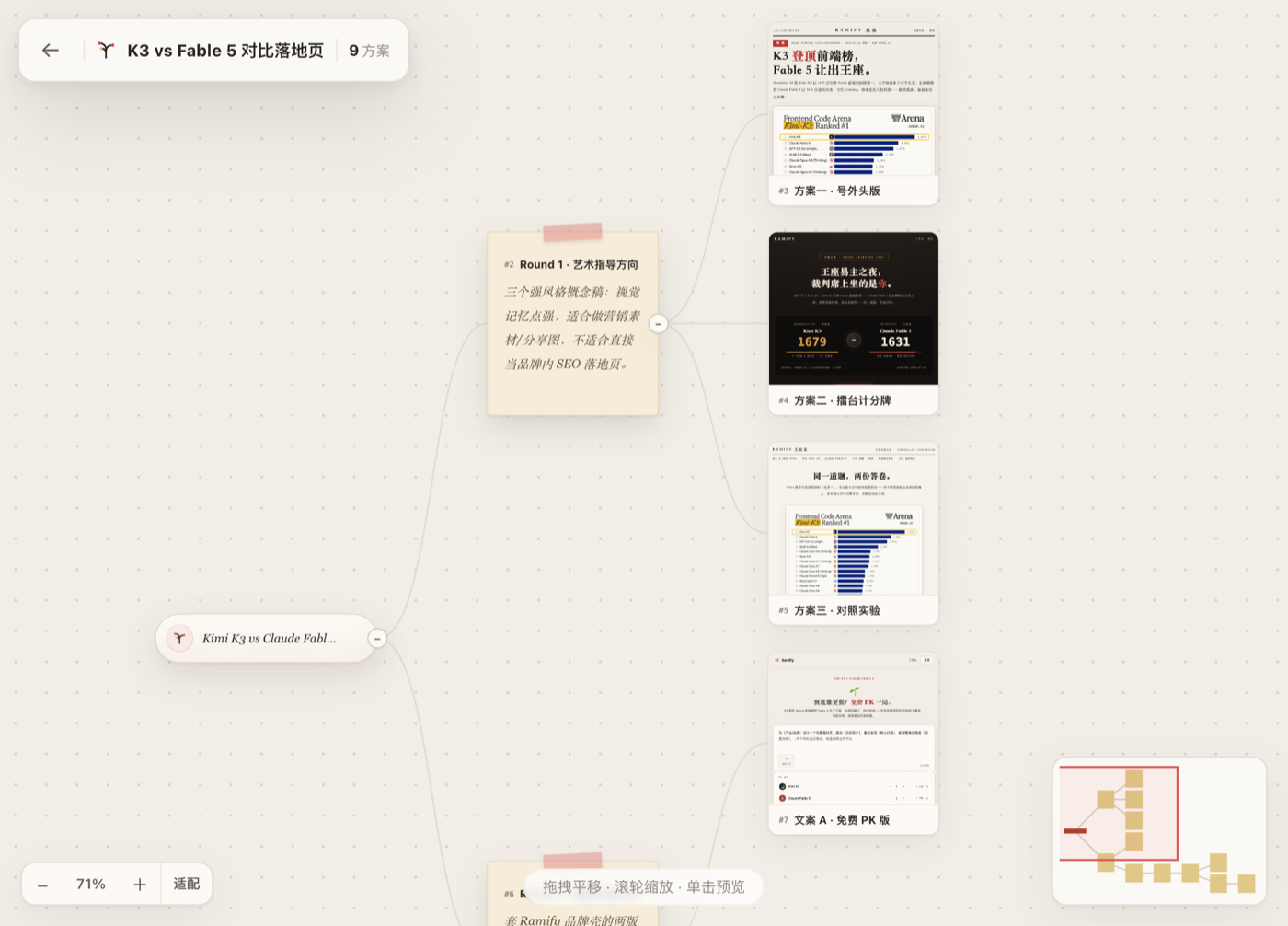
工作方式
- 点击 DSH 左侧栏的 Ramify,打开内置工作台。
- 在 Ramify 原生输入框中输入需求并选择方案数量。
- 插件立即创建项目并进入画布,同时把任务提交给当前 DSH 会话和模型。
- Agent 通过 Ramify 工具把方案持续写入画布,节点和预览实时出现。
- 点击节点右上角的发散按钮,输入修改要求,即可从该节点继续生成分支。
整个过程不需要复制本地地址,也不需要在 Ramify 中再次配置模型或 API Key。
特性
- 原生 DSH 插件:使用标准插件清单、Cordis 服务和 Client UI 插槽,没有修改 Harness 源码。
- 原生 Ramify UI:保留网站版创作票据、数量选择、画布、节点卡片和分支气泡的视觉与交互。
- 当前会话驱动:界面提交通过 DSH 官方会话输入能力发送给当前模型。
- 即时进入画布:首页提交后先创建项目并立即打开画布,Agent 随后向同一项目写入节点。
- 可视化分支:从任意已完成节点继续发散,旧方案保持不变。
- 安装后自动启动本地画布,不需要单独运行 CLI。
- HTML、Markdown、SVG、图片、视频和音频作品可直接预览。
- SQLite 本地持久化,前端轻量轮询感知变更。
- 不接收或存储模型 API Key。
- 插件卸载时清理自己启动的运行时;已有 Ramify 实例会被复用而不会被关闭。
环境要求
- Node.js 22.19 或更高版本
- DeepSeek Harness:任一
@deepseek-ai/cordis4.x 的 0.1.x 版本。当前实测版本为 0.1.3-alpha.1 与 0.1.6-alpha.2,devDependencies钉在 0.1.6-alpha.2。 - 插件只把
@deepseek-ai/cordis声明为 peer:其余@deepseek-ai/dsh-*包由宿主在浏览器侧和 Node 侧提供,插件不复制它们的运行时。
安装
从源码安装(当前推荐)
git clone https://github.com/yanglongyun/ramify-dsh.git
cd ramify-dsh
npm install
npm run build

dsh plugin --profile web add "$PWD"
dsh web --port 3099
npm 包发布后
dsh plugin --profile web add @ramify/dsh-ramify
dsh web --port 3099
启动后点击 DSH 左侧栏底部的 Ramify。插件会自动启动运行时,并把工作台嵌入 DSH 覆层;顶部的外部打开按钮仅作为可选的独立窗口模式。
使用
你可以直接从 Ramify 输入框开始,也可以在 DSH 对话中要求 Agent 使用 Ramify。例如:
使用 Ramify 为这个 AI 搜索产品探索三个明显不同的落地页方向,做出可预览页面让我比较。
插件向模型注册以下工具:
| 工具 | 用途 |
|---|---|
ramify_start | 启动或连接画布 |
ramify_project_create | 创建项目与根节点 |
ramify_project_list | 列出项目 |
ramify_project_tree | 读取完整创意树 |
ramify_node_add | 添加单个节点或作品占位符 |
ramify_node_batch | 原子化创建多层节点树 |
ramify_node_complete | 写入 HTML、Markdown、SVG 或媒体作品 |
ramify_node_update | 更新标题、文本或树位置 |
ramify_settings | 切换主题和界面语言 |
架构
Ramify UI (DSH overlay iframe)
        │ 结构化创建/分支意图
        ▼
DSH Client UI 会话桥 ──► 当前 DSH 会话与模型
        │                         │
        │ 轻量轮询感知变更        │ Ramify tools
        ▼                         ▼
本地 Ramify runtime ◄──── 项目、节点与作品
        │
        └── SQLite + 本地 artifact 文件
- DSH Web UI:默认
http://127.0.0.1:3099 - Ramify runtime:默认
http://127.0.0.1:9531 - DSH Web UI 与 Ramify runtime 通过 HTTP 连接;作品详情按普通网页完整运行。
配置
用户可以在 profile 的 cordis.patch.yml 中覆盖插件配置:
- id: ramify
  name: '@ramify/dsh-ramify'
  config:
    port: 9531
    dataDir: '/absolute/path/to/ramify-data'
    startupTimeoutMs: 5000
    shutdownTimeoutMs: 3000
dataDir 省略时使用平台默认目录:
- macOS:
~/Library/Application Support/Ramify DSH/ - Windows:
%APPDATA%/Ramify DSH/ - Linux:
${XDG_DATA_HOME:-~/.local/share}/ramify-dsh/
开发
npm install
npm run typecheck
npm test
npm run build
npm pack --dry-run
npm install 请用 npm 11 或更高版本:宿主包之间的 peer 图(dsh-llm / dsh-scope / dsh-invariants …)会让 npm 10 的解析器崩溃(Cannot read properties of null (reading 'edgesOut'))。CI 走 npm ci,从 lockfile 安装,npm 10 也能正常完成。
一条命令执行完整检查:
npm run check
检查内容包括 TypeScript、插件测试、Ramify runtime/UI 测试、生产构建和 npm 包内容验证。
构建产物 lib/ 与 app/dist/ 会提交到仓库,因此从本地 checkout 或 Git 安装时不需要执行安装期构建脚本。
浏览器端通过包清单中的 dsh.client 声明加载,使用 DSH 提供的侧栏、覆层、工具卡和会话输入插槽,并复用 Harness 提供的 React 运行时。npm 关键字和 GitHub Topic 均包含 dsh-plugin。
数据与作品运行
- 默认数据保存在操作系统应用数据目录,升级或重启不会清空。
- 插件不读取、不接收也不保存模型 API Key;模型调用由当前 DSH 会话负责。
- Runtime 监听
0.0.0.0:9531,DSH 默认通过127.0.0.1:9531访问并管理它。 - 画布卡片缩略图使用空
sandbox,不会运行 JavaScript,避免大量作品同时执行脚本拖慢画布。 - 右侧详情与新窗口作品不使用 sandbox 或 CSP,可正常运行脚本、加载外部资源、联网和提交表单。
许可证
MIT。第三方依赖许可见 THIRD_PARTY_NOTICES.md。
Comments
Loading…
From the same category
by anywhere-labs
为 DeepSeek Harness (DSH) 插件生态打造的现代化桌面端解决方案。万物皆「插件」,桌面本身也是「插件」。
★ 30.4k
↓ 108/wk
MIT
TypeScript
Oct 10, 2026
dsh plugin --profile web add dsh-plugin-desktopby zhu1090093659
DeepSeek Harness (DSH) Web Plugin Aggregation Ecosystem · Everything is a plugin, distributed via the Creative Workshop
★ 8.6k
↓ 125/wk
Apache-2.0
TypeScript
Oct 10, 2026
dsh plugin --profile web add dsh-webA collection of independent Web UI plugins and skins, including task boards, Git graphs, mobile access, and live token stats.
★ 7.6k
↓ 119/wk
Apache-2.0
TypeScript
dsh plugin --profile web add dsh-webby omdsh-dev
开放的侧边栏底座,支持三方拓展注册新侧边栏页面。内置文件渲染编辑/终端/侧边对话/Git/子代理页面 | Open sidebar foundation, supports third-party extensions to register new sidebar pages. Built-in file rendering/editing, terminal, side chat, Git,
★ 4.1k
↓ 38.1k/wk
MIT
TypeScript
Oct 9, 2026
dsh plugin --profile web add dsh-better-sidebarby bowenliang123
The best DeepSeek Harness plugin for context insight and management, with context dashboard / browser / sidebar and context command, for context statistics, composition, breakdown, evolution details,
★ 2k
↓ 34.4k/wk
Apache-2.0
TypeScript
Oct 11, 2026
dsh plugin --profile web add dsh-contextby shaobeichen
把 DeepSeek Harness 装进你的口袋:电脑上跑 dsh web,手机扫码即同步访问(局域网 + 公网,实时同屏)Put DeepSeek Harness in your pocket: run dsh web on your computer and access it synchronously by scanning a QR code on your phone (LAN +
★ 1.6k
↓ 3.2k/wk
GPL-2.0
JavaScript
Sep 16, 2026
dsh plugin --profile web add dsh-pocket