
dsh-better-right-click
Manifest validBetter Right-Click: right-click menu on file references in the DSH transcript. Copies the absolute path, reveals the file selected in Explorer by reusing and focusing an existing window, and lists eve
Better Right-Click(dsh-better-right-click)
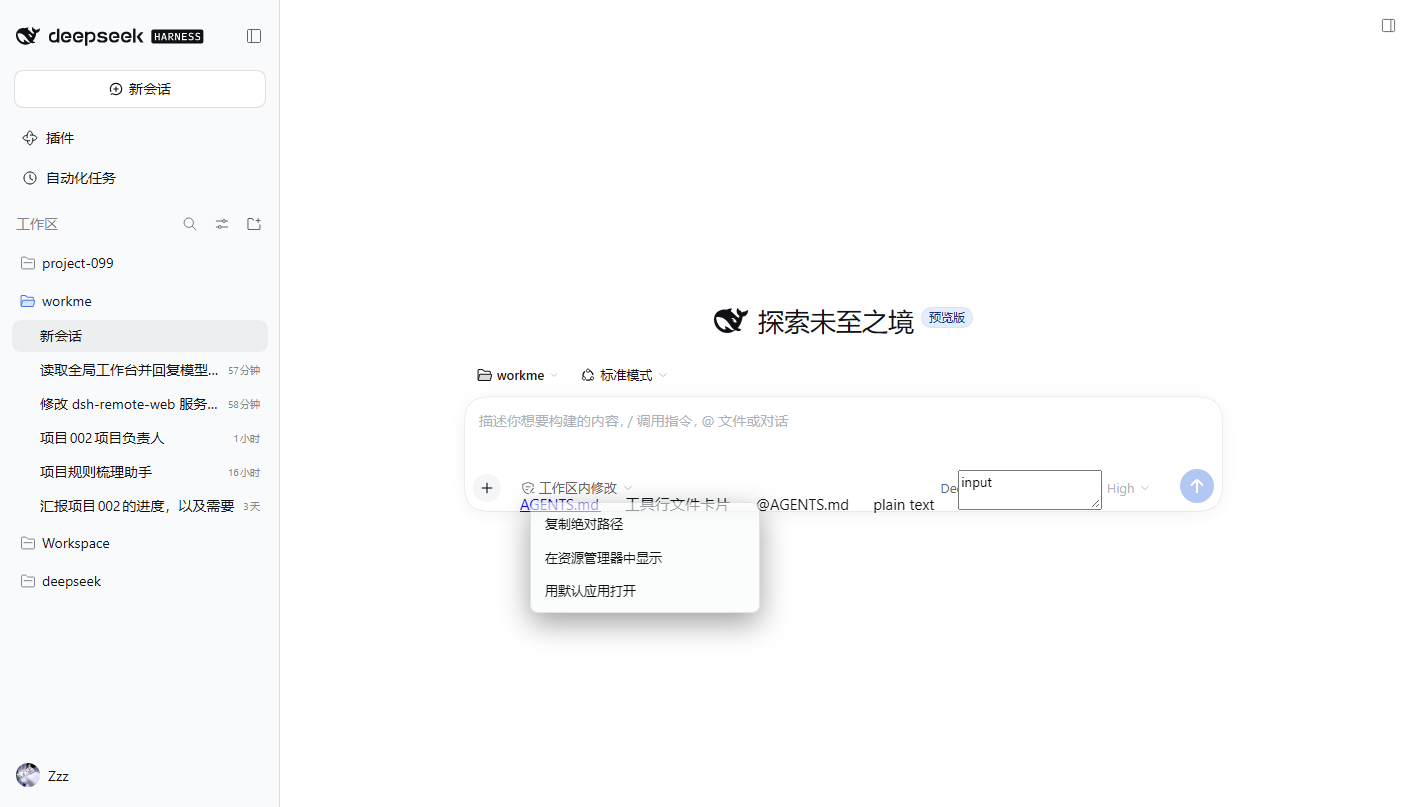
DSH(DeepSeek Harness)Web 会话正文里,对文件引用点右键,弹出三项菜单:
| 菜单项 | 行为 |
|---|---|
| 复制绝对路径 | 把规范化后的绝对路径写入剪贴板 |
| 在资源管理器中显示 | Windows:explorer.exe /select,<path>(打开并选中该文件);macOS:open -R;Linux:xdg-open 父目录 |
| 用默认应用打开 | Windows:PowerShell Start-Process -FilePath(路径经环境变量参数化);macOS:open;Linux:xdg-open |
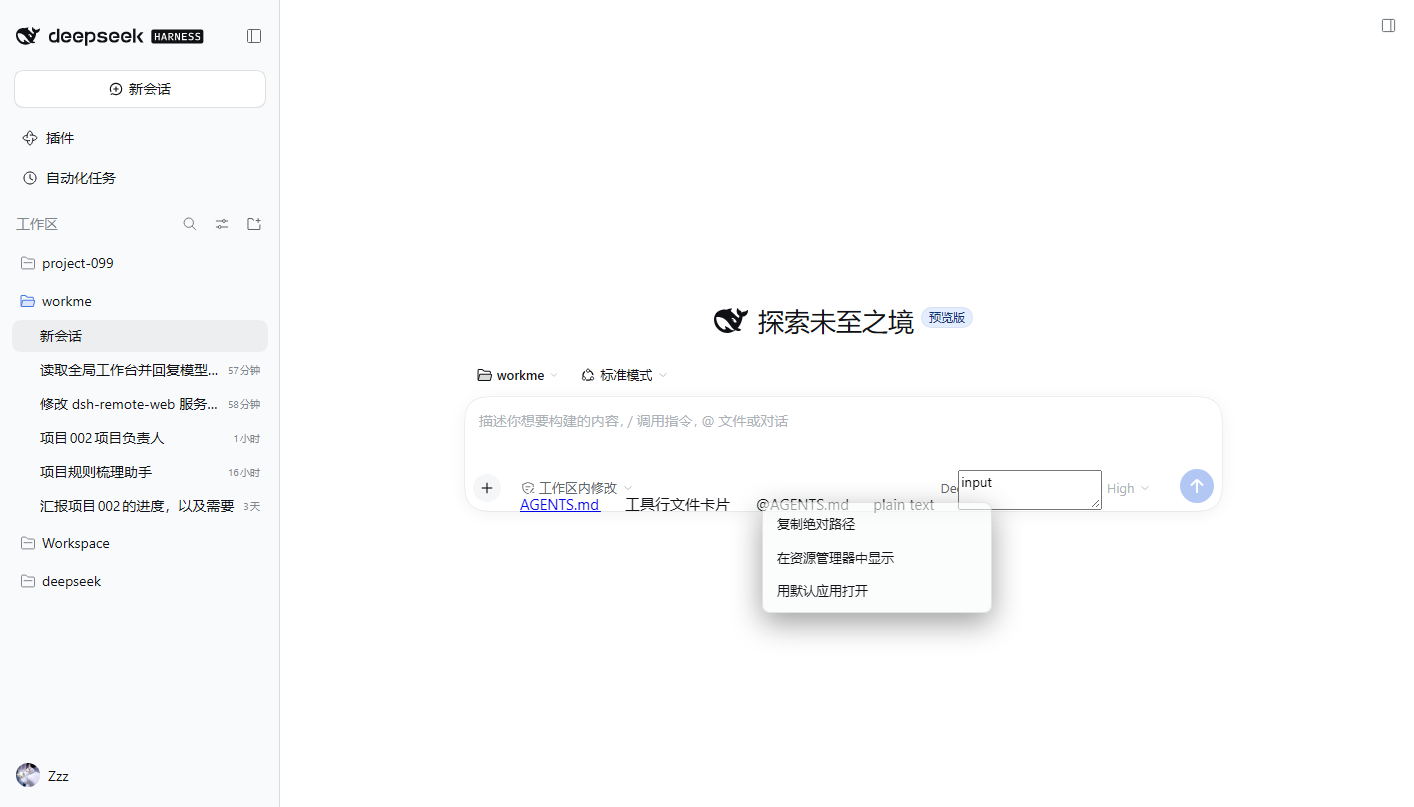
覆盖三类节点:正文 Markdown 链接(蓝色文件名)、@文件 引用、工具行里的文件卡片。
右键正文空白 / 输入框 / 代码块 / 按钮 → 不拦截,原生菜单照常出现。
适配版本:DSH 0.2.1-rc.2(engines.dsh:>=0.2.1-rc.2 <0.3.0)。
当前完整支持 Windows;macOS / Linux 走同一套分支,未在真机验证。
安装(标准方式:dsh plugin add)
本包声明了 dsh.bundle(bundle.patch = ./cordis.patch.yml),因此它就是一个标准的「组合包 patch 型」插件:由 DSH 插件管理器安装与卸载,安装时只向 profile 追加一行 file-menu,不改动既有行。
为什么必须声明:DSH 插件管理器「只管理组合包」——没有组合包 patch 声明的依赖在安装前就会被拒绝,且装进去的运行会被回滚(
package.json/pnpm-lock.yaml恢复原样)。
# 从 npm 安装(推荐)
& 'D:\DeepSeek Harness\resources\runtime\cli\bin\dsh.cmd' plugin --profile <profile> add dsh-better-right-click

# 或从本地 tgz 安装
& 'D:\DeepSeek Harness\resources\runtime\cli\bin\dsh.cmd' plugin --profile <profile> add "C:\path\to\dsh-better-right-click-0.2.0.tgz"

# 或在 DSH Web「插件」页里粘贴 dsh-better-right-click
也可以在 DSH Web 的「插件」页里搜索 / 粘贴 git、tarball 或本地目录说明安装。
卸载:dsh plugin --profile <profile> remove dsh-better-right-click → 重启;file-menu 那一行随包一起撤掉。
截图
截图随仓库托管(
docs/),图片用绝对地址引用,npm 页面也能显示。
右键正文里的文件引用(浅色主题,独立测试 profile filemenu-test;图为 0.1.0 的三项菜单,0.1.6 起下方还多出「用 X 打开」分组):
三类节点(Markdown 链接 / data-file-path 文件卡片 / @文件 引用)都会命中:
已验证
- DSH
0.2.1-rc.2(Windows 10.0.19045,Web GUIhttp://127.0.0.1:3080,独立 profilefilemenu-test)。 - 安装:
dsh plugin --profile <profile> add <tgz>(0.1.1 起可走标准安装;dsh.bundle.patch指向本包的cordis.patch.yml),--dump-config合成结果含- id: file-menu / name: dsh-file-menu。 - 宿主路由:无 token 也能命中(同源白名单靠 Origin);
GET /file-menu/open→{ok:true,schemaVersion:1,version:"0.1.2"};GET /file-menu/status→cwd为活动会话工作区(读~/.dsh/sessions会话头;取不到才退回进程 cwd)。 - 资源管理器定位:0.1.1 修掉「路径含空格时
/select被拆成多个参数」的缺陷(现在自己给路径补双引号)。 - 0.1.2:相对路径基准改读活动会话工作区(此前是 profile 目录,导致相对路径全 404);失败改为底部提示条,不再静默;菜单背景改为不透明。
- 0.1.7:修两处「打开了却什么都没有」——子进程继承
ELECTRON_RUN_AS_NODE=1导致 Electron 应用静默退出(spawn 前剔除该变量),以及 PowerShell 中文标签乱码(stdout 强制 UTF-8);菜单加载期显示「正在读取可用程序…」占位,不再先闪「用默认应用打开」。 - 0.1.6:右键菜单列出本机注册的所有能打开该扩展名的程序(默认 ProgID / OpenWithProgids / OpenWithList 按 MRUList 排序),失效项自动跳过,点谁用谁打开;宿主新增
POST /file-menu/handlers与POST /file-menu/open-with(只接受枚举结果里的 exe)。 - 0.1.3:直接拼 base 找不到时,在工作区里按路径后缀做有界搜索(跳过 node_modules/.git/隐藏目录,20k 条目、12 层上限、10s 缓存),同名多个时取最近修改的那个;404 回包带
attempted与base,客户端提示里直接显示尝试过的绝对路径;新增GET /file-menu/last供自查最近 20 次请求。 - 0.1.9:菜单与提示文案跟随 DSH 界面语言(
ctx.locale→<html lang>→navigator.language),中文/英文自动切换,未识别语言回退英文。 - 0.6.5:修 0.6.4 的回归——
setLocked()会顺手删掉data-ext,导致确认扩展名后按「+」什么都没发生(读不到扩展名就早退了)。 - 0.6.4:设置里新增「浏览其他程序…」——弹 Windows 原生文件选择框,可指定任何 .exe(便携版/免安装软件也能用),选中后即可加为固定规则;注册表一个程序都没有时不再直接卡死,仍可走这个入口。
- 0.6.3:枚举打开方式的脚本改用 .NET 注册表 API(
Registry.ClassesRoot已合并 HKCU/HKLM,不再逐根试探),.pdf 从 10.8 s 降到 0.4 s;设置里的扩展名输入加「✓ 确认」按钮,确认后才锁输入框并去读可用程序;固定面板宽度,避免加载选项时被撑宽。 - 0.6.2:设置对话框与右键菜单加过渡动画(淡入/弹出/行重排 FLIP,尊重 prefers-reduced-motion);「默认打开方式」改成随时可编辑的固定规则列表(新增扩展名 → 选程序 → 保存),不再依赖先右键过一次文件。
- 0.6.1:菜单项改为鼠标拖动调整顺序(按住 ⠿ 手柄拖动,插入位置有蓝线提示),保存后按该顺序显示。
- 0.6.0:菜单设置对话框上线(选择显示哪些项、文件管理器三档、按扩展名固定打开方式),设置对话框跟随主题。
- 0.5.1:补齐「默认打开方式(按扩展名固定)」相关的 5 条文案(pinSection/pinCurrent/pinNone/pinnedOpen/otherApp,缺键会渲染成字面量 undefined);固定程序项改为独立渲染(不再依赖「打开方式」开关是否勾选);保存后清 handler 缓存。
- 0.5.0:菜单配色改为跟随 DSH 主题——优先用
--dsw-*设计令牌,令牌缺失时按html的color-scheme加.dsh-fm-light/.dsh-fm-dark兜底底色;主题切换时用 MutationObserver 实时同步(菜单开着也会变色);设置对话框同步。 - 0.4.0:打开方式可锁定——右键菜单里先出现「用 X 打开(已锁定)」,其余应用仍在下面备选;末尾新增「其他程序…」调起 Windows 原生选择框(选过的应用 Windows 会记住,下次自动进列表)。锁定按扩展名存(
.md→ MarkText、.txt→ 记事本),只影响本插件菜单,不改系统默认程序。 - 0.3.0:菜单可配置——右键菜单底部新增「菜单设置…」,勾选要显示的项(复制绝对路径 / 复制相对路径 / 用默认应用打开 / 打开方式列表 / 在资源管理器中显示),默认全开;文件管理器三档
auto | explorer | custom,保存即生效(写~/.dsh/better-right-click/config.json)。新增GET/POST /file-menu/config。 - 0.2.0:改名 Better Right-Click,npm 包名/仓库/客户端模块 id 全部改为
dsh-better-right-click(旧名@xmmtr/dsh-file-menu已弃用,功能相同)。 - 错误路径:缺文件 →
404 {"ok":false,"error":"not-found"};Content-Type非 JSON →415;外部 Origin →403;GET /file-menu/reveal→405。 - 客户端(Edge headless + CDP,真实页面、真实 bundle):菜单三项文案正确、复制得到
C:\Users\86137\Desktop\workme\AGENTS.md、Esc/点击外部关闭、正文空白与输入框不拦截。 - 卸载:
pnpm remove+ patch 还原 → 路由 404、__DSH_BOOT__.entries从 70 降回 69、GUI 正常启动。
已知限制
- 真实会话正文里的文件引用未做自动化抓取:无头浏览器里点侧栏会话行没有导航成功,所以「正文里实际渲染出的节点形态」是人工待验项;已用注入同形态节点(
<a href="https://github.com/xmmtr/dsh-better-right-click/blob/HEAD/AGENTS.md">、data-file-path卡片、@AGENTS.md文本)在真实页面上验证。见TODO.mdT-01。 - 只对真正的文件引用生效:正文里以普通文字出现的相对路径,必须是单个 token(不含空白)、含路径分隔符、末段带扩展名,才会被识别;带空格的文件名(未加
@/ 未做成链接)不会被识别。 - 相对路径依赖会话工作区根(客户端从 DSH
sessions服务读,拿不到时退回宿主GET /file-menu/status的cwd);两者都拿不到时不猜,菜单不出现。 - 代码块(
pre)、输入区、contenteditable内部一律不拦截。 - Shadow DOM / canvas 渲染的文件引用不支持(按
<a>、data-*与文本识别)。 - 只做定位与打开:不读文件内容、不列举目录、不执行任意命令。
- 宿主端 POST 路由要求同源(
Origin/Referer为本机回环,或Sec-Fetch-Site: same-origin),其他来源 403。 - 中文菜单文案在
lib/labels.js的LABELS,英文待补(TODO.md)。
菜单配置
两种方式,二选一:
- 界面里改(推荐):右键任意文件引用 →「菜单设置…」→ 勾选要显示的项、选文件管理器 → 保存,立即生效,不用重启。配置落在
~/.dsh/better-right-click/config.json。 - 配置文件预置(适合团队统一):
# cordis.patch.yml
- id: file-menu
  name: dsh-better-right-click
  config:
    items: [copy-absolute, copy-relative, reveal, open-default, open-with]
    fileManager:
      mode: auto          # auto | explorer | custom
      command: ''         # mode=custom 时生效,%1 代表文件路径
items 可选值:copy-absolute、copy-relative、reveal、open-default、open-with。非法项会被忽略,items 为空时回落全开。
非默认资源管理器:mode: auto 会自动读注册表(HKCU/HKLM\Software\Classes\Folder\shell\open\command),当你装了 Directory Opus / XYplorer / Total Commander / Files 等接管了文件夹打开的程序时,菜单会多一项「用 XXX 打开所在位置」。
锁定某个应用(0.4.0)
右键 → 「菜单设置…」→「锁定打开方式」:当前文件类型会列出所有能打开它的应用,选一个保存,以后这个类型的菜单顶部就固定是「用 X 打开(已锁定)」,其余应用仍可临时改选。
- 锁定按扩展名生效,只影响本插件菜单,不会改 Windows 的双击默认程序(改系统默认要 Windows 设置页手动点,微软不允许程序静默改)。
- 想换成没进列表的程序:右键 →「其他程序…」→ 在系统对话框里选,Windows 会记住它,下次自动出现在列表里。
- 锁定存在
~/.dsh/better-right-click/config.json的pins字段,可直接编辑:
{ "pins": { ".md": "C:\\Program Files\\MarkText\\marktext.exe" } }
原理
lib/index.js(宿主):ctx.webServer.register()注册 4 条精确路由/file-menu/{open,status,reveal,open-external},spawn(exe, [args])数组传参,零运行时依赖。lib/client.js(浏览器):classic-script bundle(window.__ModuleLoader__.load),捕获阶段contextmenu委托 + 纯 DOM 浮层;exports.apply(ctx)安装、exports.dispose卸载。cordis.patch.yml:只追加宿主条目;客户端半端由 DSH 识别dsh.client声明后自动下发。
English
DSH web plugin adding a three-item right-click menu (Copy absolute path / Reveal in Explorer / Open with default app) for file references in the conversation transcript: markdown file links, @file mentions and tool-row file cards. Right-clicking blank text, inputs, code blocks or buttons keeps the native menu.
- Target build: DSH
0.2.1-rc.2(>=0.2.1-rc.2 <0.3.0), fully verified on Windows only. - Install:
dsh plugin --profile <profile> add <name-or-tgz>(the package declaresdsh.bundle.patch= itscordis.patch.yml, so the plugin manager installs and removes it like any other bundle), restart DSH. - Host routes:
GET /file-menu/open,GET /file-menu/status,POST /file-menu/reveal,POST /file-menu/open-external. Same-origin (loopback) only, JSON errors, no file content read, no shell string concatenation. - Client: classic-script bundle, capture-phase
contextmenu, DOM overlay following DSH theme variables,Esc/outside click/scroll/blur close it, clean dispose. - Menu labels live in
lib/labels.js(LABELS/pickLabels()), kept in bothzhanden; the active language follows the DSH locale, then<html lang>, thennavigator.language, and falls back to English.
MIT.
Comments
Loading…
Similar plugins
by XcodeFish
Adds a right-click menu on file references in chat output, listing registered applications with icons for open-with, revealing files in the file manager, and copying absolute or relative paths resolve
★ 1
MIT
JavaScript
Oct 1, 2026
dsh plugin --profile web add @codefisher798/dsh-file-link-menuCodex-style right-click menu for the DSH web GUI: files, chat file paths, and hyperlinks.
★ 0
dsh plugin --profile web add dsh-right-click-menuby nubeslove
DSH Web 插件:给文件引用加右键菜单(打开文件 / 在资源管理器定位 / 浏览器预览 / 复制路径)。Right-click actions for file mentions in DeepSeek Harness.
★ 0
MIT
JavaScript
Oct 17, 2026
dsh plugin --profile web add dsh-file-actionsby InnovationLou
Right-click menus for DeepSeek Harness chat links: open with an application, reveal in the file manager, copy the path, save a copy, and open or copy URLs.
★ 0
MIT
JavaScript
Oct 20, 2026
dsh plugin --profile web add dsh-link-actionsby SJcun
Right-click menu for the DSH (DeepSeek Harness) Web GUI: open a workspace project or file reference in the file manager, and a link in the external browser. | 为 DSH(DeepSeek Harness)Web GUI 补上右键菜单:工作区
★ 0
MIT
JavaScript
Oct 12, 2026
dsh plugin --profile web add dsh-right-click-menuby dreammaker2016
该仓库暂未提供项目说明。
★ 1
MIT
JavaScript
Sep 21, 2026
dsh plugin --profile web add @z1995418/dsh-file-menu