

dsh-link-actions
Manifest validRight-click menus for DeepSeek Harness chat links: open with an application, reveal in the file manager, copy the path, save a copy, and open or copy URLs.
dsh-link-actions


English | 中文
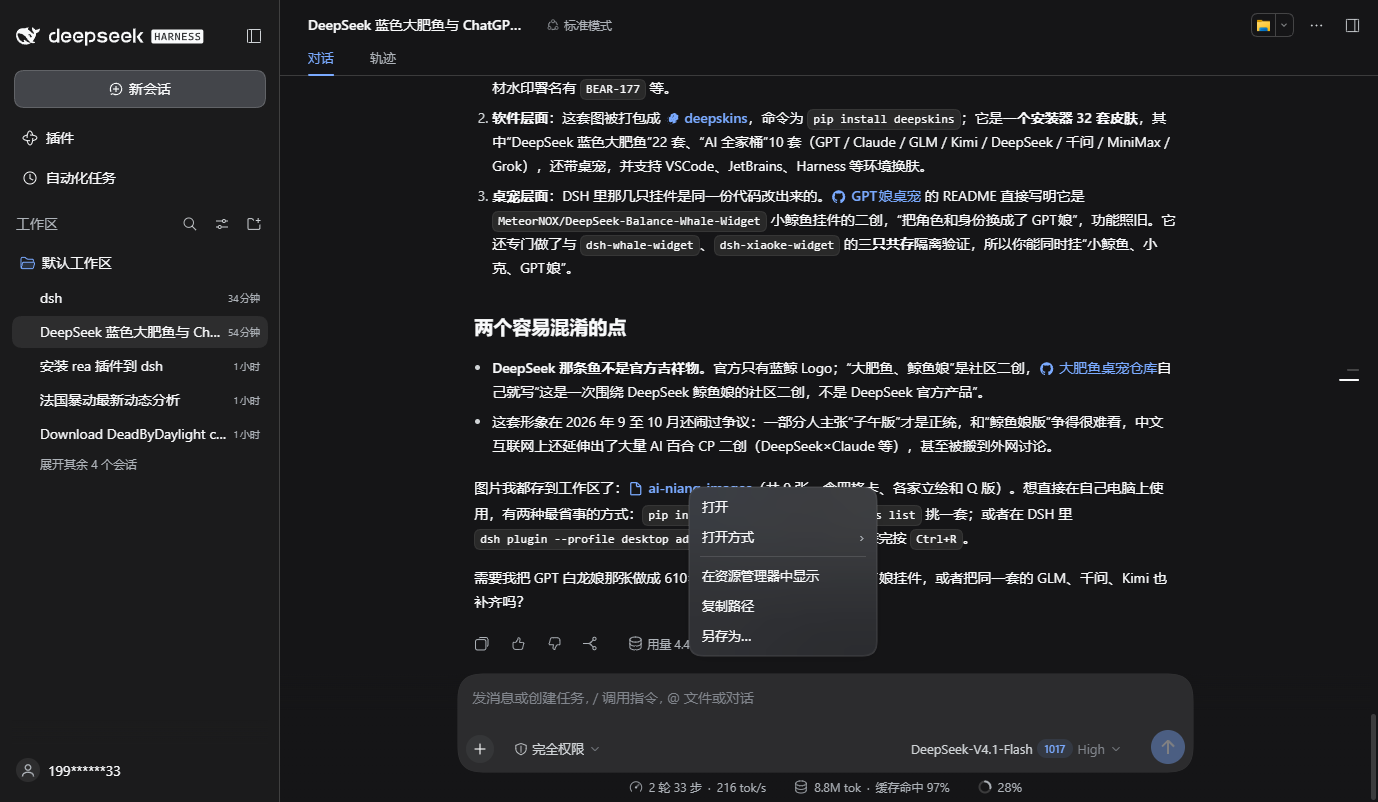
Right-click menus for links in DeepSeek Harness chat. File and folder links gain open, open with, show in file manager, copy path, and save as; HTTP(S) links gain open in browser and copy link.
Why a plugin
The DSH repository does not accept external pull requests today, and the plugin ecosystem is the path it recommends instead. The client also has no per-link slot: a Markdown link is a plain anchor or button, so this plugin listens for contextmenu on the document, recognises the two link shapes the Markdown renderer emits, and draws its own menu.
Tested against the shipped 0.2.1-rc.2 runtime. It needs a DSH client build that serves client plugins; the desktop app and dsh web both do.
Install
From npm:
dsh plugin --profile desktop add dsh-link-actions
Straight from this repository (lib/ is committed, so no build step either):
dsh plugin --profile desktop add github:InnovationLou/dsh-link-actions
From a local checkout, which is what you want while editing:
dsh plugin --profile desktop add link:E:\MyProject\dsh-link-actions
Then append this to ~\.dsh\profiles\desktop\cordis.patch.yml:
- insert:
    - id: link-actions
      name: dsh-link-actions
Restart the client. A page reload (Ctrl+R) is not enough: the plugin entry is composed when the Host boots.
For another profile — the one dsh web uses, for instance — replace desktop in both places.
Uninstall:
dsh plugin --profile desktop remove dsh-link-actions
Then delete those three lines from cordis.patch.yml.
Menu
File and folder links — the filename buttons and fileMention chips in a message:
| Item | Behavior |
|---|---|
| Open | Hand the path to the Host desktop's default application; a folder opens in the file manager |
| Open with › | List the registered handlers for the file and open it with one |
| Show in file manager | Reveal the file with it selected |
| Copy path | Copy the resolved absolute path |
| Save as… | Read the file's bytes and write them to a location you pick |
HTTP(S) links — ordinary <a> elements in the message:
| Item | Behavior |
|---|---|
| Open in browser | Open the URL in a new window |
| Copy link | Copy the href |
How it works
- Where the path comes from. The renderer puts the full path in a file link's
title(the resolver supplies it forfileMention, the authored destination forMarkdownFileLink); when there is notitle, the button text is the path. - Relative paths. They are joined with the viewing Session's
cwd. The Host resolves relative paths against its own process cwd, which would be wrong. - Existing Remotes only.
session.canOpenWorkspacePath,session.workspacePathApplications,session.openWorkspacePath, andworkspaceFiles.readBytes; the plugin ships no transport of its own. - Product design tokens.
--dsw-menu-surface-fill,--dsw-elevation-prominent,--dsw-alias-*, so the card follows the active theme. - No runtime dependencies. The client half is one self-contained ES2022 script; the build only wraps it in the DSH module-loader handshake (
window.__ModuleLoader__.load({ id, factory })). No bundler.
Verified
Against the shipped 0.2.1-rc.2 runtime, with the same client bundle that npm serves:
| Scenario | Result |
|---|---|
| Install from npm | dsh plugin add dsh-link-actions (0.1.0, 8 files / 71.5 kB), fresh profile, client boot, menu opens |
| Install from GitHub | dsh plugin add github:InnovationLou/dsh-link-actions, fresh profile, client boot, menu opens |
| Right-click a folder link | Five items: open, open with, show in file manager, copy path, save as |
| "Open with" on an image | Real handlers listed: Paint, Photos, VS Code, Typora, Notepad++, … |
| "Save as" on a png | "Saved" notice, file landed in the download directory under its own name |
| Right-click an HTTP(S) link | Two items: open in browser, copy link |
| Relative path | ai-niang-images\fish-01-classic.png resolved through the Session cwd |
Open and Show in file manager go through the same session.openWorkspacePath call (the reveal branch was checked in code) but were not exercised by automation against real windows.
Limitations
- Transcript only. Links outside
[data-chat-flow]— the sidebar, the document preview — keep their native behavior. - No "open with" for folders. The OS has no folder-level associations, so that item removes itself when the list resolves empty.
[label](https://github.com/InnovationLou/dsh-link-actions/blob/HEAD/relative/path)links. The button carries only the label the author wrote; when no real path can be recovered, only Copy path is offered.- Save as is bounded by the Host's
workspaceFilesread limit (maxFileBytes); a directory cannot be saved this way. - Application icons may not render. They come from the Host's
open-in-app/icon/<id>route; a missing icon removes its slot so the labels stay aligned. - Internal surfaces. The
dsh.clientdeclaration, the Remote names,data-chat-flow, and thefileMention/fileLinkCSS-module classes are product internals; re-check after a DSH upgrade.
Development
node scripts/build.mjs          # src/ -> lib/, including the loader handshake
node --check lib/client.js      # syntax check
tools/ holds the local verification helpers (Node 24 ships WebSocket, so they talk to CDP directly): cdp-contextmenu.mjs for the link menu, cdp-file-menu.mjs for the file menu, cdp-open-with.mjs for the submenu, cdp-save-as.mjs for an end-to-end save, cdp-screenshot.mjs for a capture, and asar-head.mjs to read the installed app.asar.
test/overlay.yml mounts the plugin into a throwaway CLI profile:
dsh --profile <name> --patch test/overlay.yml --no-open --port 7401
so verification never touches the profile you use daily.
Releasing
Publishing runs on npm Trusted Publishing: the release workflow asks GitHub
for an OIDC token, npm exchanges it for a short-lived publish grant, and no npm
token is stored in the repository or in any secret. That keeps the account's
"require 2FA and disallow bypass tokens" setting intact — there is no token that
could bypass it.
One-time setup, on npmjs.com → the package → Settings → Trusted Publisher (GitHub Actions):
| Field | Value |
|---|---|
| Publisher | GitHub Actions |
| Organization or user | InnovationLou |
| Repository | dsh-link-actions |
| Workflow filename | release.yml |
| Environment | leave empty |
Then a release is three commands:
npm version patch --no-git-tag-version
git commit -am "release: v0.1.2" && git tag v0.1.2
git push origin main --follow-tags
The tag starts release, which rebuilds lib/, fails if the rebuild differs
from the commit, and publishes with a provenance attestation. Running the same
workflow by hand (workflow_dispatch) publishes whatever version the commit
already carries.
0.1.1 was the first release published this way: npm recorded a SLSA v1
provenance statement for it (attestations),
and no npm token exists anywhere in the pipeline.
License
MIT
Comments
Loading…
Similar plugins
by XcodeFish
Adds a right-click menu on file references in chat output, listing registered applications with icons for open-with, revealing files in the file manager, and copying absolute or relative paths resolve
★ 1
MIT
JavaScript
Oct 1, 2026
dsh plugin --profile web add @codefisher798/dsh-file-link-menuCodex-style right-click menu for the DSH web GUI: files, chat file paths, and hyperlinks.
★ 0
dsh plugin --profile web add dsh-right-click-menuby dreammaker2016
该仓库暂未提供项目说明。
★ 1
MIT
JavaScript
Sep 21, 2026
dsh plugin --profile web add @z1995418/dsh-file-menuby SJcun
Right-click menu for the DSH (DeepSeek Harness) Web GUI: open a workspace project or file reference in the file manager, and a link in the external browser. | 为 DSH(DeepSeek Harness)Web GUI 补上右键菜单:工作区
★ 0
MIT
JavaScript
Oct 12, 2026
dsh plugin --profile web add dsh-right-click-menuby wuwaka
Adds a right-click menu to DeepSeek Harness inside desktop shells that ship no context menu: cut, copy, paste and select all in the composer, copy and copy-as-plain-text on selected text elsewhere, an
★ 0
MIT
JavaScript
Sep 12, 2026
dsh plugin --profile web add dsh-clipboard-menuby nubeslove
DSH Web 插件:给文件引用加右键菜单(打开文件 / 在资源管理器定位 / 浏览器预览 / 复制路径)。Right-click actions for file mentions in DeepSeek Harness.
★ 0
MIT
JavaScript
Oct 17, 2026
dsh plugin --profile web add dsh-file-actions