

dsh-skin-abyssal
Manifest validAbyss ABYSSAL —— DSH (DeepSeek Harness) UI Skin: near-black deep seabed + single bioluminescent light source + glass panels. With a console, open the 'Settings → Skin Management' card wall; it can also run standalone without a console. In settings, the first option in the 'Skin' dropdown, 'Native', restores the default skin.
深渊 ABYSSAL · DSH UI 皮肤



近黑深海底 · 单一生物荧光光源 · 只透光不加厚边的玻璃
按 dsh.ecosystem.ui-skin-loader/v1 公约实现的 DSH 皮肤包。装好后出现在
设置 → 皮肤 的卡片墙里,与其它皮肤并列,一键切换。
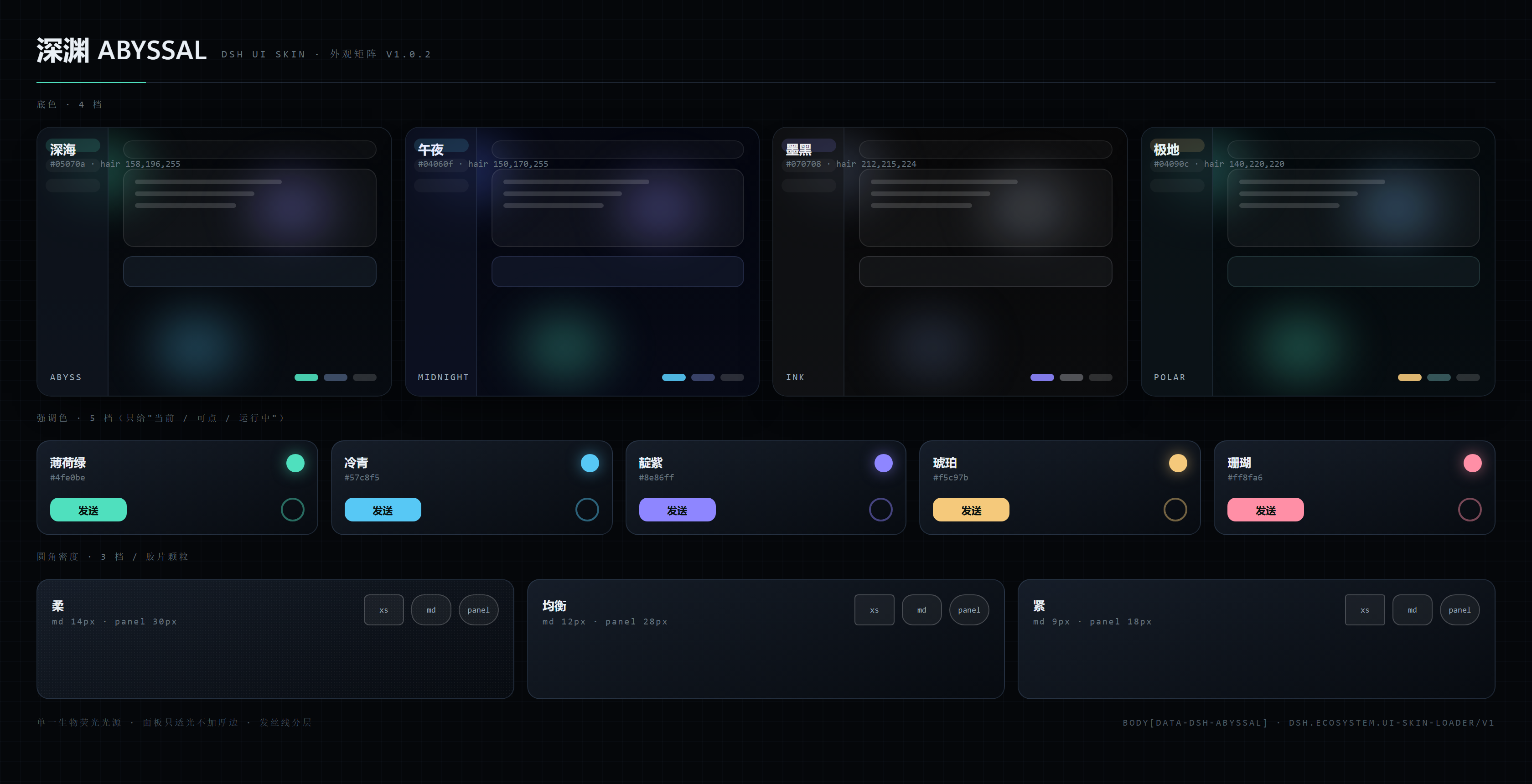
运行模式:有控制台托管,没控制台自立
| 场景 | 行为 |
|---|---|
| 装了皮肤控制台 | 登记托管:出现在 设置 → 皮肤管理 卡片墙里,由控制台负责互斥切换 / 持久化 / 故障隔离 |
| 没装控制台 | 等待 3 秒宽限后进入自立模式:自动应用外观,并在「设置 → 深渊」里给出开关与全部调节项 |
不会误判:皮肤用运行时提供的
ctx.inject(["uiSkinLoader"], cb)显式等待控制台服务出现, 而不是在加载瞬间"看一眼有没有"。所以即使控制台比皮肤晚一步就绪,也仍然会正常登记(这是上一版踩过的坑)。
对控制台 / 脚本的接口
无论哪种模式,皮肤都暴露一个统一入口:
window.__dshSkins["skins.abyssal"]
// { mode: "console" | "standalone", skinId, version,
//   isActive(), activate(), deactivate(), getSettings(), setSettings(patch) }
「原生」选项
设置面板里的 「皮肤」下拉 第一项是 原生(默认观感) —— 选中即还原默认皮肤:
- 有控制台时:调用控制台的
switchTo("default")(与控制台自己的"还原默认观感"同一路径),持久化归控制台; - 自立模式时:直接关掉自己(
enabled=false),立即卸下并长期保持原生,随时可再从下拉里选回本皮肤。
控制台是可选的第三方插件,不随本包分发。
这是一个 DSH 插件
本仓库是 DeepSeek Harness 的插件(皮肤类)。
按官方 README「Community and support」一节的要求,仓库已打上
dsh-plugin topic,便于在
github.com/topics/dsh-plugin 被发现;
package.json 的 keywords 与 dsh.skin.tags 里同样带 dsh-plugin。
三种安装方式,任选其一:
| 方式 | 命令 / 操作 |
|---|---|
| git(无需下载包) | dsh plugin --profile desktop add https://github.com/tenebris173/dsh-skin-abyssal |
| 美化包 | 从 Releases 下 ABYSSAL-UI-*.zip,双击 安装深渊皮肤.cmd |
| 本地源码 | 见下方「安装 → B. 从源码装」 |
装完必须重启 DSH(插件包只在启动时进启动图),随后在 设置 → 皮肤 里一键切换。
外观
| 项 | 选项 | 默认 |
|---|---|---|
| 底色 | 深海 / 午夜 / 墨黑 / 极地 | 深海 |
| 强调色 | 薄荷绿 / 冷青 / 靛紫 / 琥珀 / 珊瑚 | 薄荷绿 |
| 圆角密度 | 柔(14px)/ 均衡(原生)/ 紧(9px) | 柔 |
| 背景极光 | 强 / 柔 / 关 | 柔 |
| 胶片颗粒 | 开 / 关 | 开 |
4 × 5 × 3 × 3 × 2 = 360 种组合,改档即时生效并跨重启保留
(皮肤自治:localStorage,键 dsh.skin.abyssal.preferences.v1)。
安装
A. 用打包好的美化包(推荐给最终用户)
下载 release 里的 ABYSSAL-UI-*.zip,解压后双击 安装深渊皮肤.cmd。脚本会找到本机 DSH
(优先用你正在运行的那个),用官方途径装进 desktop profile,并把 activeSkin 切到本皮肤。
B. 从源码装(开发)
# 应用目录(默认装在当前用户的 LocalAppData 下;装在 Program Files 时改成对应路径)
$app = "$env:LOCALAPPDATA\Programs\DeepSeek Harness"
$cli = "$app\resources\app.asar\dsh\node_modules\@deepseek-ai\dsh-desktop-host\lib\cli.js"

# 以软链方式安装(改代码刷新即生效)
& "$app\DeepSeek Harness.exe" $cli plugin --profile desktop add "<本仓库绝对路径>"

# 卸载
& "$app\DeepSeek Harness.exe" $cli plugin --profile desktop remove dsh-skin-abyssal
装完必须重启 DSH(新增插件包只在启动时进启动图)。切换皮肤也可以直接在 设置 → 皮肤 里点,不必手改配置。
C. 从 1.0.2 及更早升级
1.0.3 换了命名空间:皮肤 id 统一为 skins.abyssal,包名统一为 dsh-skin-abyssal
(旧值带个人标识,见 1.0.2 的 package.json)。旧 id 不会自动继承,需重装一次:
# 1) 完全退出 DSH —— 运行中 pnpm 会报 ERR_PNPM_EPERM(node_modules 被占用)

# 2) 查出旧包名并卸掉(这里不重复写出旧值)
& "$app\DeepSeek Harness.exe" $cli plugin --profile desktop list | Select-String 'skin-abyssal'
& "$app\DeepSeek Harness.exe" $cli plugin --profile desktop remove <上面查到的旧包名>

# 3) 装新包
& "$app\DeepSeek Harness.exe" $cli plugin --profile desktop add "<本仓库绝对路径>"

# 4) 把 profile patch 里任何 *.skin.abyssal 形式的旧 id 换成新 id(改前先备份)
$patch = "$env:USERPROFILE\.dsh\profiles\desktop\cordis.patch.yml"
Copy-Item $patch "$patch.bak"
(Get-Content $patch -Raw) -replace '[\w.-]+\.skin\.abyssal', 'skins.abyssal' |
  Set-Content $patch -Encoding UTF8 -NoNewline
也可以直接双击美化包里的 安装深渊皮肤.cmd —— 它会把新包装上并把 activeSkin 切过来。
设计语言
- 单光源 —— 整屏只有一组极光(左下强调色、右上靛紫、右下冷青),面板用半透明表面透出它, 层级靠表面亮度而非阴影。
- 发丝线分层 ——
rgba(158,196,255,.10)1px 描边 + 3% 白表面;永不加厚边。 - 强调色纪律 —— 强调色只给「当前 / 可点 / 运行中」;成功 / 警告 / 危险保持独立语义色。
- 仪表感 —— 元数据用等宽字体,数字 tabular。
实现要点
- 观感承载:
theme.overrideTokens()覆盖宿主公开 token ——--dsw-alias-*(107)、--dsw-specific-*(11)、--dsw-menu-*、--dsw-linear-*、--dsw-radius-*、--dsw-static-neutral(-bluish)-*中性灰阶。覆盖一律带!important(宿主有内联 token)。 - 驱动宿主的亮暗开关:宿主的亮暗分支是
body[data-ds-dark-theme],而--dsw-specific-input-major这类表面 token 只在暗色分支里有定义。皮肤是纯暗色, 所以激活时置位该属性、退出时还原 —— 否则未覆盖的表面会落进 light 分支。 - 浮层实色兜底:
[role="dialog"] / [aria-modal] / [role="menu|listbox|tooltip"]强制实色 + 直角,保证弹窗永远不透出正文(用标准语义属性,不碰宿主私有类名)。 - 背景:极光与颗粒画在
body背景上(多层radial-gradient+ 内联 SVG 噪声), 不新增浮层,因此没有 z-index / 层叠上下文风险。 - 自有节点:只有一个
<style data-skn-abyssal-style>与body[data-skn-abyssal]标记。 - 生命周期(公约 §4.3 / R8):activate 的每项副作用都登记 disposer,teardown 幂等;
deactivate/skinCtx.signalabort / fiber 意外 dispose 三路汇合,退出后 token 与节点全部还原。 - 设置面板:经
settings.section席位注册 React 组件,只在皮肤激活时出现。
自测
| 脚本 | 覆盖 | 断言 |
|---|---|---|
tests/browser-smoke.mjs | 控制台路径:登记载荷 / 激活副作用 / 真实 CSS 层叠 / teardown | 31 |
tests/console-wait.mjs | 控制台迟到 1 秒(不许误判自立)/ 始终不出现(自立 + 能回原生) | 18 |
tests/skin-selector.mjs | 「皮肤」选择器:控制台模式走 switchTo / 自立模式走开关自己 | 9 |
tests/contrast.mjs | 每个强调色 × 每种底:文字/标签对比度 ≥4.5:1,亮底派生深档 | 31 |
tests/dependency-check.mjs | 宿主半依赖自检 | 6 |
合计 95 项断言。
目录
lib/index.js          宿主半(空 apply:观感全在 client 半)
lib/client.js         皮肤本体(登记 / token 表 / 外观面板 / 生命周期)
cordis.patch.yml      bundle patch(row id = 设置命名空间)
install/              一键安装 / 卸载脚本(美化包同款)
preview/              外观矩阵图 + 卡片预览 SVG
tests/browser-smoke.mjs
更新记录
见 CHANGELOG.md。
许可
MIT。
Comments
Loading…
From the same category
by anywhere-labs
为 DeepSeek Harness (DSH) 插件生态打造的现代化桌面端解决方案。万物皆「插件」,桌面本身也是「插件」。
★ 30.2k
↓ 129/wk
MIT
TypeScript
Oct 8, 2026
dsh plugin --profile web add dsh-plugin-desktopby zhu1090093659
DeepSeek Harness (DSH) Web Plugin Aggregation Ecosystem · Everything is a plugin, distributed via the Creative Workshop
★ 8.5k
↓ 282/wk
Apache-2.0
TypeScript
Oct 8, 2026
dsh plugin --profile web add dsh-webA collection of independent Web UI plugins and skins, including task boards, Git graphs, mobile access, and live token stats.
★ 7.6k
↓ 282/wk
Apache-2.0
TypeScript
dsh plugin --profile web add dsh-webby omdsh-dev
开放的侧边栏底座,支持三方拓展注册新侧边栏页面。内置文件渲染编辑/终端/侧边对话/Git/子代理页面 | Open sidebar foundation, supports third-party extensions to register new sidebar pages. Built-in file rendering/editing, terminal, side chat, Git,
★ 4.1k
↓ 57.8k/wk
MIT
TypeScript
Oct 5, 2026
dsh plugin --profile web add dsh-better-sidebarby bowenliang123
The best DeepSeek Harness plugin for context insight and management, with context dashboard / browser / sidebar and context command, for context statistics, composition, breakdown, evolution details,
★ 1.9k
↓ 39k/wk
Apache-2.0
TypeScript
Oct 8, 2026
dsh plugin --profile web add dsh-contextby shaobeichen
把 DeepSeek Harness 装进你的口袋:电脑上跑 dsh web,手机扫码即同步访问(局域网 + 公网,实时同屏)Put DeepSeek Harness in your pocket: run dsh web on your computer and access it synchronously by scanning a QR code on your phone (LAN +
★ 1.6k
↓ 3.8k/wk
GPL-2.0
JavaScript
Sep 16, 2026
dsh plugin --profile web add dsh-pocket