

dsh-colorlab
Manifest valid★ 1Chat UI colour theme plugin for DeepSeek Harness. Ships the Mariana palette as its default preset and adds a colour engine: 18 adjustable colour slots, 9 Markdown prose roles, saved presets, WCAG contrast hints and light/dark modes.
dsh-colorlab
EN · 中文
A colour theme plugin for the DeepSeek Harness chat UI. It ships Sublime Text's Mariana palette as its default preset, and adds a colour engine on top: 18 adjustable colour slots, 9 Markdown prose roles, saved presets, live WCAG contrast warnings and light/dark modes — all from a settings panel, persisted to your profile.
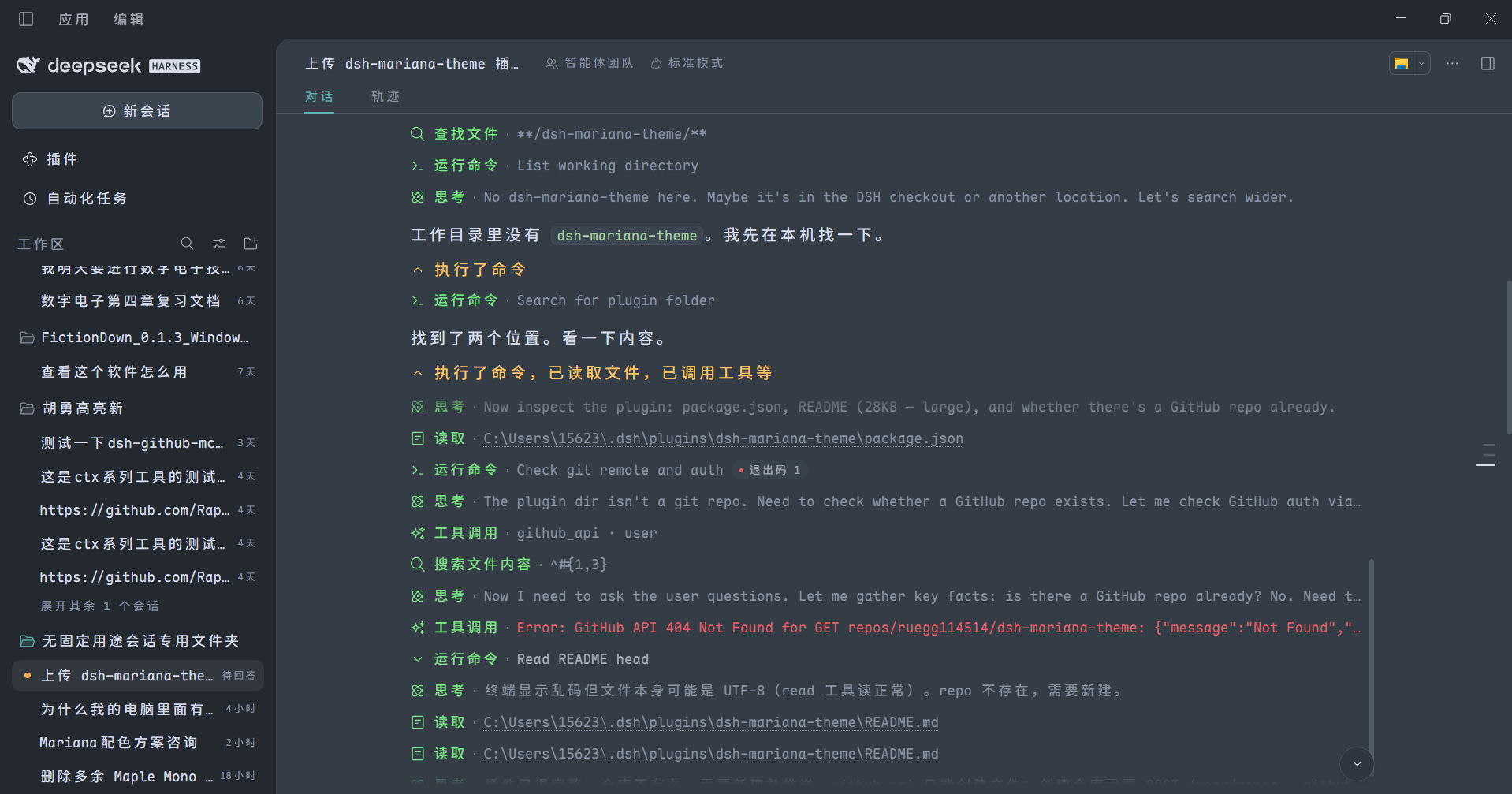
Process rows are colour-coded (green for tool calls, amber for summaries), headings and inline code are tinted, and the surface sits on Mariana's cool blue-grey rather than pure black.
It does not patch app.asar, and it does not fork the host. It uses DSH's
official theme extension point (ctx.theme.overrideTokens) and layers its tokens
on top of whatever theme is active.
Install
dsh plugin add ruegg114514/dsh-colorlab
This installs from source, so DSH will ask you to approve the package's build
step (allowBuilds) on first run. Restart DSH afterwards — the plugin is picked
up by the loader at boot.
Uninstall
dsh plugin remove ruegg114514/dsh-colorlab
Or just turn Enable off in the plugin's settings panel: the theme reverts to the host default immediately, no restart needed, and your saved colours are kept.
What it changes
Mariana is the default colour scheme of Sublime Text 3.0 (2017) and Sublime
Text 4. Its background is a cool blue-grey (#343D46) rather than pure black,
and its foreground is a soft grey (#D8DEE9) rather than pure white — which is
why it stays readable for long sessions on bright displays.
| Area | Effect |
|---|---|
| Surfaces / cards / sidebar / menus | #343D46 / #2F3841 / #23292E |
| Body / secondary / tertiary text | #D8DEE9 / #A7ADBA / #8792A2 |
| Borders and dividers | low-opacity overlays of #D8DEE9 |
| Bubbles / input / code blocks | #3B454F / #2E363F |
| Status colours | success #99C794, error #EC5F67, warning #F9AE58 |
| Code syntax highlighting | keywords #C594C5, strings #99C794, functions #5FB3B3, numbers #F9AE58, comments #8792A2 |
| Sidebar terminal | background and cursor follow the theme |
The colour engine
Settings panel
Settings → ColorLab:
| Option | What it does |
|---|---|
| Enable | Off reverts to the host palette immediately; your settings are kept |
| Apply to | Dark appearance only (default) / both dark and light |
| Surface variant | Standard #343D46 / Deep #252B32 (the early ST3 tmTheme) / Dim #2B3336 |
| Accent | Teal #5FB3B3 / Orange #F9AE58 / Blue #6699CC — affects business-state highlights only |
| Code palette | Overrides Shiki's --shiki-* tokens used inside fenced code blocks |
| Prose highlight | Adds colour hierarchy to Markdown body text (headings, bold, inline code, list markers, quote rules) |
| Prose brightness | Original / Boosted (default) / Brighter — interpolates toward white without shifting hue |
| Prose preview | Shows both states side by side, right under the toggle |
| Prose colours | 9 independent slots: heading, bold, italic, inline code, list marker, quote text, quote rule, link, strikethrough |
| Process row highlight | Colours process rows — tool rows one colour, summary rows another |
| File card colour | Recolours the header band of "edited N files" cards and the whole card body of "delivered files" cards |
| Custom colours | 18 slots (8 surfaces / 3 text / 7 syntax), each adjustable |
| Presets | Save the current palette and load it back later, up to 12 |
LaTeX code blocks and Python built-ins (print, len, open) get Mariana's
var(blue) (#6699CC) — the colour Sublime's Mariana gives support.function.
Shiki merges that scope with entity.name.function into a single token, so
function calls and LaTeX commands match Sublime, while function definition
names are blue there too.
Markdown gets Sublime's markup.* details: list markers in var(green),
blockquote text in var(orange), and inline code on a tinted background.
18 custom colour slots
| Group | Slots |
|---|---|
| Surfaces (8) | base, panel 1/2/3, overlay menu, sidebar, code block, bubble/input |
| Text (3) | body, secondary, tertiary |
| Syntax (7) | strings, functions/punctuation, links/calls, keywords, errors/constants, numbers/cursor, find highlight |
Three ways to change a slot: click the swatch to open the system colour picker, type a hex value below it, or paste one in.
Resetting to default clears that override — only the slots that actually differ from the default are written to your profile, so clicking around a bit does not pin all 18 down.
Live contrast warning: when body text against the background drops below 4.5:1, the settings panel reports the measured ratio and suggests ≥ 7:1. The figure is computed as real WCAG contrast, not estimated.
Presets
Name it and press Save to store the current surface variant, accent and all custom slots. Each preset shows five swatches (surface / body / accent / keyword / string) so you can tell them apart at a glance.
- Saving under an existing name overwrites it
- 12 presets maximum — they live in your profile's YAML
- Each carries a timestamp ("just now / N min ago / MM-DD HH:mm")
- A preset matching your current palette is marked in use
- Resetting to defaults does not delete your presets — they're your own work; reset only touches the live palette
Three independent highlight toggles
| Toggle | Scope | Mechanism |
|---|---|---|
| Code palette | Fenced code blocks only | Overrides --shiki-*, consumed by Shiki's inline <span> styles |
| Prose highlight | Markdown body text only | Injects a stylesheet targeting the host's markdown container |
| Process row highlight | Process entries (write / edit / run command) only | Injects a stylesheet targeting data-variant rows |
Turning one off does not affect the others.
Prose brightness
| Role | Original | Boosted (default) | Brighter |
|---|---|---|---|
| Heading | #5FB3C3 4.51:1 | #7CC1C1 5.39:1 | #92CBCB 6.11:1 |
| Bold | #F9AE58 5.90:1 | #FABD76 6.63:1 | #FBC88D 7.23:1 |
| Italic / quote | #A7ADBA 4.91:1 | #B7BCC6 5.80:1 | #C3C7D0 6.52:1 |
| Inline code | #99C794 5.76:1 | #ABD1A7 6.52:1 | #BAD9B6 7.20:1 |
| Link | #80AAD5 4.54:1 | #97B9DD 5.42:1 | #A9C5E2 6.19:1 |
| Strikethrough | #EC5F67 3.36:1 | #EF7C82 4.14:1 | #F29298 4.91:1 |
(Contrast measured against #343D46; darker surface variants score higher.)
Only dark values are brightened — on the light appearance, interpolating toward white would reduce contrast. Code blocks and interface surfaces are never affected.
Process row highlight
Two colours, three targets. Summary and expanded content stay unchanged.
| Target | Example | Default |
|---|---|---|
| Tool rows | write / edit / run command | Light green #7EE787 |
| Summary rows | ran a command, wrote files, analysing your request | Light amber #FAC863 |
| Turn summary | "Done, took 1m 20s" | Light amber #FAC863 |
10 categories are selectable (grouped into summary rows and tool rows), 5 enabled by default. Both colours are independently adjustable.
A status bar tells you what is actually happening
At the top of the settings panel:
channel override— using the official extension point (normal)channel style— fell back to the stylesheet channel (ctx.themeis unsupported in your build)channel none— not active right now (switched off, or the appearance is light while the mode is dark-only)N tokens overridden,prose on/off,appearance dark/light,config connected / memory-only
The settings panel itself is currently in Chinese only. The theme, the preset names you type and everything else are language-independent.
Known limitations
- Terminal ANSI 16 colours are not themed. The host does not expose the xterm ANSI palette as design tokens and the plugin cannot reach the xterm instance, so only the terminal background, foreground, cursor and selection follow the theme.
- Prose highlighting depends on a host class-name prefix. It matches
[class*="_markdown_"]; the prefix comes from a host source filename and is stable across builds, but if the host renames that CSS Module file the rule stops matching — prose falls back to a single colour, without an error. - Prose highlighting does not cover half-parsed Markdown. During streaming
the DOM structure is the same so rules still apply, but an unclosed
**is not coloured while it is half-written. - Corner radii and fonts are untouched. Those belong to
ui-themeanddsh-font-probe; this plugin only deals with colour. - The light variant is not original Mariana. Mariana itself is dark-only; the light values are same-hue lightened derivatives, there so that "apply to both" mode is not glaring.
- Custom colours only override the dark appearance. There are no custom slots for light — deliberately, so colours picked against a dark background do not become invisible on a light one.
- Presets live as a YAML string in your profile. The 12-preset cap keeps
this bounded. If you hand-edit
cordis.patch.ymland break thepresetsfield, the plugin safely treats it as "no presets" — nothing throws and nothing is lost, the presets just stop showing until you fix the YAML.
Design notes
Implementation details — how the token override works, why the two channels exist, how host CSS specificity was matched rule by rule, how a write-race condition was found and fixed — are kept in docs/DESIGN.md (in Chinese).
Tests
npm test        # 9 suites, offline
npm run check   # syntax check
License
MIT. The Mariana palette originates from Sublime Text
(Sublime HQ Pty Ltd, colour scheme by Dmitri Voronianski). This plugin is an
independent reimplementation of the palette as DSH design tokens; it is not
affiliated with or endorsed by Sublime HQ.
中文
DeepSeek Harness 对话界面的配色主题插件。内置 Sublime Text 的 Mariana 配色作为默认预设,并在其上提供一套配色引擎:18 个可调颜色槽位、9 个正文 Markdown 角色色、配色方案存取、实时 WCAG 对比度提示、深浅两种模式 —— 全部在设置页里完成,配置持久化到 profile。
过程条目按类型上色(工具行亮绿、汇总行亮黄),标题与行内代码着色, 界面底色是 Mariana 的冷调蓝灰而不是纯黑。
它不改 app.asar,不补包,不 fork 宿主 —— 它走 DSH 官方的主题扩展点
(ctx.theme.overrideTokens),把令牌叠加在当前主题之上。
安装
dsh plugin add ruegg114514/dsh-colorlab
从源码安装,首次运行 DSH 会要求你授权该包的构建步骤(allowBuilds)。
装完重启 DSH —— loader 在启动时装载插件。
卸载
dsh plugin remove ruegg114514/dsh-colorlab
或者直接在设置页把「启用」关掉:立即回退到宿主默认配色,无需重启, 已保存的颜色不会丢。
它改了什么
Mariana 是 Sublime Text 3.0(2017)起及 Sublime Text 4 的默认配色,
底色是冷调蓝灰 #343D46 而不是纯黑,前景是柔和的灰 #D8DEE9 而不是纯白 ——
长时间用下来没那么刺眼。
| 位置 | 效果 |
|---|---|
| 界面底色 / 卡片 / 侧栏 / 菜单 | #343D46 / #2F3841 / #23292E |
| 正文 / 次级 / 三级文字 | #D8DEE9 / #A7ADBA / #8792A2 |
| 边框与分隔线 | #D8DEE9 的低透明叠加 |
| 气泡 / 输入 / 代码块 | #3B454F / #2E363F |
| 状态色 | 成功 #99C794、错误 #EC5F67、警告 #F9AE58 |
| 代码语法高亮 | 关键字 #C594C5、字符串 #99C794、函数 #5FB3B3、数字 #F9AE58、注释 #8792A2 |
| 侧栏终端 | 底色与光标跟随主题 |
设置页
设置 → ColorLab:
| 项 | 说明 |
|---|---|
| 启用 | 关掉立即回退宿主配色,设置保留 |
| 套用范围 | 「仅深色外观」(默认)/「深浅都套用」 |
| 背景变体 | 标准 #343D46 / 深 #252B32(ST3 早期 tmTheme 那档)/ 中间 #2B3336 |
| 强调色 | 青 #5FB3B3 / 橙 #F9AE58 / 蓝 #6699CC,只影响业务态高亮 |
| 代码高亮色板 | 覆盖代码块内 Shiki 的 --shiki-* 色板 |
| 正文高亮 | 给 Markdown 正文加颜色层次(标题、加粗、行内代码、列表标记、引用竖线) |
| 正文高亮亮度 | 原值 / 提亮(默认)/ 更亮。在原色基础上朝白插值,色相不动 |
| 正文高亮预览 | 紧跟开关,直接展示开/关两种效果 |
| 正文颜色 | 9 个独立槽位:标题、加粗、斜体、行内代码、列表标记、引用文字、引用竖线、链接、删除线 |
| 过程行高亮 | 工具行一个颜色、汇总行另一个颜色 |
| 文件卡片颜色 | 「已编辑 N 个文件」卡片的头部横带,以及「交付文件」卡片的整张底色 |
| 自定义配色 | 18 个槽位(界面底色 8 / 文字 3 / 语法色 7),逐个调 |
| 配色方案 | 把当前配色存成方案,随时载入,最多 12 套 |
LaTeX 命令和 Python 内置函数(print len open)用 Mariana 的
var(blue)(#6699CC),与 Sublime 里 support.function 的颜色一致 ——
Shiki 把 support.function 和 entity.name.function 合并成同一个令牌,
所以函数调用和 LaTeX 命令与 Sublime 一致,函数定义名则也是蓝色。
Markdown 会补上 Sublime 的 markup.* 细节:列表符号 var(green) 绿、
引用正文 var(orange) 橙、行内代码加淡色底。
18 个自定义槽位
| 分组 | 槽位 |
|---|---|
| 界面底色(8) | 主背景、面板一/二/三层、浮层菜单、侧栏、代码块、气泡输入框 |
| 文字(3) | 正文、次级文字、三级文字 |
| 语法色(7) | 字符串、函数/标点、链接/调用、关键字、错误/常量、数字/光标、查找高亮 |
三种改法:点色块开系统取色面板、在下面直接输 hex、或粘贴色值。
改回默认会自动清除该覆盖 —— 存进 profile 的只有「偏离默认」的那几项, 不会因为点过一圈就把 18 项全写进去。
实时对比度提示:正文与背景的对比度掉到 4.5:1 以下时,设置页会提示 「正文与背景对比度只有 x.xx:1(建议 ≥ 7:1),可能看不清」。这个数字是当场算的 WCAG 对比度,不是估算。
配色方案
输入名字点「保存」,就把当前背景变体 + 强调色 + 全部自定义槽位存成一套。 列表里每套显示 5 个色点(背景/正文/强调/关键字/字符串)方便辨认。
- 同名保存 = 覆盖
- 上限 12 套(存在 profile 的 YAML 里)
- 每套带保存时间:「刚刚 / N 分钟前 / MM-DD HH:mm」
- 与当前配色一致的方案显示「使用中」
- 「恢复默认配色」不会删掉已保存的方案 —— 那是你的资产
三个高亮开关互不影响
| 开关 | 范围 | 机制 |
|---|---|---|
| 代码高亮色板 | 只有围栏代码块 | 覆盖 --shiki-* |
| 正文高亮 | 只有 Markdown 正文 | 注入样式表,命中宿主 markdown 容器 |
| 过程行高亮 | 只有过程条目 | 注入样式表,命中 data-variant 行 |
正文高亮亮度
| 角色 | 原值 | 提亮(默认) | 更亮 |
|---|---|---|---|
| 标题 | #5FB3C3 4.51:1 | #7CC1C1 5.39:1 | #92CBCB 6.11:1 |
| 加粗 | #F9AE58 5.90:1 | #FABD76 6.63:1 | #FBC88D 7.23:1 |
| 斜体 / 引用 | #A7ADBA 4.91:1 | #B7BCC6 5.80:1 | #C3C7D0 6.52:1 |
| 行内代码 | #99C794 5.76:1 | #ABD1A7 6.52:1 | #BAD9B6 7.20:1 |
| 链接 | #80AAD5 4.54:1 | #97B9DD 5.42:1 | #A9C5E2 6.19:1 |
| 删除线 | #EC5F67 3.36:1 | #EF7C82 4.14:1 | #F29298 4.91:1 |
(对比度在 #343D46 上算;背景越暗数字越高。)
只提亮深色值 —— 浅色外观是深字浅底,朝白插值会降低对比度。 代码块与界面底色完全不受影响。
过程行高亮
两种颜色、三类目标,摘要与展开内容不变。
| 目标 | 例子 | 默认色 |
|---|---|---|
| 工具行 | 写入 / 编辑 / 运行命令 | 亮绿 #7EE787 |
| 汇总行 | 执行了命令、已写入文件 / 正在分析请求 | 亮黄 #FAC863 |
| 本轮汇总 | 已完成,用时 1 分 20 秒 | 亮黄 #FAC863 |
10 个分类可勾选(分「汇总行」「工具行」两组),默认选中 5 项。 两个颜色各自独立可调。
状态条
设置页顶部有一条状态条,把「到底有没有生效」摊开:
主题通道 override= 走官方扩展点(正常)主题通道 style= 回退样式表通道(你的宿主版本不支持ctx.theme)主题通道 none= 当前没生效(开关关了,或浅色外观 + 仅深色模式)已覆盖 N 个令牌、正文高亮 开/关、外观 深色/浅色、配置 已连接/仅内存
设置页文案目前只有中文。 主题本身、配色方案名称等与语言无关。
已知限制
- 终端 ANSI 16 色不变。 宿主没有把 xterm 的 ANSI 调色板暴露成设计令牌, 插件也拿不到 xterm 实例,只能保证底色 / 前景 / 光标 / 选区跟随主题。
- 正文高亮的选择器依赖宿主类名前缀。 用
[class*="_markdown_"]匹配, 前缀来自宿主源文件名,跨构建稳定;但宿主若重命名那个 CSS Module 文件, 规则会失配 —— 表现是正文退回同色,不会报错。 - 正文高亮不覆盖流式渲染中的半截 Markdown。 DOM 结构相同所以规则照常命中,
但未闭合的
**在半截状态下不会被着色。 - 不改圆角与字体。 那是
ui-theme与dsh-font-probe的职责,本插件只碰颜色。 - 浅色变体不是 Mariana 原版。 Mariana 本身只有深色版,浅色值是同色相提亮的 自制品,只为「深浅都套用」模式下不刺眼。
- 自定义配色只覆盖深色。 浅色没有对应槽位 —— 刻意的,避免把深色下挑的颜色 搬到浅色底上变成看不见的字。
- 配色方案存在 profile 的 YAML 字符串里。 12 套上限是为了不让它无限膨胀。
如果手改
cordis.patch.yml把presets写坏,插件会安全地当成「没有方案」, 不抛错也不丢数据,只是界面上看不到 —— 修好 YAML 即可恢复。
实现说明
实现细节 —— 令牌覆盖的原理、两条通道的存在理由、宿主 CSS 特异性的逐条对齐、 一个写盘竞态的发现与修复 —— 放在 docs/DESIGN.md。
校验
npm test        # 11 个套件,离线可跑
npm run check   # 语法检查
许可
MIT。Mariana 配色来自 Sublime Text(Sublime HQ Pty Ltd,配色方案作者
Dmitri Voronianski)。本插件是把该配色重新实现为 DSH 设计令牌的独立实现,
与 Sublime HQ 无隶属或背书关系。
Comments
Loading…
From the same category
by anywhere-labs
为 DeepSeek Harness (DSH) 插件生态打造的现代化桌面端解决方案。万物皆「插件」,桌面本身也是「插件」。
★ 31.8k
↓ 84/wk
MIT
TypeScript
Oct 19, 2026
dsh plugin --profile web add dsh-plugin-desktopby zhu1090093659
DeepSeek Harness (DSH) Web Plugin Aggregation Ecosystem · Everything is a plugin, distributed via the Creative Workshop
★ 9k
↓ 87/wk
Apache-2.0
TypeScript
Oct 20, 2026
dsh plugin --profile web add dsh-webA collection of independent Web UI plugins and skins, including task boards, Git graphs, mobile access, and live token stats.
★ 8.4k
↓ 101/wk
Apache-2.0
TypeScript
dsh plugin --profile web add dsh-webby omdsh-dev
开放的侧边栏底座,支持三方拓展注册新侧边栏页面。内置文件渲染编辑/终端/侧边对话/Git/子代理页面 | Open sidebar foundation, supports third-party extensions to register new sidebar pages. Built-in file rendering/editing, terminal, side chat, Git,
★ 4.3k
↓ 49.7k/wk
MIT
TypeScript
Oct 17, 2026
dsh plugin --profile web add dsh-better-sidebarby PC2005-cloud
DSH 桌面宠物:一行命令装好即用的透明动画小桌宠,支持多开、大小位置随心配置;还内置 DIY 素材链,能用 AI 视频自造专属宠物
★ 2.8k
↓ 19.2k/wk
MIT
TypeScript
Oct 19, 2026
dsh plugin --profile web add dsh-petby bowenliang123
The best DeepSeek Harness plugin for context insight and management, with context dashboard / browser / sidebar and context command, for context statistics, composition, breakdown, evolution details,
★ 2.4k
↓ 43.4k/wk
Apache-2.0
TypeScript
Oct 20, 2026
dsh plugin --profile web add dsh-context