

dsh-worktree
Manifest validGit worktrees and branches for the DeepSeek Harness Web Client: a session-header chip that switches branches, creates worktrees, and opens them as harness workspaces.
@achasoft/dsh-worktree
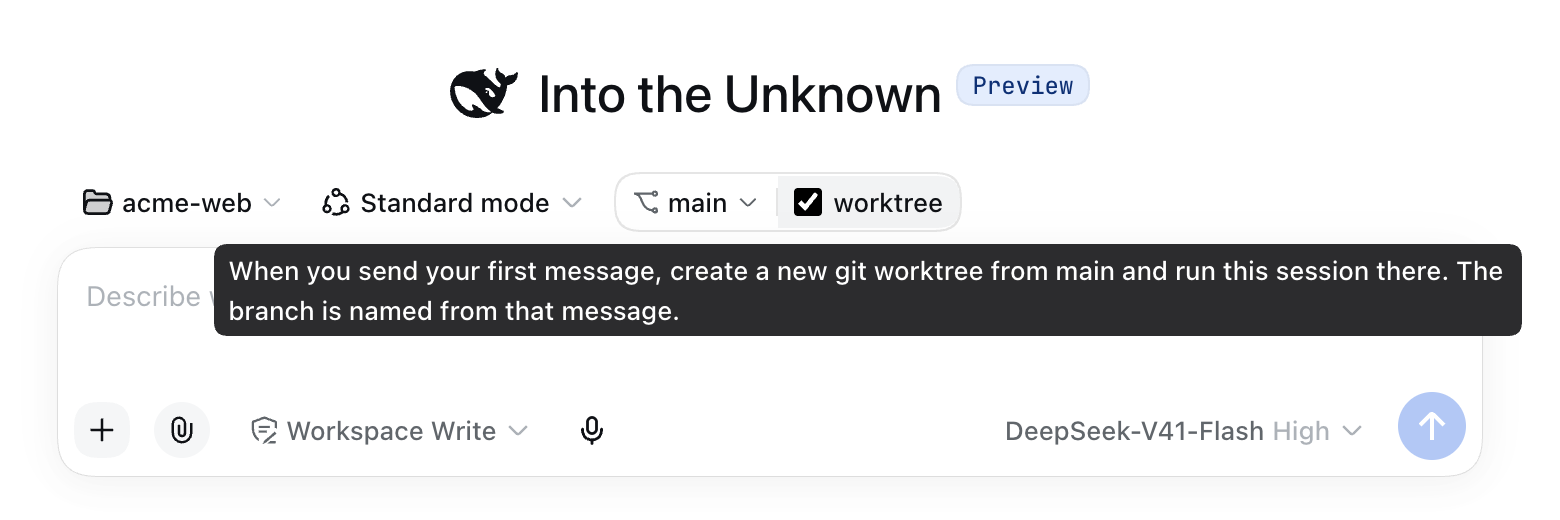
Git branches and worktrees for the DeepSeek Harness (dsh) Web Client. On the new-session screen it adds a project switcher and a branch pill with a worktree checkbox. Tick it and your first message runs in a fresh git worktree on a new branch named after that message. Once a session is running, a slim row above the composer shows the branch and worktree it is in, and lets you switch, create, rename, delete, lock, and prune them. git runs on the host. The browser never runs a git command itself.
Features
New-session toolbar
On a blank new chat, the row above the composer reads: project switcher, the harness's own mode chip, and a branch pill holding the branch and a worktree checkbox.
Project switcher. Opens a searchable list of your workspaces with Browse for folder… at the bottom. That entry opens the host's folder chooser, registers the folder as a workspace, and moves the new session there. If you have no workspaces yet, opening the switcher goes straight to the chooser.
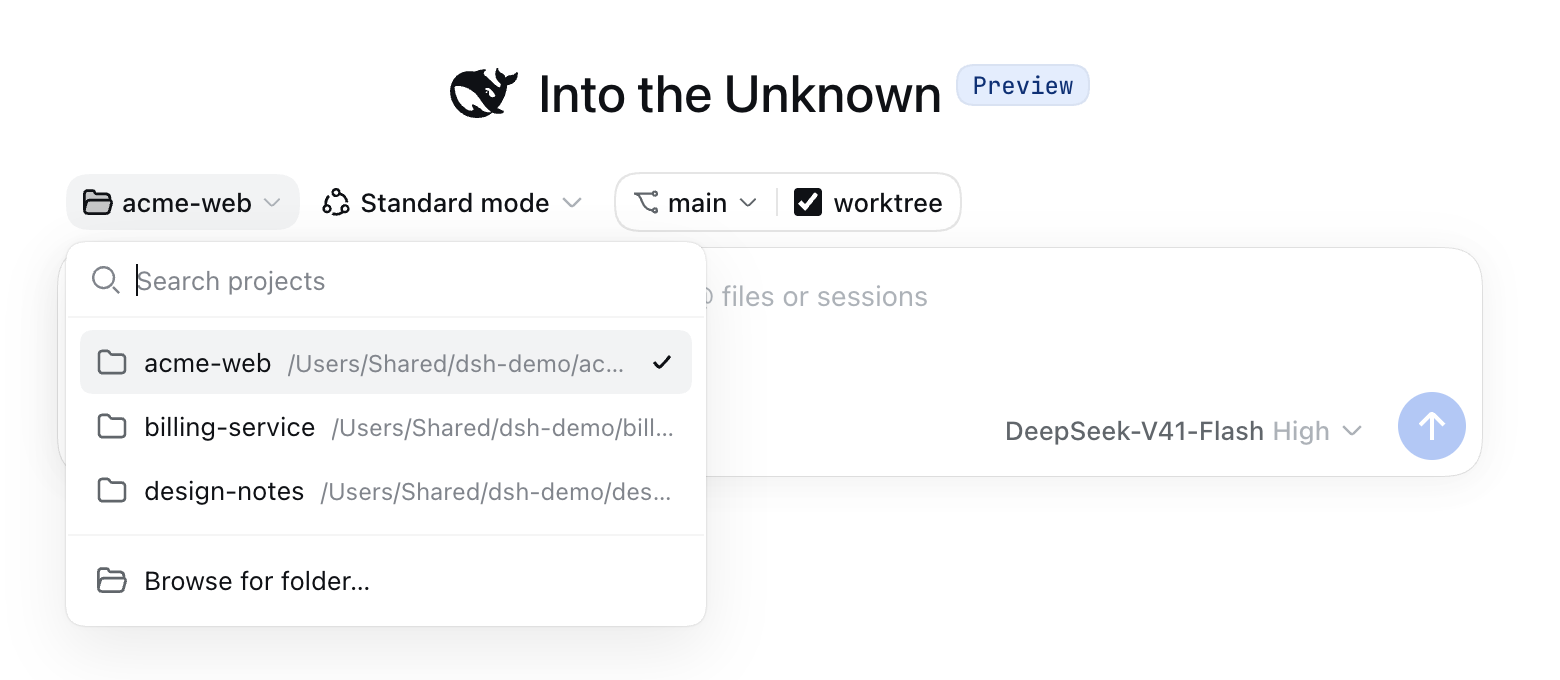
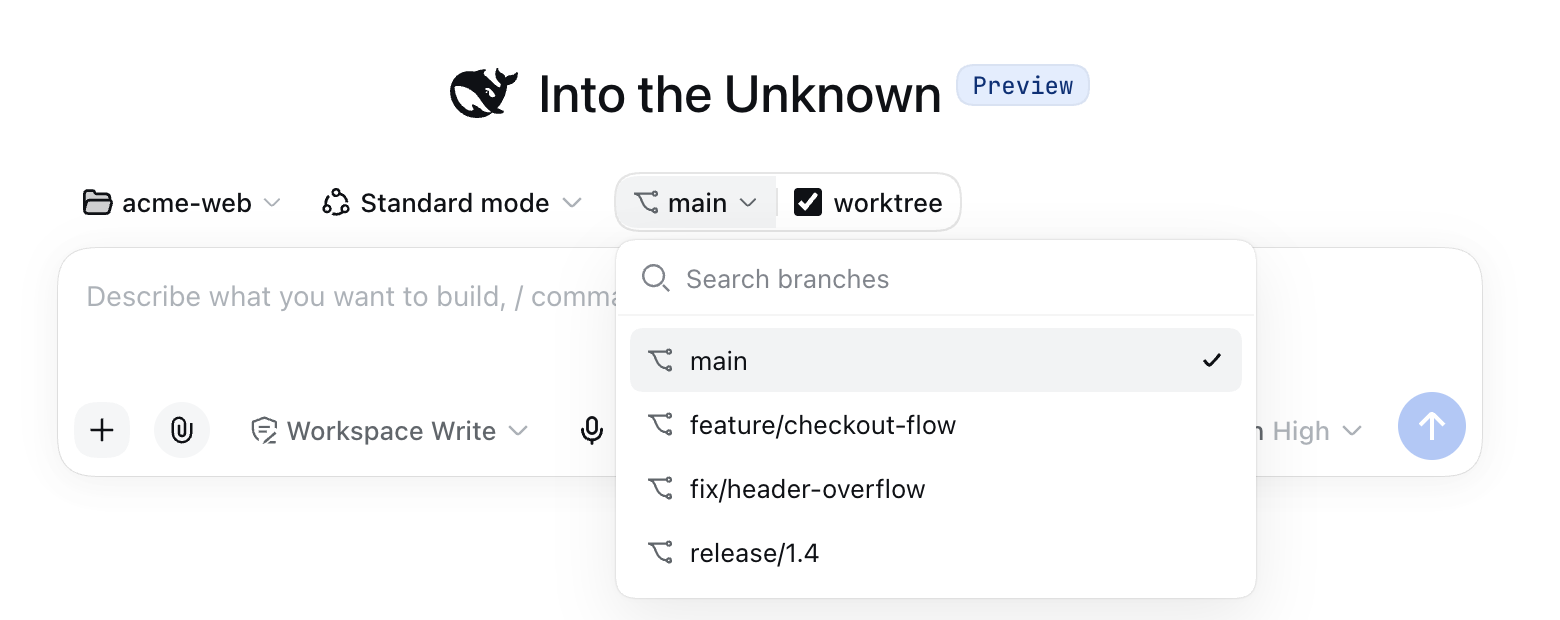
Branch pill. Shows the branch the session will start on.
- Worktree unticked. The session runs in the project folder, so picking a branch switches that folder to it. A switch that would overwrite uncommitted changes is refused, and git's message appears in the dropdown.
- Worktree ticked. Nothing is created yet. The branch you pick is the base the new worktree will start from, and the project folder is left alone.
When a repository has more branches than maxBranches, the list says so. Typing a search then also asks the host, so a branch past the limit can still be found.
First send with the worktree ticked. When you press Enter or the send button, the plugin:
- locks the composer;
- asks the deployment's current model for a branch name based on your message. With no model, or if the call fails, it uses a slug of the message.
branchPrefixis prepended, and a taken name gets a-2,-3, … suffix; - runs
git worktree add -b <name>from the chosen base branch, at the pathworktreePathTemplategives; - registers the worktree as a workspace named after the branch, moves the draft and its attachments there, and sends it.
If you leave the session before the worktree is ready, or the move does not finish in time, the workspace, the worktree, and the new branch are removed again. Your message stays unsent in the composer, and you get a notice.
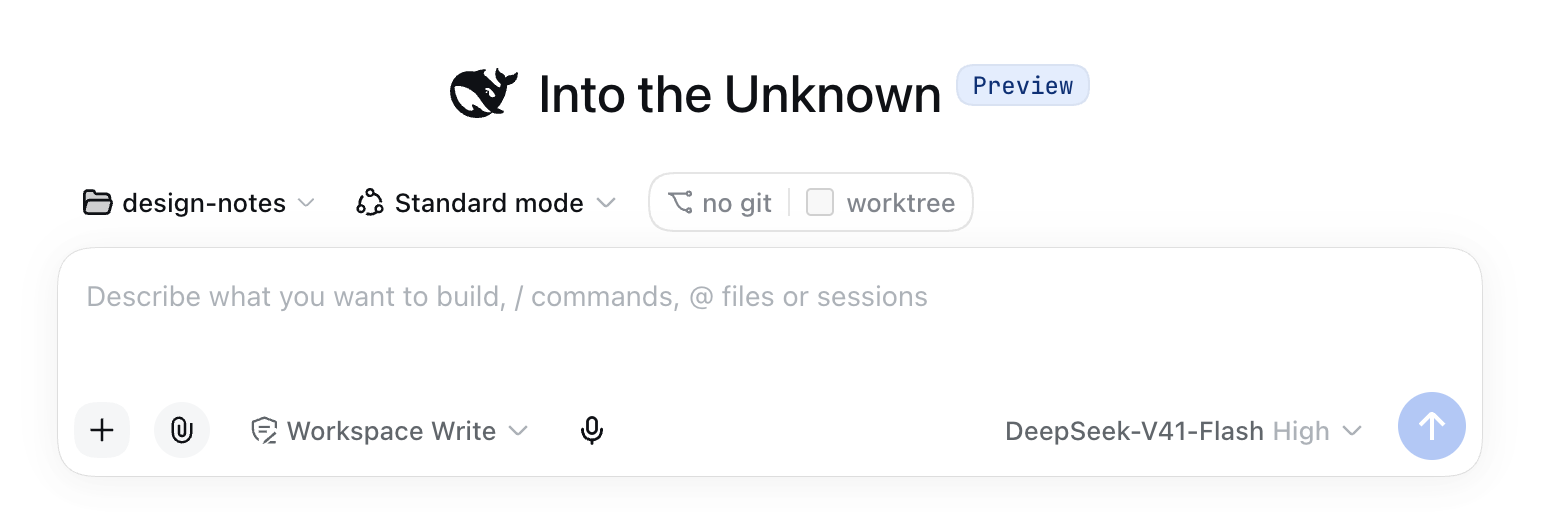
Pill states. Whenever a project is selected, the pill keeps its place in the row:
| Pill reads | Meaning |
|---|---|
| grey placeholder | The first reading has not arrived yet. |
| no git (disabled) | The folder is not a git repository, git cannot run on the host, or showChip is off. The tooltip says which. |
| git error (disabled) | The reading failed, for example on a timeout. The tooltip shows git's message, and the reading is retried with backoff. |
Branch and worktree row (active session)
After the first message, a row directly above the composer shows ⑂ branch ↑ahead ↓behind • and the current worktree's name with a count of worktrees. The dot means uncommitted changes. A + button next to it creates a new worktree. The row re-reads the repository every refreshIntervalMs. The popovers open upward.
The row is hidden in sessions whose folder is not a git repository, when git is unavailable, and when showChip is off.
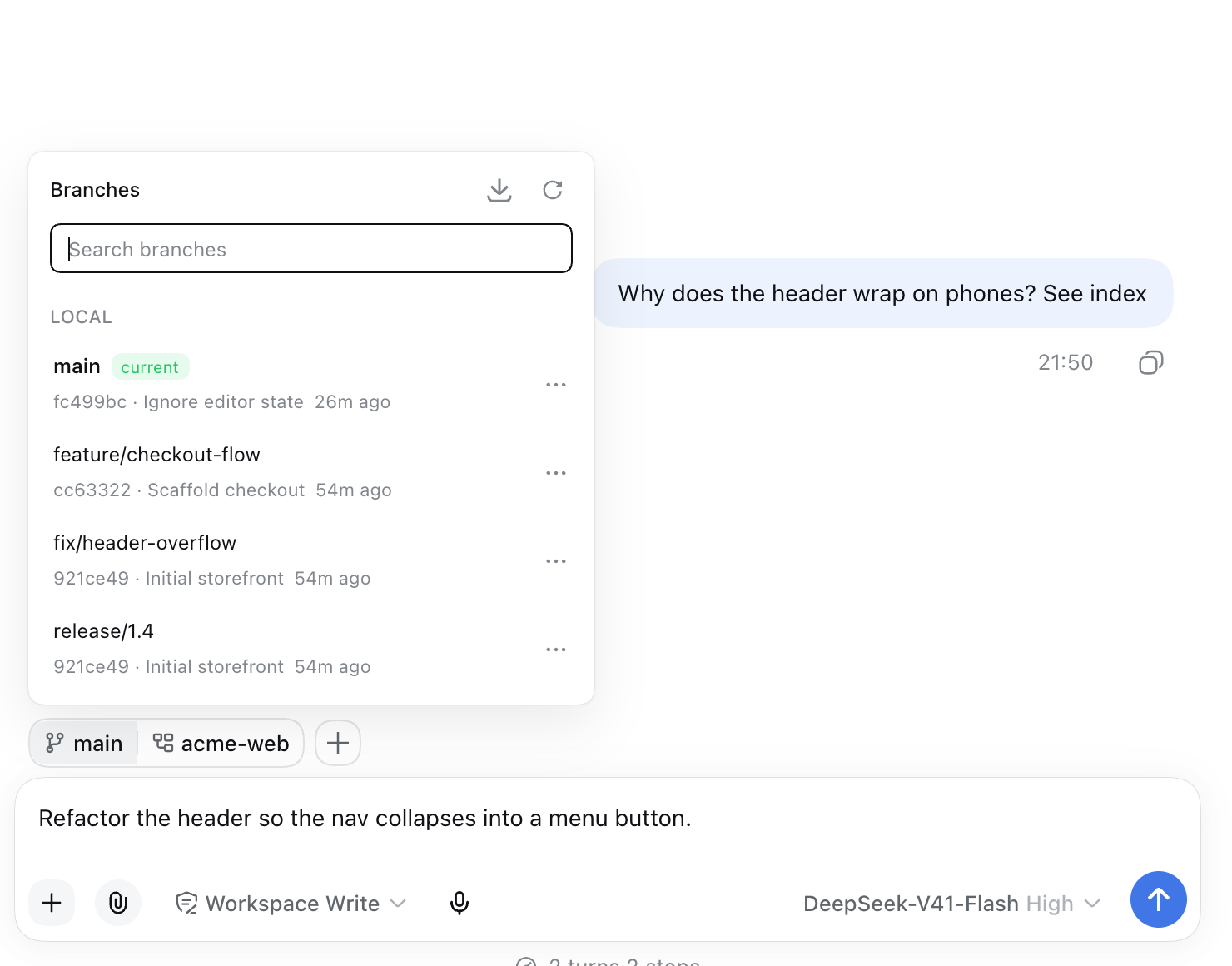
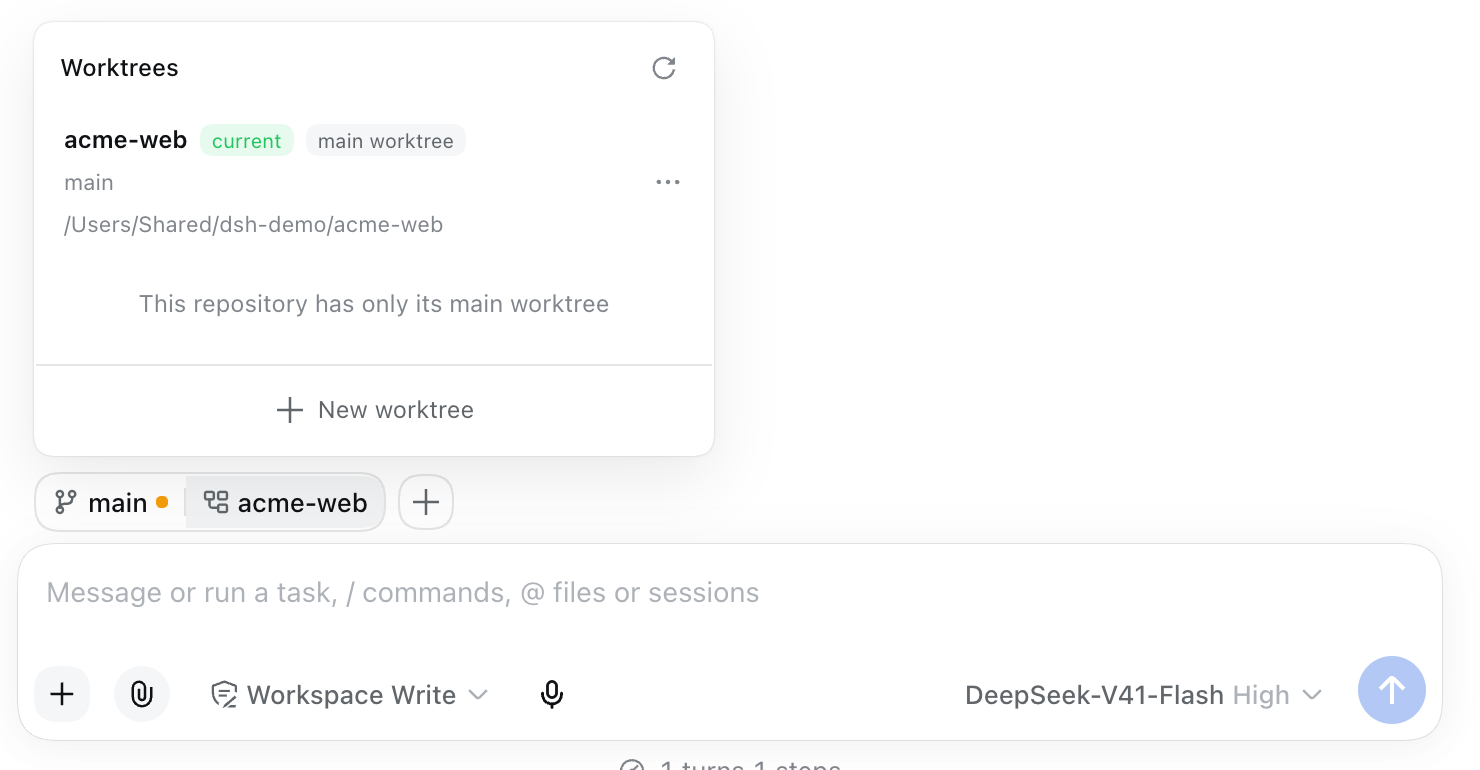
Branch popover. Local and remote-tracking branches, each with its tip commit, author, age, and ahead/behind counts, plus a search field.
- Switch to a branch. When the worktree has uncommitted changes, a Carry uncommitted changes switch appears. It runs
git switch --merge, which aborts on conflict. Without it, git refuses a switch that would overwrite changes. - Picking a remote branch creates the matching local branch that tracks it. If the local branch already exists, the plugin switches to it.
- A branch already checked out in another worktree offers to open that worktree instead, because git will not check one branch out twice.
- Create a branch from the search text, open a new worktree for a branch, or rename or delete a local branch.
- Fetch and prune remotes runs
git fetch --all --prune.
Worktree popover. Every worktree of the repository, marked main, current, detached, locked, or prunable.
- Open a session here registers the worktree as a workspace and opens a session in it.
- Show in file manager appears only when the host supports revealing a path.
- Lock / Unlock and Remove… are available for linked worktrees. The main worktree cannot be locked or removed, and neither can the worktree the current session runs in.
- Prune stale records runs
git worktree prune.
New worktree dialog (the + button). Choose a new or existing branch and an optional start point. The directory is prefilled from worktreePathTemplate and can be edited. It must not exist, or must be an empty directory. Register as a workspace and Open a session after creating default to registerWorkspace and openSession.
Destructive actions.
- A force-delete of an unmerged branch, or a force-remove of a worktree with uncommitted changes, needs the name typed to confirm while
confirmDestructiveis on. git worktree removedeletes ignored files (a.env, a build directory) even without force. So the remove dialog lists them first and needs its own checkbox before removing them, whateverconfirmDestructiveis set to. The host refuses such a removal without that acknowledgement.- Remote branches are never deleted.
- Removing a worktree does not unregister its workspace. Remove the workspace from the sidebar yourself.
Settings card
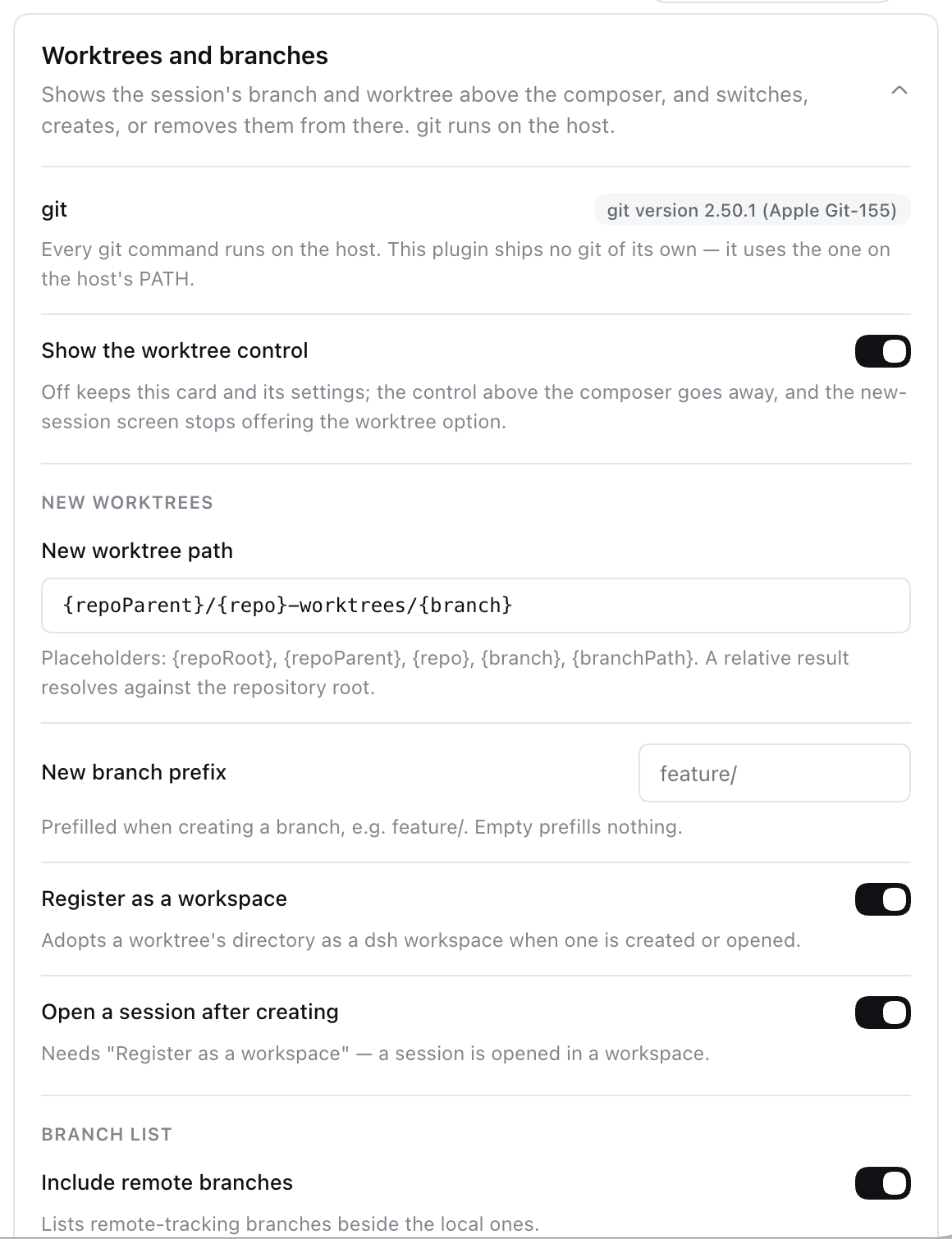
Settings → Plugins → Worktrees and branches shows whether git was found on the host, with its version, and edits the preferences. See Configuration.
Requirements
- DeepSeek Harness 0.1.5-rc.2, with the
webprofile. This is the version the plugin is tested against. Node^22.19 || >=24, as inengines. - git 2.23 or newer on the host process
PATH, because the plugin usesgit switch. With git 2.36 or newer, the plugin reads the worktree list in NUL-separated form and also reads thelockedandprunableflags. With older git it reads the plain listing, which does not show those two flags. - pnpm on
PATH, becausedsh pluginruns pnpm. - Harness capabilities, all mounted by the base bundle:
@deepseek-ai/dsh-subprocessand@deepseek-ai/dsh-fs, required to run git. Without either, the row stays hidden, the pill reads no git, and the settings card names what is missing.- A directory picker (
dsh-client-ui-directory-picker-nativeor-browse) for Browse for folder…. Without one, that entry reports that no chooser exists. - Optional:
llmandagentDefaultModelfor model-written branch names. Without them the name is a slug of the message. - Optional: the settings service. Without it, the values from
cordis.patch.ymlapply and the card cannot save changes.
- OS: developed and tested on macOS. The code has no platform-specific git handling. Linux and Windows are not verified.
Install
dsh plugin --profile web add @achasoft/dsh-worktree
dsh web
dsh plugin --profile <name> … runs pnpm with the remaining arguments in $DSH_HOME/profiles/<name> (default ~/.dsh/profiles/web), creating the profile first if it does not exist. After pnpm succeeds, dsh adds every dependency whose package.json declares dsh.bundle to that profile's dsh.profile.bundles list. This package declares "dsh": { "bundle": { "patch": "./cordis.patch.yml" } }, so it becomes a profile layer with no manual edit. Restart dsh web after installing.
To uninstall, remove the package. dsh also drops it from dsh.profile.bundles:
dsh plugin --profile web remove @achasoft/dsh-worktree
How cordis.patch.yml is applied
At boot, dsh builds the configuration from patch layers, in this order:
- Each bundle's
cordis.patch.yml, indsh.profile.bundlesorder. This package's file inserts two rows. - The profile's own
$DSH_HOME/profiles/<name>/cordis.patch.yml. $DSH_HOME/cordis.patch.yml, which applies to every profile.- Any
--patch <file>overlays.
A later layer overrides an earlier one by row id. The two rows this package inserts:
| id | name | Role |
|---|---|---|
worktree | @achasoft/dsh-worktree/host | Host service: git over RPC, and the worktree settings section. |
worktree-ui | @achasoft/dsh-worktree | Browser half. It must be the bare package name, because the Web Client finds browser code by resolving <row name>/package.json. |
To see the composed result:
dsh --profile web --dump-config
Configuration
Every key lives in the config of the worktree row. To override keys, add the row to your profile's cordis.patch.yml by id. Restate every key, because a patch replaces the row's whole config:
- id: worktree
  config:
    showChip: true
    worktreePathTemplate: '{repoParent}/{repo}-worktrees/{branch}'
    branchPrefix: 'feature/'
    registerWorkspace: true
    openSession: true
    includeRemoteBranches: true
    maxBranches: 200
    refreshIntervalMs: 15000
    gitTimeoutMs: 20000
    networkTimeoutMs: 120000
    maxOutputBytes: 1048576
    graceMs: 5000
    confirmDestructive: true
The host schema declares no defaults, and every key except branchPrefix is required. The defaults below are the values cordis.patch.yml ships. Values saved from the settings card are stored as a user layer over the patch value. The host reads settings on each request, so changes need no restart.
| Key | Default | Card | What it does |
|---|---|---|---|
showChip | true | yes | Shows the row above the composer and an enabled new-session pill. When off, the pill reads no git and the RPC endpoints and settings card stay available. |
worktreePathTemplate | {repoParent}/{repo}-worktrees/{branch} | yes | Directory for a new worktree. See Path template. |
branchPrefix | '' | yes | Prefix added to new branch names: first-send names, and branches created from the branch popover or the create dialog. Example: feature/. |
registerWorkspace | true | yes | Default for Register as a workspace in the create dialog. |
openSession | true | yes | Default for Open a session after creating. Requires registerWorkspace. |
includeRemoteBranches | true | yes | Lists remote-tracking branches next to local ones. |
maxBranches | 200 | yes | Most branches returned per reading (minimum 1). The list says when it was cut. |
refreshIntervalMs | 15000 | yes, in seconds | How often the row re-reads. 0 means read only on explicit refresh. |
gitTimeoutMs | 20000 | yes, in seconds | Time limit for a local git command (minimum 1000). |
networkTimeoutMs | 120000 | yes, in seconds | Time limit for fetch (minimum 1000). Must not be less than gitTimeoutMs. |
maxOutputBytes | 1048576 | no | Memory cap for each captured git output stream (minimum 4096). |
graceMs | 5000 | no | Delay between TERM and KILL when a git command is stopped. |
confirmDestructive | true | yes | Requires typing the name before a force-delete or force-remove. |
The host refuses a configuration at load, and the card refuses to save it, when:
worktreePathTemplateis empty or contains neither{branch}nor{branchPath};networkTimeoutMsis less thangitTimeoutMs;openSessionistruewhileregisterWorkspaceisfalse.
Path template
The template expands against the repository being acted on. A relative result resolves against {repoRoot}.
| Placeholder | Expands to |
|---|---|
{repoRoot} | The repository's main worktree directory. |
{repoParent} | Its parent directory. |
{repo} | Its directory name. |
{branch} | The branch name with / replaced by -, so feature/login becomes one directory. |
{branchPath} | The branch name with slashes kept, so feature/login nests. |
RPC and model-facing surface
The plugin registers no model tools, prompt content, or session events. The browser half calls one Typert Remote namespace, worktree, over the harness's own client connection:
| Endpoint | Purpose |
|---|---|
describe | Whether git is available, its version, and the preferences the browser draws from. |
overview | HEAD, dirty counts, branches, and worktrees for one workspace directory. |
searchBranches | Case-insensitive branch-name search past maxBranches. |
fetch | git fetch --all --prune --quiet. |
checkout, createBranch, renameBranch, deleteBranch | Branch changes. |
suggestBranchName | Branch name from a prompt, written by the model or as a slug. |
suggestPath, addWorktree, inspectWorktree, removeWorktree, lockWorktree, pruneWorktrees | Worktree changes. |
Every endpoint returns a result value with a failure code (no-git, not-a-repository, refused, timeout, …) instead of throwing. The root export @achasoft/dsh-worktree re-exports these types for other packages.
Security notes
- git runs only on the host, through
ctx.subprocess, withGIT_TERMINAL_PROMPT=0,GIT_PAGER=cat, andLC_ALL=C. The plugin registers no HTTP routes. All calls go through the harness's own client connection. - Opening a folder runs nothing the folder configures.
- Every invocation passes
-c core.fsmonitor=false. - Background readings (the status poll) also switch off every
filter.<driver>.clean/processdefined in the repository's local or per-worktree config, includinginclude.pathfiles. They also pass--no-optional-locksand--ignore-submodules=dirty. - Filters from your global or system config, such as git-lfs, keep working.
- A repository whose filter driver name contains
=cannot have that filter disabled on the command line, so it is not read automatically.
- Every invocation passes
- Browser input is checked before it reaches git.
- Branch names must pass git's ref-name rules, and a leading
-is refused. - Start points are verified with
rev-parse --verify. - Worktree paths must appear in git's own
worktree list. --ends the options wherever git's parser accepts it.- A new worktree's destination must be absent or an empty directory.
- Branch names must pass git's ref-name rules, and a leading
- No uncommitted work is thrown away without a prompt. Checkouts never use
--force. Force-delete and force-remove are separate, confirmed actions. Ignored files need an explicit acknowledgement that the host enforces. - Cleanup deletes only a branch that holds no work. When a first send is abandoned, the new branch is deleted only while its tip is still the commit it was created at. The host checks this with
expectedTip.
Known limitations
- The first send is intercepted in the composer. The harness has no pre-send hook for a plain prompt, because input triggers only handle drafts that start with
/. A hidden element in the composer's tool row (conversation.input.left) listens, in the capture phase, for Enter and for clicks on the send button. It acts only while a worktree is ticked, the draft does not start with/, no trigger menu owns Enter, no IME composition is in progress, and the send button is enabled. A future change to the composer's DOM, such as the send button no longer being the card's last button, would need this updated. - The worktree is created on the first message, not when you tick the box, because its branch is named from that message.
- The project folder's branch switch is refused on a dirty tree. The new-session pill never carries changes. Use the row's Carry uncommitted changes switch in a running session, or commit first.
- Folders that are not repositories show a disabled no git pill on the new-session screen, and no row in a running session.
- Shadowed seat. The new-session toolbar replaces the harness's workspace picker by registering
conversation.hero.workspaceat priority-1. The lowest priority renders, and the core picker is at0. The core menu's Add workspace… entry is replaced by Browse for folder…. Uninstalling returns the core picker. - The row mirrors the shell's session phase. The composer dock is also drawn on the blank screen, so the row reproduces the conversation shell's phase rule (checked against
@deepseek-ai/dsh-client-ui-conversation0.1.5-rc.2) to decide when to show. - Branch names from a model use a model call (up to 32 output tokens, 20 s timeout) against the deployment's provider for each worktree created on first send.
Development
The dev dependencies are link: specifiers to a DeepSeek Harness source checkout at ../../deepseek-harness, relative to this directory. Clone the harness there before installing.
pnpm install
pnpm run typecheck
pnpm test              # checks generated/ against src/host, then runs vitest
pnpm run build         # tsc -p tsconfig.build.json, then tsdown -> lib/
generated/ holds the Typert RPC contract and is committed source. The harness's generator only runs inside a harness checkout, so scripts/emit-typert.mjs writes the contract in that generator's format. If you change src/host/types.ts or the @Remote methods in src/host/index.ts, update the spec in that script and regenerate:
pnpm run regen:typert  # rewrites generated/ and generated/.fingerprint
pnpm run check:typert  # the same check pnpm test runs first
To load your checkout into a local profile, build it, then add it by path. dsh resolves a relative path against the directory you run it from:
pnpm run build
dsh plugin --profile web add "$(pwd)"
dsh web
The profile loads the built lib/ output, not src/, so build before adding the checkout. After changing browser code, rebuild and reload the page. After changing anything under src/host/, or regenerating generated/, restart dsh web.
License
MIT
Comments
Loading…
From the same category
by nexu-io
🎨 Best DeepSeek Harness Design Plugin. The open-source Claude Design alternative. 🖥️ Local-first desktop app. 🖼️ Your coding agent becomes the design engine: prototypes, landing pages, dashboards,
★ 98.3k
Apache-2.0
TypeScript
Sep 27, 2026
deepseek-harness-desktop is a interface plugin for DeepSeek Harness. See the repository documentation for its documented capabilities.
★ 28.6k
MIT
by zhu1090093659
DeepSeek Harness (DSH) Web Plugin Aggregation Ecosystem · Everything is a plugin, distributed via the Creative Workshop
★ 8.1k
Apache-2.0
TypeScript
Sep 27, 2026
dsh plugin --profile web add dsh-webA collection of independent Web UI plugins and skins, including task boards, Git graphs, mobile access, and live token stats.
★ 7.4k
Apache-2.0
TypeScript
dsh plugin --profile web add dsh-webby ZSeven-W
The world's first open-source AI-native vector design tool and the first to feature concurrent Agent Teams. Design-as-Code. Turn prompts into UI directly on the live canvas. A modern alternative to Pe
★ 6k
MIT
Rust
Sep 27, 2026
by omdsh-dev
开放的侧边栏底座,支持三方拓展注册新侧边栏页面。内置文件渲染编辑/终端/侧边对话/Git/子代理页面 | Open sidebar foundation, supports third-party extensions to register new sidebar pages. Built-in file rendering/editing, terminal, side chat, Git,
★ 3.8k
↓ 52.4k/wk
MIT
TypeScript
Sep 27, 2026
dsh plugin --profile web add dsh-better-sidebar