

dsh-skin
Identified★ 3Skins for DeepSeek Harness Web — image or video wallpapers, translucent panels, custom colours, logo and wordmark, ambient audio. Drop a folder in, pick it in Settings.
dsh-skin
English · 简体中文
Skins for DeepSeek Harness Web — the kind where you point it at a wallpaper and the whole interface sits on top of it.
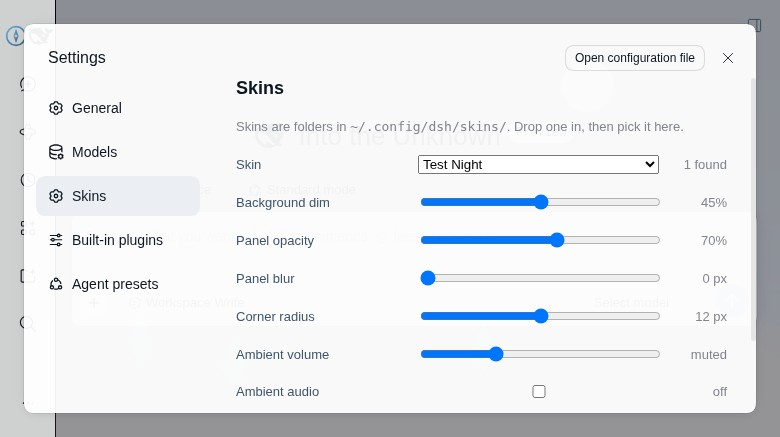
A skin is a folder. Drop it in ~/.config/dsh/skins/, refresh, pick it in Settings → Skins.
Image or video background, translucent panels, your own colours, your own logo and wordmark, optional
ambient audio. No build step, no upload dialog, nothing leaves the machine.
Requirements
- dsh 0.2.2-rc.x. The client peers are pinned to that range; the plugin manager refuses anything outside it rather than half-loading.
- The web profile (
dsh web). The desktop app loads its client differently and is not supported yet.
Install
# from a checkout
dsh plugin --profile web add /path/to/dsh-skin

# or from GitHub
dsh plugin --profile web add github:bigm4ngo/dsh-skin
Restart dsh web and open Settings → Skins.
Nothing is installed system-wide: dsh plugin puts the package in the profile's own node_modules,
and lib/ ships pre-built, so your machine needs no compiler or build step.
Make a skin
The full format — every field, the colour tokens, the rules for drawing a logo — is in SKIN-FORMAT.md. It is written to be handed to a designer, not only to a developer.
The short version:
~/.config/dsh/skins/harbour/
├── skin.json
├── background.jpg      (or .mp4 / .webm)
├── logo.svg            (optional)
└── ambient.mp3         (optional)
{
  "name": "Harbour",
  "background": { "file": "background.jpg", "dim": 0.5 },
  "colors": {
    "dark":  { "bg-layer-1": "#0b1524", "brand-primary": "#7ad1ff" },
    "light": { "bg-layer-1": "#ffffff", "brand-primary": "#1b6f9e" }
  }
}
Reload the page and it appears in the list. If something is wrong — a missing file, a value that isn't a colour, a 700 MB video — the skin is refused and the reason is printed under the dropdown instead of being applied silently.
What you can change
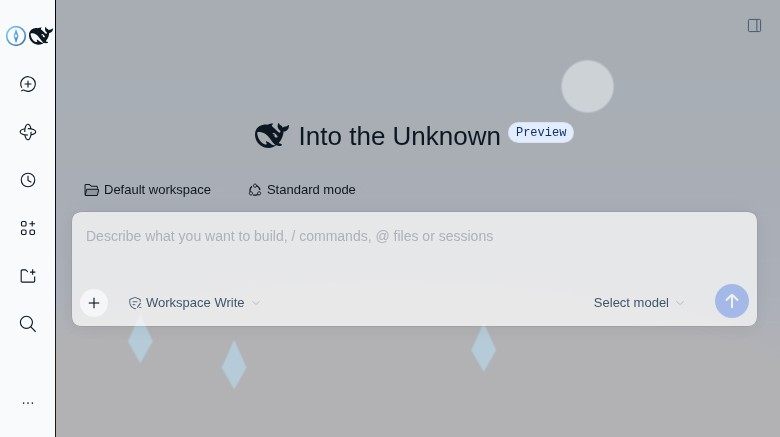
- Background — image or video;
cover/contain/fill/repeat; position; dimming; blur. - Surfaces — panel opacity, backdrop blur, corner radius, the message bubble, the composer field,
the popup menu, and any
--dsw-*colour token, separately for light and dark mode. - Logo and wordmark — your own SVG/PNG/WebP replaces the product mark; a plain string replaces the
wordmark.
hideMarkremoves the product mark without a replacement, anddeepDivingMarkswaps the whale on the running status line. - Accent-driven controls — one
brand-primaryalso themes the Chat/Trajectory tabs, the active workspace glyph, the send button and the “Deep diving” line, with readable send-button contrast. - Ambient audio — a looping file, or the video's own track; muted by default, with a volume slider.
- Favourites — star the skins you keep coming back to; pinned skins move to the top of the picker and stay in a quick-pick row. Remembered in the browser like the other preferences.
Five of those stay adjustable in the UI (dim, panel opacity, blur, radius, ambient volume) and are
remembered per browser. Everything else comes from skin.json, so a designer can ship a look without
the user having to fiddle.
Notes and limits
- Branding is applied to the existing brand seat, not through the sidebar's brand slots: on 0.2.2-rc.1 those slots do not accept an out-of-tree occupant. The shell's mark is hidden and the skin's logo is painted into the same box, so layout is unchanged.
- Class names in the shell are build-hashed, so the plugin finds the outer containers by geometry and by stable class suffixes rather than exact selectors. A future dsh release may move them; if a wallpaper stops showing through, that is where to look.
How it is put together
Two halves, both small:
- Host (
src/index.ts) registers/dsh-skinon the web server and serves the skins directory — listings at/dsh-skin/index.json, media at/dsh-skin/<skin>/<file>with HTTP range support so video can stream. It validates each manifest on read. - Browser (
src/client/) fetches the listing, paints the background layer, overrides the design tokens at the element that declares them, and registers the Skins settings page.
A skin is data plus media: no CSS, no scripts, no HTML. Unknown fields are ignored, not executed.
Development
pnpm install
node scripts/build.mjs     # lib/index.js (host) + lib/client.js (browser)
lib/ is committed, so installing from a fresh clone needs no build.
Licence
MIT.
Comments
Loading…
From the same category
by anywhere-labs
为 DeepSeek Harness (DSH) 插件生态打造的现代化桌面端解决方案。万物皆「插件」,桌面本身也是「插件」。
★ 20k
↓ 145/wk
MIT
TypeScript
Aug 25, 2026
dsh plugin --profile web add dsh-plugin-desktopby zhu1090093659
DeepSeek Harness (DSH) Web Plugin Aggregation Ecosystem · Everything is a plugin, distributed via the Creative Workshop
★ 10.3k
↓ 156/wk
Apache-2.0
TypeScript
Aug 25, 2026
dsh plugin --profile web add dsh-webA collection of independent Web UI plugins and skins, including task boards, Git graphs, mobile access, and live token stats.
★ 8.6k
↓ 156/wk
Apache-2.0
TypeScript
dsh plugin --profile web add dsh-webby bowenliang123
The best DeepSeek Harness plugin for context insight and management, with context dashboard / browser / sidebar and context command, for context statistics, composition, breakdown, evolution details,
★ 5k
↓ 146.7k/wk
Apache-2.0
TypeScript
Nov 11, 2026
dsh plugin --profile web add dsh-contextby omdsh-dev
开放的侧边栏底座,支持三方拓展注册新侧边栏页面。内置文件渲染编辑/终端/侧边对话/Git/子代理页面 | Open sidebar foundation, supports third-party extensions to register new sidebar pages. Built-in file rendering/editing, terminal, side chat, Git,
★ 4.5k
↓ 83.6k/wk
MIT
TypeScript
Aug 25, 2026
dsh plugin --profile web add dsh-better-sidebarby shaobeichen
把 DeepSeek Harness 装进你的口袋:电脑上跑 dsh web,手机扫码即同步访问(局域网 + 公网,实时同屏)Put DeepSeek Harness in your pocket: run dsh web on your computer and access it synchronously by scanning a QR code on your phone (LAN +
★ 2.3k
↓ 6.2k/wk
GPL-2.0
JavaScript
Aug 23, 2026
dsh plugin --profile web add dsh-pocket