

dsh-settings-sidebar
IdentifiedShow or hide sidebar panel entries and add shortcuts to Settings sections in DeepSeek Harness.
Sidebar menus for DeepSeek Harness
Show or hide sidebar panel entries and add shortcuts to Settings sections. Existing panels use their actual sidebar names, not the shorter names of their corresponding Settings sections.
Screenshots
Manage visibility
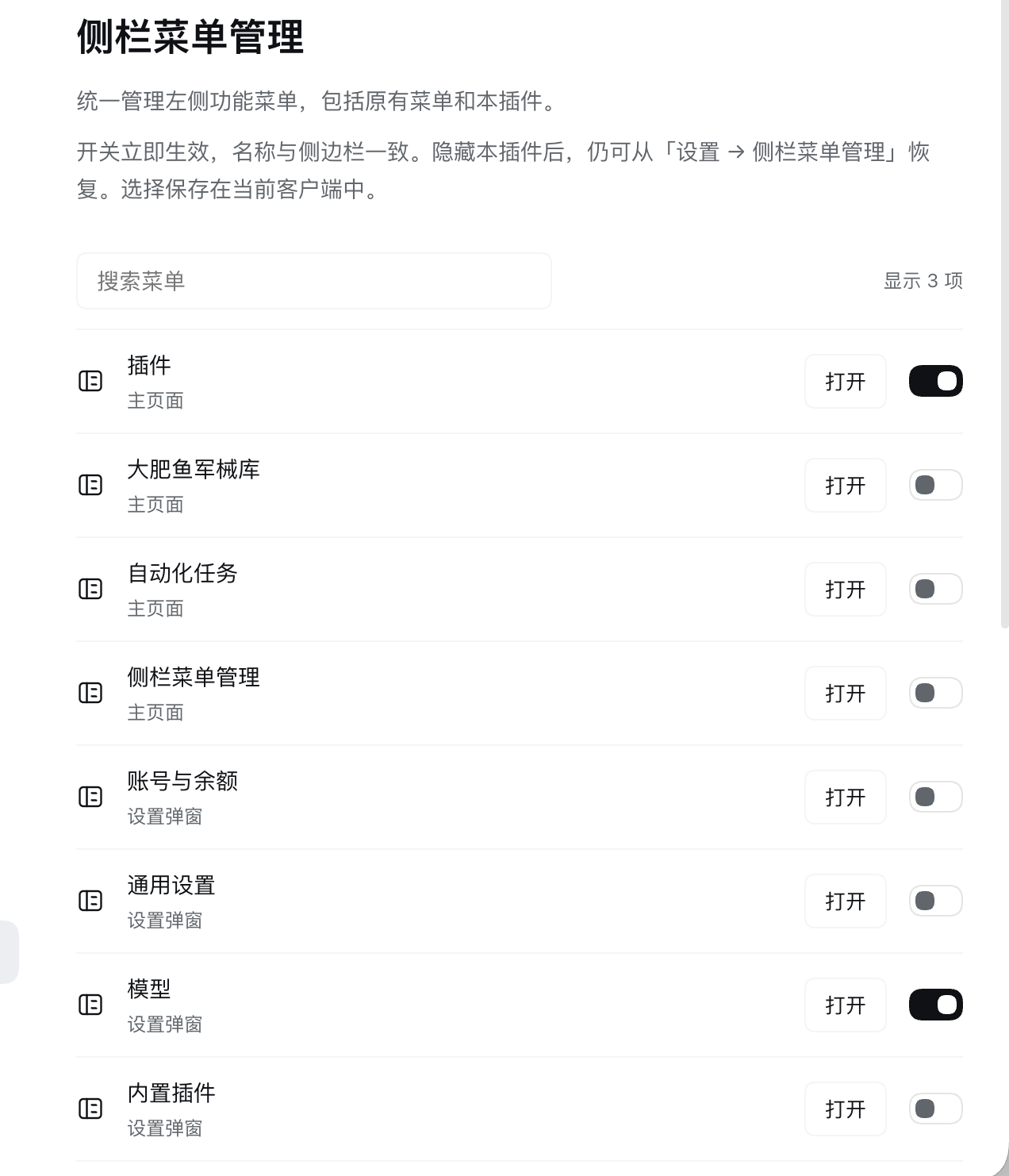
Settings shortcuts in the sidebar
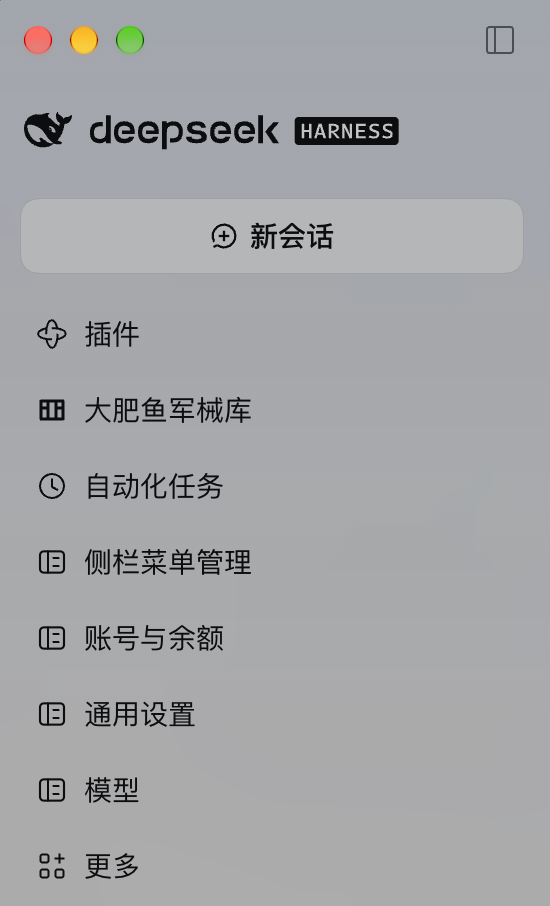
Screenshots show two example configurations. Captured and provided by the plugin author for publication.
Install
Requires DeepSeek Harness Web or Desktop with the sidebar, Settings and layout client APIs. The plugin ships directly loadable JavaScript: no build, install scripts or additional runtime dependencies. React and the client store are supplied by the Harness module loader.
Ask your Harness agent:
Install the GitHub plugin github:zyileven/dsh-settings-sidebar
Or install into your active CLI profile (desktop below is the Desktop profile; substitute your own):
dsh plugin --profile desktop add github:zyileven/dsh-settings-sidebar
Alternatively, download dsh-settings-sidebar.tgz from Releases and run:
dsh plugin --profile desktop add ./dsh-settings-sidebar.tgz
For a pinned version, use github:zyileven/dsh-settings-sidebar#v1.1.1. The package keeps its internal identifier @local/dsh-settings-sidebar; it is distributed through GitHub/tarballs, not npm.
Use
- Open Sidebar menus from the sidebar or Settings.
- Search for a menu and toggle its visibility. Existing panels, More and the manager itself are included.
- If you hide the manager, reopen Settings → Sidebar menus to restore it.
Where a menu opens depends on whether its content has a main page. Entries with their own main-content page open that page in the main content area, exactly as the original sidebar button does; entries that exist only as a Settings section have no main page, so they open the Settings dialog already positioned on that section. Such a dialog does not replace the page you were on: closing it leaves that page selected, and if that page's plugin has been removed the shortcut falls back to the conversation. The Plugins inventory page and the built-in-plugin Settings section are separate entries.
Hiding an entry does not disable its plugin, delete its page or remove its Settings entry. New Session, workspace browsing and account/Settings controls are outside the panel-menu scope; Settings remains available for recovery.
Data and safety
Visibility choices stay in this client's localStorage. No network requests, account/model/Host configuration changes, session-data changes or model tools are added. Preferences do not sync between clients. First-version pins are migrated; failed saves report an error and preserve the current state. Uninstalling removes policy styles and added shortcuts, restoring original panels. Local preferences remain for reinstalls.
Compatibility and limitations
The current host has no public filter for every original sidebar panel. Original entries are hidden by a stylesheet rendered in shell.overlay, scoped to the global navigation and complete button accessibility names. Labels are CSS-string escaped and follow locale changes. The plugin does not read or rewrite other plugins' DOM or replace the sidebar. New Settings shortcuts use ordinary slot registrations and disposers.
- Hiding affects sidebar navigation rows only. More's popup or other locations may still expose the same function.
- Two original entries with exactly the same display name are hidden together.
- The plugin depends on current navigation markup,
layout.panelInfosubscription and the Settings shell's shared StoreopenSectionaction. Host upgrades require revalidation. Settings navigation failures are reported in the manager. - Existing panels default to visible; Settings shortcuts without an existing sidebar entry default to hidden.
The SVG icon is original artwork; the storefront PNG is converted from it. No third-party UI artwork is bundled.
Development and verification
npm test
npm pack --ignore-scripts
Node's built-in tests cover names, original/self visibility, shortcut lifecycle, persistence/migration, failed storage, preserved modal backgrounds and listener disposal. Installed Desktop checks also exercised original-panel hiding, manager recovery through Settings and closing Models Settings back onto the Plugins page. These checks are not a cross-version compatibility guarantee.

Versions
| Latest version | Published | Size |
|---|---|---|
| 1.3.0 | — | — |
Comments
Loading…
Similar plugins
by linguiyii
DeepSeek Harness 客户端插件:把设置入口放到侧边栏底部,一键打开设置页。 / A DSH client plugin that puts a settings button at the bottom of the sidebar.
★ 1
MIT
JavaScript
Oct 18, 2026
dsh plugin --profile web add dsh-sidebar-settingsby pkui1mpression-design
Sidebar panel for DeepSeek Harness: lists the plugins installed in the current profile and gives each one an enable/disable switch.
★ 0
MIT
JavaScript
Nov 3, 2026
dsh plugin --profile web add dsh-sidebar-installed-pluginsby zhujiuyi
Lists every entry that can appear in the left sidebar and gives each panel entry its own hide/show switch from a section in Settings.
★ 0
MIT
JavaScript
Oct 23, 2026
dsh plugin --profile web add @zhujiuyi/dsh-leftpanelby Nishikinov
DSH plugin: puts a Settings row in the sidebar header, immediately before Plugins, and opens the native Settings panel in one click.
★ 0
MIT
JavaScript
Oct 6, 2026
dsh plugin --profile web add dsh-sidebar-settings-buttonby suntianc
Adds custom icons to the DSH Settings sidebar and exposes a keyed `settings.section.icon` slot for third-party settings sections.
★ 1
MIT
TypeScript
Oct 17, 2026
dsh plugin --profile web add dsh-ui-settings-iconsby lywusichen
管理 DeepSeek Harness 左下侧栏按钮的插件:拖拽排序、显隐控制,隐藏按钮收进"更多"菜单,可统一按钮高度。
★ 3
↓ 12/wk
MIT
JavaScript
Sep 11, 2026
dsh plugin --profile web add dsh-sidebar-buttons