

dsh-vista
Manifest validVisual memory and active inspection for DeepSeek Harness: revisit any image, inspect any region, read exact pixels.

dsh-vista
Visual memory and active inspection for DeepSeek Harness.




Your agent sees an image once. dsh-vista makes it addressable forever.
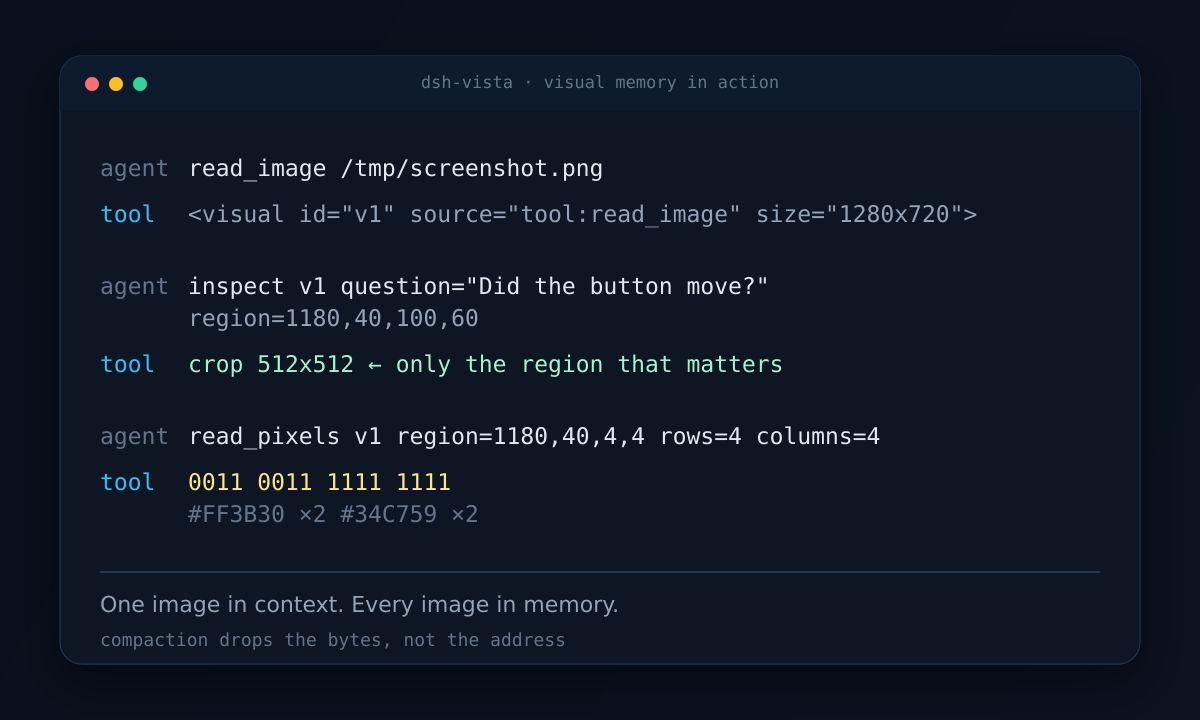
DSH agents work with screenshots, charts, and rendered pages, but the image that matters is often gone after the next tool call or compaction. dsh-vista keeps every image it has seen in an addressable archive and gives the agent three tools to go back to it:
inspect— revisit any past image and crop any region, enlarged without smoothing;read_pixels— sample exact colors from a region as a compact symbol matrix;visuals— list the images the agent has already seen.
Every image that reaches the model is automatically tagged with a stable id:
<visual id="v12" source="tool:read_image" size="1280x720"></visual>
The model can reference v12 later even if the original image has fallen out of
the context window.
Why
- Compaction drops bytes, not meaning. dsh-vista keeps the original bytes addressable after the context has moved on.
- Re-screenshotting is expensive and lossy. The screen has changed; the image you need is the one from three steps ago.
- "Look at the whole image again" is not inspection. A good visual agent asks a specific question about a specific region.
- Text-only fallback.
read_pixelsworks even when the model route accepts text only.
Install
dsh plugin --profile web add dsh-vista
Or pin a version:
dsh plugin --profile web add dsh-vista@0.1.3
Then verify:
dsh --profile web --dump-config | grep dsh-vista
dsh --profile web
From a GitHub checkout:
dsh plugin --profile web add github:ZhangShurong/dsh-vista#v0.1.3
Tools
| Tool | What it does | Output |
|---|---|---|
inspect | Select an archived visual and an optional region; crops from the original and enlarges with nearest-neighbour. | Image blocks |
read_pixels | Divide a region into equal rows and columns; sample each centre pixel. | Palette + symbol rows |
visuals | List recent visuals with id, source, size, and timestamp. | JSON |
Example inspect:
{
  "question": "Did the button move after the click?",
  "views": [
    {
      "label": "button before",
      "visual": "v11",
      "region": { "x": 1180, "y": 40, "width": 100, "height": 60 }
    }
  ]
}
Example read_pixels result:
{
  "palette": { "0": "#FF0000", "1": "#0000FF" },
  "views": [
    { "label": "quadrant", "visual": "v1", "rows": 2, "columns": 2, "samples": ["01", "11"] }
  ]
}
read_pixels only measures. It does not align, transform, or interpret pixels.
How it works
tool result / attachment
        │
        ▼
tools/post-execute ──► archive bytes, assign vN, prepend <visual id="vN">
        │
        ▼
     model sees: <visual id="v12" ...></visual>  [image]
        │
        ├── inspect(v12, region)      ──► cropped + enlarged image
        ├── read_pixels(v12, region)  ──► palette + symbol rows
        └── visuals()                 ──► index of previous images
The archive is content-addressed and append-only (index.jsonl plus files under
archiveDir). DSH's attachment service still owns the image that reaches the
model; dsh-vista keeps a second copy so visual ids survive compaction and image
offload.
Configuration
Defaults live in src/config.ts. Override them in the bundle row or the
profile patch:
- id: dsh-vista
  config:
    archiveDir: /home/me/.dsh/dsh-vista/archive
    displaySize: 1024
    maxInspectViews: 8
    maxPixelViews: 16
    maxPixelSamples: 4096
    annotate: true
    retentionDays: 7
| Field | Default | Meaning |
|---|---|---|
archiveDir | $DSH_HOME/dsh-vista/archive | Byte store and index.jsonl. |
displaySize | 1024 | Longest edge of an inspected crop. |
maxInspectViews | 8 | Views per inspect call. |
maxPixelViews | 16 | Views per read_pixels call. |
maxPixelSamples | 4096 | Total samples per read_pixels call. |
annotate | true | Insert <visual id="..."> before every archived image. |
retentionDays | 7 | Delete older archived visuals; 0 keeps forever. |
Verified against DSH 0.2.1-rc.2
Tested end to end with deepseek-flash:
read_imagereturned an image; dsh-vista archived it and appended<visual id="v1" source="tool:read_image" size="16x16">.visualslistedv1.inspectcropped and enlarged the archived image and returned a model-visible 1024×1024 PNG.read_pixelsreturned the expected01 / 11color samples.- The model correctly described the red/blue quadrants.
The attachment bridge in src/content.ts uses:
ctx.attachments.saveImage({ data, mediaType, name })
ctx.attachments.imageHostPath(ref)
Both are confirmed in the installed @deepseek-ai/dsh-attachment.
What this deliberately does not do
- No environment adapters (ARC-AGI-3, GameWorld, browser automation).
- No
play/actaction tools. - No one-action-per-turn policy, budgets, or evaluation harness.
- No Python sidecar.
Those belong in follow-up plugins. This one answers a narrower question: does addressable visual memory plus active inspection improve a DSH agent's visual work?
Development
pnpm install
pnpm typecheck
pnpm build
npm pack --dry-run
The package is an ESM bundle. lib/ is generated; assets/ contains the logo
and README images.
Releasing
Publishing runs in GitHub Actions, not from a laptop.
Tag-driven (recommended):
npm version patch          # or minor / major
git push --follow-tags
Manual button:
Actions → Publish → Run workflow → choose patch, minor, or major.
The workflow bumps the version, commits, tags, and publishes.
The workflow uses npm Trusted Publishing (OIDC) and publishes with provenance. One-time setup:
- Open https://www.npmjs.com/package/dsh-vista/access
- Add a Trusted Publisher → GitHub Actions:
- Owner:
ZhangShurong - Repository:
dsh-vista - Workflow filename:
publish.yml
- Owner:
- No
NPM_TOKENsecret is needed.
If you prefer a token instead, add an NPM_TOKEN repository secret and set
NODE_AUTH_TOKEN: ${{ secrets.NPM_TOKEN }} on the publish step.
CI (.github/workflows/ci.yml) runs typecheck, build, and npm pack --dry-run
on every push and pull request.
License
MIT
Comments
Loading…
Similar plugins
by xiciyang
Lossless visual memory for DSH agents: store an image once, address it by sha256, read exact pixels, compare past frames, recall by text/tag/turn — no second vision model in the loop.
★ 3
MIT
JavaScript
Oct 19, 2026
dsh plugin --profile web add @xiciyang/dsh-visual-memoryby zoahdev
Give DeepSeek Harness eyes: analyze images with an OpenAI-compatible vision model via a vision_analyze tool.
★ 0
↓ 285/wk
MIT
TypeScript
Aug 17, 2026
dsh plugin --profile web add dsh-visionby kanchengw
Plug-in vision for text-only models on DSH, with native interaction for image understanding and generation, GUI automation, through layered evidence memory and cache.
★ 1
↓ 386/wk
MIT
TypeScript
Aug 29, 2026
dsh plugin --profile web add dsh-mindseyeby jonah791
Agent-driven long-term memory for DeepSeek Harness: scoped memory (global + per-workspace), layered entries (fact/knowle
★ 3
↓ 81/wk
MIT
TypeScript
Sep 7, 2026
dsh plugin --profile web add dsh-agent-memoryby Scorp1o117
Vision model for DeepSeek Harness | DeepSeek Harness 外置视觉模型插件
★ 8
↓ 934/wk
NOASSERTION
JavaScript
Oct 24, 2026
dsh plugin --profile web add dsh-tool-visionby guyuefangyuanl
Cross-session persistent memory for the DeepSeek Harness: a model-facing memory tool, an always-on index section, and a bundled maintenance skill.
★ 3
↓ 312/wk
MIT
JavaScript
Aug 21, 2026
dsh plugin --profile web add dsh-memory