

oh-story-dsh
Manifest valid★ 635A DSH plugin for novel writing and short-drama production, powered by Oh Story and Drama Skills.

Oh Story DSH
小说、短剧、互动游戏与视频解说创作工作台,装进 DeepSeek Harness。





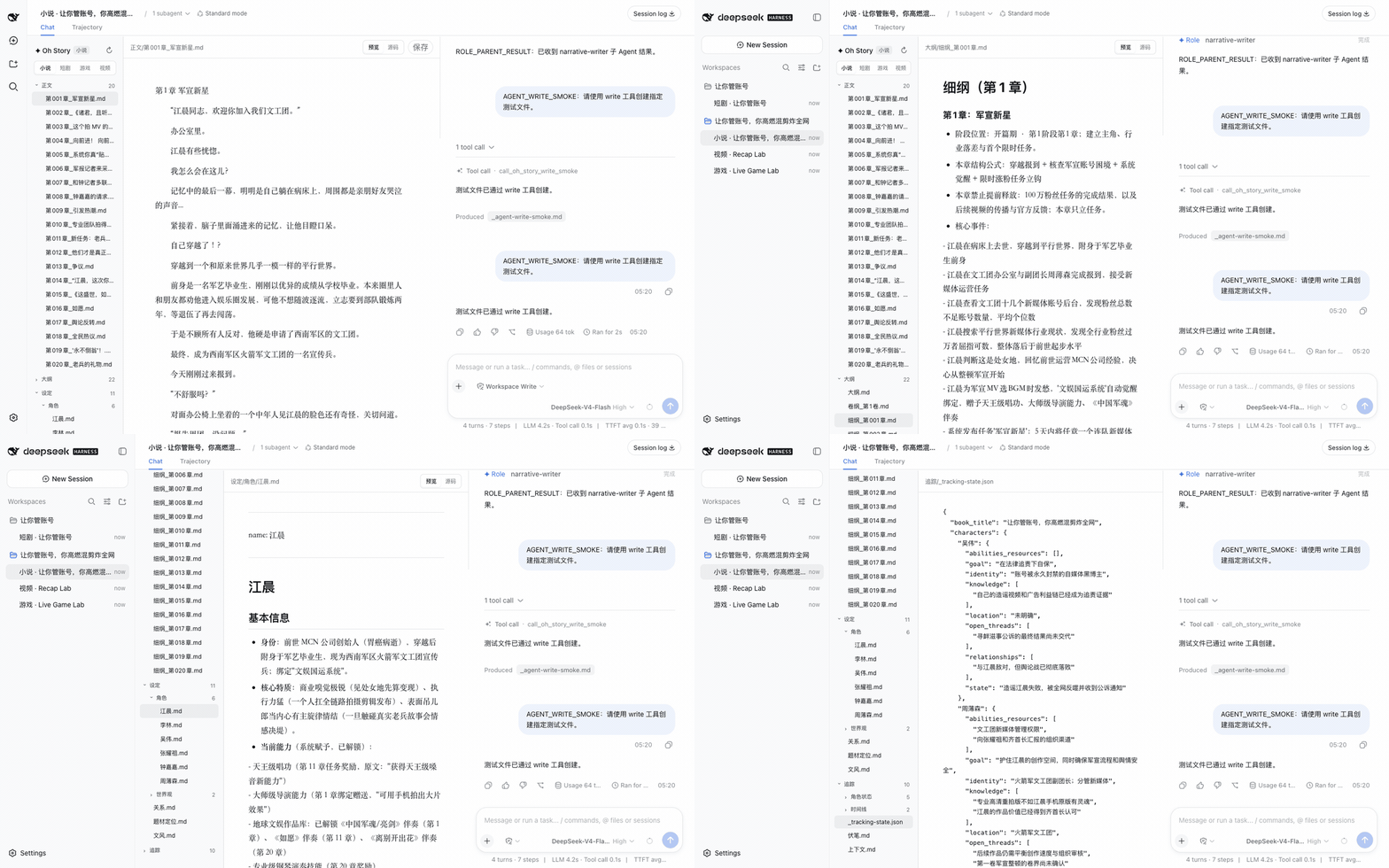
oh-story-dsh is a community plugin for DeepSeek Harness (DSH) and is not affiliated with DeepSeek. It packages four creative pipelines—novels, short dramas, interactive games, and video narration—into DSH: DSH handles Agents, sessions, models, permissions, and Chat, while the plugin provides creative Skills, specialized Roles, project protocols, and the corresponding workbenches.
- Novels: a three-pane layout with a file tree, editor, and Chat, shipping 13 Oh Story Skills and 7 specialized Roles alongside the plugin.
- Short dramas: each episode maintains a script, visual settings, storyboards, image and video prompts; the "Production" view projects these into a shot board and an asset board, and the finished film is assembled by
/short-drama-edit. - Games:
/novel-to-game quickgenerates a playable build, with real-time playtesting on the left and Chat on the right. - Video narration: produces a narrated finished piece or dubbed translation for local videos, with the original, edited, and final versions previewable in place.
Installation
Node.js 24+ is required. The install command temporarily provides pnpm, so machines with only Node.js installed can still run it:
npx -y --package pnpm@11.7.0 --package @deepseek-ai/dsh@0.1.5-rc.1 dsh plugin --profile web add @oh-story/dsh@0.1.9 &&
npx -y @deepseek-ai/dsh@0.1.5-rc.1 web
Keep the terminal running; the browser opens automatically by default. If it doesn't open on its own, copy the full http://127.0.0.1:3080/?token=... link printed by the terminal and visit it manually; the first-time authentication requires the token in the link. Closing the terminal stops the service.
Before starting AI creation, add a Provider and enter an API Key under "Settings → Models" in DSH, or set the environment variable DEEPSEEK_API_KEY before launch. If you only want to browse existing works, you can choose "Configure later" during the first-time onboarding.
从 GitHub Release 安装预构建包
The prebuilt packages in the GitHub Release have gone through the same test suite:
npx -y --package pnpm@11.7.0 --package @deepseek-ai/dsh@0.1.5-rc.1 dsh plugin --profile web add https://github.com/zenstory-ai/oh-story-dsh/releases/download/v0.1.9/oh-story-dsh-0.1.9.tgz &&
npx -y @deepseek-ai/dsh@0.1.5-rc.1 web
DSH's plugin add internally requires pnpm; the --package pnpm@11.7.0 flag in the command is provided for that purpose.
视频工作台的宿主机依赖
The video workbench pipeline also requires Python 3.10+ and ffmpeg/ffprobe with the subtitles filter backed by libass on the host machine (macOS: brew install ffmpeg; Debian/Ubuntu: sudo apt install ffmpeg). Video narration additionally uses MIMO_API_KEY (Fish Audio TTS requires FISH_API_KEY separately).
配置媒体生成 API(短剧生产需要)
DeepSeek writes the scripts, storyboards, and prompts; image, video, and music generation are handed off to the short-drama-produce Skill via the short drama's "Production" flow, which then calls the vendor APIs listed below. Write the keys into the host machine's environment variables before launching DSH:
| Capability | Vendor | Required environment variables | Optional |
|---|---|---|---|
| Images | GPT Image 2 | OPENAI_API_KEY | OPENAI_BASE_URL |
| Video | Seedance (Volcano Ark) | ARK_API_KEY, SEEDANCE_MODEL | SEEDANCE_BASE_URL, SEEDANCE_ALLOWED_RATIOS, SEEDANCE_MIN_DURATION/SEEDANCE_MAX_DURATION |
| Video | MiniMax H3 | MINIMAX_API_KEY, MINIMAX_VIDEO_MODEL, MINIMAX_VIDEO_RESOLUTIONS | MINIMAX_VIDEO_BASE_URL, MINIMAX_VIDEO_RATIOS, MINIMAX_VIDEO_MIN_DURATION/MINIMAX_VIDEO_MAX_DURATION |
| Music | MiniMax Music | MINIMAX_API_KEY | MINIMAX_BASE_URL |
export OPENAI_API_KEY=...            # 图片
export ARK_API_KEY=... SEEDANCE_MODEL=...   # 视频,模型/Endpoint ID 以账号开通的为准
npx -y @deepseek-ai/dsh@0.1.5-rc.1 web
You only need to configure the ones you actually use: without a video API key, you can still write storyboards and generate keyframe images. The top of the short drama workbench's "Production" view shows whether each vendor is configured and which variable is missing; the plugin only checks for variable existence. At startup, the plugin registers these four built-in adapters into a config file that contains no credentials (by default, in a directory oh-story-dsh-<uid>/ under the system temp folder, readable/writable by the current user only; the "Generation environment" entry shows the full path). When the Agent runs production_tool.py run, it references that file directly; if you write your own adapter or change timeouts, point OH_STORY_DRAMA_ADAPTER_CONFIG at the file path. For each vendor's parameters, resolution, and duration constraints, see short-drama-produce/references/providers/ shipped with the plugin. Novel covers use the image generation tool visible in the current Preset.
Start Creating
On first entry, you'll see the DSH home page first. Click + (Add workspace) next to Workspaces on the left, choose a folder to store your works, then select that directory under Choose workspace below, and DSH will open a blank session; you can also open an existing session from the left side. When the directory already contains a creative project, four workbench tabs appear: "Novel / Short Drama / Game / Video".
An empty directory keeps DSH's native Chat. After configuring a model, type /story, /short-drama, /novel-to-game quick, or /video-recap to start creating; the workbench appears automatically once the Agent writes the first creative file. Browsing existing works does not require an API key. After the workbench is collapsed, you can reopen it via the "Creative Workbench" button in the session area.
Copy these prompts, replace the bracketed content, and send.
Video narration: describe your goal directly in Chat:
给 /path/to/video.mp4 做一个 3 分钟中文解说成片,保留关键原声,字幕烧进画面。
把 /path/to/english.mp4 翻译成中文配音,保留原说话人的声音。
Existing draft; round one only plans the continuation, clarify the direction before writing to project files:
Plan the next scene of this self-owned or licensed novel. Read only the [chapter file] and [setting file] I named in this workspace; [ending fragment] is unfinished, don't count it as a full chapter. First list known facts relevant to the next scene, what the POV character knows, and gaps or conflicts. Then offer two continuation paths, each stating the character's goal, the obstacle, and the visible change their action causes; don't reveal [secret] early, stop at [scene boundary]. Reply in Chat only—don't create, move, or rewrite files, generate prose, or call media services; list unknowns as questions, don't invent facts.
After picking a direction, ask it to import or plan per the bundled flow, stating what to write where; back up the original.
If You Don't See the UI
- Install reports
pnpm not found on PATH: re-run the full install command with--package pnpm@11.7.0from above, and confirm installation succeeded before starting. - Browser didn't open or asks for authentication: open the full link with
?token=...printed in the terminal; if the port is occupied, useweb --port 3081and visit the newly printed link. - The four creative tabs are missing: first add a works directory and open a session. An empty directory needs you to run a creative command in Chat first—the workbench appears after creative files are generated; a collapsed workbench can be restored via the "Creative Workbench" button in the session area. If existing works still don't show, check whether installation and launch use the same profile, then restart DSH and refresh the page.
- Standalone
storyprofile has no web service: follow the "On-demand loading" section below to add@deepseek-ai/dsh-web-app; new profiles need the Web UI added separately.
Novel Workbench
A three-pane layout of file tree, editor, and Chat (see the demo at the top). Covers long-form, short stories, topic selection, chart scanning, text breakdown, import, review, de-AI-ification, and cover workflows; 13 Oh Story Skills and 7 specialized Roles ship at a pinned upstream version alongside the plugin.
Short Drama Workbench
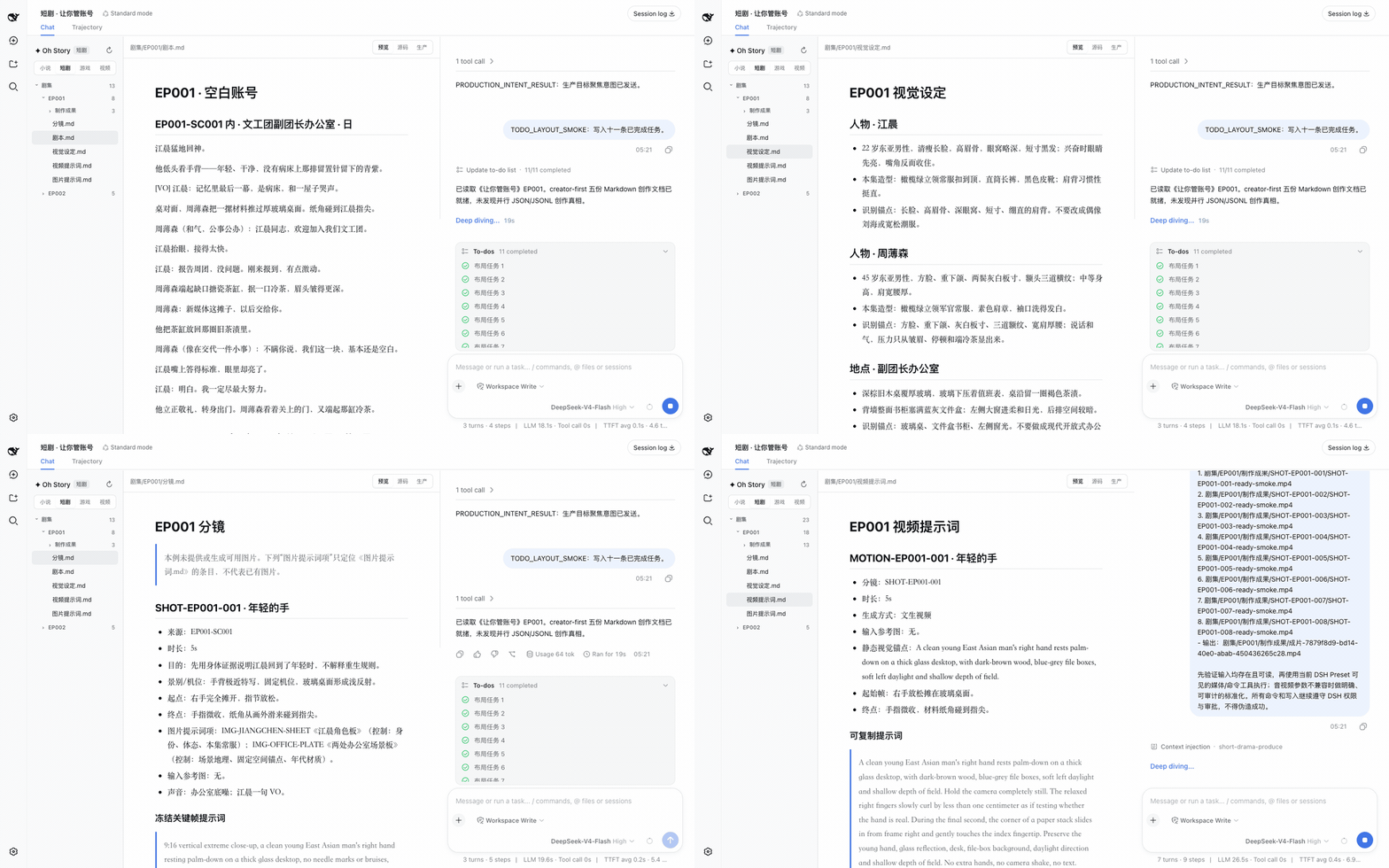
For each episode, up to five readable Markdown files are maintained on request: 剧本.md, 视觉设定.md, 分镜.md, 图片提示词.md, 视频提示词.md. The Production view projects these documents into a shot board, asset board, tasks/versions, final-cut ordering, and a relationship canvas, and flags duplicate IDs, dangling references, and format errors in place. Final-cut assembly is delegated to /short-drama-edit: it writes the scheduled shot order into 《剪辑单.md》, then renders into 剧集/<EP>/制作成果/成片/. Production delivery runs through DSH native sessions, the current Preset's tools, and permission confirmations.
Game Workbench
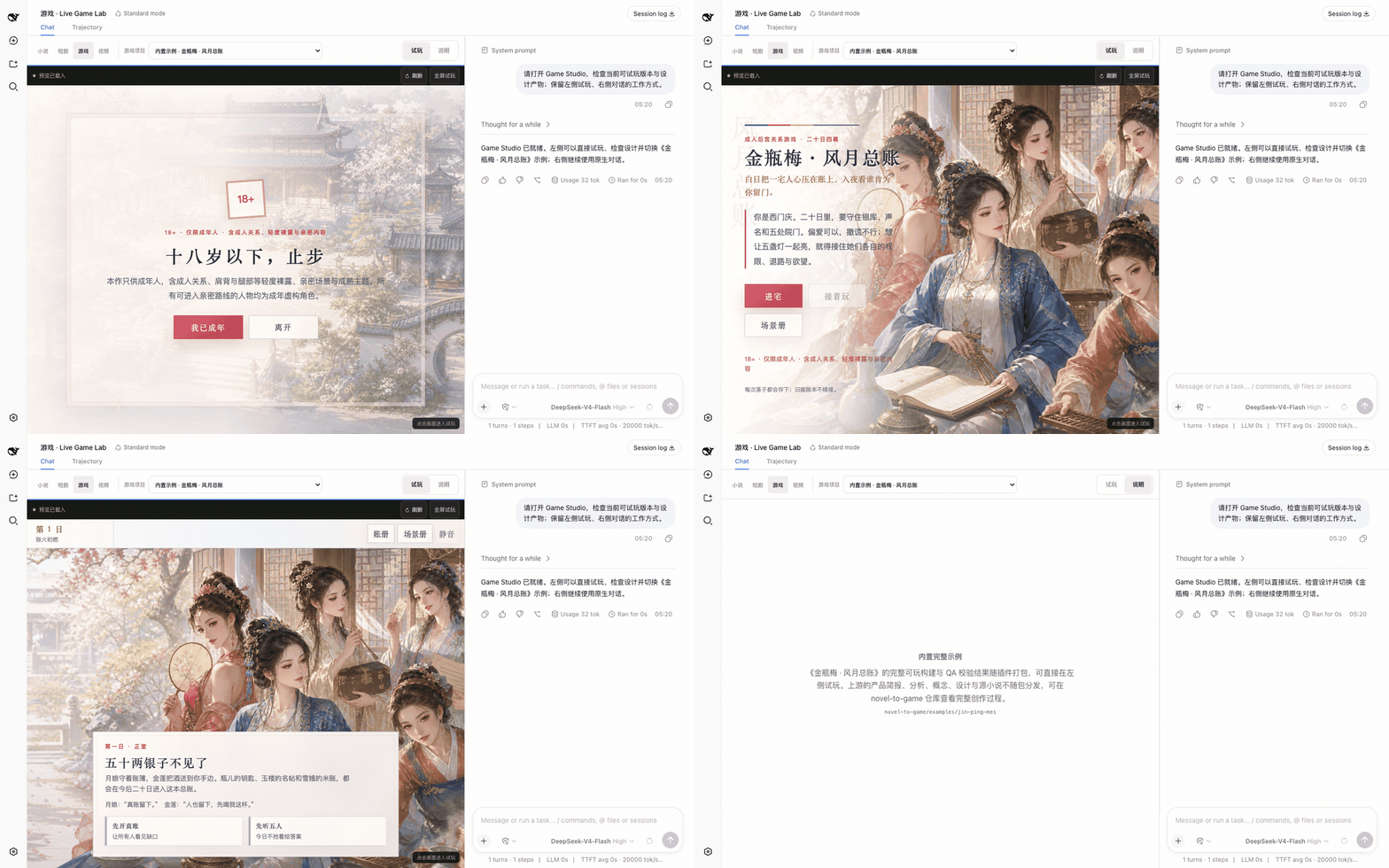
A two-column layout: live playtesting on the left, DSH Chat on the right. Artifacts from /novel-to-game quick are written to game-adaptations/<project>/; once build/app/index.html is ready, the project automatically appears in the project list, where you can refresh, go full screen, and switch projects. A fully playable build of 《金瓶梅 · 风月总账》 is built in — verify inputs, core loop, endings, and restart right out of the box.
Video Workbench
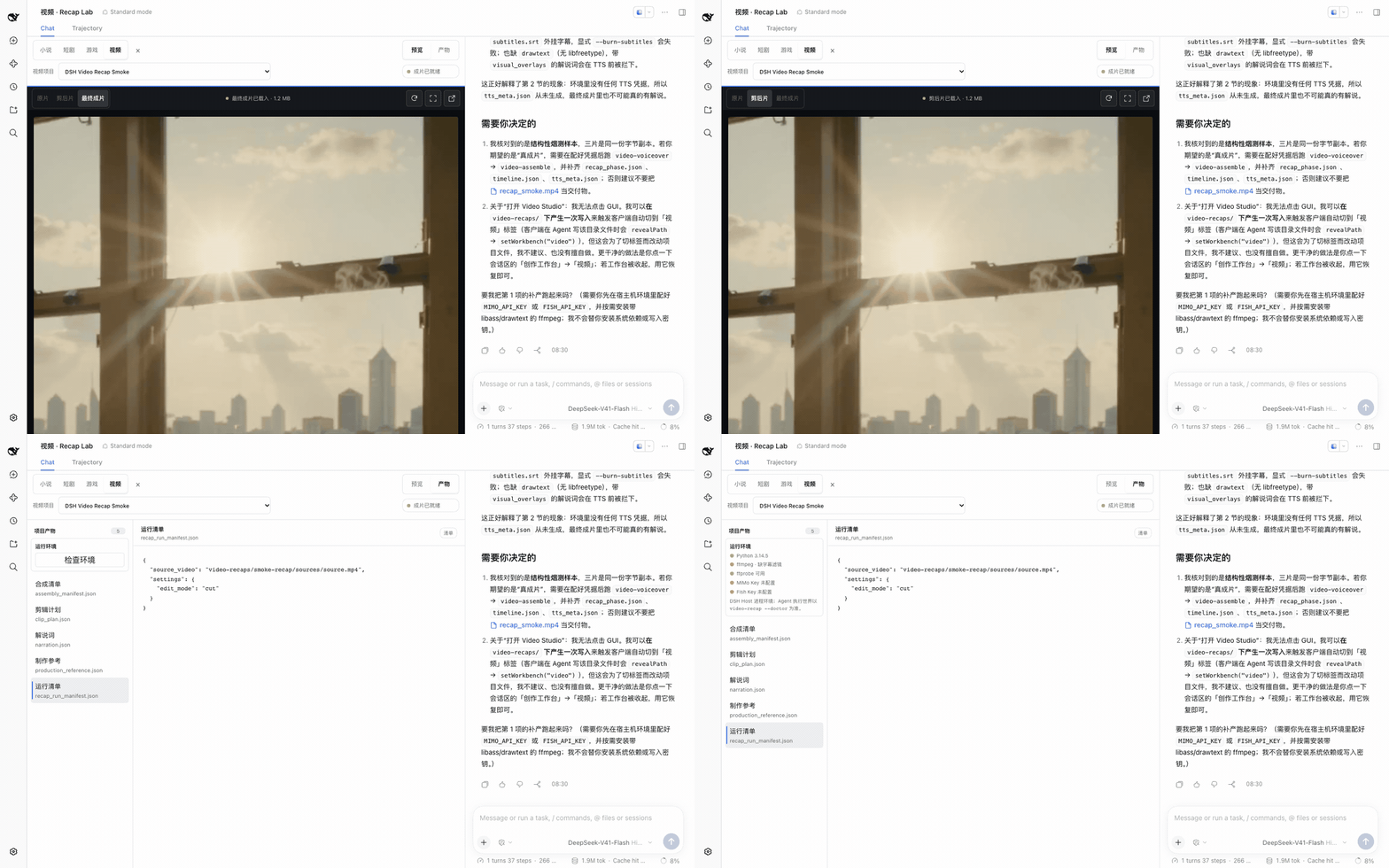
Same layout: preview on the left, Chat on the right. Projects live in video-recaps/<project>/: the source footage in sources/, upstream work products in work/, and deliverables in outputs/. The workbench offers switching between source / trimmed / final cut, stage hints, a run checklist, and QA artifact viewing; videos are previewed via HTTP Range streaming.
Core Experience
- Live file follow: When the Agent calls official file tools, the target file is automatically located and the editor renders in-progress content in sync.
- Chat file navigation: Clicking a work file name in the official Chat makes the file tree jump to it and open the file in the editor.
- Creative document preview: Markdown supports headings, tables, task lists, quotes, and code blocks; JSONL is shown as structured records with line numbers, types, and status.
- Project media library: Automatically aggregates the real image/video outputs from each episode and delivery directory in the current workspace, with search, type filtering, and cross-episode referencing.
- Real generation contract: Optional built-in GPT Image 2, Seedance, and MiniMax Music adapters; accounts, models, credentials, and availability are determined by the DSH runtime environment and out-of-project configuration.
- Safe editing: Source editing and quick-save are supported; uncommitted human edits will not be overwritten by concurrent Agent modifications.
- Stable long conversations: The message area scrolls independently, and the official Composer stays pinned at the bottom of the Chat panel.
- No interference with other scenarios: The workbench takes over the session layout only when the current workspace has a novel, short drama, game, or video project; it can be collapsed at any time, and when collapsed the session reverts to the native DSH form. The choice is remembered per workspace.
For the capability boundaries and protocol constraints of each workbench, see the architecture notes.
Capability Catalog
| Workbench | Upstream capability | Main entry points |
|---|---|---|
| Novel | Oh Story 0.7.10 · 13 Skills · 7 Roles | /story, /story-long-write, /story-review |
| Short drama | Drama Skills 0.7.0 · 11 Skills | /short-drama, /short-drama-write, /short-drama-storyboard, /short-drama-edit |
| Game | NovelToGame 0.3.1 · 7 Skills · playable 《Jin Ping Mei》 sample | /novel-to-game quick, /game-build, /game-qa |
| Video | video-recap-skills 0.5.0 · 6 Skills | /video-recap, /video-script |
On-demand loading
Whichever profile a plugin is installed into, every Session in that profile will load the creative Skills; the workbench only shows up when there's a creative project. If you want to keep the stock web profile clean and only open the workbench when you create, install the plugin into a dedicated profile instead.
1. Install into a dedicated profile
npx -y --package pnpm@11.7.0 --package @deepseek-ai/dsh@0.1.5-rc.1 dsh plugin --profile story add @oh-story/dsh@0.1.9
2. Add the UI
A new profile has no UI by default. Edit ~/.dsh/profiles/story/package.json and set dsh.profile.bundles to:
"bundles": [
  "@deepseek-ai/dsh-base",
  "@deepseek-ai/dsh-web-app",
  "@oh-story/dsh"
]
@deepseek-ai/dsh-web-app is DSH's built-in web UI bundle and must be loaded before the creative plugin.
3. Start on demand
npx -y @deepseek-ai/dsh@0.1.5-rc.1 web                          # 原版 DSH
npx -y @deepseek-ai/dsh@0.1.5-rc.1 --profile story --port 3081  # 创作工作台
The two profiles can run simultaneously on different ports. Models, credentials, workspaces, and session history are stored centrally by DSH, so switching profiles won't lose anything. Use the same dsh version for installation and startup — mixing versions will produce errors like unknown option '--no-open'.
FAQ
Do I have to install the plugin to write novels with DeepSeek? For just discussing a synopsis or tweaking a passage of bundled text, a regular model chat is enough — bring the result back to your manuscript yourself. Install DSH plus this plugin when you want to keep creating around a local work directory and browse files in the workbench. If you'd like an account-based web project, the optional ZenStory hosted workbench is available; see the writing environment comparison for the details.
Need an API Key to browse existing works? No. Pick "later" at first launch and open the work directory to browse files; configure a model when you start AI creation.
Storyboard or game design is done — where do the final cut and playable build come from? The short-drama final cut is rendered by /short-drama-edit per 《剪辑单.md》 (needs media generation API set up first); the game build is produced by /game-build and lands in the Game Workbench project list when ready.
Further reading
- DeepSeek novel writing guide: choose the work directory, configure the host model, then specify the genre, perspective, and where this session stops.
- Importing and continuing: separate completed chapters, unfinished fragments, settings that must be preserved, and the scope of the next segment.
- Short-drama character consistency: separate identity, styling, and per-shot state.
- Game choices with consequences: make action costs, visible changes, and follow-through explicit.
- Splitting original audio and narration: first list the key lines, visual evidence, and gaps that need narration.
- Writing environment comparison: what plain chat, the DSH plugin, and the hosted workbench are each suited for.
Thanks
- DeepSeek Harness: provides the native plugin runtime, Agent, sessions, permission approvals, and web workbench foundations.
- LINUX DO: thanks to the community for its discussion, feedback, and open-source support.
Changelog · Contributing Guide · Architecture Overview · Security Policy
Compatibility
Versions
| Latest version | Published | Size |
|---|---|---|
| 0.1.6 | — | — |
| 0.1.0 | — | — |
| 0.1.5 | — | — |
| 0.1.4 | — | — |
| 0.1.7 | — | — |
| 0.1.3 | — | — |
| 0.1.9 | — | — |
| 0.1.8 | — | — |
| 0.1.2 | — | — |
| 0.1.1 | — | — |
| 0.1.14 | — | — |
| 0.1.10 | — | — |
| 0.1.11 | — | — |
| 0.1.13 | — | — |
| 0.1.12 | — | — |
| 0.1.15 | — | — |
| 0.1.16 | — | — |
| 0.1.19 | — | — |
| 0.1.17 | — | — |
| 0.1.18 | — | — |
Comments
Loading…
Similar plugins
by LiPu-jpg
dsh-Openwrite:OpenWrite 的 DeepSeek Harness 小说创作插件,含统一创作 Agent、90 个小说工具、原生工作台与标准审稿 DAG
★ 895
Apache-2.0
TypeScript
Oct 28, 2026
dsh plugin --profile agent add dsh-openwriteby wbb316
DSH 插件:小说创作台 —— 给 agent 5 个 novel_* 工具 + 一个能改设定、画关系图、一键续写并流式直播的右侧栏面板
★ 5
MIT
JavaScript
Oct 6, 2026
dsh plugin --profile web add dsh-novelby HengryLiang
DeepSeek Harness 插件:AI 短剧工作区(立项/总纲/人物/剧本/分镜/导出)+「短剧模式」Agent 预设(34 个 drama_* 工具、9 个随包技能)· AI short-drama workspace plugin for DSH
★ 4
MIT
JavaScript
Oct 20, 2026
dsh plugin --profile web add dsh-plugin-ai-dramaby peterwangze
DSH (DeepSeek Harness) 自动化小说写作发布流水线插件:claude-writing-workflow 迁移版 agent 预设 + 小说工作台(可视化/实时渲染/章节编辑)+ 多平台发布配置与数据驱动优化闭环
★ 8
NOASSERTION
JavaScript
Oct 22, 2026
dsh plugin --profile web add dsh-novel-writingby ygunoil
DeepSeek Harness plugin for VA Studio: generate short dramas, images, videos, novels and screenplays, and reverse-engineer prompts.
★ 0
MIT
JavaScript
Oct 20, 2026
dsh plugin --profile web add dsh-va-studioby tea-whale
DeepSeek Harness (DSH) 写作工具插件:长文工作流、风格控制与 8 套常用写作模板,进度落盘、跨轮次续写。零运行时依赖。
★ 1
MIT
JavaScript
Sep 9, 2026
dsh plugin --profile web add dsh-writing-studio