
dsh-ask-reader
Manifest validPins an assistant reply into a right-sidebar tab rendered as Markdown with syntax-coloured code, marks each pinned turn with a longer, thicker, brighter tick on the turn navigator, and quotes a select
dsh-ask-reader
A right-Sidebar reading board for DeepSeek Harness. Pin one of the assistant's replies into the right column, read it as rendered Markdown beside the conversation, then select the part you do not understand and send it back into the main composer as a quote.
Screenshots
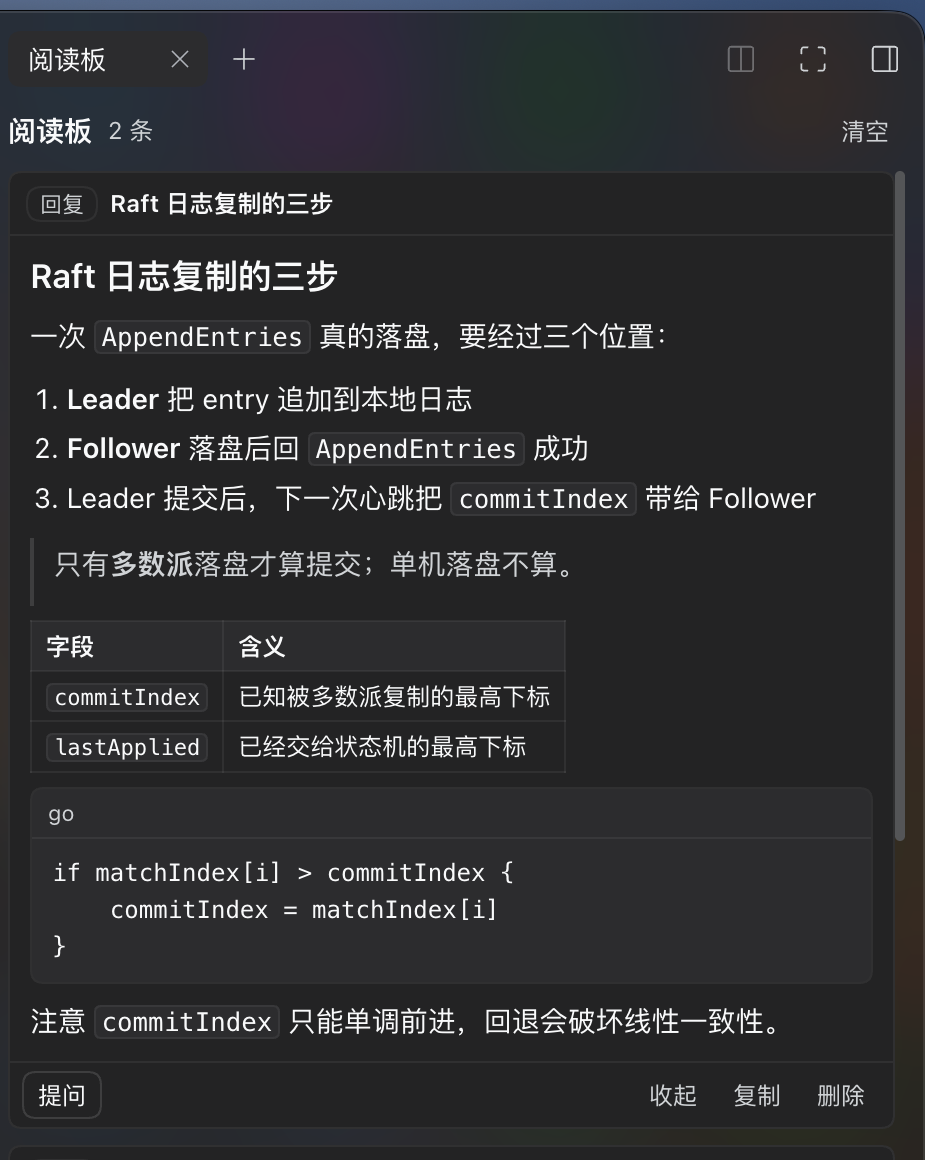
A reply pinned on the right, rendered as Markdown beside the conversation — heading, numbered steps, a blockquote, a table and a labelled code block, with the card's own controls under it:
The entry points — the two icon actions in the row under a finished reply (each label appears on hover only, laid out like the row's other icon buttons):

Why
Long answers are easier to work through beside the chat than in it: the board keeps one reply visible while you scroll the conversation, and asking about a specific sentence is one gesture instead of retyping it.
Use
- Pin. A finished assistant reply carries two icon actions, and they are the entry points:
- ☆ star — “Pin to the reading board”. Pins the reply and leaves the right column alone; nothing opens. Once the reply is pinned the ☆ is filled; clicking the ★ again unpins, so the star goes back to ☆, that turn's rail marker goes back to a normal tick, and the column still does not open.
- → arrow — “Pin to reading board”. Pins the reply and opens the right column on the Reading board tab. On a reply that is already pinned it only opens the column, and says the reply is already on the board.
- Or open the board from the arrow icon in the session header, and paste arbitrary text with + Paste text at the bottom of the panel.
- Read. Pins render as Markdown — headings, lists, blockquotes, tables, syntax-coloured fenced code, bold/italic/inline code/links — not as source. Cards are expanded in full; Collapse folds one back to a preview.
Each card's head shows when its message was written — the clock alone for today,
MM-DD HH:mmfor another day, and the year too once it is not this year — and a Jump button scrolls the conversation back to the message the pin came from. - Ask. Drag-select a passage; a blue pill → Send to chat appears once the selection is released. Clicking it puts that passage into the main composer as a Markdown quote — add your question and send. Without a selection, Ask on the card quotes the whole pin.
Behaviour
- Pins live in browser
localStorage, one set per session; a reload keeps them, clearing site data removes them. The marker appearance in Settings → Reading board is the one exception: those preferences are stored once for the whole device, so a change there applies to every session. That change also reaches the app's other windows and sessions on this device at once, without a reload. - The two reply icons are the entry points: the star pins in place and toggles the pin off again, the arrow pins and opens the column.
- A pinned turn's tick on the right edge of the conversation — the turn navigator — gets longer, thicker and brightly coloured: 26 px wide by default and 4 px tall, against the 20 px the longest normal tick reaches. Each pinned turn takes its own bright colour. This colouring needs the turn to be loaded in the transcript: markers exist only for turns that are currently loaded, and several pinned replies inside one turn share that turn's single mark.
- Settings → Reading board is where that appearance is set, and it does nothing else: Use one color (with a colour picker while it is on), Use one length (with a 22–28 px slider while it is on), and a preview of the effect. Even the shortest pin marker is longer than a normal tick.
- Pins written before turn numbers were recorded carry none. For those the plugin reads the session history — passively, a page at a time, and only until it has what it needs — to learn which turn the pin belongs to, so its marker can be coloured. When that lookup cannot find it, the marker is simply absent.
- The label under an icon action is a bubble, and it is visible only while the pointer is on that icon; the feedback line a click produces goes as soon as the pointer leaves.
- Pins hold at most 40 entries per session; the oldest is dropped past that.
- Every write merges against what is already stored rather than the in-page cache, so a reload between two writes cannot drop a pin.
- Quotes are capped: 2000 characters from a reply (that reply is already in the session log), 6000 from a pasted excerpt. The overflow is marked
… (truncated). - Jump finds the message through the conversation's own anchor keys. When the row is not paged in yet, it walks backwards through the chat's own load older control until the row appears, then centres on it; it reports only after reaching the start of the conversation without finding it.
- Pins made before 0.1.3 carry the time they were pinned; from 0.1.3 on, a reply's pin carries the time the reply was written.
- Only the session on screen has a composer. Where it is unavailable, the panel copies the passage to the clipboard and says so instead.
- The Markdown renderer is the plugin's own and deliberately small: no math, no Mermaid, no raw HTML, no images. Those show as text.
- Fenced code is coloured with the theme's own shiki palette (
--shiki-token-*), so a block reads here exactly as it does in the conversation and follows light/dark with the rest of the app. Recognised languages:js/ts/tsx,python,go,rust,sh/bash,sql,json,yaml. Anything else stays in plain monospace rather than guessing.
Install
From the repository, or from the prebuilt tarball attached to the latest release:
dsh plugin --profile <profile> add github:zbh13782-lang/dsh-ask-reader
# or
dsh plugin --profile <profile> add https://github.com/zbh13782-lang/dsh-ask-reader/releases/latest/download/dsh-ask-reader.tgz
Or, in DSH Desktop, Settings → Plugins → Add plugin and paste either address. The package declares dsh.bundle, ships no dependencies, no build step and no install scripts — a tarball install therefore skips the build-approval prompt.
Layout
| Path | Role |
|---|---|
client.js | The whole browser half: tab type, panel body, Markdown renderer, the two reply actions, the settings section, the header entry |
index.js | Host half (empty — the bundle row needs a module) |
cordis.patch.yml | Loader row inserted by the bundle |
locale/*.json | Plugin Manager title/description |
docs/DETAIL.md | The detail page shown in Plugin Manager |
Licence
MIT.
Comments
Loading…
Similar plugins
by ylw-ux
Pins passages selected in a conversation into a per-conversation right-sidebar panel, marks them in the transcript, jumps back to the source passage on click, and quotes a pinned passage into the comp
★ 4
↓ 816/wk
MIT
JavaScript
Oct 28, 2026
dsh plugin --profile web add dsh-pinsHighlight or quote any passage of an answer, attach a note to it, then send the excerpt back to the composer as a quoted instruction.
★ 0
MIT
TypeScript
dsh plugin --profile web add dsh-plugin-highlight-notesby latte03
Select text in the dsh web conversation to attach it as an annotation to your next message. The source text keeps a dashed highlight with an ordinal badge in place, and the composer summary lists, edi
★ 6
↓ 1.9k/wk
MIT
TypeScript
Nov 16, 2026
dsh plugin --profile web add dsh-select-quoteby zzx-dear
Select any text in a DSH chat reply to get a floating Follow-up/Copy pill: one click quotes the selection into the composer so you can type your own follow-up question, or copies it.
★ 0
MIT
JavaScript
Aug 18, 2026
dsh plugin --profile web add dsh-selection-followupby panando
DSH plugin: turn any selected reply snippet into an atomic reference chip — delete as one unit, click to jump back to the source, structured serialization on send.
★ 1
MIT
JavaScript
Oct 4, 2026
dsh plugin --profile web add @panando/dsh-quote-sidechatby YizhouLouisLu
Select text in the DSH Web UI conversation to quote it into the composer, or ask about it in a throwaway side panel that leaves no record.
★ 0
MIT
JavaScript
Oct 5, 2026
dsh plugin --profile web add dsh-select-ask-plugin