
dsh-plugin-highlight-notes
IdentifiedHighlight or quote any passage of an answer, attach a note to it, then send the excerpt back to the composer as a quoted instruction.
dsh-plugin-highlight-notes · 批注 ✍️
给 DeepSeek Harness 的回答加批注:选中文字 → 右键「批注」→ 写备注 → 一键放进输入框。
全部逻辑跑在浏览器半边,不碰会话日志、模型请求、文件系统。批注只存在你这台机器的浏览器里。
截图
功能
| 功能 | 说明 |
|---|---|
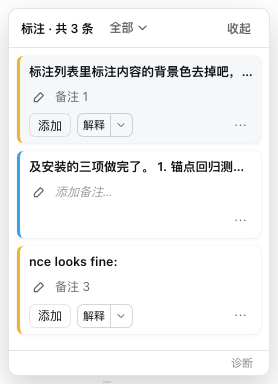
| 两种批注 | 仅高亮:右键一步完成,纯视觉记号,默认不进列表;可引用:弹框写备注,进列表并可交回输入框 |
| 列表筛选 | 仅可引用 / 仅高亮 / 全部,默认只看可引用,标签带数量 |
| 高亮 | 用 CSS Custom Highlight API 绘制,不插入任何 DOM 节点,不干扰 Markdown 渲染 |
| 按会话隔离 | 每条批注属于创建它的会话;切换会话自动换列表、清高亮、切回自动恢复 |
| 偏移自愈 | 锚点存「座位键 + 偏移 + 引文 + 前后文」,DOM 重建或前文改动后靠引文重新定位 |
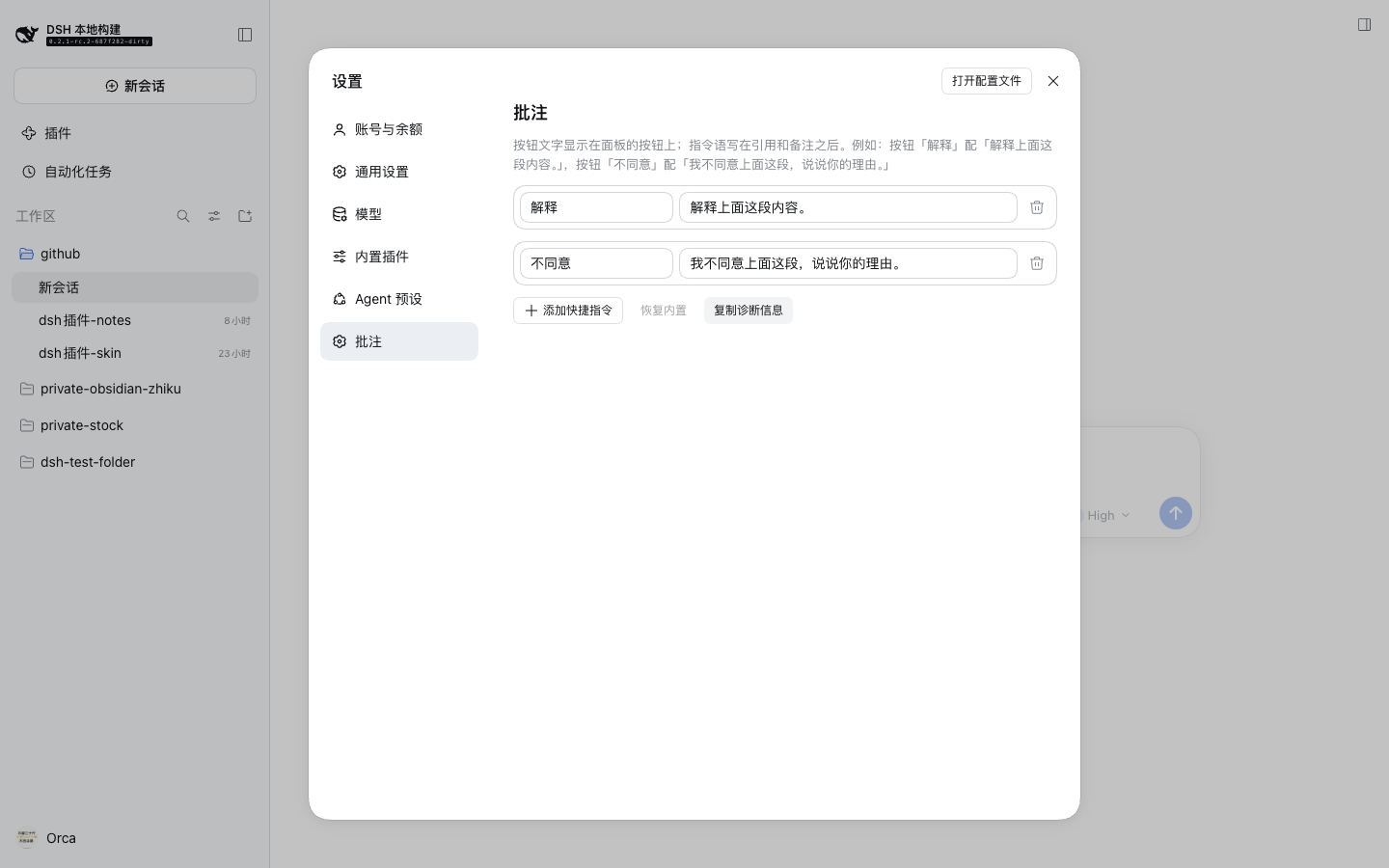
| 喂给模型 | 引用块 → 备注 → 指令,三段拼成一条消息写进输入框,由你自己按发送。内置「解释 / 不同意」,也可在设置里增删 |
| 可配置 | 「设置 → 标注」里编辑快捷指令的按钮文字与指令语;内置两条以真实行呈现,可改可删,「恢复内置」回到未配置态 |
| 入口 | 输入框上方状态栏的「批注 N」药丸,点开右侧浮层面板 |
| 中英文 | 跟随 DSH 语言设置 |
安装
dsh plugin --profile desktop add dsh-plugin-highlight-notes
装完重启 DSH——运行中的进程持有内存里的旧插件树。
桌面应用也可以在「插件」页的安装框里填 dsh-plugin-highlight-notes。
从源码
git clone <repo> && cd dsh-plugin-highlight-notes
pnpm install
pnpm build
dsh plugin --profile desktop add "file:$PWD"
用法
- 在回答里选中一段文字(同一段落内),右键 →「标注」。
- 写备注(可留空)→「保存标注」。文字被高亮(暖黄),状态栏药丸计数 +1。 只想划个记号时,右键直接选「高亮」(冷蓝,不进列表)。
- 点药丸打开面板:点条目可滚动定位;「解释这部分」把引用块和备注写进输入框。
- 切到别的会话,面板只显示那个会话自己的标注;切回来原样恢复。
数据
- 存在浏览器的
localStorage,键为dsh-plugin-highlight-notes/v1/<sessionId>。 - 不进入会话日志,换设备或清空站点数据会丢;这是刻意的取舍(见
DESIGN.md)。 - 卸载插件不会删除已有数据,重新安装即可看到。
已知限制
- 跨段落选择会被拒绝(会提示「请在同一个段落内选择」),跨会话的锚点也无意义。
- 折叠起来的内容(思考过程、折叠的工具输出)里的文字标不到;展开后已有的标注会重新定位成功。
- 高亮颜色统一;
::highlight()只支持静态名,按标签配色留到后续版本。 - 桌面端右键菜单由插件自绘(Electron 原生菜单在宿主进程,插件改不了)。
- 桌面端只在开发版 Web renderer 上验证过配色与几何;打包应用内的实机验证见交付说明。
开发
pnpm typecheck     # tsc
pnpm test          # 锚点定位的回归用例(纯函数,无浏览器)
pnpm build         # lib/index.js + lib/client.js
pnpm smoke         # 无浏览器加载 bundle,断言三个插槽的注册
pnpm verify        # 上面四步一次跑完
本地起真实应用(在 deepseek-harness 仓库里):
pnpm dsh web --patch ../dsh-plugin-highlight-notes/dev.patch.yml
改 client 刷新页面即可;改 host 或 overlay 需要重启。
demo/ 里是立项前的交互验证页(锚点算法与性能实测),不属于插件运行时。
设计决策
见 DESIGN.md:数据边界、模型可见性、面板形态、引用模板、会话隔离。
Comments
Loading…
Similar plugins
by latte03
Select text in the dsh web conversation to attach it as an annotation to your next message. The source text keeps a dashed highlight with an ordinal badge in place, and the composer summary lists, edi
★ 3
MIT
TypeScript
Oct 25, 2026
dsh plugin --profile web add dsh-select-quoteby zhao-guang-ai
该仓库暂未提供项目说明。
★ 3
↓ 1.9k/wk
MIT
JavaScript
Oct 24, 2026
dsh plugin --profile web add dsh-quote-annotate-proby YizhouLouisLu
Select text in the DSH Web UI conversation to quote it into the composer, or ask about it in a throwaway side panel that leaves no record.
★ 0
MIT
JavaScript
Oct 5, 2026
dsh plugin --profile web add dsh-select-ask-pluginby sunnystarye-ui
Codex-style text annotation for conversations: select text, add a quote with your comment, inject it into the composer, and expand sent annotations as a pill.
★ 0
MIT
JavaScript
Aug 24, 2026
dsh plugin --profile web add dsh-plugin-text-quoteby zzx-dear
Select any text in a DSH chat reply to get a floating Follow-up/Copy pill: one click quotes the selection into the composer so you can type your own follow-up question, or copies it.
★ 0
MIT
JavaScript
Aug 18, 2026
dsh plugin --profile web add dsh-selection-followupby bigbigman-001
Select text anywhere in DeepSeek Harness, click the quote pill next to the pointer, and the selection lands in the composer as a small quote chip; hover the chip to read the full quote.
★ 0
MIT
JavaScript
Oct 18, 2026
dsh plugin --profile web add dsh-quote-to-composer