
dsh-clipboard-history
IdentifiedClipboard history beside Settings: records text copied in the DSH Web app and, on Windows, text copied in other applications while DSH runs; search the list, re-copy, pin, delete entries, or pause rec
Clipboard history
A DeepSeek Harness Web plugin that keeps a searchable history of text copied in the DSH Web app and in other applications.
What it does
- Adds a Clipboard history button beside Settings at the sidebar foot (icon only when the sidebar is collapsed).
- Records text copied with the normal copy/cut actions, with in-app copy buttons, and text copied in other applications while DeepSeek Harness is running.
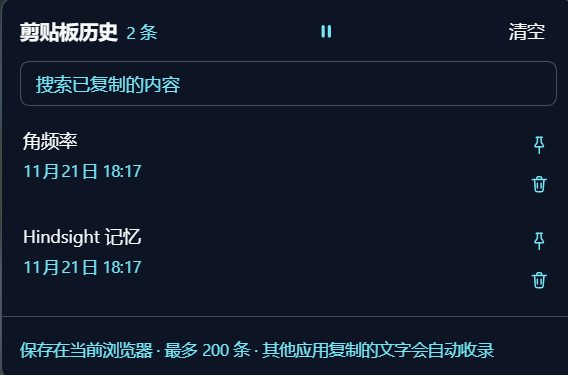
- Opens a panel where you can search the history, click an entry to copy it again, pin an entry, delete a single entry, or clear everything (the clear action asks for confirmation).
- Has a pause button in the panel header for moments when you copy passwords or other secrets; pausing stops both the page and the Host-side clipboard watcher.
- Keeps up to 200 entries and 20 000 characters per entry. Pinning protects an entry from being pushed out while new copies arrive, but the history never holds more than 200 entries. Copying the same text again moves that entry to the top instead of duplicating it.
Data and limits
- History lives only in the Web app's
localStorage, under the keydsh.clipboard-history.v1. It stays on this machine and is never sent to a server. - Entries are kept as plain text until you clear them, so treat the panel like a log: use Clear all to wipe the history (browser site data can be cleared too).
- Copies made in other applications are read from the Windows clipboard by the Host half and merged into the same history. When the Host half is not running, the page falls back to reading the clipboard itself when DSH regains focus, so the most recent outside copy still appears.
- Clearing browser site data for the DSH Web app also clears the history.
Install
Install the package directory as a bundle (for example with the plugin manager's install_bundle action and this directory as the target). The bundle registers one Host row, @local/clipboard-history, from cordis.patch.yml, and the client half loads with the Web app. The Host-side clipboard watcher starts with the Host process, so restart DeepSeek Harness after changing index.js.
Development
index.js— Host half: spawns a PowerShell clipboard watcher and serves new clipboard text overGET /dsh-clipboard-history/latestfor the Web app to poll.client.js— the Web client module: capture, storage, sidebar footer action, overlay panel, and syncing with the Host watcher.locale/en.json,locale/zh.json— display metadata shown in the plugin manager.
The icon at icon.svg is original artwork created for this plugin (clipboard glyph, blue gradient body, light clip and page lines). It is sampled from the same blue as the DSH brand accent.
Comments
Loading…
Similar plugins
Adds a dedicated Token usage page to DSH with live per-session input, output, cache read, cache write and total counts, cache hit rate, a 14-day history strip, search and sortable columns; usage is re
★ 1
MIT
JavaScript
dsh plugin --profile web add dsh-token-usageby jackovibe
Codex 式会话置顶与归档风格的 DSH Web 插件(置顶=标记不是排序,宿主持久,零顺序改动)
★ 1
MIT
JavaScript
Sep 23, 2026
dsh plugin --profile web add dsh-codex-pinby kakajun
Records real clicks, inputs, navigation and network traffic in a user-guided browser session for DSH, then generates a Markdown timeline report (report.md + events.jsonl) to build API-level skills.
★ 4
↓ 320/wk
MIT
TypeScript
Oct 19, 2026
dsh plugin --profile web add dsh-web-recorderby yingrui96
An always-on attention pill in the session header. One glance shows how many sessions are waiting on you — approvals, questions, and failures — and what you already declined. Its HTTP routes have no D
★ 0
MIT
JavaScript
Nov 15, 2026
dsh plugin --profile web add dsh-attention-boardby sunshaobei
Standalone arrow-key input history for the DSH web composer: ↑/↓ recalls sent prompts from one global ring shared across all sessions and workspaces, persisted to localStorage with an overridable cap.
★ 0
NOASSERTION
JavaScript
Oct 4, 2026
dsh plugin --profile web add dsh-input-historyby wuwaka
Adds a right-click menu to DeepSeek Harness inside desktop shells that ship no context menu: cut, copy, paste and select all in the composer, copy and copy-as-plain-text on selected text elsewhere, an
★ 0
MIT
JavaScript
Sep 12, 2026
dsh plugin --profile web add dsh-clipboard-menu