
dsh-lego-io-preview
Manifest valid3D preview for BrickLink Studio .io LEGO models in the DSH sidebar: orbit and zoom the real LDraw geometry, see the part count, and load parts missing from the bundled set from a local Studio install
dsh-lego-io-preview
Read-only 3D preview for BrickLink Studio .io LEGO models, drawn in the
DSH right sidebar. Open an .io file from the workspace and the panel parses
its modelv2.ldr, resolves the part list against a bundled LDraw part set and
renders it with WebGL2 — no Studio install, no Python, no external converter.
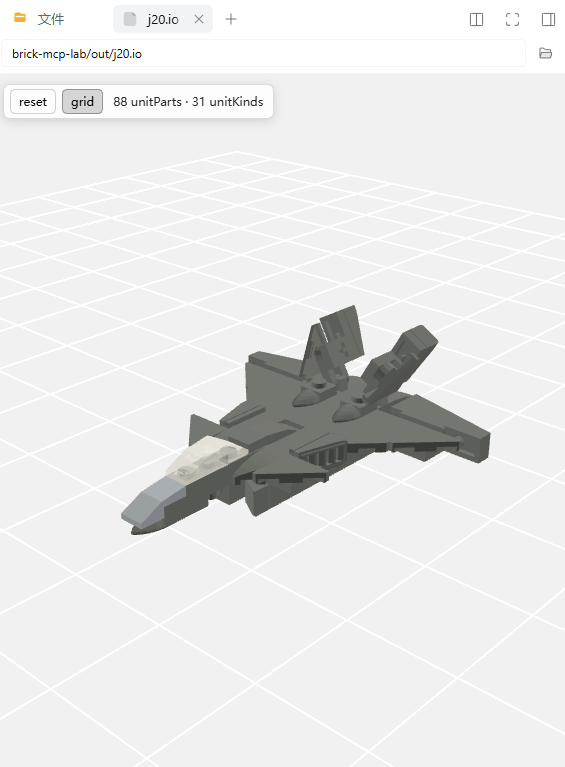
A real BrickLink Studio model (J-20 fighter, 88 parts / 31 part kinds) opened from the file tree: every part is drawn from LDraw geometry, orbit and zoom work inside the sidebar panel.
What it shows
- type-11 part lines from
modelv2.ldr(falls back tomodel.ldr, then to classic type-1 LDraw lines) - real LDraw geometry for the bundled parts, with their LDraw colours
- drag to orbit, wheel to zoom, shift-drag (or middle-drag) to pan, double-click to reset, grid on the model floor
Bundled parts (171 files, 171 903 triangles, built from the official LDraw library): bricks 1×1–1×12 and 2×2–2×10, plates 1×1–1×8 and 2×2–4×8, tiles, grille tiles, 45°/curved slopes, cheese slopes, round bricks/plates, technic bricks/pins, windows, doors and a few minifig accessories.
Requirements
- DSH
0.2.2-rc.1or newer. dsh-better-sidebaris strongly recommended: the file tree of that plugin opens.iothrough its own viewer registry, and this plugin registers itself there. Without it DSH's built-in document preview renders the file instead.- Studio 2.0 is optional. With Studio installed, every part the bundle does not cover is read from Studio's own LDraw library at runtime (see below); without it, unknown parts are drawn as boxes.
Parts outside the bundle
Everything else is loaded on demand from the LDraw library that Studio 2.0 ships with, so a Studio user does not have to rebuild the bundle for a new model:
- the client parses the model and collects the part names it cannot draw;
- it POSTs them to
/dsh-lego-io-preview/geom, the plugin's host route; - the host indexes
<studio>/ldraw/partsonce (about 33 000 files, ~0.2 s), recursively expands the requested.datfiles into triangles, caches them in%LOCALAPPDATA%\dsh-lego-io-preview\geom-cache.jsonand answers in batches; - the client merges the geometry and draws the model normally, showing
+N from the Studio libraryin its status bar.
The host looks for the library at <config.libraryPath>,
D:\Program Files\Studio 2.0\ldraw, C:\Program Files\Studio 2.0\ldraw,
%LOCALAPPDATA%\Studio 2.0\ldraw and /Applications/Studio 2.0/ldraw
(macOS). If no library is found the preview simply falls back to the bundled
parts and reports the rest as missing, exactly as before.
Adding parts
The geometry is baked into the bundle, so a part that is not in the payload is a grey box. To add parts:
# optional: point at any LDraw library (defaults to Studio's own library)
$env:BRICK_LDRAW = "D:\Program Files\Studio 2.0\ldraw"

# collect every part referenced by the models you care about
.\.venv\Scripts\python.exe build_parts.py --scan "C:\path\to\models" --extra "3005,54200"

.\.venv\Scripts\python.exe build_client.py
then restart the app host (or reload the plugin). build_parts.py prints the
part ids it could not resolve and the payload size, so keep an eye on it: the
payload is embedded in client.js and every extra 100 parts adds roughly
0.9 MiB to the bundle.
Install
dsh plugin --profile desktop add dsh-lego-io-preview
or from a checkout: plugin_manager → install_bundle with the absolute path
of this directory.
License
MIT for the code (see LICENSE). The bundled part geometry is derived from the
LDraw Parts Library and is redistributed under
CC BY 4.0; the full attribution
is in LICENSE. LEGO® and BrickLink® are trademarks of their owners; this
project is unofficial.
Limits
- Read only: no editing, no saving, no BOM export.
- Legacy encrypted
.iofiles (AES,soho0909) are rejected with a hint to re-save in Studio; only the current plain-zip format is read. - Submodel references (
1 … <name>.ldr) inside the model are not flattened. - Very large models draw one call per placement; tens of thousands of parts will be slow rather than wrong.
Layout
| File | Role |
|---|---|
index.js | host half: /dsh-lego-io-preview/status and /dsh-lego-io-preview/geom |
client.js | generated client bundle: preview registration, parser, renderer |
client.template.js | readable source, __PARTS_PAYLOAD__ is the build placeholder |
locale/*.json | display title/description |
cordis.patch.yml | bundle patch inserting the plugin |
client.js is generated from client.template.js plus
../parts-payload.txt (gzip + base64 of the extracted part geometry) by
../build_client.py; ../build_parts.py regenerates the geometry from an
LDraw library at ../ldraw/ldraw. ../test_client.mjs checks the loader
contract, registrations and the .io parsing pipeline against real files
(including an end-to-end fetch from the host route); ../test_host.mjs checks
the two host routes without a running DSH.
Comments
Loading…
Similar plugins
by RoderickWilliams
Local 3D studio orchestration: detects Blender, COLMAP and ComfyUI on every run and picks the route they support, and also ships a Three.js fallback that generates models from primitive specs, edits o
★ 3
MIT
JavaScript
Oct 22, 2026
dsh plugin --profile web add dsh-local-3d-studioby lishLRF
DSH 插件:在 DeepSeek Harness 的 Web 界面查看 OBJ/STL/STEP 三维模型,并转译为标准化、LLM 可读的 JSON(含语义分析),一键发送给 AI。
★ 3
MIT
TypeScript
Aug 23, 2026
dsh plugin --profile web add dsh-3d-model-viewer为模型展示交付成果和下达精细微调指示的dsh desktop面板
★ 0
MIT
JavaScript
dsh plugin --profile web add dsh-plugin-middle-panelby RichardYZLu
CAD 3D 模型预览 / CAD 3D model preview for the DSH sidebar: STEP/STP/IGES/BREP (OpenCascade WASM, parsed in a Web Worker) + STL/3MF/OBJ/PLY, with orbit camera, structural edges, wireframe and an axis gizmo. Works with dsh-better-sidebar or DSH's built-in document preview.
★ 0
NOASSERTION
JavaScript
Oct 28, 2026
dsh plugin --profile web add dsh-cad-previewPreview Blender .blend files in the DeepSeek Harness right Sidebar: cached headless GLB export plus a dependency-free WebGL viewer with scene statistics.
★ 0
MIT
JavaScript
dsh plugin --profile web add dsh-blend-previewby XIAOke8698
DeepSeek Harness(DSH)Web 界面插件的乐高式可视化视图
★ 0
MIT
JavaScript
Sep 6, 2026
dsh plugin --profile web add dsh-lego-plugin