
agent-trees
Manifest validLive multi-way tree of the current session's agents in the DeepSeek Harness conversation view and right sidebar, with status, plan progress, tokens, cost (requires dsh-cost-meter), and runtime on ever
Agent Trees / 智能体树
Agent Trees / 智能体树 — a DeepSeek Harness UI plugin that renders the current
session's agent workflow as a live multi-way tree, in a top-down chart layout by
default. It is a standard DSH bundle (dsh.bundle) with a Web Client half and no
build step.
中文简介:在 DeepSeek Harness 的对话页和右侧边栏中以多叉树展示当前会话的智能体工作流;每个卡片显示状态、计划进度、Token、费用和运行时间。
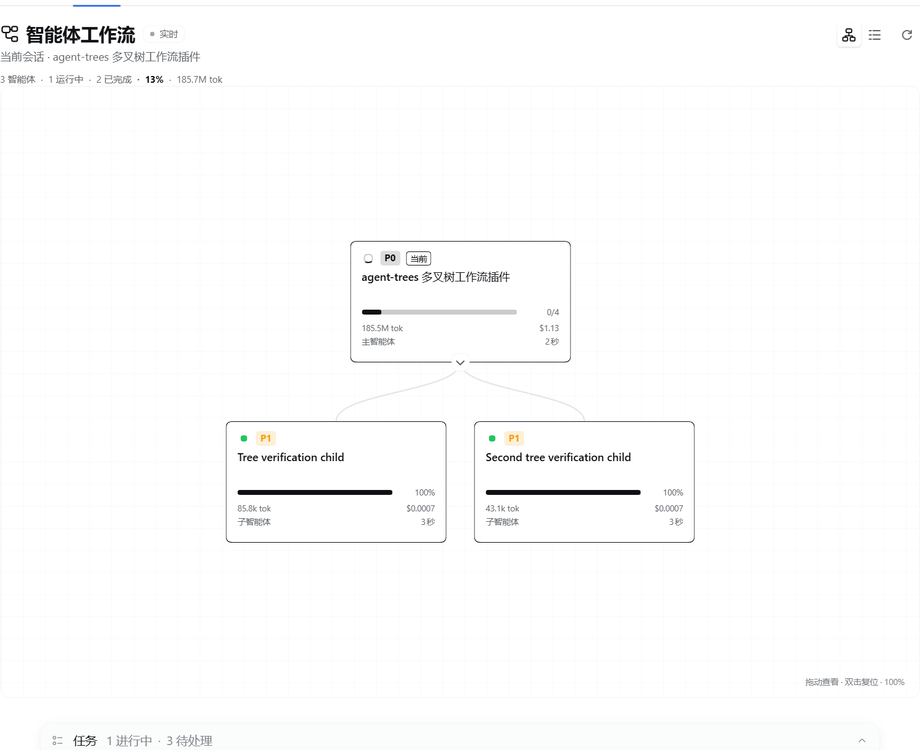
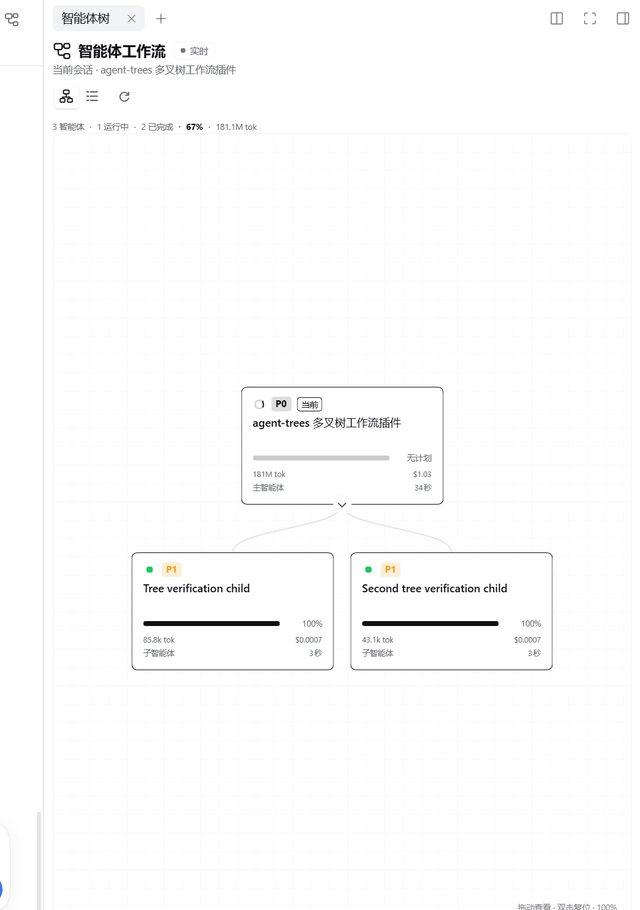
Each agent is a compact card ("小方块") with a minimal 1px outline:
- the task it owns (the delegation label, or the session title when no label exists),
- a top-left status indicator — a small spinner while running, a green dot on success, a red dot on failure, and a grey dot otherwise,
- a
P0–P3priority badge, - a static progress bar based on its todo plan (no flowing animation),
- a footer with current tokens, USD cost, main/subagent role, and live duration.
The current session is the highlighted card. When the current session is itself a subagent, the tree walks up to the topmost available parent and marks the current agent in the family tree.
Install
The plugin is prepared for the dsh-market
catalog through awesome-dsh-plugin.
Once the catalog entry is live, search Agent Trees / 智能体树 in
Settings → Plugin Market.
You can install it directly from the repository now:
dsh plugin --profile web add github:xiezouqu12/agent-trees
On DSH Desktop, install from Settings → Plugins (the desktop app owns its profile, so the CLI does not change the running app's profile).
Repository: xiezouqu12/agent-trees.
Requires DeepSeek Harness >=0.2.1-rc.1 <0.3.0.
Screenshots
Where it appears
Open a conversation and select the Agent Trees / 智能体树 tab next to
Chat, Trajectory, and the other views. The tab is added through the
conversation.view Client slot.
It also opens in the right sidebar:
- Click the small tree icon in the conversation header (next to the sidebar toggle) to open or focus the Agent Trees sidebar tab in one click.
- The right sidebar's
+guide lists an Agent Trees capsule, so the tab can also be opened from there. - The sidebar tab is a native
sidebar.right.pane.tabbody with a compact layout, and it stays open beside the chat while the session changes.
The sidebar is not opened automatically for an ordinary session. It opens
when you click the header tree icon or pick the capsule from the sidebar +
guide. A long multi-agent task may auto-open it once after 3+ agents have had
at least one running for about 25 seconds, and only while the sidebar is
collapsed; a simple project never triggers it.
Layouts
The view opens in Chart layout: a top-down org chart with rounded cards and smooth curved connectors on a graph-paper canvas that fills the remaining panel height (the whole sidebar body in the right-sidebar tab). Drag anywhere on the canvas background to pan the whole tree; use the mouse wheel to zoom around the cursor (35%–250%); double-click the background to reset pan and zoom. The canvas hint shows the current zoom percentage. Each card shows the task, priority, status, progress, tokens, cost, role, and runtime. Collapse a branch with the round chevron at the card's bottom edge; the chart reflows immediately.
The two icon buttons in the header switch between Chart and List (the indented tree). The same layout applies to the conversation tab and the right-sidebar tab.
How the data is derived
The plugin is Client-only and reads existing client-visible session projections — it writes no session events and registers no Host route:
| Projection | Used for |
|---|---|
subagentCatalog | parent → child topology, delegation mode, task label |
subagentTiming | last-turn completion, settled/active duration |
tokenUsage | per-agent token total |
costUsage | per-agent token buckets and USD cost (when dsh-cost-meter is mounted) |
todos | per-agent task progress, when the agent used todo_write |
Session summaries (useSessions().byId) supply titles, running state, blank,
and the parent link. useSessionStatus supplies the live status map.
Progress rules
- If the agent has a todo list, progress is
(completed + 0.5 × in_progress) / total, and the card showsdone/total. - A running agent without a todo plan shows a static empty track labelled
无计划; the top-left spinner indicates that it is running. Nothing flows or animates. - A finished agent whose latest closed turn completed shows 100% and a green status dot.
- A finished agent whose todo list is fully completed is also 100%, even when the timing projection has not settled yet.
- A finished subagent whose latest closed turn did not complete shows a red
status dot; its bar stays at its actual todo progress, or
无计划when it had no plan. - A blank, not-yet-started agent shows 0% and a grey dot.
- External tasks (
mode: "external") have no local session, so their bar is neutral and labelled "外部". - The main agent is never marked red just for being idle between turns: it
shows a grey idle dot. Red is reserved for a subagent that ended without
completing. The main agent's todo projection is cleared at each turn start, so
the card shows
无计划until a new plan is written; it keeps the last plan it observed.
The header's overall percentage follows the main task's todo plan when the root has one, so a small finished child cannot inflate the main task. When the main task is running without a todo plan it uses the finished-agent ratio instead; otherwise it averages the per-agent progress values that are known. The value is shown inline with the agent counts; hover it for the estimate source.
Priority rules
- By default priority follows depth: root =
P0, direct children =P1, grandchildren =P2, deeper =P3. - A delegation label may override it with a leading
[P0],P1:,P0 -, etc. prefix; the prefix is removed from the displayed task title.
Order
Cards no longer display sequence numbers (#01, #02, …). Siblings keep the
parent catalog's event order, and the tree position itself conveys the workflow
order.
Interactions
- Click a card to open that agent's conversation (the current card is inert).
- Click the header tree icon to open or focus the right-sidebar tab.
- Drag the canvas background to pan the tree; use the mouse wheel to zoom around the cursor; double-click the background to reset pan and zoom.
- Switch between chart and list with the two header layout icons.
- In chart layout, use the round chevron at the bottom of a card to collapse its branch; in list layout, use the chevron at the left of the row.
- The refresh icon re-reads projections for every visible agent.
- The header keeps a compact one-line summary: agents, running, done, overall percentage, and token total. There is no separate progress card, search bar, filter row, or legend taking up tree space.
- Keyboard:
ArrowUp/ArrowDownmove between cards,ArrowRight/ArrowLeftexpand or collapse,Home/Endjump to the ends,Enter/Spaceopens.
Projection updates arrive through the normal Client store, so topology, status, todos, duration, and token counts update live. A one-second clock refreshes durations while any agent runs.
Compatibility
Built and tested against DeepSeek Harness 0.2.1-rc.2 (the version in this
desktop install). The package declares engines.dsh: >=0.2.1-rc.1 <0.3.0.
It depends only on the Web Client slot surface and the standard session hooks:
conversation.viewslot withsessionId,useSessions,useSessionStatusctx.sessions.refreshProjectionsctx.uiWorkspace.openSessionctx.localeandctx.slots
No Harness Client package is imported as a module; React comes from the browser module table.
Files
| File | Purpose |
|---|---|
index.js | Host half (metadata only) |
client.js | Browser module: view, tree, cards, styles, locale dictionaries |
cordis.patch.yml | Inserts the agent-trees row |
locale/en.json, locale/zh.json | Plugin Manager display metadata |
icon.svg | Original artwork |
screenshot-main.png, screenshot-sidebar.png | Marketplace screenshots |
screenshots.json | dsh-market screenshot manifest |
marketplace/agent-trees.yml | Entry submitted to the awesome-dsh-plugin catalog |
LICENSE | MIT |
Notes and limits
- The tree reflects what the Client projection store knows. An agent that is not
reachable through a parent's
subagentCatalog(for example an external task without a parent-owned catalog fact) cannot be shown as a local child. - External tasks have no local execution status; they are displayed as leaves.
- When a running agent has no todo list, the bar is a static empty track labelled
无计划; the card never invents a percentage. - The plugin does not mark the main session as "completed" merely because it is idle; completion always follows the last closed turn or an all-completed todo list.
Development
The plugin has no build step. Edit client.js (a browser module registered
through window.__ModuleLoader__) and let DSH HMR reload it, or reload the page.
Run node --check client.js for a syntax check. The host half index.js is a
no-op metadata module; the bundle patch inserts the client row.
License
MIT © 2026 xiezouqu12. See LICENSE.
Comments
Loading…
Similar plugins
A live conversation map for DeepSeek Harness web: real-time session tree with subagent lineage, running state, and one-click navigation.
★ 0
dsh plugin --profile web add dsh-conversation-mapby robiteame
dsh-session-tree-extension Append-only, multi-branch conversation trees for DeepSeek-Harness — a PI-Agent-style SessionTree. The agent's history becomes a tree of immutable nodes, forkable at any hist
★ 20
MIT
TypeScript
Oct 13, 2026
dsh plugin --profile web add dsh-session-tree-extensionby orphiczhou
Left-sidebar session tree for DeepSeek Harness: every session with its nested subagent descendants, click-through to multi-turn conversations, plus the tree_send tool for messaging any continuable ses
★ 0
MIT
JavaScript
Oct 2, 2026
dsh plugin --profile web add @orphiczhou/dsh-session-treeby softspark
Processes tab for DeepSeek Harness: every agent and subagent of a conversation as a live console with paired tool requests and responses, installed as one profile bundle.
★ 0
Apache-2.0
TypeScript
Sep 26, 2026
dsh plugin --profile web add @softspark/dsh-process-consoleby Way2LOose4
Real-time session cost preview for DeepSeek Harness: live cost readout, today usage chart, price_estimate/session_cost tools, prices kept in sync with the DeepSeek official site (peak/off-peak aware)
★ 3
MIT
JavaScript
Aug 14, 2026
dsh plugin --profile web add dsh-agent-pricingby zoe1nan
Live command deck for DeepSeek Harness agent teams: roster telemetry, task board, approvals, write actions, built-in Windows desktop capsule, and phone access.
★ 16
↓ 19/wk
MIT
JavaScript
Oct 19, 2026
dsh plugin --profile web add dsh-cockpit