

dsh-cockpit
Manifest valid★ 17Live command deck for DeepSeek Harness agent teams: roster telemetry, task board, approvals, write actions, built-in Windows desktop capsule, and phone access.
Cockpit · 指挥台
一眼看清一支 AI 编队正在做什么。
DeepSeek Harness 支持多个 agent 并行干活。但当一支编队跑起来,你会同时面对一串会话、一堆待办、若干子代理的实时动作,以及偶尔撞车的文件写域。Cockpit 把这些收进一块实时看板:编队在干嘛、计划走到第几步、任务板卡在哪、谁刚写了什么文件——并且允许你在同一个界面里做决定:审批、发话、中断。
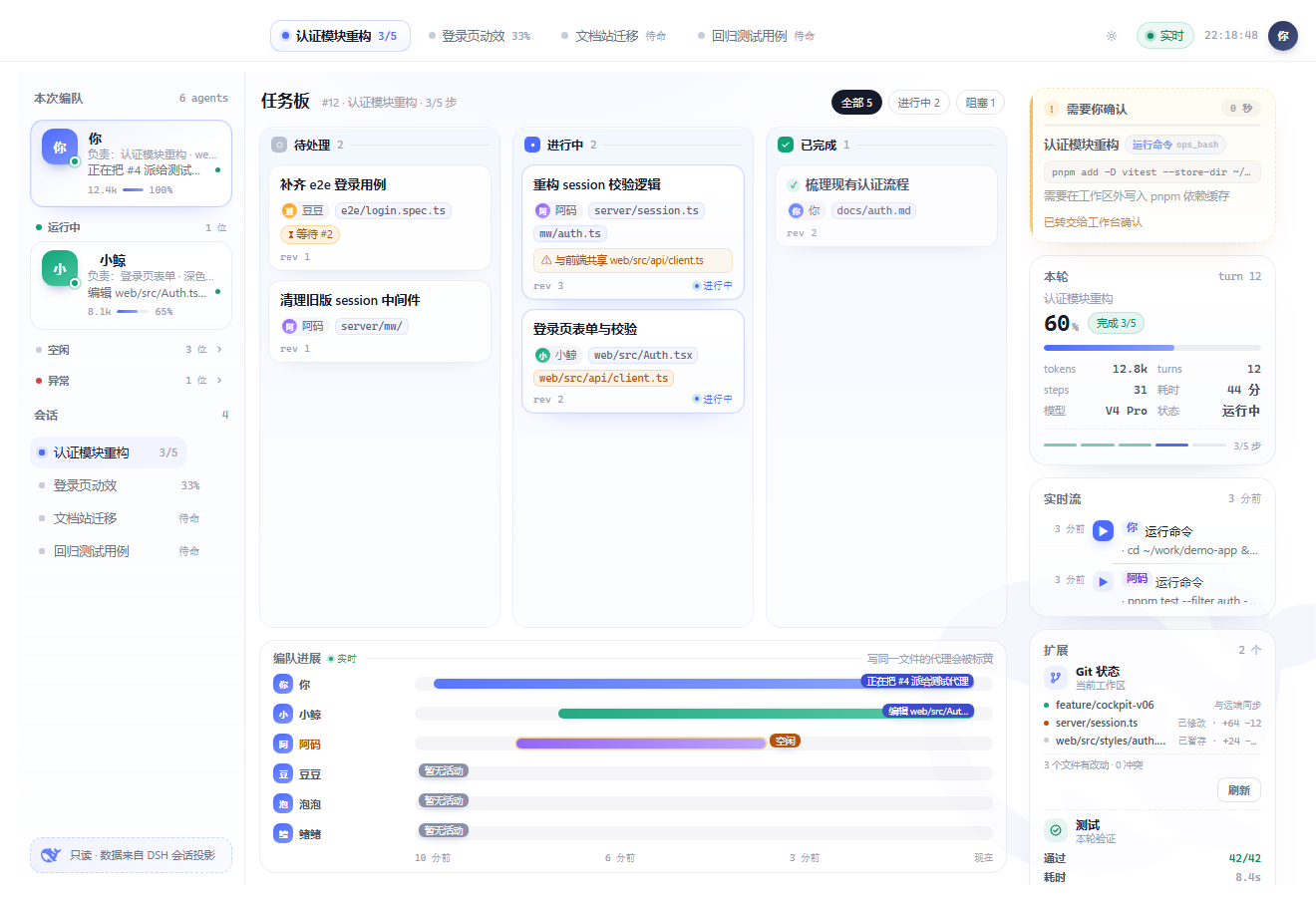
从 v0.2 起它内嵌在 DSH 工作台里:侧栏点一下「Cockpit 指挥台」,页面就在主区打开,不用另开浏览器标签、不用记端口。独立 URL 也保留,方便第二块屏或手机。
特性(v1.0)
看
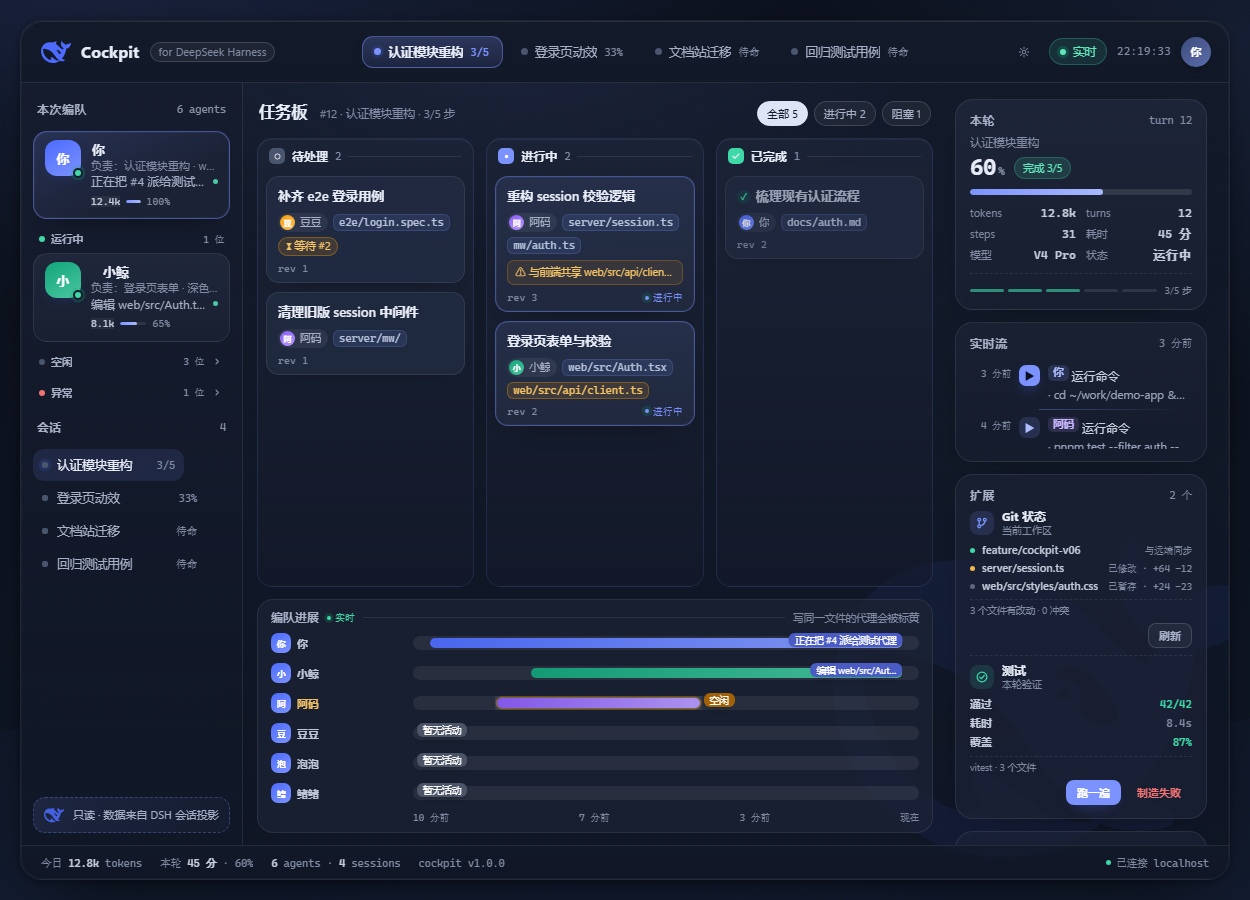
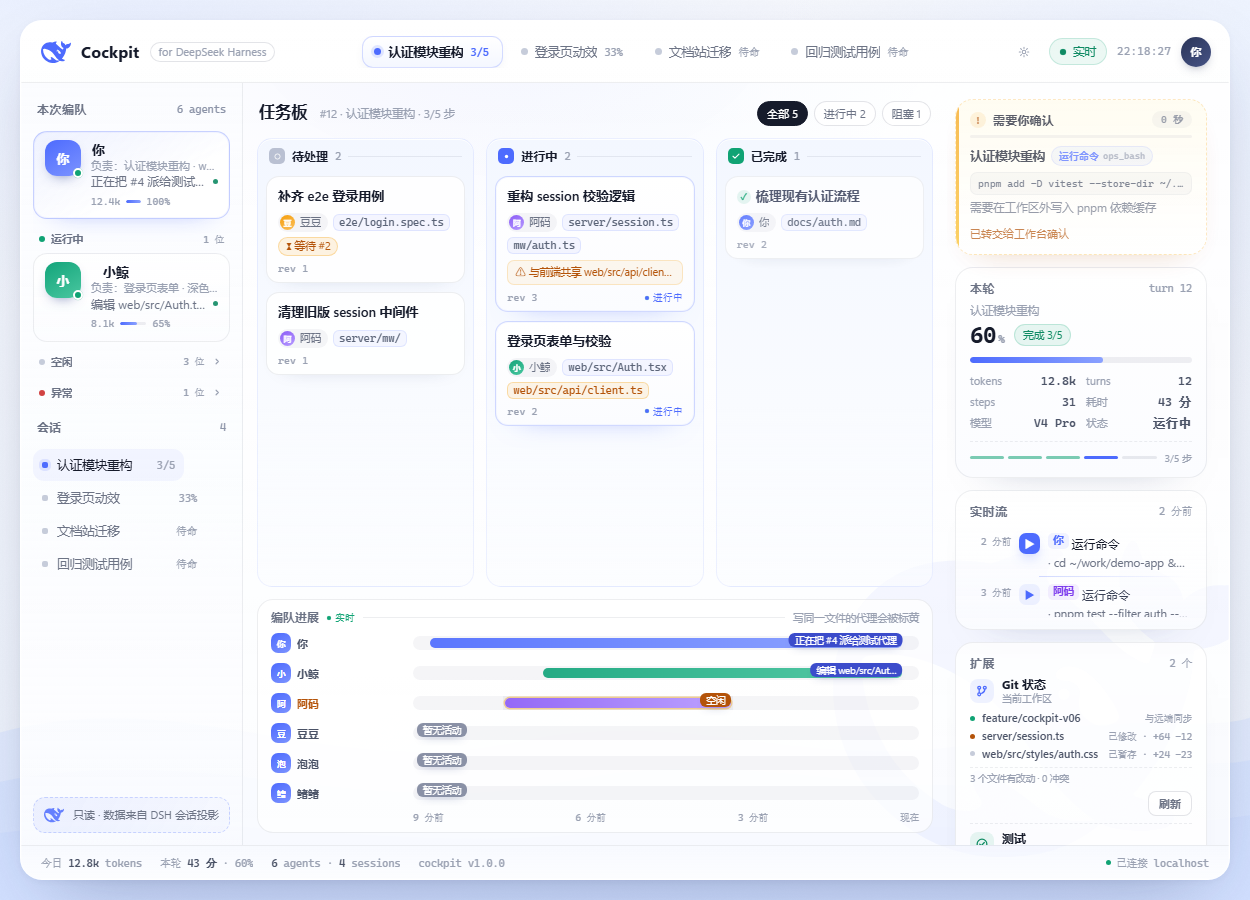
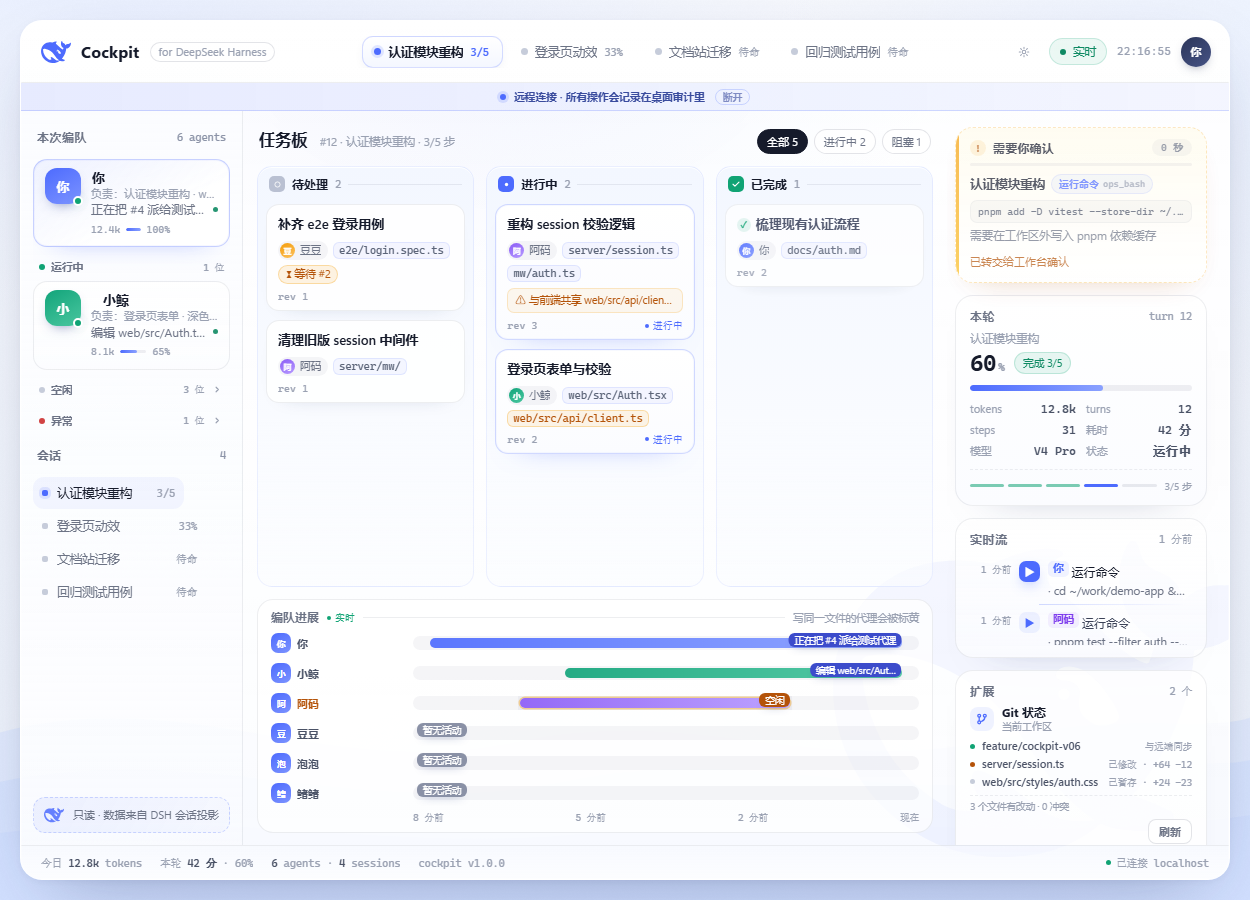
- 实时编队:每个成员的模型、真实 token 数、当前动作、负责范围(自动从任务主题/改动文件归纳);按运行中 / 空闲 / 异常分组,运行中永远在前
- 任务板:共享任务、状态列、依赖关系(
blockedBy)、两人的写域重叠会被标成「双写风险」 - 计划兜底:没有共享任务板时,自动用本轮 todo 计划铺满看板,永远不空
- 实时流:工具调用说人话(
运行命令/编辑文件/搜索内容…),参数一行省略、点击展开 - 本轮数据:进度、token、耗时、步骤、模型、状态,液面进度条随事件实时更新
- 会话切换:点左栏会话或顶部 pill 即切换,每个标签页记住自己的选择
操作
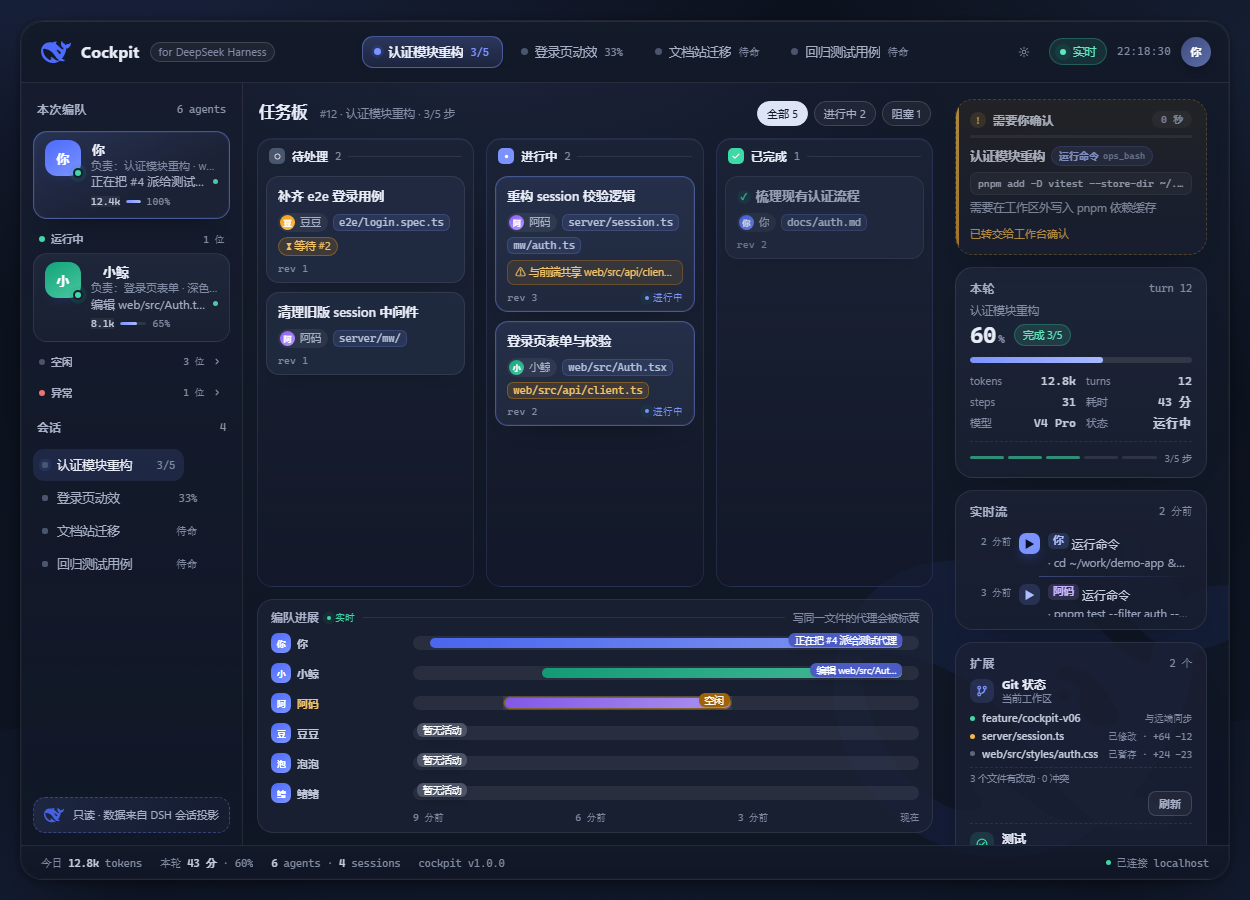
- 审批闸口:审批请求直接出现在 deck 里,允许一次 / 拒绝;25 秒不处理自动交回原生弹窗
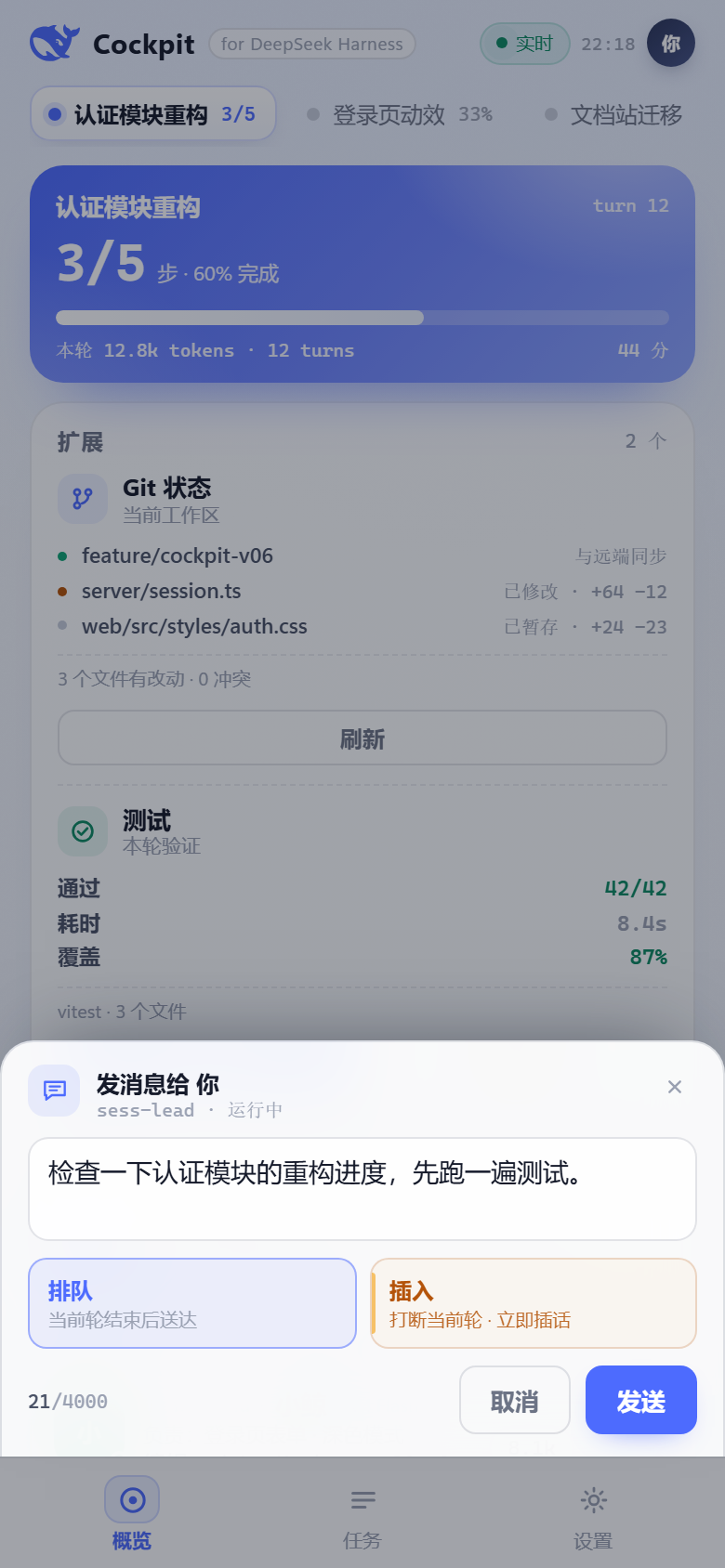
- 发消息:对某个 agent 排队送达,或「插入」打断当前轮立刻插话
- 中断:行内确认后停止正在跑的轮
- 所有写操作:同源校验、失败回滚、本地审计(
~/.dsh/cockpit/audit.jsonl)
桌面胶囊(Windows)
装一个插件就有桌面悬浮胶囊:液体进度条 + 步骤读数 + 「N 跑 · M 批」徽标;点击展开完整卡片,可一键打开指挥台。胶囊进程由插件托管(自动启动/退出/崩溃重启),设置页可启停。
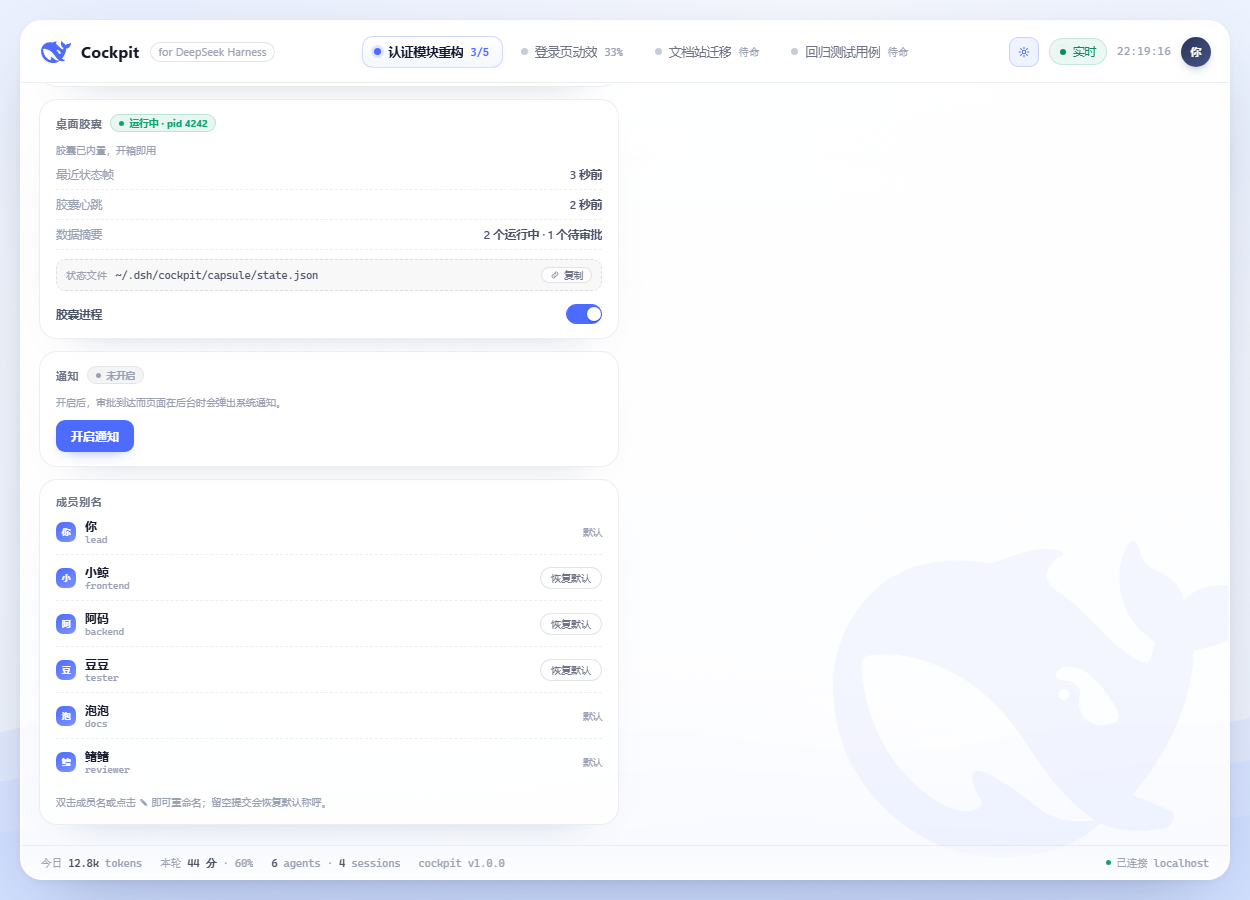
手机 / 远程
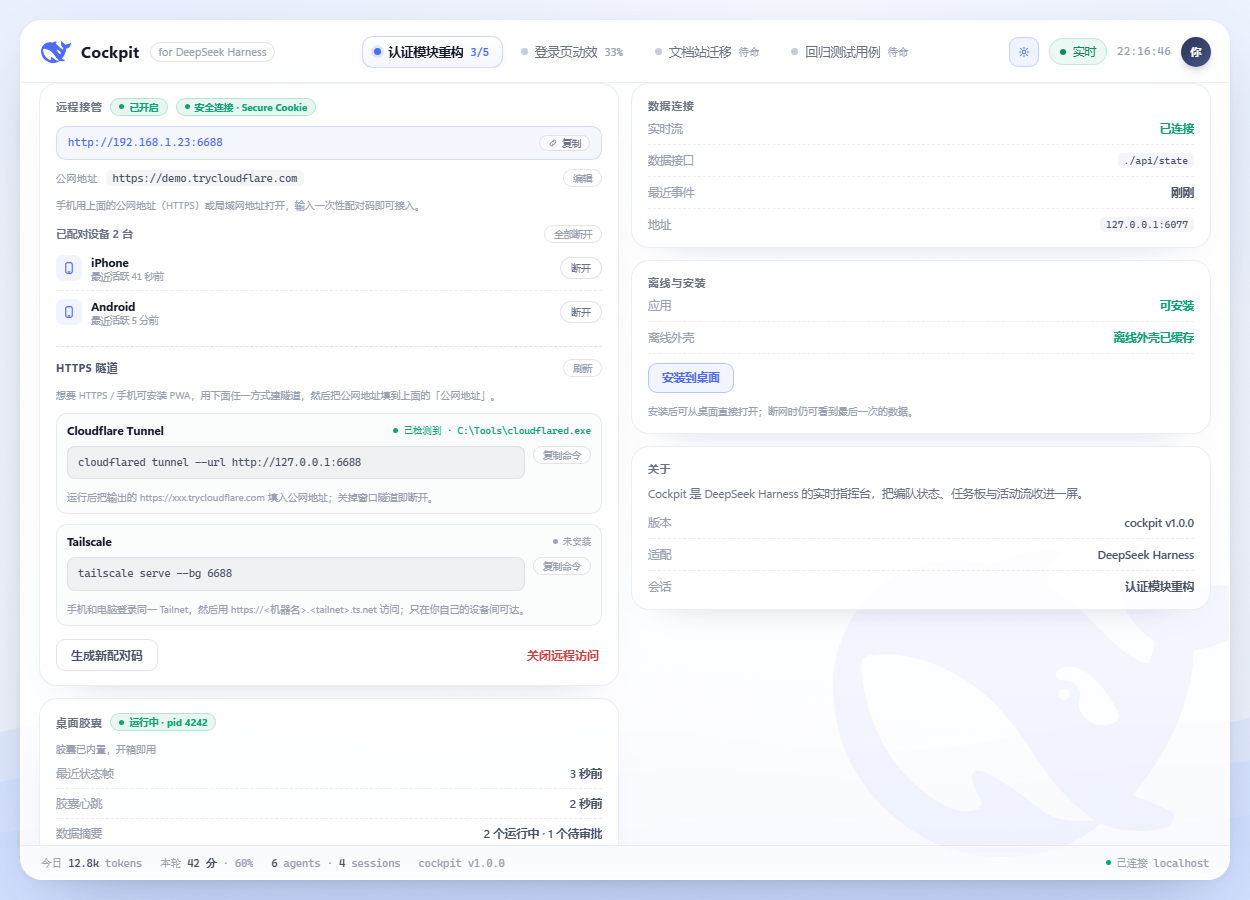
- 局域网一次性配对码(6 位、2 分钟有效、单次使用、错误限速),手机浏览器即可接管
- 需要 HTTPS 时给出隧道向导(检测 cloudflared / Tailscale,只给命令,不替你执行)
- 公网 HTTPS 地址 + Secure Cookie;配对设备可随时撤销
- 审批到达时(页面在后台)可发系统通知
- PWA:可安装、离线外壳、断网提醒
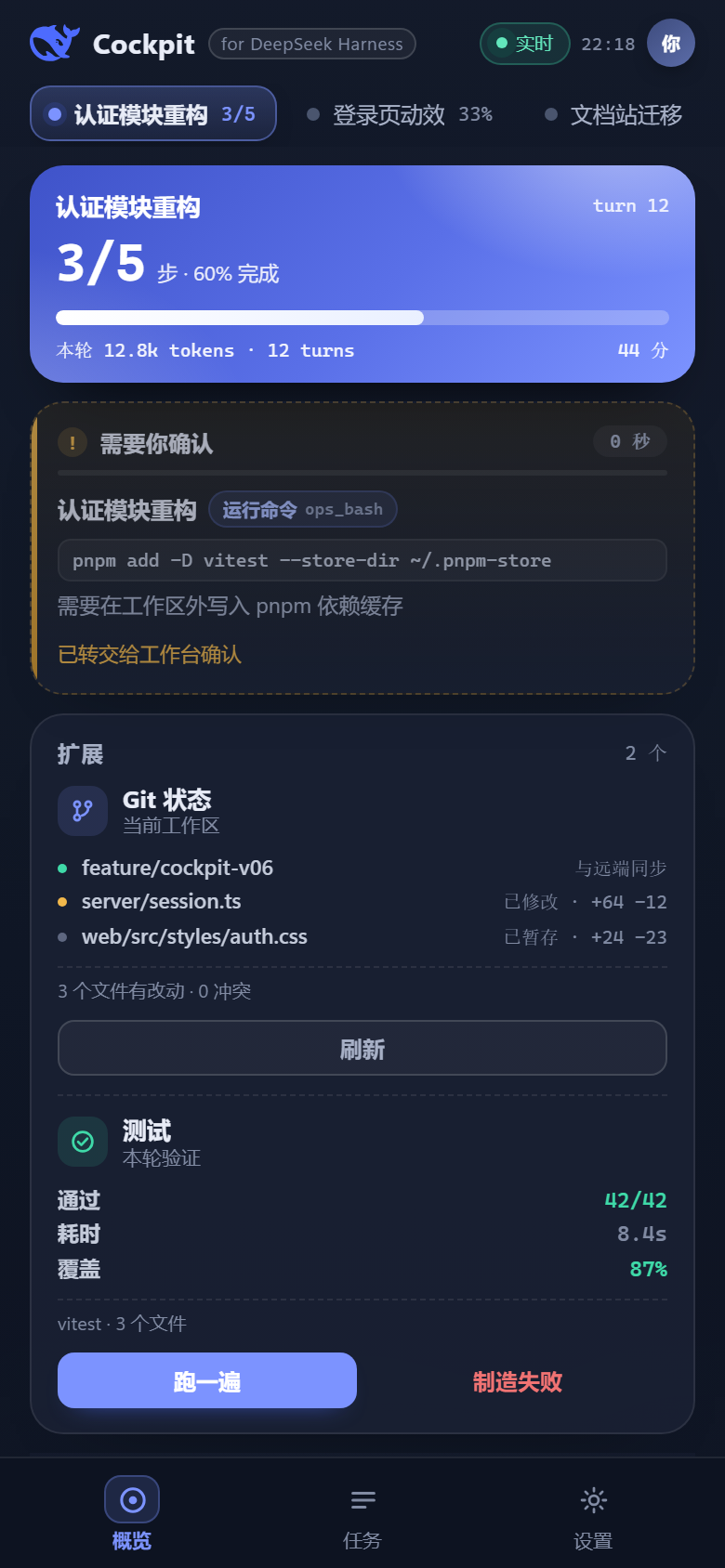
界面
- 内嵌工作台 / 独立页 / 手机单栏三套布局,列宽可拖、双击复位,宽度本地记忆
- 深色模式跟随工作台主题;1250/1000/390 三档适配;reduced-motion 与键盘可达
- 字体统一无衬线栈;数字等宽
安装
前置:DeepSeek Harness(带插件系统与客户端模块)、Node.js ≥ 22;桌面胶囊仅 Windows 10 2004+,其他平台 deck 正常、胶囊自动隐藏。
- 下载
dsh-cockpit-<version>.tgz(Releases 或本地npm pack) - 安装到你的 profile 并重启:
dsh plugin --profile <profile> add /path/to/dsh-cockpit-1.0.0.tgz
- 重启 DSH 后:侧栏出现「Cockpit 指挥台」,点开即用;桌面胶囊随宿主自动启动(Windows)。
独立访问:http://127.0.0.1:<DSH 端口>/cockpit/。
升级:重复 add 新版本 tgz 后重启;设置与别名保存在 ~/.dsh/cockpit/,升级不丢。
卸载:dsh plugin --profile <profile> remove dsh-cockpit,再重启。
安全与隐私
- 本地优先:插件只监听本机 DSH 端口;不向任何服务器上报数据;文档中的截图与示例均为演示数据
- 默认只读:除你点击触发的审批 / 发消息 / 中断外,不派生 agent、不改任务、不自动同意
- 审批:只回答 once 决策,25 秒超时即交回原生弹窗;可用
DSH_COCKPIT_APPROVALS=0完全关闭接管 - 远程:默认关闭;开启后只绑私有网段,只代理
/cockpit/*;6 位一次性配对码、失败限速(重启仍保留)、会话 HttpOnly + SameSite;设备可撤销;所有远程操作带remote:true审计 - 扩展卡:其他插件只能提交纯 JSON 只读内容,宿主做类型 / 长度 / 超时校验
- 环境变量:
DSH_COCKPIT_REMOTE_PORT(默认 6688)、DSH_COCKPIT_REMOTE_SECURE=1(强制 Secure Cookie)、DSH_COCKPIT_APPROVAL_HOLD_MS、DSH_COCKPIT_APPROVALS=0
扩展卡片(给插件作者)
任何插件都可以把自己的只读信息卡注册进 deck:
export function apply(ctx) {
  ctx.inject(['cockpit'], (ctx) => {
    ctx.cockpit.registerCard({
      id: 'git-status',
      title: 'Git 状态',
      subtitle: '当前工作区',
      order: 10,
      async load() {
        return { kind: 'list', items: [{ label: 'main', value: '与远端同步', tone: 'ok' }] }
      },
      actions: [{ id: 'refresh', label: '刷新', kind: 'primary' }],
      async onAction({ action }) {
        if (action === 'refresh') return { toast: '已刷新' }
      },
    })
  })
}
- 载荷类型:
list/metrics/status/text(纯 JSON,无 HTML) - 宿主负责超时、缓存、数量上限与错误隔离;动作走
POST /cockpit/api/cards/<id>/action(同源) - 完整契约见 docs/STATE.md,可安装示例见 examples/git-card
已知限制
- 桌面胶囊仅 Windows;macOS / Linux 只有 deck
- PWA 安装与系统通知要求安全上下文(HTTPS 或 localhost);局域网 HTTP 只能当网页用(设置页会提示)
- 后台 Web Push 尚未实现,当前只有前台/系统通知
- DSH 团队模型只增不减:同一会话里 teammate 无法删除,Cockpit 用折叠分组保持界面干净
开发
npm run preview # http://127.0.0.1:6077/cockpit/ 本地预览(mock 数据 + 假后端)
目录:
index.js        host 插件:会话投影、写操作、审批、胶囊监管、远程访问、扩展卡
client.js       客户端半:侧栏入口 + 主区面板(iframe)
public/         deck 前端(原生 ES module,无构建、无 CDN)
capsule/        Windows 桌面胶囊(WPF / PowerShell)
mock/           预览用演示数据
examples/       扩展卡示例
docs/           契约与路线图
契约(state 字段、SSE、端点、审批/动作语义)见 docs/STATE.md;路线图见 docs/ROADMAP.md。
English
Cockpit is a live command deck for DeepSeek Harness agent teams. It answers one question — what is the team doing right now — and lets you act on it in the same place.
- Embedded in the workspace (sidebar entry) or standalone at
/cockpit/ - Live roster with real per-agent tokens / actions / ownership, task board with dependencies and write-scope conflict warnings, plan fallback when no shared board exists, human-readable activity stream
- Approvals gate, queue / steer messages, interrupt a running turn — all click-driven, with a local audit log
- Built-in desktop capsule (Windows): liquid progress bar + badges, managed by the plugin, toggle in settings
- Phone access: one-time pairing code, optional HTTPS tunnel wizard, Secure cookies, notifications, installable PWA
- Extension cards: other plugins register read-only JSON cards with actions
- Local-first: no telemetry; only the explicit actions you take write back to DSH
Install: dsh plugin --profile <profile> add /path/to/dsh-cockpit-1.0.0.tgz, restart DSH, then open Cockpit in the sidebar.
Windows capsule requires Windows 10 2004+. PWA install and notifications need a secure context (HTTPS or localhost). Backend Web Push is not implemented yet.
MIT licensed. Not affiliated with DeepSeek.
License
Compatibility
Versions
| Latest version | Published | Size |
|---|---|---|
| 0.2.0 | — | — |
| 0.2.1 | — | — |
| 0.2.2 | — | — |
| 0.2.3 | — | — |
| 0.2.4 | — | — |
| 0.2.5 | — | — |
Comments
Loading…
Similar plugins
by huxint
Agent teams for DeepSeek Harness: named long-lived teammates over ctx.subagents, a shared task list, a member-to-member mailbox, virtual workspaces, and a live team room in the conversation view
★ 13
MIT
TypeScript
Sep 28, 2026
dsh plugin --profile web add dsh-teamby PerryLink
Persistent, cross-session multi-agent team rooms for DeepSeek Harness — members, a message bus, a shared task board, and a shared timeline that survive restarts.
★ 3
↓ 470/wk
Apache-2.0
JavaScript
Oct 7, 2026
dsh plugin --profile web add dsh-team-roomsby momasiku
Give DeepSeek Harness hands and eyes: screen_view hands the model a real PNG of your desktop, desktop_control drives the mouse, keyboard and windows, desktop_sequence runs a whole task in one call.
★ 16
↓ 165/wk
MIT
JavaScript
Oct 20, 2026
dsh plugin --profile web add dsh-pilotby softspark
Processes tab for DeepSeek Harness: every agent and subagent of a conversation as a live console with paired tool requests and responses, installed as one profile bundle.
★ 0
Apache-2.0
TypeScript
Sep 26, 2026
dsh plugin --profile web add @softspark/dsh-process-consoleby jtt0001
Windows always-on-top task progress overlay for DeepSeek Harness (DSH): live phase/tool/command, real todo progress, multi-task list, approvals from the overlay.
★ 0
MIT
C#
Sep 8, 2026
dsh plugin --profile web add dsh-progress-overlayby guo6x
Give your DSH agent hands: drive a real browser (Edge/Chrome over CDP) from the chat — ref-driven clicking, per-session browsers, and a live cockpit panel. Zero runtime deps, no API key.
★ 23
↓ 239/wk
MIT
JavaScript
Oct 5, 2026
dsh plugin --profile web add dsh-pilot