

dsh-sidebar-shelf
Manifest validCollapse every DSH left-sidebar panel entry into one clean, searchable shelf — open a panel only when you need it. 侧栏收纳架
dsh-sidebar-shelf
Give the DSH sidebar back its space. Every left-sidebar panel entry folds into one quiet shelf; open a panel only when you need it.


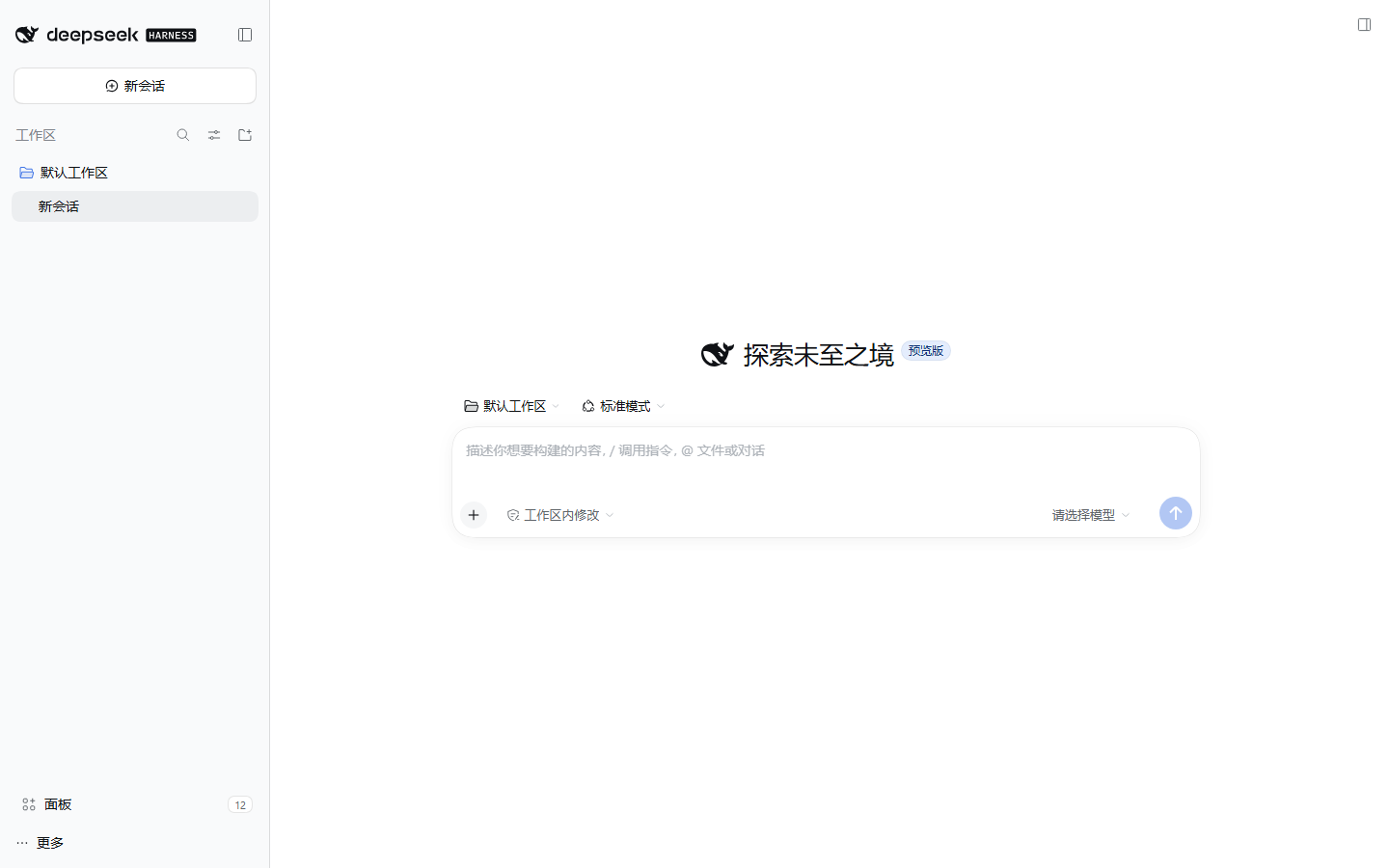
Why
The DSH Web/desktop sidebar stacks its brand row, New Session, every global panel entry, the workspace list, and Settings. Each plugin that adds a panel adds a row to that column — plugin manager, plugin market, schedules, MCP studio, context, skills, system monitor. Ten rows is roughly 400px, and the workspace area is squeezed to a couple of conversations.
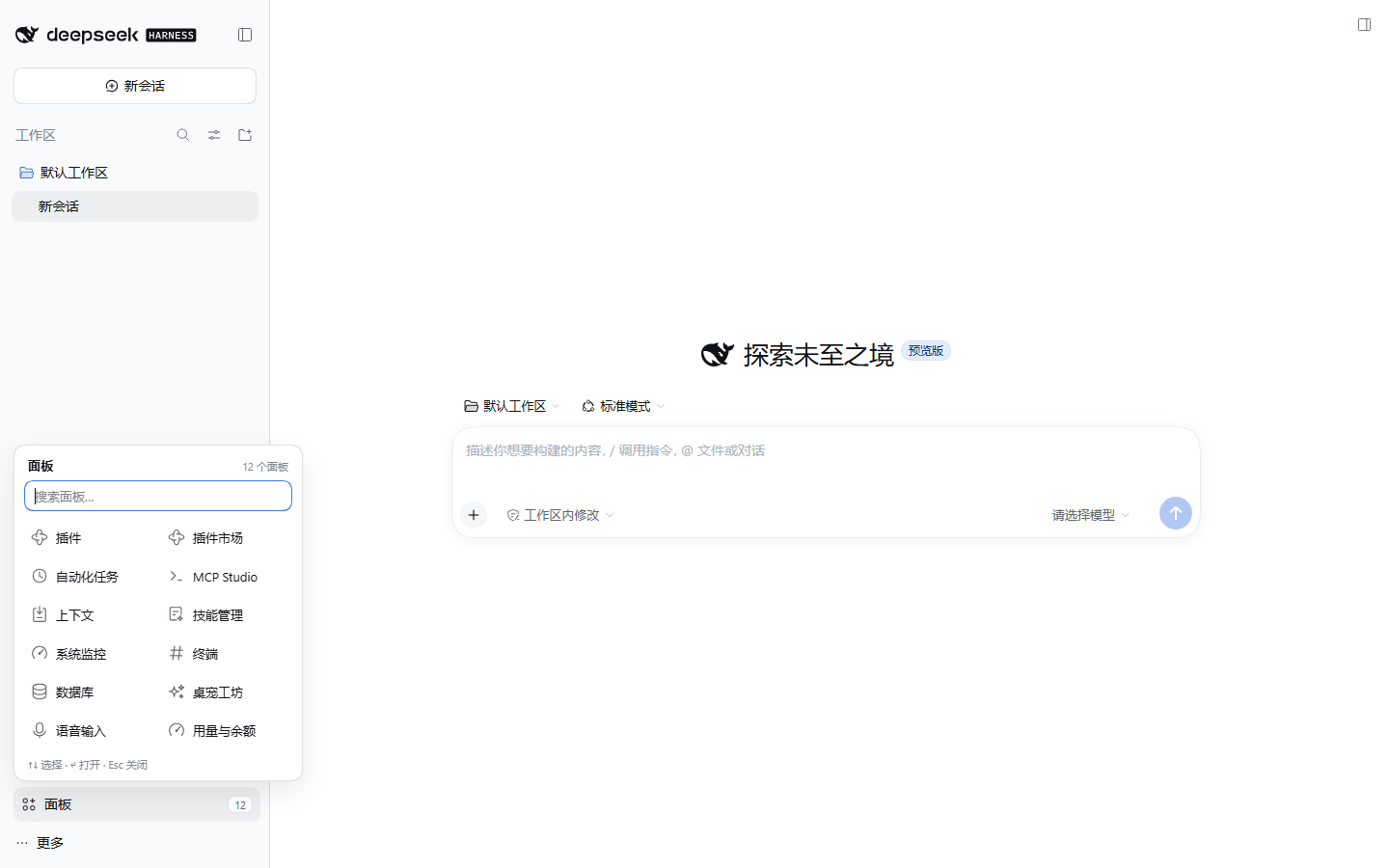
dsh-sidebar-shelf does exactly one thing: it folds all panel entries into a single shelf in the sidebar footer, and brings any of them back on demand.
- One calm row instead of N panel rows.
- A 2-column shelf with each panel's own icon and name.
- Search appears once there are more than seven panels.
- Keyboard first:
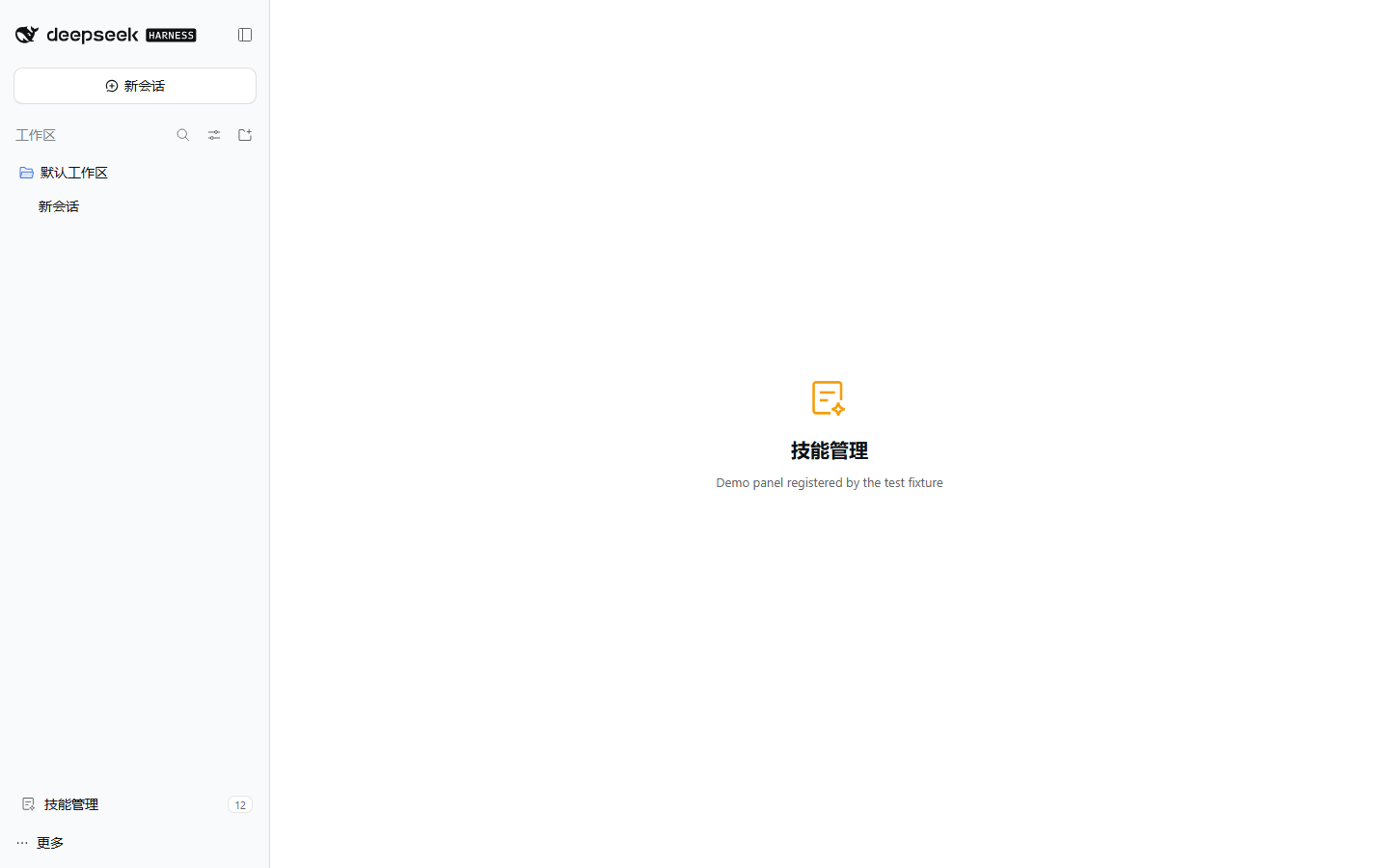
↑/↓to move,Enterto open,Escto close, and plain typing filters. - "You are here": while a panel is open, the shelf row shows that panel's icon and name, so the sidebar still tells you where you are.
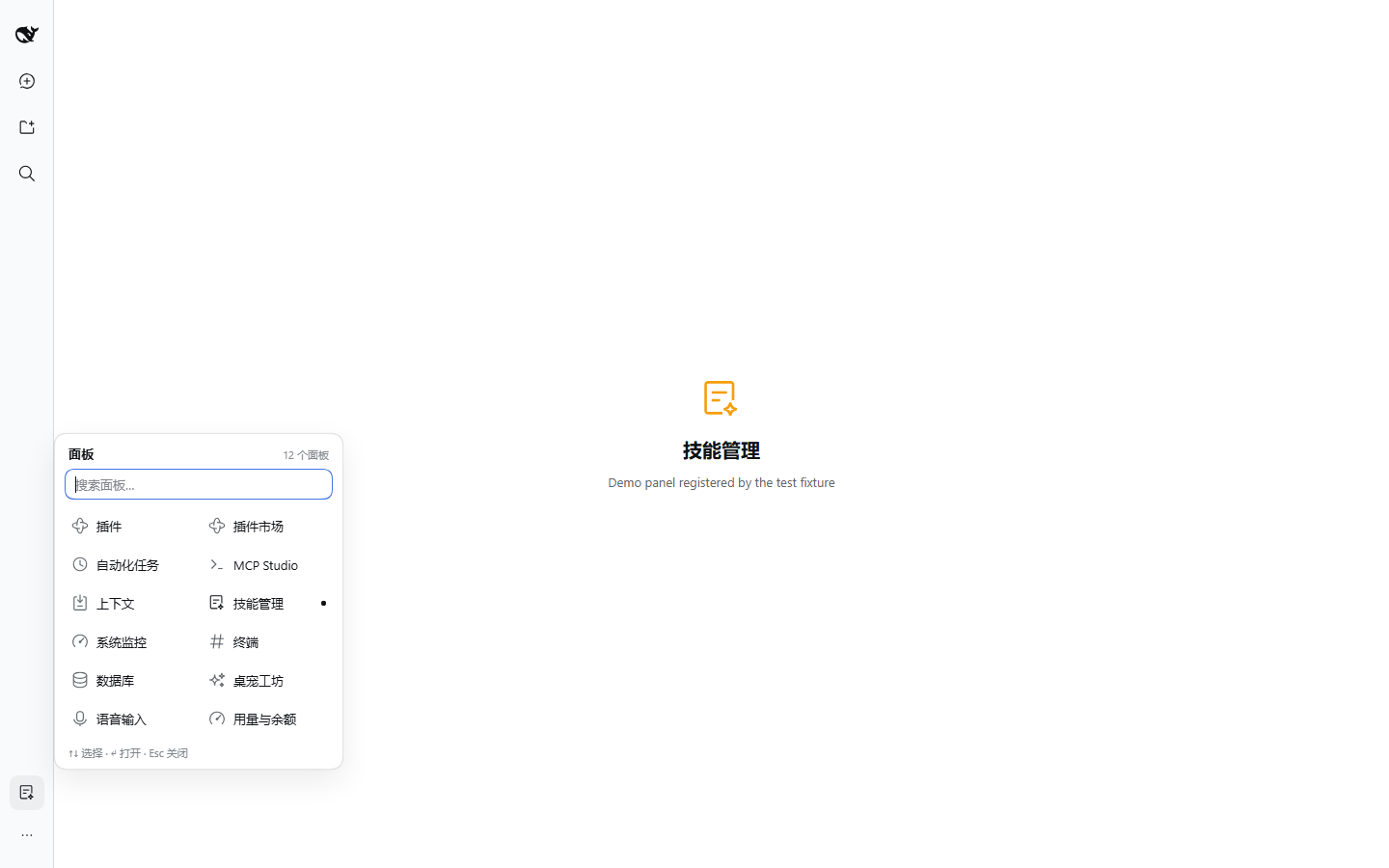
- Rail aware: in the 56px sidebar rail the shelf becomes a 36px icon button and opens beside the rail, not on top of it.
- Theme aware: only
--dsw-alias-*/--dsw-radius-*/--dsw-shadow-*tokens; follows light and dark themes.
| Panel open | Rail | Dark |
|---|---|---|
 |  | 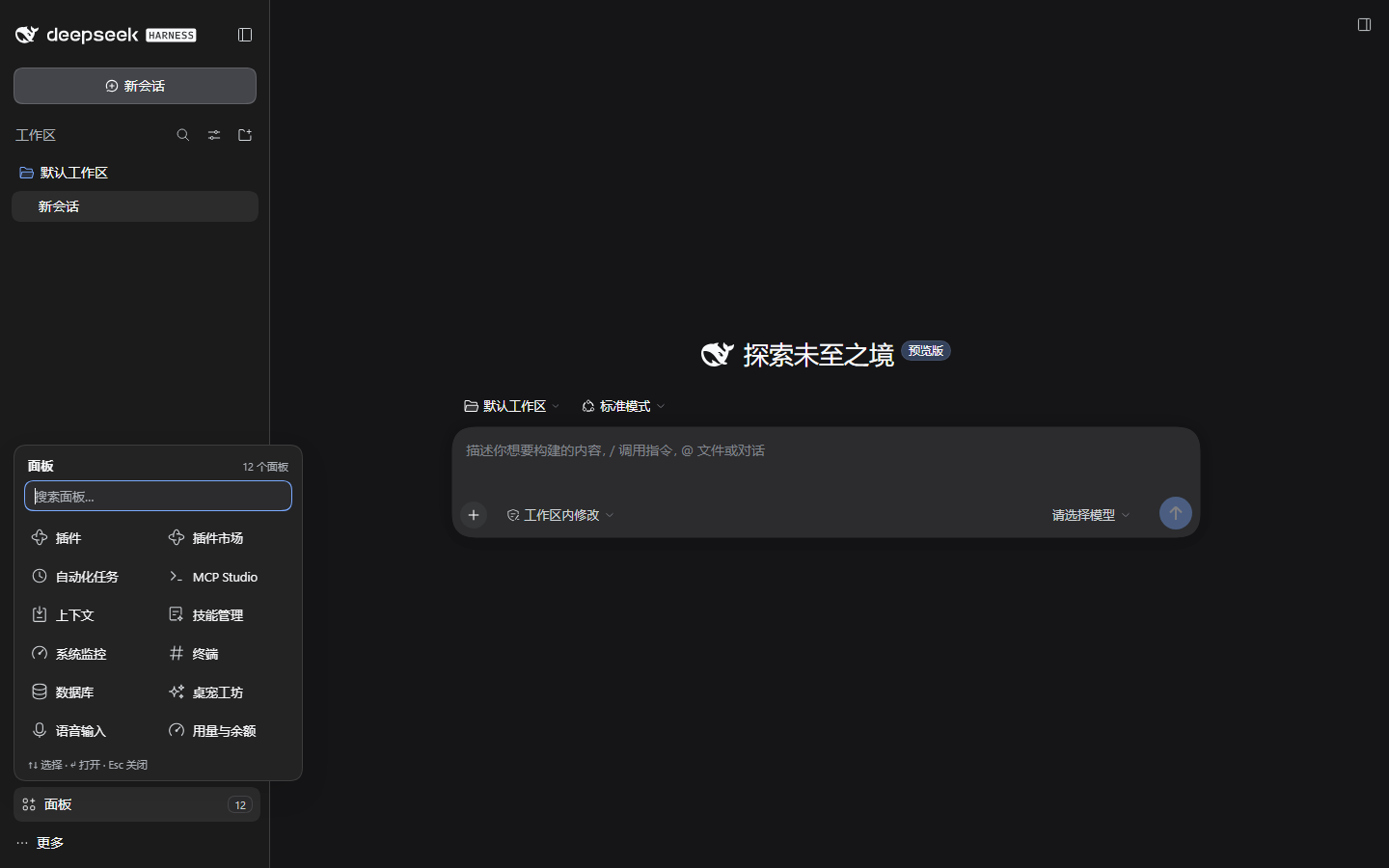 |
Install
Requires DSH (DeepSeek Harness) with the web profile — the desktop app uses the same client.
# straight from GitHub (no build step, no allowBuilds approval)
dsh plugin --profile desktop add github:wumouren114/dsh-sidebar-shelf

# or from a local clone
git clone https://github.com/wumouren114/dsh-sidebar-shelf.git
dsh plugin --profile desktop add ./dsh-sidebar-shelf
desktop is the profile name in this repository's examples; substitute web, tui, or whatever profile you run. After installing, enable the plugin in Settings → Plugins (it is added to dsh.profile.bundles) and reload the page.
Verify: the panel column is gone and a Panels row appears above Settings with a count badge. Click it — every registered panel is there, including "Plugins". Picking one opens it and closes the shelf.
This package ships a hand-written
lib/client.js: there is noprepare/postinstallscript, so a GitHub install never stops at pnpm'sERR_PNPM_GIT_DEP_PREPARE_NOT_ALLOWEDorERR_PNPM_IGNORED_BUILDS.
Requirements: DSH 0.2.x client, Node.js ≥ 20 for the CLI that installs it.
How it works
DSH's left sidebar is owned by @deepseek-ai/dsh-client-ui-sidebar. Third-party plugins cannot re-declare or re-order that list, but the shell publishes a small, stable contract:
| Contract | Use |
|---|---|
sidebar.panellist slot (root scope, list) | Every panel registers an icon component with id / order / label. The shelf reads this registry as the single source of truth. |
sidebar.footer.action slot (root scope, list) | Where the shelf trigger lives, next to Settings. |
ctx.layout.selectPanel(id) | The official way to open a panel; the shelf never fakes a click. |
ctx.layout.panelInfo | The selected-panel source, used for the active marker and the "you are here" trigger. |
Concretely, lib/client.js:
- reads
ctx.slots.entriesOfSlot("sidebar.panellist")and mirrors the sidebar's own sort (order, then registration order); - walks up from its footer node to the sidebar root (the element whose direct child is
<nav>) and sets one attribute; - a single scoped rule hides that
<nav>:[data-dsh-shelf="on"] > nav { display: none !important }; - renders the panelled shelf in a portal, with the panel's own registered icon component (wrapped in an error boundary that falls back to an initial);
- calls
ctx.layout.selectPanel(id)when a tile is chosen.
Nothing else is touched: no workspace rows, no brand row, no Settings, no host-side behavior, no DSH files. Unmounting the plugin removes the attribute and the stylesheet, and the native list comes back.
Verified
- DSH
0.2.1-rc.3, Windows, Chromium 1440×900 — 17/17 end-to-end checks, light + dark + 56px rail. node test/smoke.mjs— 10 manifest/bundle/wiring checks, no dependencies.
The screenshots above were produced by test/e2e.cjs against a throwaway profile; the panels in them come from a test-only fixture (test/demo-panels), not from shipped code.
Known limitations
- The native panel list is hidden entirely, including the built-in "More" menu (
Browse other plugins/Create your plugin). The Plugins panel is still one click away in the shelf. - One plugin, one job: there is no per-panel pin/hide policy yet. If you need "keep these three in the sidebar", say so in an issue — it is the natural v0.2.
- Do not pair it with another plugin that hides the same list (e.g.
dsh-toomuch-plugins,dsh-sidebar-organizer); pick one. - The DOM contract is the sidebar root's direct
<nav>child. If a future DSH release changes that structure, the worst case is an un-hidden list, never a broken sidebar.
Development
node test/smoke.mjs                  # static + wiring checks, no browser
node test/e2e.cjs <dsh-web-url>     # real UI checks + screenshots (needs puppeteer-core)
test/e2e.cjs expects NODE_PATH to point at a node_modules that contains puppeteer-core, and a Chromium/Edge binary (override with DSH_SHOT_BROWSER). The repo has no build step: lib/client.js is the shipped bundle.
License
MIT © wumouren114 — see LICENSE.
Comments
Loading…
Similar plugins
by ACGsu
Fold the DeepSeek Harness sidebar's global panel list into a single row, with a popover to switch panels.
★ 0
MIT
JavaScript
Oct 20, 2026
dsh plugin --profile web add dsh-sidebar-panel-foldby rivenshanghai
Collapses the global panel entries above the workspace in the DSH Web sidebar into a single toggle in the sidebar footer.
★ 1
MIT
JavaScript
Oct 30, 2026
dsh plugin --profile web add dsh-toomuch-pluginsby zuojinxin
让 DSH 的扩展入口和视图标签支持折叠、排序、隐藏。Collapse, reorder and hide the DSH sidebar extensions and the conversation view tabs.
★ 5
↓ 602/wk
MIT
JavaScript
Nov 2, 2026
dsh plugin --profile web add dsh-sidebar-managerby RiddanceY
Adds a footer button to the DeepSeek Harness sidebar that collapses or expands the global panel list.
★ 0
MIT
JavaScript
Oct 21, 2026
dsh plugin --profile web add dsh-panel-collapseby Alice-Marx
DSH plugin to collapse the sidebar tools area and remember its state.
★ 0
MIT
JavaScript
Oct 21, 2026
dsh plugin --profile web add @ljwei-stak/dsh-folding-windowsby zhujiuyi
Lists every entry that can appear in the left sidebar and gives each panel entry its own hide/show switch from a section in Settings.
★ 0
MIT
JavaScript
Oct 23, 2026
dsh plugin --profile web add @zhujiuyi/dsh-leftpanel