

dsh-folding-Windows
Manifest validDSH plugin to collapse the sidebar tools area and remember its state.
dsh-folding-Windows

让 DeepSeek Harness(DSH)侧边栏的功能区和工作区分别展开或收起,各自记住状态。 支持在工作区内置顶项目,并通过 DSH 的原生排序保存项目顺序。
DSH 插件类别: 用户界面与体验(UI/UX)
许可证: MIT
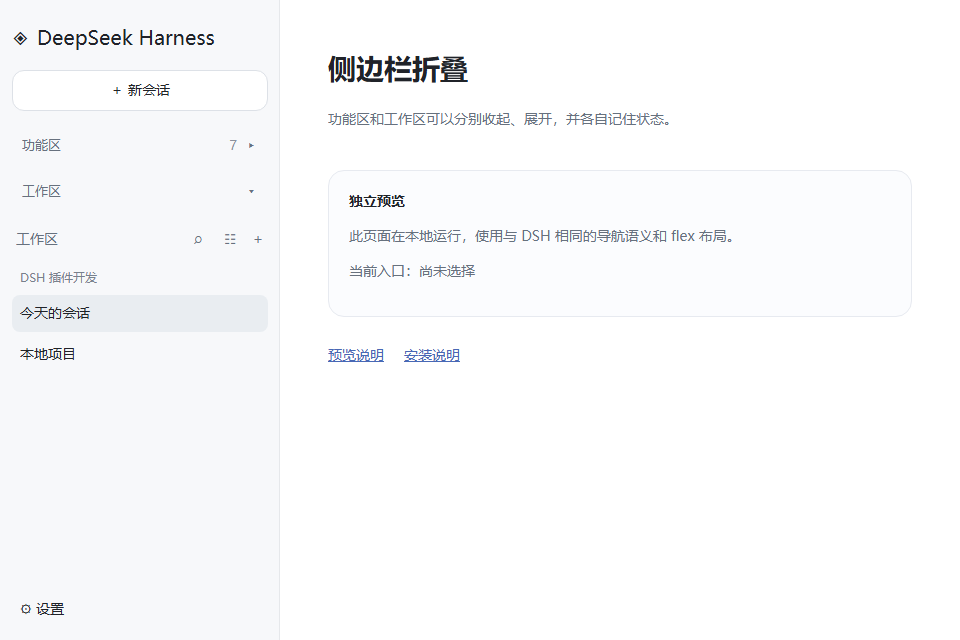
截图
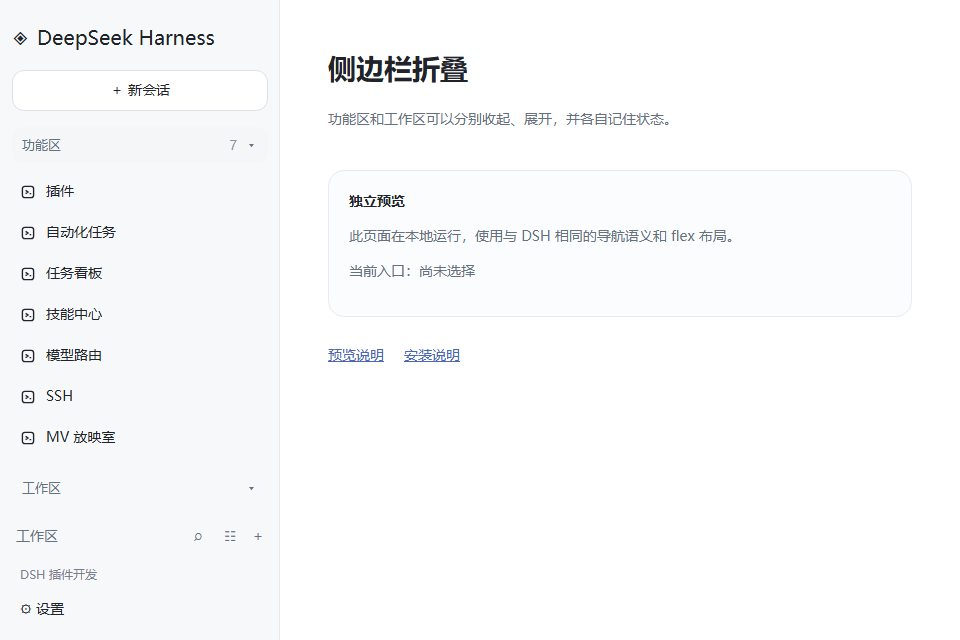
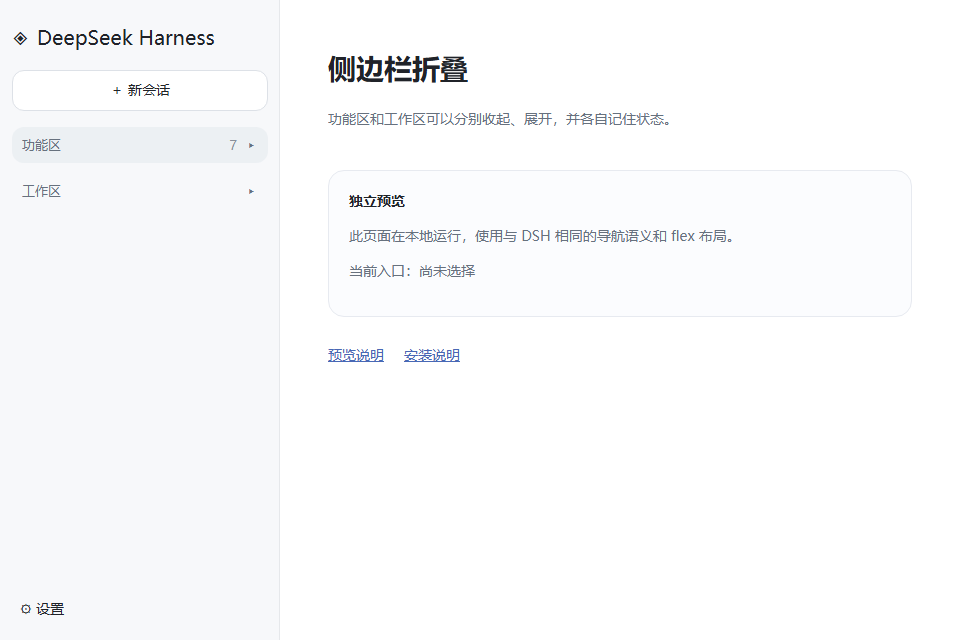
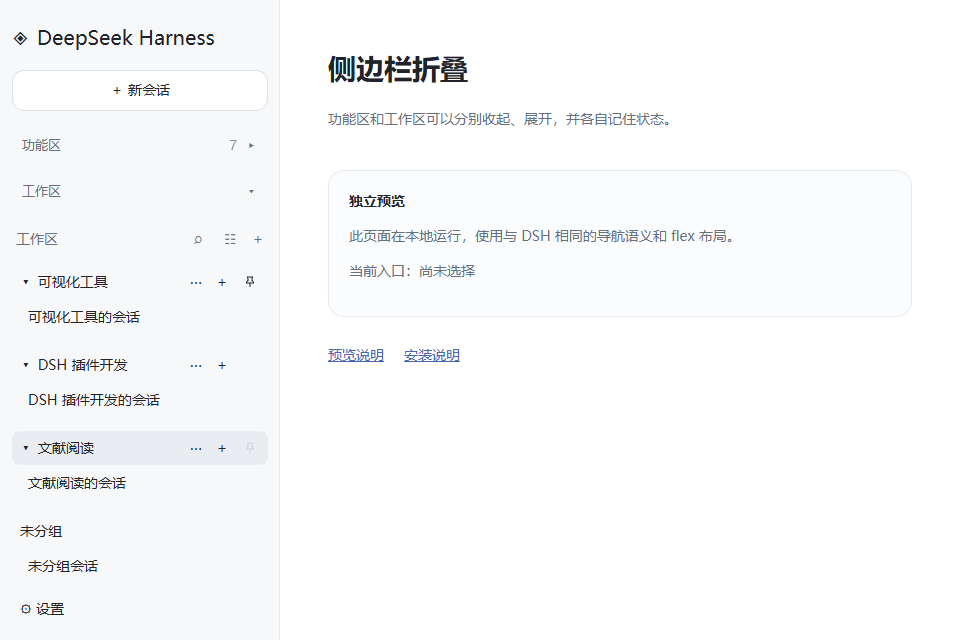
安装
需要已安装可运行的 DSH CLI 和 pnpm。在终端运行以下命令,将插件安装到 DSH 的 Web 配置:
dsh plugin --profile web add @ljwei-stak/dsh-folding-windows
dsh --profile web
如果希望直接从 GitHub 源码安装:
dsh plugin --profile web add github:Alice-Marx/dsh-folding-Windows
dsh --profile web
将 web 替换为使用 Web 界面的其他配置名。重新启动 DSH Web 配置后插件生效;更新或卸载可使用 dsh plugin --profile web update @ljwei-stak/dsh-folding-windows 或 dsh plugin --profile web remove @ljwei-stak/dsh-folding-windows。
支持的配置
- 安装目标:DSH Web 配置(例如
web);通过 DSH 的插件管理命令安装后,由 DSH 更新该配置的依赖清单和 Bundle 列表。 - 插件清单:根目录
package.json声明包名、版本、许可证、最低 DSH 版本及 Web 客户端平台。 - Bundle 配置:
cordis.patch.yml将插件的客户端模块加入 DSH 配置。 - 无需新增配置文件、环境变量或 API 密钥。折叠状态和项目置顶偏好按浏览器配置保存在
localStorage;清除该站点数据会重置这些偏好。
插件入口导出 apply(ctx),在 DSH 的效果生命周期中安装客户端增强;项目置顶通过 DSH 注入的 workspaces 服务调用原生排序能力。
权限与数据
- 读取并调整 DSH Web 界面的侧边栏 DOM,添加折叠按钮和样式,并观察界面节点变化以适配动态加载。
- 通过浏览器
localStorage保存两个区域的折叠状态和项目置顶偏好;通过 DSHworkspaces服务调整项目顺序。 - 此版本不发起网络请求,不访问文件系统、命令行、环境变量或凭据,也不向外部服务发送数据。
- 停用或卸载并刷新后,插件移除自身样式与按钮、恢复被隐藏的区域;项目顺序保留在 DSH 中。
兼容性
package.json声明的目标为 DSH>=0.2.0-rc.2,客户端平台为web。- 安装运行要求 Node.js
^22.19.0 || >=24.0.0(与package.json的engines.node一致)。 - 实测环境包括 DSH Web
0.2.1-rc.2;针对0.2.0-rc.2和0.2.1-rc.2的侧边栏结构也有浏览器夹具验证记录。 - 适用于 Windows 上的 DSH Web 界面及使用相同 Web 界面的部署。不适用于没有 Web 客户端界面的 headless 或 TUI 配置。
- 插件依赖 DSH Web 侧边栏的语义标签和 DOM 结构;若上游调整这些结构,插件可能需要更新适配。
使用
- 新增「功能区」按钮,点击即可展开或收起插件、自动化任务、任务看板、技能中心、模型路由、SSH、MV 放映室等入口。
- 新增「工作区」按钮,点击即可展开或收起整个工作区区域,包括其中的搜索、项目和会话列表。
- 功能区首次默认收起,工作区首次默认展开;两个区域的状态分别保存在当前浏览器配置中,刷新后保留。
- 新增或卸载其他插件时,功能入口数量自动更新。
- 支持 Tab 聚焦及 Enter / 空格操作;收起的入口不会进入 Tab 顺序。
- 收起整个侧边栏后,功能区开关随之隐藏;重新打开侧边栏时恢复原状态。
- 支持中文、英文以及 DSH 的深浅色主题。
项目置顶
在「按工作区」或「按工作区树」视图中,鼠标移到项目行,点击图钉即可置顶;已置顶项目保留图钉,点击可取消置顶。也可用 Tab 聚焦图钉后按 Enter 或空格。
- 多个置顶项目按最近置顶在前排列,刷新后保留;重命名不影响置顶记录。
- 项目和其所属会话一起排序;树形视图保留父子层级,在同级项目中优先显示置顶项。
- 取消置顶恢复本插件记录的普通顺序。项目置顶与两个区域的折叠状态分别保存。
- 纯会话视图没有项目行;切回工作区视图即可使用图钉。
- 置顶偏好保存在当前浏览器,项目顺序由 DSH 持久化。停用插件时保留当前项目顺序。
禁用或卸载本插件并刷新后,原来的功能入口和工作区恢复显示。存储不可用时仍可折叠,但刷新后回到各区域的默认状态。
开发与验证
无需运行时依赖,不修改 DSH 本体文件,不发送网络请求。通过官方客户端插件入口加载,使用「全局面板 / Global panels」「新建会话 / New session」「搜索会话 / Search sessions」等语义标签与侧边栏结构定位区域,保留 DSH 原有节点和点击行为。DSH 如果调整这些标签或结构,插件会停止增强,需适配后才能继续折叠。
npm ci
npx playwright install chromium
npm run build
npm run check
npm test
npm run preview
浏览器测试使用与官方侧边栏结构一致的夹具,覆盖折叠、展开、刷新记忆、动态入口、重挂、重复启用及卸载恢复。预览页面仅用于演示和测试,不是完整 DSH 应用。
源码位于 src/,项目排序逻辑和项目行按钮分别位于 pin-controller.js、project-pins.js。构建将源码合并,包装为 DSH 要求的 window.__ModuleLoader__.load({ id, factory }) 模块,产物为 lib/client.js。
许可
MIT
Comments
Loading…
Similar plugins
by miao-ge
DSH plugin: right-click menu on the left sidebar workspace rows - rename, delete workspace, open in VS Code, reveal in File Explorer, plus open in a new tab when dsh-project-tabs is installed.
★ 0
MIT
JavaScript
Oct 5, 2026
dsh plugin --profile web add dsh-sidebar-context-menuby ruanimal
Collapses the DSH Web sidebar panel menu (plugins, extensions, scheduled tasks, IM) from a vertical labelled list into a horizontal row of 36×36 icon buttons with hover tooltips; a Settings → General
★ 0
JavaScript
Sep 30, 2026
dsh plugin --profile web add dsh-sidebar-panel-buttonsby Minecraftbe
一个简单的工具调用折叠 / A simple tool call collapsing plugin for DSH Web GUI
★ 7
↓ 351/wk
MIT
JavaScript
Sep 16, 2026
dsh plugin --profile web add dsh-toolfoldby jamesct
a dsh plugin for file manager in current sidebar
★ 0
MIT
JavaScript
Oct 5, 2026
dsh plugin --profile web add dsh-file-managerA sidebar assistant plugin for the Web interface, allows users to select any text, displays the model’s reasoning process and final answer in a floating panel.
★ 0
dsh plugin --profile web add dsh-sidehelperby Han-1413141
DSH Web client plugin: collapse every expanded section (Think / tool cards) in the conversation in one click, with a customizable hotkey.
★ 2
MIT
JavaScript
Oct 2, 2026
dsh plugin --profile web add dsh-sticky-disclosure