

dsh-tool-highlight
Manifest validLayered syntax highlighting for bash/pwsh command and read code output in the DSH web GUI (VS Code Dark+ palette: keywords/strings/numbers/functions/comments each get a color); colors only what it rec
dsh-tool-highlight


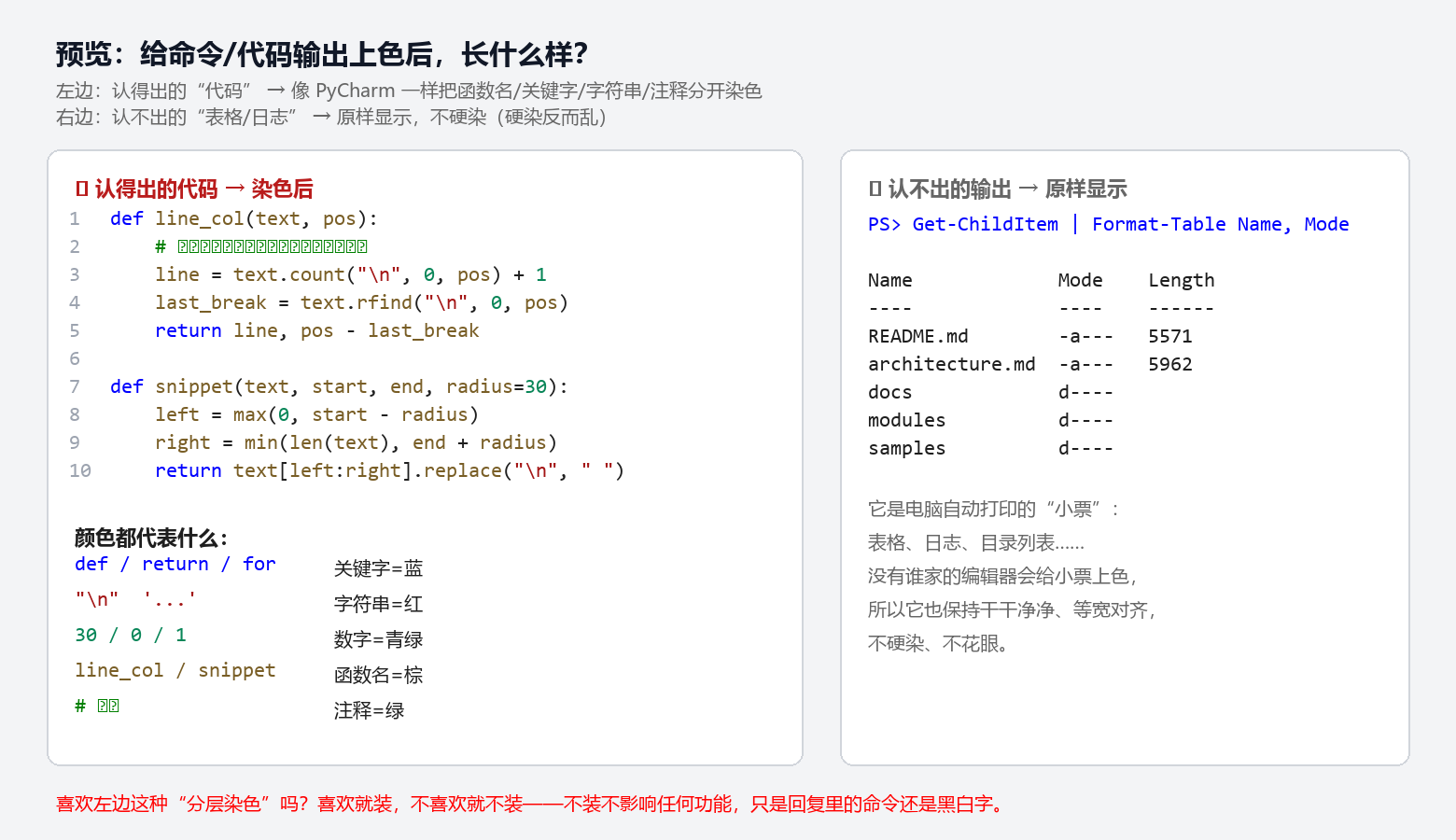
DeepSeek Harness(DSH)web 插件:给 bash / pwsh 命令与 read 的代码输出做分层语法染色(VS Code Dark+ 风格:关键字/字符串/数字/函数名/注释各一色)。认得出来才染,表格/日志保持原样。
纯前端渲染,不新增、不改写任何会话内容,不调用模型 —— 零 token 开销。
效果
- read 代码文件 → 按扩展名识别语言(
.py .js .ts .json .ps1 .sh ...),PyCharm 式分词染色 - bash / pwsh 输出 → 内容启发式识别:像 JSON 按键/字符串/数字分色;像代码按语法分色;表格/日志保持原样(硬染反而花眼)
- 附带退出码状态条(绿=成功 / 红=非零退出或信号)
- 默认折叠(可开关):read / bash / pwsh 卡片默认收起为一行标题(路径 + 状态条),点击标题行展开/折叠;运行中与出错时自动展开(看实时输出、不藏错误)。可在 设置 → 插件配置 → 工具卡片折叠 关闭此开关,恢复全部展开的旧行为。
效果预览图(左:代码染色 / 右:表格原样):
配置
| 键 | 类型 | 默认 | 说明 |
|---|---|---|---|
collapseByDefault | boolean | true | read / bash / pwsh 卡片默认折叠;设为 false 恢复全部展开。 |
入口:设置 → 插件配置 → 工具卡片折叠(开关即时生效,持久化到用户设置文档)。也可直接在 profile 的 cordis.yml / settings.yaml 写:
tool-highlight:
  collapseByDefault: true
安装
# 方式一:npm(推荐,即装即用)
dsh plugin --profile web add dsh-tool-highlight

# 方式二:GitHub 源
dsh plugin --profile web add github:vollegrewar/dsh-tool-highlight

# 方式三:本地 link(开发用)
dsh plugin --profile web add link:/path/to/dsh-tool-highlight
装完 重启 dsh web 并硬刷新(Ctrl+Shift+R)。
若用 GitHub 源安装遇到 pnpm 的
allowBuilds提示,按提示把dsh-tool-highlight加进 profile 的pnpm-workspace.yaml白名单即可;本插件无构建脚本,npm 安装不会触发。
与 dsh-better-tool-ui 共存
本插件只接管 read / bash / pwsh 三个工具卡(priority -2),
dsh-better-tool-ui 继续负责 write/edit 的 diff、彩色状态条等其余工具——各管各的,互不冲突。
不装 better-tool-ui 也能单独使用。
工作原理
- 挂在 DSH 官方空 keyed 槽位
tool.call.toolview上,按工具名注册渲染器 - 语言识别:
read按文件扩展名;命令输出按内容启发式(JSON 可解析 → JSON;代码特征行 ≥2 → Code;否则纯文本) - 分词染色器为自研轻量正则(零运行时依赖),配色 VS Code Dark+,明暗主题跟随 DSH 主题 token
常见问题
会增加 token 消耗吗? 不会。纯前端渲染:不改写会话内容、不调用模型,读取已有文本重新上色而已——和把 Word 字变颜色同理。
为什么表格/日志不上色? 认不出的内容硬染反而花眼(没人会给打印小票上色)。这是"认得出来才染"的设计,不是缺功能。
和 dsh-better-tool-ui 冲突吗? 不冲突。本插件只接管 read / bash / pwsh(priority -2),better-tool-ui 继续管其余工具。
开发与贡献
- 逻辑测试:
npm test(无头运行分词器 + 语言识别,失败非零退出) - 贡献指南见 CONTRIBUTING.md,更新记录见 CHANGELOG.md
- English: README.en.md
License
Compatibility
Versions
| Latest version | Published | Size |
|---|---|---|
| 0.2.6 | — | — |
| 0.1.0 | — | — |
| 0.1.1 | — | — |
| 0.2.0 | — | — |
| 0.2.1 | — | — |
| 0.2.2 | — | — |
Comments
Loading…
Similar plugins
by JanEickholt
Renders edit and write tool calls as always-expanded side-by-side diffs styled like git diff, with optional syntax coloring and word-level highlighting.
★ 2
↓ 203/wk
MIT
JavaScript
Oct 29, 2026
dsh plugin --profile web add dsh-inline-diffby YaoaY
为 DSH Web 的助手 Markdown、工具调用和 Think 内容提供可自定义的语义配色。Customizable semantic color accents for assistant Markdown, tool calls, and Think blocks in DSH Web.
★ 4
↓ 25/wk
MIT
TypeScript
Oct 20, 2026
dsh plugin --profile web add dsh-conversation-accentsby Yokira404
自动标注提示链中的关键词Keyword counts and highlighting for DSH thinking rows
★ 0
MIT
JavaScript
Sep 29, 2026
dsh plugin --profile web add github:Yokira404/dsh-thinking-highlight
No screenshots
by ruegg114514
Chat UI colour theme plugin for DeepSeek Harness. Ships the Mariana palette as its default preset and adds a colour engine: 18 adjustable colour slots, 9 Markdown prose roles, saved presets, WCAG contrast hints and light/dark modes.
★ 1
NOASSERTION
JavaScript
Oct 27, 2026
dsh plugin --profile web add dsh-colorlabby MoYu-CN
Extra light and dark color themes for the DSH UI, registered as pure color tokens on top of the official theme runtime.
★ 0
MIT
JavaScript
Oct 12, 2026
dsh plugin --profile web add dsh-theme-packby jsdvjx
Session strata for the DeepSeek Harness Web GUI: the transcript's scrollbar becomes a to-scale, colour-coded map of the whole run, with your own messages emphasised and clickable anchors.
★ 95
↓ 165/wk
MIT
JavaScript
Sep 11, 2026
dsh plugin --profile web add dsh-strata