

dsh-desktop
Manifest valid★ 485DeepSeek Harness Desktop App: a local AI desktop workspace for DSH Sessions, projects, files, web research, plugins, and Office artifacts.
DSH Desktop
DSH Desktop 插件集成版(DSH Desktop Bundle Edition)—— 把官方 DSH Web、社区插件和桌面能力装进一个开箱即用的应用。
对话、文件、Git、终端、任务、Worktree 与插件市场,都运行在同一个 DSH Profile 中。






DSH Desktop (Bundle Edition) is a community-maintained desktop distribution. It runs the official DeepSeek Harness npm runtime and the official dsh-web-app directly, and ships a set of pinned, verified community Bundles. You don't need to set up the environment, hunt for plugins, or maintain a separate plugin state — just open the app and start working from a single Profile.
Official site · Latest download · Mobile remote · Getting started · Install plugins
Download
| Platform | Installation | Status |
|---|---|---|
| macOS Apple Silicon | Download the .dmg and drag into "Applications" | Developer ID signed and Apple notarized |
| Windows x64 | Download the .exe, choose install scope and client directory | Follow the artifacts provided on the current Release page |
| macOS Intel / Linux | No official installer yet | Can be run from source |
For direct links and file sizes per platform, see the official download page; for common first-run issues (Gatekeeper, SmartScreen, API Key, domestic downloads), see the official FAQ.
The client install directory only stores the application. Profiles, plugins, Sessions, and other DSH data are managed by a separate data directory; moving the client installation location does not migrate or delete that data.
Works out of the box
官方对话与 Agent主窗口就是官方 DSH Web。Session、Agent、Tool、Skill、MCP、设置和历史由 DSH 自己管理,没有第二套 Chat 页面。 |
Better Sidebar 工作台内置文件树、代码与 Markdown 编辑、Git、终端、网页与扩展 Tab。0.18.0-alpha.0 对接当前 alpha SDK,并保留多仓库、Worktree、Vue 文件和本地 Markdown 图片等能力。 |
插件市场在官方设置页里发现、安装、更新、停用和卸载插件。界面、CLI 和应用重启都以同一个 Profile 为准。 |
任务、附件与 Worktree任务看板、文件和文件夹附件、Git Worktree、项目工具、Office 与结构化结果都由独立 Bundle 提供,可以按需组合。 |
桌面 Host 与恢复应用负责窗口、原生文件选择、更新、启动和恢复。正式安装包通过右上角按钮提示更新,悬停可看更新日志,点击后才下载、预检 Profile 并安装;Profile 或 Client 出错时进入恢复页。 |
可复现的默认环境新 Profile 从随包固定产物离线初始化;普通启动不重写已有 Profile,也不会把用户卸载的插件悄悄装回来。 |
手机远程登录并启用当前电脑后,可以从 Android、Remote Web 或另一台 Desktop 继续同一 Workspace 和 Session。Host 只建立出站连接,不开放公网监听端口。 |
明确的服务边界当前账号、设备目录、信令和中继由第三方服务提供;连接方式、安全边界和停用方法见手机远程说明。 |
Interface
Chat, question cards, approvals
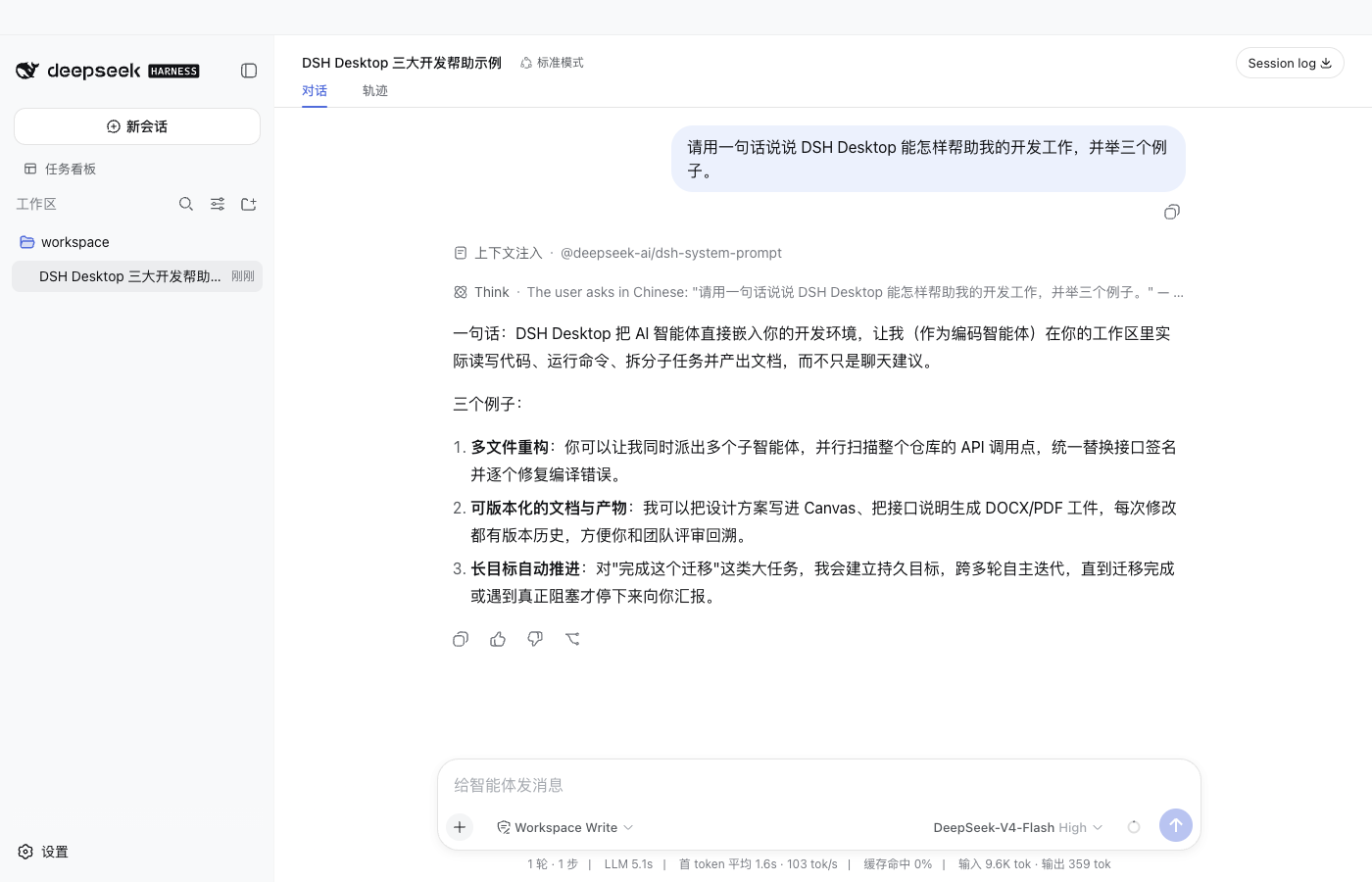
Conversations, tool approvals, question cards, queued messages, and replay stay in the official Session.
Plugin market in official settings
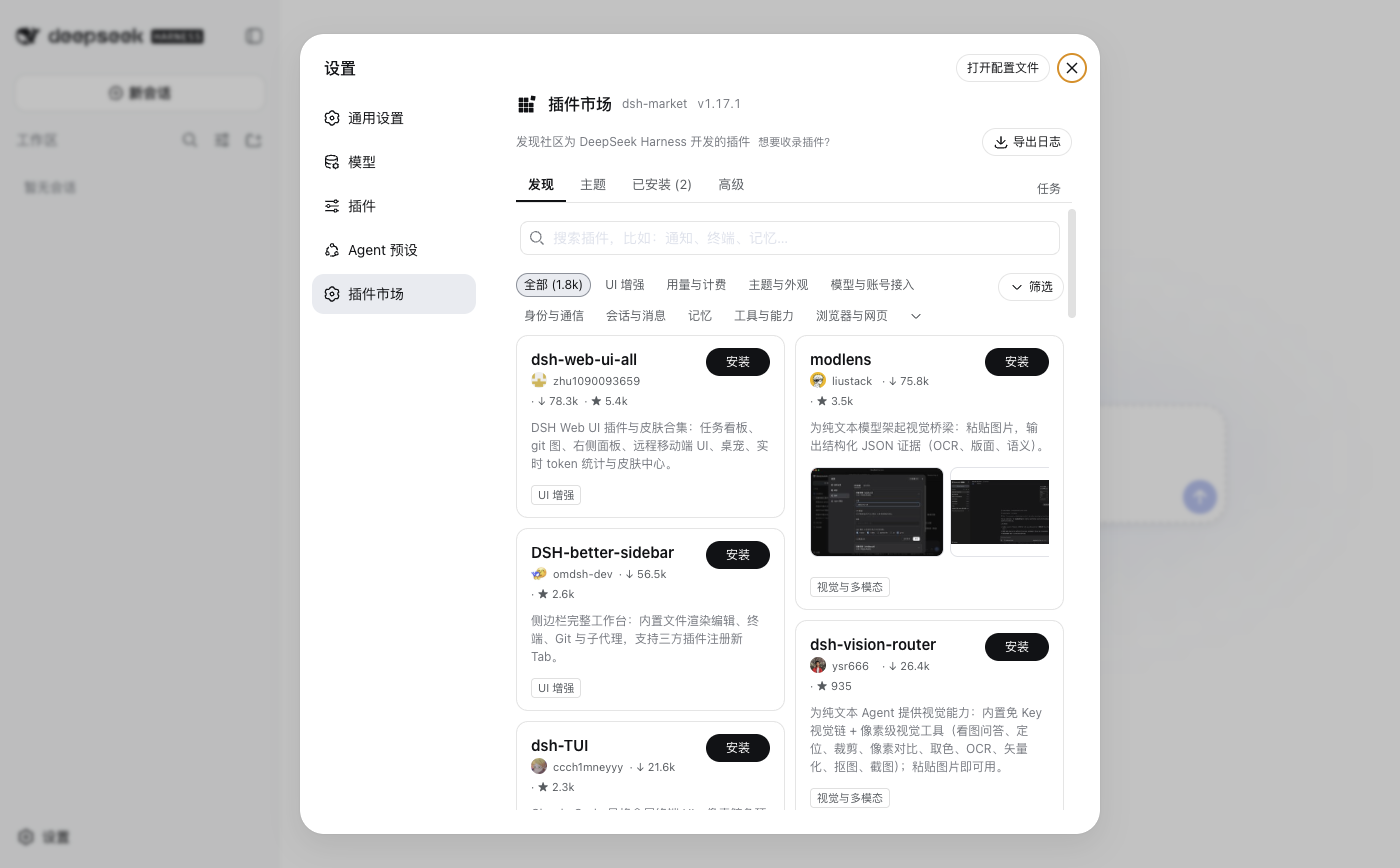
The plugin marketplace uses the official settings slot — no separate settings page or plugin database.
Git Worktree Workspace
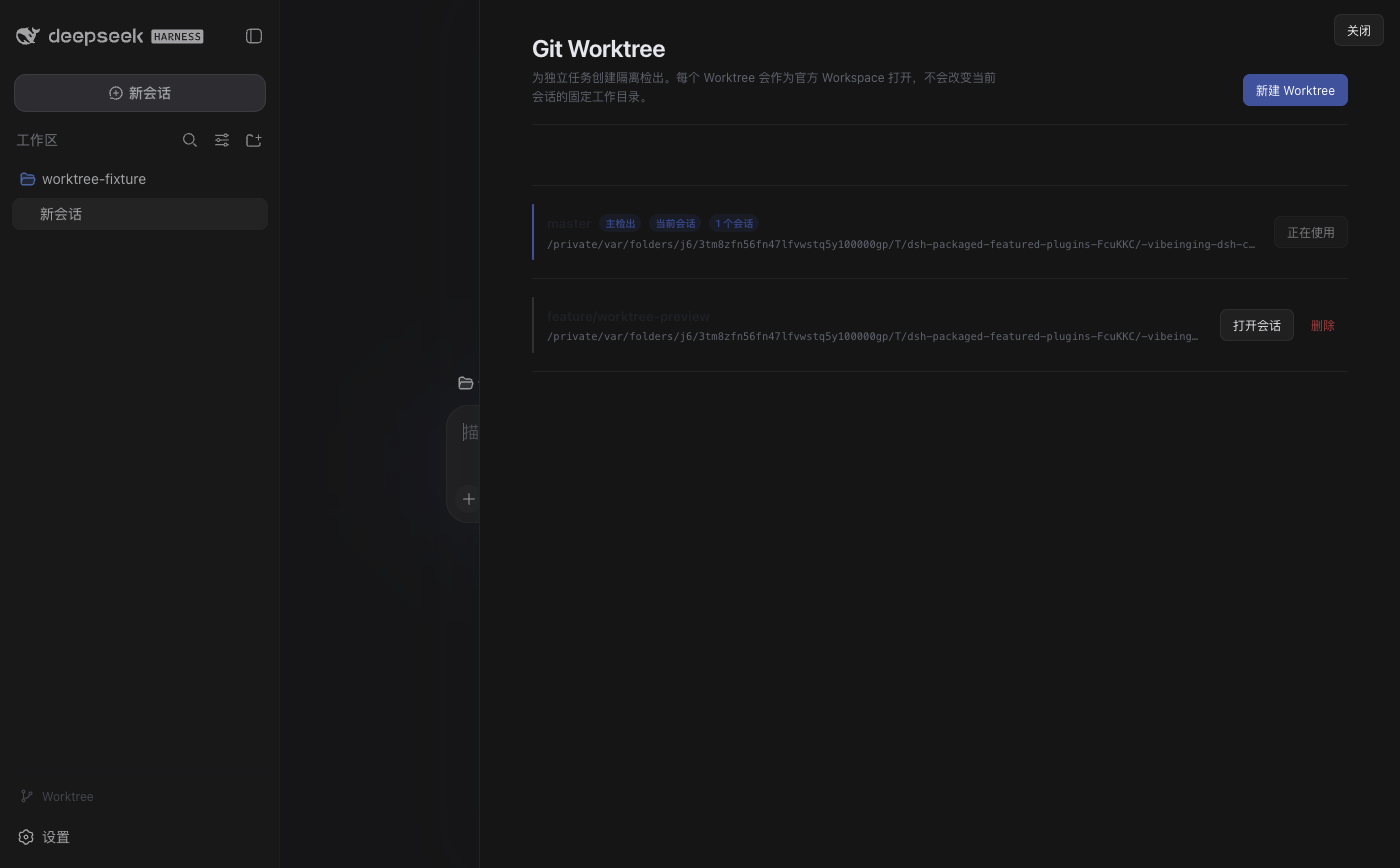
Create an isolated Worktree from the current Session's working directory, and set up an official Session for the new workspace.
Built-in by Default: Phone Remote
New Profiles include the precisely pinned ds-harness-remote@0.4.1 by default, shipped together with the DSH 0.1.5-rc.1 trial line. Once you open Remote in the sidebar, sign in, and enable remote access for the current computer, you can open the same Host's Workspace and Session from Remote Web, the Android app, or another Desktop, to continue conversations, send images, and handle permission requests.
- Network boundary: The Host only establishes outbound connections and does not open public-listening ports; Remote attempts LAN, P2P, TURN, and Relay in sequence, and all paths carry business traffic encrypted with Noise IK.
- Account & data: Currently connects by default to the third-party account, device directory, signaling, and relay services on
dsh.r2049.cn; device identity and credentials are stored inDSH_HOME. Remote access is not offered until you sign in and enable it for the current computer. - Authorized devices: The current Harness is controlled through a pinned Harness API allowlist; the Agent can still run tools with its original permissions. Direct Shell, PTY, or generic file RPC are not exposed.
- Uninstalling: Existing Profiles that get upgraded will receive this default Bundle once; if you disable or uninstall it, application updates will not restore it.
dsh plugin --profile web remove ds-harness-remote
No supported self-hosted server is offered yet; independent security review, real cross-network two-machine testing, and long-term stability verification remain incomplete. If you don't need remote, just uninstall it. The desktop build applies a SHA-256-verified compatibility projection to this pinned tarball without modifying official DSH or upstream source. See Phone Remote notes for connection methods, security boundaries, and how to disable.
Special thanks to DeepSeek Harness Remote Web for providing the community with the currently available remote entry point and companion services, enabling DSH Desktop users to keep working from their phone or browser.
Built-in: Session Teams
New Profiles include @vibeinging/dsh-session-teams@0.1.1 by default. It lets DSH session windows collaborate directly with each other:
- Send a message to another window: Tell the current window "hand this off to
窗口名", and the message appears in the target as a real DSH message — visible, persistent, and clickable to trace back to source. - Let one window be the lead: Create a group of windows with roles, assign tasks and dependencies; members report results with real messages, and the lead adjusts tasks in natural language without memorizing IDs.
All team and window state is read/written via the official Session API on the current Profile; no external network connections are made. Uninstall anytime:
dsh plugin --profile web remove @vibeinging/dsh-session-teams
Why This Route
| What you care about | How DSH Desktop handles it |
|---|---|
| Does it depend on a private frontend | It loads the official Web and npm runtime directly, without maintaining a private Chat fork |
| Can community plugins be used as-is | Regular UI, Tool, and workflow plugins continue to use the official Bundle, Service, and Slot |
| Will plugin state get out of sync | The official Profile is the single source of truth; the marketplace, settings, and CLI all operate on the same data |
| Are default plugins trustworthy | Pinned versions, integrity, permissions, dependencies, and licenses, plus retained offline install artifacts |
| Are native capabilities too broad | File, window, and Browser Workspace features are only exposed through a limited set of methods bound per Session |
| Will startup overwrite configuration | Existing Profiles keep user choices; on failure the original Profile is preserved and a recovery page is shown |
| Will app updates modify plugins | A read-only pre-check of the Profile runs before updates; Bundles the user has disabled or uninstalled are not restored |
Electron here is a very thin desktop Host layer. The real Agent, sessions, and plugin system still belong to DSH; the project's own features are also broken down into Bundles wherever possible. This way, portable plugins can be installed into both the compatible official Web and DSH Desktop, and only desktop-specific capabilities use the explicit desktop-adapter.
Getting Started
- Download the installer for your platform from Releases.
- Launch the app, choose a working directory, or create a session directly.
- Open files, Git, or the terminal in the sidebar; add files and folders in the input box.
- When you need more capabilities, open "Settings → Plugin Marketplace".
Model credentials are managed by DSH settings and local environment. The project never writes API keys into README, screenshots, or plugin manifests.
Installing More Plugins
Use "Settings → Plugin Marketplace." It lists source, version, compatibility, and permissions; still check upstream docs before installing — listing does not imply this project has audited or bundled it.
You can also use the official CLI to operate on the same Profile:
dsh plugin --profile web add -w <package>@<exact-version> --save-exact --ignore-scripts
dsh plugin --profile web remove <package>
Plugins that conform to the official DSH Bundle and dshClient contracts do not need to be rewritten specifically for DSH Desktop. Plugins that require windows, native file dialogs, or a Browser Workspace must explicitly use DSH Desktop's narrow Host contracts; when these capabilities are missing in other hosts, they should simply report it.
Optional Example: Skin Center
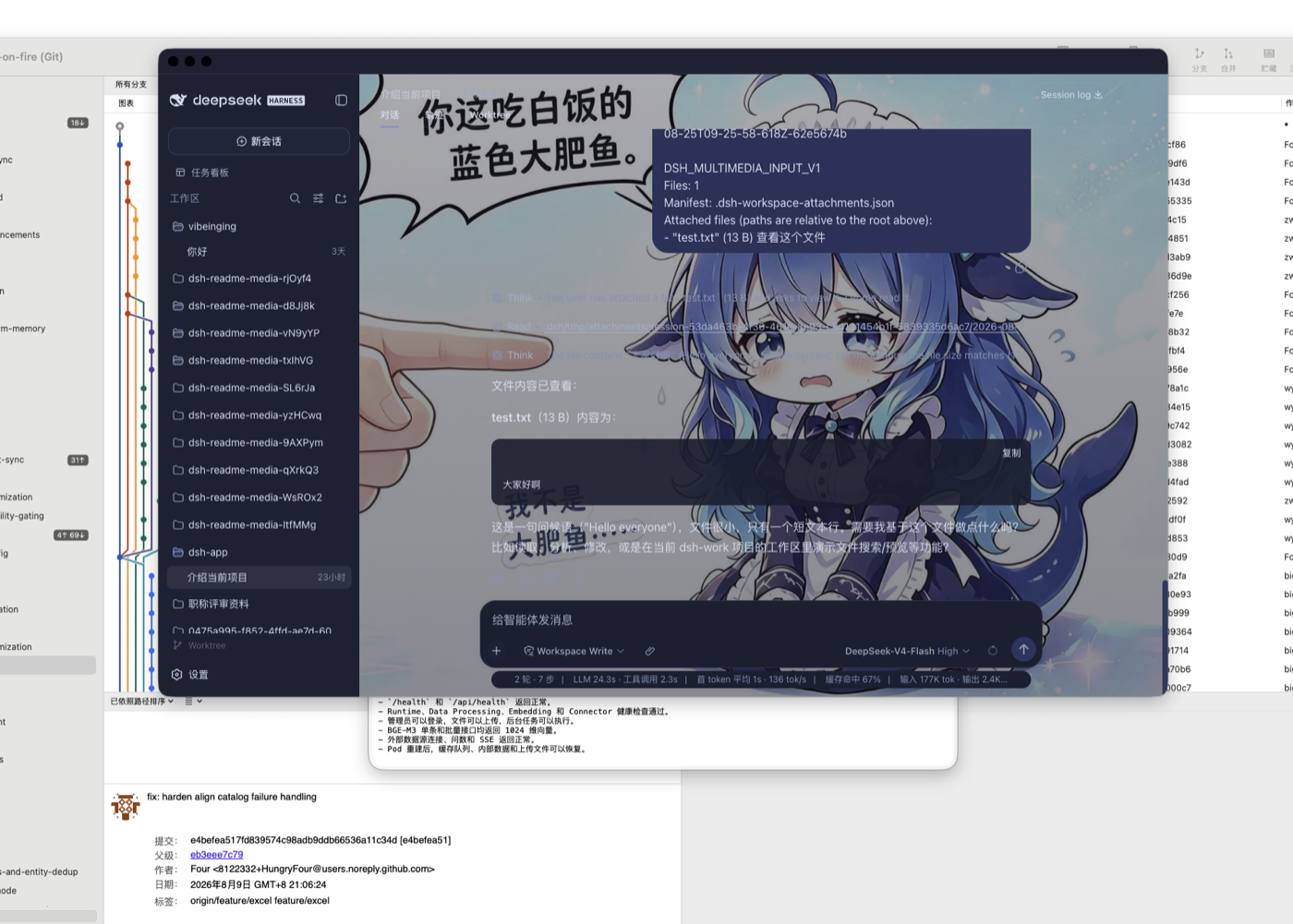
The app keeps the official Web look by default. If you want a personalized interface, you can install the community-maintained Skin Center from the plugin marketplace (@linxin666/dsh-client-ui-skin-center): dozens of skins take effect on try-on, are not written to disk and can be reverted, and the official look can be switched back to at any time.
dsh plugin --profile web add @linxin666/dsh-client-ui-skin-center
Each skin asset carries its own upstream license (some CC BY-NC-SA or character-licensed), so the Skin Center is not built in by default; users opt in via the marketplace.
Default Plugins
A new Profile includes Better Sidebar, dshmarket, task board, attachment input, Git Worktree, mobile remote, session window teams, as well as project, Canvas, Office, structured result, and model inheritance capabilities by default. All manageable bundles can be disabled or uninstalled.
查看新 Profile 默认安装的 16 个 Bundle
| 默认 Bundle | 类型 | 声明权限 | 官方管理方式 | 来源 |
|---|---|---|---|---|
@vibeinging/dsh-work-product-host-ipc | desktop-adapter | dsh-work-parent-ipc、browser-workspace-host、file-dialog-host、window-host | 桌面基础服务,不提供卸载 | 本地包 |
@vibeinging/dsh-desktop-profile-host | desktop-adapter | dsh-profile-filesystem、controlled-pnpm-runtime、dsh-cli-runtime | 桌面基础服务,不提供卸载 | 本地包 |
@vibeinging/dsh-desktop-chrome | desktop-adapter | 无 Host 权限 | dsh plugin --profile web remove @vibeinging/dsh-desktop-chrome | 本地包 |
@vibeinging/dsh-project-tools | desktop-adapter | product-host | dsh plugin --profile web remove @vibeinging/dsh-project-tools | 本地包 |
@vibeinging/dsh-canvas-tools | desktop-adapter | product-host | dsh plugin --profile web remove @vibeinging/dsh-canvas-tools | 本地包 |
@vibeinging/dsh-structured-ui-tools | desktop-adapter | product-host | dsh plugin --profile web remove @vibeinging/dsh-structured-ui-tools | 本地包 |
@vibeinging/dsh-model-inheritance | portable | 无 Host 权限 | dsh plugin --profile web remove @vibeinging/dsh-model-inheritance | 本地包 |
@vibeinging/dsh-product-bridge | desktop-adapter | product-host | dsh plugin --profile web remove @vibeinging/dsh-product-bridge | 本地包 |
@vibeinging/dsh-office-tools | desktop-adapter | office-artifact-host | dsh plugin --profile web remove @vibeinging/dsh-office-tools | 本地包 |
@vibeinging/dsh-client-ui-worktree | portable | 无 Host 权限 | dsh plugin --profile web remove @vibeinging/dsh-client-ui-worktree | 本地包 |
@linxin666/dsh-client-ui-task-board | portable | 读取当前 DSH Session、Workspace 与完成历史、在 DSH_HOME 写入任务账本和执行记录、按用户操作或 Host cron 启动 DSH Session 任务、可选启动固定的跨平台防休眠 helper | dsh plugin --profile web remove @linxin666/dsh-client-ui-task-board | 上游仓库 |
ds-harness-remote | portable | 连接 dsh.r2049.cn 的外部账号、设备目录、信令、TURN 与 Relay 服务、从同一账号下的 Web、Android 或另一台 Desktop 读取并控制当前 Harness 的 Workspace、Session、模型、权限、设置与凭据写入、在 DSH_HOME 保存长期 X25519 设备身份私钥和设备凭据、通过固定 Harness API 白名单运行远程请求;不开放直接 Shell、PTY 或通用文件 RPC,但 Harness Agent 仍可按原权限运行工具 | dsh plugin --profile web remove ds-harness-remote | 上游仓库 |
dsh-multimedia-webui-input | portable | 读取用户主动选择的文件和文件夹、向当前 Session 工作区的 .dsh/tmp/attachments 写入附件、按用户二次确认清理带插件所有权标记的附件目录 | dsh plugin --profile web remove dsh-multimedia-webui-input | 上游仓库 |
dsh-better-sidebar | portable | 读取、搜索、创建、修改和删除当前 Session 工作区文件、在当前 Session 工作区执行 Git 操作、启动和停止本地终端进程;模型终端工具默认关闭、打开用户输入的网页或外部编辑器,并接收用户主动上传的文件、用户开启后向模型注册 sidebar_open 工具,用于在当前会话侧栏打开工作区文件、文件夹或 HTTP(S) 页面;默认关闭 | dsh plugin --profile web remove dsh-better-sidebar | 上游仓库 |
dshmarket | portable | 读取和修改当前 DSH Profile 的依赖、Bundle 顺序和启停状态、通过受控 pnpm 安装、更新和卸载用户确认的插件、访问插件目录、npm、GitHub 以及用户配置的 WebDAV 或 Gist、导出或导入包含 Profile 配置的备份 | dsh plugin --profile web remove dshmarket | 上游仓库 |
@vibeinging/dsh-session-teams | portable | 跨当前 Profile 的可见会话窗口读取、路由并转发消息与任务(含子智能体接力)、通过官方 Session API 在 Profile 会话存储中写入团队、任务与可见窗口中继状态、按需创建顶层会话窗口,以当前工作区、模型与权限组合子智能体团队并执行调度 | dsh plugin --profile web remove @vibeinging/dsh-session-teams | 上游仓库 |
插件选择、权限和离线边界见插件市场选择与桌面接入。
从源码运行
需要 Node.js 24 或更高版本:
git clone https://github.com/vibeinging/dsh-desktop.git
cd dsh-desktop
npm install
npm run doctor
npm run dev:electron
本地构建 macOS Apple Silicon App:
npm run package:mac:dir
open "release/mac-arm64/DSH Desktop.app"
本地目录包用于开发;面向普通用户的签名安装包以 GitHub Release 为准。
数据与权限
- Profile、插件、Session 和本地运行数据默认保存在
~/.dsh,可通过DSH_DATA_ROOT修改,与客户端安装目录无关; - 官方 Web 没有产品 preload、Node 权限或通用 IPC;
- 文件与目录只有在用户主动选择或插件已声明权限时才进入当前 Session;
- 插件启动失败不会静默修改原 Profile;恢复页可重试、安全启动、移除问题插件和导出过滤后的诊断;
- 正式安装包通过官网查询更新,用随机安装 ID 统计近期活跃客户端;安装包仍来自本项目公开 GitHub Release,用户确认后才下载和安装,退出统计方式见隐私说明;
- 第三方 Bundle、原生二进制与视觉资产各自遵守上游许可证和再分发条件。
与其他社区桌面项目的区别
DSH Desktop 选择“官方 Web 单一界面 + 官方 Profile 单一权威 + 精选社区 Bundle + 窄 Native Host”。它不追求再做一套完整前端,而是把桌面体验做成 DSH 插件生态的一个可靠发行组合。
DSH Desktop by anywhere-labs 是另一个独立社区桌面发行版,更强调完整桌面 Shell 与跨平台客户端体验;dataelement/dsh-desktop 也是独立社区项目。三个项目的代码、发行和路线互不从属,用户可以按界面、插件方式和平台产物选择。
相关项目
| 项目 | 关系 |
|---|---|
| dsh-website | 本项目官网(DSH Desktop Station · dshdesktopstation.com) |
| DeepSeek Harness | Agent、Session、Tool、Skill、MCP、Profile 与官方 Web 运行时 |
| Cordis | 插件化基础 |
| DSH Better Sidebar | 默认工作区侧栏、编辑器、Git 与终端 |
| dsh-market | 默认插件市场 |
| dsh-session-teams | 默认会话窗口团队 Bundle(本项目维护,@vibeinging/dsh-session-teams) |
| dsh-web | 任务看板与皮肤中心的上游社区生态仓库(Apache-2.0) |
| dshfind | DSH 学习、分享与插件发现社区 |
与 DeepSeek Harness 的关系
DSH Desktop 是基于 DeepSeek Harness 与 Cordis 插件体系构建的独立社区项目。“DeepSeek Harness”仅用于说明兼容性和技术来源。本项目与深度求索不存在隶属、合作、授权或背书关系。
许可证
项目代码使用 MIT License。第三方组件、固定 tarball、原生二进制和视觉资产的来源与分发条件见 THIRD_PARTY_NOTICES.md。
Comments
Loading…
Similar plugins
by Nono-neko
An AI-native browser workspace for DeepSeek Harness (DSH), combining multi-tab browsing, live page annotations, lightweight code editing, workspace previews, and Agent-assisted iteration across Web an
★ 13
↓ 254/wk
Apache-2.0
TypeScript
Oct 2, 2026
dsh plugin --profile web add @nono-neko/dsh-browserby euanguo
DSH Studio — a local development workbench for DeepSeek Harness: project tree, Git review, terminal, and plugin marketplace (Desktop + Web)
★ 12
MIT
TypeScript
Aug 30, 2026
dsh plugin --profile web add @dsh-studio/desktopby staff-os
An enterprise workbench for the DeepSeek Harness: AI employees, knowledge bases, skills, MCP servers and DSH plugins, all manageable from a running session.
★ 4
MIT
JavaScript
Aug 25, 2026
dsh plugin --profile web add @staff-os/dsh-workbenchby rifkyazizf
small session tabs plugin for the DeepSeek Harness (dsh) desktop app
★ 0
MIT
JavaScript
Oct 8, 2026
dsh plugin --profile web add dsh-session-tabsby ltmroberthk915
Windows Computer Use for DeepSeek Harness with screenshots, UI Automation, 18 desktop tools, per-Agent activation, human-input handoff, approval prompts and prebuilt native workers.
★ 4
↓ 314/wk
MIT
JavaScript
Oct 19, 2026
dsh plugin --profile web add dsh-codex-style-computer-useby CaT-Hode
Windows desktop plugin for DeepSeek Harness — shared Web sessions and plugins, startup logs and update recovery. DSH 桌面插件:共用 Web 对话与插件。
★ 0
MIT
JavaScript
Oct 21, 2026
dsh plugin --profile web add dsh-app