

dsh-session-tabs
Manifest validsmall session tabs plugin for the DeepSeek Harness (dsh) desktop app
dsh-session-tabs
JetBrains-style session tabs for the DSH Web GUI: one tab per chat session, in a strip at the top of the conversation panel.
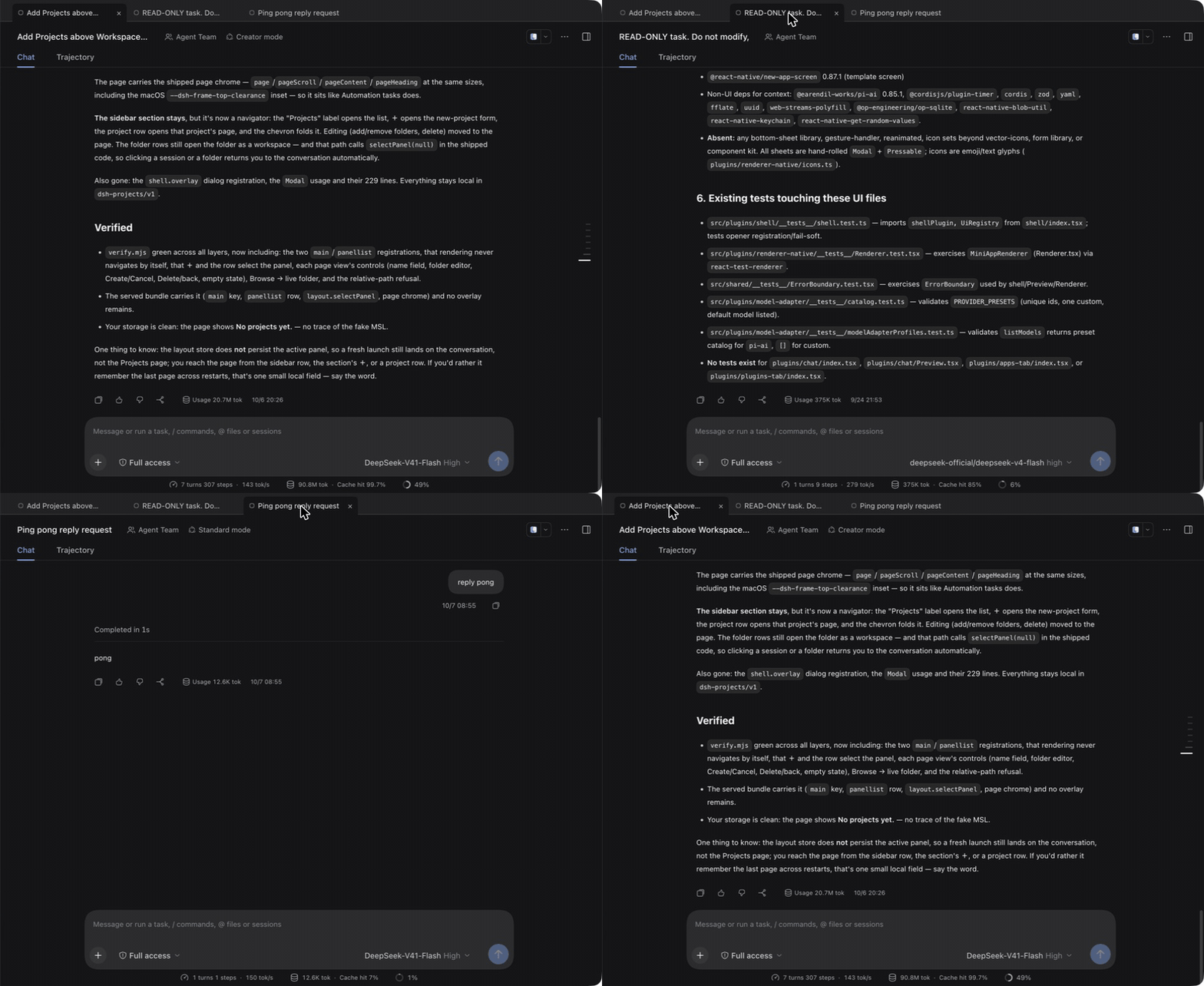
│ ● Add DeepSeek… × │ ● Fix the login bug │ ● vendor sync │
A session you sent a message in keeps its tab. A session you merely opened is one disposable tab that the next open replaces, so clicking through the sidebar never leaves a trail of tabs.
The rule
This is the editor-tab behaviour from JetBrains, with sessions in the role of files:
| Session | Tab |
|---|---|
| You sent a message in it | An ordinary tab that stays |
| You only opened it | The single "preview" tab, replaced by the next open |
The stick signal is not tracked by this plugin. The session list already
carries it as blank:
A blank session is the selected Workspace's provisional New Session row.
blank === false therefore means the session has real content. The host sets it
on the first accepted prompt (promptAttempted, set synchronously before the
first await) and its reducer deliberately refuses to re-blank a session
afterwards:
handleBlank(blank) {
  if (blank === this.blankBit) return;
  if (blank && (this.promptAttempted || this.running)) return;  // sticky
  ...
}
So "sent a message" is the host's own durable notion of it, already computed and already sticky. Delegating to it means the strip cannot disagree with the rest of the UI about whether a session has been used, and there is no local bookkeeping to drift or to persist.
Two properties follow, and both are tested:
- Order is engagement order, not recency. Revisiting an old tab does not reshuffle the strip under the pointer.
- The preview is always last, because it is the one that will be replaced.
Subagent sessions are excluded: they are reached through their parent's breadcrumb rather than by switching the conversation, so a tab for one would misrepresent what the strip does. Nothing is capped or recycled: every engaged session keeps a tab in engagement order, and the row scrolls sideways when the tabs outgrow it (plain wheel included), with the active tab kept in view.
Placement — the first row of the conversation
The strip is registered in conversation.input.dock — a list seat above the
composer, shared with the todo, queue, and goal docks — and drawn in a row this
plugin anchors ahead of every row the conversation already has, so the tabs are the
first thing in the conversation:
div.root                            ← the conversation column (flex column)
├── div[data-session-tabs-host]     ← the strip's row (inserted by this plugin)
├── header                          ← title row + Chat/Trajectory view tabs
└── div[data-conversation-content]  ← transcript + composer
Why it is not a seat
The app declares no seat above the conversation content:
conversation.headeris a single seat declared and occupied by the shippedui-conversationplugin. A second registration at the same priority throwssingle slot "conversation.header" already has a registration …; registering atapplytime — before the seat exists — throwsslot "conversation.header" is not declared, which fails the plugin's whole fiber and aborts web boot.- Its only unoccupied child,
conversation.header.leading, sits inside the title bar (the window drag region), so it cannot hold a full-width row. - The header's other children (
…session.header.actions,.utilities) are narrow control clusters beside the title.
Placement is therefore done in the DOM: the dock registration supplies the seat
and the session props, and the component inserts a host row as the conversation
column's first child, then renders the strip into it with createPortal (the shell
exposes react-dom as a platform seed word, so a client bundle may require it).
The column is reached from the seat's own placeholder, so it is always the column
that seat belongs to. The host is re-anchored whenever it leaves the document, so a
re-render of the conversation column cannot strand the strip in a detached node.
The row sits outside the header's data-window-drag region, so chips click and
scroll normally; window dragging keeps the title row and the sidebar.
Why the memory is the whole order, not the visible tabs
stepTabs returns the strip and the order to remember next, which is the full
engagement order — never the window that happened to be rendered. That looks like a
detail; it is the difference between a still strip and a rotating one:
| Remembered | What 6 re-renders of 10 engaged sessions show |
|---|---|
| the visible tabs (a window) | 5 distinct windows — the strip rotates on every re-render |
| the full engagement order | 1 window, unchanged |
Typing re-renders the strip constantly (the session store ticks), so a rotating
strip is exactly the flicker a user sees while typing. verify.mjs replays this
loop through stepTabs — the function the component calls — and fails if more than
one window appears.
Why the memory is module state, not a ref
Switching sessions remounts the conversation Factory occurrence — its key carries
the session generation — so a ref dies the moment you open another session. A
dismissal kept in a ref therefore came back on the very next click elsewhere, and the
engagement order died with it, reshuffling the tabs on every switch. dismissedTabs
and engagementOrder are module state for that reason, and verify.mjs drives real
remounts (fresh refs, retained module memory) to assert both survive.
A page reload would still wipe them, and the shell reloads its page whenever the app
restarts, so the same memory is written to localStorage under
dsh.session-tabs.v1 — the dsh.<name>.v1 convention shipped client plugins use (the
conversation's transcript width, the right sidebar's layout) — and read back on load.
That key lives in the dsh-app://app origin, which the desktop registers as
standard + secure, so it survives restarts. A blocked store, a missing key, or a
corrupt payload all read as a cold start rather than an error, and the offline suite
covers the round trip, the payload validation, and a seeded "page load".
The scrollbar is the shell's
The strip sets no scrollbar-width/scrollbar-color, on purpose. ui-theme
installs unscoped ::-webkit-scrollbar rules (--dsh-scrollbar-width = 5px, a
rounded thumb in --dsw-alias-scrollbar-bg-l1, a hover colour from
--dsw-alias-scrollbar-hover-l1), so the bar matches the transcript's and the
sidebar's. Chromium ignores those rules for any element that sets the standard
properties, and the strip used to set scrollbar-width: thin — which is why it had a
fat native macOS bar while the rest of the app had a thin themed one. If a profile
disables ui-theme, the strip's bar goes native along with every other scrollbar.
The frame is browser-style, and why the rail is paint
The strip is drawn as a browser tab strip rather than a row of chips: a bar a shade
off the pane's own surface, the tabs sitting on a hairline rail along its bottom,
and the active tab punched down to the pane colour so it reads as connected to the
row beneath it. The chip is 30px tall with 8px shoulders and square feet
(borderRadius: "8px 8px 0 0") on a 36px bar.
Three things about how that is drawn are deliberate, and each was forced by how CSS composites a scroller:
- The bar's fill is a translucent neutral (
rgba(127,127,127,0.12)), not a surface token. The shell's surfaces are raised above the pane in dark mode —--dsw-alias-bg-baseis the pane, and--dsw-alias-bg-layer-1…3are lighter than it — so no single surface token can be "a bar slightly off the pane" in both themes: one theme would erase the bar, the other would paint a raised card. A 12% neutral over the pane reads as a raised bar in the dark theme and a recessed one in the light theme, from one value. - The active chip is filled with
--dsw-alias-bg-base— the pane's own colour. That, not a border or a shadow, is what merges the tab into the row below. - The rail is the strip's bottom row of background, not a
border-bottom. A child cannot paint over its parent's border, and the strip clips its own overflow because it is the horizontal scroller — so the active chip could never cover a border to break the rail under itself. Painted as the strip's own background, the chips are composited on top of it: the active chip's opaque fill hides the rail beneath it, while the gaps between tabs and the inactive tabs keep it. The strip carries no bottom padding for the same reason, so a chip's box reaches the rail.
Degradation
| Conversation shape | Where the strip draws |
|---|---|
Main column whose parent has a header child | the anchored row — the column's first row |
| Embedded occurrence (subagent preview — no header) | nothing; a dock strip there would be noise |
Unrecognized shape (no [data-conversation-content] ancestor) | the dock it was registered in |
The last row is the safety net: a future app version can move the strip, but not lose it — and none of these paths can fail web boot.
Why the registration waits for the declaration
conversation.input.dock is declared by the Conversation Factory, whose entry
mounts after this plugin's two services (slots, sessions) resolve, so the
registration is made inside ctx.slots.inject("conversation.input.dock", …): the
callback runs when the seat is declared, now or later, and never runs if it is
not. A bare ctx.slots.register({ name: "conversation.input.dock" }, …) at
apply time throws slot "conversation.input.dock" is not declared (a parent entry's children table must declare it), and a throw inside apply fails the
plugin's whole fiber — the desktop shell then replaces the app with its
"could not start" dialog.
Layout
package.json    dsh.client declaration (platform: web) + local package metadata
lib/index.js    node half — empty apply(), gives the Loader a host-side row
lib/client.js   browser half — the strip (inlined policy) + top-row anchoring
lib/policy.js   the recycle rule, imported by verify.mjs
verify.mjs      policy + bundle contract + rendered chips (node verify.mjs)
lib/client.js cannot import lib/policy.js: a client bundle is a
window.__ModuleLoader__ bundle that may require only the shell seeds react
and react/jsx-runtime, and the browser half ships as-is with no bundler. The
policy is therefore inlined verbatim, and verify.mjs asserts the two copies
agree — on every constant, on the whole deriveTabs derivation across its
fixtures, and on chipLabel, fitLabel, and graphemes across their cases — so
editing one without the other fails the run.
Titles and widths
Every chip is the same width (TAB_WIDTH, 190px, border-box) regardless of its
title: a strip whose tabs widen and narrow with their text reads as noise, and one
busy title would shove its neighbours sideways. Inside that fixed box the label takes
whatever the state dot and the reserved close slot leave (flex: 1 1 auto,
min-width: 0) and ellipsizes there — so a longer title, or a larger shell font,
trims the label instead of resizing the tab.
The label text is still cut first, on word boundaries when a whole word is reasonably close to the limit, so a chip reads as a phrase rather than a chopped token:
| Session title | Chip |
|---|---|
Add DeepSeek peak/off-peak session tabs | Add DeepSeek… |
a_very_long_single_token_filename | a_very_long_single… |
Fix the login bug | Fix the login bug |
The full title stays reachable as the chip's tooltip, so truncation never hides which session a chip is.
The tab context menu
Right-click a chip for the shell's own menu material (MenuSurface +
MenuItemButton from dsh-client-ui-primitives, portaled to the body and clamped
into the viewport):
| Row | What it does |
|---|---|
| Rename session | edits the title in place — the chip's label slot becomes an input, seeded with the full title; Enter commits, Escape and blur abandon |
| Close all left | dismisses every tab before this one |
| Close all right | dismisses every tab after it |
| Close all others | dismisses every other tab |
Two rules keep it honest:
- Bulk closes act on tabs, never sessions. They only add ids to the dismissal
set (
closeRangeIds), which is the same memory the × uses. - The active tab is never left behind. If a bulk close dismisses the session being read, the conversation follows the tab that was kept — so the strip and the transcript cannot disagree about which session is up.
- The right-clicked tab is never closed by any of the three, and a row with nothing to do is disabled rather than hidden, so the menu keeps its shape.
Rename goes through sessions.rename(sessionId, title) — the service call the
sidebar's own rename dialog ends at. That dialog itself cannot be raised by a
third-party plugin (its request store is plugin-local state), which is why the strip
carries its own inline editor.
Interactions
- Click a chip — focus that session (
ctx.uiWorkspace.openSession, looked up per click). This is notctx.sessions.open: the sessions service has no such method, which is why an early build's chips looked dead while the sidebar navigated fine. - Click × — drop the tab from the strip, and re-render immediately: the dismissal set is a ref (it is only read while deriving the strip), so the handler also bumps a render ticket — without it the chip lingered until an unrelated store tick and the × looked dead. The session itself is untouched; deleting a session stays the sidebar's job. Closing the active tab first selects a neighbour, so the strip is never left pointing at a session it no longer shows.
- The × is a reserved slot, not an insertion. A closable chip always carries
the control's 16px (plus gap) and toggles only its visibility: always visible on
the active chip, visible on hover for the rest. Appending it on hover widened
that chip and pushed every chip after it sideways under the cursor. The last
remaining tab and the preview carry no slot at all — neither can be closed.
Hovering the × lights a small circular background under it (a tighter highlight
than the chip's own), and that hover changes colours only:
closeControlStyleis asserted to return identical geometry in every state. - The last remaining tab is not closable, since an empty strip has no way back. A preview tab is not closable either — it is already disposable.
- A running session shows a green dot on its chip.
Verify
node ~/.dsh/plugins/dsh-session-tabs/verify.mjs
Covers the recycle rule (browsing leaves exactly one tab; engaging promotes it;
engaged tabs survive a browse; order is stable; subagents excluded; the cap
holds), the fixed-point memory (a replayed re-render loop that must not move the
strip), the fitted chip labels (the pixel fit, its word-boundary and stub rules,
grapheme-safe cuts, the canvas measurer's font plumbing and its no-canvas
fallback, and the character budget that stands in before layout), the
wheel-to-sideways mapping, the bundle contract
and inline-copy parity, the
dock registration (the seat and list id it claims, and that apply cannot reach
register outside the declaration wait), the placement decision (anchored row,
embedded silence, dock fallback), and the rendered chips including the
close-control rules.
Mutation-tested rather than trusted: disabling the preview rule fails 19
assertions, breaking truncation fails 8, registering the wrong seat fails 1,
reinstating a fixed tab window fails 2, a dead or vertical-only wheel mapping fails
2 and 1, a clipped (overflow: hidden) strip fails 1, and each placement guard
fails its own — a row inserted below the existing ones 1, a host anchored in an
embedded occurrence 1, a missing header check 1, a row that can stretch the
conversation column 1, an unrecognized shape that stops falling back to the dock 1,
a missing anchor marker 1, and registering without waiting for the declaration (the
bug that broke web boot) 2.
fails 2.
Install
The plugin goes into the desktop profile, which the DeepSeek Harness app
owns. The dsh plugin command refuses that profile, so edit its files directly.
-
Quit DeepSeek Harness.
-
Add the package to
dependenciesin~/.dsh/profiles/desktop/package.json:"dsh-session-tabs": "github:rifkyazizf/dsh-session-tabs" -
Install it from the profile directory:
cd ~/.dsh/profiles/desktop && pnpm install -
Append the loader row to
~/.dsh/profiles/desktop/cordis.patch.yml:- insert: - id: ui-session-tabs name: 'dsh-session-tabs' -
Start DeepSeek Harness. The tab strip shows at the top of the conversation panel.
To pin a version, append a tag or commit to the spec, for example
github:rifkyazizf/dsh-session-tabs#a8f106b. To update, run pnpm update dsh-session-tabs in the profile directory.
For local development, clone the repo and point the dependency at the clone with
"file:/path/to/dsh-session-tabs". The profile is watched live
(patchReload: live) and DSH's client-HMR row polls the client bundle, so edits
to lib/client.js hot-reload in an open tab. A new plugin row needs one page
refresh the first time.
The strip is registered in conversation.input.dock (list seat, id
session-tabs, order 10) and drawn in its own row under the conversation header.
Disable or remove
To disable the strip, comment out the ui-session-tabs insert in
~/.dsh/profiles/desktop/cordis.patch.yml. To uninstall, also remove the
dependency and run pnpm install in the profile directory. Changes take effect
on the next page refresh.
Known gaps
- The strip scrolls rather than recycling. With very many engaged sessions the
row keeps every tab and scrolls; the × on a chip is how tabs are pruned. While it
is scrolling, the shell's themed 5px horizontal bar is laid out in the strip's last
row, so the row grows by 5px and the active tab's feet rest on the bar rather than
on the rail. That row cannot be reclaimed — a custom
::-webkit-scrollbarconsumes layout space, and the strip has to stay a scroller, since a fixed tab width is the whole point of the chip contract (see Titles and widths). - Memory lives in
localStorage, not on the host. Dismissals and the engagement order survive a reload and an app restart, but clearing site data — or reaching the GUI on a different origin — starts fresh. The engaged set itself is durable on the host (itsblankbit), so only which tabs you closed and their order are local. - A dismissal lasts until you revisit that session. Closing a tab hides it while something else is current; navigating back to that session (sidebar included) brings it back — that is the rule, not a bug.
- No drag-to-reorder, and no middle-click close. Right-click offers rename and the three bulk closes only — no pin, fork, or archive (those stay in the sidebar).
- The menu is English-only. The plugin registers no locale dictionaries, unlike
the shipped client plugins, which pass their rows through
ctx.locale.
License
Comments
Loading…
Similar plugins
by Tabbit-Browser
Tabbit Browser plugins for Deepseek Harness
★ 107
MIT
TypeScript
Oct 8, 2026
dsh plugin --profile web add dsh-tabbitby ghbhiee
File browser, preview, and web terminal panel for DeepSeek Harness — session-docked workbench plugin
★ 0
MIT
JavaScript
Aug 18, 2026
dsh plugin --profile web add dsh-plugin-workbenchby orriduck
A small, session-aware terminal UI for DeepSeek Harness
★ 3
↓ 323/wk
MIT
TypeScript
Aug 13, 2026
dsh plugin --profile web add dsh-tuiby Stolyarovmn
DeepSeek Harness Web plugin: a global Schedule tab showing reminders across all dialogs
★ 1
MIT
JavaScript
Oct 8, 2026
dsh plugin --profile web add @stolyarovmn/dsh-client-ui-schedule-tabby CaT-Hode
Windows desktop plugin for DeepSeek Harness — shared Web sessions and plugins, startup logs and update recovery. DSH 桌面插件:共用 Web 对话与插件。
★ 0
MIT
JavaScript
Sep 28, 2026
dsh plugin --profile web add dsh-appby qikairo7
Session-level token usage & cost panel plugin for DeepSeek Harness (DSH)
★ 0
MIT
JavaScript
Sep 25, 2026
dsh plugin --profile web add dsh-usage-panel