

echocat-skill-panel
Manifest valid★ 201DSH Skill Call Audit + In-App Skill Manager
echocat-skill-panel
v4.1.0 · A cordis plugin for DSH Desktop Beta: tracks which skills each conversation turn used, and lets you install, remove, and update them right in the app.
No reliance on model self-reporting — the plugin infers which skills were called this turn from session events (auto, your manual /name, or none).
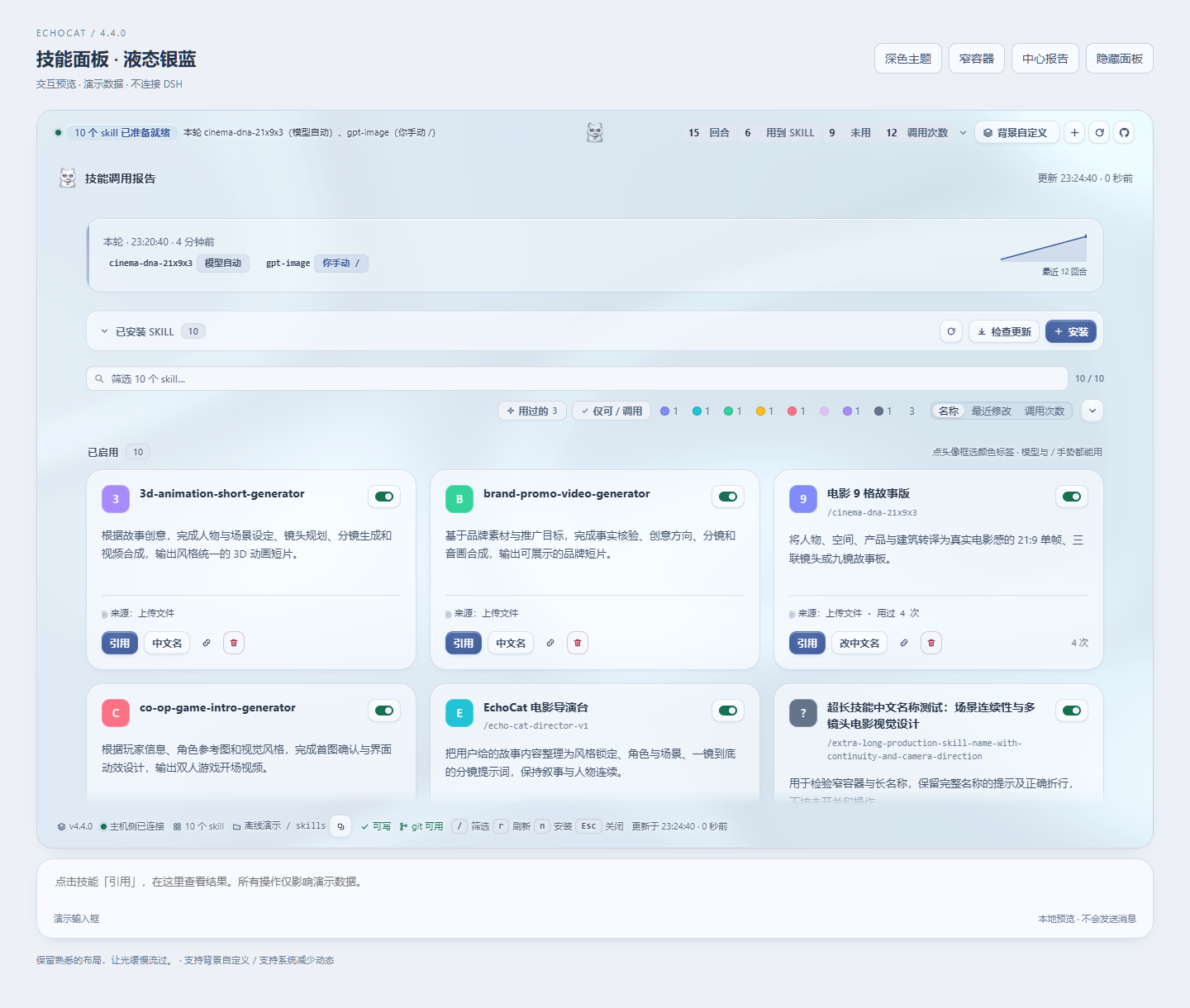
Three UIs share one data source:
| Location | Description |
|---|---|
| The strip directly above the input box | One-line conclusion + four counters; clicking it expands the full report in place. The only interface with one-click skill referencing |
| Left sidebar icon | Always-present entry point; click it to open the panel in the middle column |
| Middle-column panel | Full report + skill catalog |
Collapsed bar above the input, 4 counters always visible; click to expand the full report, floating separately:

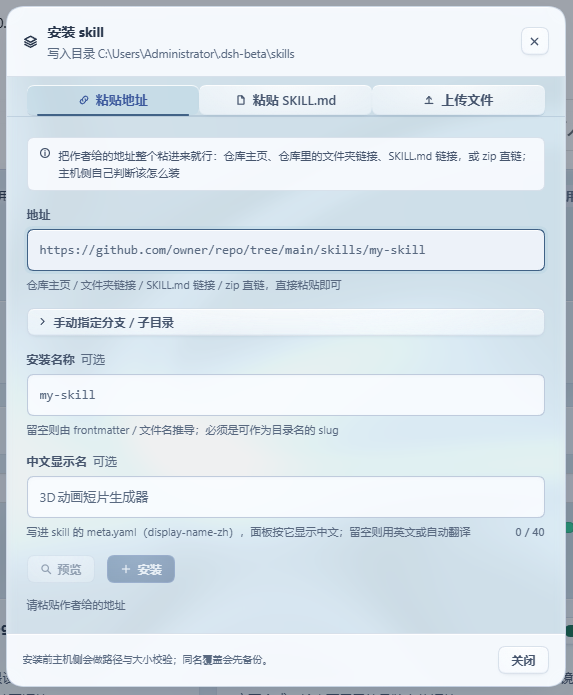
One-Click Install
Just paste the whole URL the author gave you:
https://github.com/owner/repo/tree/main/skills/my-skill
Repo home, folder links inside a repo, SKILL.md links, zip direct links, owner/repo, SSH addresses — all work; the host itself decides whether to clone or download, and parses the branch and subdirectory from the URL, so no three-field form. You can also upload .md/.zip, or paste an entire SKILL.md.
同名不会静默覆盖:先备份再替换。装错了能删,删掉的进备份目录,永不硬删。
Updateable After Install (4.0)
问题:3.0 把地址用一次就丢了(git 克隆还会被删掉)。作者发了修复,你无从判断新旧,只能删了重装 —— 而删除是移动到备份。
How it works: at install time, the source is written into that skill's own .echocat.json: the URL, branch, subdirectory, the commit at install time, and a content fingerprint. So:
- The card gains a source line. When the remote has a newer commit, it is marked "updatable"; two clicks replace it, with the old version going to backup first.
- The check runs
git ls-remoteonce and does not re-download content; when the source is pinned to a commit it won't be falsely flagged as "has new version". - When you have manually modified this skill's files, the confirmation text explicitly states "the update will overwrite them" — this is the only scenario where changes are lost.
- Manually installed, or 2.x/3.0-installed skills have no such record; the card offers a "mark source" action, enter the URL once and it becomes trackable for updates.
- Chinese display names are unaffected: updates keep the
display-name-zhyou set for the skill.
UI
- Widths scale with the interface: the strip and panel widths are derived from the host's input box width (
--dsh-composer-card-max-widthminus 16px), always narrower than the input box, and share its center axis — wide windows, narrow windows, and embedded layouts all work. - One complete design language: four surface tiers (canvas / card / raised / sunken), one accent color (indigo, used only for primary actions, selection, and "something to do"), a five-level type scale (10.5 → 26px, larger sizes get tighter tracking), three-level shadows (each level is two low-opacity layers), and hairline borders derived from ink color via
color-mix. - 485 named adjustments: 215 behavior polishes (polish.js) + 270 design redo items (design.js), all named data records with reasons; the stylesheet is generated from them, and tests verify each one actually takes effect.
- The plugin can check for its own updates: the panel header and the strip each have a button group — "Check updates" asks npm and GitHub which is newer (10-minute cache, only fetches on click), next to a jump link to the GitHub releases page. When a newer version is found the button shows the accent color and a small dot, and the header directly shows "updatable x.y.z"; "not found" and "already up to date" are two different messages.
- Skill names show fully on one line: the card is a three-row structure (name row / description / button row). The name takes the whole line and wraps, never truncates with an ellipsis — previously it shared the line with six buttons, leaving long names as a few characters plus an ellipsis.
- The four counters live in the strip row: after expanding the strip, turns / skills used / unused / call counts sit on the same line as the conclusion and turn count, no extra row, not hidden inside the expanded report.
- A switch per skill: disabling moves it out of DSH's watched skills directory — the model genuinely can't load it, while every file is kept intact and it can be re-enabled in one click. Enabled and disabled are listed in two groups; disabled cards can still be renamed, checked for source, updated, or deleted.
- Both light and dark themes verified: the dark palette listens to both the system preference and the in-app theme; all text colors have been checked for WCAG contrast ratios (body 18.2:1, secondary 6.4:1, metadata 5.3:1).
prefers-reduced-motion,prefers-reduced-transparency, and narrow-screen layouts each have their own overrides.- The workflow for changing the interface:
node tools/preview.mjsrenders the actual panel and screenshots it, add--measureto print computed styles — see first, then change.
一键调用
输入框正上方常驻一条横栏,点开后在 skill 卡片上按「引用」,/名字 就追加进草稿 —— 回车即按手动手势调用它。装完 skill 的成功提示里有同一个按钮,装完即用。
Chinese Display
Write the Chinese name into that skill's own meta.yaml (display-name-zh) and the panel will display it in Chinese. You can fill it in during installation, edit it on the card at any time after install, or clear it by leaving it blank.
/名字 手势仍然走 ASCII 代号,两者互不干扰。
Installation
GitHub source (recommended; you get the complete package):
git clone https://github.com/VDERR/echocat-skill-panel.git
cd echocat-skill-panel
& ".\安装-3.0.ps1"      # 备份清单 → 镜像 → 清旧包名 → 建联接 → 改 manifest → pnpm install
npm (published on npm under the same package name):
dsh plugin --profile web add echocat-skill-panel     # 走 dsh 的插件安装
npm install echocat-skill-panel                      # 或直接装进 profile 目录
Both
peerDependencies(@deepseek-ai/dsh-llm,@deepseek-ai/schemastery) are markedoptional: they are supplied by the DSH runtime, so npm won't go fetch a copy on its own to displace the host's.
After installing, you must restart DSH Desktop Beta. The host-side is snapshotted into memory at boot, while the client bundle is re-fetched on every page load — so just refreshing the page is enough for client-only changes, but any host-side change requires a restart.
The script backs up the profile manifest before it does anything; -Rollback rolls it back with one click. The four manual steps, uninstall rollback, and five hard constraints that will keep the app from starting are all documented in 安装说明.md.
More
Pops a native system notification once at the end of every turn; auto-translates and caches skills without a Chinese name; dark theme; automatically switches to read-only (with an explanation) when the host refuses writes; and every configuration option — see 安装说明.md.
Architecture and implementation notes, the installation engine's four safety rules, why width uses percentages instead of pixels, why disabling is "move out of the directory" rather than renaming, why the 485 adjustments are generated, how the design redo went "see it first, then change it", why provenance records live inside the skill directory, why version comparison can't just compare strings, why "declared in the stylesheet" does not equal "the rule can match the element" (a lesson from the 4.0.1 blank-page bug), pitfalls stepped in (host semantic tokens can't be used as visual tokens, comma selectors can't share a combinator, min-height:0 will defeat a sticky footer, backticks inside CSS comments will truncate the stylesheet…), and the test details — 1364 assertions across twelve gates — see docs/设计要点.md.
Development
node tools/build-client.mjs        # 生成 lib/client.js(改了 src/client/ 就必须跑)
npm test                           # 九个套件
node tools/preview.mjs             # 渲染真实面板并截图(浅色 + 深色)
node tools/preview.mjs --measure   # 打印关键元素的计算样式
node tools/check-width-live.mjs    # 真 Chrome 量宽度(改了宽度规则就跑)
lib/client.jsis a committed build artifact (the target machine has no toolchain, solib/must be committed together). If you modifysrc/client/, rebuild it in the same commit —verify-install.mjschecks that the bundle matches the package, and skipping it will fail at the gate.
The runtime has zero dependencies; @deepseek-ai/dsh-llm and @deepseek-ai/schemastery are peers provided by the host.
License
MIT; see LICENSE.
Versions
| Latest version | Published | Size |
|---|---|---|
| 4.1.0 | — | — |
| 4.2.0 | — | — |
| 4.4.0 | — | — |
| 4.4.1 | — | — |
| 4.4.2 | — | — |
Comments
Loading…
Similar plugins
by VDERR
DSH 技能调用审计 + 应用内 skill 管理器
★ 196
↓ 802/wk
MIT
JavaScript
Sep 24, 2026
dsh plugin --profile web add dsh-echocat-skill-panelby VDERR
DSH 技能调用审计 + 应用内 skill 管理器
★ 194
↓ 509/wk
MIT
JavaScript
Sep 20, 2026
dsh plugin --profile web add echocat-skill-panel-3.0by Zh0uHX
在 DSH 设置中搜索、安装和管理 Skills.sh 技能
★ 0
MIT
TypeScript
Sep 22, 2026
dsh plugin --profile web add dsh-skillsby tuogusa
DeepSeek Harness 技能管理器:扫描/删除/撤回/检查更新技能,支持 GitHub/Gitee Release(host + client 一体包)
★ 4
↓ 171/wk
MIT
JavaScript
Aug 19, 2026
dsh plugin --profile web add dsh-skill-managerby weibaohui
DeepSeek Harness 插件:技能市场——安装/删除/详情 API + 管理界面
★ 21
↓ 3.1k/wk
JavaScript
Sep 30, 2026
dsh plugin --profile web add @weibaohui/skills-managementby jasper-zsh
DeepSeek Harness(DSH)的只读技能清单插件,在 Web GUI 中展示全局技能和当前会话可见的技能,并从会话日志推导技能加载状态。
★ 0
TypeScript
Aug 14, 2026
dsh plugin --profile web add dsh-plugin-skill-panel