

dsh-echocat-skill-panel
Manifest valid★ 196DSH Skill Call Audit + In-App Skill Manager
dsh-echocat-skill-panel
5.0.0 rename: package name and repo name changed to
dsh-echocat-skill-panel; functionality is identical to 4.4. See the 5.0.0 release notes for details.
v5.0.0 · A cordis plugin for DSH Desktop Beta: tracks which skills each turn of conversation uses, and lets you install, uninstall, and update them right inside the app.
Detection doesn't rely on the model — the plugin infers skill usage from session events (auto, manual /name, or none). Reports it even if the model forgets to mention.
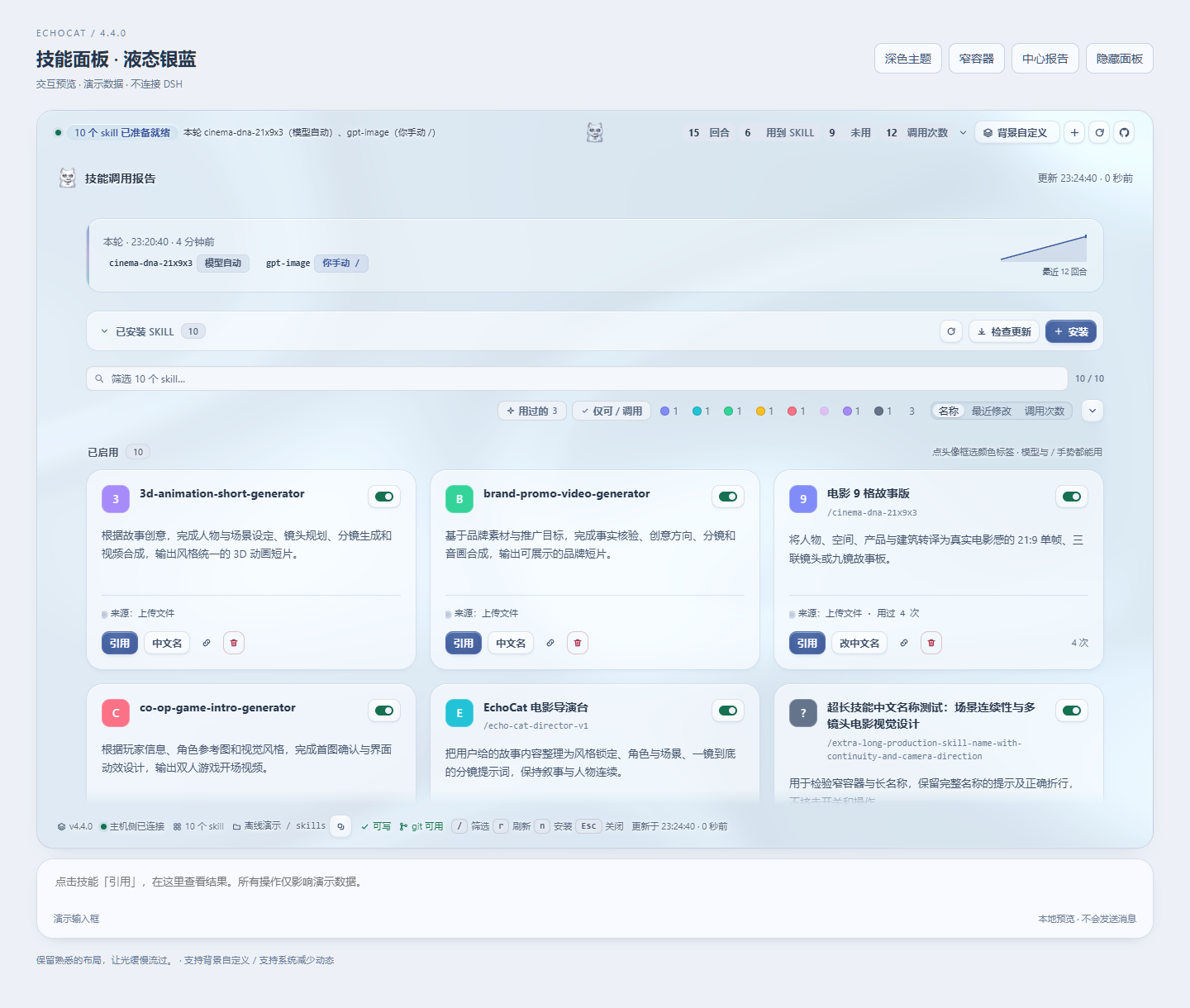
Three views, one data source:
| Location | Description |
|---|---|
| Horizontal strip directly above the input box | One-line conclusion + four counters; click to expand the full report in place. The only surface with one-click skill citation |
| Left-column icon | Permanent entry point; click it to open the panel in the middle |
| Middle-column panel | Full report + skill catalog |
The strip above the input is collapsed by default with four counters; click to expand the full report, which floats independently:

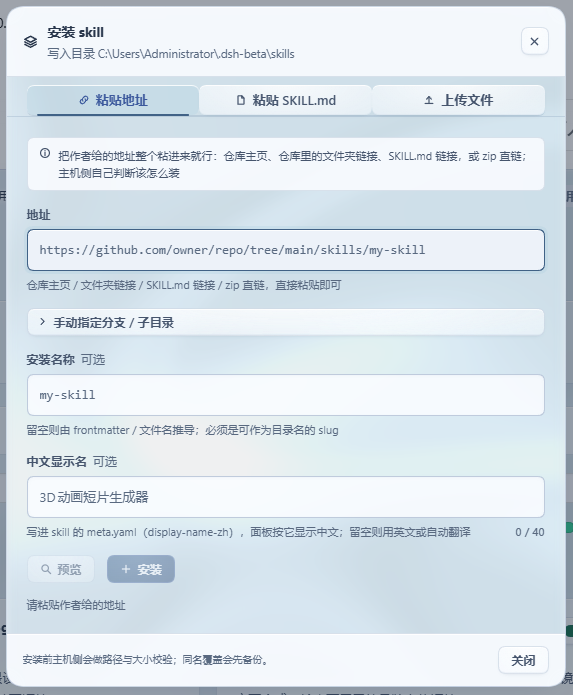
One-click install
Just paste in the URL the author provided:
https://github.com/owner/repo/tree/main/skills/my-skill
Repo homepage, folder links inside the repo, SKILL.md links, direct zip links, owner/repo, SSH addresses — all accepted. The host decides for itself whether to clone or download; branch and subdirectory are parsed from the URL, so you never fill in three separate fields. You can also upload .md/.zip, or paste the entire SKILL.md directly.
同名不会静默覆盖:先备份再替换。装错了能删,删掉的进备份目录,永不硬删。
Background customization (4.4)
The panel supports custom backgrounds. "Background" (top-right of strip & report) opens a settings panel with live preview on the left — tweak, look, cancel anytime. Preview, cancel, and restore-default are three distinct actions; nothing is "saved" just by changing it.
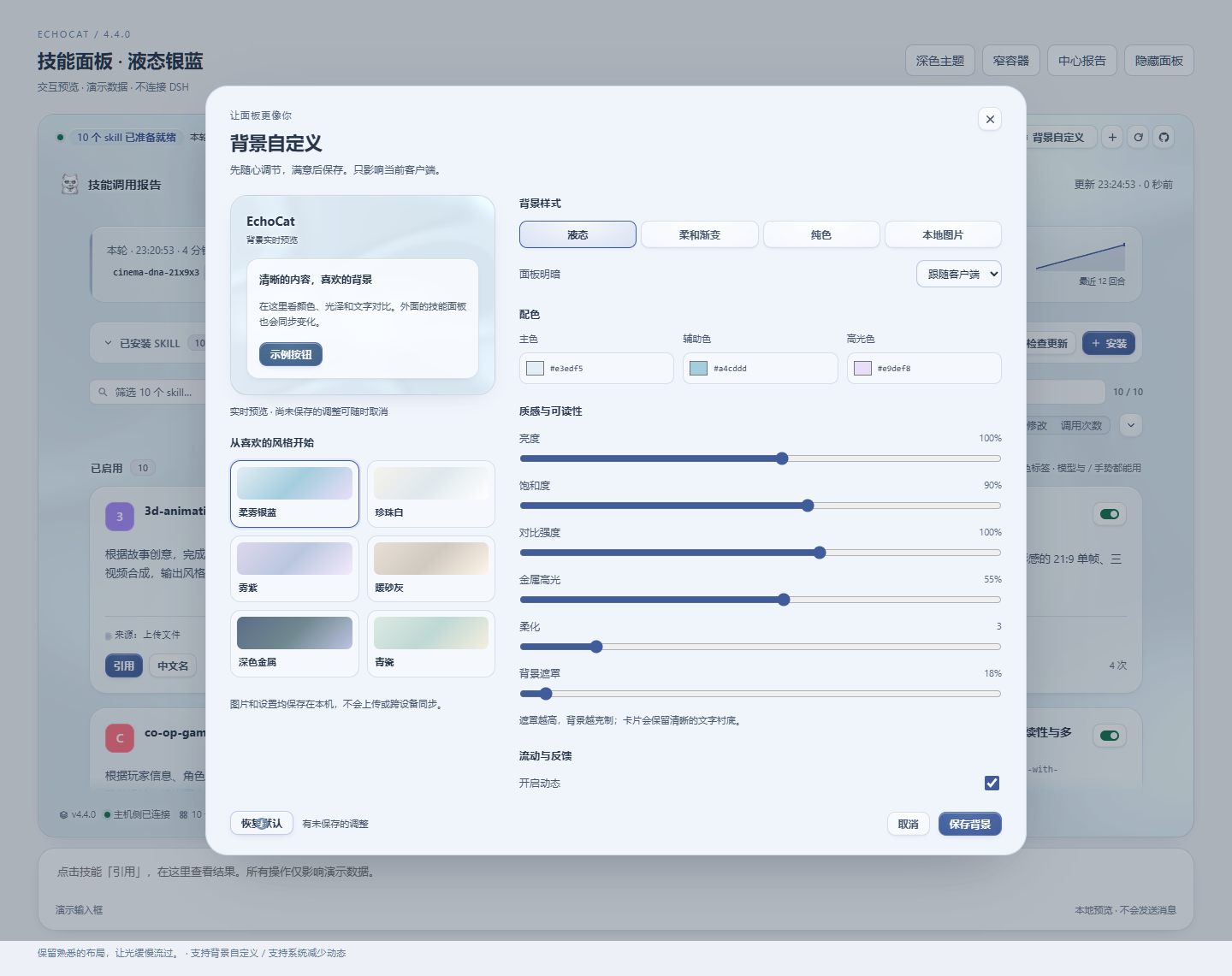
- Four style families: liquid, soft gradient, solid color, local image; plus six low-saturation presets (soft silver-blue, pearl white, plum, warm sand gray, dark metal, celadon) to jump-start you.
- Every slider actually affects the background: primary / secondary / highlight colors, value, brightness, saturation, contrast, metallic highlight, softness, mask, speed, distortion, pointer feedback — and inapplicable options are hidden, not left there as no-ops.
- Images are processed locally: accepts JPG/PNG/WebP (up to 8 MB), downscaled locally so the long edge is ≤ 1920, with fill-crop / fit / stretch and positioning. Images and settings are stored separately in the client's local database — never uploaded, never touching skill data or host config.
- Only affects the current client: settings are shared across all surfaces of this plugin and survive refresh, but cross-device sync is not claimed — because it doesn't happen.
- In static mode the background is not continuously rendered; hiding, uninstalling, and the system "reduce motion" setting still work as usual.
Installed skills can be updated (4.0)
Problem: 3.0 discarded the source URL after use (git clones even deleted). Author ships a fix, you can't tell old from new, so you delete & reinstall — and delete means "move to backup".
How it works: at install time, the source is written into the skill's own .echocat.json: URL, branch, subdirectory, the commit at install time, and a content fingerprint. This gives you:
- The card gains a source line. When the remote has a newer commit it's marked "Update available"; two clicks replace it, with the old version backed up first.
- The check runs
git ls-remoteonce and does not re-download content; a source pinned to a specific commit will not be falsely reported as "new version available". - If you've hand-edited files of this skill, the confirm dialog says plainly "updating will overwrite them" — this is the only scenario where your changes get lost.
- Skills installed manually, or by 2.x/3.0, have no such record; their card offers a "Record source" button — fill in the URL once and it joins the update flow.
- Chinese display names are unaffected: updates keep the
display-name-zhyou set for that skill.
UI
- Widths scale with the interface: strip and panel widths are derived from the host's own input box width (
--dsh-composer-card-max-widthminus 16px), always narrower than the input box, and sharing the same centerline — correct in wide windows, narrow windows, and embedded layouts alike. - A complete design language: four surface elevations (canvas / card / raised / sunken), one accent color (indigo, reserved for primary actions, selection, and "there's something to do"), a five-step type scale (10.5 → 26px, tighter tracking as size grows), three levels of shadow (each two layers of low opacity), and hairlines derived from ink via
color-mix. - 485 named adjustments: 215 behavioral polishes (polish.js) + 270 design redos (design.js) — all named data records with rationale; the stylesheet is generated from them and tests verify each one actually takes effect.
- The plugin can check for its own updates: a button group on both the panel header and the strip — "Check for updates" asks npm and GitHub which is newer (10-minute cache; the network is only touched when you click), next to a link to the GitHub releases page. When a new version is found, the button gets the accent color and a small dot, and the header spells out "Update to x.y.z"; "not found" and "up to date" are two different messages.
- Skill names fit on one line: the card is a three-row layout (name / description / button row). The name owns the whole line and wraps instead of being truncated with an ellipsis — previously it shared the line with six buttons, leaving long names as a few characters plus an ellipsis.
- The four counters live on the strip row: once expanded, turns / skills used / unused / invocation counts sit on the same line as the conclusion and turn count — no separate line, and no longer hidden inside the expanded report.
- A toggle per skill: disabling moves the catalog out of the skills directory DSH watches — the model genuinely can't load it, while not a single file is lost; re-enable with one click anytime. Enabled and disabled are listed in two groups; disabled cards can still be renamed, have their source checked, updated, or deleted.
- Both light and dark verified: the dark theme is wired to both the system preference and the in-app theme signals; all text colors have been checked against WCAG contrast (body 18.2:1, secondary 6.4:1, metadata 5.3:1).
prefers-reduced-motion,prefers-reduced-transparency, and narrow-screen layouts each have overrides.- How the UI gets changed:
node tools/preview.mjsrenders the real panel and takes screenshots; add--measureto print computed styles — see it first, then change it.
One-click invoke
输入框正上方常驻一条横栏,点开后在 skill 卡片上按「引用」,/名字 就追加进草稿 —— 回车即按手动手势调用它。装完 skill 的成功提示里有同一个按钮,装完即用。
Chinese display
The Chinese name is written into the skill's own meta.yaml (display-name-zh), and the panel shows it in Chinese. You can set it at install time, change it on the card anytime afterwards, or clear it by leaving it blank.
/名字 手势仍然走 ASCII 代号,两者互不干扰。
Installation
GitHub source (recommended, gets you the complete package):
git clone https://github.com/VDERR/dsh-echocat-skill-panel.git
cd dsh-echocat-skill-panel
& ".\安装-3.0.ps1"      # 备份清单 → 镜像 → 清旧包名 → 建联接 → 改 manifest → pnpm install
npm (published to npm under the same package name):
dsh plugin --profile web add dsh-echocat-skill-panel     # 走 dsh 的插件安装
npm install dsh-echocat-skill-panel                      # 或直接装进 profile 目录
Both
peerDependencies(@deepseek-ai/dsh-llm,@deepseek-ai/schemastery) are markedoptional: they are provided by the DSH runtime, so npm will not download its own copy to replace the host's.
You must restart DSH Desktop Beta after installing. The host-side half is snapshotted into memory at boot, while the client bundle is refetched on every page load — so client-only changes only need a page refresh, but any host-side change requires a restart.
The script backs up the profile manifest before making any changes; -Rollback reverts everything in one step. The four manual steps, uninstall rollback, and the five hard constraints that will prevent the app from starting are all in Installation Guide.md.
More
Fires one native system notification at the end of each turn; auto-translates and caches skills that lack Chinese; dark theme; automatically becomes read-only (with an explanation) when the host disallows writes; all configuration options — see installation guide.md.
Architecture and implementation highlights, the four safety rules of the installation engine, why width uses percentages instead of pixels, why disabling means "move out of the directory" rather than rename, why the 485 adjustments are generated, how the design rework was "see first, then change", why source records live inside the skill directory, why version comparison can't use string comparison, why "declared in the stylesheet" ≠ "rules actually match elements" (the lesson from the 4.0.1 full-page blank bug), pitfalls stepped on (host semantic tokens can't serve as visual tokens, comma selectors can't share combinators, min-height:0 breaks sticky footers, backticks in CSS comments truncate stylesheets…), and the 1364 assertion / twelve-gate test details — see docs/design-notes.md.
开发
node tools/build-client.mjs        # 生成 lib/client.js(改了 src/client/ 就必须跑)
npm test                           # 九个套件
node tools/preview.mjs             # 渲染真实面板并截图(浅色 + 深色)
node tools/preview.mjs --measure   # 打印关键元素的计算样式
node tools/check-width-live.mjs    # 真 Chrome 量宽度(改了宽度规则就跑)
lib/client.js是入库的构建产物(目标机器没有工具链,lib/必须一起提交)。改了src/client/就要在同一个 commit 里重建它 ——verify-install.mjs会核对 bundle 与包是否一致,漏了会在门里失败。
运行时没有任何依赖;@deepseek-ai/dsh-llm 与 @deepseek-ai/schemastery 是 host 提供的 peer。
许可
MIT,见 LICENSE。
Versions
| Latest version | Published | Size |
|---|---|---|
| 5.0.0 | — | — |
| 5.1.0 | — | — |
| 5.1.2 | — | — |
| 5.1.3 | — | — |
Comments
Loading…
Similar plugins
by VDERR
DSH 技能调用审计 + 应用内 skill 管理器
★ 201
↓ 561/wk
MIT
JavaScript
Sep 22, 2026
dsh plugin --profile web add echocat-skill-panelby VDERR
DSH 技能调用审计 + 应用内 skill 管理器
★ 194
↓ 509/wk
MIT
JavaScript
Sep 20, 2026
dsh plugin --profile web add echocat-skill-panel-3.0by Zh0uHX
在 DSH 设置中搜索、安装和管理 Skills.sh 技能
★ 0
MIT
TypeScript
Sep 22, 2026
dsh plugin --profile web add dsh-skillsby weibaohui
DeepSeek Harness 插件:技能市场——安装/删除/详情 API + 管理界面
★ 21
↓ 3.1k/wk
JavaScript
Sep 30, 2026
dsh plugin --profile web add @weibaohui/skills-managementby tuogusa
DeepSeek Harness 技能管理器:扫描/删除/撤回/检查更新技能,支持 GitHub/Gitee Release(host + client 一体包)
★ 4
↓ 171/wk
MIT
JavaScript
Aug 19, 2026
dsh plugin --profile web add dsh-skill-managerby jasper-zsh
DeepSeek Harness(DSH)的只读技能清单插件,在 Web GUI 中展示全局技能和当前会话可见的技能,并从会话日志推导技能加载状态。
★ 0
TypeScript
Aug 14, 2026
dsh plugin --profile web add dsh-plugin-skill-panel