

dsh-apple-liquid-glass
Manifest valid★ 3Apple-style liquid glass theme for DeepSeek Harness: composer edge glow, per-surface scope switches, a stroke-order handwritten hello opening, and a centred blue particle sphere after switching models. Settings-only controls. Background untouched.
Liquid Glass — DSH Apple Liquid Glass
An Apple-style liquid-glass material for the DeepSeek Harness web client: composer, sidebar controls, model picker, and send button, with a faint flowing blue glow along the composer's top edge and sides that freezes while you type. The opening hello is now drawn along its stroke order, and switching to a different model spawns a centred blue particle sphere. The original four per-surface scope switches are preserved. Intensity, scope, and splash are configured in Settings → Liquid Glass; the chat surface has no floating control. The page background stays untouched.
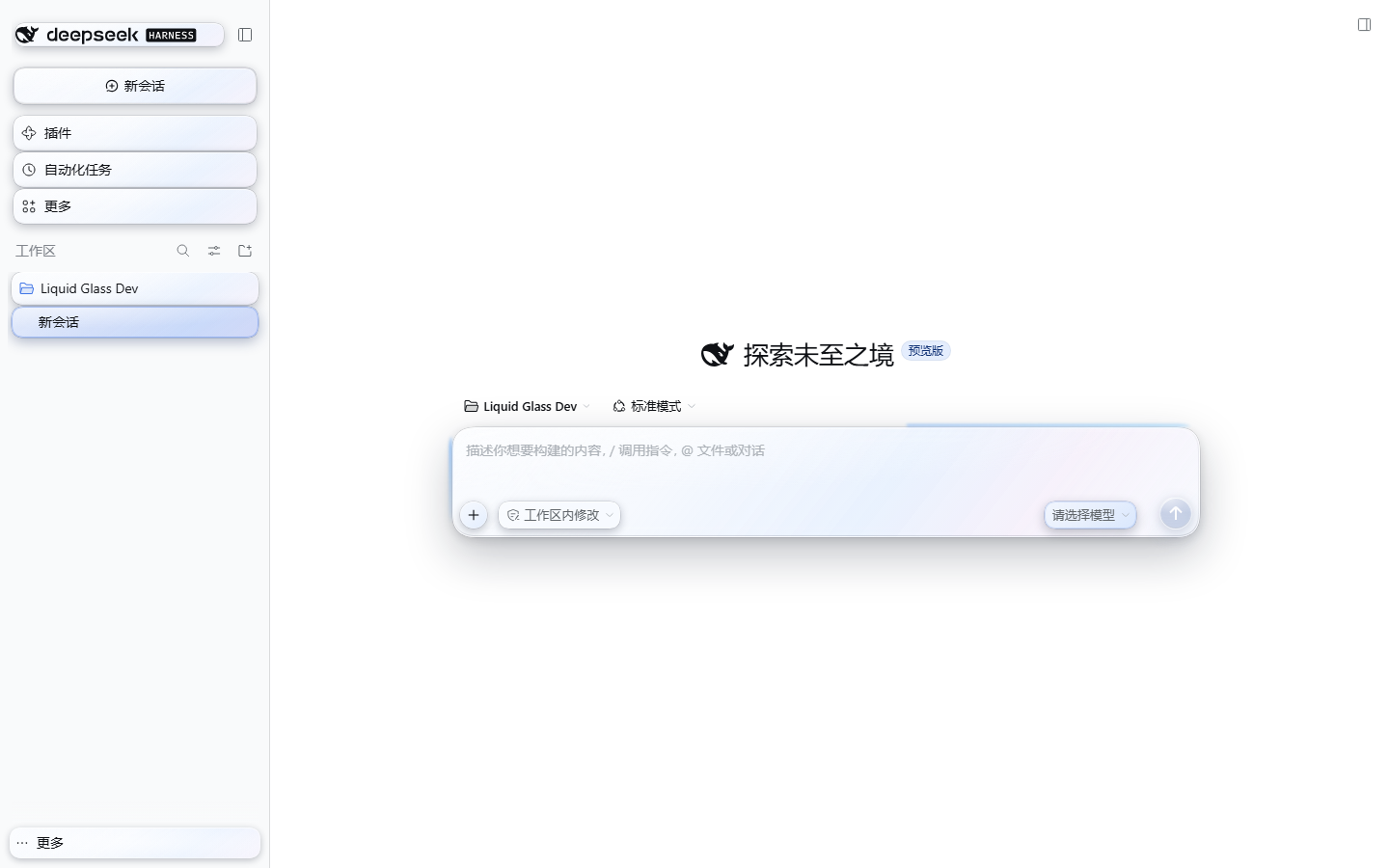
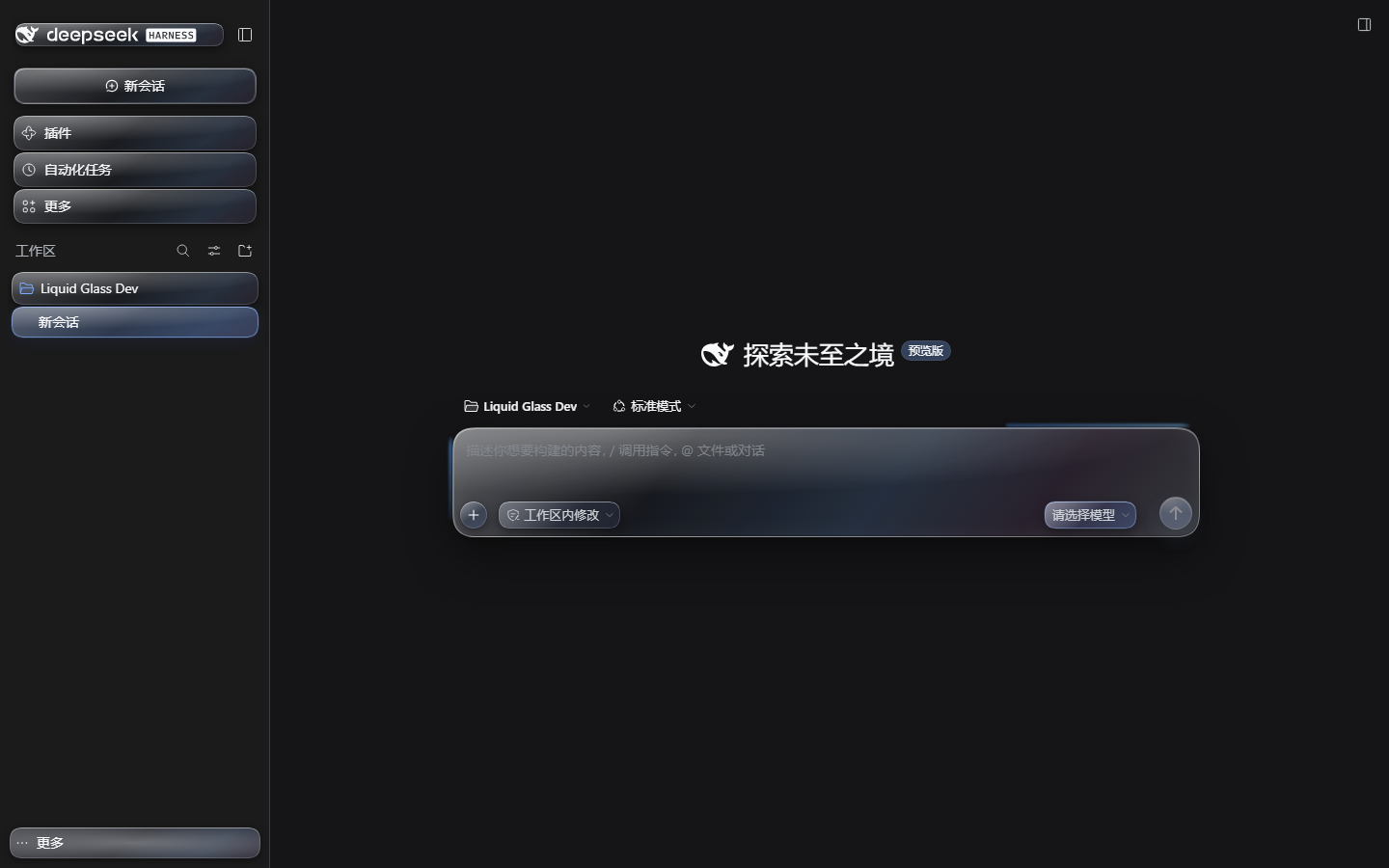
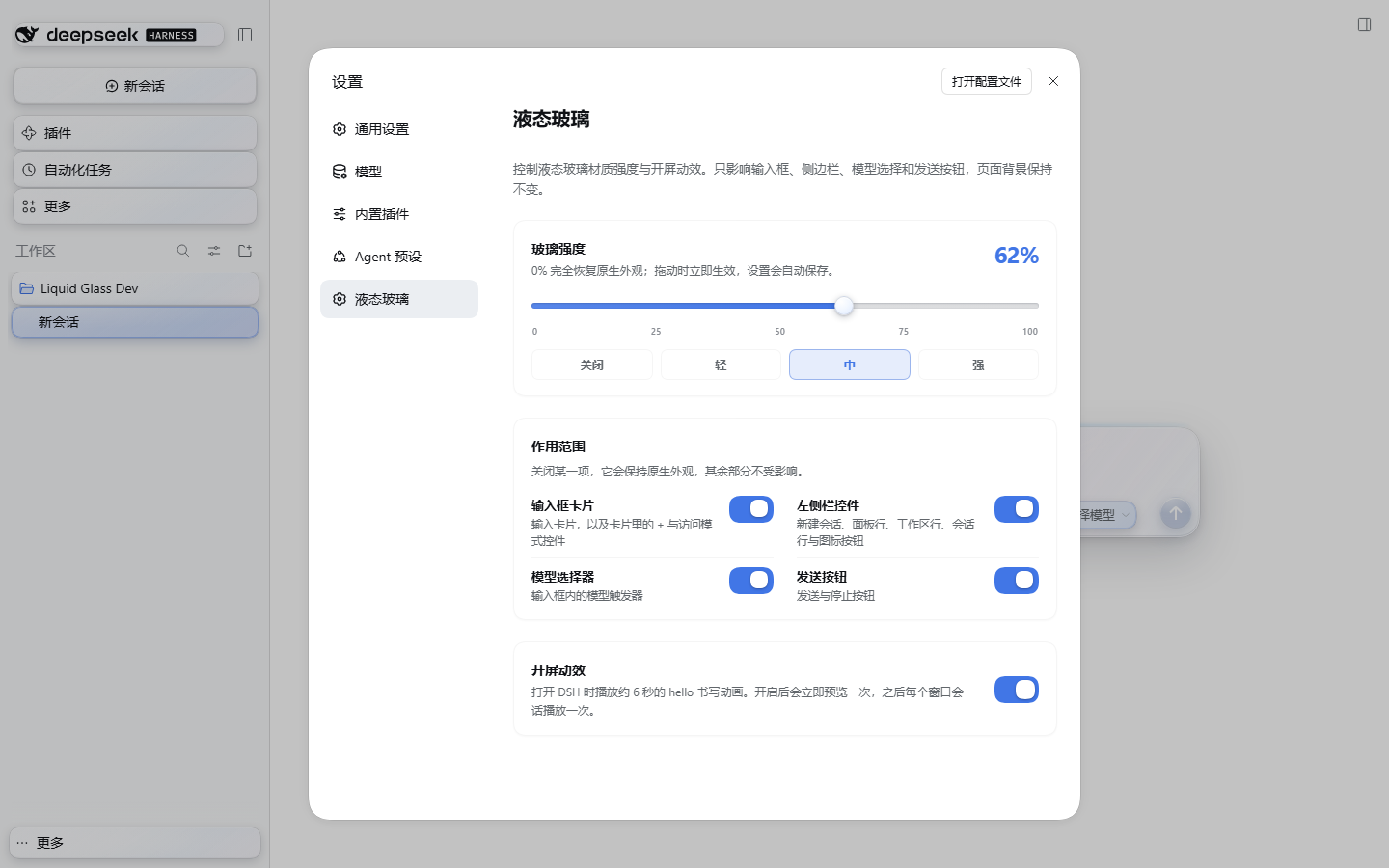
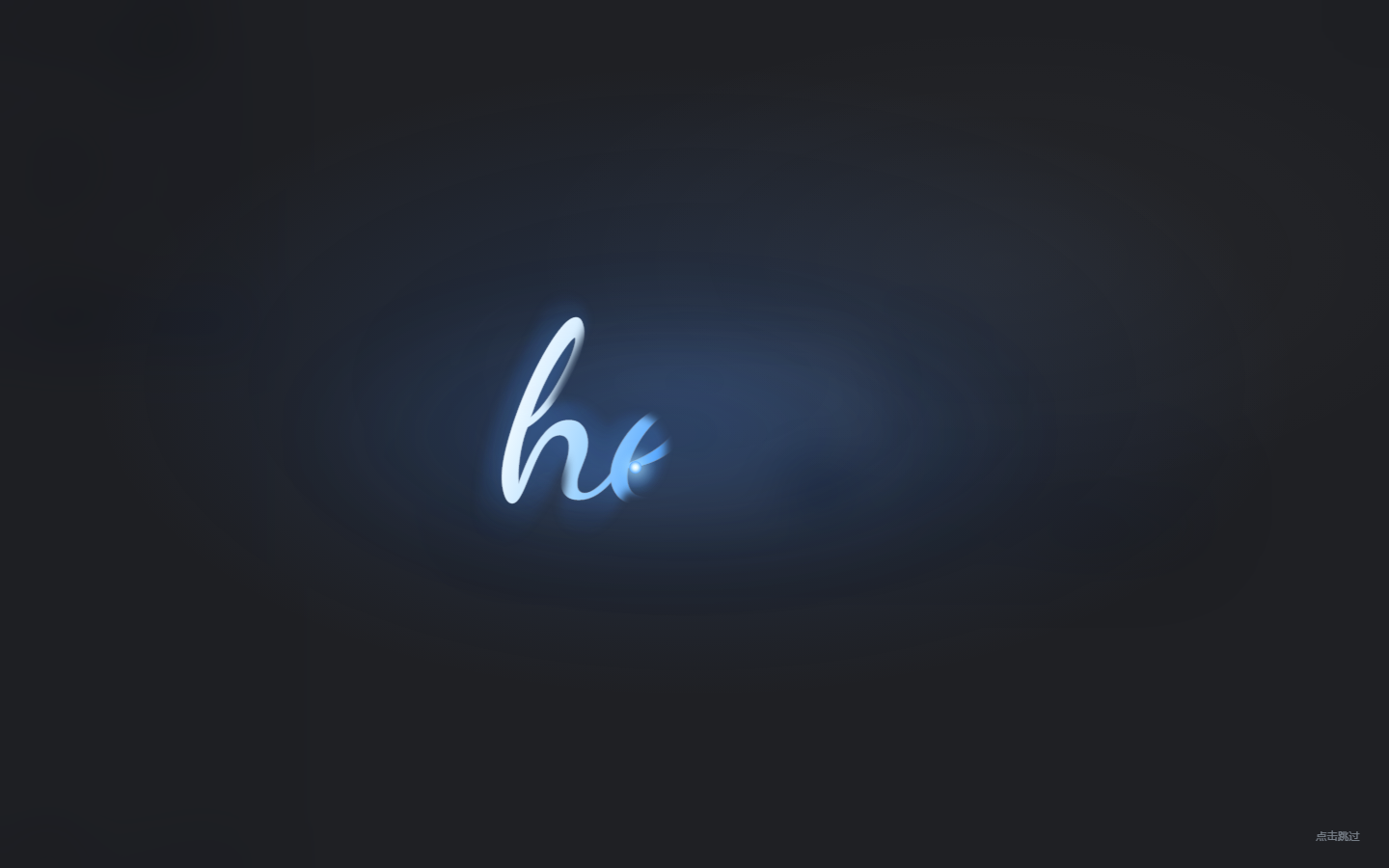
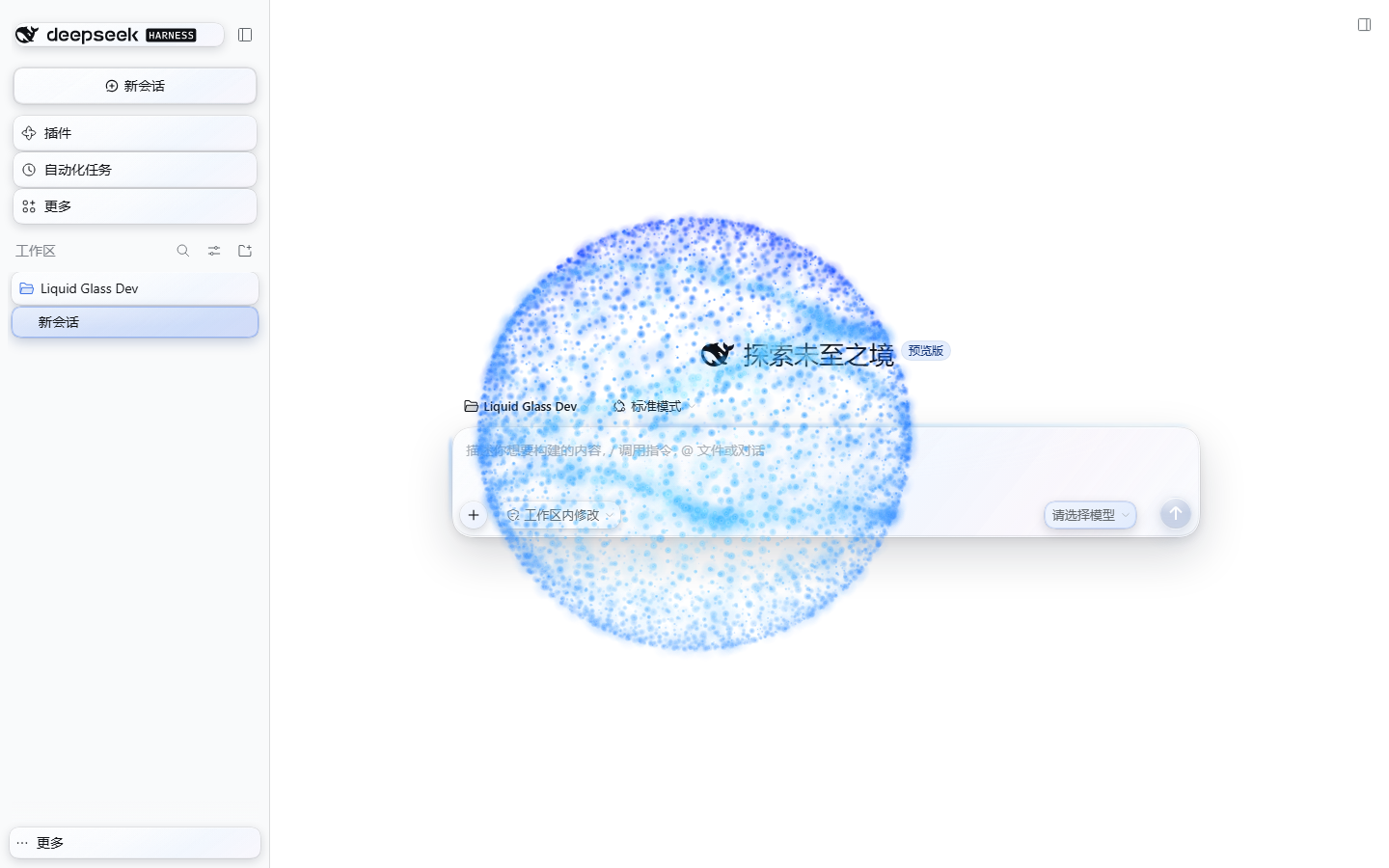
Captured in a real DSH 0.2.1-rc.5 web profile.
Install
Repository: https://github.com/tianyuec11-design/dsh-apple-liquid-glass
From GitHub (recommended)
DSH Desktop
-
Open Plugins in the sidebar.
-
Click Add plugin / + and choose Install a third-party plugin.
-
Paste the repository URL:
https://github.com/tianyuec11-design/dsh-apple-liquid-glass -
Install, then Enable it. Refresh the page (or restart if the host asks).
-
Open Settings (bottom-left account menu → Settings) → Liquid Glass. The intensity slider and the Opening animation switch live there.
dsh web
dsh plugin --profile web add 'github:tianyuec11-design/dsh-apple-liquid-glass'
Restart dsh web afterwards. dsh plugin needs pnpm on PATH; the Desktop app ships its own package manager.
GitHub Release tarball
A pinned release is also available as:
https://github.com/tianyuec11-design/dsh-apple-liquid-glass/releases/download/v0.3.0/dsh-apple-liquid-glass-0.3.0.tgz
dshmarket's Themes tab only lists themes in its catalog. A GitHub-installed theme appears under Installed plugins; it is still a complete bundle theme and can be enabled or disabled normally.
From a local folder (development)
-
Plugins → Add plugin / + → Install a third-party plugin.
-
Paste the absolute path to this folder (replace with your local checkout):
C:\path\to\dsh-apple-liquid-glass -
Install → Enable → refresh.
Local dsh web install:
dsh plugin --profile web add "C:\path\to\dsh-apple-liquid-glass"
From a self-built tarball
node scripts/build.mjs
npm pack
Then install dsh-apple-liquid-glass-0.3.0.tgz through the plugin manager.
Use
Everything lives in Settings → Liquid Glass; the chat surface has no floating button.
- Glass intensity: 0–100% slider with presets Off / Light / Mid / Strong = 0 / 35 / 65 / 100; applies live and saves automatically.
- Surfaces: the original four independent switches — composer card, sidebar controls, model picker, send button. Turn one off and it keeps its native look while the rest stay glass.
- Opening animation: switch. Enabling it previews once; afterwards it plays once per DSH window session (a same-tab refresh does not repeat it).
- Model-switch particle sphere: automatic. After switching to a different model, a centred blue particle sphere flows slowly for 5s and then dissolves over 5s. It is not a full-screen overlay; only the particles occlude, and pointer events stay available throughout.
- The choice persists per browser in
localStorage(keydsh-apple-liquid-glass.settings.v1). - 0% removes every surface override; the opening animation remains controlled by its own switch.
Surfaces
In Settings → Liquid Glass → Surfaces, each switch is independent:
| Switch | Covers |
|---|---|
| Composer card | The input card, +, access-mode pill, and the blue top/side glow |
| Sidebar controls | New session, panel rows, workspace rows, session rows, icon buttons, search field |
| Model picker | The model trigger inside the composer |
| Send button | Send / stop button |
All four are on by default. Turning one off restores that surface to native immediately while the others stay glass; the choice survives a reload. The blue edge glow belongs to Composer card, so turning that off removes it too. At 0% every surface is native, but the four switch states are preserved.
Composer edge glow
- When glass is on, a blue gradient halo runs along the composer's top edge and both sides.
- A 2px strip plus a 1.5px blur keeps the visible thickness under 1.5mm (about 5.67 CSS px).
- Typing, key presses, or IME composition freeze the flow immediately; it resumes about 1.1s after the last input.
- At 0% or with glass off, the glow disappears completely.
Opening animation
- An Apple-event-style handwritten lowercase hello on a translucent frosted-black stage. It is revealed along one centreline path in h → e → l → l → o order, with a glowing pen tip following the stroke; it is no longer a flat left-to-right wipe.
- The bundled Dancing Script font (SIL OFL 1.1) and the original light blue/white gradient are unchanged; only the reveal mechanism changed.
- About 5–7 seconds; click anywhere or press
Escto skip. - With
prefers-reduced-motion, a static hello is shown for about 2 seconds.
Model-switch particle sphere
- After opening the model picker and switching to a different model, a centred blue particle sphere appears.
- It is a ~560px transparent canvas: no full-screen layer, no backdrop, no background. Only the particles themselves occlude; the UI outside the sphere and in the gaps stays visible.
- The colour is a blue gradient — deep blue at the rim, cyan-blue inside, a few white highlights; not one flat colour.
- It flows slowly for 5 seconds, then disperses and fades for 5 seconds (about 10s total, then removed).
- The canvas is
pointer-events: nonefor its entire lifetime, so scrolling, typing, and clicking work during both the flow and the fade. - It fires only when the user has interacted with the model selector recently and the trigger's model label actually changes; initial model hydration does not trigger it.
prefers-reduced-motionshortens and calms it.
Material scope
| Area | Elements |
|---|---|
| Composer | Input card, + add button, access-mode pill |
| Composer edges | Flowing blue glow on the top edge and both sides |
| Left sidebar | Brand/new-session, panel nav rows, workspace rows, session rows, settings/account row; small icon buttons on hover/focus |
| Model picker | The model trigger inside the composer |
| Send | Send/stop button |
The page background, message bubbles, header, and the model dropdown menu itself are out of scope for this version. See Surfaces above for which switch covers which area.
How it works
- Pure CSS material, a tiny DOM controller, a React settings section, and a 2D canvas particle layer; none of them needs a third-party runtime dependency.
- The composer's
backdrop-filterlives on a::beforepseudo-element so the card never becomes the backdrop root of its fixed-position popups;isolation: isolatekeeps the stacking local. - The blue edge glow lives on the card's
::after: two side gradients plus a top gradient animated throughbackground-position. While typing, the controller setsdata-dslg-typing="true"on the card and CSS pauses the animation. - Sidebar styling targets clickable elements, never the whole column, so the background stays native.
- Pointer movement updates
--dslg-mx/--dslg-myfor a moving specular highlight. Press feedback uses the individualscaleproperty so the host's owntransformsurvives. - At 0% the controller removes
body[data-dslg-glass="on"]and every--dslg-*variable; all surface selectors stop matching. - The Settings section registers through DSH's
settings.sectionslot (slots+locale); no button is added to the chat surface. - Surface scope is stored as
surfaces(composer / sidebar / model / send). The controller writesbody[data-dslg-composer|sidebar|model|send="on|off"], and every material selector is narrowed by its surface attribute, so turning one off removes only that group of overrides. - The opening animation is a full-screen DOM layer with an embedded Dancing Script WOFF2, an SVG mask path that follows the h→e→l→l→o centreline, gradient text, and a pen-tip dot.
getTotalLength()/getPointAtLength()keep the mask and the tip in sync; writing starts after the font is ready. - The model-switch sphere is a 2D canvas: Fibonacci sphere + three flowing ribbons, theme-aware blue/cyan sprites, and a
source-atopgradient tint. It is ~560px, pointer-transparent, and is removed after 5s of flow + 5s of fade. - The model trigger is watched with a
MutationObserveron its accessible name/text. The sphere only plays when the user interacted with the model selector in the last 15s and the model label actually changed, so initial model hydration does not fire it. prefers-reduced-motionandprefers-reduced-transparencyare respected.- Light/dark follows the host through
body[data-ds-dark-theme]; the particle palette adapts to the theme.
Files
dsh-apple-liquid-glass/
├─ package.json
├─ cordis.patch.yml          # bundle registration
├─ lib/
│  ├─ index.js               # host half: intentional no-op
│  └─ client.js              # built browser bundle
├─ src/
│  ├─ client.js              # material, settings, splash, particle source
│  └─ style.css              # material, settings, splash, particle styles
├─ assets/
│  ├─ fonts/                 # Dancing Script WOFF2 + OFL
│  └─ icon.svg
├─ scripts/build.mjs         # wraps the ModuleLoader bundle and inlines the font
├─ preview/harness.html      # static development preview
├─ docs/                     # README screenshots
└─ LICENSE
Development
node scripts/build.mjs
start .\preview\harness.html
The preview accepts ?theme=light|dark&level=0..100&splash=1&typing=1&hover=1&lang=en. It uses a mock host DOM; the settings section needs a real DSH host.
After installing from a local folder, DSH HMR may reload the bundle automatically. If not, refresh the page or restart the host. The Desktop plugin manager installs a copy, so reinstall after source changes, or use a link install during development.
Compatibility
- DSH >= 0.2.1-0.
- Verified on DSH 0.2.1-rc.5 (web profile): light/dark, 0%/62%/100%, glow pause while typing, all four surface switches and their persistence across reload, settings slider and splash switch, stroke-order writing and skip, and the particle sphere's transparent occlusion / pointer pass-through / 5+5s timing / auto-removal.
- The model-switch trigger path was verified against the real model trigger: changing its accessible name/text starts the sphere. The dev profile had no selectable models, so a real menu-item click was not available; the watcher uses the same post-switch label change in a normal host.
- Desktop uses the same web client; the settings section relies on the host's
settings.section/slots/localeservices, available in 0.2.1. - Chromium/Electron only; Safari/Firefox are not tested.
Known limitations
- The model dropdown menu, message bubbles, and header are not themed yet.
- Small sidebar icon buttons get the material on hover/focus only, to avoid a wall of blur.
- No SVG edge refraction yet; the current material is blur + saturation + translucent tint + specular highlight + bevel + shadow.
- The opening animation is an approximation of Apple's event style, not Apple's proprietary artwork; it uses bundled Dancing Script with Snell Roundhand / Apple Chancery as system fallbacks.
- The stroke reveal uses one centreline mask path plus a wide soft stroke, not per-glyph vector strokes; the font and blue/white gradient are unchanged.
- The model-switch particle sphere is a stylised particle approximation of the reference image, not the image asset itself. It stays around 560px and never becomes a full-screen layer.
- The sphere only appears when the model label changes after a recent model-selector interaction; initial hydration and same-model selection do not fire it. There is no separate switch; reduced-motion shortens it.
- The splash plays once per window session; a same-tab refresh does not repeat it. Toggle it off and on in Settings to preview again.
- The glow resumes about 1.1s after the last keystroke by design.
- No wallpaper and no page-background changes.
Uninstall
-
Desktop: Plugins page → this plugin → Remove; restart if prompted.
-
Web:
dsh plugin --profile web remove dsh-apple-liquid-glass
License
MIT. See LICENSE.
The opening font Dancing Script © The Dancing Script Project Authors, distributed under the SIL Open Font License 1.1; see assets/fonts/OFL.txt.
"Liquid Glass" describes the visual material. This project is not affiliated with or endorsed by Apple Inc.
Comments
Loading…
From the same category
by awesome-dsh-plugin
A curated list of plugins for DeepSeek Harness (dsh) · DeepSeek Harness 插件精选列表
★ 21.9k
CC0-1.0
Python
Nov 1, 2026
by 0xsline
DeepSeek Harness (DSH) ecosystem: curated plugins, tools, and infrastructure from dsh-external/hub and the public dsh-plugin topic.
★ 1.3k
CC0-1.0
Python
Oct 16, 2026
by Yuuyuko-uu
DSH 鱼的记忆:给会话一份会淡忘的长期记忆,每条都带时间
★ 453
MIT
JavaScript
Nov 1, 2026
dsh plugin --profile web add dsh-fish-memoryby SAOS-3624
Scene-aware storyboard for DeepSeek Harness: 9-16 numbered cells with timestamps + transcript + an audio envelope, packed into ONE image (384 tokens). Two tools: video_storyboard and video_zoom.
★ 356
↓ 4.4k/wk
MIT
JavaScript
Nov 1, 2026
dsh plugin --profile web add dsh-video-storyboardby uumit-ai
Open dsh web from your phone or another computer through a UUMit account, without running your own server or installing another program: a built-in tunnel client connects to UUMit's hosted tunnel, and
★ 308
↓ 303/wk
MIT
JavaScript
Oct 21, 2026
dsh plugin --profile web add @uumit-ai/dsh-uumit-remoteby xiajiajun516
DeepSeek Harness (DSH) backup & restore plugin — export, import, migrate and sync your complete DSH configuration, plugins, MCP servers, skills and workspace. One-click migration to another machine.
★ 287
↓ 8.4k/wk
MIT
TypeScript
Nov 1, 2026
dsh plugin --profile web add dsh-config-manager