

dsh-uumit-remote
Manifest valid★ 4@uumit-ai/dsh-uumit-remote
English | 简体中文
A DeepSeek Harness (DSH) plugin that lets you open the DSH running on your computer from your phone or any other computer, through UUMit. No desktop client to install.
After installing, click Remote access (远程访问) next to the settings button at the bottom of the DSH sidebar. A panel opens inside DSH where you connect to UUMit and choose who can use it. You, and the people you invite, then open the app URL (like https://dsh--<your-computer>.<UUMit address domain>/) and get the same DSH as on your computer: chats, terminal, files and settings all work, and settings are saved back to this computer.
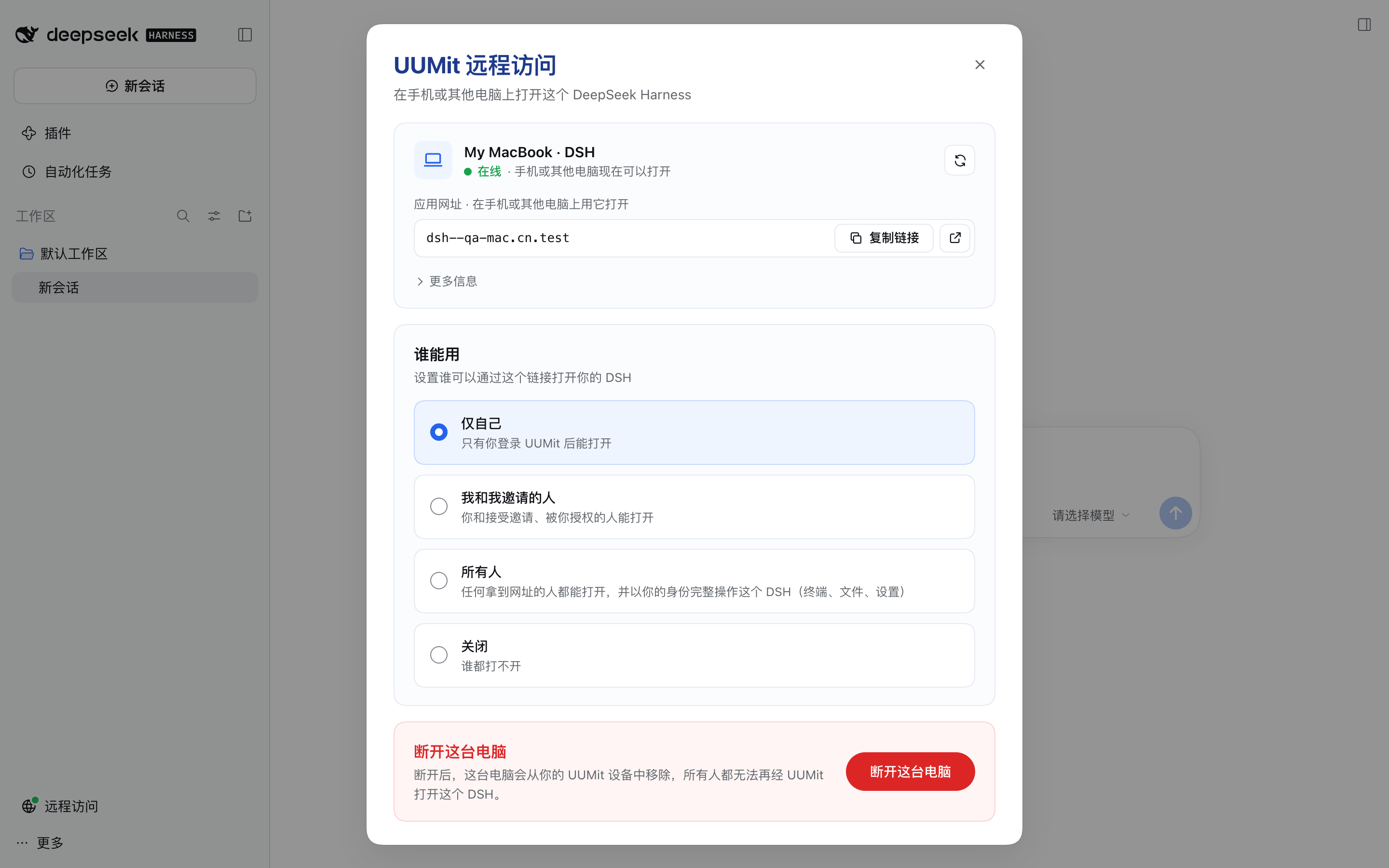
The plugin runs inside the DSH process and connects to the UUMit tunnel directly. It does not download or start any other program, and it does not open any port on your computer.
Beta. This is a preview release, published under the
betatag. Behaviour and configuration may change before 1.0.The plugin's interface is currently in Simplified Chinese. The button and option names below are translated, with the Chinese label in parentheses.
Requirements
dsh web, DeepSeek Harness 0.2.1-rc.2 or later. The DSH desktop app does not run a web server and is not supported.- Node.js 22.19 or later (the same as DSH).
- A UUMit account.
Install
dsh plugin --profile web add @uumit-ai/dsh-uumit-remote@beta
Then restart dsh web.
DSH installs plugins with pnpm, which by default skips releases published in the last 24 hours. Within a day of a new release, @beta can still give you the previous version; to get the new one right away, name the exact version, for example @uumit-ai/dsh-uumit-remote@0.1.0-beta.3.
If you use a registry mirror such as npmmirror and the install reports that no matching version was found, the mirror has not synced this release yet. Install straight from the official registry:
dsh plugin --profile web add @uumit-ai/dsh-uumit-remote@beta --registry=https://registry.npmjs.org/
To uninstall:
dsh plugin --profile web remove @uumit-ai/dsh-uumit-remote
The plugin is plain JavaScript with no runtime dependencies and no build step. The browser half (client.js) is written directly in the factory format the DSH module loader expects; React comes from the DSH page.
Use
- Open DSH on this computer and click Remote access (远程访问, a globe icon when the sidebar is collapsed) next to the settings button at the bottom of the sidebar. The panel opens inside the DSH page, not in a new window. If the entry does not appear, open the fallback page at
<dsh web address>/uumit-remote/. - Click Connect to UUMit (连接到 UUMit), sign in to UUMit on the page that opens, check that the connection code (连接码) matches the one in the panel, and confirm. If the confirmation page does not open, you can generate an 8-character pairing code on the UUMit website and enter it instead.
- Once connected, DSH appears as the app
dshunder your UUMit address. Under Who can use it (谁能用), choose:- Only me (仅自己): only you, signed in to UUMit;
- Me and people I invite (我和我邀请的人): create invite links or grant access by phone number, and revoke at any time;
- Everyone (所有人): anyone with the URL can fully operate this DSH as you. The panel asks you to confirm;
- Off (关闭).
- Open the App URL (应用网址) shown in the panel from anywhere.
- When you no longer need it, click Disconnect this computer (断开这台电脑). The computer is removed from your UUMit devices.
The DSH agent can help too: the plugin registers the tool uumit_remote_access (show status, start connecting, tell you where to manage it). The agent cannot change who can use the app.
Configuration
Override the entry with id: uumit-remote in the profile's cordis.patch.yml. The whole entry is replaced, so omitted options go back to their defaults.
| Option | Default | Description |
|---|---|---|
apiBase | https://api.uumit.com | Platform endpoint. The UUMIT_API_BASE environment variable takes precedence. Non-HTTPS is only allowed for loopback and private addresses |
serviceName | dsh | Name of the registered app |
deviceName | <hostname> · DSH | Computer name shown on UUMit. Can also be set with UUMIT_DEVICE_NAME |
autoConnect | true | Bring a connected computer online when DSH starts. Never starts pairing on its own |
home | $DSH_HOME/uumit-remote | Local state directory |
Test-only switches: UUMIT_TUNNEL_INSECURE_TLS=1 skips verification of the tunnel node certificate, UUMIT_TUNNEL_CA_FILE sets a node CA file, and UUMIT_WEB_BASE sets the website base URL.
Security
- Access control is decided by the UUMit gateway; the plugin checks every request again with the same rules and rejects anything missing or malformed.
- Remote browsers never receive DSH's own login credential. The plugin exchanges an internal credential locally, keeps it only in memory, and attaches it to requests forwarded to DSH. After you revoke someone, their next request is rejected.
- The management panel only accepts the browser on this computer that already has DSH open. Remote pages opened through UUMit cannot reach it.
- The device credential is stored in
$DSH_HOME/uumit-remote/credentials.json, readable only by you, and never appears in logs or pages. - Remote visitors pick folders with an in-page browser, so no system dialog pops up on your screen. Features that open files or apps on this computer are hidden from remote visitors.
- Everyone means anonymous visitors can use your terminal and files as you. Choose it only if you understand the risk.
Please report security issues privately through GitHub's security advisory page rather than public issues.
Development
npm test            # unit and integration tests
npm run test:frps   # protocol conformance against a real frps 0.71.0
test:frps needs an frps 0.71.0 binary, set with FRPS_BIN or placed at test/e2e/.tools/frps; without it those tests are skipped.
Full local run (uses a temporary DSH_HOME, so your own ~/.dsh is untouched, and connects to no shared environment):
# 1. a real frps plus a stand-in platform
QA_API_PORT=18990 node test/e2e/qa-stack.mjs > /tmp/qa-stack.log
# 2. install the plugin into a temporary profile and start dsh web
DSH_HOME=/tmp/dsh-qa dsh plugin --profile web add link:$(pwd)
DSH_HOME=/tmp/dsh-qa UUMIT_API_BASE=http://127.0.0.1:18990 UUMIT_TUNNEL_INSECURE_TLS=1 dsh web --host 127.0.0.1 --port 3191 --no-open > /tmp/dsh-qa-web.log
# 3. nine acceptance steps: connect, open the real DSH through the tunnel, rejections,
#    who can use it, invites and grants, the "Everyone" confirmation, off, disconnect and re-pair
node test/e2e/qa-flow.mjs /tmp/dsh-qa-web.log /tmp/qa-stack.log
Layout: client.js browser half (sidebar entry, in-page panel), src/frp/ frp client subset, src/control/ platform API and local state, src/tunnel.js tunnel management, src/agent.js orchestration, src/proxy/ loopback proxy and identity gate, src/ui/ local management API and fallback page, src/tool.js agent tool.
License
Versions
| Latest version | Published | Size |
|---|---|---|
| 0.0.0-stage | — | — |
| 0.1.0-beta.0 | — | — |
| 0.1.0-beta.1 | — | — |
| 0.1.0-beta.3 | — | — |
Comments
Loading…