
dsh-git-graph
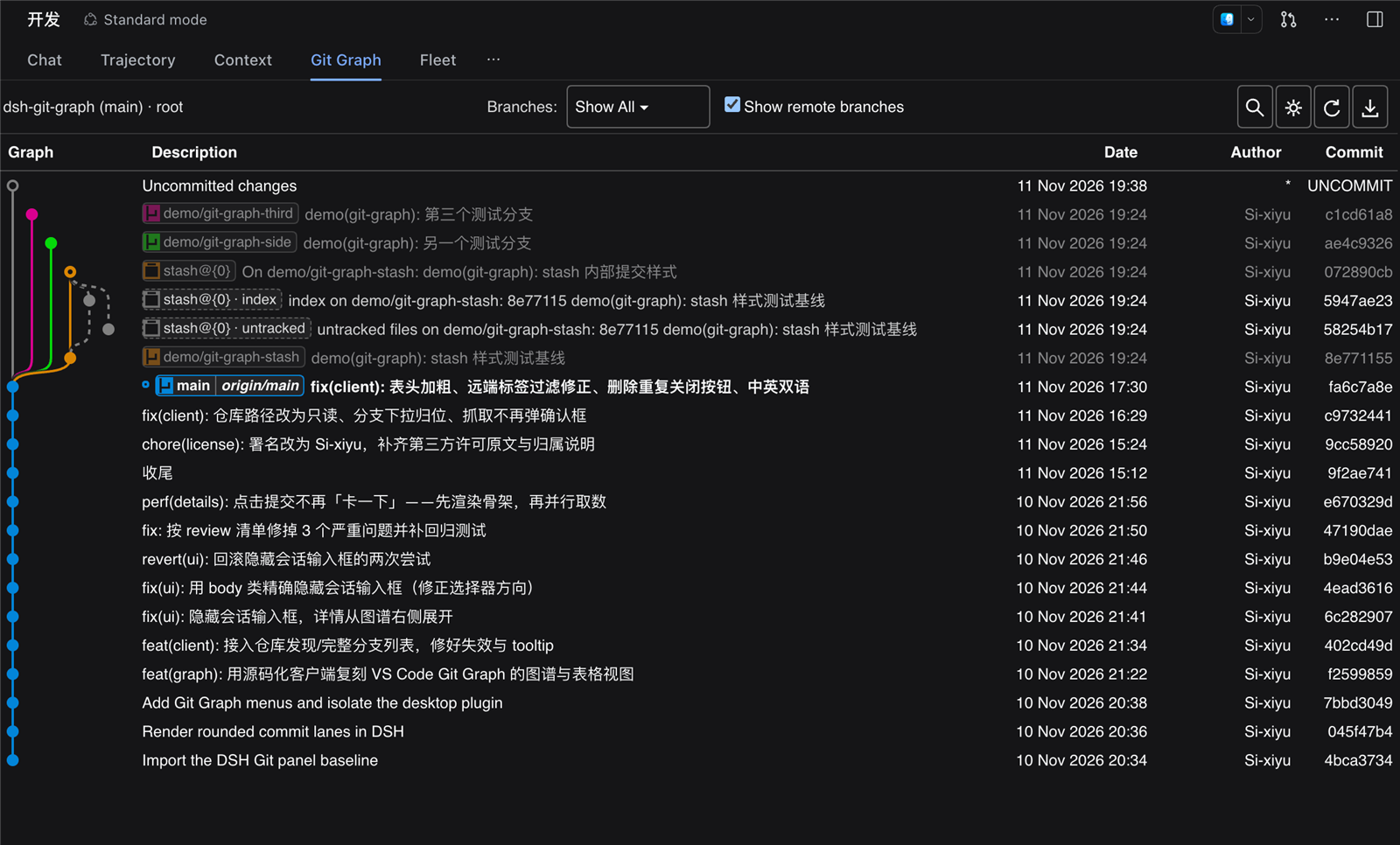
Manifest validGit Graph for DeepSeek Harness: a VS Code-style commit graph with branch switching, merge, rebase, tags, stash and inline diffs.
DSH Git Graph is a VS Code-style Git graph plugin for DeepSeek Harness — commit history, branch actions and inline diffs, inside a session tab.
English | 简体中文
DSH Git Graph turns the repository of the current session into a commit graph you can work on without leaving the chat page: switch, create and delete branches, merge, rebase, reset, cherry-pick, tag, stash, push and pull — with an inline commit details view and a diff drawer.
Features
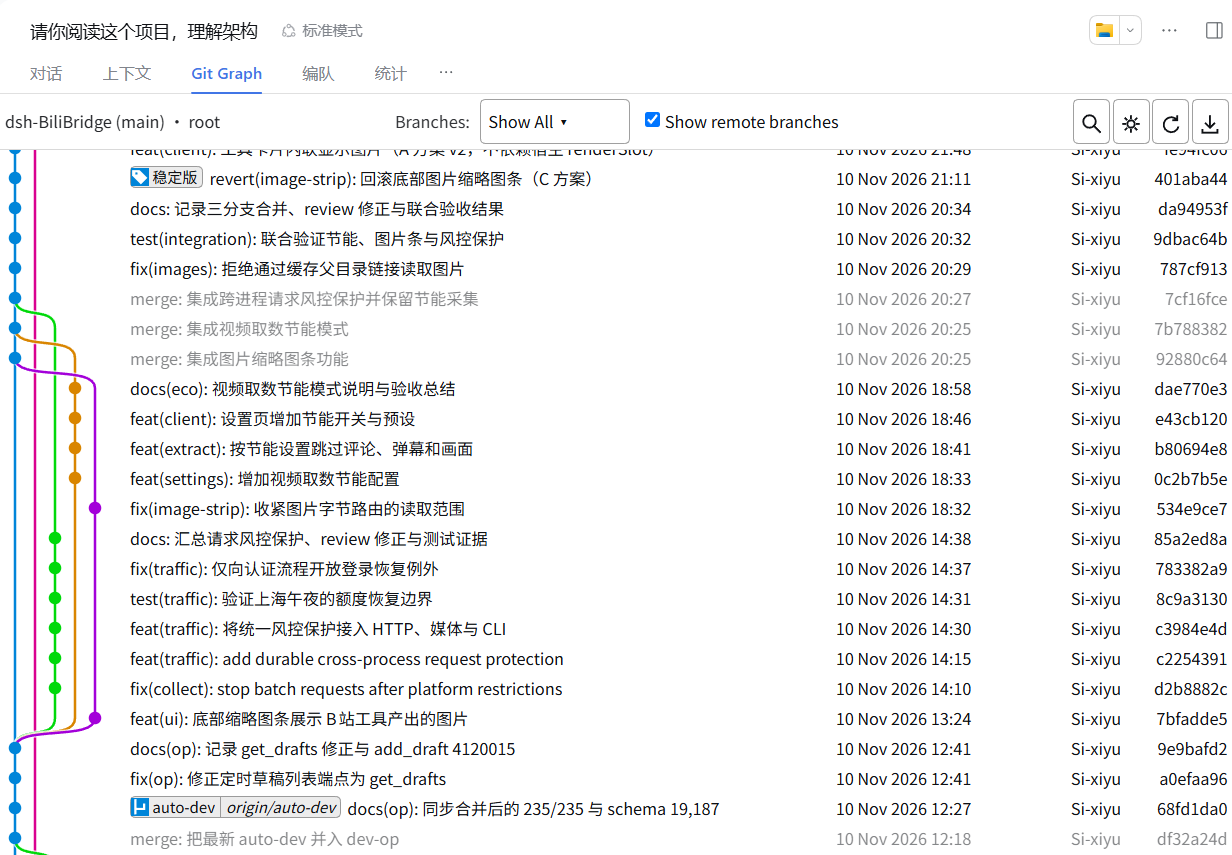
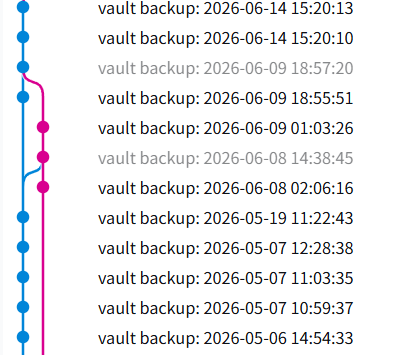
- Commit graph — branch-coloured lanes with per-row width, correct merge and side-branch
routing. Stash commits (including their internal
index/untrackedentries) and the uncommitted-changes row are drawn distinctly; commits outside the checked-out branch are muted. - Reference pills — local branches, remote branches and tags as compact pills, with the checked-out branch highlighted. Hover for a tooltip, double-click to check out.
- Inline commit details — author, committer, date, parents and the full message on the left;
changed files with
+n / -non the right. Click a file to open its diff. - Diff drawer — a resizable bottom panel with virtualised scrolling, per-file grouping and add/delete highlighting.
- History actions — checkout, create, rename, delete (optionally on remotes), merge, rebase, reset (soft / mixed / hard), cherry-pick, revert, drop a commit.
- Tags and stashes — create annotated or lightweight tags (optionally pushed), delete them locally or on a remote; push, apply, pop and drop stashes.
- Remotes — fetch (with prune options), push (normal / force-with-lease / force, set upstream), pull a specific remote branch.
- Search and keyboard —
Ctrl/⌘+Fsearch with highlighting,Ctrl/⌘+Rrefresh,Ctrl/⌘+Hjump to HEAD, arrow keys to move (Ctrl/Ctrl+Shiftfor first / alternative parent–child). - Multiple repositories — discovers repositories under the session directory and lets you switch.
- Bilingual UI — follows the host language, switchable in Preferences, remembered locally.
Quickstart
Install with the DSH CLI (recommended)
dsh plugin --profile desktop add dsh-vsc-git-graph
Restart DSH Desktop, open a session inside a Git repository, and select the Git Graph tab.
Install from a tarball (offline)
In root
npm run dist
Then Settings → Plugins → install from archive and pick dist/dsh-vsc-git-graph-<version>.tgz.
Install from source
git clone https://github.com/Si-xiyu/dsh-git-graph.git
dsh plugin --profile desktop add ./dsh-git-graph
Install from the plugin market
Once the plugin is listed in the DSH plugin catalog, it can also be
installed from Settings → Plugins → Discover (dsh 0.2.1+). Add
https://cdn.jsdelivr.net/npm/dsh-plugin-catalog/index.json as an index source if the Discover tab is
empty.
Let your agent install it
Paste this into your agent:
Install the DSH Git Graph plugin from https://github.com/Si-xiyu/dsh-git-graph into my
DeepSeek Harness desktop profile.

1. Check prerequisites: `git --version` works, and `dsh --version` is >= 0.1.0-rc.5.
2. Install from npm: `dsh plugin --profile desktop add dsh-vsc-git-graph`.
3. If the npm registry is unreachable, clone the repo and install the local path instead:
   `git clone https://github.com/Si-xiyu/dsh-git-graph.git` then
   `dsh plugin --profile desktop add <absolute-path-to-the-clone>`.
4. Restart DSH Desktop, open a session inside a Git repository, and confirm a "Git Graph"
   tab appears in the session tab bar.
Machine-readable install notes for agents: AGENTS.md.
Usage
- Open the Git Graph tab in a session — the graph follows that session's working directory.
- Click a commit to expand its details; click a file to open the diff drawer.
- Right-click a branch pill, commit, tag or stash for its actions.
- Double-click a branch pill to check it out.
Requirements
- DeepSeek Harness Desktop ≥ 0.1.0-rc.5
giton yourPATH- Node.js ≥ 20 (development and build only)
Security
The host half registers /vsc-git-graph on the app's webServer, and that route runs
git — including write operations (checkout, merge, commit, discard, push). A
webServer route carries no Host/Origin check and no browser authentication by
itself, so the handler runs the app's Connection trust fence
(ctx.connection.requestRejection) before the method check, before reading the
body, and before any git command: cross-site and DNS-rebinding requests answer 403,
callers without the browser's login-token credential answer 401. A composition that
provides no connection service registers no reachable handler (503) rather than an
open one.
Development
npm install
npm run build   # src/ -> lib/client.js (single-file client bundle)
npm test        # host + graph-engine + client bundle tests
npm run dist    # distributable tarball
The graph layout engine lives in src/graph.js and is specified behaviourally in
docs/GRAPH-SPEC.md.
License & credits
Released under the MIT License (© Si-xiyu).
- Baseline: enoughpower/dsh-git-graph (MIT), license
text in
licenses/. - The graph and its interactions are modelled after
VS Code Git Graph.
src/graph.jsis an independent implementation written against a behavioural specification: behaviour matches the reference for visual parity, while the source text is not a copy. - Per-path attribution: THIRD_PARTY_NOTICES.md.
Comments
Loading…
Similar plugins
by enoughpower
Git view for DeepSeek Harness: status, commit graph, branches, diff, staging/commit, push/pull and blame.
★ 5
↓ 551/wk
MIT
JavaScript
Sep 30, 2026
dsh plugin --profile web add dsh-git-graphby DevViking-Persike
DeepSeek Harness plugin: a Git commit-graph view with lanes, refs, and worktree management, beside the chat input
★ 0
MIT
JavaScript
Aug 27, 2026
dsh plugin --profile web add dsh-git-graphby yoggu
Git history and working-tree diff graph for the DeepSeek Harness web sidebar.
★ 0
MIT
JavaScript
Oct 1, 2026
dsh plugin --profile web add dsh-git-graphby mjnhmd
Git status bar for DeepSeek Harness: repo, branch, changes and SHA above the composer, with branch switching and a diff pane.
★ 1
MIT
JavaScript
Nov 6, 2026
dsh plugin --profile web add dsh-git-barGit workspace manager for DeepSeek Harness: a repo-gated composer button opens a settings-style panel for diff/commit, branch, conflict, and worktree management, plus a commit history with branch-grap
★ 1
↓ 65/wk
MIT
JavaScript
dsh plugin --profile web add @duke-dsh-plugins/dsh-git-managerby kaixinbaba
Git development workbench for DeepSeek Harness: captures branch, status, worktrees, stashes and recent commits, with commands, tools and a settings UI.
★ 0
↓ 67/wk
MIT
JavaScript
Aug 20, 2026
dsh plugin --profile web add dsh-git-workbench