

dsh-git-graph
Manifest valid★ 5Git view for DeepSeek Harness: status, commit graph, branches, diff, staging/commit, push/pull and blame.
dsh-git-graph
DeepSeek Harness 集成 Git 视图的插件。
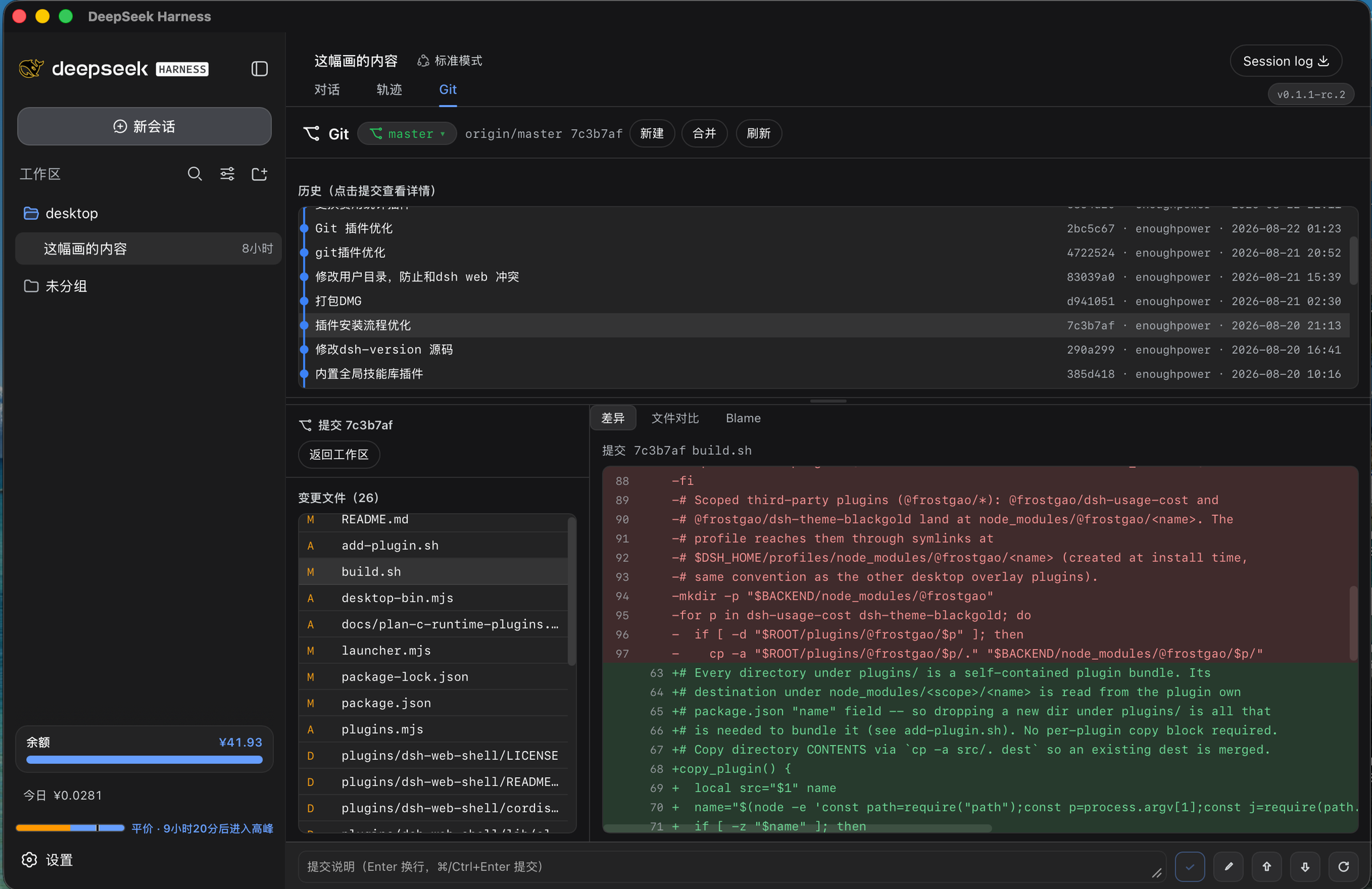
dsh-git-graph 把 Git 操作(状态 / 分支 / 差异 / 提交 / 推送拉取 / 提交图 / 溯源)打包成一个可直接安装的
dsh 插件。宿主半注册 /git JSON API,浏览器半在会话区域加一个 Git 页签,打开与当前会话工作目录
绑定的面板(分支栏 + 提交图 + 变更文件 + 差异视图)。界面文案中英双语(跟随 dsh locale 服务)。
移动端适配:Git 页签在手机(dsh-pocket 代理)上也可见,窄屏下自动单列堆叠(历史图 → 变更文件 → 差异)、压缩顶栏与字号、放大触控目标;桌面宽屏保持三栏布局。
特性
Git 操作(/git)
- 工作区状态:
status返回分支信息 + 已暂存 / 未暂存 / 未跟踪三类文件,逐文件标注状态码(XY)。 - 分支管理:列出本地/远程分支(
branches)、切换(switchBranch)、新建(newBranch)、 删除(deleteBranch)、重命名(renameBranch)、合并(merge,可选--no-ff)。 - 分支 / 标签统一下拉:顶栏一个下拉框用分组(
<optgroup>)同时列出「本地分支 / 远程分支 / 标签」, 选中分支走switchBranch、选中标签走switchTag(检出为 detached HEAD)。tags会标注当前检出的标签, 胶囊据此回显当前 ref(在标签上时显示标签名,而不是HEAD (no branch))。若面板指向的是插件自身的仓库, 选标签会先弹确认(避免把正在运行的插件前端换成旧版本);选分支不拦截,方便一键切回。 - 差异与提交:
diff(工作区 / 已暂存)、stage/unstage/discard/remove、commit(提交选中文件或全部)、amend。 - 历史与溯源:
log(oneline 列表)、graphLog(带父提交的提交图)、fileLog(单文件历史)、blame(逐行溯源)、show/showStat/showFiles/showFileDiff(提交详情与单文件差异)、catFile(读指定 ref 或工作区文件内容)。 - 远程与标签:
push/pull/fetch(可prune)、remotes、tags、conflicts。
大 diff 截断到 2 MiB,避免超大差异冻结传输与前端渲染。
界面截图
兼容性
| 项 | 要求 |
|---|---|
| dsh(宿主) | >= 0.1.0-rc.5 |
| Node.js | >= 20 |
| git | >= 2.28(git init -b 需要;分支/合并/日志等日常操作 2.x 均可) |
| 平台 | 宿主(Node)+ Web(浏览器) |
安装
该插件是 bundle 插件(package.json 声明 dsh.bundle + cordis.patch.yml,并声明 dsh.client),
装好后宿主层与浏览器层都会被自动激活。
# 本地目录
dsh plugin --profile web add /path/to/dsh-git-graph

# 或已发布的 npm 包
dsh plugin --profile web add dsh-git-graph
使用
- 装好插件并在会话内打开一个工作区(仓库目录)。
- 会话区域出现 Git 页签(对话轨迹右侧),点击进入 Git 面板。
- 面板内:顶部分支栏 + 提交图;选中一个提交看详情(变更文件 / 差异);选中工作区文件可暂存 / 提交 / 丢弃。
- 面板绑定「当前会话工作目录」。
JSON API
所有请求都是 POST,content-type: application/json。通用响应:
// 成功
{ "ok": true, "value": { /* 结果 */ } }
// 失败
{ "ok": false, "error": { "code": "git-error", "message": "..." } }
/git 操作
| op | 请求 | 说明 |
|---|---|---|
status | { path } | 分支 + staged / unstaged / untracked 文件;self 标记该目录是否为插件自身源码树 |
staged | { path } | 仅已暂存(index vs HEAD)文件 |
branches | { path } | 本地/远程分支(当前、track 信息、ahead/behind) |
switchBranch | { path, name } | 切换分支(远程名自动退化为本地短名) |
switchTag | { path, name } | 切换到标签(检出为 detached HEAD) |
newBranch | { path, name, base?, switch? } | 新建分支,switch 为真时切过去 |
deleteBranch | { path, name, force? } | 删除分支(force → -D) |
renameBranch | { path, name, oldName? } | 重命名当前/指定分支 |
merge | { path, name, noFf? } | 合并分支,冲突时返回 conflicts: true |
diff | { path, file?, staged? } | 差异(截断到 2MiB) |
stage | { path, files[] } | 暂存指定文件 |
unstage | { path, files[] } | 取消暂存 |
discard | { path, files[] } | 丢弃工作区改动 |
remove | { path, files[] } | 物理删除(含未跟踪) |
log | { path, n? } | 最近提交列表 |
graphLog | { path, n? } | 提交图(含父提交、作者、日期、refs) |
fileLog | { path, file, n? } | 单文件历史 |
blame | { path, file } | 逐行溯源 |
catFile | { path, file, ref?, workingTree? } | 读某 ref 或工作区文件内容 |
commit | { path, message, files[]? } | 提交选中文件(缺省提交全部) |
amend | { path, message? } | 追加到上一提交 |
show | { path, hash } | 提交补丁 |
showStat | { path, hash } | 提交元信息 + stat + 补丁 |
showFiles | { path, hash } | 提交变更的文件名 |
showFileDiff | { path, hash, file } | 提交内单文件差异 |
push | { path, branch?, setUpstream? } | 推送 |
pull | { path, rebase? } | 拉取(--ff-only) |
fetch | { path, prune? } | 抓取远端 |
remotes | { path } | 远端列表(fetch/push URL) |
tags | { path } | 标签列表;current 为当前检出的标签(仅 detached HEAD 时非空) |
conflicts | { path } | 冲突文件列表 |
目录结构
dsh-git-graph/
├── package.json        # 插件清单:dsh.bundle + dsh.client + 发布元数据
├── cordis.patch.yml    # 宿主激活 row(id=git-graph)
├── lib/
│   ├── index.js        # 宿主半:/git 路由 + 纯函数导出(可测)
│   └── client.js       # 浏览器半:Git 页签 UI(预编译单文件 bundle)
├── test/
│   ├── parse.test.js       # 纯函数单测(porcelain / 分支头解析)
│   └── integration.test.js # 真实仓库 + HTTP 端到端烟测
├── .github/workflows/  # CI + npm 发布(provenance)
├── README.md           # 中文文档
├── README.en.md        # English docs
└── LICENSE             # MIT
开发
# 运行测试(node 内置 test runner,无需额外依赖)
npm test

# 单跑某文件
node --test test/parse.test.js
node --test test/integration.test.js
test/integration.test.js会真实git init一个临时仓库、启动apply()、用 HTTP 驱动/git做端到端冒烟,结束后清理临时目录。要求git在PATH中。lib/client.js是预编译产物(esbuild 单文件 bundle),本仓库直接复用桌面版已编译 bundle, 宿主/浏览器两半用同一包名在 dsh 客户端模块系统里注册 (window.__ModuleLoader__.load({ id: "dsh-git-graph", factory }))。- CI(
.github/workflows/):push/PR 跑测试(Node 20/22);打v*标签自动npm publish --provenance(需NPM_TOKENsecret,标签版本号须与 package.json 一致)。
安全
- 每个
/git操作都限定在请求的path目录内执行,不引入任意 shell(走execFile参数数组)。 - 请求体上限 1MiB、
git输出缓冲 64MiB、diff 截断 2MiB,避免超大内容拖垮进程。
许可证
更新说明见 CHANGELOG.md。
Compatibility
Versions
| Latest version | Published | Size |
|---|---|---|
| 0.1.0 | — | — |
| 0.1.1 | — | — |
| 0.1.2 | — | — |
| 0.1.3 | — | — |
| 0.1.4 | — | — |
| 0.1.5 | — | — |
| 0.1.6 | — | — |
| 0.1.7 | — | — |
| 0.1.8 | — | — |
Comments
Loading…
Similar plugins
by DevViking-Persike
DeepSeek Harness plugin: a Git commit-graph view with lanes, refs, and worktree management, beside the chat input
★ 0
MIT
JavaScript
Aug 27, 2026
dsh plugin --profile web add dsh-git-graphby kaixinbaba
Git development workbench for DeepSeek Harness: captures branch, status, worktrees, stashes and recent commits, with commands, tools and a settings UI.
★ 0
↓ 67/wk
MIT
JavaScript
Aug 20, 2026
dsh plugin --profile web add dsh-git-workbenchby WhitePlusMS
Read-only Git Graph view for the DeepSeek Harness web interface. Inspect commit topology, branches, tags, remotes, HEAD, and working-tree status in a dedicated view beside Chat and Trajectory.
★ 5
↓ 312/wk
MIT
JavaScript
Oct 22, 2026
dsh plugin --profile web add dsh-git-graphLocal Git workbench for DeepSeek Harness: branch search and switching, hunk-level staging, commit graph, file history and blame, stash and worktree management, conflict resolution, and eight git tools
★ 0
MIT
JavaScript
dsh plugin --profile web add dsh-plugin-git-workbenchby EasyTZ
Git panel plugin for DeepSeek Harness (dsh) — visual staging, commits, push and branch switching in the sidebar
★ 1
↓ 488/wk
MIT
JavaScript
Oct 8, 2026
dsh plugin --profile web add @easytz/dsh-gitby yoggu
Git history and working-tree diff graph for the DeepSeek Harness web sidebar.
★ 0
MIT
JavaScript
Oct 1, 2026
dsh plugin --profile web add dsh-git-graph