

dsh-remote
Discovered★ 94Native Android client to remotely control DeepSeek Harness (DSH) from your phone
DSH Remote
Best remote under 10M, bar none.
Little D, do us a favor, wawawawawa.
Hope you enjoy using it^_^
Contents
- 整体架构
- 功能特性
- 仓库结构
- 快速开始(TL;DR)
- 第一步:安装 DSH Harness
- 第二步:安装插件
- 第三步:启动 dsh web
- 第四步:Tailscale 组网
- 第五步:Caddy HTTPS 反向代理
- 第六步:手机安装并连接
- 如何自己构建 App
- 实现原理
- 常见问题(FAQ)
- 安全须知
整体架构
  Android 手机 (DshRemote App)
        │  HTTPS + WebSocket(/api/events.mux)
        ▼
  Caddy 反代  (https://<你的机器>.ts.net:8443 → localhost:3080)
        │
        ▼
  DSH 宿主  (dsh web, 127.0.0.1:3080)
        │  ┌─ @deepseek-ai/dsh-base
        │  ├─ @deepseek-ai/dsh-web-app
        │  ├─ dsh-better-sidebar        (侧边栏增强)
        │  ├─ dsh-computer-control      (电脑控制,供模型调用)
        │  └─ dsh-remote-control        (本仓库:给手机提供的 /remote/* 接口)
        ▼
  LLM(DeepSeek 等,含原生 vision 模型)
- The phone app only does "display + interaction"; all sessions, tools, and files live in the DSH host on your computer.
dsh-remote-controlis the server-side plugin bundled in this repository, responsible for exposing/remote/*routes (list directories, upload/download files, delete/rename, etc.) to the phone app.
Features
Below is a detailed walkthrough of everything the app can do (based on v1.4.4), organized by UI module.
Home / Dashboard
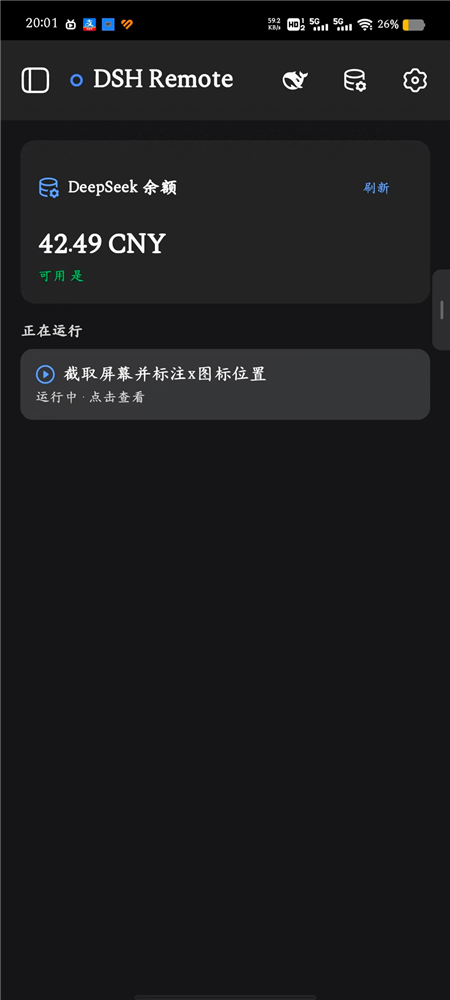
- Connection Status: The dot on the left of the title bar shows the real-time connection status to your computer's DSH (blue = connected, gray = disconnected).
- DeepSeek Balance Card: Displays the balance (CNY) and "available" status of your current DeepSeek account; tap "Refresh" to re-query.
- Running: If tasks are running on your computer, an entry like "Running · tap to view" will appear here; tapping it jumps straight to the corresponding session.
Session Management
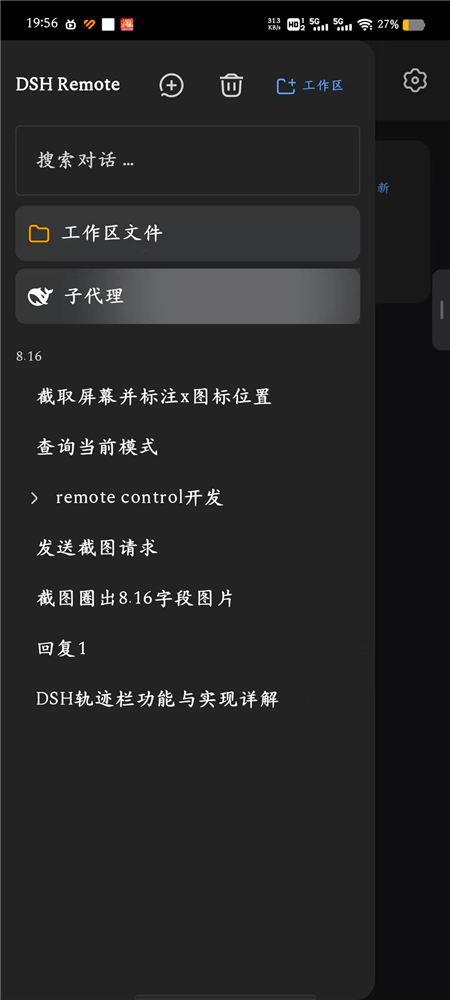
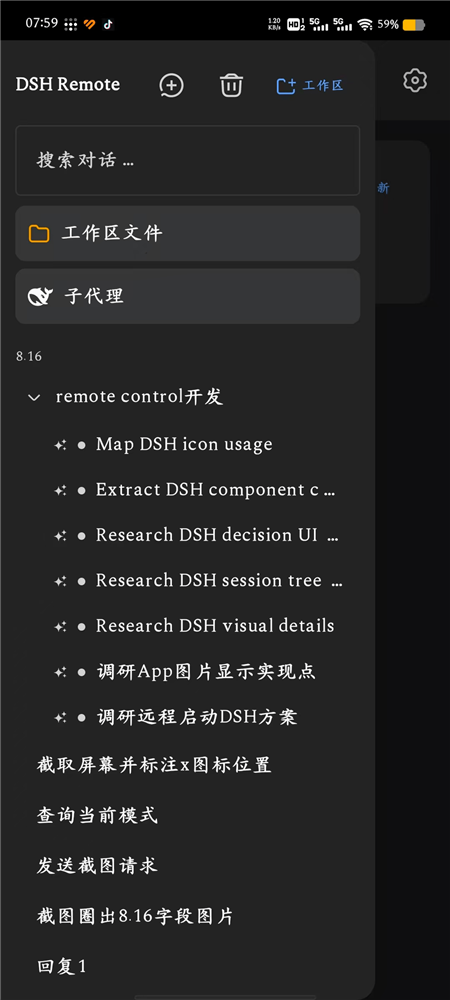
- Session list: shows all sessions, with running ones highlighted in real time.
- New / archive / rename / search: create a session on the fly, archive ones you no longer need, and locate sessions by title search.
- Sub-agents: tap the "Sub-agents" card to enter the sub-agent session tree, giving a clear view of sub-agents under the parent session; tap one to view its conversation in isolation.
- Workspace: tap "Workspace files" to open the file browser (see below).
Conversation / Trajectory
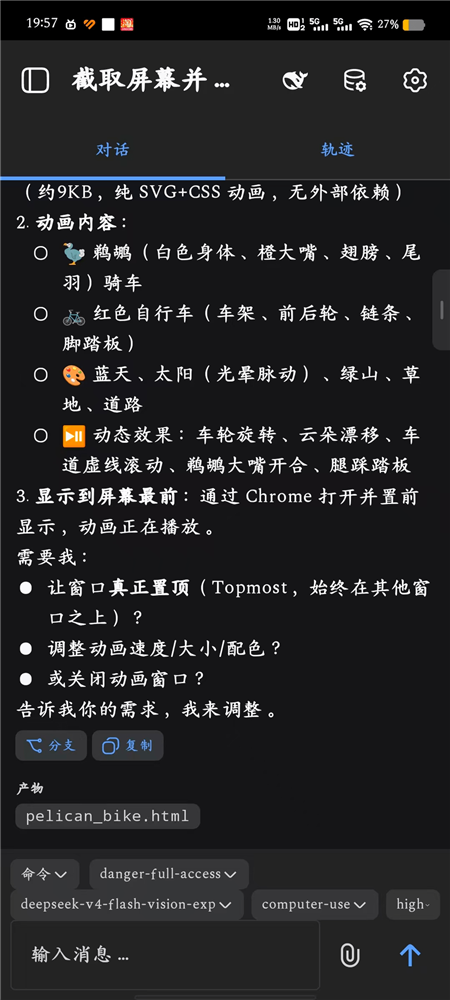
- Conversation / Trajectory Dual Tabs: Switch between the "Conversation" and "Trajectory" views at the top.
- Streaming Output: Assistant text and reasoning are displayed character by character in real time.
- Markdown Rendering: Headings, bold, inline code (gray background), code blocks, links, multi-level lists, blockquotes, and checklists.
- Todo List: The model's task list with progress shown in real time.
- Tool Call Cards: Tools like terminal commands, file editing (diff), search, and web scraping are all collapsed into expandable cards.
- Artifact List: At the end of each turn, automatically lists the file paths newly created/modified in that turn (e.g.
image_report.html). - Image Thumbnails: Images in the conversation (sent by you or generated by the AI) are shown as thumbnails; tap to enlarge to full screen and view the clear original.
- Branch (Fork) and Copy: One-click fork of any message into a sub-session, or copy its text.
Trajectory Panel
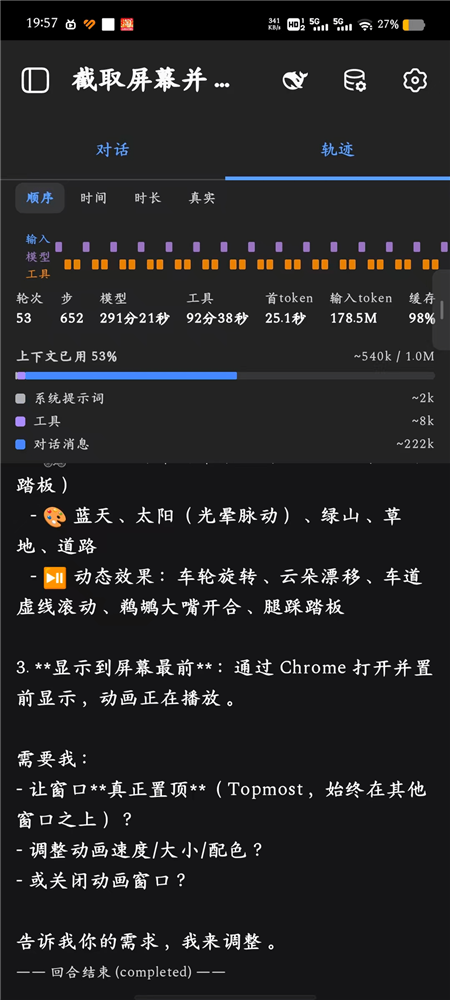
A three-lane (Input / Model / Tool) timeline showing detailed data for each turn:
- Stats Bar: Turns, steps, model time, tool time, first-token latency, total input tokens, cache hit rate.
- Context Usage: Used context percentage (e.g. 53%), broken down into token usage for "system prompt / tools / conversation messages".
- Timeline: View each step's (model, tool) invocations in sequence / duration / real-time order.
Input Area
- Command / Permission Selector: Switch permission presets directly at the bottom (read-only / workspace-write / danger-full-access) and see the currently active commands.
- Model Selection: Switch provider / model (e.g.
deepseek-v4-flash-vision-exp) and set reasoning effort (e.g.high). - Image Sending: Tap the attachment button on the left of the input box to pick from your gallery or take a photo to send to the model.
- Message Input: Input box + send button; lines starting with
/go through the host command channel (/plan,/goal,/permission, etc.) rather than being sent as regular messages.
Decision Interaction (Inline Cards)
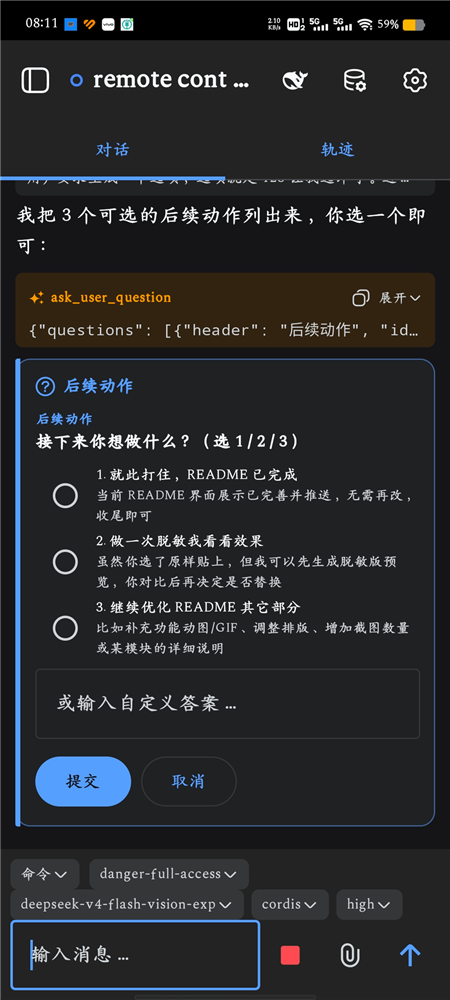
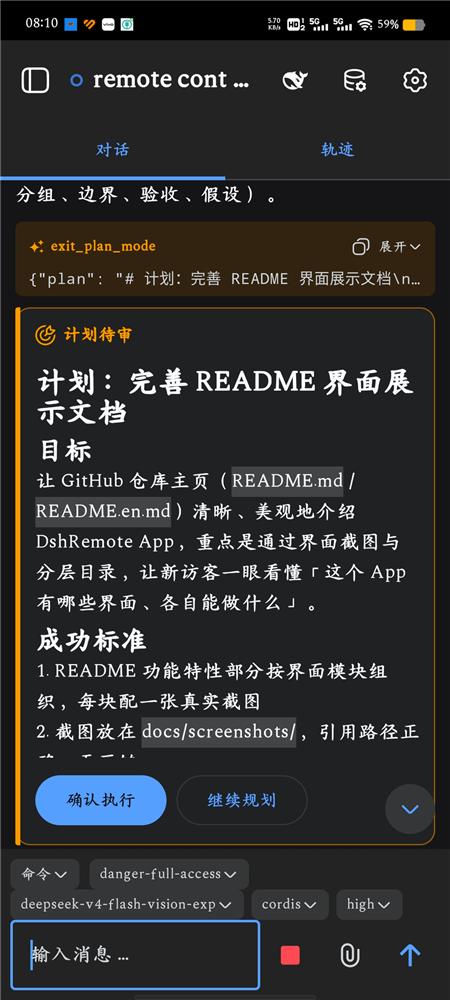
计划审批、工具批准、AI 提问这三类决策,都以卡片形式内联在对话流底部,不会弹窗盖住聊天内容:
- 计划审批:
确认执行/继续规划(带左侧色条 + 图标,长计划可滚动)。 - 工具批准:
允许一次/拒绝。 - AI 提问:单选 / 多选 + 自定义回答。
Workspace File Management
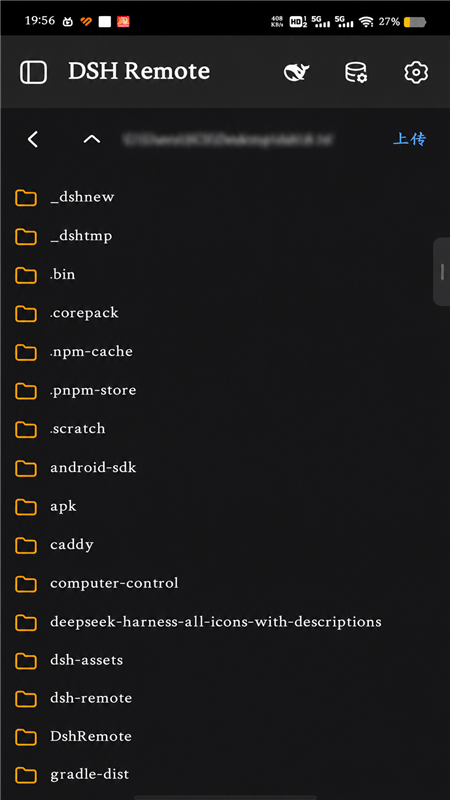
Via the dsh-remote-control server-side plugin, browse your computer's workspace directories from your phone:
- Directory Browsing: Navigate into any folder and view the subdirectory listing.
- Upload: Upload files from your phone to the current directory on your computer.
- Download / Delete / Rename / Copy: Full set of file operations.
Settings
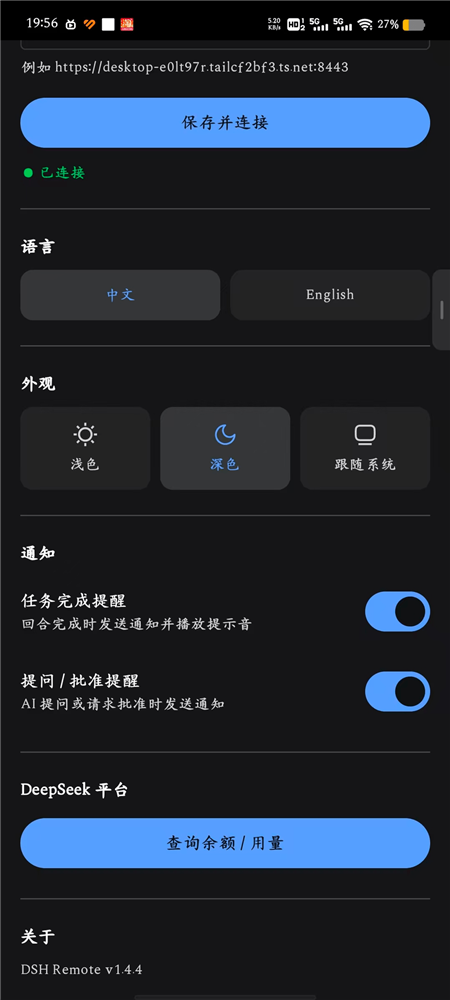
- Server Address: Enter your computer's DSH
https://…:8443address, tap "Save & Connect", and it will auto-reconnect after changes. - Language: One-tap switch between Chinese / English.
- Appearance: Three theme options — Light / Dark / Follow System.
- Notifications:
- Task Completion Alerts: Send a notification and play a sound when a turn completes.
- Question / Approval Alerts: Send a notification when the AI asks a question or requests approval.
- DeepSeek Platform: Check balance / usage.
- About: Shows the app version number.
Goals / To-Do / Background Jobs
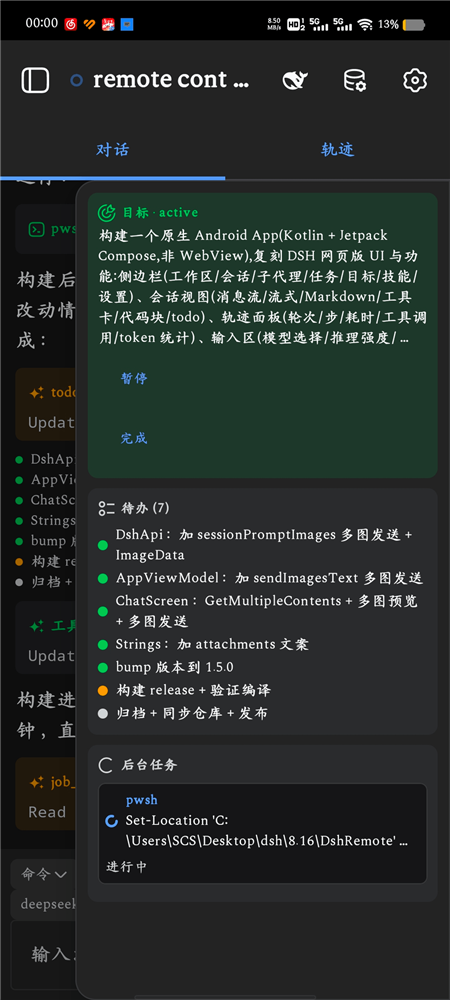
对话流中,模型正在执行的目标、任务清单和后台任务都以内联卡片透出,实时可见:
- Goal: The title of the goal currently in progress + status (
active), with "Pause / Complete" actions. - To-Do (Todo): The task list the model has broken down, with per-item progress (done / in progress / not started).
- Background Jobs: Shell / commands running in the background, showing the command and "in progress" status.
通知与后台
- 前台服务常驻,App 退到后台也能收到:任务完成、任务出错、AI 提问、需要批准等系统通知。
- 点通知直接跳转到对应会话。
仓库结构
dsh-remote/
├── DshRemote/            Android 客户端源码(Kotlin + Jetpack Compose)
│   └── app/src/main/java/dev/dsh/remote/
│       ├── data/         数据模型、DSH API、设置存储
│       ├── net/          RPC 客户端、WebSocket 客户端
│       ├── ui/           各界面(主页/会话/轨迹/文件/设置…)
│       ├── service/      前台服务(后台收通知)
│       └── MainActivity.kt
├── remote-control/       dsh-remote-control 服务端插件
│   ├── lib/host.js       注册 HTTP + SSE 路由(/remote/*)
│   ├── cordis.patch.yml  把插件挂进 profile 的 patch
│   └── package.json      bundle 声明
├── web-profile/          DSH web profile 部署模板(package.json)
│   (APK 通过 GitHub Releases 分发,不随源码进 git)
├── convert-icons.js      SVG → Android VectorDrawable 图标转换
├── render-launcher-whale.js   启动图标渲染脚本
├── launcher-whale-wifi.svg    启动图标素材
├── keystore.properties.example 签名配置模板
└── README.md
Quick Start (TL;DR)
On the computer (Windows example):
# 1) 装 DSH harness
mkdir dsh-app && cd dsh-app
npm install @deepseek-ai/dsh

# 2) 装插件(进入 web profile)
npx dsh plugin --profile web add dsh-better-sidebar dsh-computer-control
npx dsh plugin --profile web add "file:C:/path/to/dsh-remote/remote-control"

# 3) 启动
npx dsh web
On the phone: Download the latest DshRemote-1.4.4.apk from the Releases page → enter the server address in Settings → Connect.
For external network access + HTTPS, add Step 4: Tailscale and Step 5: Caddy.
Step 1: Install DSH Harness
Prerequisites
- Node.js ≥ 20 (download the LTS version from nodejs.org)
- Access to the npm registry (in China, you can configure a mirror:
npm config set registry https://registry.npmmirror.com)
Installation
DSH is an npm package — just install it into a local directory:
mkdir -p ~/dsh-app && cd ~/dsh-app
npm init -y
npm install @deepseek-ai/dsh
After installation, the dsh command is available under node_modules/.bin/:
# 直接用 npx 调用(推荐,不用配 PATH)
npx dsh --version
# 输出:0.1.1-rc.2
You can also install globally with
npm install -g @deepseek-ai/dshand then rundsh --versiondirectly.
DSH 的数据(会话、设置、profile)默认放在 ~/.dsh(Windows 是 C:\Users\<你>\.dsh)。
Step 2: Install Plugins
A DSH profile is a "plugin bundle stack". The web profile in this project is composed of the following 5 bundles:
| bundle | Purpose |
|---|---|
@deepseek-ai/dsh-base | DSH core |
@deepseek-ai/dsh-web-app | Web UI (also hosts the /api RPC and WebSocket) |
dsh-better-sidebar | Sidebar enhancements |
dsh-computer-control | Computer control (screenshots, mouse & keyboard, for model invocation) |
dsh-remote-control | This repository's plugin: provides /remote/* file endpoints for mobile |
Note: Image recognition (vision) is natively supported by DSH (via vision models such as
deepseek-v4-flash-vision-exp); it no longer depends on@liustack/modlens.
Method A: Official Command (Recommended)
npx dsh plugin --profile web add dsh-better-sidebar dsh-computer-control
# 本仓库的 remote-control 用本地路径(把路径换成你 clone 下来的位置)
npx dsh plugin --profile web add "file:C:/path/to/dsh-remote/remote-control"
dsh plugin forwards the remaining arguments to pnpm in the profile directory, which is equivalent to running pnpm add in that directory.
Method B: Manually Edit package.json
Copy this repository's web-profile/package.json to ~/.dsh/profiles/web/, change the file: path for dsh-remote-control to your local absolute path, then:
cd ~/.dsh/profiles/web
npm install
After installation, verify the bundle stack is correct with npx dsh --dump-config.
Step 3: Launch dsh web
cd ~/dsh-app
npx dsh web
By default it listens on 127.0.0.1:3080. Open http://127.0.0.1:3080 in your browser and you should see the DSH web interface.
Common options:
# 换端口
npx dsh web --port 8080
# 允许外部(Tailscale)域名通过浏览器信任墙
npx dsh web --trusted-host "desktop-xxxx.tailxxxx.ts.net:8443"
The mobile app connects via HTTPS + WebSocket, so you still need the next two steps to expose port 3080.
Step 4: Tailscale Networking
Tailscale puts your computer and phone on the same private network — no public IP or router port forwarding required.
- Install Tailscale on your computer: https://tailscale.com/download
- Install Tailscale on your phone too (App Store / Google Play)
- Log in with the same account on both sides, and confirm all devices are online in the admin panel
- Note your computer's MagicDNS name, e.g.
desktop-xxxx.tailxxxx.ts.net
Tailscale 的安装和登录步骤官方文档已经写得很清楚,这里只引用,不重复展开。只要电脑和手机能互相 ping 通就算组网成功。
Step 5: Caddy HTTPS Reverse Proxy
The app connects to your DSH over HTTPS, so you need an HTTPS endpoint. The simplest approach is to use Caddy as a reverse proxy with a self-signed certificate (the app already has TrustAll enabled, so it accepts self-signed certs).
- Download Caddy: https://caddyserver.com/download
- Create a
Caddyfilein the caddy directory:
{
  servers {
    protocols h1 h2
  }
}

https://desktop-xxxx.tailxxxx.ts.net:8443 {
  tls internal
  reverse_proxy localhost:3080
}
Replace desktop-xxxx.tailxxxx.ts.net with your computer's Tailscale name.
- Start it:
caddy run --config Caddyfile
- Open
https://desktop-xxxx.tailxxxx.ts.net:8443in your phone's browser. If the DSH web page loads, you're good.
Note: when starting
dsh web, include--trusted-host "desktop-xxxx.tailxxxx.ts.net:8443", otherwise the browser's trust wall will block non-local Host headers.
Step 6: Install and Connect on Mobile
- Install the APK: Download the latest
DshRemote-*.apkfrom this repository's Releases page (Android 8.0+), or follow How to Build the App Yourself to build it yourself. - Open the app → Settings (top right) → Enter the server address:
https://desktop-xxxx.tailxxxx.ts.net:8443
- Go back to the home page; it will auto-connect. Once connected you can:
- View the session list and enter a session to chat
- Check the trajectory panel (rounds/steps/duration/tool calls/tokens)
- Handle plan approval, tool approval, and AI questions (cards inline in the conversation)
- Browse/upload/download workspace files on the computer
- Receive background notifications for "task completed / approval needed"
How to Build the App Yourself
如果你要改代码自己打 APK:
Environment
| Dependency | Version |
|---|---|
| JDK | 21 |
| Gradle | 8.11.1 |
| Android SDK | compileSdk 35 |
Open DshRemote/ in Android Studio (it will prompt you to install the SDK). For command-line builds:
cd DshRemote
# 生成签名密钥(只需一次)
keytool -genkey -v -keystore keystore/my-release.keystore \
  -alias myalias -keyalg RSA -keysize 2048 -validity 10000
# 配置签名
cp keystore.properties.example keystore.properties
# 编辑 keystore.properties,填上你的 keystore 路径/别名/密码
# 构建
gradle assembleRelease
The build output is in DshRemote/app/build/outputs/apk/release/.
Note:
keystore.propertiesis excluded via.gitignore; the signing private key and password are never committed to the repo. The example values are just placeholders.
实现原理
通信协议
- RPC:
POST /api/<method>, envelope{"type":"client-request","rpcId":"<uuid>","method":"...","payload":{...}}, response{"type":"server-response","rpcId":...,"result":{"ok":true,"value":...}}. - Real-time events: WebSocket
/api/events.mux; frame types includesession/event(session event stream),session/queue,session/jobs,session/projection,question/requested(AI questions / plan approval),approval/requested(tool approval), etc. - Commands:
POST /api/commands/execute, payload{"args":{"agentId":"<sessionId>","line":"/plan","images":[]}}, used to execute host commands like/plan,/goal,/compact,/permission(not sent as ordinary messages). Commands go through the Typert Remote endpoint, and the payload must be wrapped in{"args":{…}}.
Key Modules (App Side)
| Module | Responsibility |
|---|---|
net/RpcClient.kt | HTTP RPC envelope encoding/decoding |
net/WsClient.kt | WebSocket mux event stream |
data/DshApi.kt | Wraps all DSH methods (session/workspace/agentPreset/goal/commands…) |
data/Models.kt | Data models + foldChat (folds the event stream into chat items) |
ui/AppViewModel.kt | Connection, session switching, event handling, decision responses |
ui/MainScreen.kt | Main/home/session views |
ui/ChatScreen.kt | Chat flow + input area + inline decision cards |
ui/TrajectoryScreen.kt | Three-lane trajectory panel |
ui/Markdown.kt | Markdown rendering |
ui/theme/ | Light/dark themes (follows system) |
service/DshForegroundService.kt | Foreground service for receiving background notifications |
Server-side Plugin (remote-control)
lib/host.js registers routes on the web profile's webServer:
GET /remote/list— list directoryGET /remote/file— download filePOST /remote/upload— upload file (base64)POST /remote/delete/POST /remote/rename/POST /remote/copy— file operations
FAQ
Q: Can't connect / spinner keeps spinning?
First check: ① dsh web is running; ② the phone and computer can reach each other over Tailscale; ③ Caddy is running; ④ the address you entered is https://...:8443 (with https).
Q: Plan mode /plan doesn't take effect?
/plan is a host command and must go through the command channel (the "Command" button in the App, or send a message starting with / in the input box); it can't be sent as a plain text message. See the "Command" menu in the App for details.
Q: Can it display images?
Yes, but DSH must be using a vision model (e.g., deepseek-v4-flash-vision-exp). Images in the conversation appear as thumbnails; tap to view the original full-screen.
Q:能改服务器地址吗? 能,设置页里随时改,改完自动重连。
Security Notes
For Users
- 完全本地部署,非常安全:所有会话、文件、密钥都只存在你自己电脑的 DSH 宿主里。App 只是通过 Tailscale 私网连回你的电脑,数据不出你的设备,不上传任何第三方云、也不采集任何信息。
- 下载/安装时弹出警告是正常的:因为 APK 目前用的是个人自签证书(还没花钱买正式代码签名证书),Chrome/安卓会提示「未知来源 / 此应用可能不安全」。点「仍要安装」「更多信息 → 仍要安装」继续即可,不是病毒,只是没花钱买证书而已。
- App 连的是你自己的
https://<你的机器>.ts.net:8443,自签证书所以会提示「证书不受信任」,这也在预期内。
For Developers / Deployers
- Do not commit
keystore.properties,*.keystore, or*.jks(signing private keys). - Do not commit
.credentials.yaml,remote-control.token,settings.yaml, orsessions/under~/.dsh(they contain your keys and sessions). - After uploading with a PAT, delete that token from GitHub immediately.
- Self-signed cert + TrustAll is for personal LAN convenience; if deploying to the public internet, use proper certificates and remove TrustAll.
License
This project is licensed under the GNU General Public License v3.0 (GPL-3.0) (full text in LICENSE).
要点:
- 你可以自由使用、修改、分发本项目。
- 引用或分发(含修改版)时,必须保留本项目的版权声明与许可证文本,并附上完整源代码。
- 你的衍生作品也必须以 GPL-3.0 开源,不得闭源。
- 本软件不提供任何担保,详见许可证原文。
Comments
Loading…
Similar plugins
by saya-ch
DeepSeek Harness 的 Android App 与安全远程访问插件,支持局域网/远程连接和高度自定义的移动界面与扩展能力。
★ 682
↓ 4.2k/wk
Apache-2.0
TypeScript
Oct 30, 2026
dsh plugin --profile web add dsh-mobileby zexadev
Mobile client for the DeepSeek Harness — use the dsh on your dev machine from your Android or iOS phone, remotely across networks, peer-to-peer over iroh with no server to set up (falls back to a rela
★ 89
MIT
Rust
Oct 26, 2026
dsh plugin --profile agent add dsh-plugin-tetherby WNLUO
DeepSeek Harness 移动端插件:手机远程操控宿主,提供受限移动 API、中转隧道与局域网配对(可作无头宿主运行)
★ 4
↓ 5.7k/wk
MIT
JavaScript
Oct 28, 2026
dsh plugin --profile web add dsh-mobile-pluginA PIN-protected, chat-only mobile web client for DeepSeek Harness, served on an isolated port over LAN or a self-provided tunnel.
★ 0
dsh plugin --profile web add dsh-mobile-accessby haibala-aii
Haibala mobile remote control for DeepSeek Harness: scan-to-pair QR and a phone surface at /m
★ 0
BSD-3-Clause
TypeScript
Aug 15, 2026
dsh plugin --profile web add @haibala-aii/dsh-extensions-remotelinkby xiazhi88
DSH Go —— 在手机/平板上用 DeepSeek Harness。Android App + 让电脑可达的 DSH 插件。
★ 3
MIT
JavaScript
Sep 18, 2026
dsh plugin --profile web add @xiazhi88/dshgo