

dsh-mobile
Manifest valid★ 664The DeepSeek Harness Android App and its secure remote access plugin, supporting LAN/remote connectivity along with a highly customizable mobile interface and extension capabilities.
DSH Mobile
在手机上安全、实时地使用电脑中的 DeepSeek Harness。





能做什么 · 快速开始 · 连接教程 · 扩展与自定义 · 设备管理 · 第三方插件适配 · 安全 · 兼容性 · 更新记录 · English
DSH Mobile is a DeepSeek Harness community plugin; the native App only supports Android.
0.4.2 updates: Added a self-hosted HTTPS reverse proxy and a cloudflared remote channel (quick tunnel + named tunnel); the cloudflared component is now installed on demand; one-click deployment of frps + Caddy. The remote provider selector and panel text were proofread at a real 380px width, and issues such as component downloads getting stuck on redirects and failure messages being overwritten on refresh have been fixed. Detailed log.
Upgrade note: The 0.4.2 plugin remains compatible with the 0.4.0 Android App; existing devices do not need to be re-paired; named tunnels require the App to be in the "Remote" flow when scanning the code. To use this Android build, please install the 0.4.2 App as well. Compatibility notes.

下载 Android App 0.4.2
版本说明与校验文件
DSH Mobile is a DeepSeek Harness plugin that lets a mobile browser or the Android App connect to your computer over the LAN, or over an optional Tailscale Funnel, cpolar, cloudflared, self-hosted FRP, or your own reverse proxy remote channel, and continue using the same sessions, workspaces, messages and tools. LAN and remote access are enabled, disabled, and device-managed independently of each other, and neither modifies the DeepSeek Harness source code.
Mobile access uses independent HTTPS and certificate pinning; only paired devices can connect.
It can also customize the mobile UI in DSH chat with /mobile <需求>.
What it can do
- Continue desktop work on phone: same sessions, workspaces, messages, tools, real-time sync.
- Customize mobile UI via chat: change layout, interactions, features directly in DSH chat, refreshing in seconds.
- Touch layouts: session drawer, tool details, settings, question cards and input bar reorganized for mobile. App native pages follow system language (Simplified Chinese, English, Italian); plugin UI follows DSH language, with Italian resources reserved for future DSH support.
- Image attachments: file picker uses DSH's native "Add" group; DSH Mobile adds "Take Photo" to it, sent via DSH native attachment flow.
- Auto-discovery, no re-pairing: switching Wi-Fi, hotspot or IP usually recovers automatically.
- One-click diagnostics: checks version, gateway, NICs, firewall, remote channel; stable reason codes localized in UI; sanitized report generated with no credentials or full addresses.
- One-click WebSocket allow for third-party plugins: diagnostics page records blocked connections by directory (with counts); click allow to open exact path, unapproved ones blocked; new blocks trigger sidebar red dot (#47). If a plugin connection keeps failing (e.g. terminal 1006), check diagnostics page first and allow with one click; manual config usually not needed.
- Faster recovery: remote reactivation recovers trusted connections in parallel, reuses versioned resources, compresses mobile startup batches.
- Three pairing methods: QR scan, pairing link, key.
Paired devices are fully trusted and can control DSH on your computer; use it only on trusted home, office LANs or trusted VPNs.
Quick start
Already have the dsh command installed:
dsh plugin --profile web add dsh-mobile@latest
dsh plugin --profile web exec dsh-mobile setup
dsh --profile web
Using the DeepSeek Harness source code directly:
corepack enable; pnpm install
pnpm dsh plugin --profile web add dsh-mobile@latest
pnpm dsh plugin --profile web exec dsh-mobile setup
pnpm dsh --profile web
也可以通过插件市场安装(可选):
dsh plugin --profile web add dshmarket
After restarting DSH, search for dsh-mobile in Settings → Plugin Marketplace and install. First time opening "Mobile Access," the LAN page lists current networks; confirm the interface, the plugin generates a private cert and configures LAN. Restart DSH once as prompted — no need to run setup in a terminal.
setup automatically selects and remembers the current LAN; after switching Wi-Fi, hotspots or IPs it usually recovers automatically; only use --address 192.168.x.x if auto-selection fails. Settings, certificates, devices and custom files are stored in $DSH_HOME/mobile-access/.
After installing and launching DSH, follow the next section to choose LAN or remote.
npm-installed plugins check for updates on desktop UI load; an "Update Plugin" button appears right of the panel title, restart DSH after install. App download shows latest version; local dev packages aren't auto-overwritten, Android App won't check or push updates.
Connection guide
LAN and remote are two independent systems: use LAN near the computer for lowest latency; enable remote when away. Each manages its own toggles, devices, and login state.
LAN access
Best for the same Wi-Fi, Ethernet or phone hotspot; it's the default and simplest way to connect.
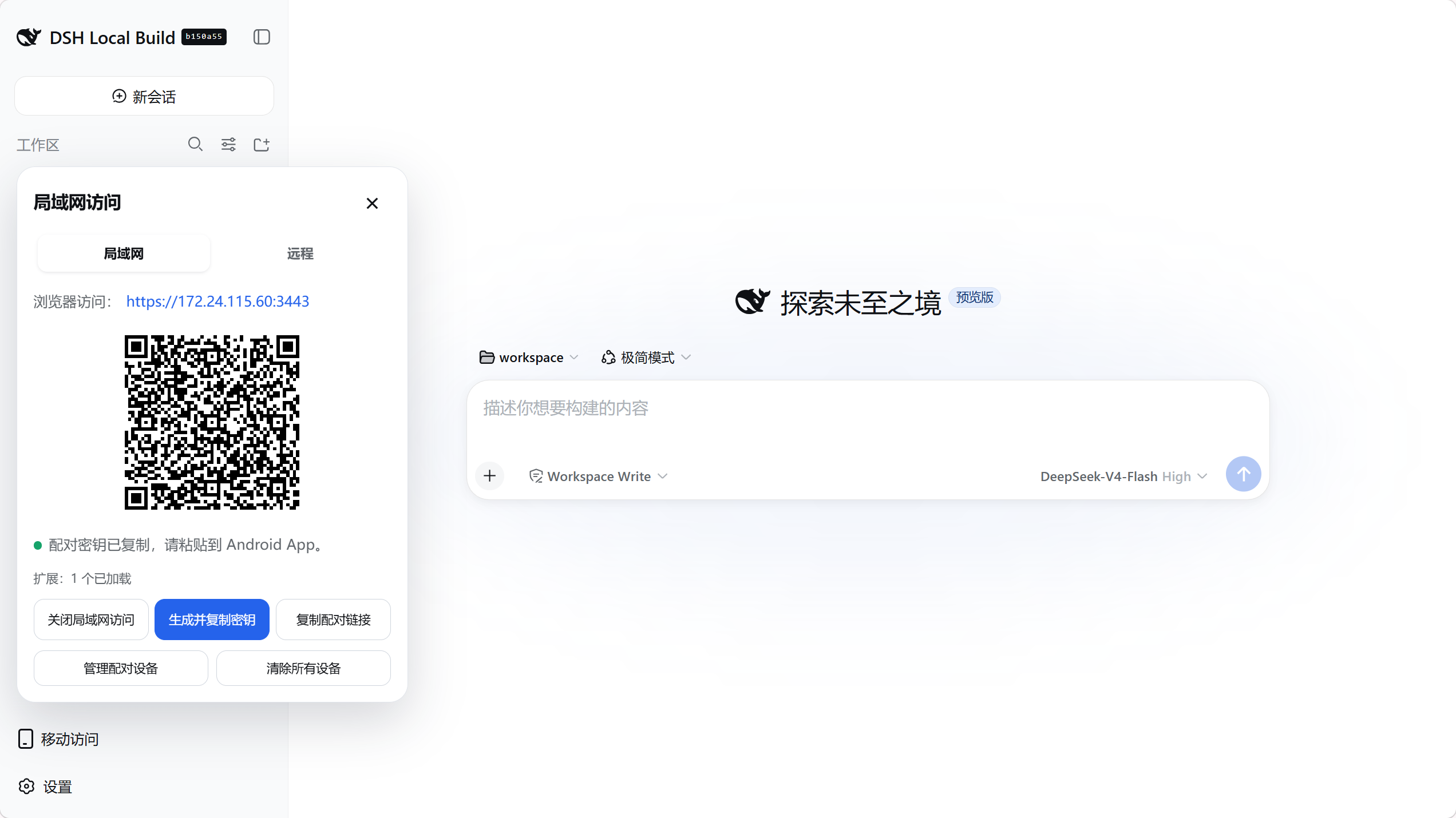
- Connect your phone and computer to the same LAN, then open Mobile Access → LAN in the bottom-left corner of DeepSeek Harness.
- If it's not enabled yet, click Enable LAN access; then click Generate and copy key, and a pairing QR code will appear in the panel.
- In the Android App, go to LAN access, scan to find the computer and tap the device, then scan the QR code or paste the pairing key.
- After pairing, persistent device trust is established. From then on, the App will automatically discover and connect when opened; switching Wi-Fi, hotspots or DHCP addresses usually does not require re-pairing.
Port notes: dsh web --port changes the DSH Web upstream port (default 3080), which the plugin follows automatically; dsh-mobile setup --port changes the Mobile HTTPS listening port (default 3443); the pairing QR code includes the actual port.
On Linux hosts without a GUI, or when opening DSH Web via a LAN IP / reverse proxy, the Mobile Access management entry in the bottom-left corner is still available. The management API still requires the TCP peer to be the local loopback (e.g., the local socat / reverse proxy connecting to 127.0.0.1); the plugin is not exposed to the public internet; browser Hosts may be localhost, RFC1918 or IPv4 link-local addresses, while public IPs and arbitrary domains still return 403. Reverse proxies must only be open to trusted local or internal requests; the /api/mobile-access management path must not be publicly forwarded to the internet. The separate HTTPS entry used by phones (default 3443) remains the mobile UI, not a desktop management portal.
You can access without the App: click Copy Pairing Link, open in phone browser; first access requires manually trusting the plugin cert per browser prompt.
The pairing and reconnection pages in mobile browsers display in Simplified Chinese, English or Italian based on the browser's Accept-Language; the Android App follows the system language. The plugin's control panel inside DSH continues to follow DSH's current language.
Remote access
Best for use when your phone is off the computer's network. Remote access is off by default; your phone does not need to install Tailscale, cpolar, cloudflared or FRP separately.
Remote services may be subject to bandwidth and connection limits: cpolar's free plan is currently 1 Mbps; Tailscale Funnel also has non-configurable bandwidth limits; cloudflared's quick tunnel is provided free by Cloudflare with a random address and rate limiting. DSH Mobile reduces traffic and waiting time through 10-item pagination, on-demand top loading, gzip and WebSocket persistent connections, but cannot exceed provider limits.
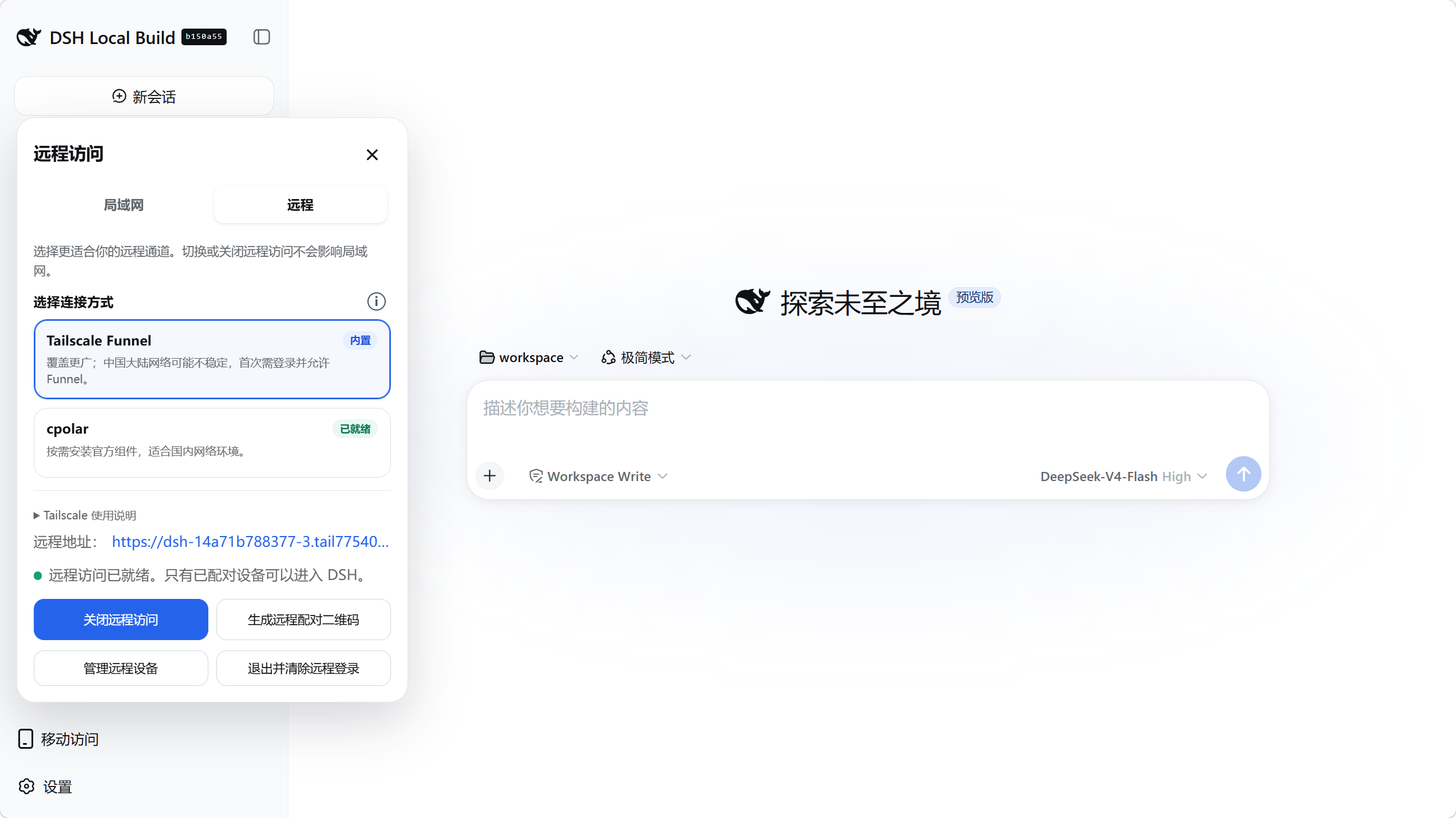
- Open Mobile Access → Remote in the bottom-left of DeepSeek Harness, and choose a connection method:
- Tailscale Funnel: Click Enable Remote Access, complete a one-time Tailscale login on the opened official page; follow the panel's prompt to allow Funnel, then return to DSH and wait for the connection to be ready.
- cpolar: Click Install Official Component, log in to the cpolar console to obtain an Authtoken, paste it, then click Save & Connect. The component will only be downloaded to the plugin's private directory after confirmation; free temporary addresses may change after DSH or cpolar restarts.
- Self-hosted FRP (Advanced): Expand Self-hosted Connection, fill in your VPS, frps port, shared Token, and public HTTPS address; the public address can be your own domain, or directly the VPS's public IPv4 (e.g.
https://203.0.113.10— replace with your actual address; the documentation's example network range will be rejected). You can copy the restricted template for manual deployment, or fill in SSH user, SSH port, and local private key path, then click Deploy frps + Caddy for automatic deployment. Auto-deployment supports Ubuntu/Debian + systemd, uses OpenSSH keys or ssh-agent, does not accept passwords, and will not overwrite a Caddyfile not managed by DSH Mobile; the server host fingerprint is displayed before deployment and cleanup, and you must verify it in your VPS console before proceeding. Public IP mode requests a Let's Encrypt IP certificate valid for ~6 days and configures daily auto-renewal. After deployment is complete, install the officialfrpcand verify the connection. When you no longer need the server, use "Copy VPS Uninstall Script" or one-click cleanup, which only removes DSH Mobile's own services and configuration. Requires Android App 0.3.3 or later. See Self-hosted FRP Guide for details. - Own Reverse Proxy: Expand Self-hosted Connection → Own Reverse Proxy, fill in the public HTTPS address (custom port supported), private listening IPv4, dedicated HTTP backend port (default 3444), and proxy source CIDR, then click Save & Start Backend. Suitable for users who already have Lucky/Nginx/Caddy; no tunneling component needed; requires Android App 0.4.0 or later. See Own Reverse Proxy Guide for details.
- cloudflared: Click Install Official Component; the plugin downloads a pinned version from the official release page to the plugin's private directory after confirmation, then automatically requests a temporary public address (quick tunnel) — no registration or login required. Suitable for users who don't want to register an account; quick tunnel addresses change on every reconnect, and the official positioning is for testing purposes with rate limiting and no availability guarantee — do not use for production access that must be permanently reachable. If you already have a Cloudflare account and domain, you can switch the tunnel type to Named Tunnel, fill in the connector token, public domain, and local forwarding port to get a fixed address that persists across restarts (the token is stored only in the private directory and passed to cloudflared via environment variables). See Cloudflare Named Tunnel for steps.
- Once the status changes to "Remote Access Ready," click Generate Remote Pairing QR Code. For own reverse proxy, only "Backend Listening" is shown: it does not verify public connectivity — you still need to check the proxy's HTTPS, certificate, and WebSocket, and verify on your phone.
- In the Android App, go to Remote Access and scan the QR code to complete independent pairing.
- After this, the App will save the current address and device credentials and auto-reconnect. If the cpolar free temporary address changes, scan the current remote QR code on the computer side to re-verify the connection; there's no need to clear App data. Old device tokens are only sent to the exact Origin they were originally saved to, not to the new domain in the QR code.
Remote Notification Note: Browser
Notificationpermissions are granted per Origin, and web system notifications only appear on the device running that webpage. The Android App's task reminders are a separate 0.4.0 feature that must be explicitly enabled in the App's foreground menu and depend on the WebView page still being alive; it is not a general-purpose background push. For reliable background push notifications, use a server-side webhook or bot channel that you have configured.
Tailscale Funnel is broad but may be unstable on mainland China networks. Its component binds public listening to the parent process and restricted control channel; exit/close/stop ends the generation and cleans up. cpolar suits domestic networks; self-hosted FRP suits users with a VPS wanting to avoid public bandwidth limits. cloudflared has two modes: quick tunnel needs no account but the address changes each reconnect (testing only, no SLA); named tunnel uses a Cloudflare token for a fixed public domain. Unregistered domains on CN VPS may be blocked; use public IPv4 mode. The plugin validates pinned components; configs and binaries live in $DSH_HOME/mobile-access/, removable from the panel anytime.
Self-hosted FRP only generates a single HTTP vhost pointing to the DSH loopback gateway; it does not provide arbitrary FRP configuration, TCP/UDP proxying, or FRP plugins. The VPS plaintext vhost must only listen on 127.0.0.1, with Caddy providing public HTTPS; the plugin will reject plaintext ports accessible from the public internet, and will only show "Ready" after the public discovery endpoint confirms the connection is to the current computer.
The own reverse proxy's HTTP backend must remain on a trusted private network; do not map it to the public internet, and do not bypass it to connect directly to DSH or the existing LAN 3443. Source CIDR matches the proxy's direct TCP source; forwarded headers are not trusted; the reverse proxy must preserve the external Host (including port), Origin, Cookie, and WebSocket. Clearing the proxy configuration does not delete already-paired remote devices.
Remote public addresses are still protected by DSH device pairing. Built-in Funnel and hosted cpolar, cloudflared currently support Windows x64; on-demand installed FRP 0.70.1 supports x64 and arm64 on Windows, Linux, and macOS.
Extensions
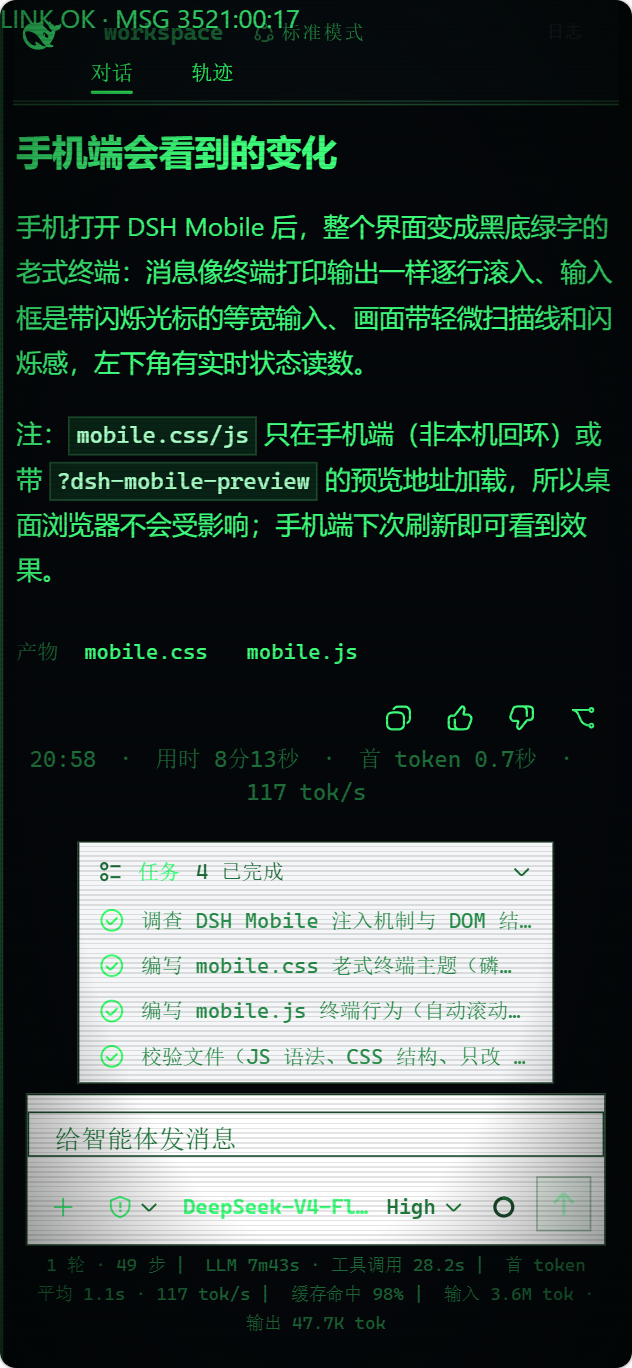
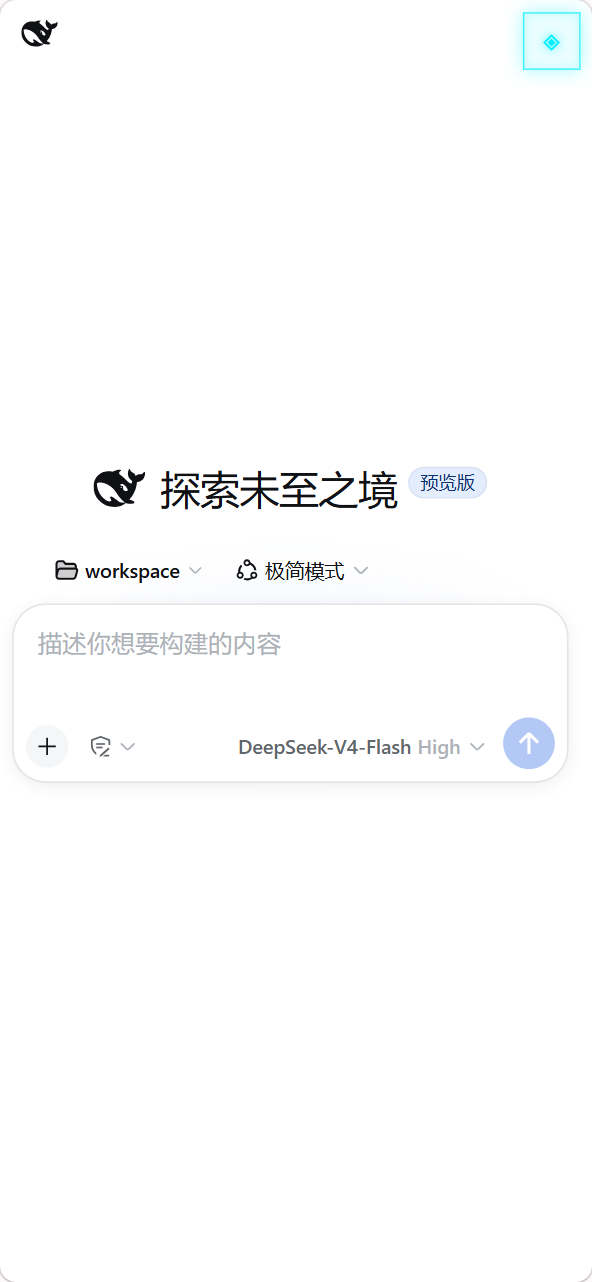
Type /mobile <需求> in a DSH chat; DSH directly edits mobile-side files, effective in seconds. E.g.:
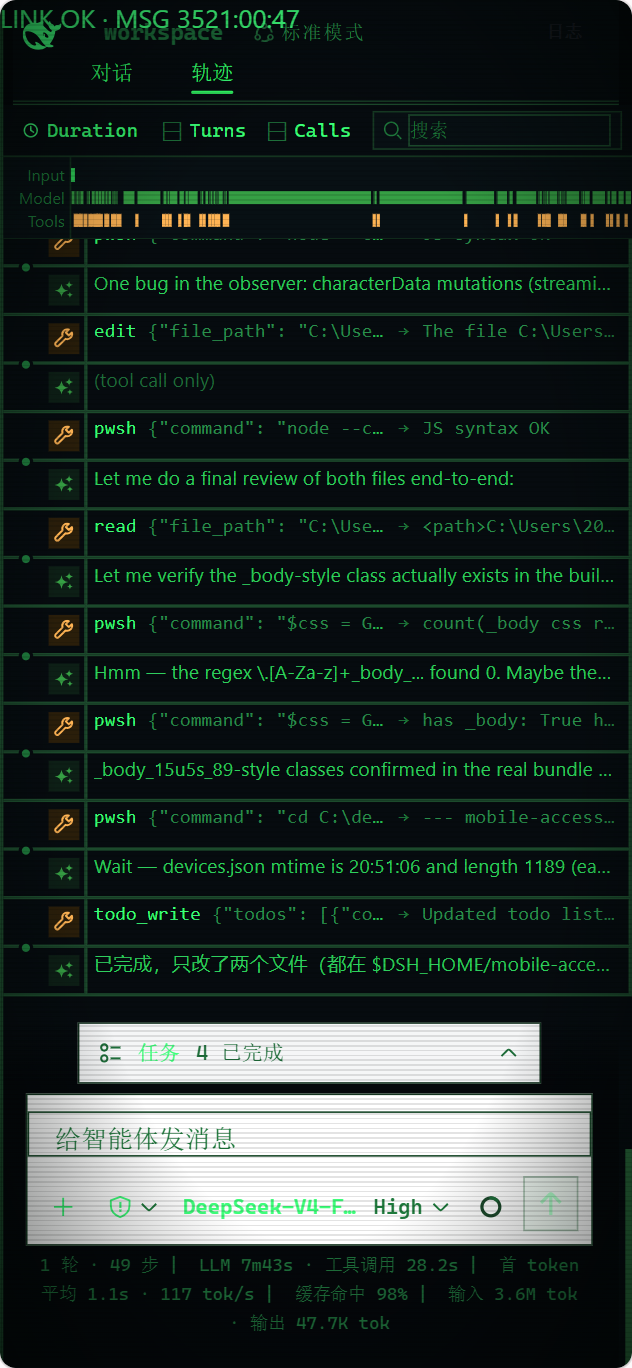
/mobile 把手机端做成老式终端的样子,让消息像终端输出一样逐行滚动
Or invoke computer-side capabilities from mobile, e.g. live PC status:
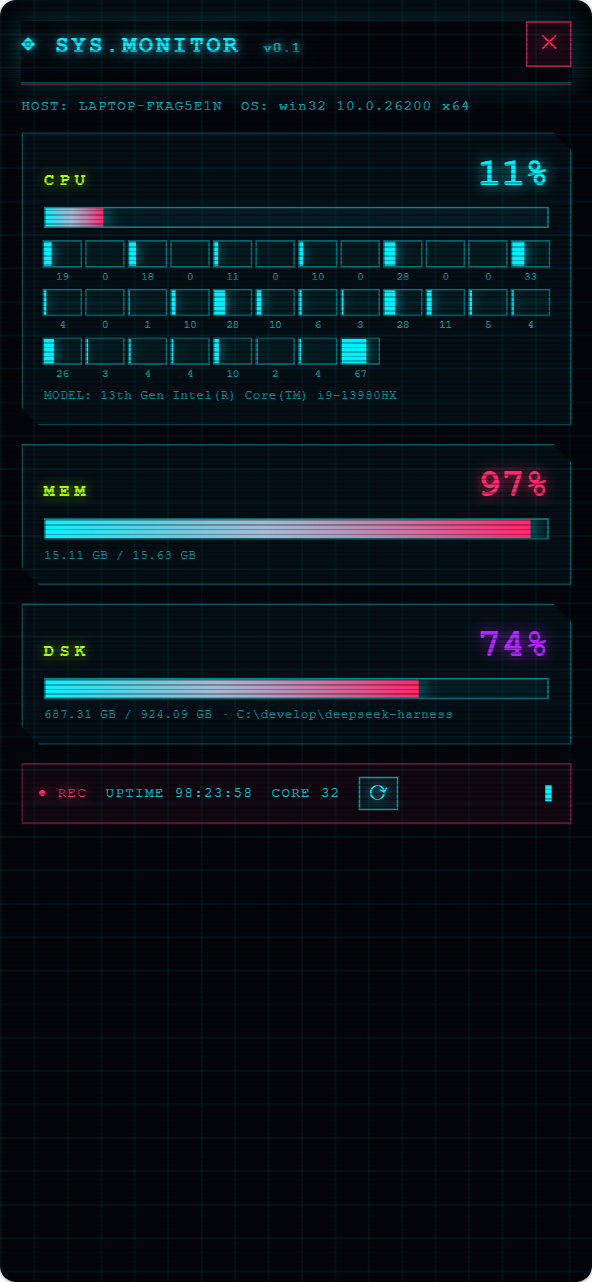
/mobile 为手机端添加赛博朋克风格的电脑监控面板,实时显示电脑的 CPU、内存和磁盘占用
/mobile hands the request to the agent in the DSH conversation, which directly modifies files under $DSH_HOME/mobile-access/ on this machine; changes take effect on the mobile side automatically after saving. Modifications fall into two categories: UI and interaction go in mobile.css/mobile.js; when computer capabilities are needed, use extensions under extensions/, whose host.mjs runs on the computer with the local user's privileges. DeepSeek Harness source code is not modified.
Extension manifest, scripts, styles, and resources refresh by version ID. On /mobile or extension file change, the plugin notifies the phone to update immediately; periodic checks (45s visible / 5min hidden) are only a disconnect fallback. Host staging failure keeps the existing version; if new UI activation fails after Host update, the extension is disabled and auto-retried to avoid mixing old/new capabilities.
Extension action input can directly use Schemastery schemas such as api.schema.object(...), or adapters with parse(value); the mobile-side api.host.invoke() sends JSON requests, and inputs are validated and normalized on the computer side before action execution.
You can even connect to a SillyTavern instance on the computer via an extension, and open its simple mobile frontend from the same App.
host.mjshas the same privileges as local programs; only create and run computer-side extensions that you understand and trust.
示例的实际效果:
Device Management
The Android App consolidates LAN, cpolar, cloudflared, Tailscale Funnel, and self-hosted FRP into a single “Paired Devices” list. On first upgrade, old LAN and remote credentials are migrated automatically without requiring re-pairing; when an address changes, original records are merged by the stable instanceId of the DSH install, preserving custom names. Device tokens and the LAN CA continue to be stored encrypted in the Android Keystore and are never displayed in the list or QR code.
每条记录显示自定义名称、连接方式、Origin、实时可达状态和最近连接时间。绿色状态点表示“可达”,灰色状态点表示“检测中”“暂不可达”“配对已过期”或“电脑端已移除”;可达性检查直接验证 DSH Gateway,不依赖 ICMP,也不会把暂时断网误判成电脑端撤销。
- 启动时打开 → 直接进入 DSH(默认):单设备直接连接;多设备优先连接上次使用的设备,其次按最近连接时间选择仍有效的设备。连接超过有限重试预算后自动回到列表,不会无限转圈。
- 启动时打开 → 显示设备列表:每次启动先选择电脑,适合经常在多台设备之间切换。该选项位于列表右上角的设置按钮中,修改后立即保存。
- 点按设备行可连接;右侧“…”和长按提供相同的操作面板,可编辑名称、立即检测、重新配对或删除本地记录。删除前会二次确认,并提供短暂撤销;撤销只恢复本机记录,不恢复电脑端已经撤销的授权。
- 在 WebView 页面打开 DSH 设置 → 通用,选择 切换电脑 可回到已配对设备列表;该动作仅在 Android App 中显示。在线收到电脑端撤销通知后,App 保留该条目并显示“电脑端已移除”,停止自动重连,同时提供 重新配对 和 删除本地记录。
A revocation on the PC side permanently deletes the device record and token digest from persistent storage, rather than keeping a revokedAt flag; on startup, revoked records left over from older versions are also cleaned up. After deletion, old tokens return 401 authentication_failed, just like unknown tokens. If an existing App is revoked while offline, its next check may show “pairing expired” and require re-pairing; online sessions still receive the revocation notice and disconnect immediately.
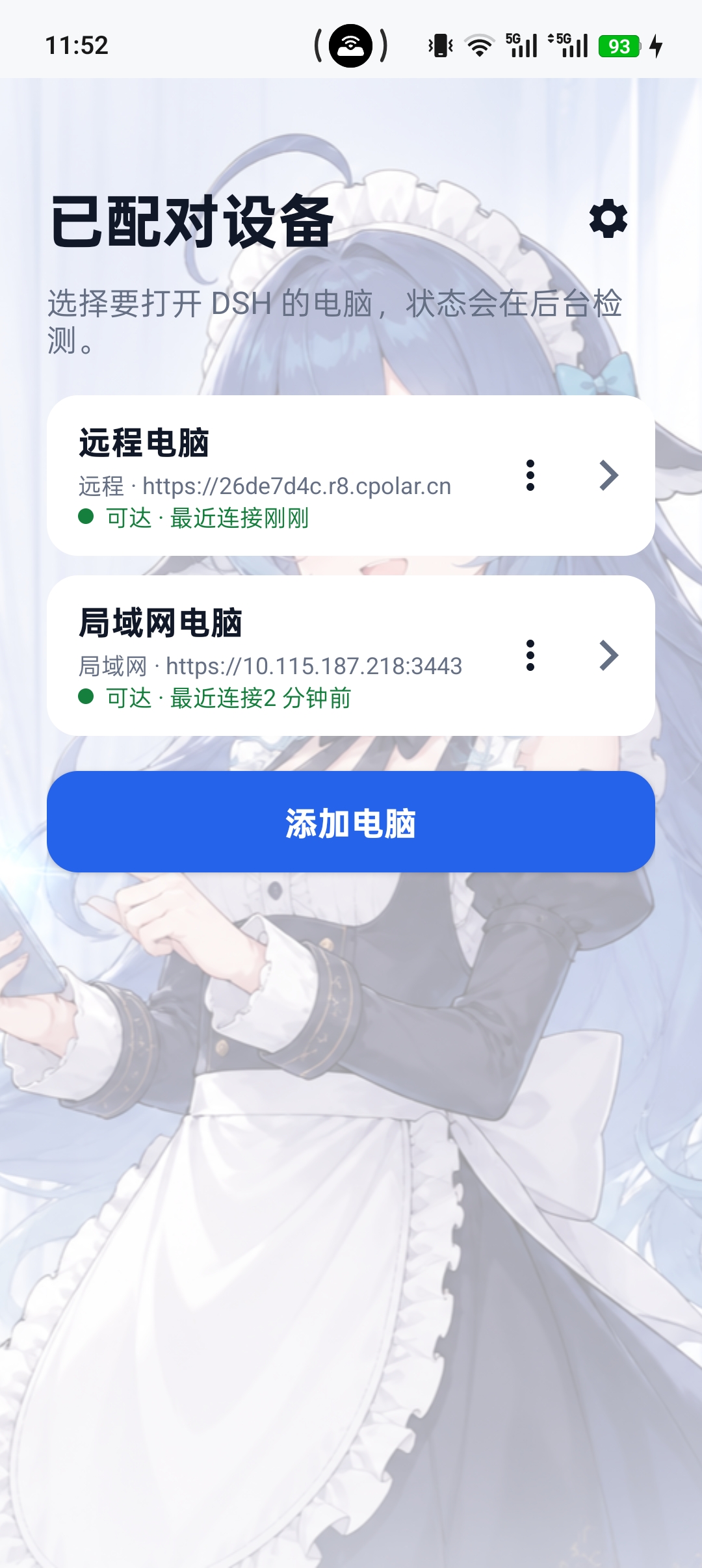 设备管理列表:查看已配对电脑、连接方式和可达状态 |
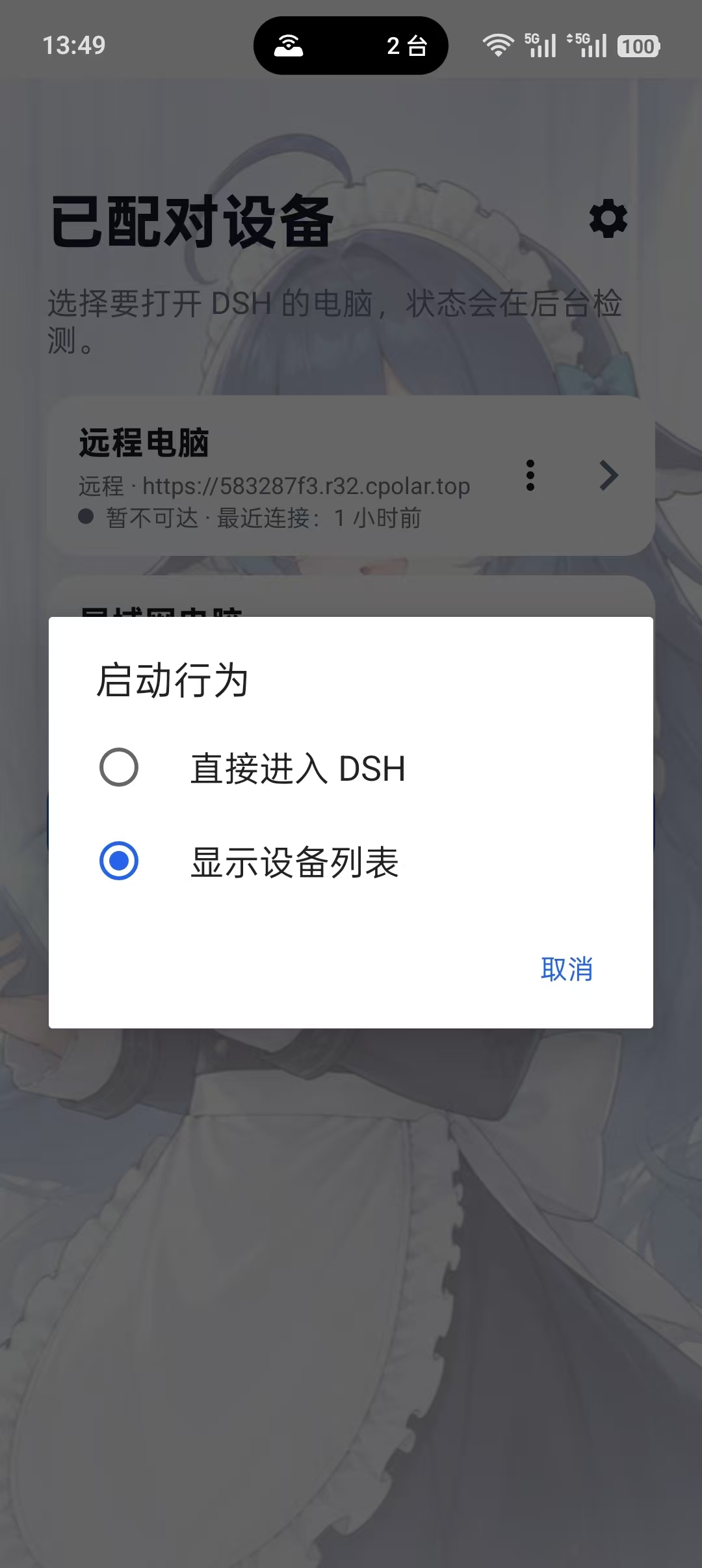 启动行为设置:选择直接进入 DSH 或显示设备列表 |
第三方插件适配
移动适配保持 DSH 原有的工作区、任务管理、终端和文件面板入口,不会把第三方插件内容隔离成另一套页面。下面的宽屏截图展示 Android App 在宽屏下的布局。App 会根据屏幕宽度自适应:手机使用抽屉和浮层,宽屏使用并排面板;两种布局共享相同的功能和连接方式。第三方插件仍由 DSH 自己加载,移动层负责适配布局与连接,不修改 DeepSeek Harness 源码。
Compatibility requirements and WebSocket allow rules:
代理页面为兼容部分社区插件允许嵌入 HTTP 页面;这类内容未加密,可能被篡改,浏览器也可能因混合内容策略拦截。处理敏感内容时请使用 HTTPS。通过 HTTPS 管理入口打开远程面板时,页面顶部会显示相同提醒。
- 已发布的 0.4.0 按 DSH
0.1.5-rc.2做过 renderer-v2 合同检查,并保留对0.1.5-rc.1局域网路径的验证。DSH 页面需要提供标准的会话、main/panelInfo和rightbar插槽;插件自身需要通过 DSH 的标准面板或侧边栏入口注册内容。 - 网关默认只允许 DSH 内置的第一方 WebSocket 路径。社区侧边栏插件使用的其他路径默认拦截,通常会在诊断页显示为待处理项目;截图中的
/sidebar/ws/agent-opens和/sidebar/ws/agent-terminals就属于这类需要按实际插件确认的路径。 - 在 连接诊断 → 第三方 WebSocket 路径 中,只对确认过的精确路径点击 允许。系统不接受带查询字符串或模糊前缀的路径;不建议使用“全部允许”。已允许的路径可以随时移除,局域网和远程连接使用同一套规则。
- 放行只代表该路径可以通过已认证、同源的 DSH Mobile 网关,不会开放任意 TCP/UDP 端口,也不会绕过设备配对。若社区插件仍然连接失败,先看诊断页的实际拦截路径,再按一条路径放行。
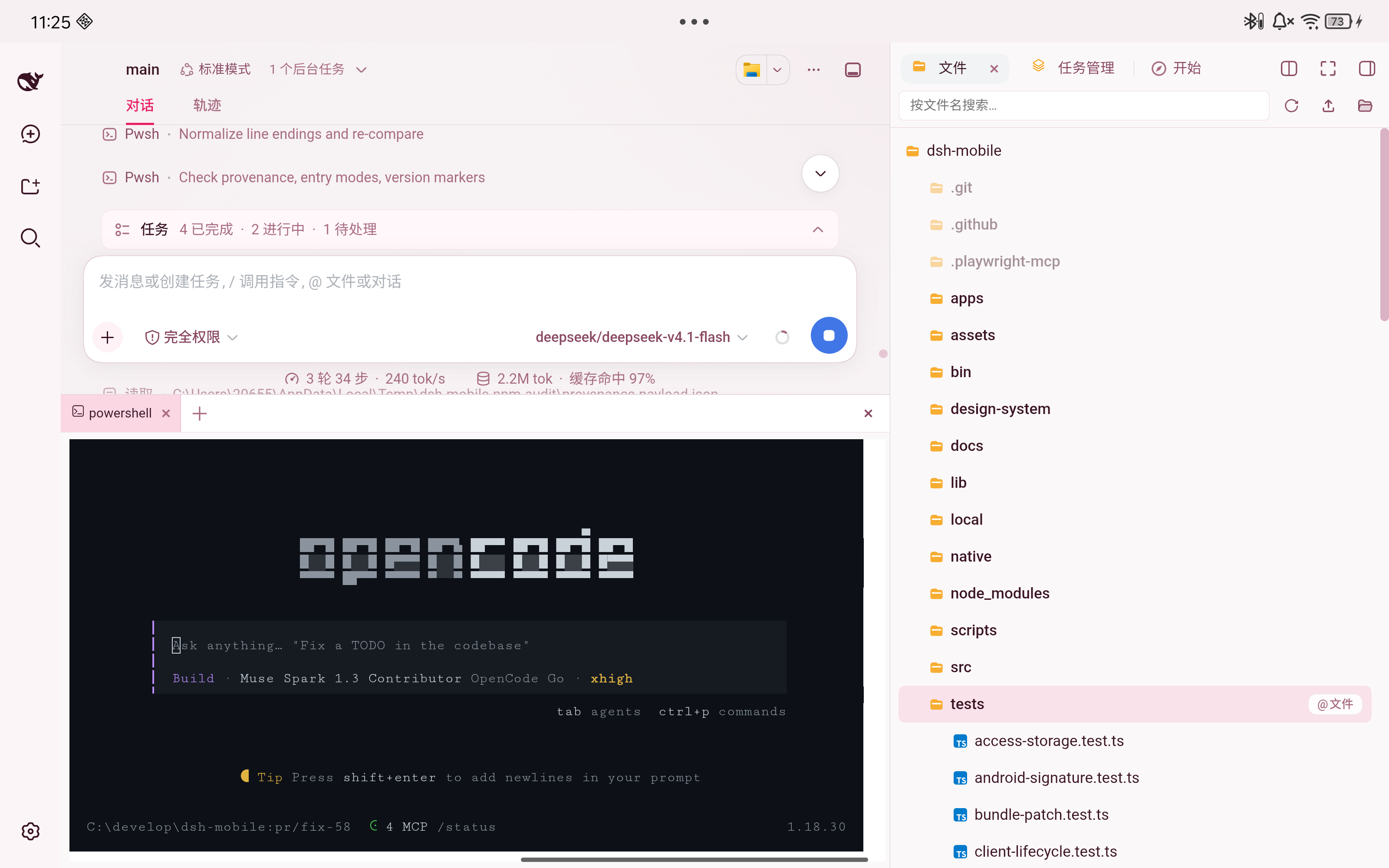 Android App 下社区侧边栏插件的兼容 |
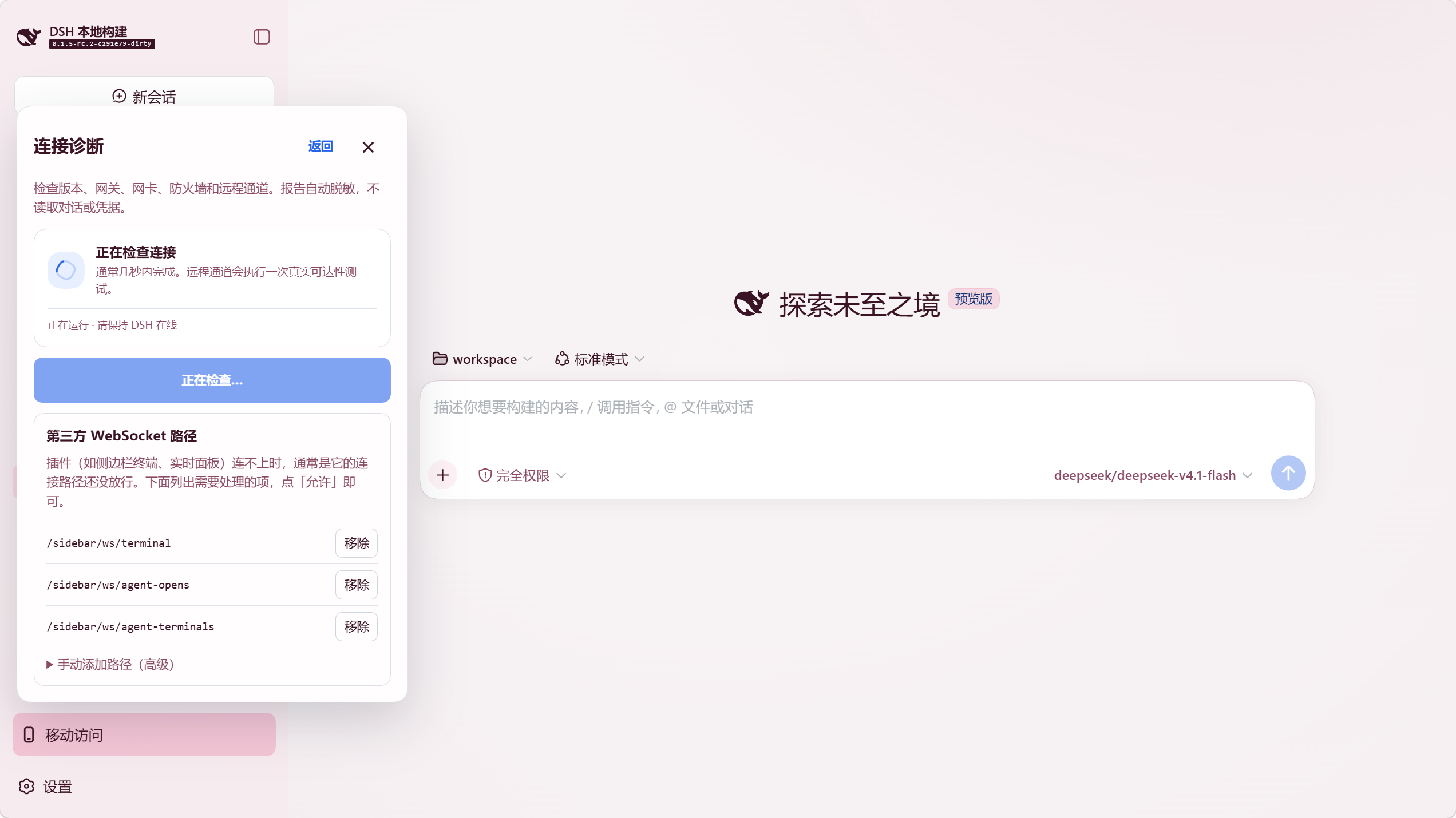 连接诊断:检查第三方 WebSocket 路径并按需放行 |
App 与手机浏览器
| 方式 | 适合场景 | 说明 |
|---|---|---|
| Android App | 日常使用 | 首屏分开显示局域网与远程入口;局域网自动发现,远程使用系统信任的 HTTPS 通道 |
| 手机浏览器 | 临时或跨平台访问 | 打开“移动访问”卡片显示的 HTTPS 地址;首次连接需在浏览器手动信任该证书 |
Android App 只是 Kotlin WebView 薄壳,不内置另一份网页;手机浏览器访问的是同一页面。需要排查兼容性时,可在浏览器地址后追加 ?frontend=stock,临时回到旧的桌面页面适配模式。
专用移动页面会在 DSH 的第一个启动脚本之前,同步加载经网关鉴权的同源 /mobile-access/compat.js,为缺少 Iterator / Iterator helpers 的 WebView 提供随插件打包的 core-js 兼容实现,避免启动时出现 Iterator is not defined。兼容层按能力检测保留或修正原生 helper,不依赖 CDN,也不会放宽 CSP;不修改 Android APK、桌面页面或 ?frontend=stock 页面。此修复并不承诺支持所有旧内核,前端仍以 ES2022 为构建目标;若还有其他兼容错误,请优先更新 Android System WebView / Chrome。
社区客户端(非官方):微信小程序客户端 原生微信小程序实现,复用「移动访问」的配对与 Remote 流协议(需 dsh-mobile ≥ 0.3.8)。 因微信正式版强制「合法域名」(需 ICP 备案的自有 HTTPS 域名),目前需通过微信开发者工具 / 真机调试使用,详见其 README。
工作原理
flowchart LR
  Phone["Android App / 手机浏览器"] -->|"局域网 HTTPS"| Lan["局域网网关"]
  Phone -->|"远程 HTTPS"| Remote["独立远程网关"]
  Lan --> Gateway["DSH Mobile Gateway Core"]
  Remote --> Gateway
  Gateway -->|"回环代理"| DSH["原生 DSH Web 与 Host"]
  DSH -->|"同一工作区、会话和事件流"| Phone
插件包含三层:Host face 负责发现、配对、HTTPS、回环代理和扩展注册表;Client face 提供独立的移动布局与扩展 SDK;Android App 提供受限的原生 Bridge。Bridge 使用 androidx.webkit WebMessage,每条消息都校验精确顶层 Origin 和主 Frame,并限制消息大小;不使用 addJavascriptInterface。DeepSeek Harness 的源码和当前 Web 页面(默认端口 3080,可通过 dsh web --port 修改)都不会被改动,安装和卸载完全通过插件机制完成。
安全
- 局域网监听只用于可信家庭、办公网络或可信热点;不要自行做端口转发。
- 远程地址可从公网到达,但未配对请求无法进入 DSH;不使用时应关闭远程开关。
- cpolar 仅在用户确认后下载固定官方版本并校验大小和 SHA-256;不会安装系统服务、写入 PATH 或设置开机启动,插件清理会删除其托管文件。
- cloudflared 同样仅在用户确认后从官方 GitHub Release 下载固定版本并校验精确大小和 SHA-256,且启动时关闭自动更新,以保证运行的始终是已校验的那份二进制;不需要账号、Token 或 DNS 记录,不写入任何凭据,清理时删除插件托管的全部文件。
- 自建 FRP 仅在用户确认后从官方 Release 下载固定版本
frpc,校验来源、精确大小、SHA-256、压缩包路径和可执行文件版本;共享 Token 不会出现在状态、诊断或日志中。复制服务器模板时 Token 会进入系统剪贴板,请粘贴后及时清除;本机清理只删除插件管理的文件,VPS 需要用面板提供的卸载脚本或一键清理单独清除。自动部署与一键清理前都会展示 SSH 主机指纹,必须到 VPS 控制台核对后才能继续。 - 配对设备拥有控制电脑端 DeepSeek Harness 的能力,应视为完全可信设备;丢失手机后应在电脑端撤销设备。
- 移动网关开启时才监听局域网;关闭后 DeepSeek Harness 仍正常在电脑本机运行。
完整说明见 SECURITY.md。
兼容性
下表列出各插件版本验证支持到的 DeepSeek Harness 版本(早于该版本的 0.1.x 均兼容)。0.3.6 起插件不再按版本号拒绝启动,未列出的更新版本由 CI 契约检查兜底。历史记录见 CHANGELOG.md。
| DSH Mobile 插件 | 验证支持的 DeepSeek Harness 版本 |
|---|---|
0.4.2 | 0.1.6-alpha.1(本机源码与 renderer-v2 契约检查) |
0.4.1 | 0.1.6-alpha.1(本机源码与 renderer-v2 契约检查) |
0.3.15、0.3.16、0.4.0 | 0.1.5-rc.2(契约检查);0.1.5-rc.1(@idoall 局域网实测) |
0.3.14 | 0.1.3-alpha.2 |
0.3.9-0.3.12 | 0.1.3-alpha.1 |
0.3.6-0.3.8 | 0.1.2-rc.1 |
0.3.4、0.3.5 | 0.1.2-alpha.2 |
0.3.0-0.3.3 | 0.1.2-alpha.1 |
0.1.4、0.2.x | 0.1.1-rc.2 |
现有 0.3.3–0.4.0 App 无需重新配对;cpolar 用户应使用 0.3.15 或更新 App,较早版本可能在免费线路的慢速首次加载完成前超时;更早的 App 还使用不同的状态栏策略。App 0.4.0 才支持多设备列表、启动行为设置和电脑端撤销状态同步;旧版 App 仍可连接已保存的单台设备。App 0.1.3 及更早版本需卸载重装并重新配对。
卸载
dsh plugin --profile web remove dsh-mobile
同时清除插件数据:
dsh plugin --profile web exec dsh-mobile purge --yes
dsh plugin --profile web remove dsh-mobile
源码模式把上述 dsh 换成 pnpm dsh。
开发
npm ci
npm run verify
Android 构建见 App 文档。
Apache-2.0,详见 LICENSE。
Compatibility
Versions
| Latest version | Published | Size |
|---|---|---|
| 0.1.0-alpha.33 | — | — |
| 0.1.0-alpha.34 | — | — |
| 0.1.0-alpha.35 | — | — |
| 0.1.1 | — | — |
| 0.3.7 | — | — |
| 0.1.2 | — | — |
| 0.1.0-alpha.36 | — | — |
| 0.3.4 | — | — |
| 0.2.1 | — | — |
| 0.3.3 | — | — |
| 0.3.1 | — | — |
| 0.3.6 | — | — |
| 0.1.4 | — | — |
| 0.3.8 | — | — |
| 0.3.9 | — | — |
| 0.3.14 | — | — |
| 0.4.0 | — | — |
| 0.5.4 | — | — |
| 0.3.16 | — | — |
| 0.1.0-alpha.32 | — | — |
Comments
Loading…
Similar plugins
by WNLUO
DeepSeek Harness 移动端插件:手机远程操控宿主,提供受限移动 API、中转隧道与局域网配对(可作无头宿主运行)
★ 4
↓ 5.7k/wk
MIT
JavaScript
Oct 28, 2026
dsh plugin --profile web add dsh-mobile-pluginby MrMu666
为DeepSeek harness开启局域网访问及移动端页面的插件,移动端界面适配
★ 10
JavaScript
Sep 18, 2026
dsh plugin --profile web add github:MrMu666/dsh-LANby zergtant
DeepSeek Harness (dsh) 远程访问插件:提供 TLS、登录认证、会话保护和 HTTP/WebSocket 透明反代,支持局域网及 FRP ,cloudflare隧道等远程访问。
★ 0
MIT
JavaScript
Sep 13, 2026
dsh plugin --profile web add dsh-remote-accessby summer1238
手机平板远程 DeepSeek Harness:扫码即可继续使用电脑上的 DSH,无需远程桌面 / SSH / 公网 IP,支持一次性配对、Github授权加密登录,独立设备授权与随时撤销,实现远程连接很简单,但安全才是我们所想要的。
★ 165
↓ 116/wk
MIT
TypeScript
Aug 28, 2026
dsh plugin --profile agent add dsh-remote-web-gatewayby KyoMio
Turn DeepSeek Harness into a phone app you can securely reach from anywhere: minimal mobile UI rework + pairing-code gateway + PWA + Web Push. 让 DSH 变成可公网安全访问的手机 App
★ 22
↓ 993/wk
NOASSERTION
JavaScript
Oct 28, 2026
dsh plugin --profile web add dsh-zen-remoteby MrMu666
为DeepSeek harness开启局域网访问及移动端页面的插件,移动端界面适配
★ 14
↓ 2.1k/wk
NOASSERTION
JavaScript
Oct 26, 2026
dsh plugin --profile web add dsh-lan-tool