

dsh-scriptorium
Manifest validA project knowledge base for the DeepSeek Harness Web GUI: notes, media sandbox, canvas, mind graph, board and project mirroring.
dsh-scriptorium



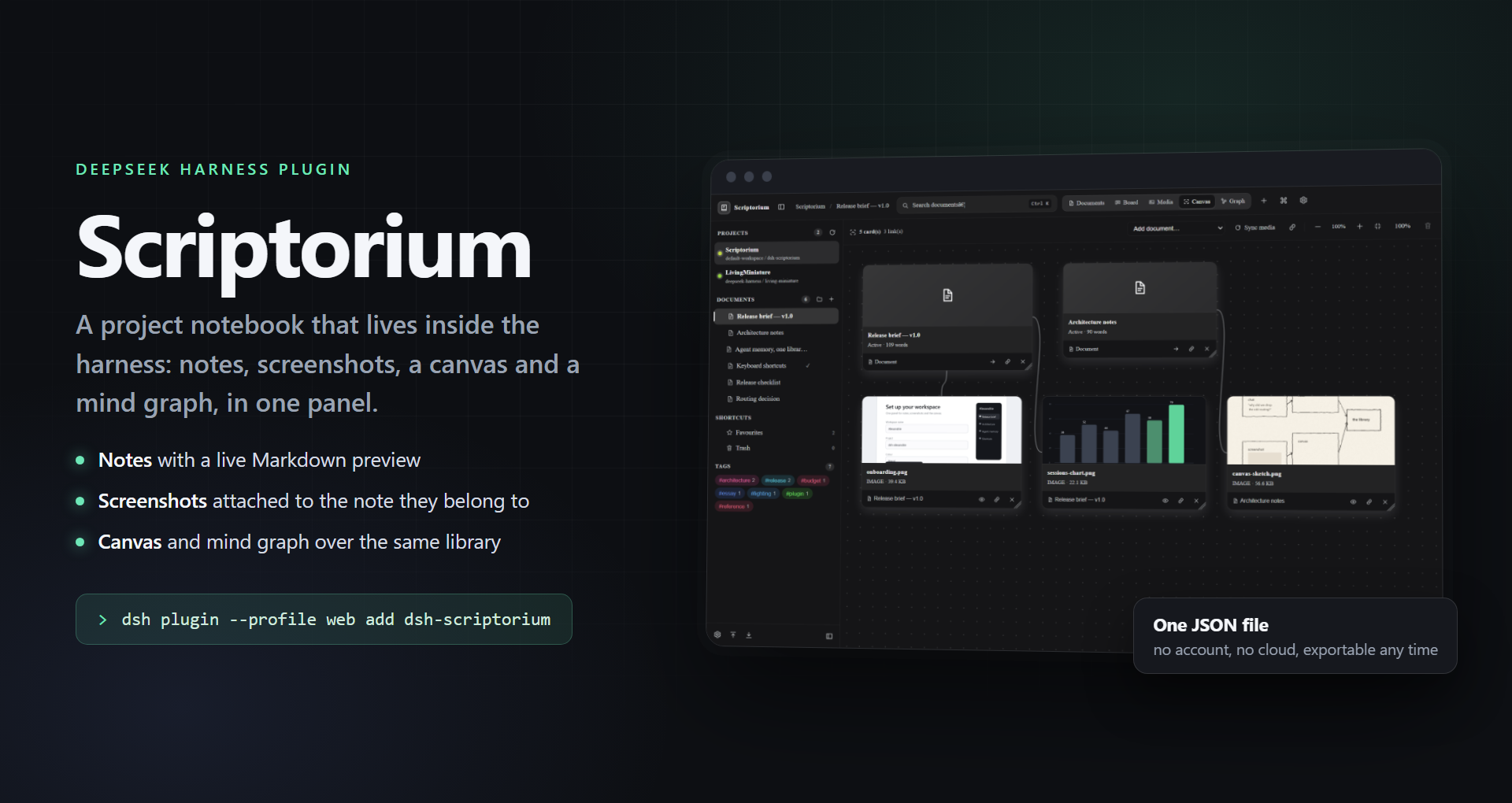
Scriptorium is a project knowledge base inside the DeepSeek Harness Web GUI: workspaces bound to Harness projects, nested documents, a Markdown editor with live preview, full-text search, a command palette, a kanban board, a free-form media canvas, an Obsidian-style mind graph, tags, favourites, trash and ZIP/JSON archives — all stored in one JSON file on the host that this plugin owns.
The panel lives in the sidebar (book icon, "Scriptorium"). Everything else is one keystroke away.
What it looks like
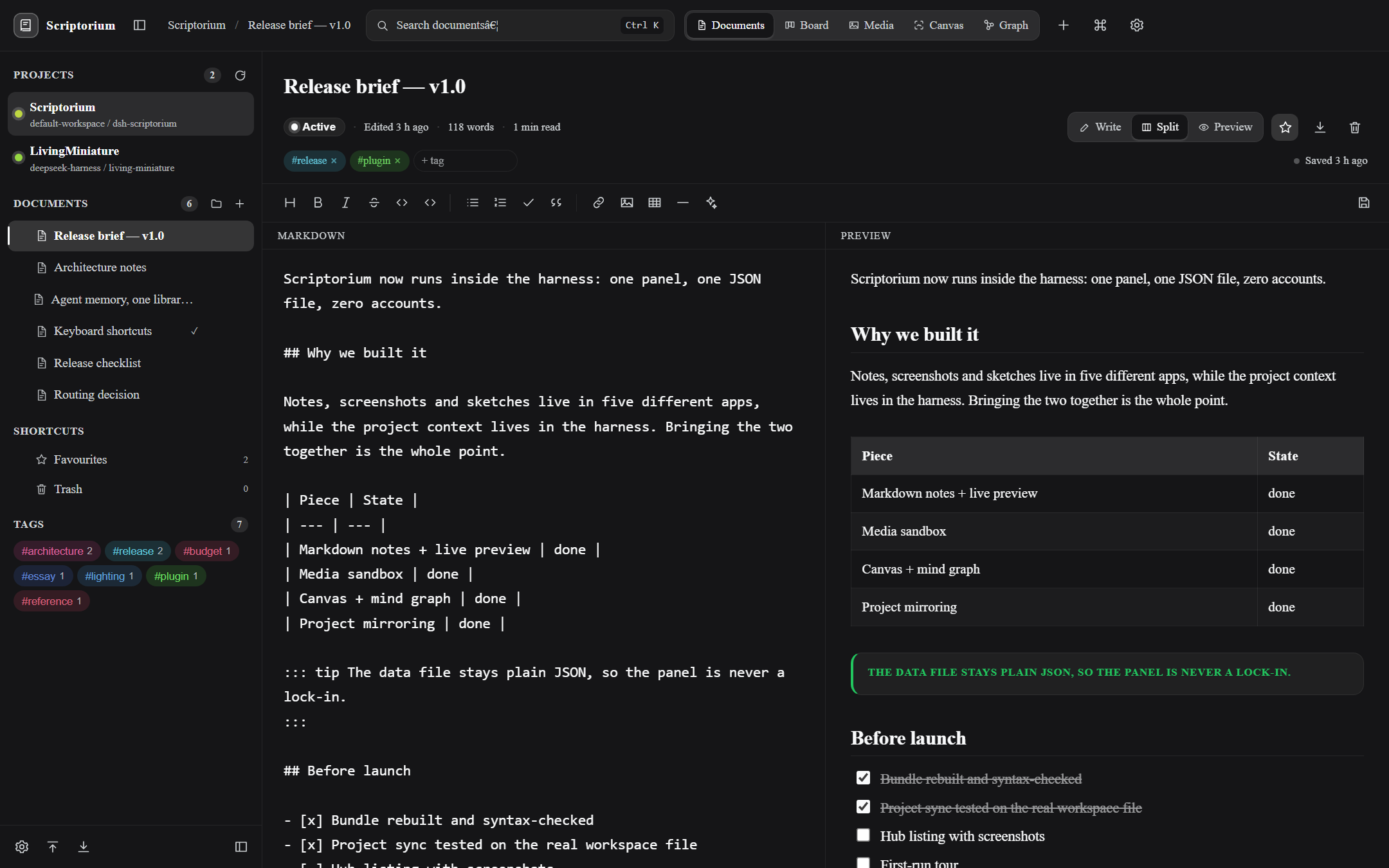 | 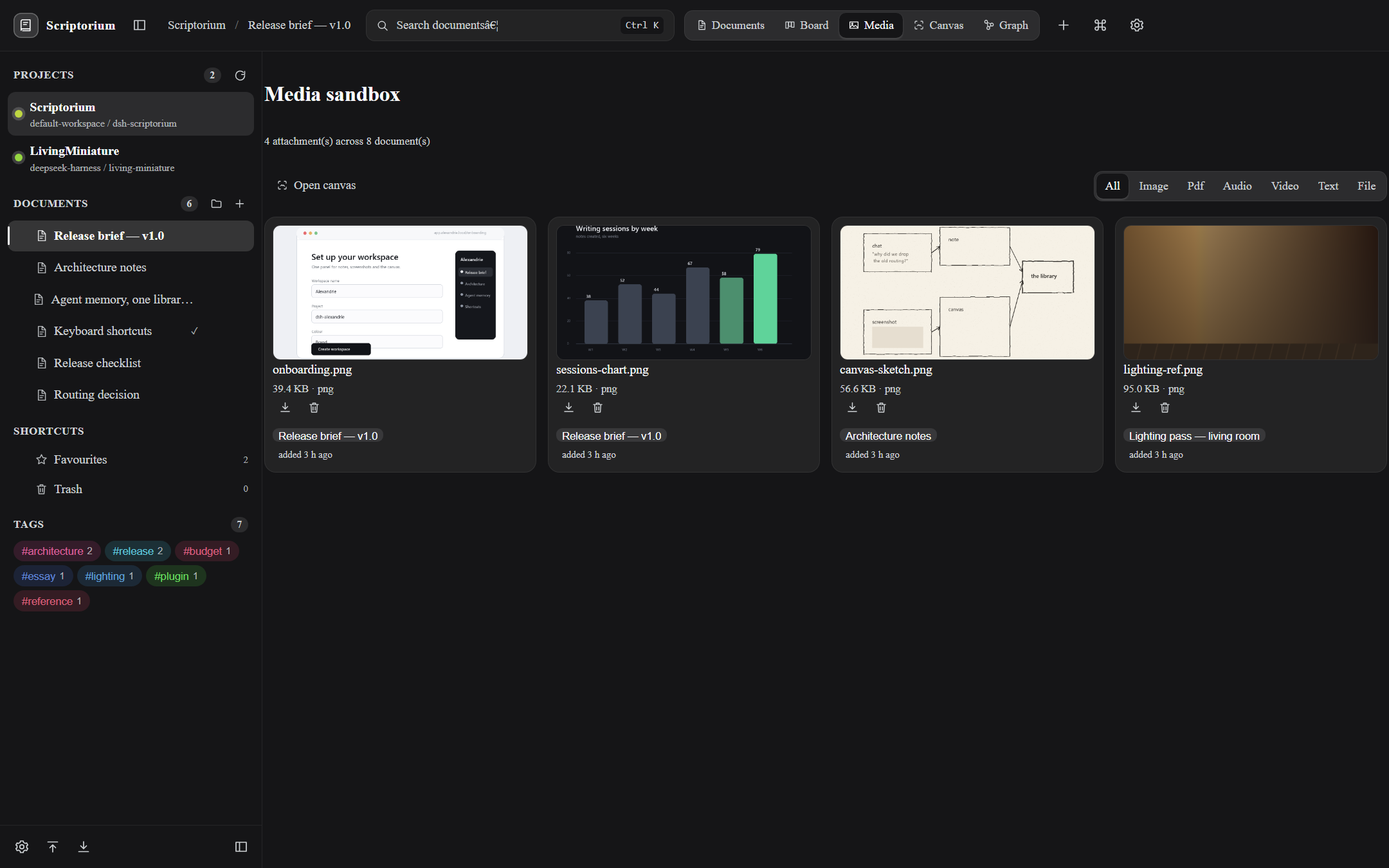 |
| Documents — nested notes, split editor and a live preview, tags and status in the header. | Media sandbox — every screenshot, PDF and clip in the project, filterable by kind. |
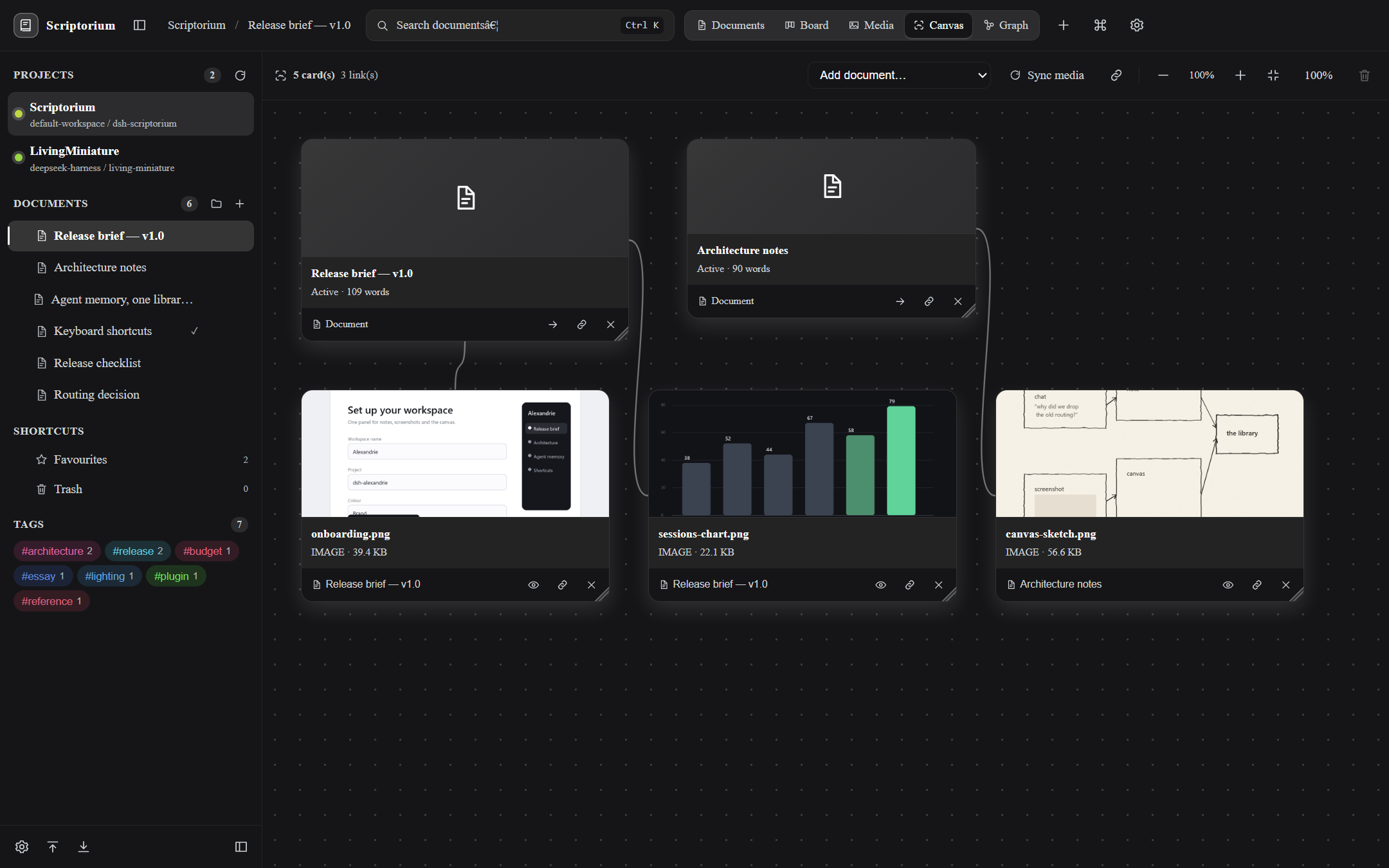 | 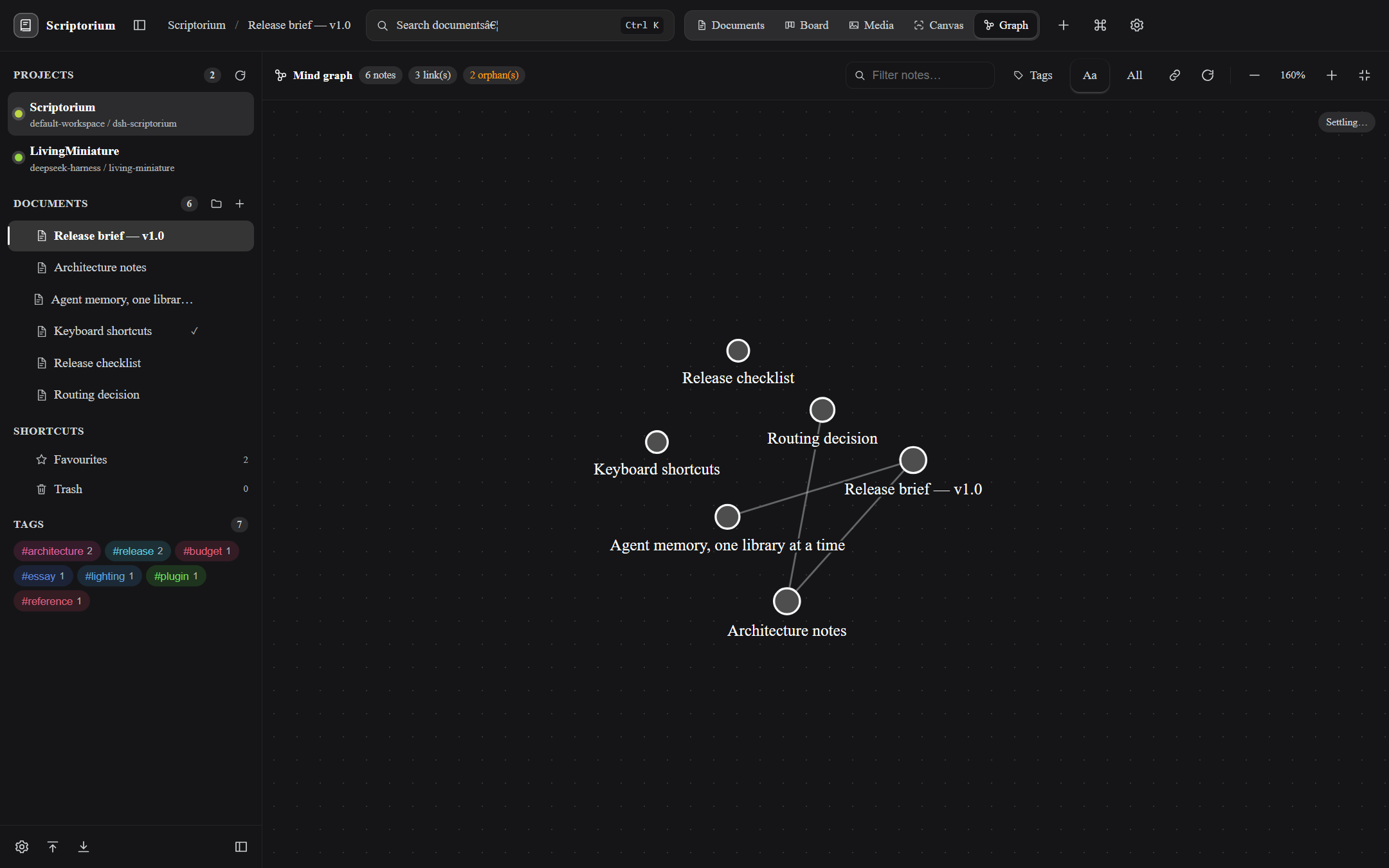 |
| Canvas — attachments become cards beside the note that owns them, joined by an edge. | Mind graph — notes are nodes, [[wiki links]] are edges; opens fitted to the panel. |
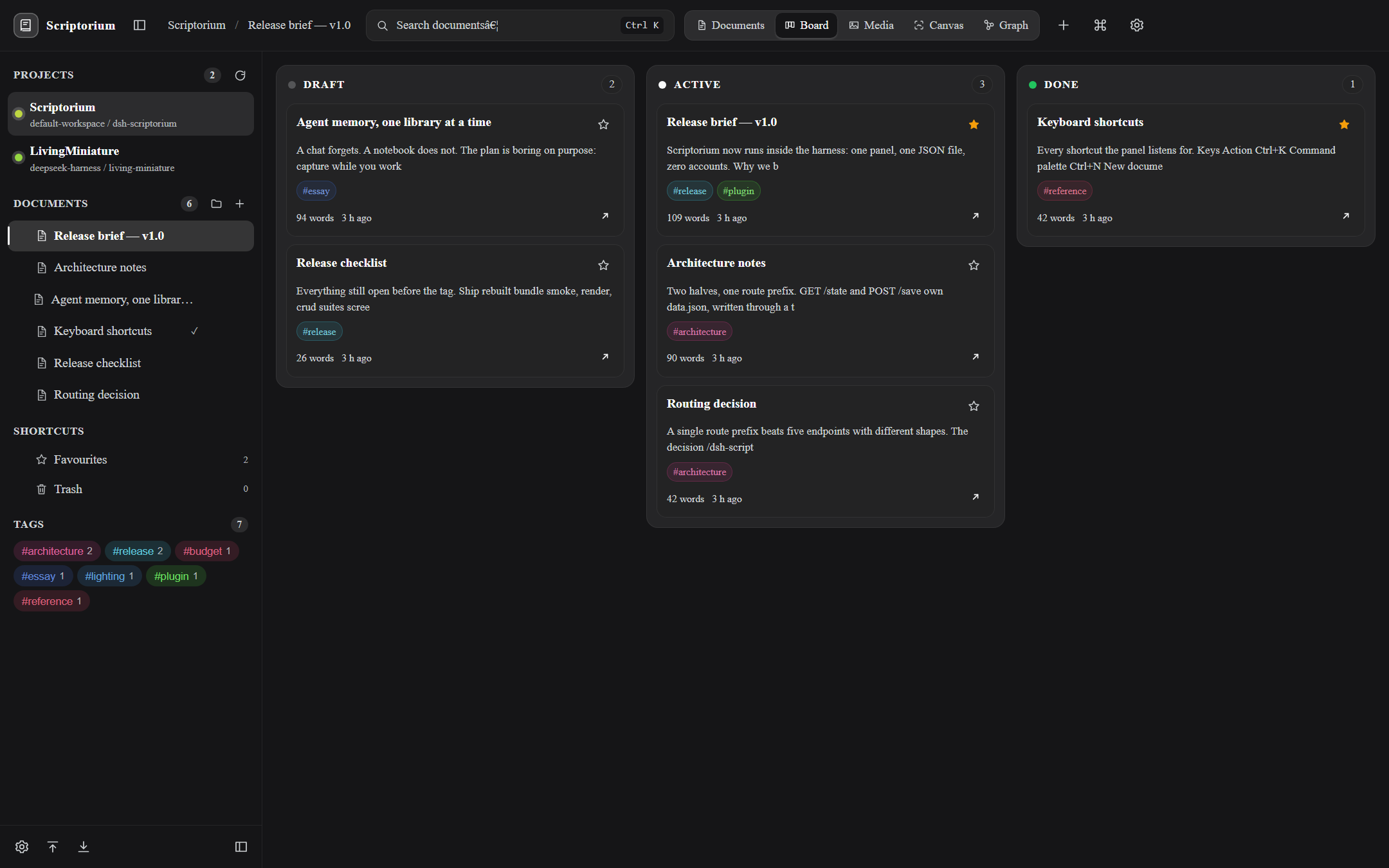 | 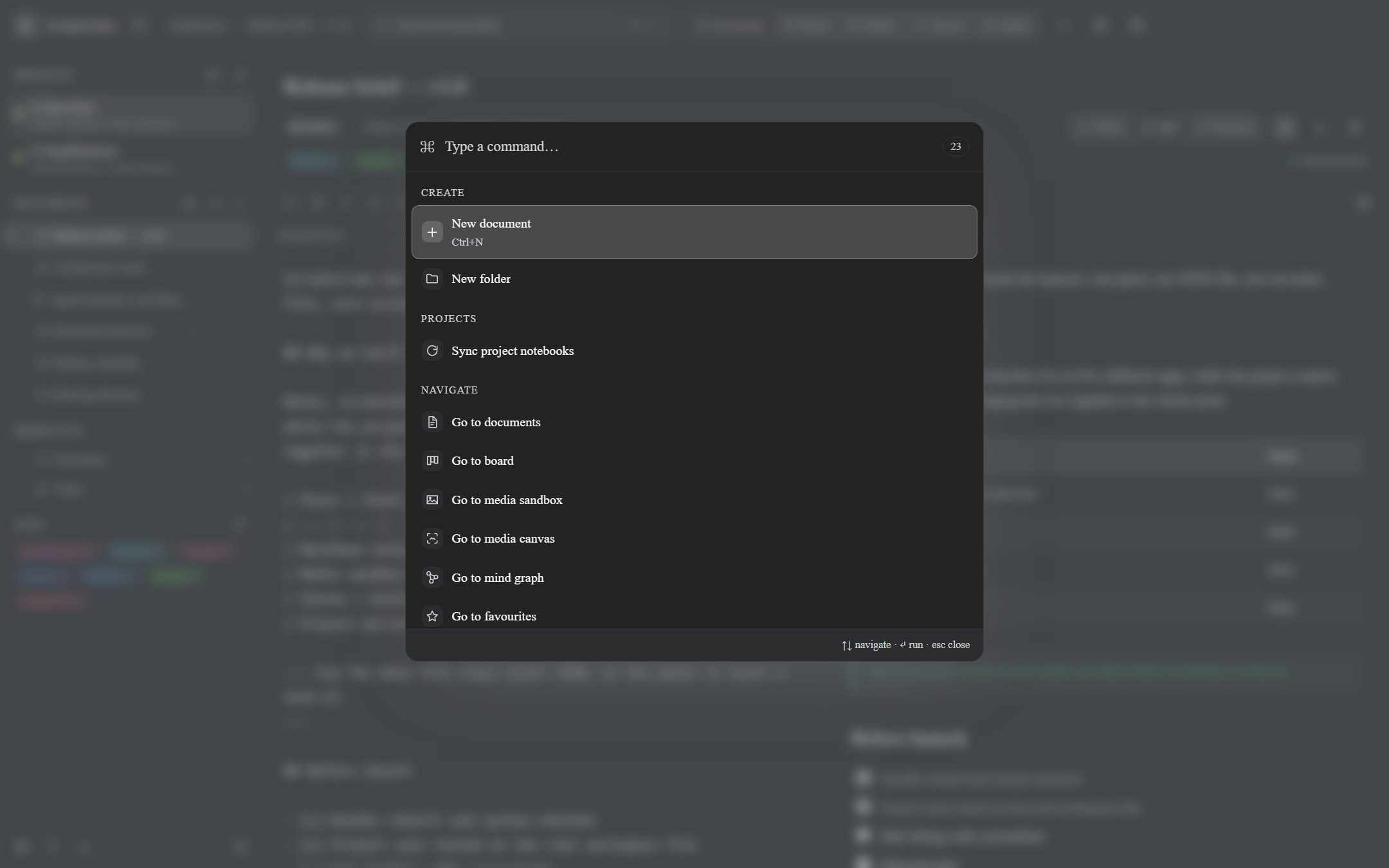 |
| Board — Draft / Active / Done, straight from each note's status. | Command palette — Ctrl+K, every action one fuzzy query away. |
In practice:
- A design review: drop three screenshots on the note, arrange them on the canvas next to the brief, link them, and the graph shows which notes reference which.
- A release: every note carries a status, so the board is the plan — drag a card and the note's status changes on disk.
- A month later:
Ctrl+Kor search finds the note, the graph shows its neighbours, and the attachment is still next to the paragraph it explains.
What you get
| Area | Behaviour |
|---|---|
| Organize | Workspaces → folders → nested documents, drag a document onto a folder, inline rename, reorder |
| Projects | Every notebook mirrors one Harness project from <DSH_HOME>/storages/workspace.json: the sidebar lists each project with its path and accent dot, sync creates/renames notebooks, a vanished project is flagged missing (its documents are kept), and an unlinked notebook can be linked — or merged into the existing project notebook |
| Write | Markdown editor: headings, bold, italic, code, links, images, tables, task lists, ::: note/tip/warning/danger callouts, fenced code with a copy button, $math$, horizontal rules |
| Preview | Write / split / preview modes, task checkboxes toggle the source line, scroll sync |
| Find | Ctrl+K command palette (fuzzy, recency-aware) and full-text search with highlighted title/body matches and relevance ranking |
| Track | Kanban board with Draft / Active / Done columns; drag a card to change its status |
| Classify | Tags on every document, tag cloud filtering, generated per-tag colours, a per-tag view |
| Keep | Favourites, soft trash with restore, permanent purge, empty trash |
| Attachments | Upload images, PDF, audio, video and text files per document; in-app preview modal (PDF via the browser viewer); media sandbox view with kind filters |
| Canvas | Free-form media canvas: every attachment becomes a draggable, resizable card beside the document that owns it, joined by an edge; pan, wheel/button zoom, fit-to-screen, link two cards, keyboard nudging, delete a link |
| Connections | Obsidian-style mind graph: notes are nodes, [[wiki links]] (with ` |
| Portability | Export JSON, export ZIP (manifest + Markdown notes + media bytes), import JSON (merged, never overwriting) and import ZIP (ids remapped, media stored); the canvas travels both ways and is re-pointed at the imported ids |
| Feel | Shared animation set (fade, pop, toast, tree expansion), theme-token colours only, prefers-reduced-motion respected |
Keyboard: Ctrl+K palette, Ctrl+N new document, Ctrl+S save, Ctrl+B/Ctrl+I bold/italic,
Esc closes overlays; shortcuts stay out of the way while the caret is inside a field.
Storage
- Documents:
<DSH_HOME>/scriptorium/data.json(atomic tmp+rename writes, one serialized queue, revision counter; oversized or malformed snapshots are rejected with a 400). - Snapshots are validated field by field before
POST /saveor a ZIP import can persist them: workspace ids are unique, every node belongs to an existing workspace, parent chains resolve and stay inside one workspace without cycles, tags are non-empty strings, attachment ids are unique and resolvable, canvas cards point at live nodes/attachments with canonical ids, canvas links connect existing cards, and graph preferences are the three known booleans. Errors name the exact path (for examplenodes[12].media[0].id) and nothing is written when validation fails. A snapshot newer than this build'sSTORE_VERSIONis rejected with a clear message; older versions run the ordered migrations first. Unknown top-level blocks are still carried through. - Attachments:
<DSH_HOME>/scriptorium/media/<id>plus a<id>.jsonsidecar with name/mime/size.DSH_HOMEdefaults to~/.dsh. A directory left by the pre-rename build (<DSH_HOME>/alexandrie/) is moved into place on first mount, so existing notes, attachments and layout survive the rename. - Layout copy:
<DSH_HOME>/scriptorium/layout.jsonholds onlycanvas+graphand is written beforedata.jsonon every save. A pre-canvas build rebuildsdata.jsonfrom a fixed key list and never touches this file, so a downgrade cannot destroy the board: the next load merges the layout back (cards whose document was deleted meanwhile are pruned), and the read itself never rewritesdata.json. - Projects: the host reads
<DSH_HOME>/storages/workspace.json(the same file the Harness workspace switcher uses) and returns{ projects, defaultProjectId, directory, source, exists }. The file is read-only for this plugin: notebook names/paths come fromglobal.workspaceIdsorder plustables.workspacesmetadata, a missing file yields an empty list, a malformed one yields an empty list plus a warning, andGET /projectsnever touchesdata.json. The legacy single notebook is adopted by the default project on the first sync so existing notes are never stranded, and a project that disappears from the Harness stays in the sidebar flaggedmissingrather than being deleted. - Archive shape is additive: a missing
canvas/graphblock is filled with empty defaults on load (95 bytes on disk), and a build never erases a top-level block it does not know, so newer features' data survives an older build's save. - Imports carry the board: a ZIP import rebuilds every card and link on the freshly remapped document/attachment ids (dead references are dropped, repeated links deduped); a JSON import keeps the local layout untouched and folds the imported cards/links in, idempotently, so the same archive imported twice adds nothing twice.
- ZIP imports are read defensively: a single entry may decompress to at most 16 MB, the whole
archive to 128 MB, with at most 2,000 entries and no entry past a 200:1 ratio once it passes
1 MB, so a tiny crafted archive answers 400
archive exceeds safety budget: <reason>instead of expanding without bound.
The browser half never touches the disk: it talks to the plugin's own same-origin route
(/dsh-scriptorium/*) with a { ok, value } / { ok: false, error: { message } } envelope, the
same proven pattern as the shipped dsh-taskboard plugin.
Host routes: GET /health, GET /state, GET /projects, POST /save, GET /export,
GET /archive/export, POST /archive/import, GET|POST /media, GET|DELETE /media/<id>.
Install
Repository: https://github.com/santera-pixel/dsh-scriptorium
From npm — the one-step command the DSH Plugin Hub runs:
dsh plugin --profile web add dsh-scriptorium
Straight from GitHub (works before any npm publish; npm runs this package's prepare script, so
the browser bundle is rebuilt during install):
dsh plugin --profile web add github:santera-pixel/dsh-scriptorium
From the Web GUI: Settings → Plugins and install from a package, or let the agent call
plugin_manager with install_bundle and target dsh-scriptorium (or a path to a local
checkout). Whichever route installs it, a page refresh is enough for a client change; the host
half (lib/index.js) is ESM and only reloads on a harness restart.
After installing, open the book icon in the sidebar.
Compatibility and permissions
- DeepSeek Harness with the Web profile; the client half declares
platform: "web"and injects only theslotsservice. The host half injectswebServerand registers routes under/dsh-scriptorium. - Node.js
>=22(the host half is dependency-free ESM). - No outbound network calls, no telemetry, no third-party embeds.
- Writes only under
<DSH_HOME>/scriptorium/(data.json,layout.json,media/). Reads<DSH_HOME>/storages/workspace.jsonread-only to mirror the Harness project list. - Caps: 12 MB per attachment, 24 MB per snapshot.
Publishing to the DSH Plugin Hub
The hub discovers public GitHub repositories that carry the dsh-plugin topic and contain a root
package.json with an apply(ctx) export. To publish:
- Push this repository to GitHub and add the
dsh-plugintopic. npm publish(the package is notprivateand setspublishConfig.access = "public"); the hub only offers one-step installs for packages that exist on npm.- Optionally install
dsh-pluginand verify the listing appears under Settings → Plugin Hub.
Build
No bundler and no JSX: src/client/*.js are plain-JavaScript parts concatenated, in filename
order, into lib/client.js inside the window.__ModuleLoader__ factory wrapper.
node build.mjs
node --check lib/client.js
lib/index.js (host half) and lib/zip.js / lib/archive.js are plain ESM with no dependencies.
Verification
The suites below live in tests/ on the dev branch. The main branch — what GitHub shows and
what the plugin hub installs — ships without them, and the npm tarball never includes them either.
| Suite | Covers | Checks |
|---|---|---|
tests/smoke.mjs | model readers/mutators, markdown rendering, search ranking, store seed/save | 13 |
tests/render.mjs | every component body under a React shim, all App views, media library/preview/grid, canvas and graph roots, project sidebar groups | 41 |
tests/crud.mjs | create/rename/move/trash/restore/purge/workspace cascade through the real store | 10 |
tests/editor.mjs | toolbar transforms, modes, task toggling, sanitising, undo-safe insert | 27 |
tests/interactions.mjs | search/overlay keyboard, palette recency, board drag, tags, shortcut guards | 23 |
tests/canvas.mjs | canvas geometry (bounds/fit/zoom anchor), item/link mutators, hostile snapshot sanitising, purge/media cleanup, wide-card placement | 19 |
tests/graph.mjs | wiki-link parsing, graph building (tags, scope, orphans, undirected dedupe), deterministic force layout including 1000-node spread, zoom/fit maths | 13 |
tests/merge.mjs | JSON archive parsing and merge semantics (no overwrite, orphan re-rooting) | 8 |
tests/archive.mjs | ZIP writer/reader round-trip, archive build/parse, id remapping | 8 |
tests/zip-budget.mjs | hand-built ZIPs prove the reader's safety budgets: ratio, entry-count, declared single-entry and actual single-entry bombs and a declared-total bomb all fail closed, while a legitimate multi-megabyte archive imports | 6 |
tests/canvas-import.mjs | an exported board survives both import paths: ZIP remap re-points cards/links onto fresh ids, drops dangling/dead references and dedupes; JSON merge keeps the target layout, folds imported cards/links in deterministically | 9 |
tests/compat.mjs | a pre-canvas data.json survives load→save→reload verbatim (old bytes unchanged, 95-byte block overhead, no drift); unknown top-level blocks carried through; no prototype pollution; nested tag/media/workspace/canvas/parent-cycle rejection with exact paths; newer-version rejection; version-0 migration | 13 |
tests/downgrade.mjs | a pre-canvas build's fixed-key rewrite of data.json is recovered from the layout copy on the next load: positions/sizes/links restored, document edits kept, deleted-document cards pruned, idempotent cycles, export carries the layout | 7 |
tests/projects.mjs | project sync (create/adopt/rename/missing/idempotent), unsafe ids ignored, linking and merge-into-existing semantics, store project state success/failure | 11 |
tests/migrate.mjs | the pre-rename data directory is moved into place on mount with documents, attachments, layout copy and revision counter intact; a second mount repeats nothing | 1 |
tests/http.mjs | the real host half on a throwaway server: state/save, project mirror + malformed file, media, ZIP export/import including the board round-trip, a bomb import answering 400 without touching the store, nested-validation 400 paths, and 409 conflicts on stale revisions | 35 |
tests/export.mjs | Markdown and JSON download naming and payload | 3 |
tests/gui.mjs | the built bundle in jsdom against a throwaway host: mount, create, type, preview, Ctrl+K, search, board move, trash/restore, settings, upload→canvas→drag→zoom, graph→connect→filter, hostile-SVG preview, and the 409 banner (Reload/Overwrite) — asserting on the rendered DOM and on data.json | 13 |
tests/battle.mjs | adversarial pass: 400-operation model fuzz with invariants, hostile canvas payloads, wiki-link abuse, 800-node layout budget, concurrent saves, traversal names, broken archives, 3000-document round-trip | 10 |
tests/live.mjs | the running harness (health/state/save/conflict/export/projects) | 9 |
279 checks in total (247 node suites, 13 jsdom GUI, 10 adversarial, 9 live).
The suites live in tests/ on the dev branch. main — what GitHub shows, what the hub
installs and what npm publishes — is dev minus tests/, so a plain checkout of main contains
no test code. Tests are never in the npm tarball either.
git switch dev        # or: git fetch origin dev && git switch dev
npm install           # jsdom + react for the DOM suites
npm test              # the fifteen node suites above
npm run test:battle   # adversarial suite only
npm run test:gui      # real DOM end to end
npm run test:live     # against the running GUI
tests/live.mjs reads the GUI URL from DSH_WEB_URL (it defaults to the current harness port).
To release, rebuild main from dev (the script copies dev's tree, drops tests/, and refuses
when main has commits of its own, i.e. someone edited the release branch directly):
npm run sync:main
git push origin main dev --tags
Tag only after the dev CI run is green. release-gate.yml rejects a release whose tree is not
exactly dev minus tests/, or whose dev CI run did not succeed, and release.yml restores the
tests/ from dev into the tag checkout and re-runs npm test, npm run test:battle and
npm run test:gui. A tag can therefore fail even when main itself looked fine — the suite, not
the branch colour, decides whether the release is sound.
Limitations
- The GUI shell answers
401to plain HTTP without a browser session, so visual end-to-end checking is manual: the automated evidence is the component tree, the host route suite and the slot-registration check (mainkey +sidebar.panellistrow). - Media previews depend on the browser: PDFs use the built-in viewer, office documents fall back to a download link.
- Attachments are capped at 12 MB each; the whole snapshot at 24 MB.
License
MIT — see LICENSE.
Comments
Loading…
Similar plugins
by NeoHotaru
Knowledge base as a canvas in the right sidebar: notes are nodes, and nine tools let the model read, write, link and remove them. A node can carry pictures and documents, and reading one returns their
★ 21
↓ 501/wk
MIT
JavaScript
Nov 6, 2026
dsh plugin --profile web add dsh-knowledge-canvasby Notoonex
Project record system for DeepSeek Harness: node-based progress board, decision ledger, and right-sidebar UI.
★ 0
MIT
JavaScript
Oct 24, 2026
dsh plugin --profile web add @notoonex/dsh-project-boardby scccy
DeepSeek Harness 面板:把各工作区 .agents/notes 的工程决策笔记渲染成原版看板(承重墙 / 时间线 / 避坑智库 / 决策清单)
★ 0
MIT
JavaScript
Nov 3, 2026
dsh plugin --profile web add dsh-notes-boardby Luaphes
Attention reminders for the DeepSeek Harness Web UI: frame badge, (N) tab title and whale-favicon recolor for sessions waiting for input or finished unopened.
★ 6
↓ 196/wk
MIT
JavaScript
Sep 9, 2026
dsh plugin --profile web add dsh-web-attention-badgeby NonchalantLudens
Project directory preview for the DeepSeek Harness web GUI — details-panel file tree + read-only file preview via a fenced /dirpreview command
★ 0
JavaScript
Aug 26, 2026
dsh plugin --profile web add dsh-side-dirby moazzamak
A DeepSeek Harness plugin that shows a research graph: one JSON node store drawn as a node-link graph, a filterable board, and a steering frontier in the right pane, with a knowledge_dag tool for the model.
★ 0
NOASSERTION
JavaScript
Oct 6, 2026
dsh plugin --profile web add dsh-knowledge-dag