

dh_picker
DiscoveredCodex-style visual element picker for the DeepSeek Harness Desktop Browser — comment on page elements and send them to the agent as one request.
DeepSeek Harness Element Picker
A Codex-style visual element picker for the DeepSeek Harness Desktop Browser.
Open any site in the Harness Browser, click an element, write a comment right next to it, press Enter — the comment lands in the chat composer as a compact chip. Collect as many comments as you need, then send one request. The agent receives your instruction plus a compact, structured description of every annotated element, so it can find and edit the matching source component.
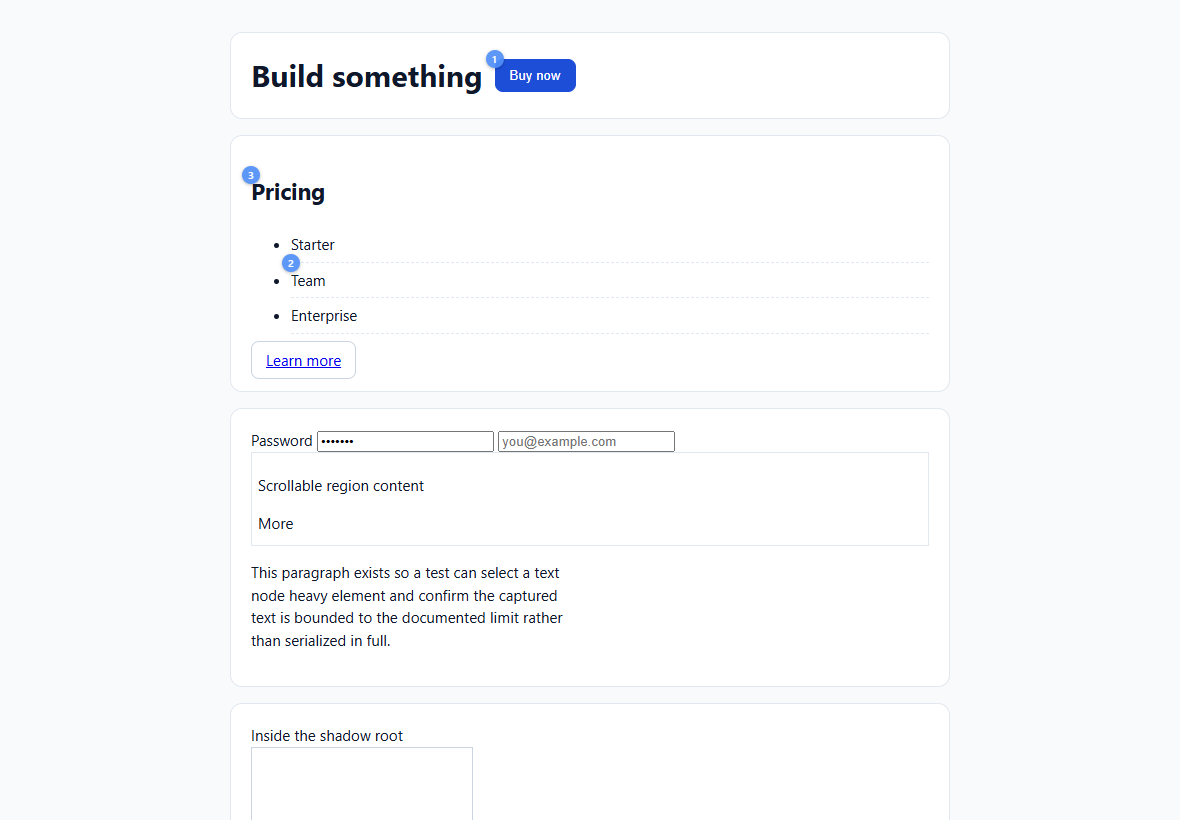
The picker is a Harness plugin bundle, not a script you paste into a website. It is installed once into a Harness profile and then works on any site the Browser can open — Next.js, React, Vue, Svelte, or plain HTML — without adding a single line to those projects.
Contents
- Why
- How it works
- Requirements
- Install
- Usage
- What the agent receives
- Payload
- Security
- Limitations
- Troubleshooting
- Development
- Versioning and upgrades
- Alternatives
- License
Why
Reviewing UI changes usually means describing elements in prose: “the button under the hero”, “that card on the right”. The picker replaces the description with the element itself:
- point at the real element in the real page,
- attach the instruction to it while you are looking at it,
- keep the chat compact (one chip per comment),
- and hand the agent enough context — selector, text, box, markup, computed styles, framework hints — to map the comment back to a component.
How it works
Harness Web GUI (trusted renderer)                     Browser page (sandboxed guest)
┌──────────────────────────────────────┐               ┌───────────────────────────────┐
│ composer: "Select element" toggle    │ executeJava   │ injected picker (zero deps)   │
│ chips: Element 1 · …  Element 2 · …  │ ────────────► │ hover · click · inline editor │
│ (send stays user-controlled)         │ ◄──────────── │ small numbered markers        │
└──────────────────────────────────────┘  console msg  └───────────────────────────────┘
              │                            per comment
              ▼
   one chat message: your text + each chip expanded to structured context → the agent
- The Harness Browser is an Electron
<webview>. The trusted renderer calls<webview>.executeJavaScript(...)— a documented Electron API. No Harness file is patched, no security setting is relaxed, and the page still has no Node, IPC, or DSH-origin access. - Each saved comment comes back as a chunked
console-messageevent and is validated before use. - The page bundle has zero dependencies and lives in a shadow root, so it neither leaks styles into the site nor inherits the site's styles.
- Comments are real composer references: at send time the input machine calls this package's
codec.serialize, which is where the structured block is produced. The visible chat stays compact; the model gets the detail. - In the transcript, a sent comment collapses to a chip (
#1 comment ▾); clicking it expands the exact block the model read.
Requirements
- DeepSeek Harness Desktop with the right-sidebar Browser tab. Verified against 0.2.1-rc.3 (Electron 44.7.0, Windows x64).
- A Browser tab open on an
http(s)page in the same window as the chat. - Node.js 22.19+ or 24+ for the build and tests (not needed at runtime).
Not supported: the Web profile (its Browser is an iframe on the site's origin, so injection is
impossible without the site's cooperation), the external system browser, and file:/data: pages.
Install
The installable bundle is packages/deepseek-harness-element-picker.
It is a normal Harness profile package: one row, one client module, no dependencies of its own.
git clone https://github.com/safroigor/dh_picker.git
cd dh_picker
node scripts/build.mjs          # regenerates packages/.../client.js from src/
Then install it into the desktop profile:
Windows (PowerShell)
& "$env:LOCALAPPDATA\Programs\DeepSeek Harness\resources\runtime\cli\bin\dsh.cmd" `
    plugin --profile desktop add ".\packages\deepseek-harness-element-picker"
macOS
"/Applications/DeepSeek Harness.app/Contents/Resources/runtime/cli/bin/dsh" \
    plugin --profile desktop add "$PWD/packages/deepseek-harness-element-picker"
Linux / dsh on PATH
dsh plugin --profile desktop add "$PWD/packages/deepseek-harness-element-picker"
dsh plugin add runs pnpm for the profile, records the package in
$DSH_HOME/profiles/desktop/package.json, and adds it to dsh.profile.bundles.
Restart DeepSeek Harness once so the profile is composed with the new bundle. After the restart, Select element appears in the chat composer whenever a Browser page is open.
Verify the install without restarting:
& "…\dsh.cmd" plugin --profile desktop --dump-config | Select-String "element-picker"
The profile records the bundle as a
link:to this checkout. Keep the directory where it is, or reinstall after moving it.
Update
git pull
node scripts/build.mjs
dsh plugin --profile desktop add "$PWD/packages/deepseek-harness-element-picker"
If only client.js changed (the usual case), a window reload (Ctrl+R) is enough to pick up the
new client module; a full restart is needed only when the profile itself changes (install, bundle
list, row config).
Uninstall
dsh plugin --profile desktop remove deepseek-harness-element-picker
Removes the row, the client module and the profile dependency. No Harness installation file, no website, and no session data are touched.
Usage
-
Open a page in the Browser tab (right Sidebar).
-
Click Select element in the chat composer. The composer status line confirms pick mode.
-
Hover the page: the element under the cursor gets an outline. Click it. The page cannot navigate or fire handlers while you are picking or writing.
-
Type a comment and press Enter. A chip appears in the message you are composing:
[Element 1 · Reduce the top padding to 24px…]Nothing is sent — exactly like attaching a file. Pick mode stays armed for the next element.
-
Repeat. Every comment is an independent chip.
-
Click a numbered marker on the page to reopen its comment; saving updates the annotation and relabels its chip in place.
-
Delete a chip to drop that annotation and its marker.
-
Press the composer's Send when ready, with or without your own text. One request goes out with your instruction and one structured block per chip. After sending (or clearing the message), pick mode resets by itself.
Keyboard
| Key | Where | Effect |
|---|---|---|
Enter | comment editor | Save the comment and add its chip. Never sends the request. |
Shift+Enter | comment editor | Newline. |
Escape | comment editor | Discard the current draft, stay in pick mode. |
Escape | pick mode | Leave pick mode; the page becomes usable again and markers stay. |
On-page UI
The page only ever shows three things, and none of them is a panel:
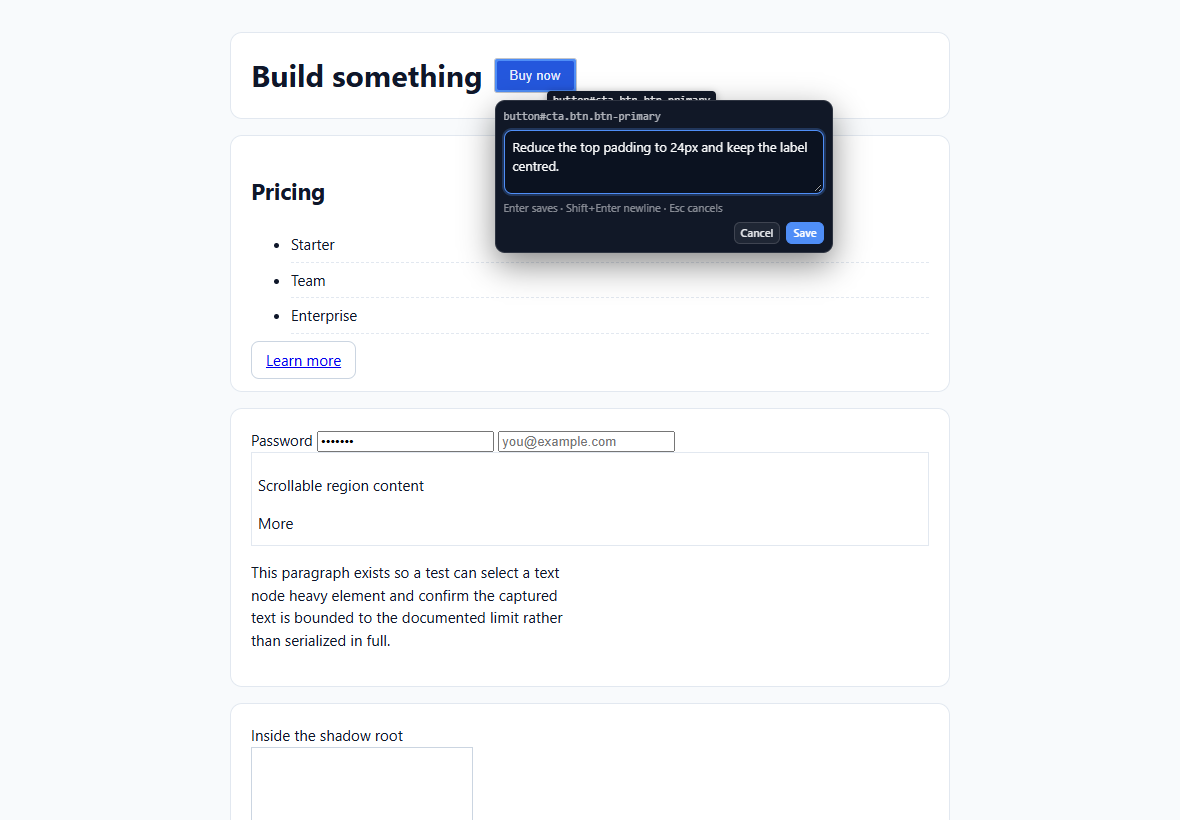
- a hover outline with a short element label,
- the inline comment editor next to the selected element (clamped to the viewport),
- small numbered markers on annotated elements.
Review, editing and sending all happen in the composer and the transcript.
What the agent receives
Each chip is replaced, in place, by a bounded block (at most ~8 lines, ~1.4 kB):
Element 1 — <button#cta> — comment: “Reduce the top padding to 24px.”
  selector: #cta
  classes: btn btn-primary · text: “Buy now” · box: 81×33 at (496,58)
  styles: padding: 8px 14px · font-size: 15px · color: rgb(255, 255, 255)
  html: <button id="cta" class="btn btn-primary">Buy now</button>
  react: PricingCard ← App (/src/Card.tsx:42:7)
  page: https://example.com/pricing — Pricing
selector is a temporary locator, never an identity. The text, classes, markup fragment, box
and framework hints are what let the agent map the comment to a source component. React hints
include the owner component stack and, in development builds, the _debugSource file:line; Vue
hints use __vueParentComponent.
Payload
One annotation crosses the page/embedder boundary per saved comment.
- Schema:
schema/annotation.schema.json(schemaVersion: 1) - Types:
types/index.d.ts
{
  "schemaVersion": 1,
  "kind": "dsh-visual-feedback/annotation",
  "annotation": {
    "ref": "element-1", "index": 1, "comment": "Reduce the top padding to 24px.",
    "createdAt": "…", "pageUrl": "…", "pageTitle": "…",
    "element": {
      "tag": "button", "id": "cta", "classes": ["btn", "btn-primary"], "text": "Buy now",
      "selector": "#cta", "alternativeSelectors": ["button.btn.btn-primary"], "xpath": "/html/body[1]/…",
      "outerHTML": "<button id=\"cta\" class=\"btn btn-primary\">Buy now</button>",
      "rect": { "x": 496, "y": 58, "width": 81, "height": 33, "docX": 496, "docY": 58 },
      "styles": { "padding": "8px 14px", "font-size": "15px" },
      "framework": [{ "framework": "react", "componentStack": ["PricingCard", "App"],
                      "source": "/src/Card.tsx:42:7" }],
      "context": { "parent": { "tag": "div", "selector": "#hero" }, "parentHTML": "…" }
    }
  }
}
Captured data is sanitized and bounded: password and hidden inputs are redacted, value,
checked, selected, srcdoc and on* attributes are dropped, data-* is allow-listed, URLs
with credential-like parameters are redacted, and text/HTML/styles are size-limited.
Security
- Guest pages keep the shipped policy:
sandbox: true,contextIsolation: true,nodeIntegration: false, no preload. The plugin does not weaken any of it. - No privileged object crosses into the page. The page returns plain JSON; the adapter bounds and validates every field before use.
- The overlay is isolated in a shadow root, is
pointer-events: noneexcept for its own controls, and blocks page clicks only in pick/edit mode. - Nothing is written into the site (no DOM, storage or cookies), and no backend is added: the Host half of the bundle is intentionally empty.
- Annotation text ends up in the committed message, so it survives reload and fork like any other message text.
See SECURITY.md for the reporting policy.
Limitations
- Desktop only, right-sidebar Browser only (see Requirements).
- Cross-origin iframes are opaque: a click inside one annotates the
<iframe>element. - Closed shadow roots cannot be inspected; open ones are descended and the host selector is recorded.
- Markers float over the page while a session is active (18 px badges). They disappear when the session ends: after sending, or when every chip is deleted.
- The transcript stores the expanded blocks, not the chips: the chip is a renderer for message text that already contains the detail. Copying a message copies the block.
- The composer chip is atomic: editing a comment happens on the page (marker → editor), not by editing the chip text.
- No screenshots.
webview.capturePage(rect)exists, but the device-pixel mapping and a second attachment flow are not shipped. - Multiple visible Browser panes: the largest visible guest is targeted; every annotation records its own page URL.
- SPA route changes keep the session; annotations keep the URL they were captured on. A real navigation closes the session and says so — annotations are never silently re-associated.
- UI copy is English-only in this version.
Troubleshooting
| Symptom | Cause and fix |
|---|---|
| No Select element control in the composer | The bundle was installed but the app was not restarted: the profile is composed at boot. Restart DeepSeek Harness, then check dsh plugin --profile desktop --dump-config. |
| Control is greyed out | No usable Browser page: open a Browser tab on an http(s) URL and keep it visible. The tooltip states the reason. |
| Control works, but hovering the page does nothing | The guest refused the injection. Reload the page in the Browser (the toolbar refresh), then click the toggle again. |
| After a plugin update the page behaves like the old version | The page keeps the injected build until it navigates. Reload the Browser page or the Harness window. |
Sent message shows raw Element 1 — … text instead of a chip | The message was sent before 0.2.0 block formatting, or a second block follows on the same line; update the plugin and send again. |
| Pick mode stays armed | Fixed in 0.2.0: the reset now watches the composer from the plugin, not from a slot component. Update and reload. |
Development
node scripts/build.mjs                       # regenerate packages/…/client.js
node scripts/build.mjs --check               # fail when the committed bundle is stale
node --test "tests/unit/*.test.mjs" "tests/integration/*.test.mjs"
node scripts/docs-screenshot.mjs             # regenerate docs screenshots
node scripts/inspect-harness.mjs --list sidebar-browser   # inspect the installed app.asar
The test suite runs the picker in a real Chromium through playwright-core
(npm i -D playwright-core, or point PLAYWRIGHT_CORE at an existing install). It needs a
Chromium-family browser; the harness launches Chrome/Edge, or starts the browser itself over CDP
when the environment forbids piped stdio.
| Suite | What it covers |
|---|---|
tests/unit/selector.test.mjs | selector generation, uniqueness, alternatives, XPath, shadow roots, iframes |
tests/unit/sanitize.test.mjs | password/hidden redaction, attribute stripping, URL redaction, size bounds |
tests/unit/annotation.test.mjs | emitted annotation vs. the published JSON Schema, renumbering |
tests/unit/client-adapter.test.mjs | built bundle contract, slot/source registration, validation, chip text, transcript matcher (no browser needed) |
tests/integration/picker.test.mjs | selection, editor, keyboard, markers, multi-annotation, marker editing, reset, viewport clamping |
Repository layout:
src/page/picker.js        framework-agnostic page bundle (the picker itself)
src/harness/client.js     Harness client adapter (inlined into the shipped bundle by the build)
packages/…/               installable bundle: client.js (generated), patch, locale, icon
schema/, types/           versioned payload contract
tests/                    fixtures, helpers, unit + integration suites
docs/                     architecture, migration, screenshots
scripts/                  build, harness inspector, docs screenshots
See CONTRIBUTING.md before opening a pull request.
Versioning and upgrades
- Plugin version follows semver; the payload carries its own integer
schemaVersionand the page bundle carriesPICKER_VERSION(a page that survived an update replaces the stale injected build instead of reusing it). CHANGELOG.mdrecords user-visible changes.docs/MIGRATION.mdlists exactly which Harness and Electron surfaces this plugin depends on, how to re-check them after a Harness upgrade, and the smallest fallback for each.
Alternatives
TEGONG00/dsh-plugin-browser— a Playwright driven screencast panel with an element→composer-chip picker. It ships its own browser surface; this plugin annotates the page the built-in Browser is actually showing. Its picker script and reference-chip design informed this work.- The
pick/pickedskills (Chrome extension + apickerMCP server) work in a separate Chrome instance and cannot see the Harness Browser.
License
MIT.
Comments
Loading…
Similar plugins
by Gnatnaituy
A browser panel in DSH's right sidebar: browse a site through a per-origin loopback proxy, pick elements into [label][DOMn] references, with tabs, page zoom, phone/tablet viewport preview and saved lo
★ 0
MIT
JavaScript
Sep 23, 2026
dsh plugin --profile web add dsh-sidebar-element-pickerby yuanc1204
Codex-style multiple independent selection comments for DeepSeek Harness (DSH).
★ 4
MIT
TypeScript
Oct 6, 2026
dsh plugin --profile web add dsh-plugin-multi-selection-commentsby robin421
Selection mode for DeepSeek Harness: click any element in a local HTML demo, locator auto-written to chat input / DSH HTML 选区模式插件
★ 0
MIT
JavaScript
Sep 30, 2026
dsh plugin --profile web add dsh-html-inspectorby stuarthu
DeepSeek Harness (dsh) browser companion: Chrome side panel embedding the full dsh web UI + host plugins for page reading, HTTP capture, and browser control.
★ 9
MIT
JavaScript
Aug 22, 2026
dsh plugin --profile web add dsh-chromeby BrambleXu
Visual browser element annotation for DeepSeek Harness, capturing DOM, styles, accessibility data, comments, and viewport screenshots. DeepSeek Harness 浏览器元素标注插件,捕获 DOM、样式、可访问性数据、评论和视口截图。
★ 13
↓ 356/wk
MIT
TypeScript
Oct 10, 2026
dsh plugin --profile web add dsh-annotateby ztlovelsw
点选前端页面任意 UI 控件,自动把控件详情(CSS 选择器/XPath/组件名/样式)写入 DeepSeek Harness 输入框,让 AI 精准定位要改的界面元素。
★ 1
MIT
JavaScript
Oct 24, 2026
dsh plugin --profile web add dsh-ui-picker