
dsh-looptree-dashboard
Manifest validMilestone dashboard that keeps a project's intent on disk next to the code: one swimlane per project showing project vision → milestone → capability → execution records, a candidate-capability pool wi

Looptree Dashboard
Every project gets one milestone tree that can actually be closed.
A DSH plugin that puts project vision → milestone → capability → execution on one screen,
gives every node a structured prompt, launches DSH sessions from the node that needs them,
and reports the live status of the dev services behind it.
Install · Usage · Data model · HTTP API · Configuration · Security · Docs · Troubleshooting




Why
Agent sessions end and the reason for the work evaporates with them. A plan becomes a dozen commits nobody can trace back to a vision, and the next session starts by guessing what "done" was supposed to mean.
Looptree Dashboard keeps that intent on disk, next to the code. Each project starts with a project
vision and a rotation/v1 card file: a milestone (milestone vision + core metrics + important
capabilities), the capability items that turn those capabilities into executable work (each with its own core
metric and approach), the plans those capabilities generate, and the execution records of the sessions that
did the work. The panel is the view; DSH is the engine.
Features
- One swimlane per project. Milestone, capability and execution-record columns at a glance. Closed
capabilities fold into a
▸ closed Nchip instead of taking up space, and the Hide closed display-style toggle removes even that chip (the count moves onto the card's chips); execution records never fold, so you always see what just ran. - Vision first, capabilities second. A milestone starts with a 3–6 sentence vision (≤ 1000 chars) of what the project should become, then 3–5 important capabilities: what must exist for that vision to hold, ordered by importance and derived from first principles. The 确认达成 gate is at least one capability child + every child closed — it no longer depends on whether the capabilities list is filled.
- One core metric, on the capability. Each capability's own
metricstates what it must reach for that capability to hold the milestone up — there is no milestone-level metric any more. The project vision sits above everything:project.vision(≤ 1000 chars) is edited from the project name's⋯ → Project infodialog. - Candidate pool with reasoning and a landing spot, sorted by importance. A milestone generates candidate capabilities that carry capability / necessity / causal / gap impact / module (brownfield or greenfield) / integration surface / evidence / importance (1–5); they are stored in descending importance order, each row shows a module badge and reveals a hover card. Adopting keeps those fields read-only; the core metric and approach stay empty and are filled with Generate 2 items.
- Live updates without tab-hopping. Finishing a session refreshes the board in place within ~2 s and the touched nodes get a 新 badge that stays until you open them; idle polling compares card mtimes so edits from another window or machine land too, without stealing focus.
- Crash-recoverable. After a DSH crash or forced restart, cards no longer deadlock on
session … already exists: a persisted session is resumed first, and if that fails a fresh session takes over (the new id is written back). Orphanedrunningrecords started by this machine are failed and closed on boot, and each failed record offers retry in place or abandon with a reason; failures never auto-close a capability. - Plan, execute, reflect from the capability. Fill the core metric and approach to enable Generate
plan (
409 FILL_REQUIRED); when a plan exists, Execute plan (409 PLAN_MISSING). Generate plan sends/plan; execute runs/plan offthen/goal <objective>in the same session. When the record finishes, reflection runs once more and stores lessons on the milestone. - Prompts are previewed before they are sent. One implementation (
lib/prompt.mjs) composes every prompt from the same four blocks — background, current node, task, output — and the panel shows the structure before sending. Per-node overrides beat card-level overrides, which beat built-ins. - Services live in the same lane. Each project lists the services it depends on, probes them every
5s, and starts them with one click using the command mapped to the current platform (
mac/windows/linux). A service can also carry abuildcommand and run it with one click — a one-shot job that reports back its exit code and the tail of its output. An AI pass can read the project (including anyMakefile, root or nested) and propose both commands — as a draft you review and probe before anything is written back. Drag the rows in the sidebar to reorder them: the top row is the default target of the composer card's Open services button. - Start all / stop all across projects. The toolbar has two batch buttons. Start all runs a port-conflict precheck first: when two services point at the same port, nothing is started and the panel lists the collision (fail closed); services already up are skipped. Stop all kills whatever is listening on the configured loopback ports, including services you started in a terminal, and reports per-port failures instead of stopping the batch.
- Two buttons in the composer. Beside the model selector, every session whose workspace is a registered project gets a compact card. Services starts every offline service of that project (port conflicts still fail closed); once anything is already listening it turns into Open services, which opens one tab per running service in the right-side embedded browser (never the system browser). A caret beside it is a service picker: whichever service is checked is the one the main button opens (the first row is checked by default). The top of that menu is start all services — it brings back only the ones that are down (greyed out when everything is up), so a crashed service no longer means opening the panel just to restart it. The same menu carries restart services and stop all services (two clicks to confirm), both scoped to the current project. If the checked service is offline, the main button falls back to starting every service in the project. When start all / restart finishes, the card opens the default service by itself (the top row, or the one you checked while the order is unchanged). The rule is strict: if the default cannot be opened — a watch service, no URL, or not listening within 15s — nothing opens; it never falls through. Loop switches the main area to the project's focus view and scrolls to the current node (running → ready → milestone), and the panel grows a ← Back to chat button so the round trip is one click each way. The card renders nothing in workspaces that are not registered yet.
- Item fields are lists you edit in place. Important-capability and core-metric editors add and remove
one item at a time (
+ Add one/×), and renumber on save. There is no drag ordering: the order you type is the order that is written back. - The arithmetic is on screen. Convergence health, close span, close rate, in-flight ages, overdue count and ETA are computed from the tree, not typed in by hand. Formulas are in rotation-card-spec.md.
- Idle branches are highlighted. The panel applies the parallel rule the other way round — a node
cannot start a session while an ancestor is running — and marks the branches you can start on now:
a
readytag plus a teal rail on the card,running N · ready Nin the lane head, and a clickable idle branch → footer that scrolls to it. A lone branch that is running lights nothing up; a lone idle branch gets a quiet emphasis. A parent whose children are running stays dark, so you never see "milestone ready" next to three running capabilities. Single-versus-multiple is counted per project, and no new field is written to the card.
See it work
| Swimlane matrix | Node detail |
|---|---|
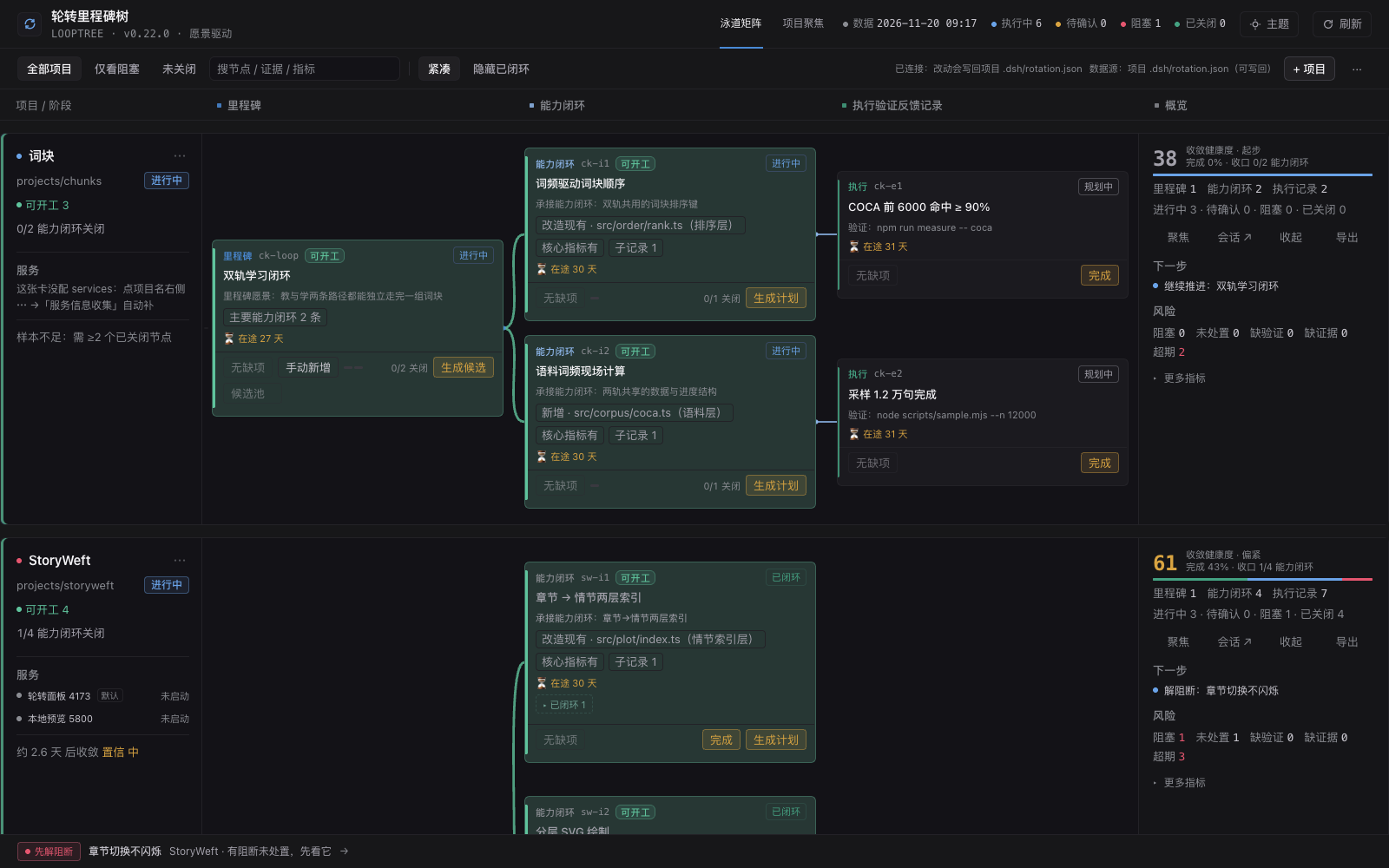 | 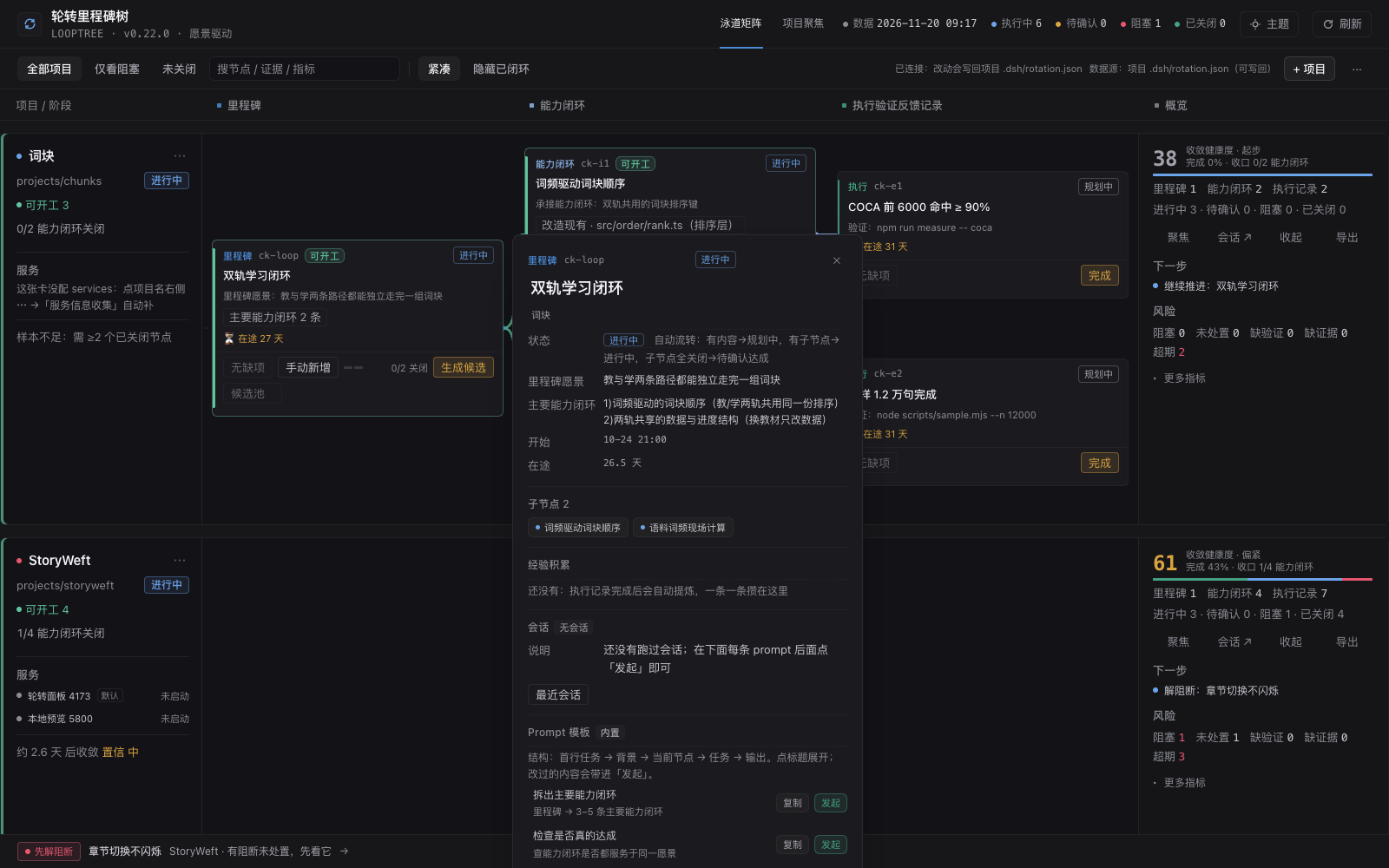 |
| Every project in one matrix: milestone → capability → execution record. | Click any node for fields, issues, plan, execution records and prompts. |
| Prompt structure before sending |
|---|
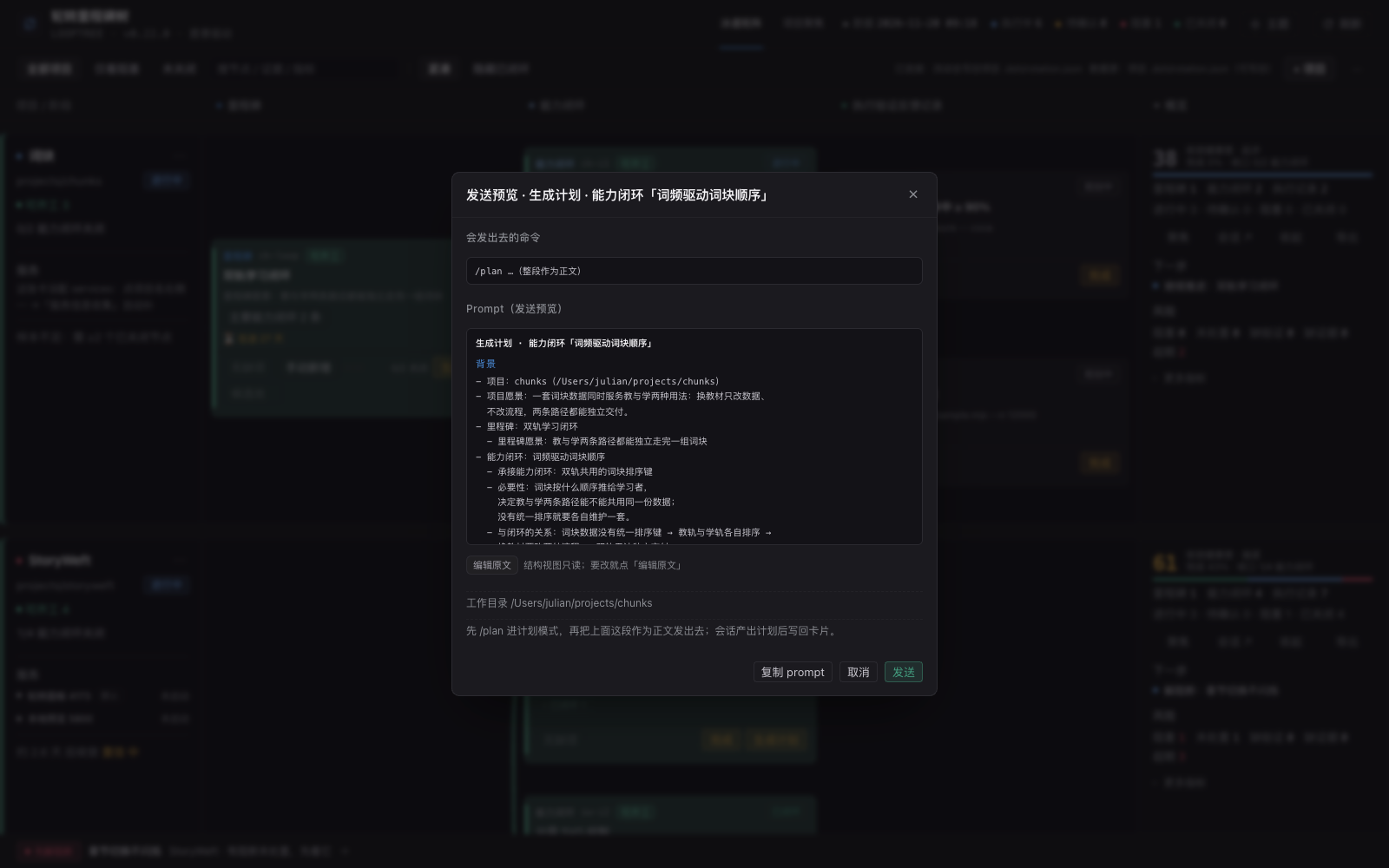 |
| Every prompt shows its blocks (background / current node / task / output) before it leaves the panel. |
Full matrix — all six sample projects
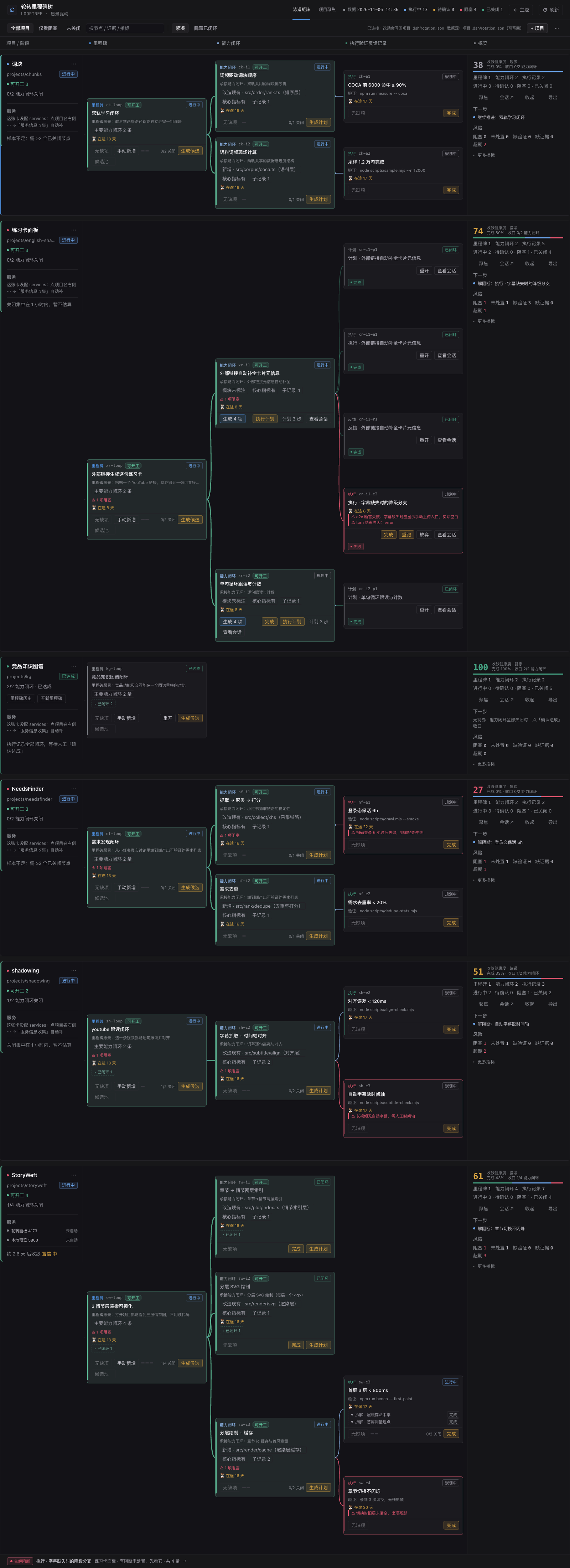
Screenshots are the real panel at v0.22 (three-column matrix, status rail on the right), running on the sample cards in samples/.
Installation
Requires DSH ≥ 0.2.1-rc.3 and Node ≥ 20. The plugin has no build step — web/ is served
straight from disk.
A. From a checkout you already have (recommended for development)
Register the repo as a link dependency of the profile you run, using the pnpm that ships with DSH:
// ~/.dsh/profiles/<profile>/package.json
{
  "dependencies": { "dsh-looptree-dashboard": "link:../../dsh-looptree-dashboard" }
}
Then restart DSH. Because the profile points at the working tree, updating is just git pull:
a web/ change is live on the next page refresh, a lib/ change needs a DSH restart.
B. From the GUI plugin market
Open the plugin market in DSH → add plugin → paste the absolute path of this repository
(not a .tgz; the market takes directories, and this repo no longer produces tarballs).
Full steps, profile traps and rollback: INSTALL.md.
Verify
curl -s http://127.0.0.1:<dsh-port>/rotation/api/health
# {"ok":true,"name":"dsh-looptree-dashboard","version":"0.13.3","base":"/rotation",...}
Then open http://127.0.0.1:<dsh-port>/rotation/app/, or click 轮转里程碑树 in the left sidebar.
If health 404s the host half is not mounted — see INSTALL.md.
Usage
Three steps, once per day:
- Read the lanes. A milestone expands into its capabilities; execution records show running / done / failed with the session result. Milestones waiting for review are amber, and execution records never fold.
- Close what is closed. Support records close themselves once every record is done; the milestone
enters 待确认达成 and only a click on 确认达成 writes
closed_at, snapshots it into the milestone history and keeps the project in the main lane. The gate is at least one capability child + every child closed; a milestone that never spawned a capability keeps its button greyed out. - Push the next step. Fill a capability's core metric + approach (or press Generate 2 items),
then Generate plan; only after the plan is written can you Execute plan. Every node has a prompt
template; 发起 previews the prompt, then starts a real DSH session in that project's
workspace.
The panel writes back on every edit; the toolbar shows 已写入 <file> · <time>.
Data model
~/.dsh/rotation/registry.json          project registry: [{ id, name, workspace, file }]
~/.dsh/rotation/candidates/            candidate pools: <card>__<node id>.json (runtime data, not in project git)
<workspace>/.dsh/rotation.json         the card itself (rotation/v1, travels with the project)

project (the card's `project` block)
└── vision            ≤ 1000 chars: what this project should become

milestone (one per card)
├── vision            3–6 sentences, ≤ 1000 chars
├── metrics[]         2–5 milestone core metrics: the observable result that proves the vision
├── capabilities[]        3–5 important capabilities: what must exist for the vision to hold (importance order)
├── children[]        capability items (kind: capability, depth 2)
│   ├── capability       the capability entry it carries — copied verbatim (read-only, ≤ 80 chars)
│   ├── necessity     why it helps the milestone (read-only, ≤ 200 chars)
│   ├── causal        doing X → which step of the milestone becomes true (read-only, ≤ 200 chars)
│   ├── metric        this capability's core metric: how far it must go to hold the milestone up
│   ├── approach      the implementation approach
│   ├── plan          plan book, written by Generate plan
│   ├── attachments[] reference screenshots: design mock / target UI / current state (≤ 12; files under `.dsh/rotation-assets/`)
│   └── children[]    execution records (kind: exec, depth 3+): one DSH session each
│       └── attachments[] proof screenshots: after / failure (closing writes "附图 N 张")
└── closed_milestones[]    ≤ 10 snapshots, written on 确认达成
A candidate row reveals a hover card (capability / necessity / causal / evidence / importance); adopting writes only the read-only trio into the card, and the core metric + approach are filled with Generate 2 items.
The registry is shared between machines (~/.dsh syncs through git) while workspace is a path that
only exists on one machine. Entries whose workspace is missing here are treated as another machine's
registrations: they are hidden, they do not reserve ids, and they are preserved verbatim on write.
Card fields, invariants and the panel mapping: rotation-card-spec.md.
HTTP API
Both halves are mounted under /rotation (override with basePath). All endpoints return JSON;
writes are validated first and rejected with 422 before anything touches disk, then written
atomically (tmp + rename, no .bak — git is the history).
| Method | Path | Purpose |
|---|---|---|
GET | /rotation/api/health | version + resolved paths |
GET POST | /rotation/api/projects | list / register a project ({name, workspace, provider?, model?}) |
DELETE | /rotation/api/projects/<id> | unregister (the project's card file is kept) |
GET PUT | /rotation/api/cards · /rotation/api/cards/<id> | read / validated write of card files |
POST GET | /rotation/api/assets | upload an attachment (dataUrl → content-addressed file) / read one by sha |
GET | /rotation/api/prompts?file=&nodeId= | composed prompt + summary + lint warnings |
POST | /rotation/api/action/plan · exec · reflect | run a node action in a DSH session |
POST GET | /rotation/api/run · /rotation/api/runs · /rotation/api/run/cancel · /rotation/api/run-config | node sessions and the concurrency cap |
GET PUT | /rotation/api/services | read / write the service list of a card |
POST | /rotation/api/service/start · /rotation/api/service/stop | one-click start / stop |
POST | /rotation/api/service/build | one-click build; waits for the exit code and returns the output tail |
POST | /rotation/api/services/probe · /rotation/api/services/collect | probe a service / AI discovery (draft → preview → write-back) |
GET | /rotation/api/services/collect?file= | the pending service draft for a card |
DELETE | /rotation/api/services/collect?file= | drop the pending draft (&id= removes one entry; no id discards the whole draft) |
GET | /rotation/api/services/all | every project's services, ports and conflicts (?probe=0 skips probing) |
POST | /rotation/api/services/start-all | start all offline services; 409 + conflicts means nothing was started |
GET | /rotation/api/session/context?sessionId= | session → workspace → project, plus a service summary for the composer card |
POST | /rotation/api/services/stop-all | kill listeners on the configured loopback ports; remote hosts are reported as skipped |
The panel also calls a few UI-only endpoints (/rotation/api/sessions, /session, /workspaces,
/pick-directory, /candidates/*, /fill, /splits); they are not a stable contract — read
lib/index.js if you are building on them.
Configuration
Plugin options (cordis.patch.yml / profile patch layer):
| Option | Default | Meaning |
|---|---|---|
basePath | /rotation | route prefix; change it if another plugin claims /rotation |
provider / model | GUI selection | pin node sessions to a provider route instead of the GUI default |
Environment: ROTATION_MAX_CONCURRENT (default 3) caps concurrent node sessions. Service
collection has no cap and does not count toward that budget.
Services are per card, and every command field accepts either a string or a per-platform map:
"services": [
  { "id": "panel", "name": "Panel :4173", "url": "http://127.0.0.1:4173", "health": "/api/run-config",
    "start": { "mac": "node serve.mjs", "windows": "node serve.mjs" } },
  { "id": "preview", "name": "Preview :5800", "url": "http://127.0.0.1:5800",
    "start": { "mac": "python3 -m http.server 5800", "windows": "python -m http.server 5800" },
    "cwd": "/tmp/rt-workspace" }
]
Platform keys: mac (also darwin / macos), windows (also win32 / win), linux, default.
When the current platform has no command, Start is hidden and the block says why.
Prompt overrides live in the card: prompts.<type> at card level, or prompts[] on a node.
Precedence is node → card → built-in, and the detail card labels the source.
Security & boundaries
Nothing leaves the machine except the model calls that DSH already routes.
- The panel is served by DSH's own web server and answers on the loopback interface only.
- Writes need a token, reads do not. A
POST/PUT/DELETEcoming from a browser with an http(s) origin must carryx-rotation-token. The token is generated per process and injected only into the panel HTML that this plugin serves, so the same-origin policy keeps any other local page from reading it — a cross-origin page can no longer callstop-all(which kills listeners by port),probe, orrun. Non-browser clients (CLI / scripts, noOrigin) and thedsh-app://shell are allowed through — they can spawn shells directly anyway; setROTATION_TOKENto pin the token for scripts. Reads stay open: any local page can still read card contents while DSH is running, so do not bind DSH to a public interface.npm run mock:authis the regression test for this rule. - Start service executes a shell command taken from the card file. Treat a
rotation.jsonyou did not write as executable code: the panel always shows platform, command andcwdbefore spawning, and the process runs in its own group so it can be stopped. - Node sessions run in-process through
ctx.agents, so they inherit the GUI's credentials and provider routing — the plugin never stores a key. - Data stays in two places: the project's
.dsh/rotation.jsonand~/.dsh/rotation/. Uninstalling the plugin removes neither.
Known limitations
- The panel has no session list or conversation history; the exec record links to a session id, not to a transcript.
- The listener is loopback-only and unauthenticated by design (see above).
- UI copy is Chinese-only for now; the data model and API are language-neutral.
- Markdown in prompts is plain text on purpose — DSH chat bubbles do not render it.
- Images live in
<workspace>/.dsh/rotation-assets/; whether they enter project git is the project's.gitignoredecision. Exported JSON does not contain image bytes. Deleting an attachment removes the card reference only;npm run assets:gcprunes unreferenced files. - Attachments are png / jpeg / webp only, ≤ 8MB each and ≤ 12 per node. A text-only model sees only the
file name and the
altcaption; a multimodal model canreadthe file at the path in the prompt. - Candidate pools are runtime data under
~/.dsh/rotation/candidates/and are not synced through the project's git: candidates do not follow you to another machine, only adopted capability items do. - Stop all locates listeners by port: on Windows it uses
Get-NetTCPConnectionthennetstat/taskkill, on macOS it needslsof(bundled with the OS), on Linux it falls back toss/netstat. Services whose URL is not a loopback address (localhost,127.0.0.0/8,::1) are reported as skipped and never killed — a configuredhttps://example.commust not take down whatever listens on the local:443.
Development
npm run dev            # fake host, no DSH needed → http://127.0.0.1:4180/rotation/app/
npm run preflight      # lint:plugin → client contract → session state machine → samples → packaging
npm run check          # against a running DSH: health / panel / registry
Individual suites: npm run lint:plugin, mock:client, mock:session, mock:action, mock:prompt,
mock:candidates, mock:genbtn, mock:closure, mock:registry, mock:services, mock:services-batch,
mock:stale-run, validate:samples. Migration for older cards: npm run migrate:capabilities — folds goals
and ideas into capability items and renames blockers to important capabilities; dry-run by default, --write
persists and writes <card>.capabilities-backup.json. Cards older than 0.13 need migrate, migrate:single-idea,
migrate:blockers, migrate:milestone first (also dry-run by default).
Architecture, event flow and directory map: docs/architecture.md.
Documentation
| Document | Read it when |
|---|---|
| INSTALL.md | installing, updating, verifying, rolling back, troubleshooting |
| rotation-card-spec.md | writing or migrating a rotation/v1 card by hand |
| docs/architecture.md | changing the host/client halves or the session runner |
| docs/prompts.md | changing prompt structure, overrides or lint rules |
| docs/execution-records.md | reading the plan / exec / reflect record format |
| docs/dev-setup.md | setting up a machine to develop the plugin |
| CHANGELOG.md | checking what changed between versions |
| docs/devlog.md | the historical log behind the current design |
| docs/backlog.md | catalogued-but-unbuilt improvements, grouped by loop and tagged "do now / defer" |
Contributing
This is a personal tool that happens to be public. Issues and bug reports are welcome — include the
/rotation/api/health output and the console error. For anything larger than a bug fix, open an issue
first so the data model does not fork; if you would rather not wait, fork it, the MIT license allows it.
License
MIT © 2026 jrri
Comments
Loading…
Similar plugins
by weibaohui
dsh 插件 · 执行流程图:把当前会话的执行过程画成实时三泳道流程图(回合/用户/助手/工具/审批/重试),子代理发散-收敛扇形 + 双击下钻子流程,SSE 事件驱动直播
★ 1
MIT
JavaScript
Oct 29, 2026
dsh plugin --profile web add @weibaohui/dsh-flowby kira905
DSH plugin: self-maintained task board for the DSH web GUI (fork of upstream 0.3.4, detached). A card is a real DSH session, and a human confirms completion rather than the runner. | DSH 插件:自维护任务看板——一
★ 0
Apache-2.0
TypeScript
Oct 20, 2026
dsh plugin --profile web add dsh-task-board-localCodex-style hook management ported to dsh: hooks.json discovered from config, plugins and projects, each hook pinned to a sha256 fingerprint that must be approved before it runs; a review dialog in th
★ 0
MIT
JavaScript
dsh plugin --profile web add dsh-codex-hooksKeeps an unfinished task list visible across turns. DSH clears the todos projection at the start of every turn and expects the model to rewrite the whole list, so when a turn is interrupted the plan i
★ 0
dsh plugin --profile web add dsh-todo-continuityLow-code project workspace for the DSH web UI. A multi-level file tree with a push-status ledger, in-panel source view and edit, pre-push static checks, and a scaffold for an empty workspace. Requires
★ 0
NOASSERTION
JavaScript
dsh plugin --profile web add dsh-project-panelby stitchmaps
To-do list panel for DeepSeek Harness: large task cards in collapsible sections, hour-precision due times, per-task reminder lead times, and DingTalk notifications through a group robot webhook or an
★ 0
MIT
JavaScript
Oct 30, 2026
dsh plugin --profile web add todolist