
dsh-todolist
Manifest validTo-do list panel for DeepSeek Harness: large task cards in collapsible sections, hour-precision due times, per-task reminder lead times, and DingTalk notifications through a group robot webhook or an
dsh-todolist
A DeepSeek Harness (DSH) desktop plugin that adds a To-do List panel to the left sidebar. It is a collapsible task list with due dates, per-task workspace-session binding, and one-click jump to the bound session.
Features
- Left-nav entry — a “To-do List” row in the sidebar, next to “Context Insights”.
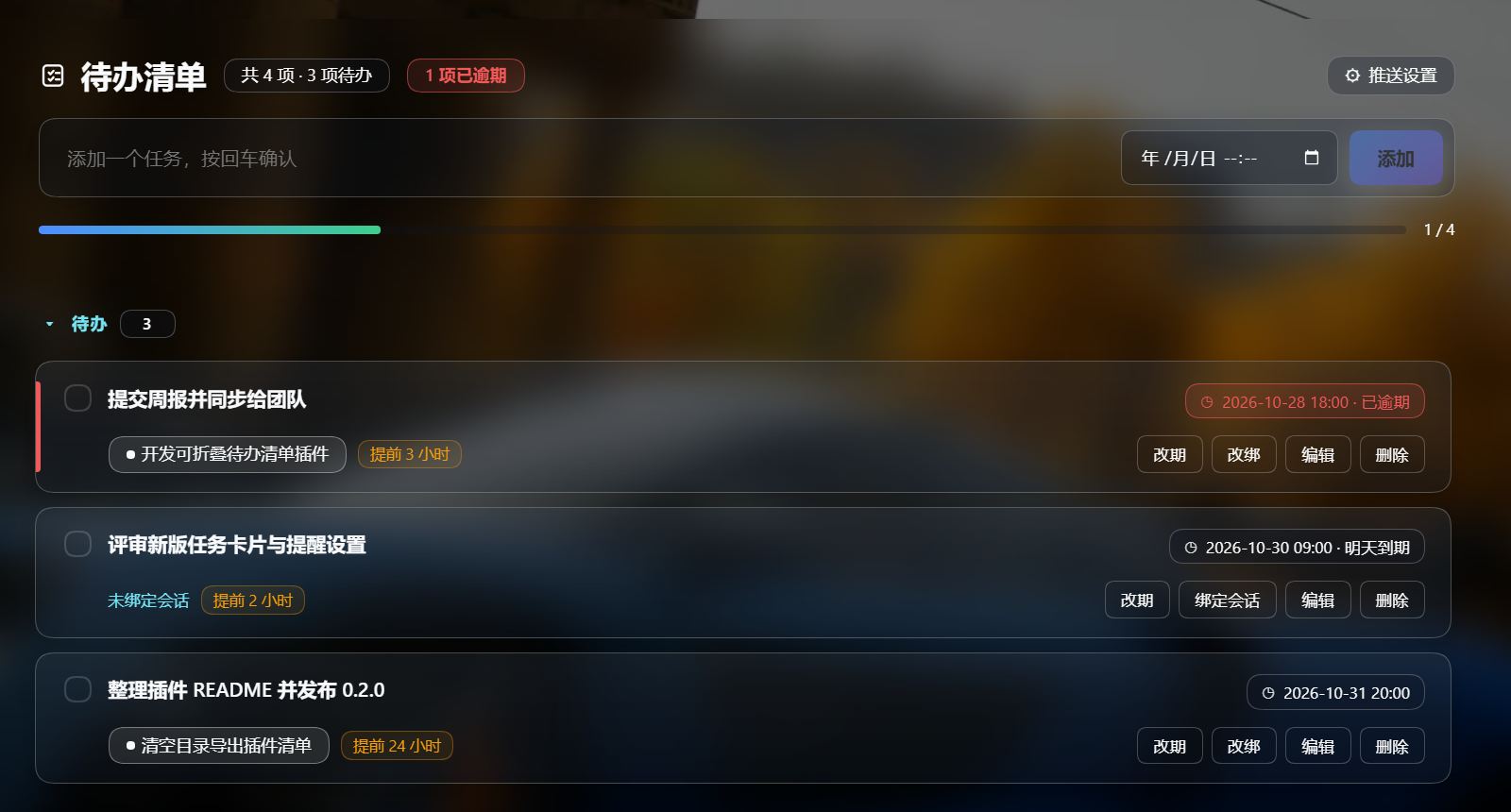
- Large task cards — two-line card layout, status accent bar (overdue red / due-today amber), rounded gradient surfaces, hover lift, and a completion progress bar.
- Full task lifecycle — add, edit (double-click or “Edit”), toggle done, delete, clear completed.
- Due time (hour precision) — set
YYYY-MM-DD HH:00when adding, or reschedule any task (“Due / Reschedule”, quick Today 18:00 / Tomorrow 09:00 / In 1 hour, clear). Overdue tasks are highlighted red, due-today amber; open tasks sort by due time. - DingTalk reminders — a global default lead time plus a per-task override (0 = off); pushes N hours before the due time through a DingTalk group robot webhook or an enterprise-app work notice. DSH must be running (tray) for the scheduler.
- Workspace-session binding — bind a task to any session grouped by workspace; a clickable chip jumps straight to that session.
- Collapsible sections — “To do” and “Completed” sections can be collapsed, with counts.
- Persistent — tasks are stored on the host at
<DSH_HOME>/todolist/todos.json, so they survive app restarts and are independent of the random web port. Every write keepstodos.json.bakplus up to 20 timestamped snapshots undertodolist/backups/. - Bilingual — built-in Chinese / English UI strings.
Requirements
- DSH NEXT 2.0.20 (or a compatible 0.2.x release).
- Windows + PowerShell for the install script (manual installation is also possible).
Install
git clone https://github.com/stitchmaps/dsh-todolist.git
cd dsh-todolist
pwsh -File .\install.ps1
The script:
- copies this repository's plugin files into
%DSH_HOME%\profiles\desktop\node_modules\todolist; - records a
file:dependency in the profilepackage.json; - appends a loader row to the profile
cordis.patch.yml.
Every modified file is backed up next to the original with a timestamp. Refresh the Web GUI (Ctrl+R) if the entry does not appear immediately.
Manual install: copy the package into the profile node_modules, then add
- insert:
    - id: todolist
      name: todolist
to ~/.dsh/profiles/desktop/cordis.patch.yml.
Usage
- Click To-do List in the left sidebar.
- Type a task and press Enter (or “Add”); the date picker next to the input sets an optional due date.
- On a task card:
- Due / Reschedule — choose a date and hour, use quick Today 18:00 / Tomorrow 09:00 / In 1 hour, set the reminder lead time, or clear it.
- Bind session — pick a session grouped by workspace, then click the session chip to jump to it.
- Edit — rename (or double-click the title).
- checkbox — toggle completion; Delete removes the task.
DingTalk reminders
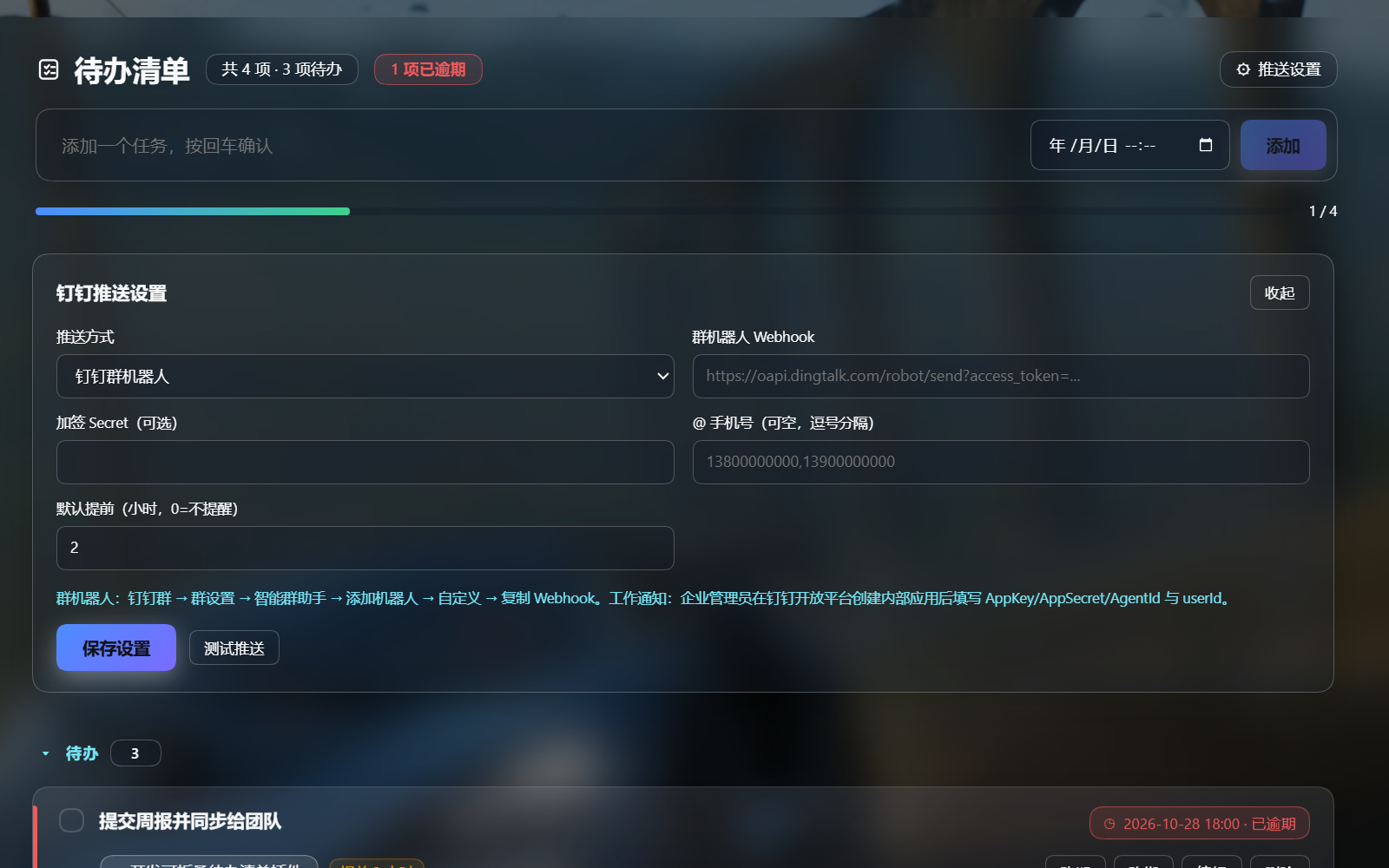
- Click Push settings (top-right of the panel).
- Pick a mode:
- Group robot: paste the DingTalk custom-robot webhook (group → Settings → Smart group assistant → Add robot → Custom). Optionally fill the signing secret and
@mobile numbers. - Work notice: fill AppKey / AppSecret / AgentId / recipient userIds from an internal app created on the DingTalk Open Platform.
- Group robot: paste the DingTalk custom-robot webhook (group → Settings → Smart group assistant → Add robot → Custom). Optionally fill the signing secret and
- Set a default lead time in hours (0 = no reminder), click Save settings, then Send test to verify.
- Per-task override: open a task's due dialog and pick a reminder lead time (default / off / 1–48h).
Credentials are stored locally in <DSH_HOME>/todolist/todos.json. A group robot posts to the group; a work notice goes to the individual.
How it works
DSH plugins have two halves:
- Browser half (
lib/client.js) is loaded by the DSH web module loader. It registers:sidebar.panellist— the sidebar entry (id: todolist);- the
mainkeyed slot — the full panel. Session data comes from the slot runtime'suseWorkspaces()/useSessions()hooks; jumping usesctx.get('uiWorkspace').openSession(sessionId).
- Host half (
lib/index.js) is a plain Cordis plugin. It registersPOST /api/todolist/statethroughconnection.fetch.register, reads/writes<DSH_HOME>/todolist/todos.jsonatomically, and runs a 60-second reminder scheduler that pushes to DingTalk N hours before a due time.
The browser bundle is hand-written in the same lazy-CJS factory format as official UI plugins (window.__ModuleLoader__.load({ id, factory })), so no build step is needed.
Repository layout
.
├─ package.json             # main = host half, ./client = browser half, dsh.client
├─ cordis.patch.yml         # bundle patch: inserts the plugin row
├─ icon.svg
├─ lib/
│  ├─ index.js              # host half: persistence + POST /api/todolist/state
│  └─ client.js             # browser half: sidebar entry + main panel
├─ install.ps1
├─ README.md / README.zh.md
├─ LICENSE
├─ docs/panel.png
└─ docs/panel-settings.png
Notes
- The screenshot uses sample data.
- This is a UI plugin: it does not register any model-facing tool or prompt content.
- The data model is
{ version: 2, tasks: [{ id, title, done, due: 'YYYY-MM-DDTHH:00' | null, remindHours: number | null, remindedAt, reminderDue, sessionId, sessionTitle, createdAt, updatedAt }], config: { dingtalk: {...}, defaultRemindHours } }. - Backups:
<DSH_HOME>/todolist/todos.json.bak(previous version) and<DSH_HOME>/todolist/backups/todos-YYYYMMDD-HHmmss.json(last 20 writes). If the main file is missing or corrupt, the host falls back to the newest backup on read.
License
MIT — see LICENSE.
Compatibility
Versions
| Latest version | Published | Size |
|---|---|---|
| 0.2.1 | — | — |
Comments
Loading…
Similar plugins
by zhengjy01
Task dispatcher for DeepSeek Harness: use TickTick (滴答清单) as the daily task dispatcher — a cordis timer pulls today's due tasks, writes them to the task file, and notifies (WeChat via ClawBot / flomo / macOS); optional auto-execute with result receipts
★ 3
↓ 188/wk
MIT
JavaScript
Sep 29, 2026
dsh plugin --profile web add dsh-task-dispatcherby shuxidemosheng
Enhanced todo_write plugin for DeepSeek Harness: floating task panel with capsule mode, priority tags, full checklist rendering. Fork of @deepseek-ai/dsh-tool-todo.
★ 107
↓ 337/wk
NOASSERTION
JavaScript
Oct 18, 2026
dsh plugin --profile web add dsh-tool-todo-plusby KelaoHu
Time-shifting task delegation for DeepSeek Harness (dsh): plan tasks at leisure, they run unattended off-peak, come back to a report. Human-adjudicated, desktop + web.
★ 180
↓ 337/wk
MIT
TypeScript
Oct 17, 2026
dsh plugin --profile web add dsh-lowtideby kaotusi
DeepSeek Harness (DSH) system-level task notifications: approval required / awaiting reply / task finished (background job, subagent, workflow) → OS notification center with chimes + in-app bell panel
★ 4
MIT
JavaScript
Aug 15, 2026
dsh plugin --profile web add @deepseek-ai/dsh-task-notifyby Meltllsy
A global personal to-do list that is independent of any session: sidebar panel plus an edge dock that peeks on hover and pops open when a task is due, with desktop notification and custom sounds.
★ 0
Apache-2.0
TypeScript
Oct 16, 2026
dsh plugin --profile web add dsh-todo-reminderby liuyuguo99
Todo & task manager for DeepSeek Harness (dsh): list / board / calendar / gantt, subtasks, recurrence; the same data is exposed to the agent as tools and a slash command.
★ 0
MIT
JavaScript
Sep 21, 2026
dsh plugin --profile web add dsh-task-todo