

ManuScript
DiscoveredA local research-writing workspace for DSH and Codex. Organize a manuscript, check citations against source PDFs, and trace Word review comments across drafts.
 ManuScript
English · 简体中文
ManuScript is a local workspace for research writing. Find a passage in the chapter map, follow a citation to its source PDF, and match a Word comment to the sentence your reviewer read.
v0.13.1 is the DSH plugin market beta.
Open the interactive demo · Install with an agent · Download the beta · Check platform support
Screenshots
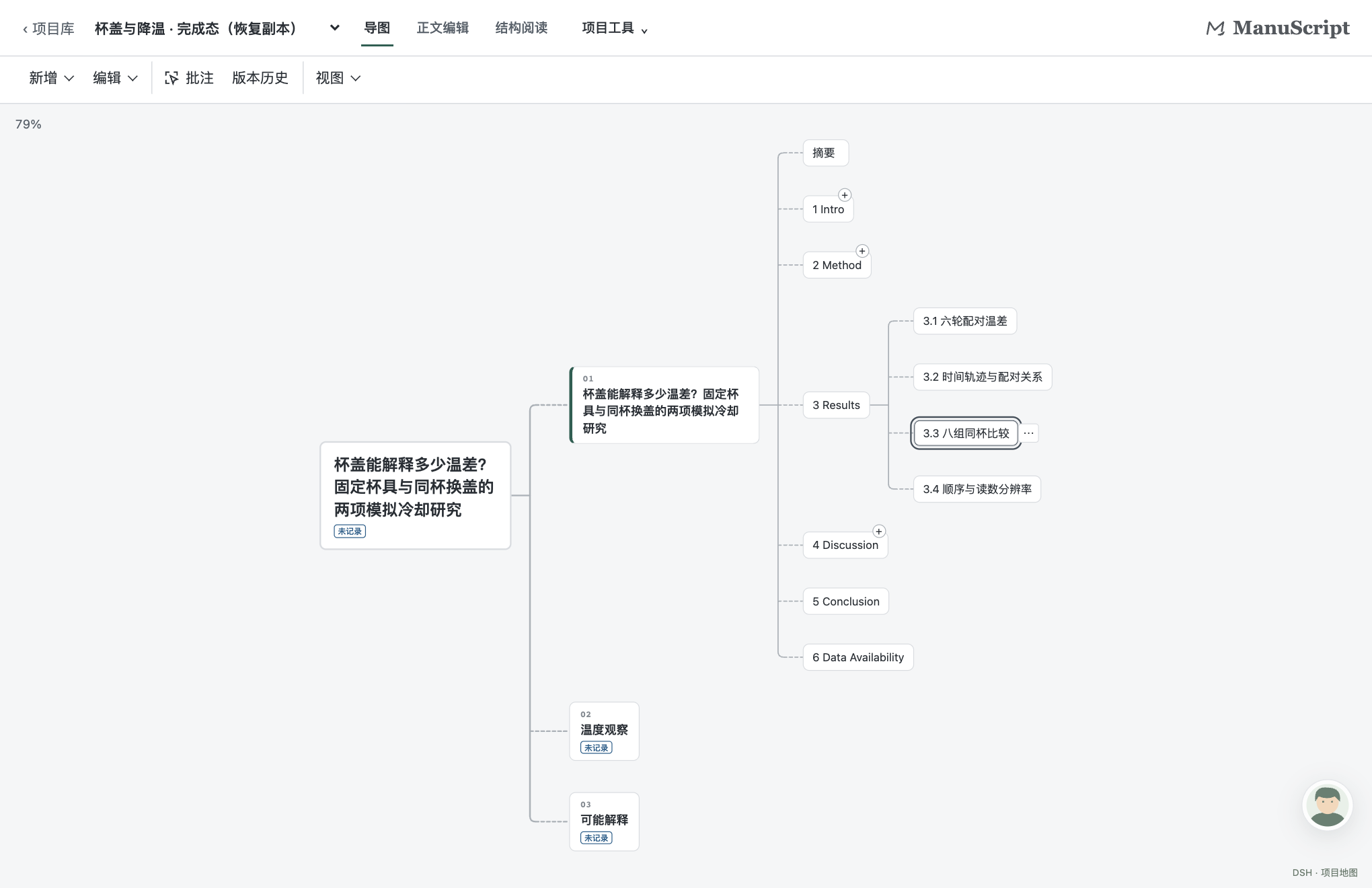
The chapter map for the cup-cooling study. Select 3.3 and choose “⋯ → 定位正文” to open its results in the manuscript. Screenshots show v0.13.0 in DSH Web 0.2.2-rc.1 on macOS.
Follow a review comment through the paper
“The lid slowed cooling,” says the first draft. The reviewer points out that the lidded cup was glass and the open cup was ceramic. Could the cups themselves explain the temperature gap? Follow the evidence in your browser. The demo has English navigation. The paper, review comments and embedded structural reader are in Chinese.
| Open in the demo | What to look for |
|---|---|
| Chapter map | Expand 2 Method, select 2.2 and use the node menu to jump to the full text. |
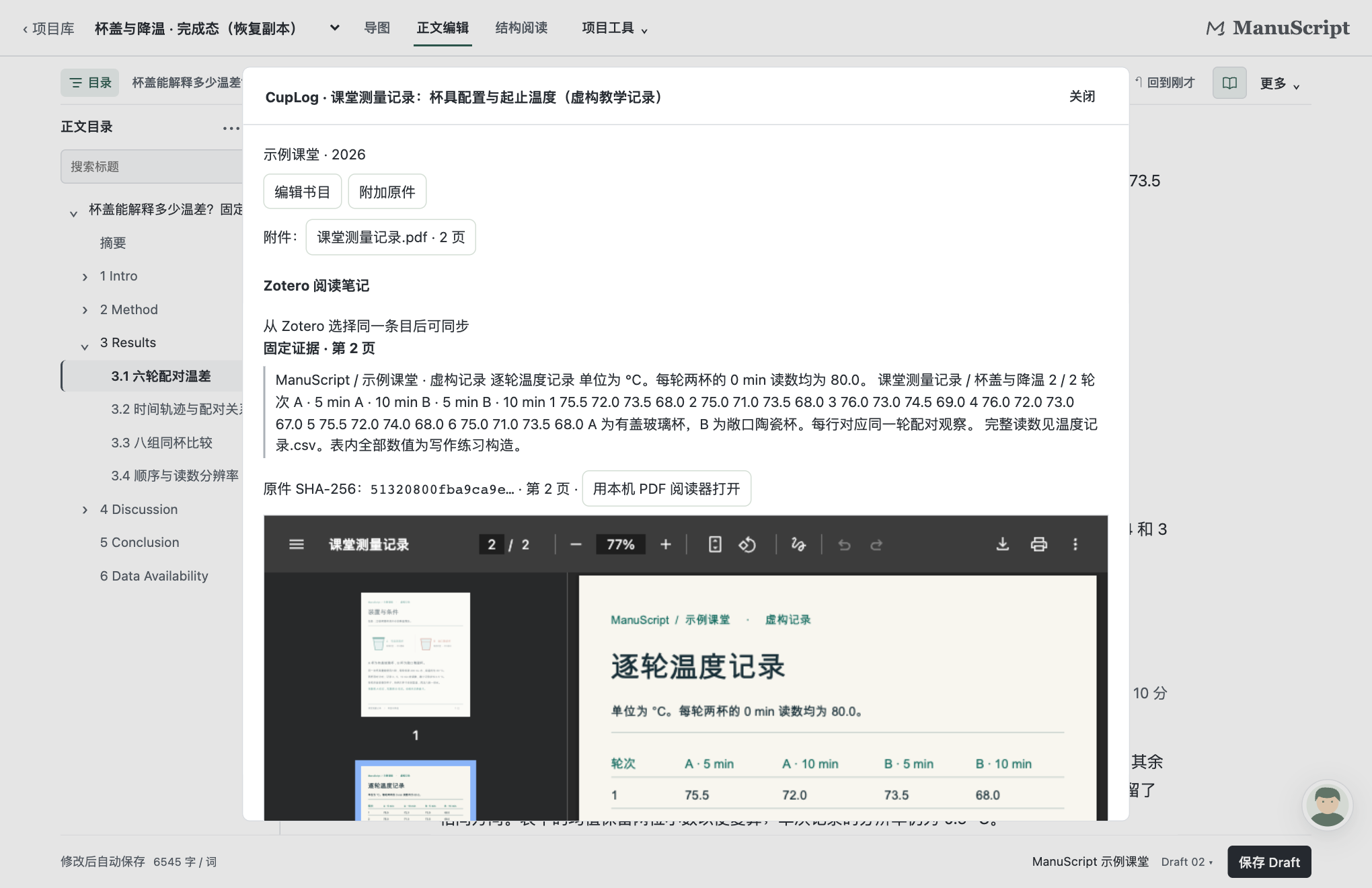
| Section 2.2 and its citation | Open the measurement log on PDF page 1 to check the setups. The same source in 3.1 opens the readings on page 2. |
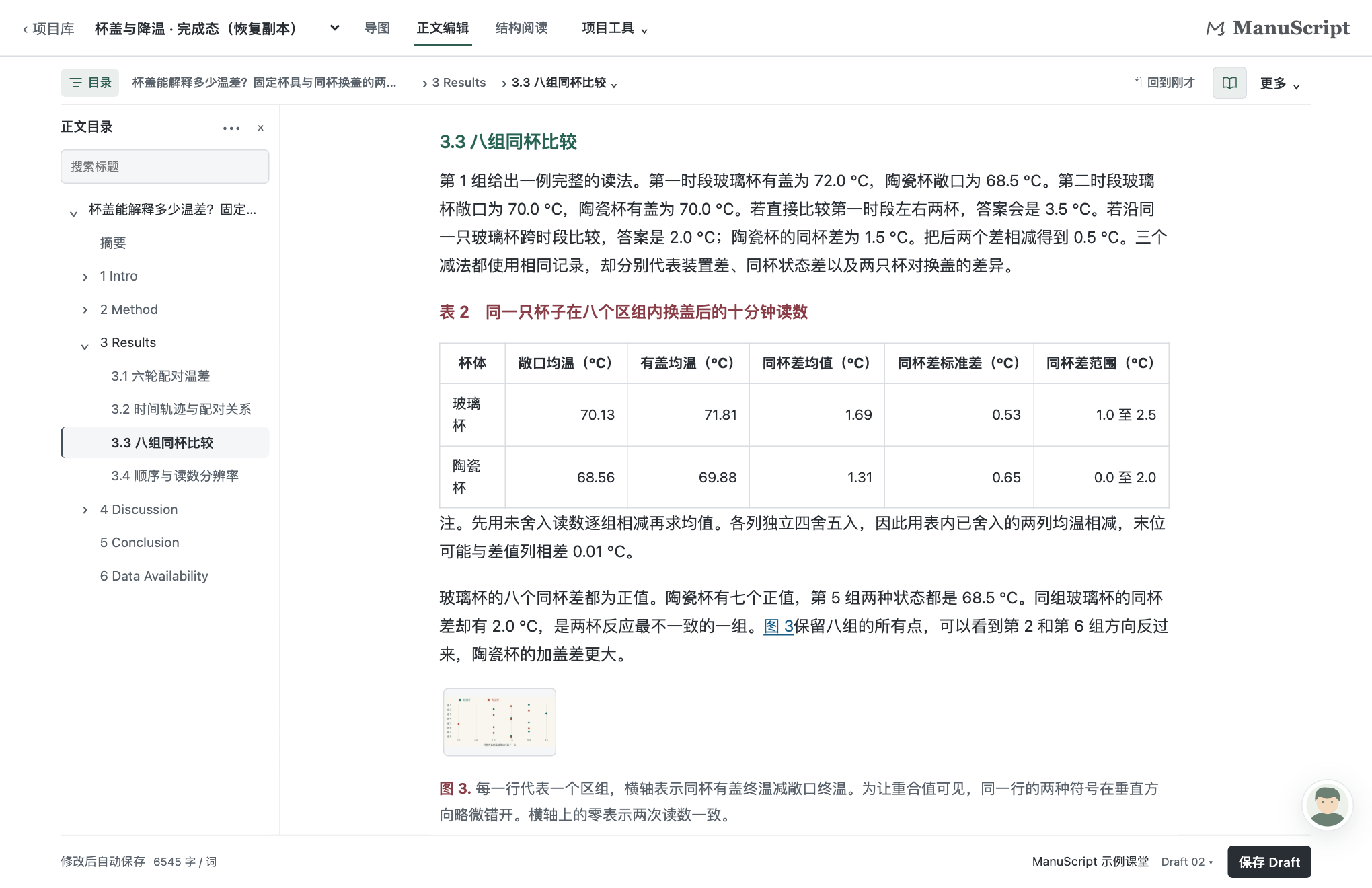
| Within-cup comparison in 3.3 | Read Table 2 to compare each cup’s final temperature with and without its lid. |
| Whole-paper structure | Start with the research question and follow links between the methods, results and discussion. |
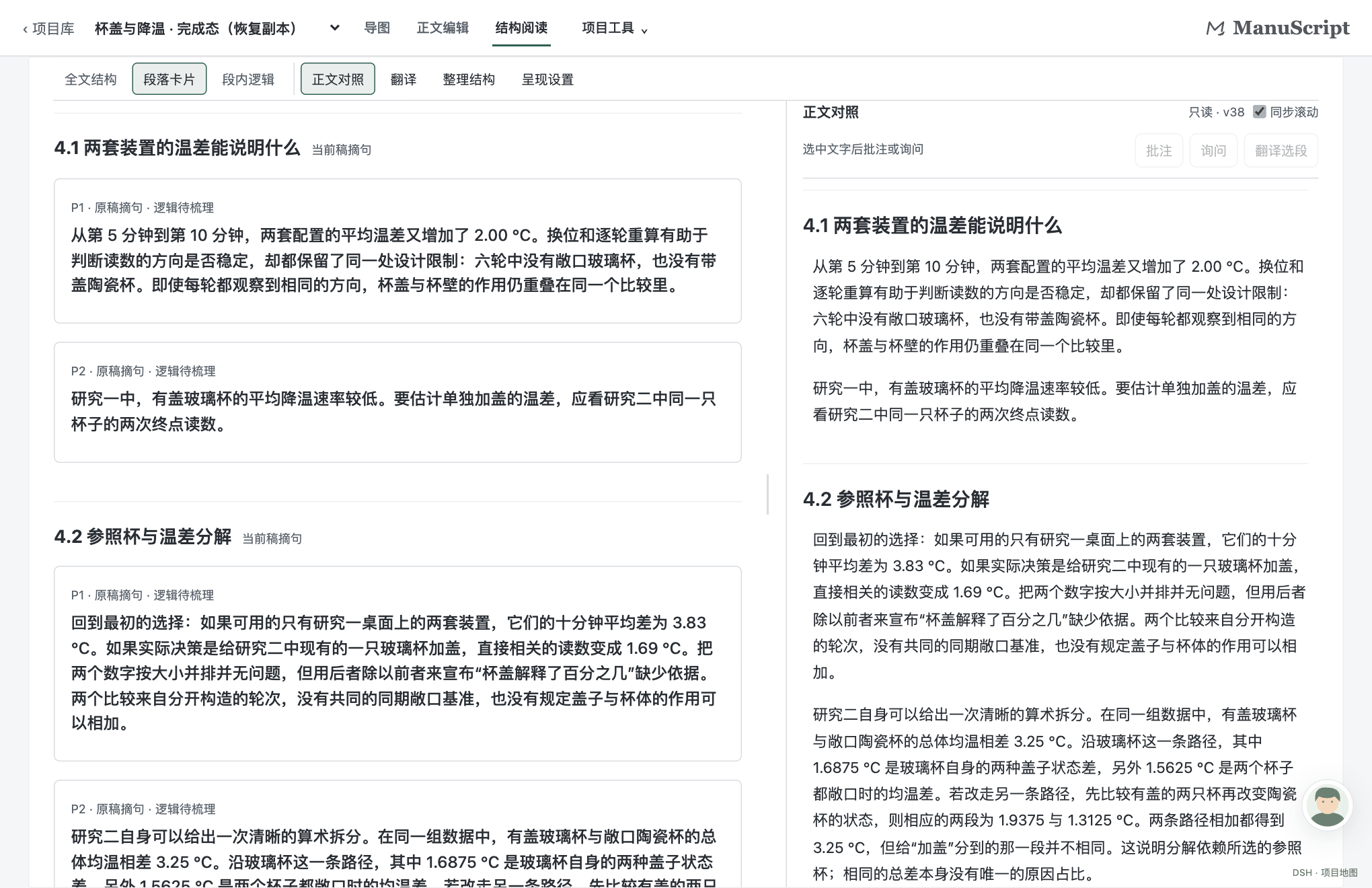
| Passage and revision in 4.1 | Explore the prepared paragraph and its logic graph. Select a node to see its source sentence, then compare both Drafts and the Word comment. |
See screenshots of the manuscript, source PDF and structural reader
Manuscript. The contents pane locates section 3.3. Table 2 lists the mean final temperatures with and without a lid and the difference for each cup.
Citation. The measurement-log citation in 3.1 opens CupLog on page 2, where the reader can check the readings for each round.
Structural reading. The paragraph cards in 4.1 sit beside the corresponding passages in the continuous manuscript.
Sample paper and files
The original simulated study includes six chapters, 14 numbered subsections, figures, tables, equations and APA 7 references. Read the revised paper · Paper PDF · Annotated Word file
After installation, choose 载入杯盖与降温示例 to open the completed project with both Drafts. For hands-on practice, restore the starter project, write from idea cards, save a Draft, import comments and export the revision. The working manuscript saves automatically. 保存 Draft (Save Draft) creates a numbered snapshot on the first save or after an edit. Sample walkthrough (Chinese) · Workflow diagram and source (Chinese), made with Archify 3.2.0 by tt-a1i.
Install with an agent
Copy the whole block to an agent that can use your terminal. Add “Use Codex” or “Use DSH Web” if you have chosen a host.
Install and verify ManuScript v0.13.1 on this computer. The official repository is https://github.com/RJ2045-PRC/ManuScript .
Read “Platform support” and the installation guide for the chosen host in README.md on the default branch. Identify the OS and shell. Use my chosen host, or ask whether I want Codex or DSH Web.
For macOS DSH Web, run the one-time dependency setup and install the prebuilt package. For Codex, check out v0.13.1, run setup and doctor, and register the local marketplace for manuscript@manuscript-lab. Explain any platform limitation before installing.
Load a copy of the bundled cup-cooling example and check for Draft 01 and Draft 02. Report the steps completed, host version and where to open the plugin. Tell me if I need to restart the desktop app. Preserve my existing projects, plugin settings and credentials.
Platform support
| Platform | Codex | DSH Web |
|---|---|---|
| macOS | The MCP App entry point was tested with the packaged plugin. Restart Codex and open ManuScript from More / Explore. | The marketplace beta targets macOS on Apple silicon with DSH Web 0.2.2-rc.5. See the installation guide below. |
| Native Windows | PowerShell instructions are provided below. The v0.13.0 MCP manifest launches ./server.mjs directly. Desktop launch, project I/O and export still need testing on Windows. | The v0.13.0 launcher exits on win32. WSL requires a compatible Linux DSH runtime and has not been tested for this release. |
Install in DSH Web on macOS
Use Node.js 24.9 or later and pnpm 10 or later, plus Python 3.13, Pandoc, Poppler and LibreOffice. With Homebrew you can install the Python and document tools using brew install python@3.13 pandoc poppler and brew install --cask libreoffice. If needed, install pnpm with npm install --global pnpm@10. Check that node, pnpm and python3.13 are available in the terminal where you start DSH.
-
Download setup-dsh-runtime.py, requirements-dev.lock and SHA256SUMS.txt from v0.13.1. From their download directory check the two files, then run setup once.
grep -E ' (setup-dsh-runtime\.py|requirements-dev\.lock)$' SHA256SUMS.txt | shasum -a 256 -c && python3.13 setup-dsh-runtime.py --lock requirements-dev.lock -
In a DSH Web profile that has dsh-market installed, open Plugins → Plugin Market, search for ManuScript, then confirm the GitHub Release source and install. Start or restart the same profile with
npx -y @deepseek-ai/dsh@0.2.2-rc.5 web. If a fresh profile prompts for sign-in or an API key, complete that step in DSH. The sample does not call a model. -
In the sidebar, select ManuScript → 载入杯盖与降温示例 (Load the cup-cooling example). Bind the sample to a dedicated local folder you have created. Open the manuscript, check that both Drafts are present, and use the sample to practise editing and exporting.
-
To install directly, download manuscript-0.13.1.tgz and verify it against the same checksum list. Run this from the directory containing the download, then start DSH Web as above.
npx -y @deepseek-ai/dsh@0.2.2-rc.5 plugin --profile web add ./manuscript-0.13.1.tgz
DSH automatically uses the Python environment prepared under ~/.manuscript/runtime. If setup reports a missing tool, install it and run setup again. You can use --check to recheck the environment without changing it.
Manual installation
Install Git, Node.js 24.9 or later, Python 3.11 or later, Pandoc, Poppler (pdftoppm) and LibreOffice (soffice). Start with your operating system below, then follow the instructions for your host. Codex and DSH have separate project stores. To move a project between them, export its ZIP and restore it in the other host.
macOS terminal
git clone --branch v0.13.1 https://github.com/RJ2045-PRC/ManuScript.git
cd ManuScript
npm run setup
npm run doctor
export MANUSCRIPT_PYTHON="$PWD/.venv/bin/python3"
Windows PowerShell
For a native Windows Codex trial, make node, npm.cmd, pandoc, pdftoppm and soffice available in PowerShell. The commands use the Python Launcher to locate Python 3.11 or later. If you only have python.exe, set MANUSCRIPT_BOOTSTRAP_PYTHON to its full path instead.
git clone --branch v0.13.1 https://github.com/RJ2045-PRC/ManuScript.git
Set-Location ManuScript
$env:MANUSCRIPT_BOOTSTRAP_PYTHON = py -3 -c "import sys; print(sys.executable)"
npm.cmd run setup
if ($LASTEXITCODE -ne 0) { throw "ManuScript setup failed" }
$env:MANUSCRIPT_PYTHON = (Resolve-Path ".venv/Scripts/python.exe").Path
npm.cmd run doctor
if ($LASTEXITCODE -ne 0) { throw "ManuScript doctor failed" }
Once the checks pass, continue with Codex below.
Register and open the Codex plugin
With the Codex CLI installed, run these commands from the repository root. On macOS use:
codex plugin marketplace add "$PWD"
codex plugin add manuscript@manuscript-lab
In Windows PowerShell use:
codex plugin marketplace add (Get-Location).Path
codex plugin add manuscript@manuscript-lab
Check the installation with codex plugin list --json. Quit Codex completely and restart it from the environment where you set MANUSCRIPT_PYTHON. Open ManuScript from More / Explore, select 载入杯盖与降温示例 and look for Draft 01 and Draft 02. If the MCP process fails to launch on Windows, include the OS, Codex version and startup error in your issue.
Guides and feedback
- The user guide (Chinese) covers writing, snapshots, citations, review and export. The plugin manual (Chinese) lists the host entry points.
- The release includes the built plugin in
manuscript-0.13.1.tgz. Verify downloads againstSHA256SUMS.txt. The source tree also includes the built workbench. After editing source, runnpm run build, thennpm testto check the MCP App entry point. - Model conversations and assisted restructuring require a model configured in the host. Scanned-document OCR and lossless round trips for arbitrary Word styles or complex multi-file LaTeX projects have not been verified.
For a bug report, include the ManuScript version, host and host version, steps to reproduce, and expected and actual results. The simulated paper is available for reproductions. Open an issue
Release guide for maintainers (Chinese)
License
ManuScript’s original code, documentation and public sample are released under the MIT License. Third-party code, citation styles and teaching materials carry their respective credits and licenses. Third-party notices
Comments
Loading…
Similar plugins
by caihua8669
Document review workbench: select text in a Markdown file, leave comments saved as MRSF sidecar files next to it, and let the agent read them with doc_review_* tools and propose edits you accept or re
★ 1
MIT
JavaScript
Oct 17, 2026
dsh plugin --profile web add @caihua/dsh-doc-reviewby Biogod2020
DSH Markdown manuscript review plugin source: annotations, proposals, version comparison, figures and BibTeX
★ 1
MIT
TypeScript
Sep 30, 2026
dsh plugin --profile web add @deepseek-ai/dsh-experimental-paper-reviewby qinpeizhan77
Local-first fiction workspace that links outlines, chapters, characters, timelines, writing rules, and continuity checks to the conversation.
★ 10
↓ 278/wk
MIT
TypeScript
Aug 30, 2026
dsh plugin --profile web add deepseek-harness-novel-studioby PerryLink
Pre-submission checklist for DeepSeek Harness: manuscript structure and declaration statements, keyword-based coverage of starter CONSORT/STROBE/PRISMA items with locators and advice, and a submission
★ 0
Apache-2.0
TypeScript
Nov 13, 2026
dsh plugin --profile web add dsh-manuscript-checkby xinyang20
Workspace resource library for DeepSeek Harness: organize, preview and reuse references and deliverables.
★ 0
MIT
TypeScript
Oct 8, 2026
dsh plugin --profile web add dsh-project-spaceby hh719509125
DeepSeek Harness (DSH) 文档编辑插件:在右侧栏的文档预览里就地编辑文本文件并保存,支持 Ctrl+S、冲突保护、行尾逐字节保留。In-place document editor for the DSH Sidebar preview: Ctrl+S, conflict protection, byte-exact line-ending preservation.
★ 5
MIT
JavaScript
Oct 8, 2026
dsh plugin --profile web add @local/dsh-plugin-document-editor