

DSH-dialog-viewer
Manifest validA readable dialogue transcript tab for the DeepSeek Harness Web client right sidebar.
DSH Dialog Viewer



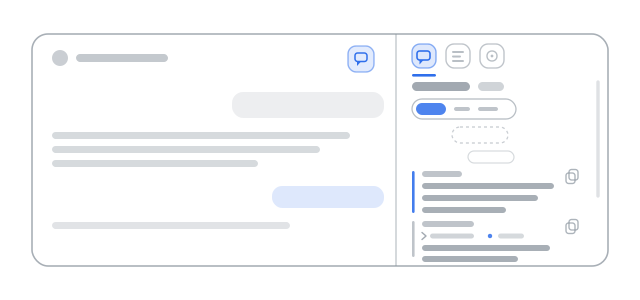
A DeepSeek Harness bundle that adds a Dialog tab to the right sidebar of the Web client. It renders the current session as a readable transcript — no terminal scrolling, no squinting at collapsed steps.
What you get
- Two entry points — a speech-bubble button in the conversation header, and a Dialog card in the right sidebar guide.
- Chronological transcript of user, steering and assistant messages, with local time and day dividers.
- Role filter — All, You, Assistant — plus a live message count.
- Collapsible reasoning blocks, and a step status badge (
Working…,Interrupted). - Copy a single message or the whole dialogue, with an inline confirmation.
- Load earlier history for the part of the session that is not loaded yet.
- Attachment counts on user messages.
- Theme-native styling from
--dsw-alias-*tokens, so light and dark follow the host. - Localized UI in English, Russian and Chinese, with English as the fallback.
Requirements
- A DSH Web client that provides these packages (any current desktop or web build does):
@deepseek-ai/dsh-client-locale,dsh-client-ui-chat,dsh-client-ui-conversation,dsh-client-ui-sidebar-right,dsh-client-ui-session. - No additional dependencies: the bundle is plain ES modules and React, provided by the host.
Installation
The package is a DSH bundle, so install it as a local directory rather than through npm:
- Download or clone this repository.
- Open Plugins in DSH and choose Add plugin.
- Pick the repository folder — the one containing
package.jsonandcordis.patch.yml. - Open any session: the Dialog card appears in the right sidebar guide.
Nothing else is required — no build step, no restart, no profile files edited by hand. Local
installs are linked, so edits to client.js take effect on the next reload.
If the bundle was installed by the agent itself through the plugin manager, the same folder is
already linked into the profile as @local/dsh-dialog-viewer.
Usage
| Control | Where | Action |
|---|---|---|
| Speech-bubble button | Conversation header | Opens the Dialog tab (or reveals it if the sidebar is collapsed) |
| Dialog card | Right sidebar guide | Opens the same tab |
| All / You / Assistant | Panel toolbar | Filters rows by role |
▸ Reasoning | Assistant row | Expands or collapses the reasoning text |
| Copy | Row meta line | Copies that message; confirms with Copied |
| Copy dialog | Panel header | Copies the whole filtered transcript |
| Load earlier | Top of the transcript | Fetches older history in pages |
| Tab close control | Tab strip (host-provided) | Closes the tab; the session is untouched |
How it reads the dialogue
The tab body receives the standard useChat and useSession props of the
sidebar.right.pane.tab slot and reads the Chat target's loaded Nodes:
- visible
user,steeringandassistant-stepNodes, ordered byanchorSeq; - user rows take text and attachment count from
data.content; - assistant rows take text and reasoning blocks from
data.blocksand show the step status.
Nothing is written to the session log, no extra projection is registered, and no request is made on the model's behalf. Closing the tab or removing the bundle leaves the session intact — the only trace is the tab's own state.
Package layout
| File | Purpose |
|---|---|
package.json | Bundle manifest: dsh.bundle.patch plus the dsh.client web half |
cordis.patch.yml | Inserts the inert Host row dialog-viewer |
index.js | Host half; exports an empty apply because the plugin is client-only |
client.js | Client module: locale dictionaries, stylesheet, tab type, tab body, header button |
locale/*.json | Plugin name and description for the Plugins page (en, ru, zh) |
docs/DETAIL.md | Plugin detail document shown in Plugins, with its preview image |
icon.svg | Original artwork used as the plugin icon |
scripts/check.mjs | Repository self-check: manifest, locales, docs, artwork |
Localization
UI text comes from dictionaries inside client.js and is resolved through the client locale
service, so switching the DSH language switches the tab, the filter and the buttons. Unknown
languages fall back to English. The Plugins page metadata is localized separately in
locale/*.json.
Development
git clone https://github.com/Phikec/DSH-dialog-viewer.git
cd DSH-dialog-viewer
npm run check          # manifest, locales, detail documents, artwork
node --check client.js # syntax
npm run check runs on every push through GitHub Actions. There is no bundler: client.js
registers itself with window.__ModuleLoader__ and is loaded by the host as-is.
Limitations
- The transcript covers the part of the session that is loaded; Load earlier fetches more, but there is no cross-session search.
- The tab is read-only by design — it never edits, deletes or resends messages.
- Only the Web client platform is implemented; there is no TUI or Desktop-native surface.
Uninstall
Remove the bundle in Plugins. The bundle writes no profile files by hand, so removal also drops the tab type and the header button. No session data is touched.
License
MIT © Phikec
Comments
Loading…
Similar plugins
by yhfgyyf
Temporary side conversations for DeepSeek Harness Desktop and Web
★ 0
Apache-2.0
JavaScript
Oct 30, 2026
dsh plugin --profile web add dsh-side-chatby acdsh4869
Adds a native sidebar menu item in DSH that opens chat.deepseek.com in a standalone browser window with persistent login, and supports bidirectional text selection transfer between DSH and the web pag
★ 2
MIT
JavaScript
Oct 10, 2026
dsh plugin --profile web add dsh-deepseek-web-relayby gulagala001
DeepSeek 网页聊天、临时侧栏聊天、API 开放平台与 DSH 会话迁移。
★ 3
MIT
JavaScript
Nov 15, 2026
dsh plugin --profile web add dsh-deepseek-workbenchby asukasec
Right-side user-message navigator for the DeepSeek Harness Web UI.
★ 9
MIT
JavaScript
Aug 14, 2026
dsh plugin --profile web add dsh-message-previewby zneoxlab
DeepSeek 网页工作台 for DSH — 在侧栏列出 DeepSeek 网页版会话,点开即用完整网页对话,支持接力到当前或新任务。
★ 0
MIT
JavaScript
Oct 20, 2026
dsh plugin --profile web add dsh-deepseek-webdeskby QuinnKevin
Explain an unfamiliar concept selected in a DeepSeek Harness conversation in an isolated right-sidebar tab; the conversation is read-only and the explanation prompt is customizable.
★ 0
JavaScript
Nov 11, 2026
dsh plugin --profile web add @local/dsh-concept-explainer