

deep-blend
DiscoveredBlender 3D animation workbench for DeepSeek Harness (dsh): SceneSpec is the source of truth and .blend is a compiled artifact — 16 tools for scene specs, previews, visual review and delivery renders.
DeepBlend Studio

A Blender 3D animation workbench for DeepSeek Harness (
dsh). SceneSpec is the source of truth;.blendis a compiled artifact.
English | 中文
Install
dsh plugin --profile web add 'github:pearjelly/deep-blend#path:/packages/deepblend/bundle'
Then restart dsh web. A new session can select the DeepBlend Studio preset, and
the workbench appears in the sidebar.
One command installs both planes:
| Plane | What arrives |
|---|---|
| Host composition | the Blender runtime provider, the project/revision store, and the workbench's host half |
| Agent preset | DeepBlend Studio and DeepBlend dev mode, deployed into <DSH_HOME>/.agent-presets/ — the 16 model-visible tools belong to a preset, not to the host, so a session only sees them when it runs on one |
The
#path:form is quoted because#starts a comment in a shell. Requires pnpm onPATH(dsh pluginforwards to it) and a repository it can reach: pnpm resolves thegithub:spec through an anonymous codeload tarball, so the repository must be public — which it now is.
Requirements
| DSH | 0.1.5-rc.2 — the version this repository is measured against (deepblend/tools/dsh-baseline.json). The plugin declares what it needs as peerDependencies, which is what the market's compatibility preflight reads. |
| Blender | 5.2.1. The repository ships a managed, checksum-pinned install for macOS arm64 (npm run blender:install); on any other platform install Blender 5.2.1 yourself and point blenderPath at it in the profile's patch layer. Upstream publishes linux-x64 only — there is no Linux arm64 build — so the supported Linux is x86_64. |
| ffmpeg + ffprobe | Only for the delivery step that encodes frames into an MP4. Install it the way your platform does: brew install ffmpeg (macOS), sudo apt install ffmpeg (Debian/Ubuntu), sudo dnf install ffmpeg (Fedora), winget install ffmpeg (Windows) — or point ffmpegPath/ffprobePath at an absolute path. Without them rendering still runs and no frame is lost: encoding fails with ENCODER_NOT_FOUND and the message names the binary. |
| Node.js | ≥ 22 — for the repository's own tools and test suites, not for the plugin. |
See it
These are not mockups: they were captured from a running dsh web, a real Chrome and a real
Blender by deepblend/tools/capture-docs-images.mjs, and the project in them was built by
clicking the workbench controls. Re-run it to refresh them.
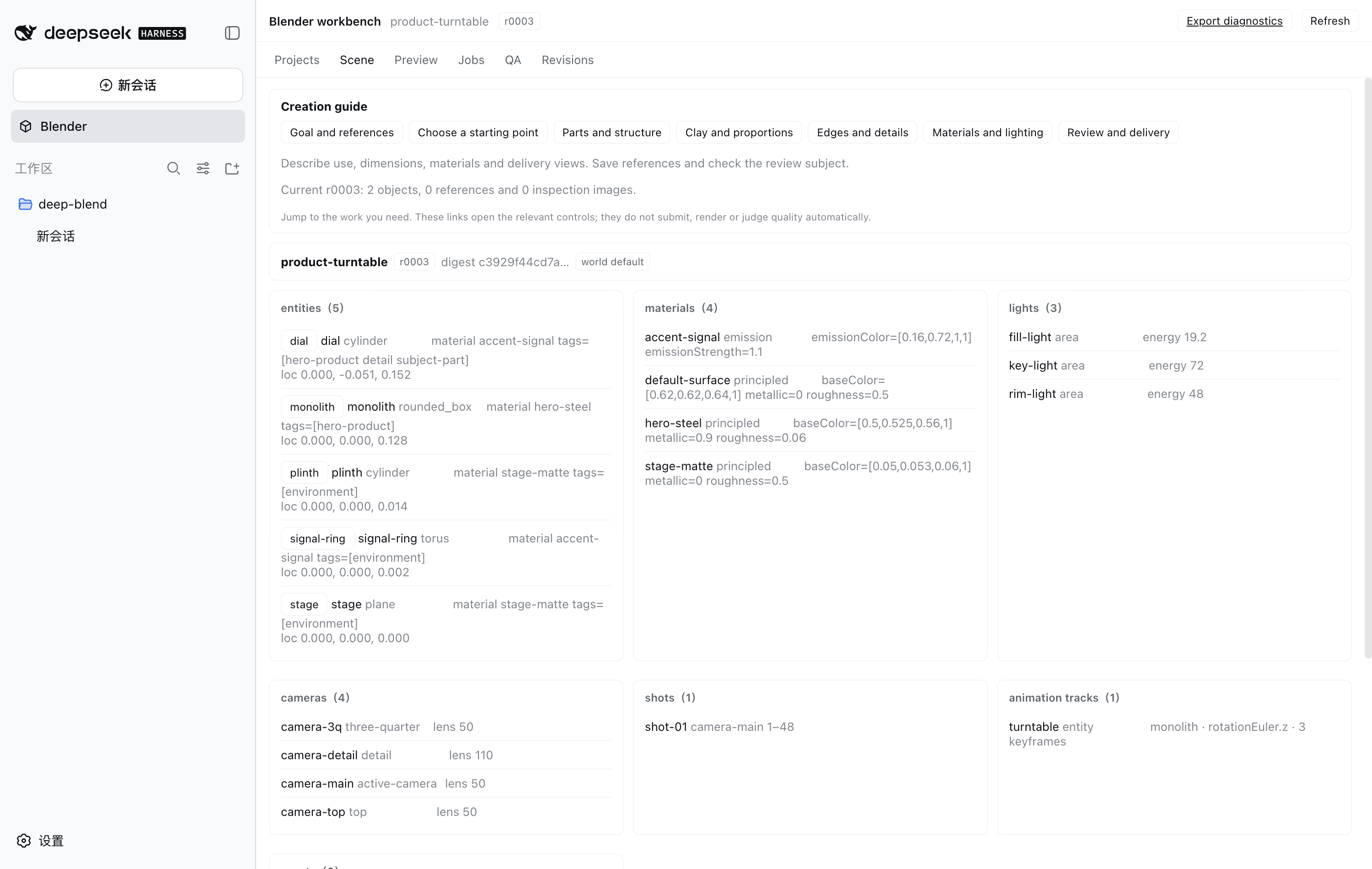
Workbench — project header, current revision, and the scene tree the host computes:
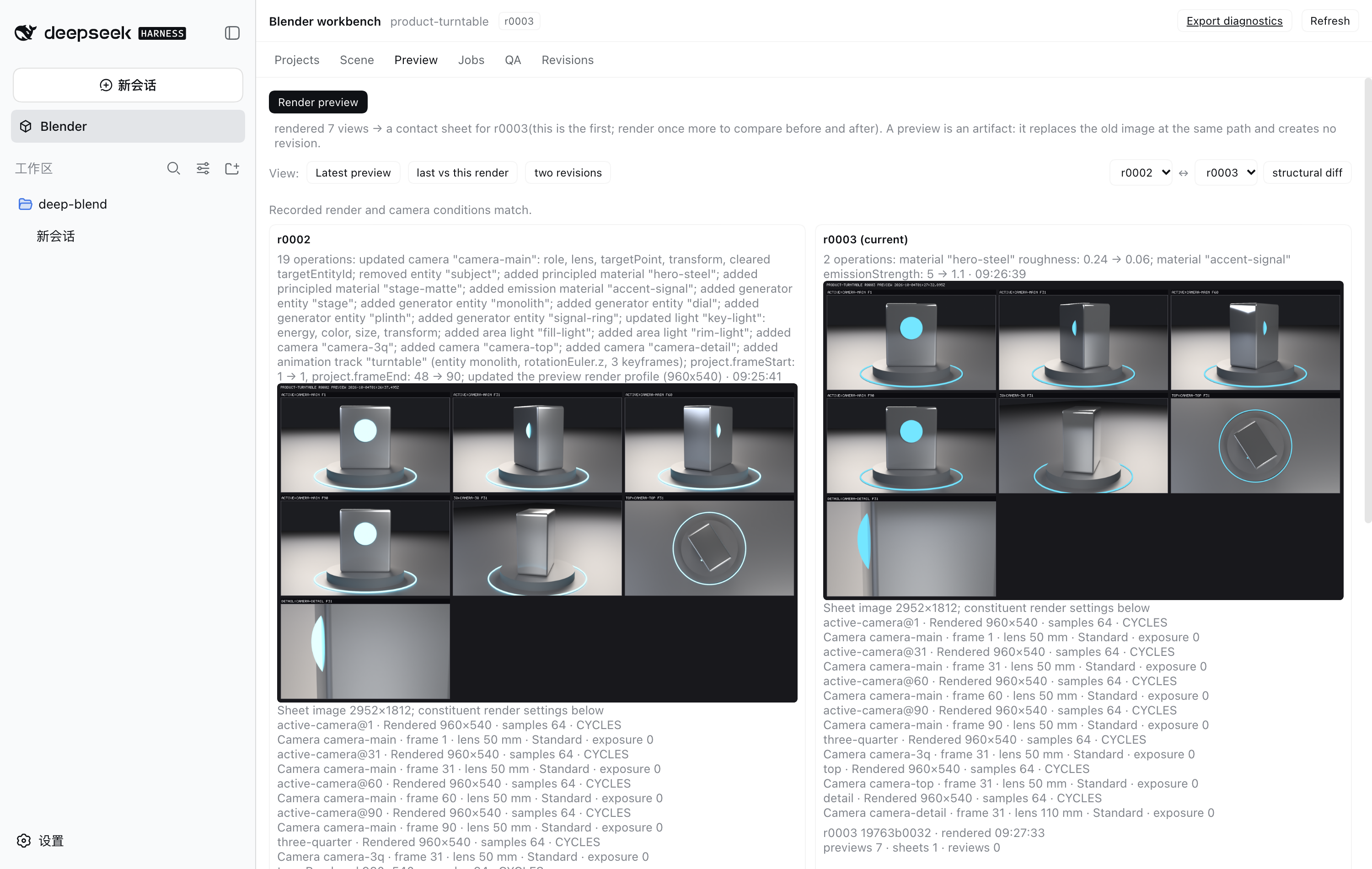
Preview comparison — one preview renders seven views into a contact sheet; change a material, render again, and the two sheets sit side by side with their own digests and render times:
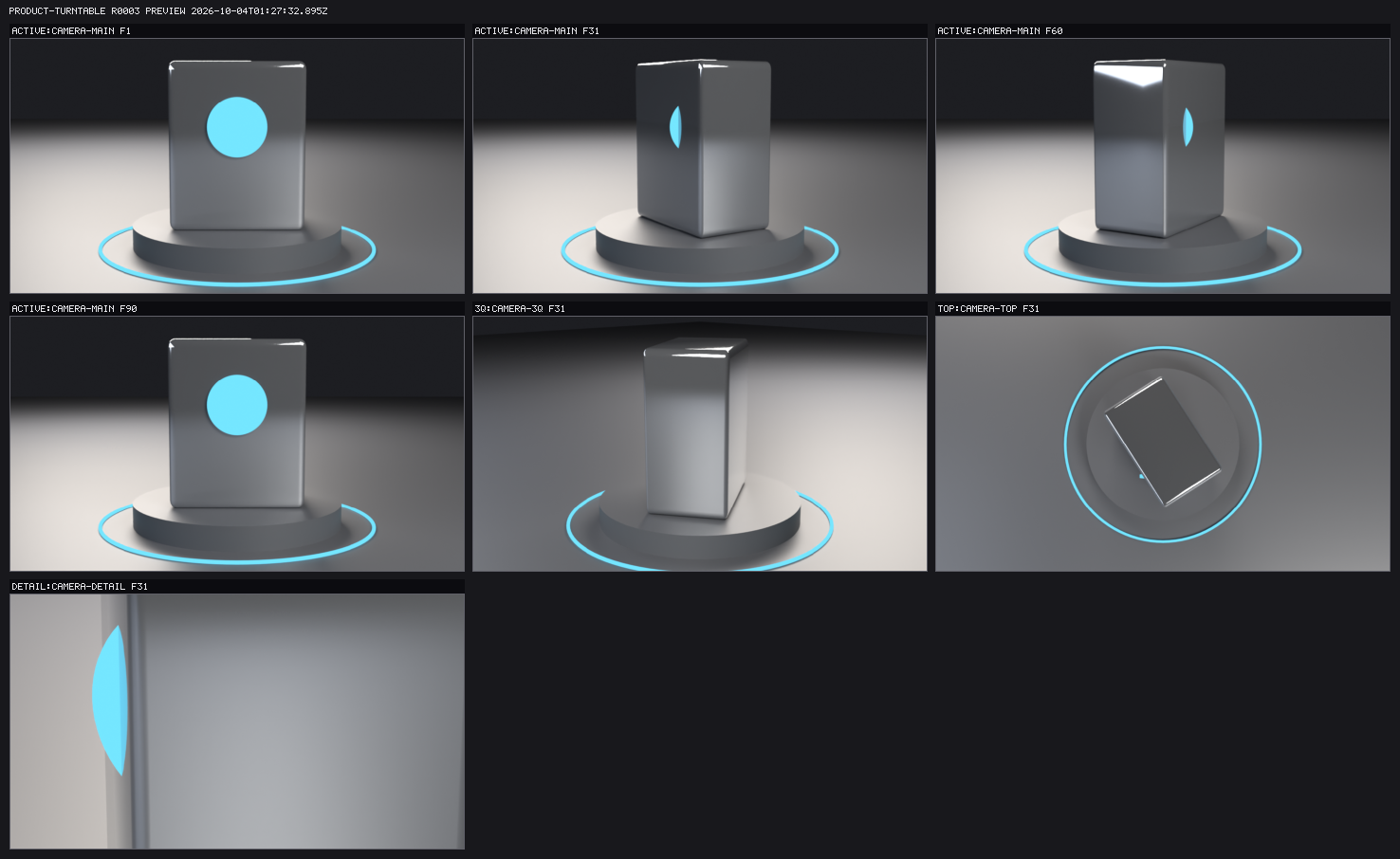
The render itself — seven views (the active camera sampled at four animation frames, plus three-quarter, top and detail) composited into one sheet:
What you get
16 model-visible tools across four jobs — inspecting a scene, changing it, judging a render, and delivering a video:
- Scene — create a project, read it, read and patch the scene, validate it
- Preview — render a preview, render an explicit set of views, compare against the last one
- Visual review — the model looks at the contact sheet and reports what it sees; a deterministic scorer measures occlusion and framing from the rendered pixels
- Delivery — a final 1080p render, encode to MP4, poll or cancel the job, restore a revision, ingest an asset
The workbench — a project header, a revision list, and six scene cards, served from a closed set of HTTP routes by the host half of the plugin.
Revisions that cannot be half-applied. Every accepted change is one immutable revision:
the patch is validated, compiled in a staging directory, verified, then published with a
single rename. A failure never touches the current revision, and a crash leaves at most a
staging directory. scene-spec.json is the authority; the .blend can always be rebuilt.
Renders that survive being killed. Frames on disk are the truth, not a counter in a job
record — a truncated PNG is not a frame, and the ledger says which frames to re-render. After
a SIGKILL, the next process stops the orphaned renderer first, rebuilds the ledger from the
frames themselves, and finishes the job. Measured: a delivery killed at frame 6 of 60
completed all 60 and encoded a 1920×1080 output/final.mp4.
An approval gate on cost. Anything above a configured frame count does not render a single frame without an explicit approval, and the prompt names the revision it will write.
A score the model cannot write. The visual score is computed by the host from rendered pixels. The model's own findings are recorded separately, every one of them checked against the views that actually exist and the closed set of issue categories. A fix is adopted only if the score really improved; otherwise the pointer is rolled back and the revision stays in history.
Documentation
The repository's own documents are in Chinese, and they are the detailed ones:
Install it — from a clone to "DeepBlend Studio appears in a new session", four steps each with --check, and what each step does not verify | deepblend/docs/install.md |
| Use it — what a session looks like, what each tool is for, the cost model, the six workbench tabs, one worked example | deepblend/docs/usage.md |
| Rescue it — a killed render, a half-written frame, frames but no video, a wrong change to roll back, a host older than the package, an empty project list | deepblend/docs/recovery.md |
The specification — SPEC.md is the master specification; the repository is its implementation | SPEC.md |
| Per-milestone conclusions, evidence and known gaps | deepblend/docs/milestone-status.md |
README.zh.md is the Chinese README, and it carries the measured counts —
suite and file numbers, assertion totals, and the commands that produce them.
How it is built
Three planes, and which plane a change belongs to is not a matter of taste:
DSH Host Composition        →  packages/deepblend/bundle/cordis.patch.yml
                               services: Blender execution, project/revision store,
                               atomic commit transaction, UI host half

DeepBlend Agent Presets     →  packages/deepblend/preset/presets/
                               one session's model-visible tools and prompt

Blender Runtime             →  packages/deepblend/provider-local/python/
                               controlled bpy execution, a deterministic JSON
                               protocol, and the SceneSpec compiler
A row that publishes a service must live in the host composition; a preset may only hold model-visible tools, a persona, and session-scoped capability. No tool row publishes a service, which is what makes the presets legal to mount per session.
Security
Every security requirement in SPEC §15 is traced in
deepblend/docs/security.md to the line of code that implements
it and the assertion that watches it — or is recorded as not implemented, with a reason.
contract/security-controls.test.mjs fails if that table drifts from the specification.
Report vulnerabilities as described in SECURITY.md.
License and contributing
MIT — see LICENSE.
Read CONTRIBUTING.md before changing anything: it names three rules that
cost hours if you learn them the hard way (npm run setup is not optional; a change belongs
to exactly one of the three planes; adding an import requires no script edit, because the list
of links is read from the source). Bug reports use
.github/ISSUE_TEMPLATE/bug_report.yml, which asks
for the Blender, DSH and platform versions — every measurement in this repository was taken
against pinned versions, and without them a report can only be guessed at.
Current state
The state of this repository is the output of one command, not a paragraph:
bash deepblend/tests/run-all.sh # 18 suites; README.zh.md states the expected numbers
Per-milestone conclusions, the evidence behind each acceptance, and the known deviations and
gaps live in deepblend/docs/milestone-status.md. That
document is the only record and this one does not repeat it — for the reason this project has
paid for repeatedly: write the same thing in two places and one of them will rot.
Comments
Loading…
Similar plugins
by s1lverex
Blender for DeepSeek Harness: headless render/convert tools for 3D models plus a three.js viewer panel in the workbench sidebar
★ 0
MIT
JavaScript
Sep 25, 2026
dsh plugin --profile web add dsh-plugin-blenderby CheshireJCat
DeepSeek Harness plugin for complete Blender 3D modeling, reconstruction, rendering, validation, and export workflows
★ 39
↓ 660/wk
MIT
Python
Sep 16, 2026
dsh plugin --profile web add dsh-blenderby ArtlexYoung
Scenario presets and an event-sourced task protocol for DeepSeek Harness.
★ 2
↓ 34/wk
Apache-2.0
TypeScript
Sep 30, 2026
dsh plugin --profile web add dsh-super-agentby wenhao4126
Expose Herdr workspaces, panes, and coding agents as DeepSeek Harness tools.
★ 0
BSD-3-Clause
TypeScript
Aug 26, 2026
dsh plugin --profile web add @dsh-external/dsh-herdr-toolkitby hatsuyuki0103
DeepSeek Harness 插件:把 Codex 技能 fight-scene-director(多画风 AI 视频打戏设计与轨迹图调度)移植为 DSH 原生技能,输出适配 Seedance 2.0 / Seedance 2.5 / MiniMax H3 的结构化中文提示词。
★ 3
MIT
JavaScript
Sep 14, 2026
dsh plugin --profile web add dsh-fight-scene-directorby catsenior507
Assembled context for DeepSeek Harness: a context tree over the session surface with per-node assemble modes (full / key / off), agent-authored presets, and a panel that decides what the model actuall
★ 1
MIT
TypeScript
Sep 22, 2026
dsh plugin --profile web add @dsh-external/dsh-client-plugin-context-assembler