
dsh-safe
IdentifiedWindows recovery CLI and bundle for a DeepSeek Harness profile that no longer boots: test-boot a copy, disable selected plugins, restore a snapshot. Ships dsh_safe_status and dsh_safe_snapshot tools.
English · 简体中文
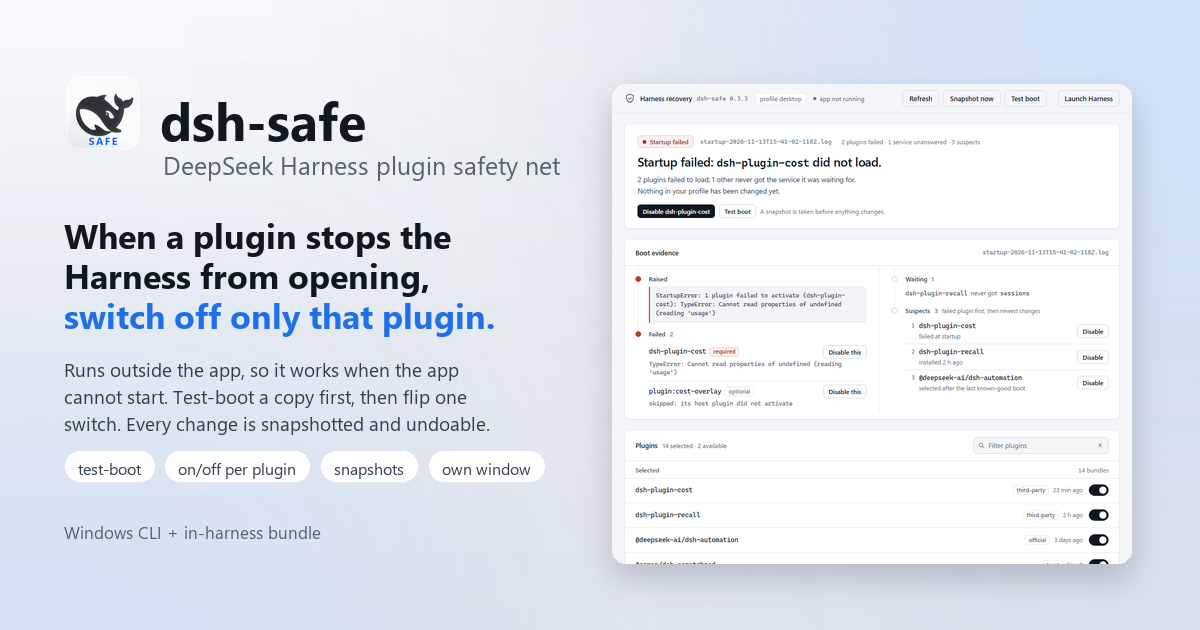
A plugin can stop DeepSeek Harness from opening. dsh-safe is the tool that
gets you out: it runs outside the app, shows what actually failed, and lets
you switch off one plugin instead of all of them.




Why not the built-in dialog
The Harness ships a recovery dialog ("Disable third-party plugins, back up the profile patch and restart"). It fires only on a crash, and it is all-or-nothing: it drops every third-party bundle and detaches the whole patch layer. When one plugin is broken, that is a lot of collateral damage — and it never appears at all when the app hangs on loading instead of crashing.
dsh-safe edits the profile files directly from a terminal or its own window, so
it does not need the broken app to boot. You get the failure, the plugin that
caused it, and one switch per plugin.
What the recovery window looks like
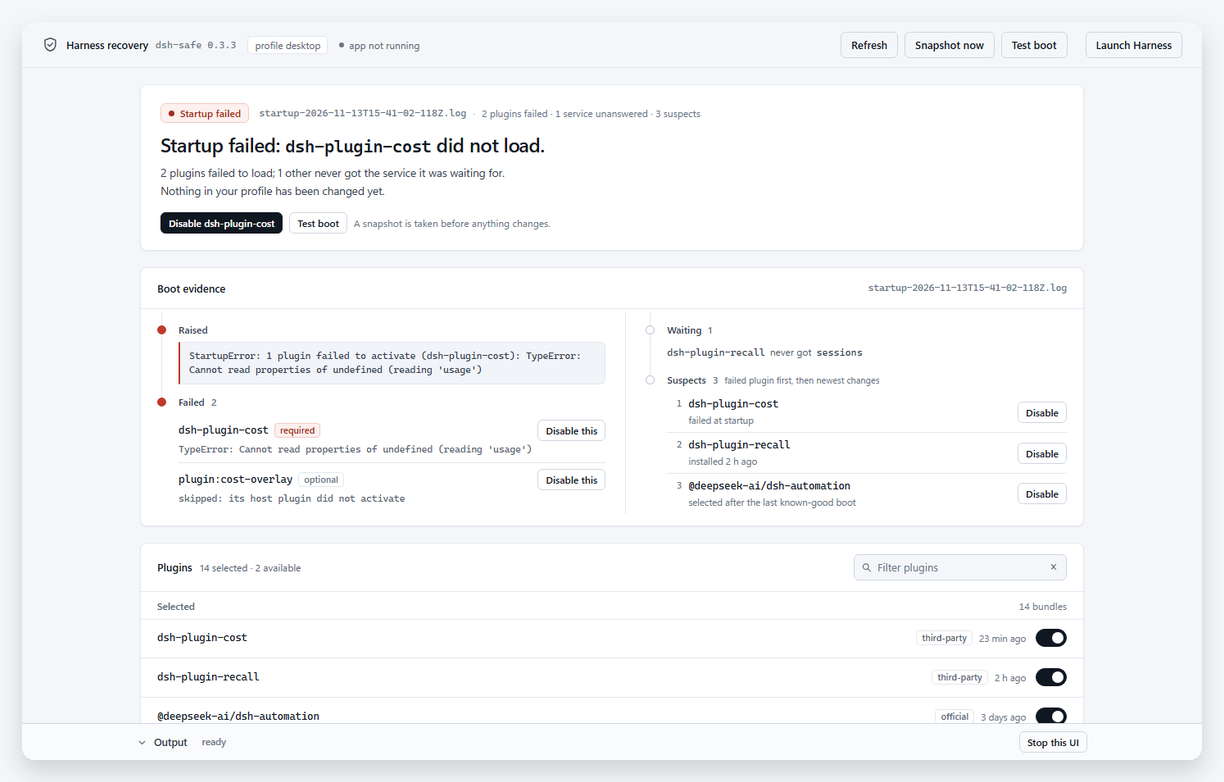
A failed boot: the verdict names the plugin, Boot evidence shows the raised exception and the plugins that failed or waited for a service, and the plugin switches and recovery points sit underneath, newest change first.
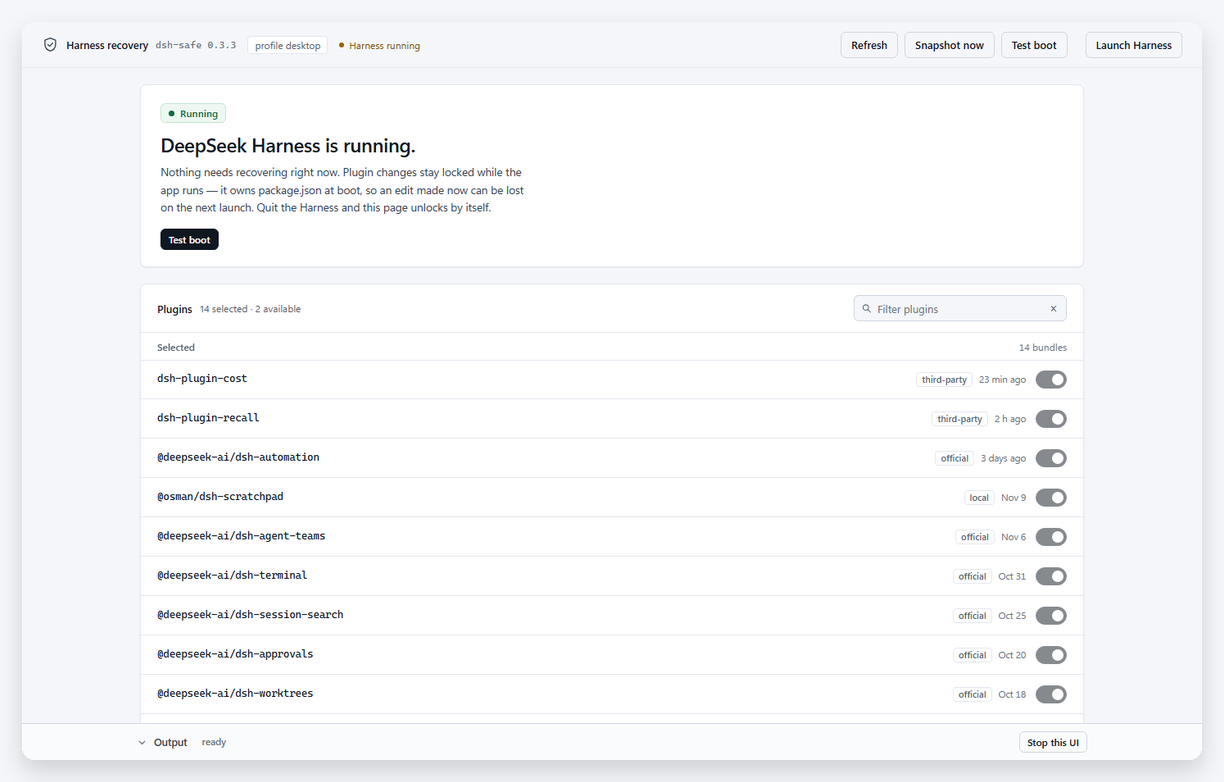
While the Harness is up, nothing is broken as far as this page can see, so it
says Running, hides the boot evidence, and locks the switches — the app owns
package.json at boot, so an edit made now can be lost on the next launch. The
page unlocks by itself once you quit the app.

Narrow screens get a single column and the header buttons fold into Actions.
Quick start
dsh-safe.cmd status      :: where the profile is, what was installed recently
dsh-safe.cmd recover     :: what failed in the newest startup log, and why
dsh-safe-ui.cmd          :: the recovery window (works while the app is down)
Take a snapshot before any risky change:
dsh-safe.cmd snapshot -l before-thing-x
Install
As a plugin, which adds two in-harness tools:
dsh plugin --profile desktop add github:osman3n/dsh-safe
Restart DeepSeek Harness. The plugin manager lists dsh-safe and the model can
call dsh_safe_status and dsh_safe_snapshot. The CLI ships in the same package,
so the recovery commands keep working.
As a standalone CLI there is no install step: clone the repo, open a terminal in
the package folder and run dsh-safe.cmd (or node dsh-safe.mjs). The only
dependency is Node.js 22+.
The recovery CLI targets Windows (it uses tasklist, cmd.exe and the desktop
executable); the in-harness tools are plain Node and work wherever the Harness
runs. The plugin half is a convenience, not the recovery path — when the Harness
cannot boot, nothing inside it can run.
| Tool | What it does |
|---|---|
dsh_safe_status | Active profile, selected bundles (and which are local links), recent snapshots, last known-good snapshot, last test boot, last recovery, newest startup-failure log with the plugins that failed or waited for services |
dsh_safe_snapshot | Copies package.json, cordis.yml and cordis.patch.yml into $DSH_HOME/safety/snapshots/<id>/; optional label and note |
Both call the same functions as the CLI, so a snapshot taken by the model is the
snapshot dsh-safe snapshots lists and dsh-safe restore accepts. Neither tool
changes the plugin selection: disabling and restoring happen from the CLI while
the app is closed.
The commands
| Command | What it does |
|---|---|
status | Profile path, whether the app is running, bundle/local counts, recent plugin operations, crash evidence |
snapshot [-l label] | Copies package.json + cordis.yml + cordis.patch.yml into a timestamped snapshot |
snapshots / list | Lists snapshots (--json for scripting) |
restore [id|latest] | Puts a snapshot back; the current state is saved as a new snapshot first |
plugins / bundles | Numbered list of selected bundles with a [core/local/official/third-party/installed] tag |
disable [name...] | Removes bundles from dsh.profile.bundles; no names = interactive picker |
enable [name...] | Adds installed bundles back; no names = interactive picker |
try | Clone this profile under a temporary name, boot it in an isolated DSH_HOME, wait for the web server, probe it, then delete the clone |
ui | Local recovery page: crash evidence, one on/off switch per plugin, snapshots, test boot, launch |
watch | Serves the recovery page and opens it when Harness writes a new crash or startup-failure log |
watch --install | Starts that watcher hidden at every Windows sign-in (--uninstall removes it) |
icon | Copies app.ico to %LOCALAPPDATA%\dsh-safe\app.ico where the shell can draw it, and prints the path |
recover | Reads the newest startup log and explains which plugin failed and why |
recover --pick --apply | Shows suspect plugins, lets you pick which to disable, applies it |
recover --apply | Disables the newest safe suspect |
recover --safe-mode --apply | Keeps only dsh-base + dsh-web-app (profile still intact) |
open | Runs try; if the boot fails it auto-disables the mapped culprit, retries, then launches the app |
disable/enable accept names or entry ids (include:workflow-kit), and
--dry-run prints the plan. Core bundles (@deepseek-ai/dsh-base,
@deepseek-ai/dsh-web-app) are refused unless you pass --force — disabling them
takes the whole app down.
Recovery recipes
1. The app crashes on launch (dialog says "Host process exited"). Don't reach for the built-in "Disable third-party plugins" button unless you want to lose every third-party bundle.
dsh-safe.cmd recover --pick --apply
dsh-safe.cmd open
2. The app opens and hangs on "loading" forever.
The built-in dialog never appears for a hang. Run dsh-safe.cmd recover first —
the startup log usually names the plugin that threw during apply() — then
dsh-safe.cmd recover --pick --apply.
3. You installed a plugin and now nothing works.
status shows the newest install/* operation, plugins shows the bundle list.
Disable the last thing you installed:
dsh-safe.cmd disable @scope/package-name
4. You want to test a profile change before letting it near the real app.
dsh-safe.cmd try — same bundles, same node_modules (via a junction), but a
throwaway profile name and DSH_HOME. The real profile is only read.
5. You disabled the wrong thing.
dsh-safe.cmd snapshots, then dsh-safe.cmd restore <id>. restore with no id
restores the newest snapshot; either way the current state is backed up first, so
restore is itself undoable.
The recovery UI
dsh-safe-ui.cmd (or dsh-safe.cmd ui) serves a small page on 127.0.0.1 and
opens it as its own window: title bar, taskbar entry, its own icon, no tabs and no
address bar. It is a normal Node process, so it works while the Harness is
crashed, hung, or closed. --browser opens a normal tab instead; --no-browser
only serves the page and prints its URL.
The icon is the DeepSeek Harness whale tile with SAFE in blue underneath, so the recovery app reads as the safe build of the app it repairs. At 16–48 px the word becomes a solid blue bar in the same place, because four letters blur into a smudge that small — Windows picks the nearest size on its own.
Windows will not draw a shortcut icon straight out of this folder: the project
carries a restrictive ACL and the shell silently falls back to a blank page. So
dsh-safe icon copies app.ico to %LOCALAPPDATA%\dsh-safe\app.ico, the window
and watcher refresh that copy when they start, and the shortcut points there. Run
dsh-safe icon after moving the package if the taskbar icon ever goes blank.
On the page, below the verdict band:
- Boot evidence — the raised error, the failed plugins (first exception plus a per-row Disable this), the plugins that waited for services, and the suspect list (failed plugin first, then newest changes) in a scrollable column.
- Plugins — every selected bundle with its own on/off switch, a filter box and
a
kindbadge. On means the bundle is loaded; flipping it off removes it from the profile after taking a snapshot, so Recovery points can put it back. Core bundles stay on with a locked switch. Installed bundles that are not selected appear below with the switch off. The list is sorted newest install or update first, using the app's plugin-operation log plusnode_modulestimestamps, so the plugin you just added sits near the top. - Recovery points — the newest 25 snapshots, each with Restore. Until a boot has been verified it says so instead of pretending there is a good point.
- Recent changes — recent plugin operations, so you can spot the change that broke the boot, next to a collapsible Output dock showing what each action did.
Mutating buttons are blocked while DeepSeek Harness is running, and the page says
so in a banner. The server binds to 127.0.0.1 only and every URL carries a random
token, so another local page cannot drive it. Stop this UI (or Ctrl+C) ends it.
One-click safe reopen: double-click the DeepSeek Harness (Safe) desktop
shortcut. It opens the recovery window immediately, even while Harness is running,
so you can inspect the profile and choose plugins before touching anything. Use
Test boot for a sandbox preflight, fix what is broken, then Launch
Harness — the page shuts itself down. dsh-safe.cmd open (without --ui) keeps
the older preflight-then-launch behaviour.
No console window. The shortcut runs dsh-safe-open.vbs through wscript, so
nothing flashes on screen; everything the launcher prints goes to
%USERPROFILE%\.dsh\safety\ui.log. Closing the window stops the server by itself:
the page pings every 20 seconds, and after two quiet minutes the Node process
exits. dsh-safe-open.cmd still exists for terminal users.
Automatically on crash
dsh-safe watch is a small background guard. It serves the recovery page and
watches two places for new failure evidence:
%APPDATA%\@deepseek-ai\dsh-desktop\logs\crash-*.log— written by the desktop app when a boot or renderer fails;%USERPROFILE%\.dsh\logs\startup-*.log— written when the host startup fails.
When a new failure appears it appends the error line to ~/.dsh/safety/watch.log
and opens the recovery page. If the app is still showing its own crash dialog the
page reports "Harness is running"; it unlocks by itself once you quit, because it
keeps polling while the app is up.
dsh-safe watch --install
That writes dsh-safe-watch.vbs into
%APPDATA%\Microsoft\Windows\Start Menu\Programs\Startup\. Remove it with
dsh-safe watch --uninstall, or delete that file. The watcher remembers the full
path of dsh-safe.mjs, so re-run --install if you move this folder.
Automatic images
The bundle keeps a short history of the profile without asking. Nothing is
prompted or printed; a small log sits at $DSH_HOME/safety/auto.log.
| When | Label |
|---|---|
| a plugin install, enable, remove or update settles successfully (applied, or restart required) | plugin-change |
| the Harness version changes and the new version stays up for 20 s | dsh-update |
| just before an approved git-autobackup run | auto-backup |
A plugin change is imaged only after the operation has settled with no error
and the app has been quiet for 5 s, so writing or fixing a plugin does not fill
the history with half-finished states. The auto-backup image is skipped when a
plugin-change or dsh-update image was taken in the last five minutes, so one
change does not use two slots.
The last 10 automatic images are kept; the oldest is deleted when a new one
arrives. A daily stable image (stable-YYYY-MM-DD) is taken at the start of
the day — at the first boot, or at 00:05 if Harness stays open — and does not
count against the 10. Stable images are not pruned: the folder gains one small
folder per day (~60 KB each), and you can delete old ones under
$DSH_HOME/safety/snapshots whenever you like.
dsh-safe snapshots lists them all; dsh-safe restore <id> puts one back. The
backup build copies the whole snapshots folder, so the images also travel with
your git-autobackup history.
How try decides the boot is "healthy"
It starts the clone with dsh --profile <trial> --no-open --port 0, waits for the
dsh web: http://127.0.0.1:... line, then probes the URL until it answers. Only
then does it declare success after a short grace period (--grace 3). A crash
during boot shows up as a lower exit code or a Failed plugins block in the trial
startup log. Successful trials delete themselves; failed ones are kept under
%USERPROFILE%\.dsh\safety\trials\ for inspection (add --keep to keep a
successful one).
Safety model
- Close the Harness before
disable,enable,restore, orrecover --apply. The app reads these files at boot and the plugin manager can also write them; editing while it runs invites a last-writer-wins surprise on the next launch. (status,plugins,snapshots,recoverwithout--apply, andtryare read-only and safe while the app runs.) - The real profile is never modified by
try/open's preflight.disable,enable,restore, andrecover --applyall take a snapshot first. - Edits are atomic (write to a temp file, then rename).
openrefuses to launch a second instance while the app is running.- The desktop profile is owned by the Electron app:
dsh --profile desktop --dump-configfails with "managed exclusively by the Electron application". That is whytryclones it under a different profile name instead of booting it directly. - A plugin that throws synchronously in
apply()is contained by the loader (the app still starts with a warning). What actually kills the process is an unhandled rejection or uncaught exception — that is the crash this tool is designed to recover from, because an in-process plugin cannot catch it.
Files it writes
| Path | Contents |
|---|---|
%USERPROFILE%\.dsh\safety\snapshots\<id>\ | package.json, cordis.yml, cordis.patch.yml, meta.json |
%USERPROFILE%\.dsh\safety\trials\<id>\ | disposable profile clone + isolated home |
%USERPROFILE%\.dsh\safety\incidents\ | one JSON per failed preflight (try/open) |
%USERPROFILE%\.dsh\safety\state.json | snapshot counter, last trial |
%USERPROFILE%\.dsh\safety\ui.log, watch.log, auto.log | launcher, watcher and automatic-image logs |
Environment overrides: DSH_HOME, DSH_PROFILE (default desktop),
DSH_SAFE_DSH (path to a different dsh launcher), DSH_DESKTOP_EXE (path to
DeepSeek Harness.exe), DSH_SAFE_FORCE_TTY=1 (force the picker when input is
piped, useful for tests), DSH_SAFE_APP_RUNNING=0|1 (override the "is the app
running" check the UI uses to block mutations; for tests), DSH_SAFE_UI_IDLE_MS
(how long the window mode waits for a ping before stopping the server; default
120000).
Wrappers
dsh-safe.cmd— the CLI.dsh-safe-ui.cmd—dsh-safe ui, opens the recovery window.dsh-safe-open.vbs— the same with no console window; the desktop shortcut points here.dsh-safe-open.cmd—dsh-safe open --uiin a console.dsh-safe.cmd openstill test-boots the profile and launches Harness when it is healthy.
All work from any directory; they resolve dsh-safe.mjs relative to themselves.
To type dsh-safe from anywhere, add the folder that contains dsh-safe.cmd to
your PATH.
Listed in awesome-dsh-plugin. MIT licensed.
Comments
Loading…
Similar plugins
by kirigayakazima
Pre-boot rescue toolkit for DeepSeek Harness — validates profile composition, detects broken plugins, and provides one-click recovery without starting DSH.
★ 0
MIT
JavaScript
Sep 12, 2026
dsh plugin --profile web add brockdsaverby IoveCelestina
Out-of-process safe boot, failure isolation, and recovery UI for DeepSeek Harness profiles.
★ 0
MIT
JavaScript
Aug 19, 2026
dsh plugin --profile web add dsh-lifeboatby lire1131
DSH crash-rescue plugin: undo config & plugin-code changes, secret-safe snapshots, one-click SAFE MODE, plus offline CLI/GUI that work even when DSH won't boot.
★ 208
↓ 1.8k/wk
MIT
JavaScript
Nov 18, 2026
dsh plugin --profile web add dsh-undo-savepointby Eason-22
DeepSeek Harness plugin: restart without losing work, with an idle-aware graceful restart and automatic session resume after the host comes back. Built-in restart supports the Windows desktop app only
★ 2
MIT
JavaScript
Nov 18, 2026
dsh plugin --profile web add dsh-autorestartby SaiSenBox
A loader-independent rescue console for DeepSeek Harness when a broken plugin prevents the Web UI from starting.
★ 3
↓ 294/wk
MIT
JavaScript
Aug 15, 2026
dsh plugin --profile web add dsh-boot-guardby BrainZombie
Fail-closed safe restart for DSH on Windows: prove a throwaway instance boots before the running host is touched, then detach through a scheduled task so the restarter survives the host it restarts.
★ 0
MIT
JavaScript
Nov 17, 2026
dsh plugin --profile web add @brainzombie/dsh-restart-win