

dsh-undo-savepoint
Manifest valid★ 192DSH crash-rescue plugin: undo config & plugin-code changes, secret-safe snapshots, one-click SAFE MODE, plus offline CLI/GUI that work even when DSH won't boot.
dsh-undo-savepoint — DSH Undo/Rollback System


An undo/rollback system built for DeepSeek Harness (DSH): install plugins, change skins, tweak settings — auto-save means auto-snapshot; manually save anytime; one-click undo / redo / roll back to any version. Even when DSH won't start, there's a stand-alone WebUI / GUI / CLI as a fallback.
Fed up with DSH crashes? Worried that small changes cause big trouble? One-click rollback of config & plugin code, secret redaction, one-click safe mode — self-rescue even when DSH is down.
Preview
| Session header: undo / redo / snapshot / message rollback all as icons + auto-snapshot status badge (saved 24 · 3 hours ago) |
|---|
 |
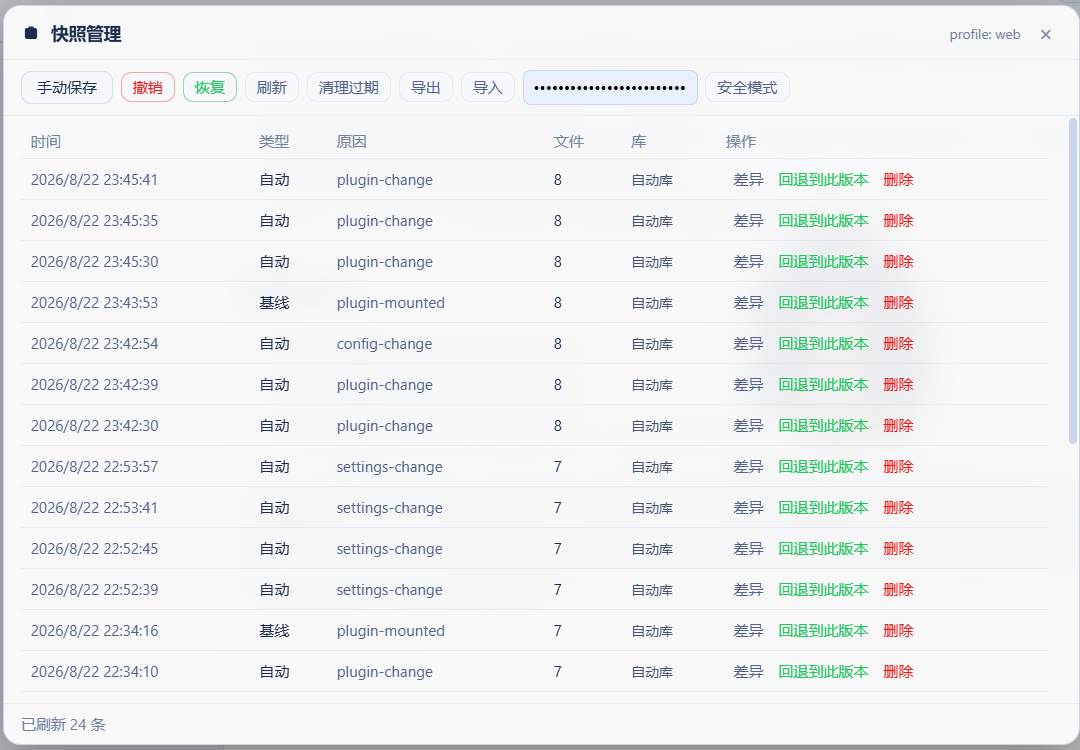
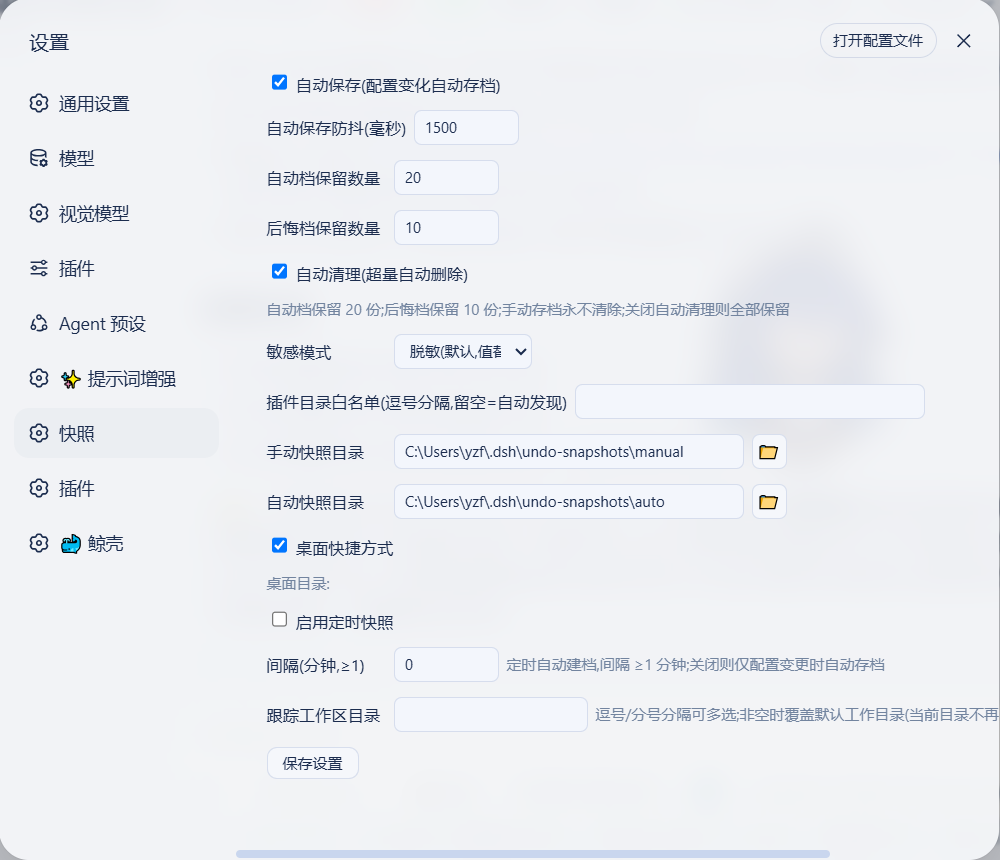
| WebUI snapshot panel: manual save / undo / redo / cleanup / export-import / safe mode, with per-entry "diff / roll back to this version / delete" | DSH settings "Snapshots" section (auto-save / retention count / sensitive mode / plugin whitelist / scheduled snapshots) |
|---|---|
 |  |
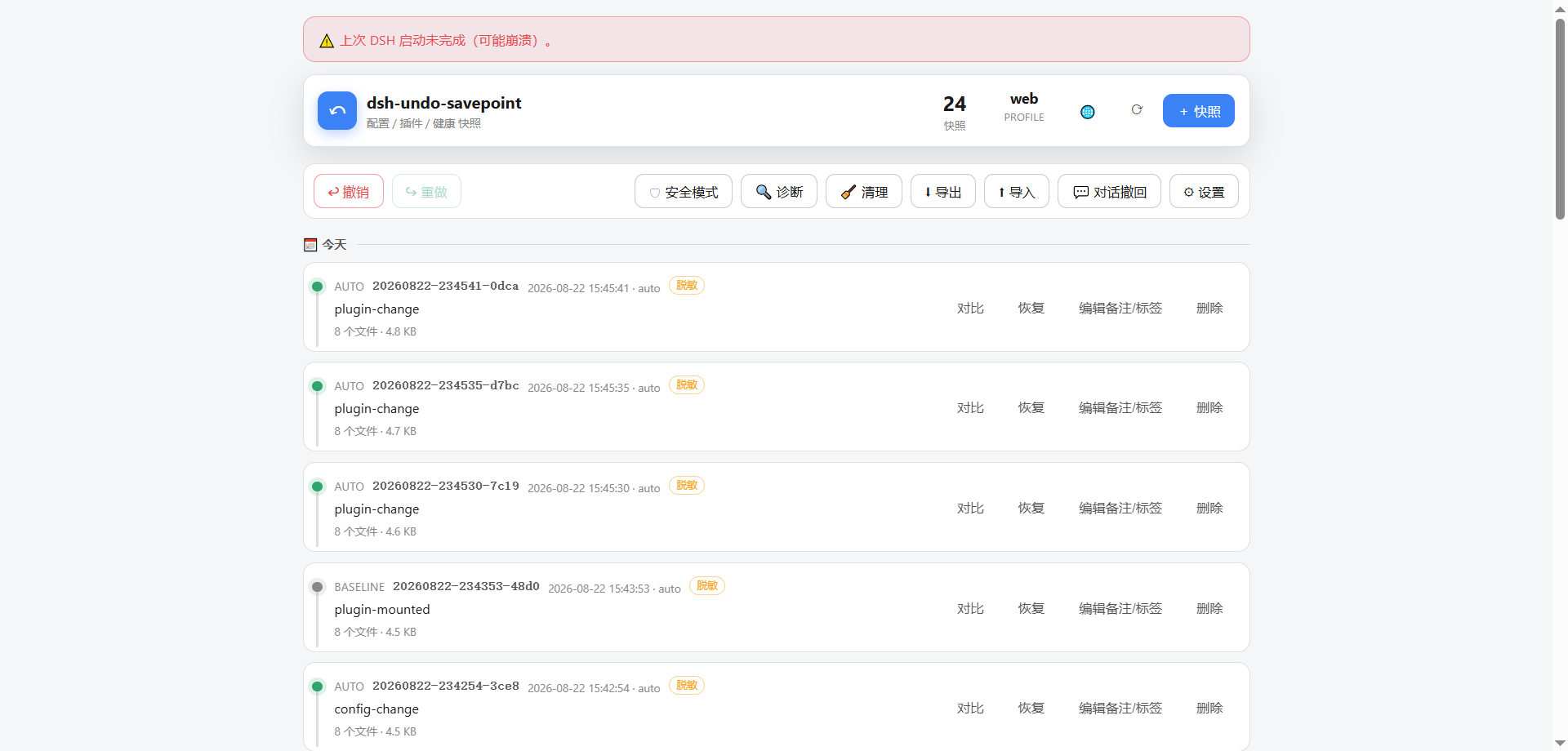
| Stand-alone WebUI: crash banner + undo / redo / safe mode / diagnostics / message rollback / settings, works without DSH running (snapshot comparison & settings: see stand-alone tools section) |
|---|
 |
Core Capabilities
| Capability | Description |
|---|---|
| One-click rollback of config + plugin code | Snapshots cover config and the user plugin code tree; undo any mistake anywhere (including yield* pure-code incidents); supports undo / redo / roll back to any version, via three entry points: WebUI / chat / offline CLI |
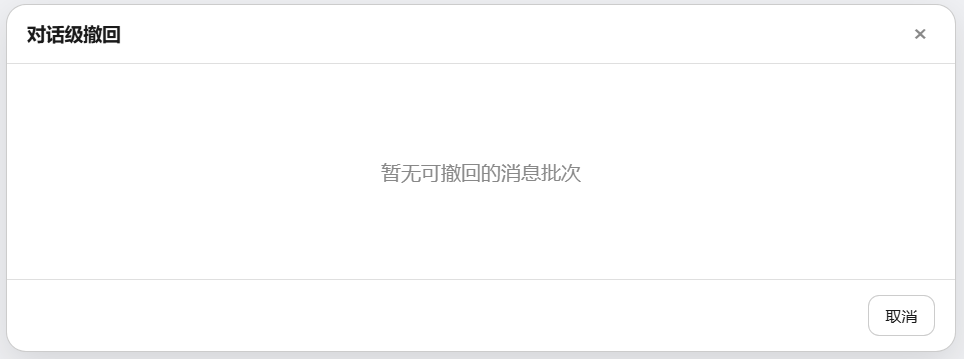
| Message-level undo | Records workspace file changes per AI message (or 60s batch); roll back "what this message changed" in one line (restore original content / delete newly created files); no git dependency, no session storage touched; "tracked workspace directories" configurable in settings (comma / semicolon multi-select, overrides default working directory when non-empty) |
| In-app message rollback | "Message Rollback" entry in the chat header + message-level rollback panel; roll back file changes for a given message batch right from the DSH panel |
| Secret redaction + local vault | .env / credentials are automatically redacted in snapshots (structure preserved); exported ZIPs leak zero secrets; real values stored in a local vault for full local rollback restoration |
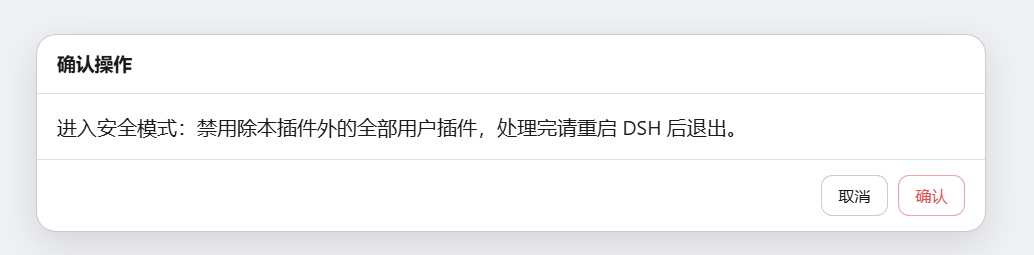
| One-click safe mode | When DSH can't start at all, disable all plugins except the undo system to guarantee boot; auto-snapshot + backup config (profile / home two-level patch backed up and restored together, neutralizing entries in dsh.profile.bundles that cause launcher hard-check failures); one-click exit; leftover state auto-degrades when the home directory is rebuilt / machine changed |
| Crash attribution | On abnormal last exit, shows the "last good snapshot" id directly + one-click rollback button; classifies crash reasons by log signature (session-corrupt / bundle-check / patch-tree), with corresponding remediation suggestions in the banner |
| Session file scan & repair | undo_scan scans <home>/sessions/**/session.jsonl.zstd: single-frame layout violations (root cause of 8/18 crashes) and synthetic-closer seq overlap (interrupted-recovery seq overlap after undo/snapshot restoration) can be repaired in one click (original kept as .bak + quarantine copy); undecodable files are quarantined only, not modified; when DSH won't start, use dsh-undo.ps1 scan [--fix] offline (requires Node ≥22.15; Node 20 degrades to advisory) |
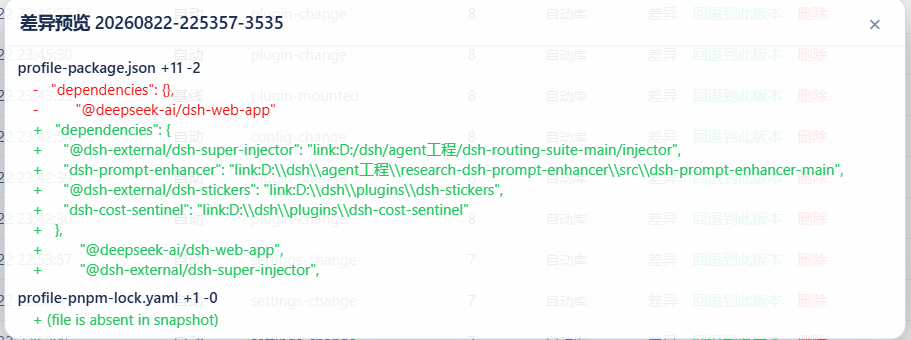
| Snapshot timeline (Time Machine) | Snapshots grouped by date in cards (notes / tag chips, respects prefers-reduced-motion) + file-level diff (additions / deletions highlighted, directory tree navigation, per-file browsing) + one-click rollback |
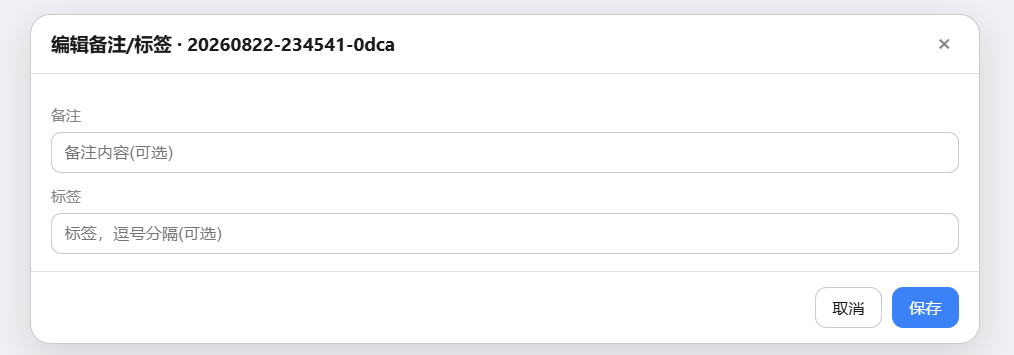
| Snapshot management | Notes / tags (undo_note, editable directly in the timeline), scheduled snapshots (interval-based, auto-created + retention cleanup), orphan blob GC (undo_compact, frees disk), ZIP export / import (optional AES-256-GCM encryption, compatible with PowerShell plaintext interop) |
One-click diagnostics & boot pre-check undo_doctor | Storage side: snapshot directory writability, blob integrity (missing / orphaned), settings file health, snapshot size distribution. Boot-side pre-checks for hard failures that crash DSH before any plugin is mounted: profile manifest BOM / JSON / structure, per-entry parseability of dsh.profile.bundles, patchReload value, link: junction targets, duplicate loader ids in patches, unfinished last boot. Outputs a structured ok / warn / err report, with fixable items tagged [fixable]; in chat undo_doctor fix=true, offline dsh-undo.ps1 doctor -Fix, and the stand-alone WebUI diagnostics panel's "Fix fixable items" button all repair in one click (a manual snapshot is taken before changes; auto re-check after fixing) |
| Cross-machine migration safety | Automatically pre-checks missing plugins before restore with clear prompts; snapshots can be one-click exported / imported as ZIP for migration (see docs/migration.md) |
| Stand-alone rescue | Works even when DSH is down: WebUI + GUI window + CLI + desktop shortcut, with timeline / rollback / comparison / safe mode / diagnostics all available |
Basic capabilities (keyboard shortcuts, chat commands, auto-cleanup, dual-mode save, configurable parameters, etc.) are in the sections below and the Changelog.
Platform Support
Since v0.4.0 the core is extracted into pure Node zero-dependency modules (lib/core.mjs / lib/zip.mjs), with per-platform distribution around it; available on Windows / macOS / Linux:
| Capability | Windows | macOS | Linux |
|---|---|---|---|
| Config / plugin snapshots, undo / redo | ✅ | ✅ | ✅ |
| Stand-alone CLI / GUI | ✅ (.bat / .ps1) | ✅ (.command) | ✅ (.sh) |
| Stand-alone WebUI (undo-server) | ✅ | ✅ | ✅ |
| File picker dialog | Native PowerShell | osascript | zenity → kdialog (falls back to manual entry if neither) |
| CI regression | windows-latest | macos-latest | ubuntu-latest |
CI is a three-platform matrix (
windows/ubuntu/macos × node[20,22]). ZIP export / import is implemented by the pure Node zero-dependencylib/zip.mjs(deflate / store, CRC32, UTF-8); no runtime dependencies are introduced, and interoperability with PowerShell has been verified in both directions.
Logo / icon: generation prompt in
docs/logo-prompt.md; the WebUI favicon uses the built-intools/webui/logo.svg. Custom icon: save a transparent PNG astools/webui/logo.png, runnode tools/make-ico.mjs tools/webui/logo.png tools/webui/logo.icoto generate the.ico, and it will be picked up automatically the next time a shortcut is created (fallback orderlogo.ico→logo.png→ system default).
Crash Rescue Quick Reference
| Scenario | Action |
|---|---|
| Config / plugin broken | Chat / WebUI / CLI: undo or restore -Id <id> |
| Plugin code broken | Same as above (snapshots include the plugin code tree, one-click restore) |
| Last exit abnormal, unsure where to roll back | WebUI / GUI banner shows last-good snapshot, one-click rollback |
| DSH won't start at all | Desktop "DSH Undo Manager" → Safe Mode button (or CLI safe-mode -Label on) → restart DSH, guaranteed to boot |
| Crash banner reports session corruption | Chat / CLI: undo_scan quarantine=true to repair (or offline dsh-undo.ps1 scan --fix) |
| Possible missing plugins after restore (cross-machine) | Restore report pre-check warns; install plugins first or enter safe mode |
| Config "changed suddenly" | CLI recent / chat undo_recent to check rollback log |
| Undo involves plugins / mounts | Report prompts "restart DSH to take effect" |
| Safe-mode confirmation: one-click disable of all user plugins except this one, ensuring DSH can boot, then troubleshoot one by one |
|---|
 |
Installation
Prerequisites: DSH (@deepseek-ai/dsh) and Node.js (≥20) installed. Host mode runs on a profile that provides
tools / systemPrompt / webServer services (all Web-type profiles qualify);
when DSH cannot start at all, use the out-of-host CLI / GUI instead.
Method A: GitHub Direct Install (Recommended)
Install the latest commit on master:
dsh plugin --profile web add github:lire1131/dsh-undo-savepoint#master
After installing, restart DSH to activate (snapshot dir, params, etc. are all editable in settings).
Method C: npm Registry Install
dsh plugin --profile web add dsh-undo-savepoint
dsh plugin add delegates to pnpm to complete the install in the profile directory; this package's package.json declares
dsh.bundle.patch, so it is automatically registered into the profile's bundle manifest after installation. Restart DSH for it to take effect.
Method B: Local Source / No-Publish
- Place the repository in a local plugin directory (avoid Chinese in the path for safety), e.g.
D:\dsh\plugins\dsh-undo-savepoint:
git clone https://github.com/lire1131/dsh-undo-savepoint.git D:\dsh\plugins\dsh-undo-savepoint
- Create a junction (Windows) so DSH's module resolver can find the local source by the package name
dsh-undo-savepoint(both the host plugin and the WebUI client plugin rely on it):
mklink /J "<你的DSH安装>\node_modules\dsh-undo-savepoint" "D:\dsh\plugins\dsh-undo-savepoint"
DSH resolves package names upward from its own
node_modules. The default install location isC:\Users\<用户名>\node_modules(when npm installs into the user directory); when run via the npx cache, a junction is created to thenode_modulesunder the npx cache directory. Runnpm root -gor check the path in DSH startup errors to confirm.
- Mount into the profile patch layer: edit
<DSH_HOME>\profiles\web\cordis.patch.ymland append:
- insert:
    - id: dsh-undo-savepoint
      name: dsh-undo-savepoint
- Active: saving triggers a hot reload (host part); refresh the page to see the header button and settings; restart DSH for steady state (old flat snapshots auto-migrate).
Dependency note: the host plugin loads
@deepseek-ai/dsh-toolsviacreateRequire('<DSH安装根>/package.json'). If DSH lives elsewhere, set the env varDSH_ROOT=<DSH安装根>— no extra installs needed.
Usage (Inside DSH)
- Undo: the header "Undo" button /
Ctrl+Alt+Z/ tell the AI "undo the last step". - Redo: the "Redo" button /
Ctrl+Alt+Y(only valid when no new operation occurred after the undo). - Manual save: "Manual Save" in the panel / tell the AI "save a snapshot" / CLI
snapshot. - Roll back to a specific version: click "Roll back to this version" on the snapshot row in the panel; or tell the AI "roll back to \<id\>"; or CLI
restore -Id <id>. - Delete a snapshot: click "Delete" in the panel; or CLI
remove -Id <id>. - Message-level undo: "Conversation Withdraw" in the conversation header; select a message batch to withdraw its file changes.
- Custom shortcuts: Settings → General → Undo / Redo shortcuts (click the input box and press the key combo; Backspace clears it).
- Save parameters: Settings → General → Snapshot Settings (auto-save toggle, debounce, retention count, the two directories, tracked workspace directories; the 📁 button next to a directory opens the system directory picker). "Tracked workspace directories" supports comma/semicolon-separated multiples; when non-empty, it overrides the default working directory.
| Conversation-level withdraw: roll back the changes of a message batch (time can be traced back to any conversation) |
|---|
 |
| Diff preview: file-level changes with red deletions and green additions; confirm before rolling back | Edit notes / tags: modify directly in the snapshot list |
|---|---|
 |  |
Out-of-Host Tools (Available Even When DSH Is Down)
Out-of-Host WebUI (Recommended, All Platforms)
node tools/undo-server.mjs # 或双击 launch-undo.bat / .command / .sh / .desktop
Spins up a local 127.0.0.1 server + built-in web UI: timeline / rollback / diff / safe mode / diagnostics. Double-click to use, no DSH dependency. After loading, a "dsh-undo-savepoint" desktop shortcut is auto-created — double-click to open directly. The diagnostics panel can also fix issues: fixable items are marked "Fixable"; click "Fix" to repair in place (auto-saves a manual snapshot first, re-checks immediately after).
| Desktop shortcut: auto-created after the plugin loads, double-click to open the out-of-process WebUI |
|---|
 |
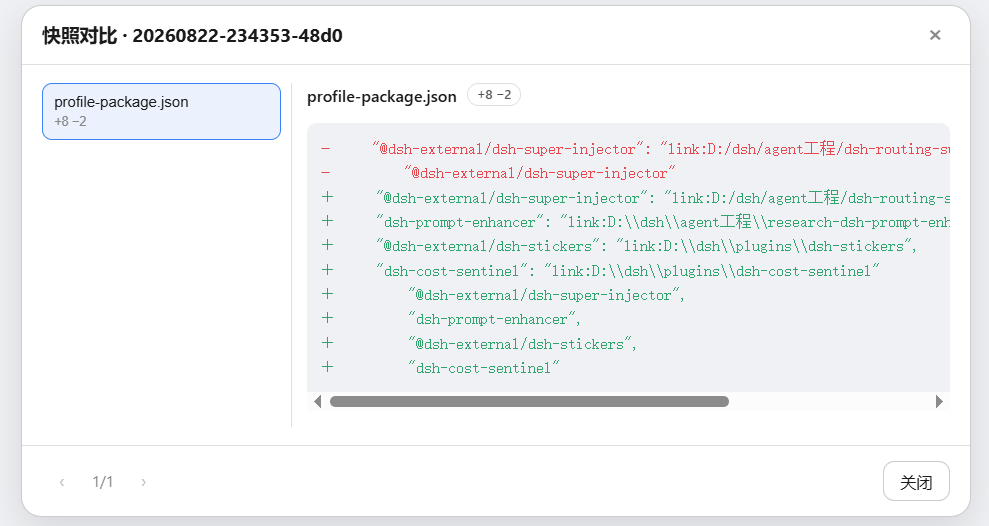
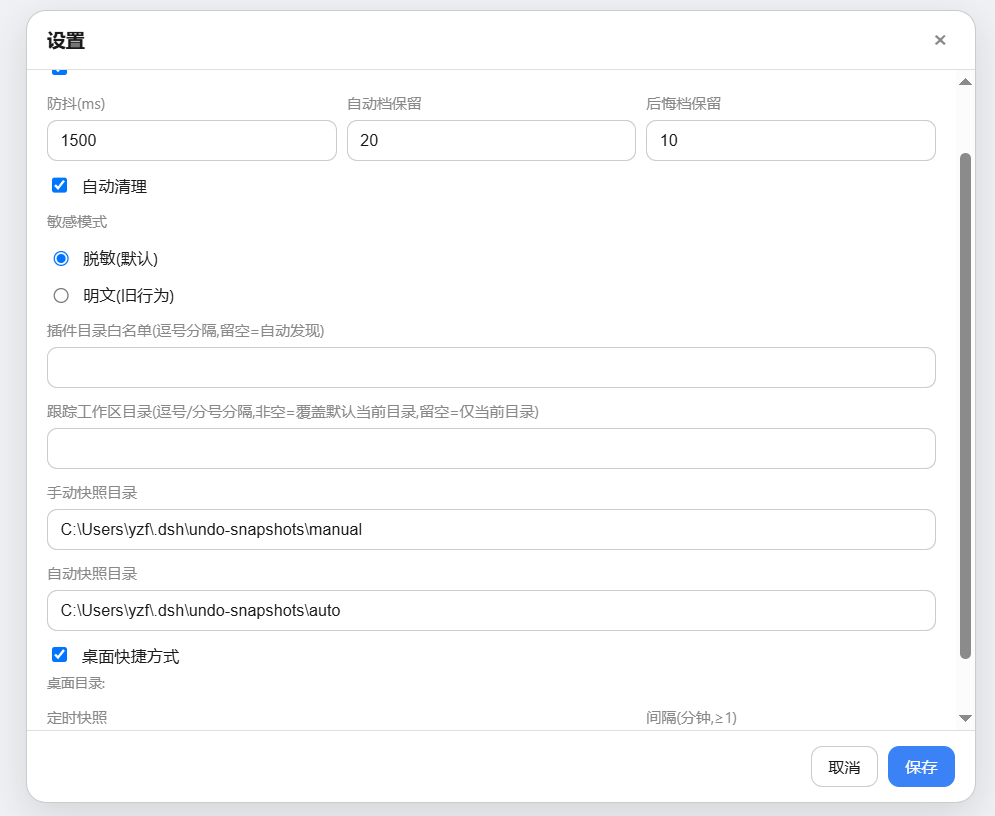
| Snapshot diff: file list + change stats (+8 / -2) + line-level diff highlighting | Out-of-process settings: debounce / retention count / masking mode / directory picker / desktop shortcut |
|---|---|
 |  |
Tool Locations
Out-of-process tools (GUI + CLI) live in the plugin's install dir, not on the desktop:
| Install method | Tool location |
|---|---|
Method A: dsh plugin add | $DSH_HOME\profiles\web\node_modules\dsh-undo-savepoint\tools\ (DSH_HOME defaults to %USERPROFILE%\.dsh) |
| Method B: clone + junction | Your cloned directory ...\dsh-undo-savepoint\tools\ |
一键创建桌面快捷方式(点开查看 PowerShell 命令)
Double-click tools\make-desktop-shortcut.bat (it auto-locates the plugin directory), and a "DSH Undo Manager" icon appears on the desktop; or copy the entire snippet below into a PowerShell window and press Enter:
$dshHome = if ($env:DSH_HOME) { $env:DSH_HOME } else { "$env:USERPROFILE\.dsh" }
$d = @("$dshHome\profiles\web\node_modules\dsh-undo-savepoint", "$dshHome\profiles\node_modules\dsh-undo-savepoint", "$env:USERPROFILE\node_modules\dsh-undo-savepoint") | Where-Object { Test-Path (Join-Path $_ 'tools\dsh-undo-savepoint-gui.bat') } | Select-Object -First 1
if ($d) {
  $w = New-Object -ComObject WScript.Shell
  $s = $w.CreateShortcut((Join-Path ([Environment]::GetFolderPath('Desktop')) 'DSH撤销管理器.lnk'))
  $s.TargetPath = Join-Path $d 'tools\dsh-undo-savepoint-gui.bat'
  $s.WorkingDirectory = Join-Path $d 'tools'
  $s.Save()
  Write-Host "已创建桌面快捷方式:$($s.FullName)"
} else { Write-Host '未找到插件目录,请先安装:dsh plugin --profile web add github:lire1131/dsh-undo-savepoint#master' }
只想打开工具目录看一眼:
$dshHome = if ($env:DSH_HOME) { $env:DSH_HOME } else { "$env:USERPROFILE\.dsh" }
explorer "$dshHome\profiles\web\node_modules\dsh-undo-savepoint\tools"
Command Line (Windows PowerShell)
进入仓库目录后:
# 程序窗口(推荐):双击 tools\dsh-undo-savepoint-gui.bat,或:
powershell -NoProfile -ExecutionPolicy Bypass -File "tools\dsh-undo-savepoint-gui.ps1"

# 命令行
powershell -NoProfile -ExecutionPolicy Bypass -File "tools\dsh-undo.ps1" list
powershell -NoProfile -ExecutionPolicy Bypass -File "tools\dsh-undo.ps1" snapshot -Label "原因"
powershell -NoProfile -ExecutionPolicy Bypass -File "tools\dsh-undo.ps1" undo
powershell -NoProfile -ExecutionPolicy Bypass -File "tools\dsh-undo.ps1" undo -SyncDeps
powershell -NoProfile -ExecutionPolicy Bypass -File "tools\dsh-undo.ps1" redo
powershell -NoProfile -ExecutionPolicy Bypass -File "tools\dsh-undo.ps1" restore -Id <id> -Force
powershell -NoProfile -ExecutionPolicy Bypass -File "tools\dsh-undo.ps1" restore -Id <id> -Force -SyncDeps
powershell -NoProfile -ExecutionPolicy Bypass -File "tools\dsh-undo.ps1" remove -Id <id>
powershell -NoProfile -ExecutionPolicy Bypass -File "tools\dsh-undo.ps1" prune -KeepAuto 20

# 启动预检(DSH 起不来时也能用);-Fix 修复可修项
powershell -NoProfile -ExecutionPolicy Bypass -File "tools\dsh-undo.ps1" doctor
powershell -NoProfile -ExecutionPolicy Bypass -File "tools\dsh-undo.ps1" doctor -Fix

# 安装插件(自动前后存档,失败自动回退)
powershell -NoProfile -ExecutionPolicy Bypass -File "tools\dsh-plugin.ps1" add <包名>
UI Language
DSH_UNDO_LANG=zh|en forces the language; when unset, Chinese systems default to Chinese, otherwise English. Applies to server output, offline CLI / GUI, and the WebUI — all dictionary sources are unified under lib/i18n/{zh,en}.json.
Common incident: DSH fails to start with errors like
duplicate loader entry id→ open "DSH Undo Manager", select the snapshot from before the problem, roll back, then restart DSH. No reinstall, no lost sessions.
Snapshot Contents & Storage
Snapshot objects are DSH's key startup configurations: cordis.patch.yml, package.json, cordis.yml, pnpm-workspace.yaml, pnpm-lock.yaml (under the profile) + cordis.patch.yml, settings.yaml, .env, .credentials.yaml (under $DSH_HOME, default ~/.dsh).
When a restore involves package.json / pnpm-lock.yaml, by default it only reports that node_modules may be out of sync; to actually rebuild dependencies, add -SyncDeps (offline CLI), sync_deps: true (chat tool), or syncDeps: true (REST). The plugin runs pnpm install --frozen-lockfile (plain pnpm install if no lockfile is present). A failed install does not affect the config files that have already been restored.
| Store | Default path (changeable in settings) | Contents |
|---|---|---|
| Manual store | <快照根>\manual\ | Manually saved snapshots (never auto-cleaned) |
| Auto store | <快照根>\auto\ | Auto snapshots, boot baselines, undo regretrates (auto: last 20 kept) |
| Legacy (compat) | <快照根>\ root | Old flat layout, read-compatible; auto-migrates to new stores at startup |
⚠️ 快照含
.env等配置副本,可能含密钥——不要外传。
体积纪律:单个快照引用体积 ≤5MB(manifest 记录
totalBytes,undo_list展示);插件代码树超限时只记清单 + 标记[truncated]告警,不丢任何数据,可手动快照 / 导出兜底。无外部插件时快照仅配置文件(KB 级);插件整体体积门禁 5MB(当前产物约 0.6MB)。
多 Profile 与自定义家目录
多 Profile(v0.3.3 起):插件从启动参数自动识别当前 profile(dsh --profile mine / --profile=mine;dsh web 回退为 web),并按当前 profile 工作:
- 配置目录:默认
$DSH_HOME/profiles/<当前 profile>(DSH_HOME 默认~/.dsh); - 快照仓库:默认
<快照根>/<当前 profile>/{auto,manual}(按 profile 隔离);作用域目录不存在而旧版平铺目录存在时自动回退平铺,旧快照不会「隐身」; - 归属标识:快照 manifest 记录
profile字段,undo_list显示当前 profile。
离线 CLI / GUI 看不到启动参数,通过环境变量 DSH_UNDO_PROFILE 或 settings 里的 profileName 指定(默认 web)。
自定义家目录(v0.3.5 起,issue #6):与官方启动器(@deepseek-ai/dsh-home-paths)解析完全一致——DSH_HOME 环境变量优先(空白视为未设置,支持 ~ / ~/ / ~\ 前缀),否则回退 <用户家目录>\.dsh。设置文件($DSH_HOME\undo\settings.json)、默认快照根($DSH_HOME\undo-snapshots)、profile 目录、home 根、插件发现路径全部基于它——第三方客户端不再出现「两套家分裂」,重启后自定义目录稳定保留。
显式覆盖始终优先:环境变量 DSH_UNDO_SETTINGS / DSH_UNDO_ROOT / DSH_UNDO_EXPORT,以及 config 里的 homeDir / profileDir / manualDir / autoDir / profileName。
REST API(WebUI 的后端)
| 端点 | 说明 |
|---|---|
GET /api/undo/status | {canUndo, canRedo, total, bootAlert, safeModeActive, ...} |
GET /api/undo/list | 快照列表(含 location: manual/auto/legacy) |
GET /api/undo/diff | ?id=<id> 指定快照与当前的文件级结构化 diff |
GET /api/undo/tree | 目录树 diff(按目录聚合,增 / 删 / 改着色) |
GET /api/undo/doctor | 一键诊断(store 可写性 / blob 完整性 / settings / 规模)+ 启动预检(清单 BOM / bundles / junction / 重复 loader id / 上次启动未完成) |
POST /api/undo/doctor/fix | 修复启动预检里的可修项(剥清单与 patch 的 BOM、按 id 去重 loader 条目、重建缺失或悬空的插件 junction),改前先落一个手动快照,返回修复清单 + 复查报告 |
GET / POST /api/undo/settings | 读 / 写保存参数(自动保存、防抖、保留数、目录),POST 即时生效 |
POST /api/undo/undo | 撤销上一步;可选 body {syncDeps: true} 按还原后的 lockfile 重建 node_modules |
POST /api/undo/redo | 恢复;可选 body {syncDeps: true} |
POST /api/undo/restore | body {id, syncDeps?} 回退到指定版本 |
POST /api/undo/remove | body {id} 删除快照 |
POST /api/undo/snapshot | body {reason} 手动保存 |
POST /api/undo/note | 快照备注 / 标签 |
POST /api/undo/messages / message | 消息级撤销:列出 / 撤回指定消息批次的文件改动 |
POST /api/undo/prune | 立即执行过期快照清理 |
POST /api/undo/export / import | 导出 / 导入全部快照 ZIP(纯 Node,兼容 PowerShell) |
POST /api/undo/safe-mode | body {on} 进入 / 退出安全模式 |
POST /api/undo/pick-dir / pick-file | 弹出系统目录 / 文件选择器(按平台分发),返回选中路径 |
GET /api/undo/locale | 返回当前语言(DSH_UNDO_LANG 或 auto) |
设计要点
- 撤销语义:自动快照在变更之后生成,所以「恢复最新存档」是空操作;真实撤销 = 回退到与当前状态内容不同的最新快照;全部相同则明确提示「没有可撤销的变化」。
- 撤销不会撤销掉自己:恢复
cordis.patch.yml后自动检查并重新写入 dsh-undo-savepoint 挂载条。 - 自动存档不误伤撤销:watcher 记录恢复操作写入的内容哈希,恢复动作自己的文件变化不会被自动存档(否则会挡住 redo);真实变更照常存档。
- 格式互通:Node 插件与 PowerShell 工具共用快照仓库与 manifest 格式;Windows PowerShell 5.1 与 PowerShell 7 均兼容。
开发与测试
- 依赖解析:host 插件通过
createRequire(<DSH安装根>/package.json)加载@deepseek-ai/dsh-tools(环境变量DSH_ROOT可覆盖),无需在仓库内安装依赖。 - 测试(不需要 DSH 运行,在仓库目录执行):
node tools\smoke-test.mjs     :: 189 项逻辑测试(快照/撤销/重做/存储分流/无变化提示/消息级撤销/孤儿GC/zip互操)
node tools\e2e-watch.mjs      :: 10 项真实时序回归(自动存档/撤销不误伤/重做)
node tools\check-size.mjs     :: 体积门禁(<5MB)
node tools\check-version.mjs  :: 版本号 semver 校验
License
MIT
Compatibility
Versions
| Latest version | Published | Size |
|---|---|---|
| 0.4.8 | — | — |
| 0.3.5 | — | — |
| 0.4.9 | — | — |
| 0.4.10 | — | — |
| 0.5.0 | — | — |
Comments
Loading…
Similar plugins
by x2802490130-prog
A development safety kit: rolling config snapshots, automatic rollback on plugin failures, boot-failure rescue, and an in-settings management panel.
★ 0
↓ 47/wk
MIT
JavaScript
Aug 15, 2026
dsh plugin --profile web add dsh-guardDSH Desktop plugin safety guard: self-repairs plugin load crashes and runs 8 core safety checks (2 optional: deep-config & smoke), prompting you when a plugin changes. Non-commercial source-available.
★ 0
↓ 153/wk
dsh plugin --profile web add dsh-plugin-guardby Zlyraz
Crash protection for installed plugins: crash cards with one-click disable, static pre-flight inspection, black-box crash telemetry, and a safe-mode rescue profile for a broken UI.
★ 0
MIT
JavaScript
Aug 17, 2026
dsh plugin --profile web add dsh-balluteby caishengshuo
Every file, one version before it breaks. A DSH plugin: snapshots a file the instant before an agent rewrites it, with a per-session GUI timeline where any point can be restored in one click.
★ 0
MIT
JavaScript
Oct 24, 2026
dsh plugin --profile web add dsh-beforewriteby Movingtoleveltwo
A production-ready UI Rewind/Revert plugin for DSH. Features inline prompt editing and a flawless dual-engine state recovery system (Workspace ShadowGit + External Tracker) with full support for forke
★ 1
MIT
JavaScript
Oct 4, 2026
dsh plugin --profile web add dsh-revertby kirigayakazima
Pre-boot rescue toolkit for DeepSeek Harness — validates profile composition, detects broken plugins, and provides one-click recovery without starting DSH.
★ 0
MIT
JavaScript
Sep 12, 2026
dsh plugin --profile web add brockdsaver