
dsh-bing-wallpaper
Manifest validDaily Bing wallpapers for DSH Web, with China/US sources, ten image-derived colour styles, and scheduled or system-following light/dark appearance.
Bing wallpaper for DSH
简体中文 · English
Daily Bing wallpapers, image-derived theme colours, and automatic light/dark appearance for DSH Web. A standalone plugin with no changes to DSH itself.

Features
- China and international (US) Bing sources, with separate caches and no automatic cross-source fallback.
- Ten colour styles: M3 Content, M3 Tonal Spot, M3 Fruit Salad, M3 Rainbow, M3 Monochrome, Vibrant, Faithful, Soft, Dysfunctional, and Muted.
- M3 styles use a ranked image seed; the five custom styles cluster multiple image colours and select candidates by style. Their colour generation is adapted from Noctalia, with browser sampling, candidate selection, and DSH readability adjustments, so results are not pixel-identical.
- Clickable palette cards show light and dark previews separated by a diagonal line.
- Wallpaper visibility from 10% to 100%, without a fixed reading overlay. Icons and semantic status colours are not recoloured.
- Optional blur, frosted glass (blur with a mist layer), blue tint, grayscale, and dimming filters, each with its own strength. Filters update the background live; the settings preview and theme extraction use the original image.
- Main pages, sidebars and the startup screen use dedicated wallpaper filter layers over a solid-colour fallback. Page content, document images and charts are not filtered.
- Independent left/right sidebar backgrounds: wallpaper or solid theme colour, wallpaper visibility and filters that follow the main background or can be customized, and an option to match the toolbar background. Sidebar settings start collapsed when visibility follows the main background. Wallpaper shares viewport coordinates with the centre through resizing, splits and drawer animations. Both solid mode and the optional theme-colour overlay use the sidebar colour shown in the palette cards; the overlay remains independent of wallpaper visibility. Desktop and mobile share the same settings.
- Scheduled, system, follow-DSH, or fixed light/dark appearance. The default schedule is 07:00–19:00 in the browser’s local time zone.
- Image title, date, source, and copyright overlaid at the bottom of the photo; refresh icon in the top-right corner.
- Automatic update checks, keeping the previous image on failure; Chinese and English UI.
Installation
Requires DSH >=0.2.2-rc.4 <0.3.0.
In DSH’s plugin manager, install @nzlov/dsh-bing-wallpaper, or ask the DSH agent to install that npm bundle. The npm package is prebuilt; no manual build is needed. Installation affects all sessions in the current profile.
To install from source (requires Git, Node.js, and npm):
git clone https://github.com/nzlov/dsh-bing-wallpaper.git
cd dsh-bing-wallpaper
npm ci --ignore-scripts
npm run build
Then install this directory in DSH using its absolute path.
Open Settings → Bing daily wallpaper. Rebuild after changing source files; follow Plugin Manager’s restart instructions when updating an installed bundle.
Notes
- No API key or CDN is required. Requests go only to fixed Bing HTTPS endpoints; chat content and browser credentials are not forwarded to Bing.
- Images are cached in memory, not saved as an offline wallpaper library. Update checks use an hourly server cache, so refreshing does not necessarily download a new image. The two regions may show the same photo.
- Plugin controls are saved in the current browser. DSH’s appearance preference is shared across the profile; use scheduling in one primary browser to avoid competing schedules.
License and credits
Author: nzlov.
- Plugin code and the original SVG icon: MIT.
- Material Color Utilities: Apache-2.0; see third-party notices and the included license.
- Photographs belong to Bing and the respective photographers. The plugin’s license does not grant rights to redistribute or commercially use those photographs. Follow the copyright link shown on each image.
Comments
Loading…
Similar plugins
✦
No screenshots
把图片、视频或内置渐变铺成 DSH 整个界面的背景,并可调主题色与面板透明度。
★ 0
MIT
JavaScript
dsh plugin --profile web add dsh-wallpaper-studio✦
No screenshots
Wallpaper skin for the DSH Web UI: presets, image URL or upload, and an opacity slider that fades the interface to reveal the wallpaper.
★ 0
dsh plugin --profile web add dsh-wallpaperby lueb386-lgtm
DeepSeek Harness 壁纸插件:为 Web 界面添加可自定义的壁纸背景——8 款渐变预设、自定义图片 URL、多来源随机壁纸(Bing 每日 / Picsum / LoremFlickr)、自动定时更换与设置持久化;随 DSH 启动自动加载,重启无需手动激活。
★ 0
MIT
JavaScript
Aug 18, 2026
dsh plugin --profile web add dsh-wallpaper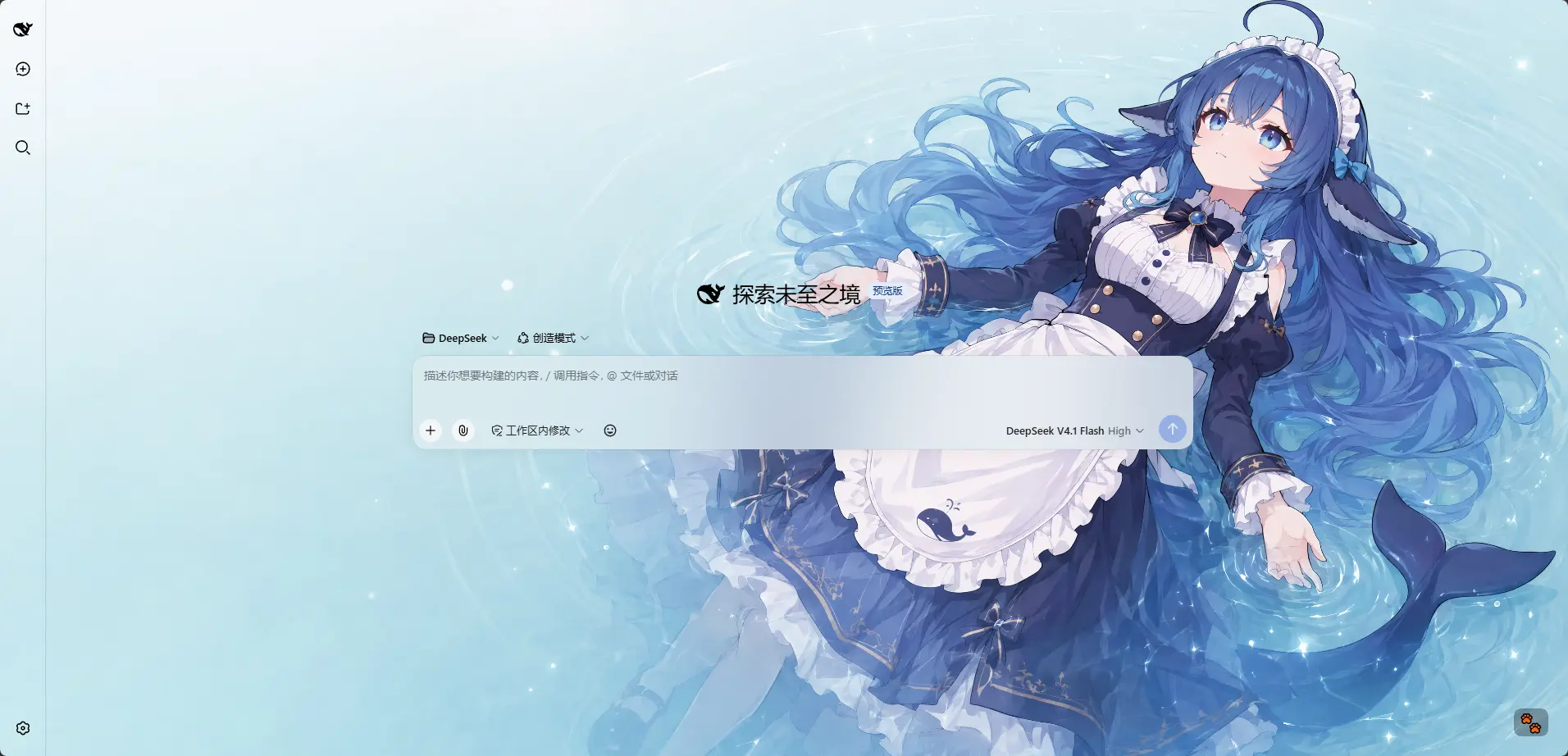 3
No screenshots
by HarmlessFunny
Per-model appearance for the DSH Web UI: an ordered rule list matched against the current session model name, each rule carrying its own wallpaper, theme colour, layout mode, framing and wallpaper opa
★ 25
↓ 1.5k/wk
MIT
TypeScript
Nov 15, 2026
dsh plugin --profile web add dsh-background-by-model✦
No screenshots
Wallpaper skin for the DSH Web UI: image background with opacity, mask and blur controls.
★ 0
↓ 247/wk
dsh plugin --profile web add dsh-wallpaper✦
No screenshots
Wallpaper backgrounds for the DSH web GUI. Windows: reads your Wallpaper Engine (Steam) library and plays video/web wallpapers behind the chat. macOS: scans the WaifuX download folder and loose media
★ 0
dsh plugin --profile web add dsh-plugin-wallpaper-engine