

dsh-explorer
Manifest valid★ 8DSH plugin: VS Code-style file-tree explorer (git decorations, preview, diff, drag-to-reference); install via dsh plugin --profile web add.
dsh-explorer
A file-tree sidebar for the DeepSeek Harness web UI. A blue round button on the right edge opens a drawer with the current workspace's files — lazy-loaded and virtualized, so even big directories stay responsive.
The plugins only add UI and a few read-only routes. Nothing in the shipped dsh packages is touched, so dsh updates shouldn't break anything.
Install (two commands — monorepo)
dsh plugin --profile web add "github:No-PRM/dsh-explorer#main&path:/dsh-plugins/dsh-explorer"
dsh plugin --profile web add "github:No-PRM/dsh-explorer#main&path:/dsh-plugins/dsh-client-ui-explorer"
# restart dsh
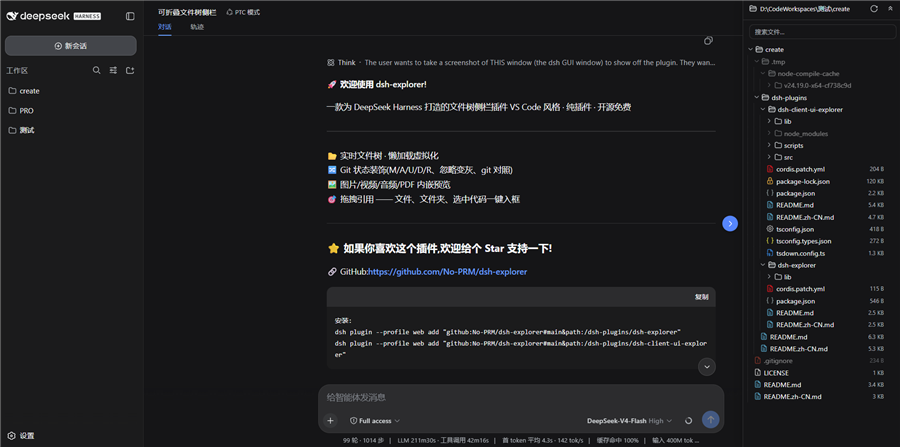
What you get
- A right-side drawer (drag the edge to resize) with a floating blue toggle; open state and width are remembered
- VS Code-style indent guides, hover highlights the active line
- Git status at a glance: M/A/U/D/R letters in a right-aligned column, tinted filenames, dirty dots on folders, struck-through rows for deleted files, gitignored entries dimmed
- Modified files get a git diff view (HEAD vs working tree, side-by-side) right in the preview
- Click a file to preview it — text opens in CodeMirror (Ctrl+F gives a VS Code-like find bar), images/video/audio/PDF play inline
- Drag any file/folder (or selected code from the preview) into the chat input — inserts an XML-tagged reference (
<reference path="…" lines="…" />) and shows a removable chip above the composer - Search (skips .git and node_modules), expand/collapse-all, auto-refresh every 1.2 s
Two packages
| package | what it does |
|---|---|
dsh-explorer | Host side (Node). Serves the read-only /filetree/* API: directory listing, file read, search, git status, raw media streaming. No dependencies. |
dsh-client-ui-explorer | Browser side (TS/TSX). The toggle, the drawer, and everything you see. |
Both follow the official dsh plugin contract. Wiring and deployment details live in dsh-plugins/README.md.
Install
You need both halves. Bundle install (monorepo — one command per package):
dsh plugin --profile web add "github:No-PRM/dsh-explorer#main&path:/dsh-plugins/dsh-explorer"
dsh plugin --profile web add "github:No-PRM/dsh-explorer#main&path:/dsh-plugins/dsh-client-ui-explorer"
# restart dsh
(Dev machine: keep the junction + cordis.patch.yml insert-row setup — don't run the bundle commands in the same profile.)
Manual (dev, no restart): copy the two packages into the profile's node_modules and add them to its cordis.patch.yml:
- insert:
    - id: filetree
      name: dsh-explorer-v1
    - id: ui-filetree
      name: dsh-client-ui-explorer
Restart dsh — or bump the host package name (v8, v9…) to avoid the restart. The browser bundle is self-contained; no npm install needed to run it. Full steps: dsh-plugins/README.md.
Development
cd dsh-plugins/dsh-client-ui-explorer
npm run dev        # watch + sync into the running profile
npm run bundle     # one-shot minified build
npm run types      # generate lib/types/*.d.ts
npm run typecheck
Host changes go into dsh-plugins/dsh-explorer/lib/index.js; copy it into the profile under a bumped package name to reload without restarting.
Docs
- dsh-plugins — architecture, install, deploy (中文: README.zh-CN.md)
- dsh-client-ui-explorer (中文: README.zh-CN.md)
- dsh-explorer (中文: README.zh-CN.md)
MIT
Comments
Loading…
Similar plugins
by devacc8
File Explorer for DeepSeek Harness: right-side resizable file tree (expand/collapse, search, syntax-highlighted preview, in-panel editing) with one-click VS Code / system file manager open
★ 0
MIT
TypeScript
Sep 18, 2026
dsh plugin --profile web add dsh-file-explorerby Pasumao
[Discontinued 2026-09-11: DSH >=0.1.5 ships a built-in workspace file tree + document preview — use that instead] VS Code-style workspace file explorer for the dsh web GUI (published versions remain i
★ 7
↓ 179/wk
MIT
TypeScript
Sep 11, 2026
dsh plugin --profile web add dsh-plugin-workbenchby joejojoking-cloud
File explorer plugin for DeepSeek Harness: file tree, preview, markdown, syntax highlighting, in-panel editing, VS Code integration - DeepSeek Harness 全局文件资源管理器插件
★ 21
↓ 41/wk
TypeScript
Aug 31, 2026
dsh plugin --profile web add dsh-file-explorerby xusuyang030218
DSH (DeepSeek Harness) file preview & editor plugin: in-browser workspace file tree, multi-format preview, online editing, version history, search. DSH 文件预览插件。
★ 0
MIT
JavaScript
Aug 24, 2026
dsh plugin --profile web add dsh-preview-uiby chengzhi43
A VS Code-style file manager plugin for DeepSeek Harness Web / DeepSeek Harness 的 VS Code 风格文件管理器插件
★ 9
↓ 148/wk
MIT
TypeScript
Sep 4, 2026
dsh plugin --profile web add @rose43/dsh-fileby xiaoksio
DSH Web GUI right sidebar: VS Code-style file explorer plus source control (git status, stage/unstage/discard, commit, diff, commit graph, sync fetch/pull/push, branch/remote management, git init, mul
★ 11
↓ 229/wk
MIT
TypeScript
Oct 27, 2026
dsh plugin --profile web add dsh-solution-explorer