

dsh-git
Manifest valid★ 1A VS Code-style Git source control panel plugin developed for DeepSeek Harness.
@mojiexuan/dsh-git
A VS Code–like Git Source Control panel for the DeepSeek Harness web UI — repo init, per-file staging, commit/push/publish/pull, branch & remote management, AI commit messages, and a commit-history graph, all in the browser.
中文文档:docs/README.zh.md
Features
- Toggleable panel — an entry above Settings in the sidebar foot opens/closes the panel.
- Repo detect & init — a non-repo workspace shows a one-click "Initialize Git repository" (
git init -b main). - Per-file staging — collapsible "Staged changes" / "Changes" lists with per-file
+/−, plus stage-all / unstage-all. - Git-semantic action button — "Commit" when there are uncommitted changes (auto-stages if nothing is staged), "Push" when the branch tracks a remote and is ahead, "Publish branch" when the branch has no upstream but has local commits.
- Pull — one click to fetch the latest from all remotes and branches (
git fetch --all --prune); shown only when a remote is configured. - Branch management — list / switch / create / delete (with confirmation).
- Remote management — show / add / remove the origin remote (with confirmation).
- AI commit messages — streaming, Conventional Commits, generated from the staged/working diff via the harness LLM (Chinese output by default).
- Commit-history graph — a lazily-paged SVG lane graph of all branches + remotes (lane topology computed client-side, rounded bends, soft palette), expanded by default at the bottom of the panel to half the panel height, virtual-scrolls and loads the next page as you scroll, expands a commit inline to its changed files, and shows a hover popover with message / author / date / hash (full hash copyable).
- Auto-refresh — polls
git statusevery 2.5 s so edits, commits and pushes made outside the panel show up. - Self-update — on first open the panel silently checks the npm registry for a newer version; when one exists, an update badge appears on the sidebar entry and a one-click "update now" link shows in the panel header, followed by a restart prompt.
- i18n — English and Chinese UI.
- Cross-platform — Windows, macOS and Linux; git runs unconfined so native TLS and credential helpers work everywhere.
Screenshots
| Source-control panel | Commit history |
|---|---|
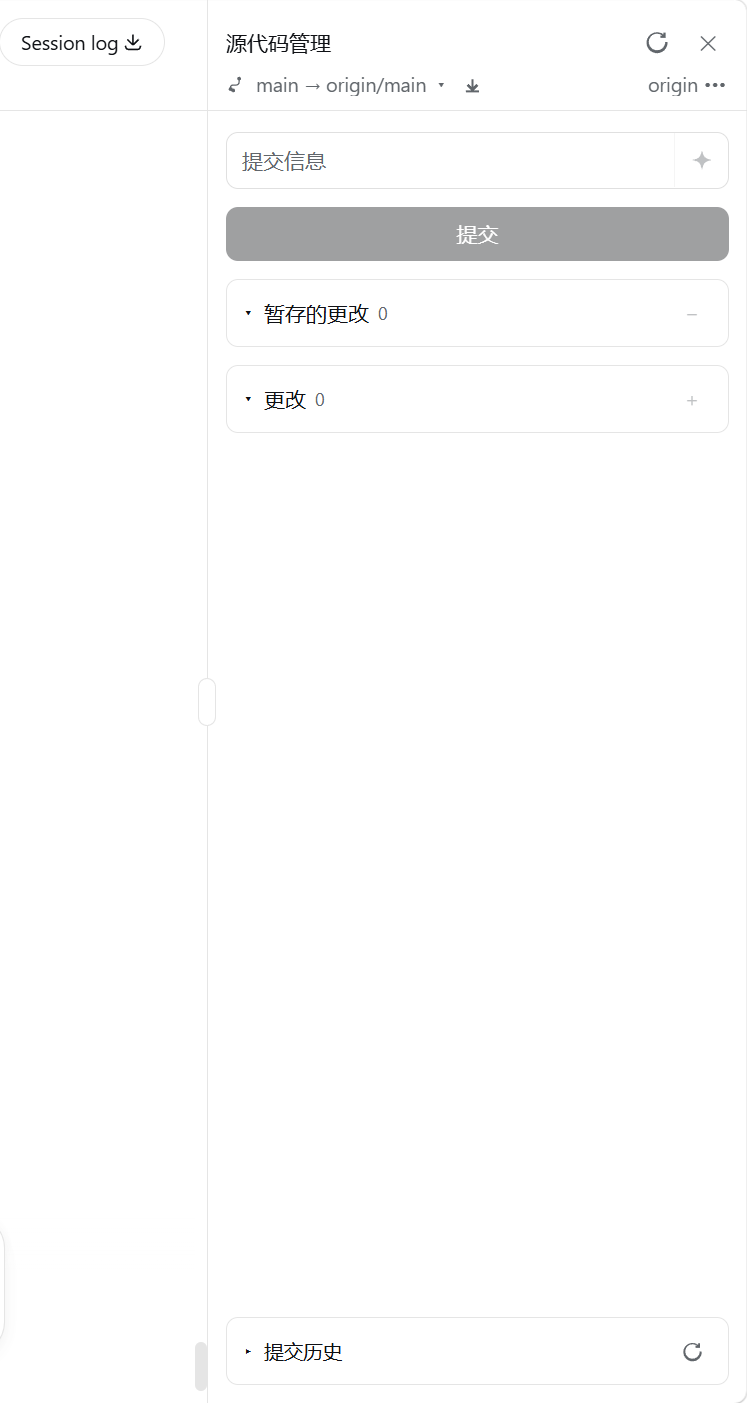 | 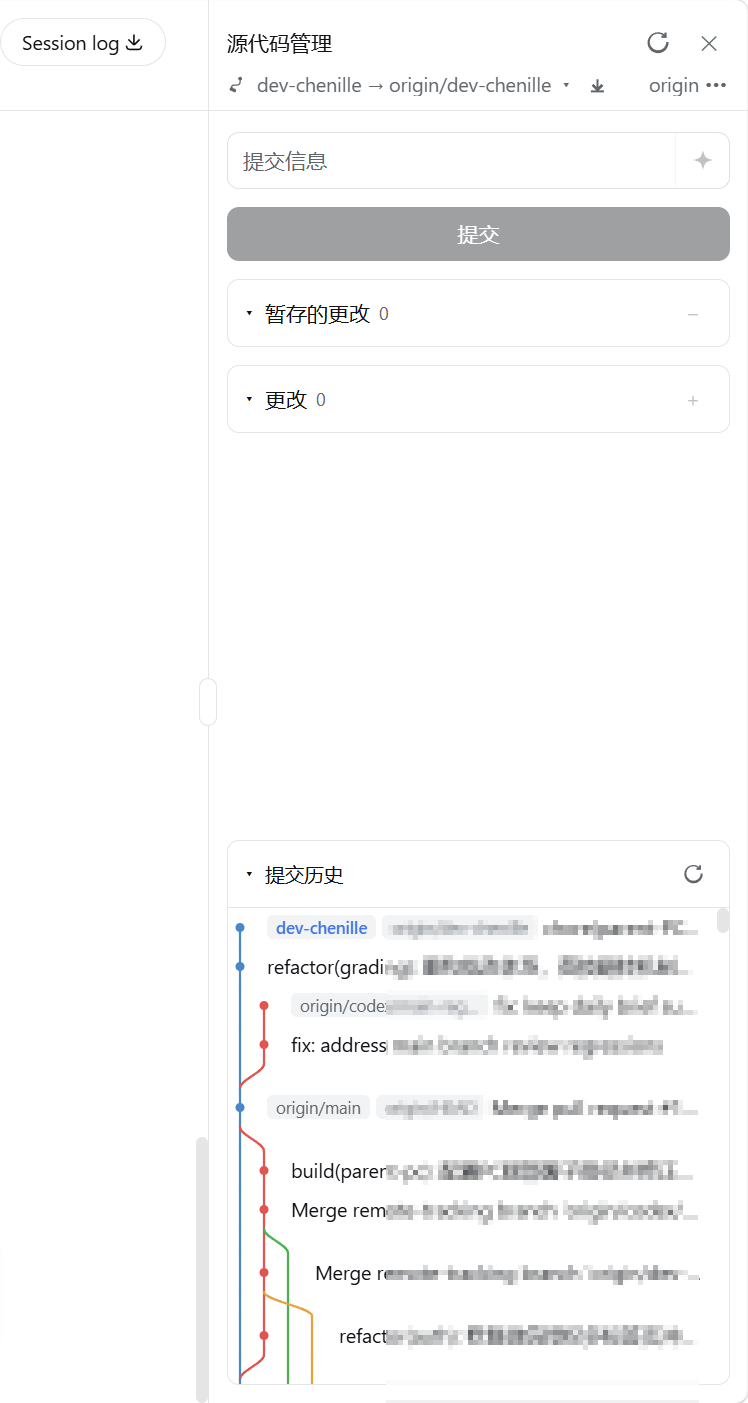 |
Install
dsh plugin --profile web add @mojiexuan/dsh-git
Then start dsh web.
Uninstall / Update
# Uninstall (same command for the published package and a local link)
dsh plugin --profile web remove @mojiexuan/dsh-git

# Update to the latest published version
dsh plugin --profile web update @mojiexuan/dsh-git
For a linked local checkout (dsh plugin --profile web add .), there is no
separate update step — rebuild with npm run build, then fully restart
dsh web (host bundle) and refresh the browser (client bundle).
Build from source
npm install
npm run build       # lib/index.js (host) + lib/client.js (client)
npm run typecheck
Configuration
Optional overrides in your profile cordis.patch.yml:
- id: git
  config:
    maxDiffChars: 4000     # cap on the diff text sent to the model (default 4000)
    maxLogEntries: 2000    # max commits per page for the history graph (default 2000; scroll to load more)
    provider: deepseek     # optional — pin the provider (defaults to the deployment model)
    model: deepseek-chat   # optional — pin the model
    reasoningEffort: off   # 'off' (default) disables thinking; 'high'/'max'/'default' passthrough
    registryUrl: https://registry.npmjs.org  # optional — npm registry base for update checks (default npmjs.org)
Structure
src/
├── shared/rpc.ts             # endpoint names + DTOs, shared by both halves
├── host/                     # Node half
│   ├── index.ts              # git/* RPC endpoints (loopback-only)
│   ├── git.ts                # ctx.shell wrapper; paths/messages via stdin (no shell injection)
│   ├── commit-message.ts     # diff truncation + ctx.llm.stream generation
│   └── update.ts             # self-update: npm version check + dsh plugin update runner
└── client/                   # browser half
    ├── index.tsx             # slot registration + RPC + locale dictionary
    ├── GitPanel.tsx          # source-control panel UI
    ├── CommitGraph.tsx       # commit-history graph (paged, virtualized)
    ├── graph.ts              # client-side lane/topology calculator
    ├── BranchMenu.tsx        # branch dropdown
    ├── GitToggleButton.tsx   # sidebar-foot toggle
    ├── rpc.ts                # typed RPC wrapper
    ├── locale.ts             # zh/en dictionaries
    ├── fileIcons.tsx         # file-type icons
    ├── icons.tsx             # icon set
    └── styles.ts             # panel stylesheet
Security
- All
git/*endpoints are registered withauthority: 'loopback'(127.0.0.1 only). - User data is never interpolated into command strings — messages go via
git commit -F -, paths via--pathspec-from-file=-, and branch/remote names and URLs are validated against safe character classes.
Publish
npm publish
Tag the GitHub repo with dsh-plugin.
License
MIT
Compatibility
Versions
| Latest version | Published | Size |
|---|---|---|
| 0.1.0 | — | — |
| 0.2.0 | — | — |
| 0.2.1 | — | — |
Comments
Loading…
From the same category
by awesome-dsh-plugin
A curated list of plugins for DeepSeek Harness (dsh) · DeepSeek Harness 插件精选列表
★ 23.7k
CC0-1.0
Python
Nov 8, 2026
by 0xsline
DeepSeek Harness (DSH) ecosystem: curated plugins, tools, and infrastructure from dsh-external/hub and the public dsh-plugin topic.
★ 1.3k
CC0-1.0
Python
Nov 6, 2026
by uumit-ai
Open dsh web from your phone or another computer through a UUMit account, without running your own server or installing another program: a built-in tunnel client connects to UUMit's hosted tunnel, and
★ 504
↓ 268/wk
MIT
JavaScript
Oct 21, 2026
dsh plugin --profile web add @uumit-ai/dsh-uumit-remoteby Yuuyuko-uu
DSH 鱼的记忆:给会话一份会淡忘的长期记忆,每条都带时间
★ 501
MIT
JavaScript
Nov 7, 2026
dsh plugin --profile web add dsh-fish-memoryby SAOS-3624
Scene-aware storyboard for DeepSeek Harness: 9-16 numbered cells with timestamps + transcript + an audio envelope, packed into ONE image (384 tokens). Two tools: video_storyboard and video_zoom.
★ 471
↓ 17k/wk
MIT
JavaScript
Nov 8, 2026
dsh plugin --profile web add dsh-video-storyboardby woniuniuniu
DeepSeek Harness 自媒体工作台插件:一句话记灵感,一键生成脚本、封面、配图和分镜
★ 462
↓ 2.8k/wk
MIT
JavaScript
Nov 8, 2026
dsh plugin --profile web add dsh-media-desk