
dsh-video-preview
IdentifiedStreaming video preview in the DSH sidebar — mp4, webm and mov play in place over an authenticated byte-range route, with 206 responses, instant seeking, no size cap and no build step.
dsh-video-preview




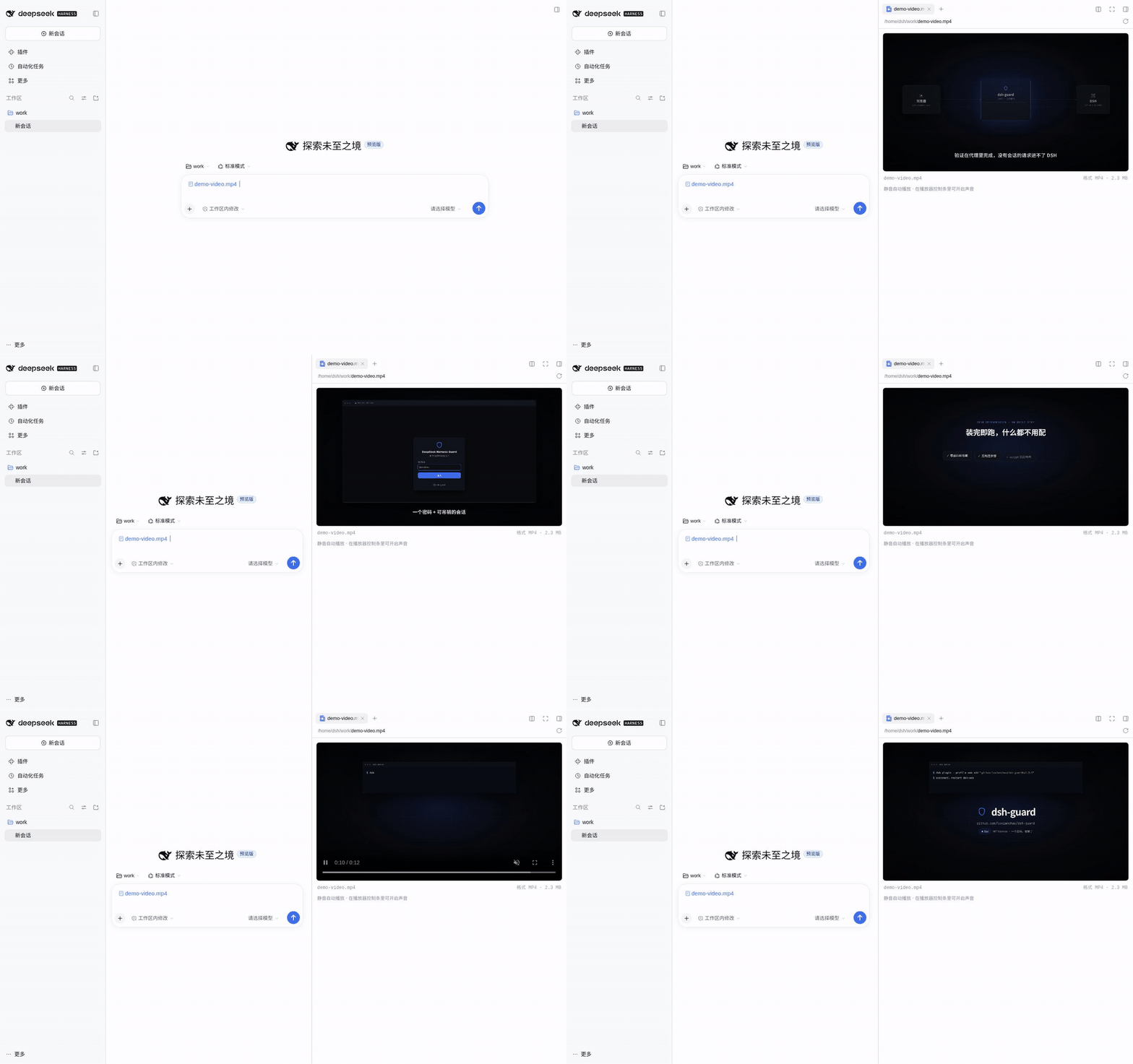
A video preview for the DeepSeek Harness (DSH) Web UI sidebar. Click an .mp4, .webm or .mov in the file tree, an @ reference, or the workspace-changes list, and it plays in place — instead of "preview is not available for this file type yet".
DSH's built-in document preview registers text, PDF, Excel and images. Video is not one of them. This plugin adds that renderer: mp4 / m4v / webm / ogv / ogg / mov.
中文说明:README.zh.md
Features
- Click and play — suffix-matched renderer that streams the file from an authenticated host route.
- True streaming — the
<video>element talks to a byte-range route (206 Partial Content), so seeking is instant and file size has no complete-read cap: a 5 GB video costs only the bytes you actually watch. - Muted autoplay — browsers refuse audible autoplay, so the preview starts silently; the native controls unmute in one click.
- Useful metadata — filename, container format, size (from a stat route).
- Readable failures — an unsupported codec or container says so instead of showing a blank player.
- Zero runtime dependencies — React comes from the host; everything else is standard Node/browser API. No build step: the browser half is a hand-written
__ModuleLoader__module. - No host coupling — the browser half registers through the public
documentPreviews/slots/localeservices; the host half throughconnection.fetchroutes inside the same browser-auth fence as every other/apiroute.
Install
# npm
dsh plugin --profile web add @lvxianchao/dsh-video-preview

# from GitHub
dsh plugin --profile web add "github:lvxianchao/dsh-video-preview"

# from a local checkout
dsh plugin --profile web add /path/to/dsh-video-preview
main only ever carries released code, so both remote forms install the latest stable release. Then restart dsh (the Web UI reloads its frontend modules on boot):
sudo systemctl restart dsh-web # adapt to your deployment
The package declares dsh.bundle, so installing it appends the package to the profile's bundle list and mounts the row automatically — no cordis.patch.yml edit needed.
To try it without touching a profile, use an overlay:
dsh --profile web --patch ./dev.yml --host 127.0.0.1 --port 3099 --no-open
# dev.yml
- insert:
    - id: video-preview
      name: '/absolute/path/to/dsh-video-preview/lib/index.js'
Use
- Type
@in the composer and pick a video file (or open one from the workspace changes). - Click the file reference; the right sidebar opens a player and starts muted playback.
- Drag, unmute, go fullscreen with the native controls. Seeking fetches only the bytes around the new position.
Configuration
| Key | Default | Meaning |
|---|---|---|
rangeBytes | 2097152 (2 MiB) | Byte window served per stream request. The browser issues consecutive ranges as it plays, so this is a latency/throughput knob, not a size limit. |
# ~/.dsh/profiles/web/cordis.patch.yml
- id: video-preview
  config:
    rangeBytes: 4194304   # 4 MiB windows
Limitations
| Limit | Cause | Workaround |
|---|---|---|
No mkv | Chrome cannot decode Matroska | Remux to mp4/webm |
| Codec-dependent | The browser only plays what the platform decodes; HEVC/AV1 vary | H.264/AAC mp4 is the safe choice |
| Session must resolve | The stream route resolves the file through the session named in the file address | Previewing files from a live session always resolves; a vanished session 404s |
| Authenticated browsers only | Routes live behind the same auth fence as the rest of /api | That is the point — no unauthenticated file serving |
How it works
| Half | File | Role |
|---|---|---|
| Host | lib/index.js | Registers GET/HEAD /api/video-preview.stream (byte ranges via workspaceFiles.readBytes(range), 206 + Content-Range) and GET /api/video-preview.stat (size/version/type) on connection.fetch |
| Browser | lib/client.js | Registers the renderer metadata (loading: "renderer") and the keyed document body; renders <video src=…> pointed at the stream route and reports its loaded version |
The renderer uses loading: "renderer", so the preview framework never performs a complete-byte read for video files — that is what removes the platform's 32 MB complete-file cap from the video path.
The browser half needs no build step — it is a module in the host loader's own format:
window.__ModuleLoader__.load({ id: "@lvxianchao/dsh-video-preview", factory: (require) => { /* … */ } });
Related
dsh-web-guard — the same author's password login for the DSH Web UI, so it can be exposed on the internet: sign in from anywhere instead of chasing one-off tokens, with reverse-proxy quirks handled. This plugin only changes how files preview, not who can open them: if the UI is reachable beyond loopback, put dsh-web-guard in front of it.
dsh plugin --profile web add @lvxianchao/dsh-web-guard
Development
main is the release branch: it only carries code that has been released and tagged. Day-to-day work happens on dev and lands on main when a release is cut.
git checkout dev
# … change, commit, test …
git checkout main && git merge --ff-only dev
git tag -a vX.Y.Z && git push origin main --tags
Shadow instance (isolated DSH_HOME, never touches a live profile or its data):
DSH_HOME=/tmp/dsh-test-home dsh --profile web \
  --patch ./test/shadow.patch.yml --host 127.0.0.1 --port 3199 --no-open
test/shadow.patch.yml mounts the plugin by path. test/e2e.mjs drives headless Chrome through "@ reference → click → assert the <video> plays, serves 206 ranges, and can seek near the end of a file bigger than the old 32 MB cap". test/record-demo.mjs records docs/demo.gif from the same flow (needs puppeteer-core and a Chrome binary).
To verify the streaming path through the auth gate — the production topology — install dsh-web-guard into the same shadow profile, boot it with test/guard.patch.yml, and run test/e2e-guard.mjs: it signs in, opens a video, and asserts 206 + Content-Range still arrive through the proxy.
Sponsor
If this plugin saved you some time, a coffee is welcome:
WeChat tip QR

Changelog
- 1.0.0 — first stable release: streaming byte-range host routes, renderer-owned loading, no complete-file size cap,
rangeBytesconfig. - 0.1.0 — preview: Blob-based playback of complete bytes (32 MB platform cap applied).
License
MIT
Comments
Loading…
Similar plugins
by 439436269-ctrl
Video and audio preview for DeepSeek Harness: play mp4/mov/mkv/webm and mp3/flac/wav in the right-Sidebar document preview, streamed over an authenticated HTTP Range route.
★ 0
MIT
JavaScript
Oct 23, 2026
dsh plugin --profile web add dsh-media-previewby wilsonchengassistant
Plays video and audio files in the right Sidebar preview pane, streamed over an authenticated HTTP Range route so a remote browser can play and seek a large file without launching a native player on t
★ 0
MIT
JavaScript
Oct 21, 2026
dsh plugin --profile web add dsh-media-web-previewby 439436269-ctrl
Play video and audio in the right-Sidebar document preview, streamed over an authenticated HTTP Range route with desktop seek.
★ 0
MIT
JavaScript
Nov 7, 2026
dsh plugin --profile web add dsh-preview-mediaby feigo313
DSH 侧边栏的内联音视频预览插件(dsh-better-sidebar 伴生):自带 /media 路由支持 HTTP Range,mp4/mkv/mp3/flac 直接播、可拖时间轴,无需先下载
★ 0
JavaScript
Oct 23, 2026
dsh plugin --profile web add dsh-av-previewby zemul
dsh-better-sidebar 的视频文件预览插件: 在侧边栏打开 .mp4 .webm .mov .mkv .avi 等视频文件时,内联渲染一个可播放、可拖拽进度条的 <video> 播放器。
★ 9
↓ 508/wk
MIT
JavaScript
Aug 27, 2026
dsh plugin --profile web add dsh-video-previewMP4 / M4V / MOV preview in the DeepSeek Harness right sidebar — plays in the pane instead of "this file type cannot be previewed".
★ 0
MIT
JavaScript
dsh plugin --profile web add dsh-mp4