

dsh-media-preview
Manifest validVideo and audio preview for DeepSeek Harness: play mp4/mov/mkv/webm and mp3/flac/wav in the right-Sidebar document preview, streamed over an authenticated HTTP Range route.
dsh-media-preview
Video and audio preview for DeepSeek Harness: play mp4, mov, mkv, webm and mp3, flac, wav right inside the right-Sidebar document preview instead of the built-in “this format cannot be previewed” empty state.
中文 | English (this file) · 中文说明
Why
The built-in preview registers renderers for text, code, Markdown, images, PDF, HTML, Office and spreadsheets, and lists video/audio suffixes as known binary containers with no renderer — so opening a video shows an icon and one line of text. This plugin registers those suffixes and draws the browser's native player, fed by an authenticated streaming route that honours HTTP Range, so seeking works and a 2 GB file is never loaded into memory or into the conversation.
Install
dsh plugin --profile <profile> add dsh-media-preview
Then restart the desktop app (a profile patch change is read at boot). No configuration is required; the defaults cover the common suffixes.
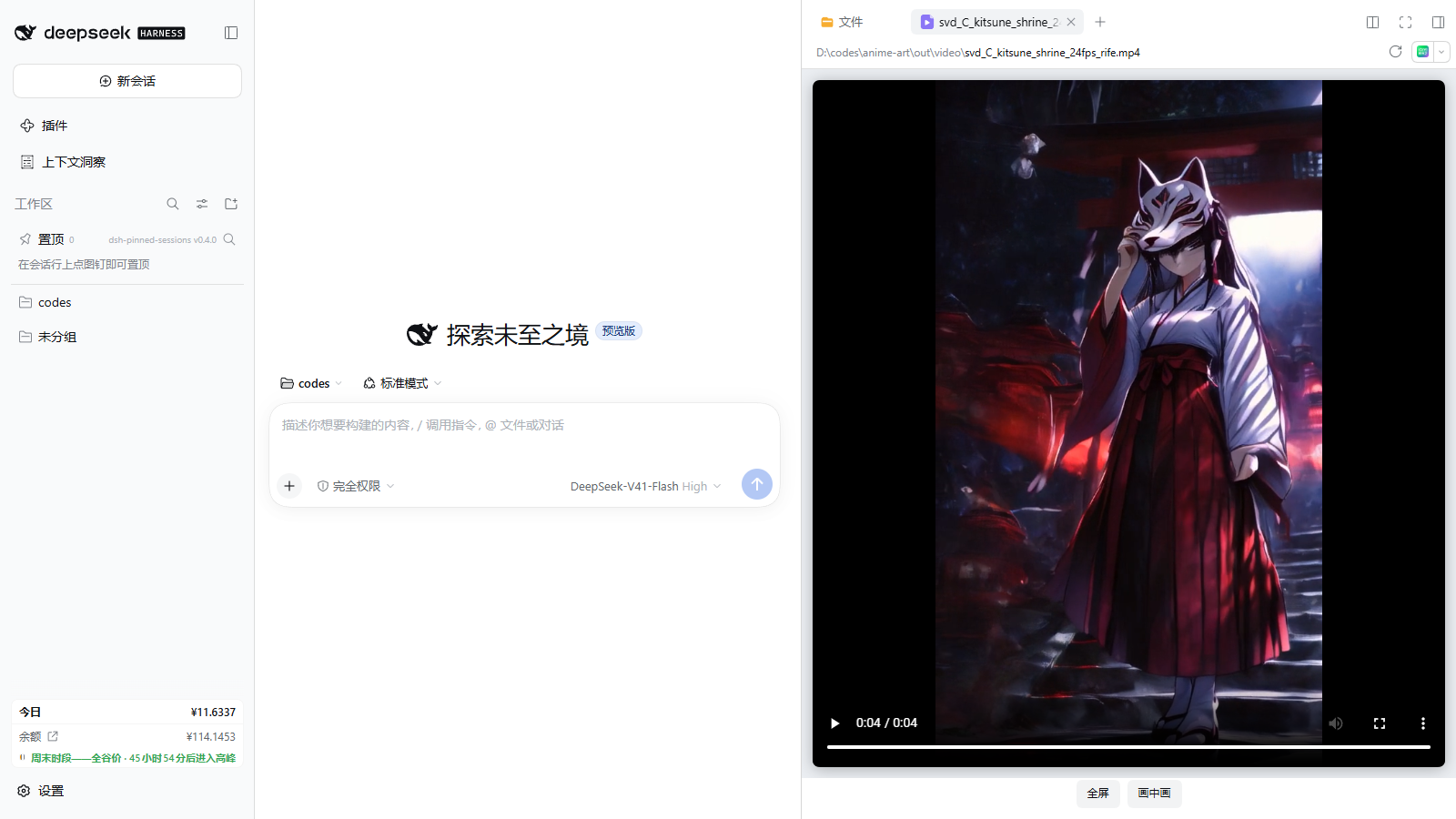
To check it loaded, open any .mp4 from the Files tab: the preview pane shows the player rather than the unsupported-format notice.
What it does
- Renderer — registers two document-previews implementations,
dsh-media-preview/media(video suffixes) anddsh-media-preview/audio(audio suffixes), with priorityextension,loading: 'renderer', and their suffixes declared binary so the “plain text” fallback is not offered. - Player — a native
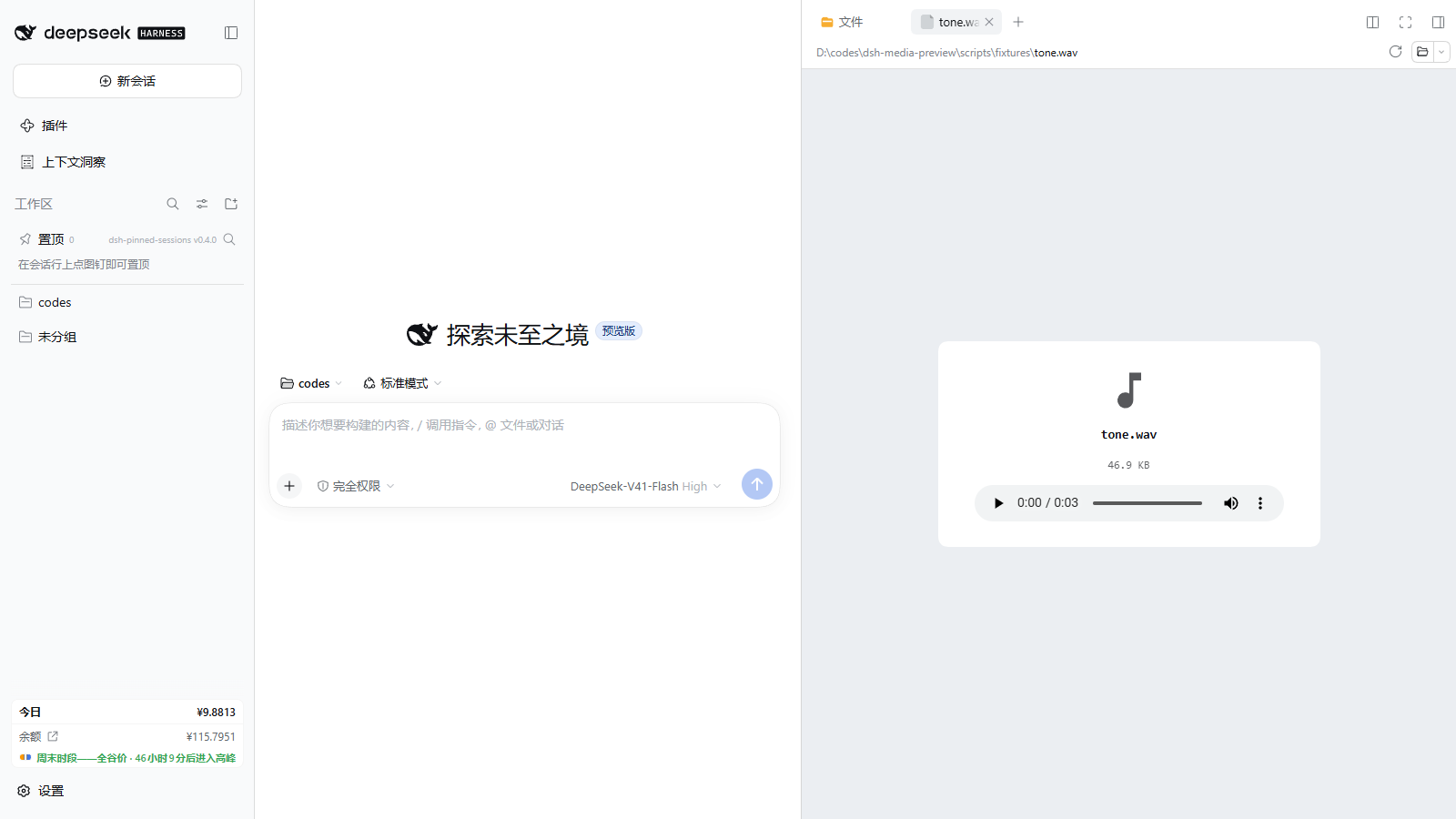
<video>/<audio>element with the browser's own controls. The video is fitted into the pane withobject-fit: containinside a flexible frame, so a portrait or landscape clip is fully visible at once, with black letterboxing instead of spilling past the preview edge. Below it sit 倍速 / Speed (cycles 1× → 1.25× → 1.5× → 1.75× → 2× → 0.5× → 0.75×), 循环 / Loop, and — for video — 全屏 / Full screen and 画中画 / Picture in picture. Speed and loop also apply to audio, and the choice is remembered per browser. Audio shows a card with the file name, its size and the player. The body reportsloaded/failedback to the document preview owner so the tab's loading state settles. - Stream — a Host route
GET|HEAD /api/media-preview?path=<absolute path>that answers200withAccept-Ranges: bytes,206withContent-Rangefor one byte window,416withContent-Range: bytes */sizefor an unsatisfiable window, andHEADwith headers only. It reads the file a chunk at a time (chunkBytes, 1 MiB by default) throughctx.fs.readByteRange, so memory stays flat. - Authentication — the route lives under
/api/, which means the composition's connection service applies its Host/Origin fence and browser-session cookie check before the handler runs. A cross-site page cannot read local files through it.
Configuration
Settings live on the media-preview entry (Settings → Plugins, or the profile patch). Every key has a code-side default, so a partial config is valid.
| Key | Default | Meaning |
|---|---|---|
enabled | true | Mount the route at all. Off leaves the renderer registered but transfers no bytes (503). |
routePath | /api/media-preview | Route pathname. Must start with /api/; anything else falls back to the default so the auth fence still applies. |
maxBytes | 2147483648 (2 GiB) | Largest file served; larger files answer 413. |
chunkBytes | 1048576 | Bytes per ranged read. |
videoExtensions | mp4, m4v, mov, webm, ogv, ogg, mkv, avi, wmv, flv, 3gp, ts, m2ts, mts | Suffixes the video player claims. |
audioExtensions | mp3, wav, flac, m4a, aac, oga, opus, weba, wma, aiff, aif | Suffixes the audio player claims. |
The browser half mirrors the suffix lists in lib/client.js; keep them in sync when changing either side. The route path is published to the page as __DSH_MEDIA_PREVIEW_CONFIG__ by the Host, so a configured path and the player's URL never drift apart.
Playback support
Playback depends on the browser's own codecs, not on this plugin. Chromium/Electron plays MP4 (H.264/AAC), WebM (VP8/VP9/Opus), Ogg and most audio formats. Matroska (.mkv) and AVI usually do not decode in Chromium; the player then reports “浏览器不支持这个编码 / This codec is not supported by the browser” and the Open in app control in the preview header still hands the file to the system player. Remuxing such files to MP4/WebM is the reliable fix.
How it is built
lib/index.js    Host entry: name / inject / Config / apply (route + index injection)
lib/config.js   Defaults and normalization, no host imports (unit-testable)
lib/schema.js   schemastery Config for the loader/settings page
lib/range.js    HTTP Range interpretation, pure functions
lib/mime.js     Suffix → media type
lib/route.js    The authenticated streaming handler (fetch-shaped, chunked)
lib/client.js   Browser bundle: renderers, bodies, styles, copy
test/           node --test: range, config, route, adapter mount, client bundle
scripts/        Headless browser E2E + HTTP probe used for verification
The browser half is a hand-written module-loader bundle (window.__ModuleLoader__.load({ id, factory })) with react and react/jsx-runtime as its only module-table requests, so it needs no build step and cannot drift from the Host's React copy.
Development
node --test test/*.test.js
For end-to-end checks, start a host with the plugin installed and run the probe:
node scripts/e2e-browser.mjs --base http://127.0.0.1:<port> --token <token> --video "<absolute path to a video>"
E2E_BROWSER_CHANNEL=msedge makes Playwright use the system Edge when the bundled Chromium is unavailable.
Known limitations
- One byte window per request; a multi-range
Rangeheader is answered416. Browsers only ever ask a media element for one window. .mkv,.avi,.wmv,.flvare claimed and listed, but Chromium cannot decode them; the plugin shows the player's error state rather than pretending they play.- No playlist, subtitle-track or speed controls of its own — the native controls own those.
License
MIT
Comments
Loading…
Similar plugins
by guwenwu112233-dot
Right-sidebar media tab for DeepSeek Harness: inline playback for local audio/video — HTTP Range for native formats, ffmpeg transcoding for mkv/avi/flv/wmv.
★ 0
MIT
JavaScript
Oct 16, 2026
dsh plugin --profile web add dsh-media-sidebarby OrderG-X
Inline video and audio playback inside DeepSeek Harness: a play_video tool plus a native player at the turn tail, served by a signed Range-capable streaming route.
★ 0
MIT
JavaScript
Oct 16, 2026
dsh plugin --profile web add dsh-video-previewby tsonglew
Audio/video preview viewer for dsh-better-sidebar: native playback with Range-seeking streaming route
★ 3
MIT
JavaScript
Aug 14, 2026
dsh plugin --profile web add dsh-media-previewby AKS1st
Media player for the DSH dock: plays audio (music player) and video (fullscreen) files, streamed over HTTP Range.
★ 0
MIT
TypeScript
Sep 11, 2026
dsh plugin --profile web add dock-mediaby xiaokaizhou
Renders local audio/video paths as inline, playable previews in DSH chat: replaces paths with <audio>/<video> players backed by same-origin /api/media-preview/* route, with explicit error statuses.
★ 0
MIT
JavaScript
Sep 21, 2026
dsh plugin --profile web add media-previewby zemul
dsh-better-sidebar 的视频文件预览插件: 在侧边栏打开 .mp4 .webm .mov .mkv .avi 等视频文件时,内联渲染一个可播放、可拖拽进度条的 <video> 播放器。
★ 8
↓ 1.4k/wk
MIT
JavaScript
Aug 27, 2026
dsh plugin --profile web add dsh-video-preview