
DSH-Idle-Watchdog
Manifest validPosts a follow-up prompt into opted-in chats that fall silent, and offers a secret-protected HTTP API that posts a message into any chat. Requires Node.js 22.5+.
DSH-Idle-Watchdog

Nudges chats that fall silent and posts prompts into any chat through a small authenticated HTTP API.
dsh plugin --profile web add dsh-idle-watchdog
# or from GitHub: dsh plugin --profile web add github:lucagiftzek/DSH-Idle-Watchdog
# restart dsh web, then opt chats in under Settings, Idle Watchdog
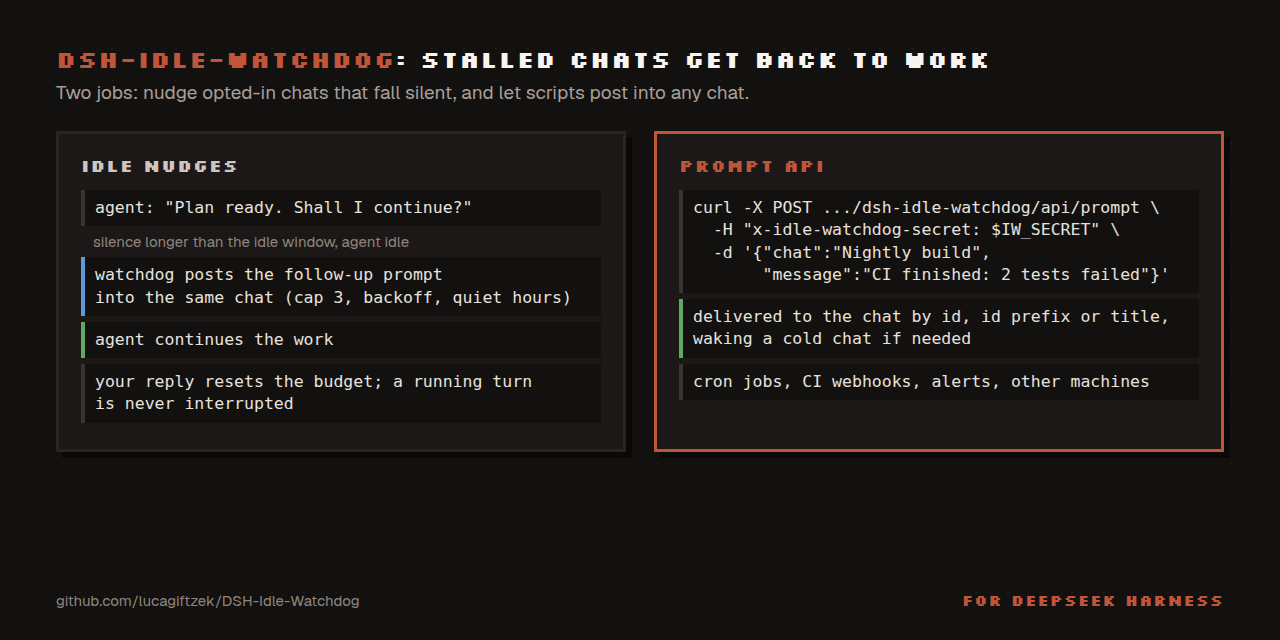
A DeepSeek Harness (DSH) web-profile plugin with two jobs:
- Idle nudges. Chats you opt in are watched. When one goes quiet for longer than your idle window and its agent is idle, the watchdog posts a followup prompt into that same chat, up to a cap, until you reply.
- External prompt API. One small, secret-protected HTTP endpoint lets scripts, cron jobs, webhooks or another machine post a message into any chat by id, id-prefix or exact title, waking a cold (not loaded) chat through DSH's own resume path when you allow it.
Why
Long autonomous chats stall for boring reasons: the model stopped after a plan, a tool call failed, a rate limit ended a turn, or the agent simply asked "shall I continue?" while you were away. The watchdog nudges such a chat back to work, with a cap so it never loops forever, and quiet hours and backoff so it stays polite. The API is the other half: anything that is not a human can still talk to a chat (a nightly job finishing, a CI webhook, a monitoring alert) without you building your own session plumbing.
POST /dsh-idle-watchdog/api/prompt
  { "chat": "nightly report", "message": "The sweep finished. Summarize failures and propose fixes." }
-> 202 { "ok": true, "chat": "session-4c1760...", "via": "title", "resumed": false }
Install (DSH web profile)
Install from npm: dsh plugin --profile web add dsh-idle-watchdog, or from GitHub: dsh plugin --profile web add github:lucagiftzek/DSH-Idle-Watchdog.
dsh plugin --profile web add dsh-idle-watchdog
# or from GitHub: dsh plugin --profile web add github:lucagiftzek/DSH-Idle-Watchdog
# then restart dsh-web: the host half is mounted at boot only
The package declares dsh.bundle, so dsh plugin add lists dsh-idle-watchdog in dsh.profile.bundles.
Or from a local checkout (linked, not copied: keep the checkout where it lives):
git clone https://github.com/lucagiftzek/DSH-Idle-Watchdog ~/plugins/DSH-Idle-Watchdog
cd ~/plugins/DSH-Idle-Watchdog && pnpm install      # or npm install

cd ~/.dsh/profiles/web                              # your DSH web profile
# 1. add to package.json:
#      "dependencies": { "dsh-idle-watchdog": "link:/absolute/path/to/DSH-Idle-Watchdog" }
#      "dsh": { "profile": { "bundles": [ "dsh-idle-watchdog" ] } }   (append to the existing list)
pnpm install
# 2. restart dsh-web: the host half is mounted at boot only
The official installer also works with a checkout: dsh plugin --profile web add link:/absolute/path/to/DSH-Idle-Watchdog.
After the restart, reload the web UI. The Idle Watchdog section appears in Settings. The browser half hot-reloads; only the server half needs the restart. Requires Node 22.5 or newer and a DSH build with the agents, settings and webServer services.
Configuration
Everything is in Settings, Idle Watchdog, and applies live. Where it is stored depends on the DSH line:
- DSH 0.1.5 and older: the
dsh-idle-watchdognamespace of~/.dsh/settings.yaml(hand-editable). - DSH 0.1.7 / 0.2.x and newer: the plugin row
idle-watchdogin the profile patch,~/.dsh/profiles/web/cordis.patch.yml(- id: idle-watchdog/config:). On the first boot after an upgrade the olddsh-idle-watchdogsection is imported once fromsettings.yaml.imported, never over a row that already has values. - No settings service:
~/.dsh/idle-watchdog/settings.json.
/status reports which store is active (settingsStore: settings, profile-row or fallback-file).
API secret file. The prompt API secret has a version-independent home: ~/.dsh/idle-watchdog/api-secret (mode 0600; override the path with DSH_IDLE_WATCHDOG_SECRET_FILE). Precedence: env DSH_IDLE_WATCHDOG_SECRET, then the file, then the stored api.secret setting. Saving a secret in Settings writes the file; on 0.2.x the secret never goes into the profile patch, and the upgrade import moves an old api.secret into the file. Scripts read it with IW_SECRET=${DSH_IDLE_WATCHDOG_SECRET:-$(cat ~/.dsh/idle-watchdog/api-secret)}.
| Setting | Meaning | Default |
|---|---|---|
enabled | Master switch (per-chat opt-in is still required) | true |
idleMinutes | Minutes of silence before a nudge (1 to 10080) | 20 |
maxNudges | Nudges per idle period; your reply refills the budget (0 to 20, 0 = never nudge) | 3 |
tickSeconds | How often the watchdog scans (5 to 3600) | 30 |
defaultPrompt | Text posted when a chat has no prompt of its own | a short English nudge |
notifyOnCap | Post one folded notice when the cap is hit | true |
chats | Watched chats: id, label, enabled, prompt (override), idleMinutes (override, 0 = global) | none watched |
api.secret | Shared secret for the prompt API; unset means the API fails closed | unset |
api.rateLimitPerMinute | Prompt calls per minute per source IP (1 to 600) | 30 |
wakeColdForApi | API may resume a chat that is not currently loaded | true |
skipWhenGoalActive | Never nudge a chat whose goal-round driver is armed and active | false |
onlyAfterError | Nudge only after the agent reported an error since the last human message | false |
backoffFactor | Window multiplier per nudge sent in a period; 2 doubles the wait each time (1 to 10) | 1 (constant) |
backoffMaxMinutes | Upper bound on the backed-off window; 0 = no bound | 0 |
quietHours.enabled | No idle nudges inside the daily window below | false |
quietHours.start / .end | HH:MM, may wrap midnight (22:00 to 07:00) | 22:00 / 07:00 |
quietHours.timezone | IANA zone such as Europe/Berlin; blank = server local time | blank |
The behaviour options added in 1.1 (skipWhenGoalActive, onlyAfterError, backoff, quiet hours) default to the old behaviour, so upgrading changes nothing until you opt in. Quiet hours delay nudges only; the external API is never blocked by them.
Example settings.yaml fragment:
dsh-idle-watchdog:
  enabled: true
  idleMinutes: 15
  maxNudges: 4
  backoffFactor: 2
  backoffMaxMinutes: 120
  skipWhenGoalActive: true
  quietHours: { enabled: true, start: "23:00", end: "07:00", timezone: "Europe/Berlin" }
  chats:
    - { id: session-abc123, label: Overnight refactor, enabled: true, prompt: "", idleMinutes: 0 }
Nudge semantics
A watched chat is nudged when all of these hold: the master switch is on, the chat is enabled, its agent is live and idle (a running turn is never interrupted), no active goal round if skipWhenGoalActive is on (needs the goals service; if your DSH lacks it the option is a no-op), an error was seen if onlyAfterError is on, the cap is not reached, the silence since the last append of any kind (including the watchdog's own previous nudge) exceeds the window (multiplied by the backoff for the n-th nudge), and quiet hours are not active. A human message resets the counter and the error flag. Reaching the cap posts one folded notice (not a fake user turn) and waits for you. Cold chats are never woken for idle reasons; only the API can wake them.
State survives restarts (~/.dsh/idle-watchdog/state.json, atomic writes). The audit ledger is ~/.dsh/idle-watchdog/activity.jsonl (rolling, 512 KiB).
Seeing what happens next
The Status card in Settings shows, per watched chat, the next nudge time or the reason it is held (running, goal active, quiet hours, cap reached, waiting for an error), the last outcome and the nudge count. The same data is a read-only endpoint, so you can preview without sending anything:
curl -sS http://127.0.0.1:3080/dsh-idle-watchdog/api/next
The HTTP API
POST /dsh-idle-watchdog/api/prompt, JSON body:
| Field | Required | Notes |
|---|---|---|
chat | yes | exact session id, unique id prefix (6 or more chars, live or watched chats), or exact chat title / Settings label |
message | yes | up to 8000 chars; arrives as a user-role message from plugin dsh-idle-watchdog |
provenance | no | up to 80 chars of free label recorded in the audit ledger (for example cron-backup) |
Auth, one of: x-idle-watchdog-secret: <secret> or Authorization: Bearer <secret>.
# set the secret once in Settings (or export DSH_IDLE_WATCHDOG_SECRET for dsh-web), then:
IW_SECRET=${DSH_IDLE_WATCHDOG_SECRET:-$(cat ~/.dsh/idle-watchdog/api-secret)}
curl -sS -X POST http://127.0.0.1:3080/dsh-idle-watchdog/api/prompt \
  -H 'content-type: application/json' \
  -H "x-idle-watchdog-secret: $IW_SECRET" \
  -d '{"chat":"ops triage","message":"Recheck the queue and alert on regressions.","provenance":"cron"}'

# the same with a bearer token, from a webhook relay on the same host
curl -sS -X POST http://127.0.0.1:3080/dsh-idle-watchdog/api/prompt \
  -H "authorization: Bearer $IW_SECRET" -H 'content-type: application/json' \
  -d '{"chat":"session-4c1760","message":"CI is red on main, please investigate."}'

# from another machine you can ssh into
ssh your-dsh-host 'curl -sS -X POST http://127.0.0.1:3080/dsh-idle-watchdog/api/prompt \
  -H "content-type: application/json" -H "x-idle-watchdog-secret: $IW_SECRET" \
  -d "{\"chat\":\"ops triage\",\"message\":\"Nightly job done.\"}"'
Other read-only routes: GET /api/health, /api/status, /api/next, /api/logs, /api/chats.
| Status | Meaning |
|---|---|
202 | delivered to a live chat |
200 | delivered after resuming a cold chat |
400 | validation error |
401 | wrong secret (10 failures per minute per IP, then 429) |
403 | the chat is owned by a subagent |
404 | unknown chat |
409 | ambiguous reference, or the chat cannot be delivered to (cold with wakeColdForApi off) |
429 | rate limited, see retry-after |
503 | no secret configured (fail closed) |
Security notes
- DSH mounts plugin routes without host authentication. The socket is loopback, so the secret is the control for machine callers. If you expose DSH through a reverse proxy, put the route behind your login proxy as well and do not publish it bare.
- Use a long random secret (16 to 256 characters). Prefer the
DSH_IDLE_WATCHDOG_SECRETenvironment variable of the dsh-web process: it wins over the stored value and keeps the secret off disk. Rotate it by setting a new one; the UI shows only an 8-hex fingerprint. - The secret is compared in constant time (sha256 then
timingSafeEqual) and is never logged or returned.GET /statusmasks it. - A browser cross-site JSON POST cannot work: the custom header forces a CORS preflight and no CORS headers are ever sent. UI-mutating routes also require
X-Requested-With: dsh-idle-watchdogand a JSON content type. Bodies are capped at 64 KiB. - Anything that can post to a chat can steer an agent that has tools. Treat the secret like shell access to that agent.
When something goes wrong
- Ask your agent to load the
idle-watchdog-doctorskill. It ships inskills/idle-watchdog-doctor/and the plugin registers it with the skills service at start (offered afterdsh webrestarts). If your DSH does not list it, install it by hand:
The skills folder is watched, so it appears without a restart. Details: docs/TROUBLESHOOTING.md.P=$(node -p "require('path').dirname(require.resolve('dsh-idle-watchdog/package.json',{paths:[(process.env.DSH_HOME||require('os').homedir()+'/.dsh')+'/profiles/web']}))") mkdir -p "${DSH_HOME:-$HOME/.dsh}/skills" && cp -r "$P/skills/idle-watchdog-doctor" "${DSH_HOME:-$HOME/.dsh}/skills/" - One-call self-check:
GET /dsh-idle-watchdog/api/doctor(read-only, same access as/status). It reports the settings mode, whetherConfigis visible to the loader, whether an API secret is configured (yes or no, plus its source: env, file or settings; never the value), the secret file mode (0600), the watched chats,sessionController, the next-nudge preview, the age of the last scan and whether the state file is writable. The read-only routes/health,/status,/nextand/logsstay available (no secrets in the output). - Every HTTP error carries a stable
code(prefixWATCHDOG_) next to the shorterrorstring scripts already parse: docs/ERRORS.md.
Troubleshooting
| Symptom | Likely cause |
|---|---|
Route answers 404 | Package is not in the profile bundles yet, or dsh-web was not restarted after installing |
503 secret-not-configured | Set a secret in Settings or export DSH_IDLE_WATCHDOG_SECRET for the dsh-web process |
401 then 429 | Wrong secret; wait for retry-after |
| No nudges arrive | Check the Status card: the chat must be enabled, live (loaded), idle, past its window, not capped, not in quiet hours, and (with onlyAfterError) have seen an error |
| Settings section missing | Hard-reload the page; the client half hot-reloads but needs the package in the profile |
| Settings are not saved to YAML | /status shows settingsStore: fallback-file; the settings service or schemastery could not be loaded |
Operations: GET /api/status for full state, GET /api/logs for the ledger tail. To pause without a restart, switch Enabled off in Settings. Kill switch: add - id: idle-watchdog / disabled: true to the profile's cordis.patch.yml and restart, or set DSH_IDLE_WATCHDOG_DISABLE=1 in the dsh-web environment.
How it differs from related tools
These are different tools for different jobs; you can run them together.
- DSH goal rounds (
@deepseek-ai/dsh-goal-round-driver). A goal is an explicit objective the model works on across automatic rounds, with a round cap, and ends when the model marks it complete or blocked. It is the right tool when you can state an objective. The watchdog has no objective: it is a generic "you went quiet" prod for any opted-in chat, plus an outside entry point. Turn onskipWhenGoalActiveso the two never both push the same chat. - Schedulers in the dsh-cron style. A scheduler decides when to start a task at wall-clock times. The watchdog reacts to silence, not to the clock, and the prompt API is what a scheduler or system cron would call to deliver its message into an existing chat.
- Watchers in the dsh-sentinel style. A watcher observes a condition (files, services, metrics) and acts on it. The watchdog only watches chat activity. A watcher that wants to tell an agent something can use the prompt API.
- dsh-continue. It resumes a session after a context overflow (compact and continue). The watchdog does not touch context; it covers the other stalls, such as an agent that stopped and waits, or
onlyAfterErrorretry nudges. The two compose without conflict.
I describe the scheduler and watcher families by what they typically do; check each tool's own docs for its exact behaviour.
Development
pnpm install        # or npm install
npm test            # pure-helper units, fake-ctx boot, nudge loop, client boot test (jsdom)
npm run check       # node --check on both halves
Design notes and the exact host services used are in docs/DESIGN.md. Release history: CHANGELOG.md. License: MIT.
More plugins by the same author
All of them are open source and run on DeepSeek Harness 0.2.x (several on 0.1.5 too).
| Plugin | What it does |
|---|---|
| dsh-artifacts | An Artifacts tab that lists the files an agent produced and previews them in place, plus a template library agents can use and extend |
| dsh-mail | Mail client and agent mail tools: IMAP, POP3, SMTP and OAuth2 accounts, scheduled and bulk sends with unsubscribe handling |
| dsh-note-keeper | Obsidian-compatible Markdown notes in the sidebar with search, graph, audio notes and transcription, OCR and client-side encryption |
| dsh-phone | SMS and calls (Twilio, SIP via Asterisk) with call audio through your own server, live voicemail and Telegram |
| dsh-voice | Read-aloud, dictation and language-aware speech with 23 TTS and STT providers, per-language routing and word highlighting |
| dsh-orchestrator | Agent swarm and task orchestration: an Orchestrate tab, orch_* tools, runners, provider cards and a machine API |
| dsh-workspace-rail | A workspace-first sidebar rail: pinned chats, projects as folders, live Recents, search and unread markers |
| DSH-Idle-Watchdog (this one) | Idle-chat nudges and an authenticated HTTP API that posts a prompt into any chat |
| dsh-plugin-updates | Update checker that only offers releases your running DSH core can load |
| dsh-subagent-tiering | Subagents default to a cheaper sibling of the parent model unless the agent names a route |
| dsh-fs-reobserve | Ends self-inflicted stale-file errors after an agent's own shell commands |
| dsh-request-image-cap | Clamps every image sent to the model to a pixel cap, fixing many-image request errors |
| dsh-seal | An encrypted channel in front of DSH: a Go reverse proxy plus a service worker that seal all DSH browser traffic |
Built by Luca Tzekos, who also makes Job Opportunities API: employer-direct job data with per-field provenance you can verify yourself, free to read and available as an API. If this plugin is useful to you, a star on this repo or a look at jobopportunitiesapi.org is the best thanks.
Comments
Loading…
From the same category
by Devin-AXIS
Enterprise-grade, local-first Agent Workbench for people and agent teams. A unified multi-engine workspace for Codex Harness, DeepSeek Harness, and OpenCode, with unified plugins and Skills, multi-age
★ 7.4k
↓ 1.1k/wk
NOASSERTION
TypeScript
Nov 1, 2026
dsh plugin --profile web add deepseek-idesignby T-Auto
Provides bash, PowerShell 7, and a suite of high-performance tools written in Rust for Windows DSH to enhance token efficiency / 为windows的dsh提供bash、powershell7及一系列rust编写的高性能tools来提高token效率
★ 5k
↓ 66.3k/wk
NOASSERTION
JavaScript
Nov 1, 2026
dsh plugin --profile agent add dsh-opsby FeiZhuLulu
A team of long-lived bots for DeepSeek Harness, with main bots, bot-to-bot messages and group chats.
★ 4.2k
Apache-2.0
JavaScript
Oct 12, 2026
by NanmiCoder
AgentTeams plugin for DeepSeek Harness
★ 2.6k
↓ 17.2k/wk
MIT
JavaScript
Oct 30, 2026
dsh plugin --profile web add @nanmicoder/dsh-agent-teamsby tong-io
Modality-First GenAI Platform
★ 1k
↓ 723/wk
AGPL-3.0
TypeScript
Oct 28, 2026
dsh plugin --profile agent add dsh-tongflowby LiPu-jpg
dsh-Openwrite:OpenWrite 的 DeepSeek Harness 小说创作插件,含统一创作 Agent、90 个小说工具、原生工作台与标准审稿 DAG
★ 906
↓ 3.1k/wk
Apache-2.0
TypeScript
Oct 28, 2026
dsh plugin --profile agent add dsh-openwrite