

ultra-documents
Identified★ 2Artifacts-like documents in the sidebar: the agent writes a self-contained HTML document, you comment on any part, send the comments back for the next version, or edit text and formatting yourself. Ev
ultra-documents
English | 中文



Artifacts-like documents for DeepSeek Harness (dsh).
Get documents you can comment on, hand back to the AI for the next version, and edit yourself, right in the dsh sidebar.
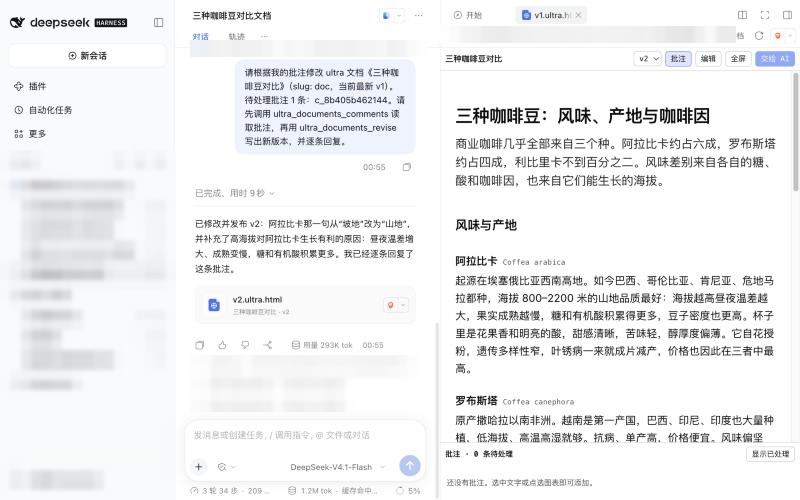
Ask the agent for a report, proposal, explainer, slide deck, diagram or dashboard. It writes one self-contained HTML page, which shows up in the chat as a card and opens in the dsh right sidebar. Then:
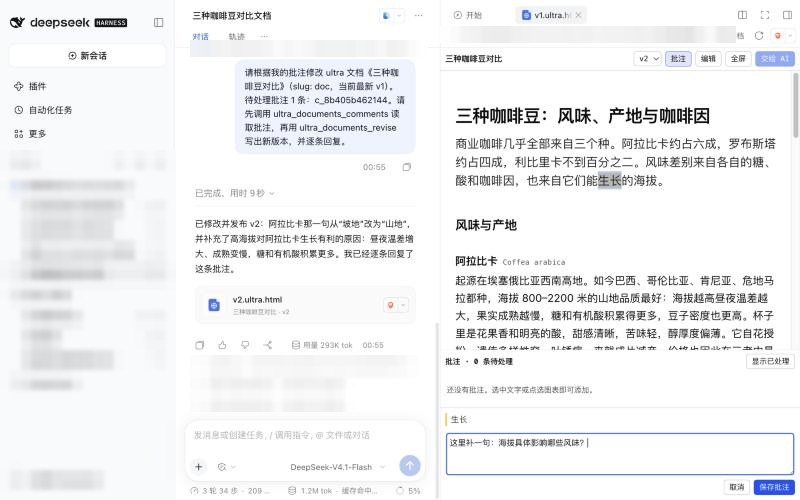
- Comment — select any text, or click a figure or table, and leave a comment.
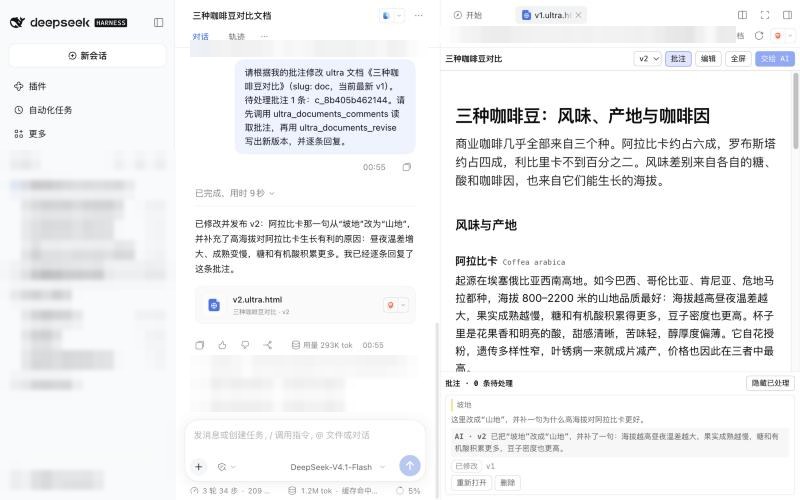
- Send to AI — one click hands the open comments to the agent, which writes the next version and answers each comment.
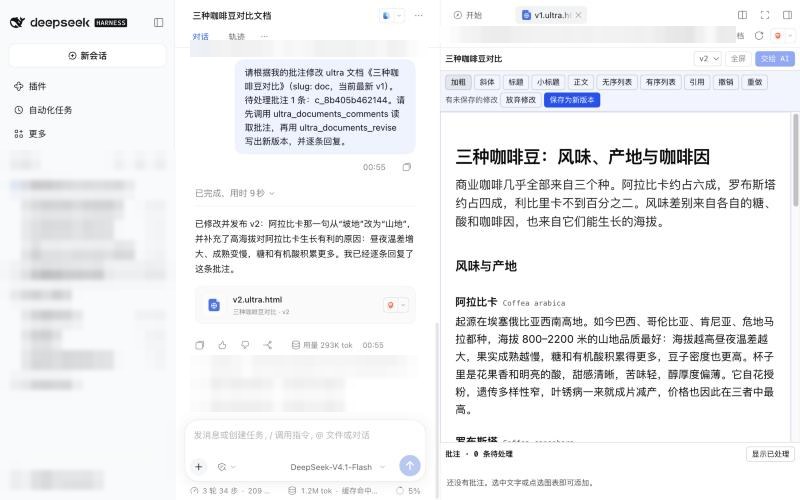
- Edit — change the text and formatting of the latest version yourself; saving creates a new version.
Every change is a new version, and you can switch between them. Everything stays on your machine: no account, no server, no sharing.
Screenshots
| Created | Commented | Revised by the AI |
|---|---|---|
 |  |  |
Install
Requires dsh 0.2.1 or later and its web interface (the desktop app or
dsh web).
dsh plugin --profile web add ultra-documents
From GitHub source instead of npm:
dsh plugin --profile web add github:Libraqg/ultra-documents
From a local checkout:
git clone https://github.com/Libraqg/ultra-documents
dsh plugin --profile web add link:/absolute/path/to/ultra-documents
In the desktop app, add the plugin from its plugin manager instead; the desktop profile is managed by the app.
Use
- Start a new session in a workspace and ask for a document, for example "Use ultra-documents to make a two-day Hangzhou itinerary with a schedule table".
- Click the card in the chat to open the document in the sidebar.
- Select text or click a figure to comment. Comment mode is on by default; switch to read mode to interact with the page normally.
- Press Send to AI to get the next version. Show handled comments to see the AI's reply on each one.
- Press Edit on the latest version to change text and formatting, then Save as new version.
Start a new session for each document: a long session carries a lot of context into every revision.
How it works
| Piece | What it does |
|---|---|
| Agent tools | ultra_documents_create, ultra_documents_revise, ultra_documents_comments, ultra_documents_list |
| Skill | ultra-documents: when to use the tools and how to write the HTML (voice, visuals, styles, slides) |
| Sidebar renderer | Claims *.ultra.html files; renders the version in an isolated sandbox with comment highlights, a comment panel, a version picker, direct editing and full screen |
| Storage | <workspace>/.ultra-documents/<slug>/ — v1.ultra.html, v2.ultra.html, …, doc.json, comments.json; the directory is git-ignored |
Documents run in an <iframe sandbox="allow-scripts"> without same-origin
access: their scripts cannot reach the dsh page, its cookies or your files.
See docs/DESIGN.md for the design.
Permissions and risks
- Files: writes only inside
<workspace>/.ultra-documents/. The host side writes with Nodefsand refuses any path that resolves outside the workspace, including through symlinks. Drafts are read only from regular files inside the workspace. - What it adds to dsh: four agent tools, one skill, one slash command
(
/ultra-documents, used by the sidebar to save comments and edits) and a sidebar renderer for*.ultra.htmlfiles. - Network and external services: the plugin makes no network requests and uses no external service. A document the agent writes may load fonts or libraries from a CDN when it is displayed.
- Model usage: creating a document and Send to AI use your configured model and its tokens. Comments and direct edits do not.
- Document scripts: run in a sandboxed iframe with no access to the dsh page, its cookies or your files; they can only open a link when you click it.
Known limitations
- Documents that run their own scripts can be commented on but not edited directly.
- A session open in two dsh processes at once (say the desktop app and
dsh web) is write-locked by one of them; saving comments or edits from the other fails. - Each comment action shows a one-line "ultra-documents" command card in the chat. It never reaches the model.
- The sidebar polls for changes every 3 seconds, and a document opened before a light/dark theme switch keeps its old theme until it is reopened.
- Local filesystem only; Sessions on a remote filesystem are not supported.
- dsh is a release candidate. Tested on 0.2.1-rc.3.
Develop
npm run build   # client/src/main.js → client.js
npm run check
npm test
client.js is generated; edit client/src/main.js and rebuild.
Licence
AGPL-3.0-or-later. ultra-documents is a modified version of tdoc by Serena Keyitan and the tdoc contributors; NOTICE.md records what changed. Bundled third-party material keeps its own licence.
Comments
Loading…
Similar plugins
by opdsh
DeepSeek Harness plugin: let agents publish HTML pages and Markdown documents as shareable artifacts on GitHub Pages
★ 0
MIT
TypeScript
Oct 8, 2026
dsh plugin --profile web add dsh-gh-pages-artifactsby caihua8669
Document review workbench: select text in a Markdown file, leave comments saved as MRSF sidecar files next to it, and let the agent read them with doc_review_* tools and propose edits you accept or re
★ 1
MIT
JavaScript
Oct 17, 2026
dsh plugin --profile web add @caihua/dsh-doc-reviewby sevenhsu7
Codex-like Markdown editing for the DSH right Sidebar: a rendered document you edit in place, including table cells.
★ 0
MIT
JavaScript
Oct 13, 2026
dsh plugin --profile web add dsh-codex-like-markdownby zoahdev
Render Markdown + JSON into self-contained HTML documents, cards, dashboards, and galleries (CLI + artifact_render tool).
★ 1
↓ 266/wk
MIT
TypeScript
Aug 16, 2026
dsh plugin --profile web add dsh-artifactsby hh719509125
DeepSeek Harness (DSH) 文档编辑插件:在右侧栏的文档预览里就地编辑文本文件并保存,支持 Ctrl+S、冲突保护、行尾逐字节保留。In-place document editor for the DSH Sidebar preview: Ctrl+S, conflict protection, byte-exact line-ending preservation.
★ 5
MIT
JavaScript
Oct 8, 2026
dsh plugin --profile web add @local/dsh-plugin-document-editorby caishengshuo
Every file, one version before it breaks. A DSH plugin: snapshots a file the instant before an agent rewrites it, with a per-session GUI timeline where any point can be restored in one click.
★ 0
MIT
JavaScript
Oct 24, 2026
dsh plugin --profile web add dsh-beforewrite