

dsh-live-terminal
Manifest validVisible terminal panel for DeepSeek Harness: stream agent shell commands into the app live and let the agent capture the terminal screen as text. DSH ???????
dsh-live-terminal
DeepSeek Harness(DSH)的可见终端面板插件:把 agent 执行的 shell 命令放进应用内终端窗口里实时显示,并允许 agent 对终端屏幕“截图”(文本屏幕快照,适合 vim/htop 等全屏 TUI)。
Visible terminal panel for DeepSeek Harness: stream agent shell commands into an in-app terminal live, and let the agent take text screenshots of the terminal screen (works for full-screen TUI apps too).



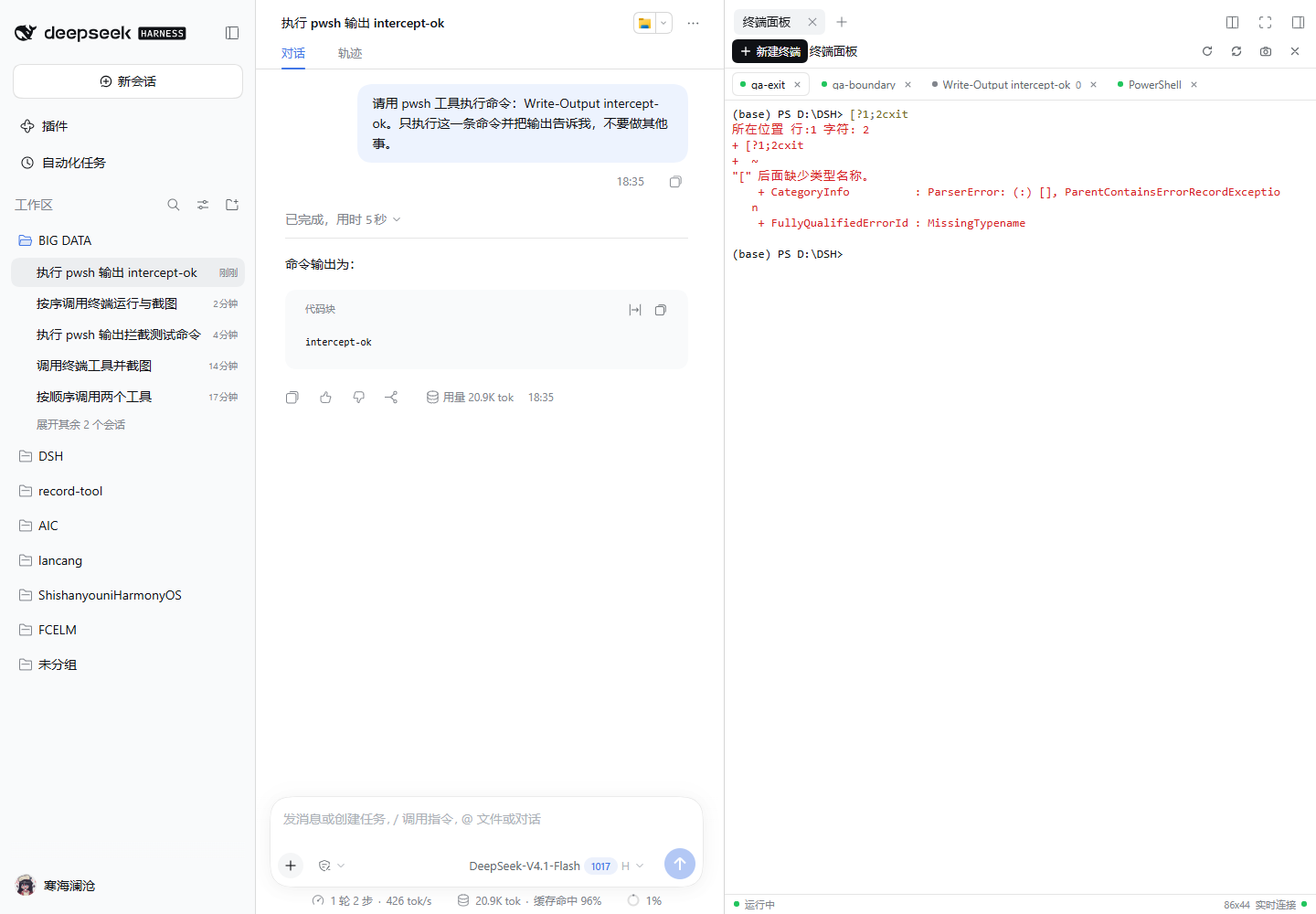
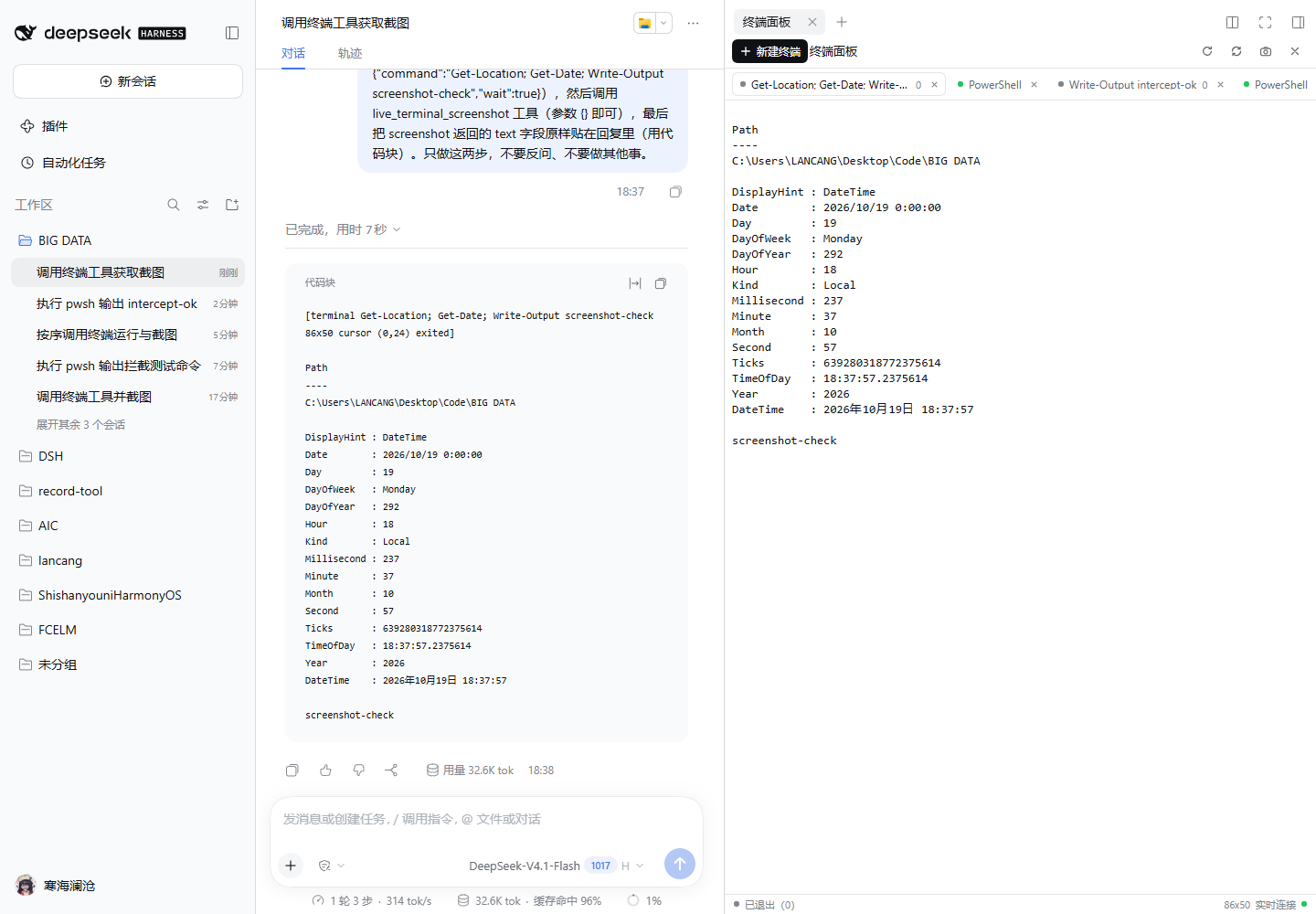
功能
- 在 DSH 右侧栏拉起真实终端(xterm.js + PTY,支持 PowerShell / cmd / bash),可直接键盘输入、多标签、resize、刷新重连。
- 接管默认 shell 命令:DSH agent 的前台
pwsh/bash调用自动在面板里执行,输出实时滚动;agent 开始执行时右侧栏自动弹出(每页面最多一次)。 - 终端截图:agent 可用
live_terminal_screenshot拿到当前可见屏幕文本 + 光标/尺寸;live_terminal_run/send/read/list/open/close提供长任务、交互输入、会话管理能力。 - 安全回退:带
run_in_background或sandbox_permissions(升权)的 shell 调用不会被接管,仍走 DSH 原生实现,保持原有审批/沙箱/后台语义。 - 中英文界面,跟随 DSH 主题与终端字体字号设置。
安装
桌面版 DSH(安装后需完全退出并重新打开 DeepSeek Harness 一次):
dsh plugin --profile desktop add dsh-live-terminal
Web 版 DSH:
dsh plugin --profile web add dsh-live-terminal
# 重启该 Host 后生效
图形界面:设置 → 插件 → 添加插件,输入 dsh-live-terminal。
插件市场:在 awesome-dsh-plugin / dsh-market 中搜索 Live Terminal 或 dsh-live-terminal。
从本地 link: 开发切回 npm 安装(可选):完全退出 DeepSeek Harness 后,在仓库根目录运行
powershell -NoProfile -ExecutionPolicy Bypass -File tools\switch-desktop-to-npm.ps1
脚本会先检测 DSH 是否仍在运行(运行中会被文件锁挡住并直接退出),并先安全移除 profile 里的 link: junction(规避 DSH/pnpm 在 link→npm 替换失败时清理删除被链接仓库 .git 元数据的问题;只删 reparse point,不动仓库目录),再把 Desktop profile 的依赖换成 npm 上的版本并校验安装结果;失败会自动恢复本地 link,加 -RestoreLink 可手动切回本地链接。
使用
- 正常和 DSH 对话,让它执行命令(例如“运行 npm test”)。命令会自动出现在右侧栏的终端面板中,实时输出。
- 自己敲命令:右侧栏 → 终端面板 → 新建终端。
- 需要 agent 看当前终端画面:让它调用
live_terminal_screenshot(TUI 程序同样有效)。 - 交互式程序(Python REPL、vim、ssh 等):agent 用
live_terminal_open建会话,再用live_terminal_send发送按键/文本。
agent 工具
| 工具 | 作用 |
|---|---|
live_terminal_run | 在可见终端里跑一条命令(独立可见会话),可选择等待完成或立即返回 |
live_terminal_screenshot | 截取当前/指定终端可见屏幕文本(可含滚动历史) |
live_terminal_open | 新建交互式可见终端 |
live_terminal_send | 向交互终端写入文本/按键(Ctrl-C = \u0003) |
live_terminal_read | 读取最近输出 |
live_terminal_list | 列出终端会话 |
live_terminal_close | 关闭终端 |
配置
在 ~/.dsh/profiles/<profile>/cordis.patch.yml 覆盖:
- id: dsh-live-terminal
  name: dsh-live-terminal
  config:
    interceptShellTools: true   # 是否接管内置 pwsh/bash 前台命令(默认 true)
    shellPath: null             # 交互 shell 路径;null = 自动探测 pwsh → powershell → cmd
    scrollback: 2000            # 每个终端的回滚行数
    maxOutputBytes: 262144      # 单次工具结果输出上限
    maxSessions: 16             # 同时保留的终端会话上限
    commandTimeoutMs: 180000    # live_terminal_run(wait:true) 的默认等待超时(live_terminal_open 仅做启动等待);被接管的 pwsh 前台调用固定 120s 上限
    retainExited: 10            # 保留多少个已退出命令会话用于回看
    interceptMinVisibleMs: 4500 # 被接管命令至少运行这么久(含 shell 启动开销)才上屏;更快的命令不产生 tab/不弹面板;0 = 全部上屏(旧行为)
    autoCloseCommandDelayMs: 5000   # 成功结束的一次性命令终端延迟多久自动关闭;-1 = 永不自动关闭;0 = 下一 tick
    autoCloseFailedDelayMs: 2000    # 失败/超时/中止的一次性命令终端延迟多久自动关闭;-1 = 永不自动关闭
    autoCloseToolTerminals: true    # false = 只自动关闭被接管的命令,live_terminal_run 创建的终端不自动关
    autoCloseNotice: failed         # failed | all | none:自动关闭时通过全局 SSE 发 notice 事件(client toast)
把 interceptShellTools 设为 false 可完全恢复原生 shell 行为,只保留 agent 主动使用的 live_terminal_*。
自动清理(v1.2)
- 快速命令不上屏:被接管的内置
pwsh/bash前台命令如果运行时间短于interceptMinVisibleMs(默认 4500ms;Windows 上含 PowerShell/ConPTY 约 3–4s 的启动开销,因此普通秒级命令默认完全不上屏),不会产生终端 tab、不触发右侧栏自动弹出、也不发sessions事件;失败时只发一条notice(见下)。想要旧行为可设0,或按本机 shell 启动开销调整。 - 结束后自动关闭:一次性命令终端在命令结束后自动关闭——成功默认
autoCloseCommandDelayMs(5000ms),失败/超时/中止默认autoCloseFailedDelayMs(2000ms)。live_terminal_run创建的终端同样适用(可用autoCloseToolTerminals: false关闭该行为),工具参数keepOpen: true可保留该终端。 - 永不自动关闭:用户新建的终端、交互式终端、每个 agent 的默认交互终端;正在选中的 tab 也会被直接关闭(由 client 处理选中态)。
- 失败通知:自动关闭失败命令时,通过全局 SSE(
GET /dsh-terminal-panel/events)发notice事件:{ type: 'auto-close', reason: 'failed' | 'succeeded', terminalId, title, exitCode, signal, excerpt }(excerpt为输出尾部最后一个非空行,≤160 字符)。autoCloseNotice控制发送范围:failed(默认,仅失败)/all(成功也发)/none(不发)。
兼容性
- DSH 0.2.1-rc.2(
engines.dsh: >=0.2.1-rc.2 <0.3.0-0;dsh.compatibility.dshReleases声明 0.2.1-rc.2 兼容)。 - Windows 10/11(PowerShell / cmd / Git Bash)与 POSIX(bash)。
- 运行时依赖:
@xterm/headless、@xterm/addon-serialize(安装时自动安装,纯 JS)。
安全说明
- 面板里的命令以当前系统用户权限运行,等价于你自己打开的终端,不套 DSH 的 agent 文件沙箱;带升权/后台参数的调用不会被接管。
- 插件 HTTP/SSE 接口复用 DSH 浏览器签名 cookie 鉴权(
ctx.connection.admit),未授权请求返回 401/403。 - 截图只读取终端屏幕缓冲,不上传外部服务。
- DSH 插件以进程内代码运行;只从本仓库/npm 官方源安装可信版本。
已知限制
- 终端会话只存在于 Host 进程内,DSH 重启不会恢复。
- 被接管命令的 stdout/stderr 在 PTY 中合并(结果仍符合内置工具 schema)。
wait:false的后台命令不再被默认超时自动终止,需要用户手动关闭或等其自行结束。- 截图是文本屏幕快照,不是 PNG 图片。
- DSH 升级到新 minor 版本后可能需要适配插件 API(
tools/execute拦截、client 模块基座)。 - 极端情况下(UI 新建终端 → 页面刷新重连 → 关闭),Windows 上可能短暂残留一个 PowerShell/OpenConsole 子进程;重启 DSH 会清理,后续版本跟进。
v1.1 变更
- shell 拦截按工具方言选择 shell:
bash方言不再落到 pwsh;方言解析/启动失败时回退next(),保持原生工具行为。 - 输出流失败终止进程树:PTY 输出流异常时 terminate 整个进程树,避免孤儿进程与悬挂会话。
maxSessions并发原子化:容量占位/回收在并发创建下仍严格不超上限。- agent 交互终端容量回收:超出容量时回收最旧的 agent 交互终端;
startingDefaults保护启动中的默认终端不被误回收。 wait:false语义:live_terminal_run(wait:false)的后台命令不再受默认超时自动终止。- SSE 背压上限:每条 SSE 连接缓冲上限 4MiB,超出时断开该慢客户端连接(EventSource 按
retry: 1000重连并重新同步 snapshot),保护 host 内存。 - 插件激活修复:
apply()在subprocess/workingDirectory已就绪(direct 分支)时不再抛出TypeError。 - 客户端增强:输入串行队列(32KB 分片 + 失败提示)、HTTP 10s 超时、全局 sessions SSE 单例、主题/resize 去抖、tabs/overlay a11y(键盘导航/aria)。
- 版本 1.2.0(client 版本号由构建期注入,与 package.json 一致)。
为什么自研
调研了 DSH 插件市场中的终端/截图类插件后自研:
- 官方右侧栏终端有窗口,但不把输出交给 agent、不支持 agent 截图;
- 官方“持久终端”bundle 有 agent 工具,但没有可见窗口;
- 社区最接近的
@hyzyn/dsh-tty有自己的tty_*工具,但不接管默认 pwsh,且依赖内部句柄实现、版本耦合风险较高。
本插件用官方插件机制 + 官方 ctx.subprocess.spawnTerminal PTY 原语 + headless xterm 屏幕镜像,同时满足“默认命令可见 + agent 截图”,并保留原生工具的回退路径。
开发
仓库根目录就是可发布的插件包(package.json 中的 dsh.bundle 声明使其可被 dsh plugin add 安装)。
lib/                 host 半侧(PTY 会话、SSE、工具、shell 拦截)
client-src/          浏览器半侧源码(xterm 面板,esbuild 打包成 lib/client.js)
tests/               host 纯逻辑单元测试(node:test)
tools/               构建、安装、e2e 脚本
docs/                architecture.md(接口契约)、test-report.md(验收报告)
qa/                  独立 QA 测试计划与脚本
screenshots.json     市场截图清单
npm install                          # 安装构建/测试依赖
npm run build                        # 构建 client-src → lib/client.js
npm test                             # host 单元测试(182 cases)
npm run typecheck

# 独立 dev host(不影响正在运行的 Desktop DSH)
& "D:\DSH\resources\runtime\cli\bin\dsh.cmd" --profile dev --no-open --port 3101
# 用日志里的带 token URL 打开页面;右侧栏快捷键:Ctrl+Shift+B
CI(GitHub Actions):windows-latest 用 Node 22/24 跑全量(npm ci → npm run build → bundle freshness(git diff --exit-code -- lib/client.js,产物未同步即失败)→ npm test → npm run typecheck);ubuntu-latest(Node 24)跑平台无关测试子集(排除断言 Windows 路径语义的 tests/registry.test.mjs)。配置见 .github/workflows/ci.yml。
本机验收(2026-10-19):host 单测 182/182 PASS;独立 e2e(真实 Chrome)44 PASS / 0 FAIL / 1 SKIP(v1.0 验收数字);真实 agent 手动项(命令拦截可见、自动弹出、live_terminal_run + live_terminal_screenshot、cwd)全部 PASS;Desktop 实机安装并重启后验证通过。v1.1/v1.2 复核数字(host 单测 182/182、e2e、浏览器探针)见 docs/test-report.md 的「v1.1 验证补充」与「v1.2 终端自动清理验证」。
发布
发布到 npm 与提交插件市场的完整步骤见 PUBLISHING.md。
License
MIT
Comments
Loading…
Similar plugins
by nguyenduclong-ict
Real-time live streaming terminal output viewer for DeepSeek Harness (DSH Desktop)
★ 1
JavaScript
Sep 13, 2026
dsh plugin --profile web add dsh-plugin-live-terminalby EasyTZ
终端面板:在当前工作区敲命令、看实时输出,多标签页、Tab 补全、Ctrl+C 中断。Terminal panel for DeepSeek Harness: run commands with streaming output, tabs, completion.
★ 0
MIT
JavaScript
Sep 5, 2026
dsh plugin --profile web add @easytz/dsh-terminal-panelby zoe1nan
Live command deck for DeepSeek Harness agent teams: roster telemetry, task board, approvals, write actions, built-in Windows desktop capsule, and phone access.
★ 19
↓ 19/wk
MIT
JavaScript
Oct 19, 2026
dsh plugin --profile web add dsh-cockpitby softspark
Processes tab for DeepSeek Harness: every agent and subagent of a conversation as a live console with paired tool requests and responses, installed as one profile bundle.
★ 0
Apache-2.0
TypeScript
Sep 26, 2026
dsh plugin --profile web add @softspark/dsh-process-consoleby JUNQINGV587
Multi-server SSH terminal panel for the DSH Web GUI: floating terminal window with tabs, side-by-side groups, broadcast, host-owned persistent sessions, and password/private-key/SSH-agent auth.
★ 0
MIT
JavaScript
Aug 19, 2026
dsh plugin --profile web add dsh-ssh-hubby jmcc-guo
SSH terminal panel & AI connection manager for DeepSeek Harness — model-driven connect/exec/list/status/disconnect tools plus an XShell-style multi-tab terminal in the Web GUI.
★ 4
↓ 53/wk
MIT
JavaScript
Sep 10, 2026
dsh plugin --profile web add @jmcc-guo/dsh-ssh