

dsh-windows-shell-policy
Manifest valid★ 7DeepSeek Harness Windows Default Shell Policy: Detects git-bash/MSYS2, one-click bash/pwsh switching via the config panel, dynamically registers bash tools, and trims the prompt tool surface · DSH Composite Plugin.
dsh-windows-shell-policy — Windows 默认 Shell 策略插件
中文 | English




dsh-windows-shell-policy
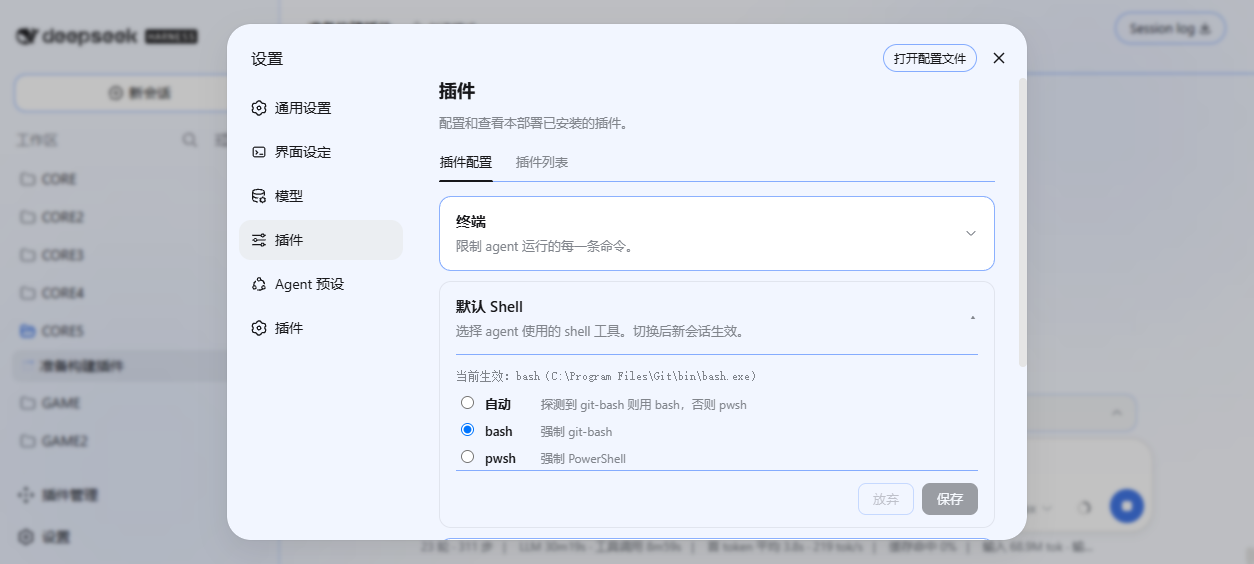
DeepSeek Harness 的 Windows 默认 Shell 策略插件:DSH 在 Windows 上默认启用 PowerShell(pwsh),而 LLM 训练语料中 bash 占比远高于 PowerShell,agent 执行 POSIX 命令时错误率显著升高。本插件探测 git-bash/MSYS2/Cygwin,在「设置 → 插件 → 插件配置」提供「默认 Shell」折叠卡片一键切换 bash/pwsh,动态注册 bash 工具并裁剪提示词工具面,让 agent 只面对一个 shell 工具。
成品展示
| 能力 | 说明 |
|---|---|
| bash 探测 | 显式 bashPath → Git 常见安装路径(Program Files / x86)→ MSYS2 / Cygwin → PATH,找到即用 |
| 配置面板 | 「默认 Shell」折叠卡片(与官方「终端 / Agent 循环 / 网页搜索」卡片同构),显示探测状态与当前生效 shell,自动 / bash / pwsh 三选一(staged 编辑 + 保存/放弃,折叠时保留未保存标记) |
| 策略生效 | auto 时探测到 bash 则用 bash 否则 pwsh;显式 bash / pwsh 强制对应 shell;切换下一次请求生效 |
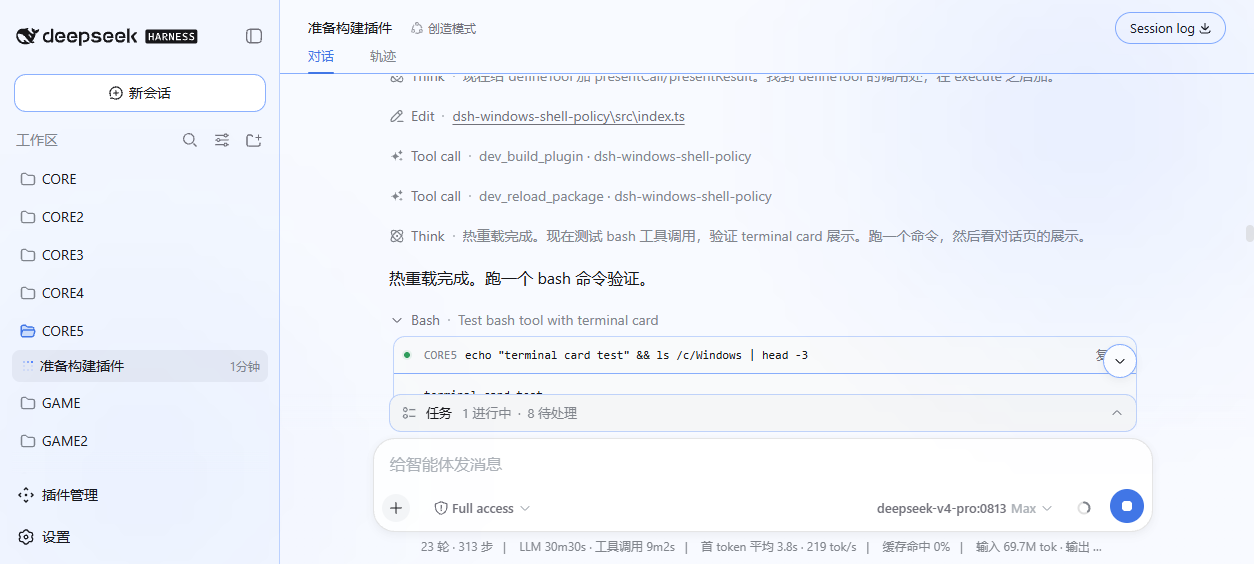
| bash 工具 | effective=bash 时动态注册(git-bash 执行,subprocess 通道,超时 / 输出截断 / exit code 标记),终端卡片展示(对话页可点击查看命令、cwd、输出与 exit 状态,与官方 shell 工具一致) |
| 提示词裁剪 | system-prompt/assemble 中按策略隐藏 pwsh / bash,agent 工具面只保留一个 shell 工具 |
| 持久化 | preferred 写入 settings 文档 shell-policy section,重启保留 |
| 卸载即净 | dsh plugin --profile web remove 或 dev_uninject_plugin 一键还原(工具注销 + 提示词恢复 + junction 清理) |
快速安装
GitHub 直装(推荐,国内网络最快,免等 npm):
dsh plugin --profile web add github:LAN-TINA-WS/dsh-windows-shell-policy
# 重启 dsh web,打开「设置 → 插件 → 插件配置」开始配置
npm 安装(一条命令):
dsh plugin --profile web add dsh-windows-shell-policy
Release ZIP 安装:
- 从 Releases 下载
dsh-windows-shell-policy-v*.zip并解压 dsh plugin --profile web add link:<解压目录>- 重启
dsh web,打开「设置 → 插件 → 插件配置」开始配置
注入器安装(免重启,开发环境):
DSH_CHECKOUT=<checkout> bash scripts/build.sh   # 产出 lib/index.js + lib/client.js
dev_inject_plugin <本目录>                      # host+UI 即时生效
配置指南
「设置 → 插件 → 插件配置」内展开「默认 Shell」卡片:
| 选项 | 行为 |
|---|---|
| 自动 | 探测到 git-bash 则用 bash,否则回落 pwsh(开箱即用) |
| bash | 强制 git-bash(未探测到 bash 时回落 pwsh 并提示) |
| pwsh | 强制 PowerShell(维持 DSH 默认行为) |
切换保存后下一次请求生效;preferred 持久化于 settings 文档 shell-policy section,重启保留。显式 bash 路径可通过 settings.yaml 的 shell-policy.bashPath 配置(面板编辑在规划中)。
反馈
问题、需求、使用体验:提交到 issue #1(欢迎反馈)。
贡献者
| 贡献者 | 贡献 |
|---|---|
| LAN-TINA-WS | 项目作者与维护者 |
License
本项目采用 MIT License。
开发者文档
开发工艺(编写规范、DSH 能力清单、组合插件转正流程)见 docs/:
| 文档 | 内容 |
|---|---|
| conventions.md | 插件编写规范与常见失败速查 |
| capabilities-host.md | DSH Host 服务/事件清单(本插件用到的) |
| capabilities-client.md | DSH Client 槽位/服务清单(本插件用到的) |
| roadmap-composition.md | 组合插件转正施工记录 |
仓库结构:src/(host + client 源码)、scripts/(构建)、docs/(文档与截图)、cordis.patch.yml(bundle patch 装配)。
Compatibility
Versions
| Latest version | Published | Size |
|---|---|---|
| 0.0.1 | — | — |
| 0.0.2 | — | — |
| 0.0.3 | — | — |
| 0.0.4 | — | — |
| 0.0.5 | — | — |
| 0.0.6 | — | — |
| 0.0.7 | — | — |
Comments
Loading…
Similar plugins
by zimzaza4
在 Windows 环境中为 DeepSeek Harness 提供 Git Bash 与 WSL 2 bash 工具,含 bwrap 沙箱、审批模式、后台任务
★ 12
↓ 164/wk
MIT
JavaScript
Oct 19, 2026
dsh plugin --profile web add @zimzaza4/dsh-bash-winby riverzhou
Windows bash tool for DeepSeek Harness: replaces the preset's pwsh with Git for Windows or MSYS2 bash while keeping the official terminal contract (cwd, background jobs, timeout promotion, result markers, terminal cards).
★ 1
NOASSERTION
TypeScript
Oct 18, 2026
dsh plugin --profile web add @riverzh/dsh-gitbashby g1998815
DSH(DeepSeek Harness) 右侧原生工具侧边栏插件:文件系统浏览器 / Git 变更与 diff / 会话变更 采用·撤回 / PTY 控制台。Windows 直连 node-pty,跟随 DSH 主题,RPC fail-closed。
★ 3
JavaScript
Aug 16, 2026
dsh plugin --profile web add dsh-workspace-toolsby yunuo110
DeepSeek Harness (DSH) bundle plugin: makes the existing bash tool run Git Bash on Windows and disables pwsh.
★ 8
MIT
JavaScript
Sep 4, 2026
dsh plugin --profile web add dsh-gitbashby liceses
DeepSeek Harness 插件:一键安装「极简模式 (Git Bash)」agent preset —— 把 DSH 自带极简模式中的 bash 调用映射到 Git for Windows 的 bash(MSYS),让 Windows 上的极简模式真正可用。
★ 131
↓ 140/wk
MIT
JavaScript
Oct 7, 2026
dsh plugin --profile web add @icelily/dsh-gitbash-presetby KannaKuron
DSH plugin: Git Bash shell for all agent modes on Windows (replaces pwsh executor)
★ 41
MIT
JavaScript
Oct 28, 2026
dsh plugin --profile web add dsh-gitbash-shell