

dsh-gitbash-new
Manifest valid★ 1Windows bash tool for DeepSeek Harness: replaces the preset's pwsh with Git for Windows or MSYS2 bash while keeping the official terminal contract (cwd, background jobs, timeout promotion, result markers, terminal cards).
dsh-gitbash
English | 简体中文
A Windows terminal bridge for DeepSeek Harness (DSH). It replaces the
model-facing pwsh tool with a real bash tool, with selectable Git for
Windows and MSYS2 profiles, while keeping the official terminal-tool
behaviour: working directory, background jobs, timeout promotion, permission
escalation, terminal cards, PTC and meta.cwd.
This is the complete user manual and reference. It covers installation, daily usage, the security model, settings, troubleshooting and development.
Minimum DSH: 0.2.1. Windows 10/11 only. The replacement applies to new sessions; existing sessions keep the tools they were created with.
Contents
- What you get
- Requirements
- Install
- Quick start
- Security model (read this first)
- Using the bash tool
- Shell profiles
- Settings
- Cookbook
- Troubleshooting
- Diagnostics
- Compatibility and upgrades
- Development
- Limitations and non-goals
- License
What you get
- One
bash, nopwshin the model tool catalogue:tools.restricthidespwsh, thetool:pwshprompt section is shadowed, andtool:bashis added. The replacement applies to new sessions; existing ones are not retrofitted. - Two shell families, one selector: Git for Windows (default priority) or
MSYS2 (
UCRT64,MINGW64,CLANG64,CLANGARM64,MINGW32,MSYS). Discovery reads the registry,where.exe, PATH and the usual install roots, validates the candidate withbash --version, and never proposes WSL'sbash.exe. - Official tool contract:
description,command,timeoutMs,workdir,run_in_background,sandbox_permissions/justification, POSIX and Windows-form workdirs, the same[exit code: N],[stderr]and truncation spill markers, andmeta.cwdfor the terminal card. - Background work:
run_in_backgroundreturns a job id; collect withjob_output, stop withjob_kill, and a foreground call past its deadline is promoted to a job instead of being killed. - Isolation instead of improvisation: PATH entries from the other bash
family are filtered out,
MSYSTEMmatches the selected profile, and Git'sbin\bash.exelauncher is canonicalized tousr\bin\bash.exe, so the environment the plugin composes is the one that actually runs. - Windows-specific correctness: the
signalNumber << 8exit encoding becomes[killed by signal: SIGTERM], and inherited WindowsPWD/OLDPWDare tombstoned sopwdstays POSIX. - Native DSH display: terminal cards, the
1 background task/1 subagentheader badges, job cards and subagent cards are rendered by DSH itself — the plugin registers abashtool withmeta.cwd, it does not draw its own chat UI. - A compact settings row with automatic discovery, an instant profile selector, compatibility mode, one-line warning and folded diagnostics.
- Explicit security: never silently widens permissions.
workspace-writeruns bash unconfined and labels the result with[compat: ...],read-onlyrefuses, andstrictallows onlydanger-full-access. See Security model. - Verified: 75 unit and integration tests, plus real-machine smoke on Git and MSYS2 (direct, background and subagent calls; light and dark settings UI).
Requirements
| Item | Requirement |
|---|---|
| DSH | >= 0.2.1 (tested on desktop runtime 0.2.1-rc.2) |
| Windows | Windows 10/11, x64; MSYS2 arm64 environments are also supported |
| bash provider | Git for Windows and/or MSYS2 |
| Node.js | ^22.19.0 or >=24, development/build only |
| Optional | Cygwin, best-effort and not recommended |
- Git Bash and MSYS2 both use the MSYS2 runtime. That runtime cannot start inside DSH's Windows ACL sandbox; this is an OS constraint, not a plugin bug (evidence in docs/DESIGN.md).
- WSL's
bash.exeis intentionally excluded. WSL is not Git Bash and does not fit this profile/environment model.
Install
Use the CLI that ships with DSH Desktop
Do not use an old global npm dsh (for example 0.1.7); it does not know
the 0.2.1 plugin/profile contract. Use the CLI under the desktop install:
set "DSH_CLI=%LOCALAPPDATA%\Programs\DeepSeek Harness\resources\runtime\cli\bin\dsh.cmd"
%DSH_CLI% --version
:: expect 0.2.1-rc.2 or newer
Fully quit DSH Desktop before changing a profile.
From a local checkout (development)
%DSH_CLI% plugin --profile desktop add link:D:/GitHub/dsh-gitbash-new
Reopen DSH, then hard-refresh the Web UI (Ctrl+Shift+R).
From GitHub (after publishing)
%DSH_CLI% plugin --profile desktop add github:riverzhou/dsh-gitbash-new
From npm (published)
%DSH_CLI% plugin --profile desktop add @riverzh/dsh-gitbash@0.2.2
Use @riverzh/dsh-gitbash@latest for the newest release.
Upgrade
Use the same CLI, restart DSH, hard-refresh:
%DSH_CLI% plugin --profile desktop remove @riverzh/dsh-gitbash
%DSH_CLI% plugin --profile desktop add link:D:/GitHub/dsh-gitbash-new
For a released version, replace link:... with @riverzh/dsh-gitbash@<version>.
Uninstall
%DSH_CLI% plugin --profile desktop remove @riverzh/dsh-gitbash
Restart DSH. The settings row disappears with the plugin. A dsh-gitbash
entry left in the profile's cordis.patch.yml is inert and can be deleted
manually.
Do not run two “bash instead of pwsh” plugins
dsh-tweaks' git-bash-terminal-tool also hides pwsh and registers bash.
If it is already installed, remove or disable it first:
%DSH_CLI% plugin --profile desktop remove dsh-tweaks-git-bash-terminal-tool
When both are present, the first one to replace wins; the later one usually
skips because pwsh is no longer restrictable. The log contains
skipped ... pwsh is not restrictable.
Quick start
- Install and restart DSH.
- Open Settings → General → Terminal tool (Git Bash / MSYS2).
- Leave Shell at Auto (recommended), or pick a specific Git/MSYS2 profile.
- Keep Compatibility at Compatibility mode (recommended) unless you want strict mode.
- Start a new session and ask the model to run something: “Use bash to print the shell, cwd and Git status.”
- Confirm the model calls
bash(notpwsh) and the result carries the expected cwd.
The settings row looks like this:
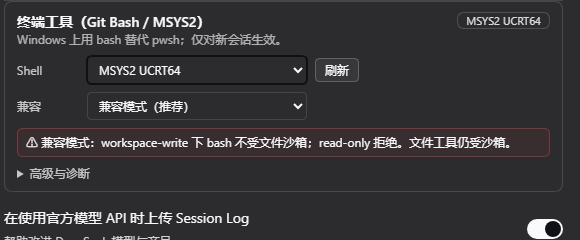
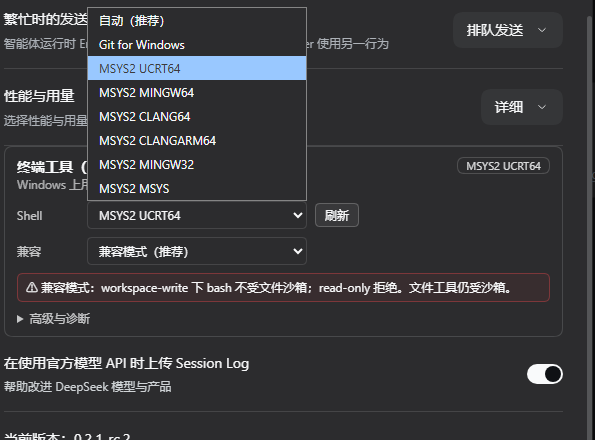
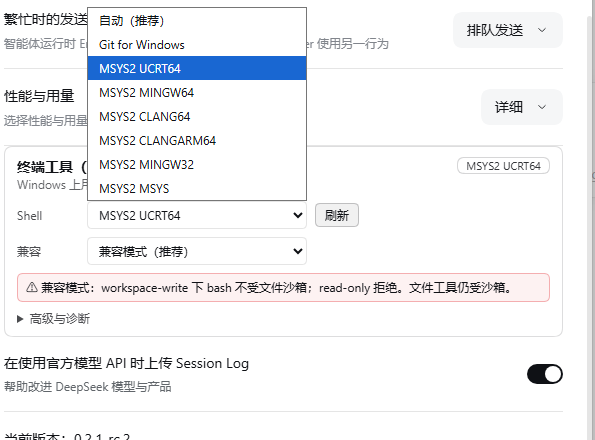
The Shell, Compatibility and MSYS2-environment dropdowns use the DSH light/dark surface tokens, so both the closed control and the open list stay readable:
Security model (read this first)
The MSYS2 runtime cannot start under DSH's Windows ACL sandbox: restricted
tokens break its named shared memory, signal pipe and BaseNamedObjects. Adding
the user SID defeats write confinement; lowering to Low integrity breaks
BaseNamedObjects again. There is no configuration in which Git Bash both runs
and stays inside that sandbox.
The plugin therefore makes the trade-off explicit:
| Session permission | compat: auto (default) | compat: strict |
|---|---|---|
danger-full-access | bash runs normally | bash runs normally |
workspace-write | bash runs outside the file sandbox, result carries [compat: ...] | refused |
read-only | refused | refused |
- File tools remain sandboxed by DSH. Only the bash process is unconfined.
- Under
workspace-write+auto, bash can write outside the workspace. Treat paths outside the workspace as read-only unless the user explicitly asks otherwise. - The plugin never silently widens permissions. The warning is always in the settings row, the tool description, the system prompt and the result text.
read-onlydeliberately refuses rather than breaking the read-only promise.strictis for security-sensitive users: bash is available only underdanger-full-access.- A blocked call can be retried with
sandbox_permissionsplus a one-sentencejustification; DSH asks the user for approval, and the wider mode applies to that call only.
Using the bash tool
Parameters
| Parameter | Type | Required | Notes |
|---|---|---|---|
description | string | yes | Clear 5–10 word description shown in the UI |
command | string | yes | Executed as bash -c '<command>'; use POSIX syntax |
timeoutMs | number | no | Positive; default 120000, capped at 600000 |
workdir | string | no | Working directory; relative paths resolve against the session cwd |
run_in_background | boolean | no | Return a job id immediately; no timeout applies |
sandbox_permissions | workspace-write | danger-full-access | no | Request a wider mode when the session policy blocks the command |
justification | string | with escalation | One sentence for the user explaining why this command needs wider access |
run_in_background and sandbox_permissions are feature-detected. The standard
web preset composes the job service and sandboxing executor, so both are
available; a minimal composition may expose only the basic parameters.
The tool runs a fresh shell for every call; it is bash -c, not a persistent
PTY. Use workdir rather than cd.
Result format
- stdout is returned as-is; stderr is appended under a
[stderr]header. - An empty result is
(no output). - A non-zero exit adds
[exit code: N]as the last line; a signal adds[killed by signal: X]. A successful foreground result usually has no exit marker; the terminal card shows the exit status pill. - A timeout that kills the call adds
[timed out after Nms]. - A timeout that promotes the call adds
[still running after Nms; moved to background job <id>]. - Large output is truncated to the tail (64,000 bytes per stream by default)
with
[output truncated; full output: <file>]; the full output is spilled to a file (up to 64 MiB). - The compatibility notice is
[compat: bash runs outside the DSH file sandbox (session mode workspace-write)]. It is a deployment notice, not command stderr. - A background start returns
started background job <id>and no stdout; read it later withjob_output.
tool/result.meta.cwd is the Windows absolute path actually used. Inside
bash, pwd is the MSYS POSIX form (for example /d/project).
Working directory and paths
- No
workdir: uses DSH's current session working directory. - Relative
workdir: resolved against the session cwd. - Windows absolute paths (
C:\...) and POSIX drive paths (/c/...,/d/...) are accepted;/tmpmaps to the Windows temp directory. - Other POSIX absolute paths (for example
/home/...) are refused rather than guessed, because the Windows mapping is ambiguous. - Prefer POSIX paths inside commands; use
$VARand${VAR:?}instead of PowerShell syntax.
Background jobs
run_in_background: truereturns a job id and continues the turn.- Use
job_output(withwait: trueto block) andjob_killto collect or stop it. These are DSH's built-in job tools; the plugin registers the job as kindbash. - The Web UI shows a background-task badge on the session header and job cards in the work steps.
- Background jobs have no timeout; stop them explicitly.
Timeouts and promotion
- A normal foreground call is bounded by
timeoutMs(default 120 s, cap 10 min). - When the job service is available, a foreground timeout promotes the call to a background job instead of killing it; the result says so and gives the job id.
- If the job service is unavailable, the call is killed at the deadline and reported as timed out.
Permission escalation
If the session policy blocks a command, retry with the narrowest wider mode and a justification:
sandbox_permissions: "workspace-write"   (or "danger-full-access")
justification: "Need to write the build cache under <path> because ..."
DSH asks the user. Approval applies to that one call. In compat: strict,
workspace-write is refused, so escalation must target danger-full-access.
Subagents, PTC and the UI
- A DSH subagent inherits the parent's tool layer. After this plugin replaces
pwshin the parent, a new child hasbashand nopwsh; this was verified for Git and MSYS2. - The child runs its own bash calls in its own session; the parent receives a
subagent card/notice and the header shows
1 subagent. Use View subagent to inspect the child conversation. - PTC (
run_code) sees the samebashtool; the plugin supplies presenters andpresentationMeta.cwd. The Web UI derives terminal cards from the tool name, arguments, result markers andmeta.cwd.
Shell profiles
A profile is more than a bash.exe path; it carries the flavour, install root,
MSYS2 environment and PATH rules.
| Flavour | Selector label | MSYSTEM | bash path |
|---|---|---|---|
| Git for Windows | Git for Windows | always MINGW64 | <root>\usr\bin\bash.exe |
| MSYS2 | MSYS2 UCRT64, MSYS2 MINGW64, … | the selected environment | <root>\usr\bin\bash.exe |
| Cygwin | Cygwin (experimental) | unset | <root>\bin\bash.exe |
- Auto prefers Git for Windows; without Git it picks the best installed
MSYS2 environment (
UCRT64first, thenMINGW64,CLANG64,MSYS). - Git for Windows has exactly one profile. MSYS2 has one profile per
installed environment; all share the same
usr\bin\bash.exe, sobashPathalone cannot distinguish them —msystemis persisted too. MSYS2environments must exist (<root>\ucrt64\bin, etc.). A missing environment makes that profile invalid rather than silently falling back.
Git bin\bash.exe is canonicalized
Git for Windows ships two entry points:
bin\bash.exeis a launcher. It resetsMSYSTEMand PATH from the installation (Git 2.56 uses UCRT64), overriding the requested environment.usr\bin\bash.exeis the runtime and honours the environment we compose.
If you enter <root>\bin\bash.exe, the plugin normalizes the profile to
<root>\usr\bin\bash.exe. The effective path is shown in the settings row.
This was a real-machine bug: before normalization, a Git profile reported
MSYSTEM=UCRT64; after it, MSYSTEM=MINGW64.
Environment isolation
| Profile | MSYSTEM | PATH prefix (before inherited PATH) |
|---|---|---|
| Git | MINGW64 | <root>\bin, <root>\usr\bin, existing <root>\ucrt64\bin / mingw64\bin / mingw32\bin |
| MSYS2 | selected | <environmentRoot>\bin, <root>\usr\bin, <root>\usr\local\bin |
| Cygwin | unset | <root>\bin |
- Common overrides:
NO_COLOR=1,TERM=dumb,PAGER=cat,GIT_PAGER=cat,CHERE_INVOKING=1. - MSYS2 also gets
MSYS2_PATH_TYPE=inherit. - The other family's roots are filtered out. A Git session does not inherit
C:\msys64\usr\bin; an MSYS2 session does not inherit Git'susr\bin. DSH_*facts are merged last, so they win.HOME,TMP,TEMPandLANGare not overridden.
Discovery order
- The configured
bashPath+msystem(highest priority; invalid means a clear error, not a silent fallback). - Git registry
InstallPath(HKLM/HKCU). - Known roots: Git (Program Files, LocalAppData,
C:\Git,D:\Git), MSYS2 (C:\msys64,D:\msys64, LocalAppData,C:\msys32), Cygwin (C:\cygwin64,C:\cygwin). where git(derive the root fromgit.exe) andwhere bash.bash.exe/git.exeonPATH.
WSL is excluded: System32\bash.exe, Sysnative, WindowsApps, \\wsl$
and wsl.exe are never candidates. Version probing runs only on Refresh or
Test, not when the settings page opens; the selector uses cached profiles.
Settings
Open Settings → General → Terminal tool (Git Bash / MSYS2). The default view is intentionally small:
- Shell —
Auto (recommended), Git for Windows, or a specific MSYS2 environment. Selecting an entry writes both the path andmsystem. - Refresh — rescans roots and probes
bash --versionfor versions/badges. - Compatibility — compatibility mode or strict mode; the one-line red warning explains the current trade-off.
- Advanced & diagnostics — manual path, Use this path, Reset to auto, Test, MSYS2 environment, and platform / sandbox mode / background jobs / last replacement.
The badge at the top right shows the effective profile (which may differ from a manually entered path after Git canonicalization).
What is stored, and when it applies
Configuration is stored in the profile's cordis.patch.yml:
- id: dsh-gitbash
  config:
    bashPath: 'C:\Program Files\Git\usr\bin\bash.exe'
    msystem: MINGW64
    compat: auto
bashPath: ''means auto.msystemisautoor a concrete MSYS2 environment; Git ignores it and usesMINGW64.compatisautoorstrict.- Settings are read when a new agent is created. Existing sessions are not retrofitted; start a new session (subagents inherit from their parent).
- The settings form is the normal path; hand-editing the patch also works but requires a DSH restart.
Cookbook
Check what the model is using
Ask:
Use bash to print
$MSYSTEM,command -v bash,bash --version,pwdandgit status.
Expected: MSYSTEM=MINGW64 for Git, or the selected environment for MSYS2;
bash resolves under the chosen install; pwd is POSIX and the terminal card
shows the Windows cwd.
Run a long-lived server
Ask the model to start it with run_in_background: true, then collect logs
with job_output and stop it with job_kill. The session header shows the
background-task badge.
Use an MSYS2 toolchain
- Install the environment in MSYS2 (for example
pacman -S --needed mingw-w64-ucrt-x86_64-gcc). - Select MSYS2 UCRT64 in Shell.
- Ask the model to run
command -v gcc; it should resolve underC:\msys64\ucrt64\bin.
Let a subagent do the work
Ask the parent to use subagent with a child prompt that runs a bash command.
The child has its own bash; the parent receives the child report and the
session shows a subagent card. Use View subagent to inspect the child.
Fix “the Git session says UCRT64”
Set Shell back to Auto (or pick Git for Windows) and refresh. A manually
entered bin\bash.exe is canonicalized to usr\bin\bash.exe; if you still see
UCRT64, you are probably running an older plugin build or a stale session.
Troubleshooting
| Symptom | What to do |
|---|---|
| Settings says no bash found | Install Git for Windows or MSYS2; click Refresh; or enter <root>\usr\bin\bash.exe manually (no quotes) |
New session still has pwsh | Confirm DSH >= 0.2.1, the plugin is in the profile bundles, and DSH was restarted; inspect %TEMP%\dsh-gitbash.log for replace: |
| Only old sessions have no bash | Replacement is per-agent; start a new session. Subagents inherit from their parent |
Git session reports MSYSTEM=UCRT64 | Old bin\bash.exe path/build; use Auto/Refresh; current builds canonicalize to usr\bin\bash.exe |
| MSYS2 environment not installed | Install it in MSYS2; the profile only lists environments whose bin directory exists |
CreateFileMapping ... Win32 error 5 / couldn't create signal pipe | The process was started inside the Windows ACL sandbox. This plugin runs bash unconfined in compat: auto; remove custom confinement or use a supported preset |
read-only refuses bash | By design; switch the session to workspace-write or danger-full-access (or escalate) |
Strict mode refuses workspace-write | Set compatibility to auto, switch the session to danger-full-access, or escalate to danger-full-access |
| Both pwsh and bash are gone after installing another plugin | Two plugins are competing; keep only one bash replacement (see Install) |
| Background jobs are unavailable | The preset did not compose ctx.jobs; use the standard web preset or run in the foreground with a timeout |
job_kill / job_output missing | They are separate DSH tools, not part of bash; ensure the jobs tool group is in the preset |
| Settings row is missing | DSH too old, plugin not loaded, or the Web client was not rebuilt/refreshed; restart DSH and hard-refresh |
| Cannot find the Git/MSYS2 selector, or changing it does not affect this session | The selector is only in Settings → General → Terminal tool (Git Bash / MSYS2); the built-in Terminal card is the separate UI-terminal plugin. Changes persist immediately but apply to new sessions only |
| Path with spaces fails | Enter the path without surrounding quotes; the settings form stores it verbatim |
| WSL bash is not listed | Intentional; WSL cannot be driven through this profile/environment model |
| Output seems cut off | Long output is tail-truncated; use the reported spill path for the full file |
Diagnostics
- Plugin log:
%TEMP%\dsh-gitbash.log(typicallyC:\Users\<you>\AppData\Local\Temp\dsh-gitbash.log). One line per event:apply, capability probing,replace: applied ...orskipped ... pwsh is not restrictable. - Settings state:
/api/dsh-gitbash/state(authenticated), used by the row;/discoverand/validateare also available to the client. They are not a public unauthenticated API. - DSH Developer Tools: raw session events, message grouping and the Node backend are the authoritative view for job and subagent cards.
- Compatibility check:
pnpm compatcheckcompares the deployed official bundles with the strings this plugin depends on.
For a full real-machine transcript, see docs/SMOKE.md.
Compatibility and upgrades
- Minimum DSH: 0.2.1. The plugin uses structural projections of official
services (
ctx.subprocess,ctx.jobs,ctx.sandboxPolicy,ctx.shellEnv,ctx.workingDirectory,ctx.approval,ctx.configForms, etc.) and does not import private DSH packages. agent/created,tools.restrict,tool:bash/tool:pwshsection names, result markers andmeta.cwdare the critical integration points. A wrong event name would be a silent no-op, so the test suite asserts the strings.- After upgrading DSH:
pnpm compatcheckpnpm test- rebuild (
pnpm build) ifsrc/changed; the committedlib/must matchsrc/ - restart DSH and hard-refresh the Web UI
- Non-Windows does not register any behaviour (
cordis.patch.ymldisables the entry whenprocess.platform !== 'win32').
Verified on 2026-10-18: DSH 0.2.1-rc.2, Git for Windows 2.56 and MSYS2
5.3.20 (UCRT64); direct bash, background jobs, subagents, the settings switch and
the native UI cards were exercised. Raw events: docs/SMOKE.md.
Development
pnpm install
pnpm build        # lib/index.js + lib/client.js
pnpm check        # tsc --noEmit
pnpm test         # node:test; 75 tests, including real Git/MSYS2 when present
pnpm selftest     # pure-logic checks, no DSH needed
pnpm compatcheck  # contract-string check against the installed DSH
Real integration tests discover local Git/MSYS2 installations and skip when
absent. They exercise MSYSTEM, PATH isolation, exit codes, stderr, real child
bash, timeout and the expected unconfined write behaviour.
Layout
src/index.ts            host entry: apply, Config, routes, replacement
src/shared/protocol.ts  host/client wire types and route constants
src/host/               discovery, env, executor, jobs, rendering, tool, routes
src/client/             settings row, store, API, locales
tests/                  unit + real integration tests
scripts/                selftest, compatcheck
docs/                   design, real-machine record, screenshots
lib/                    built output committed for link: installs
src/ and lib/ must stay in sync; dsh plugin add link: loads lib/.
docs/ is indexed by docs/README.md; unregistered docs are
treated as nonexistent.
Packaging
pnpm build
pnpm check
pnpm test
pnpm pack
The npm package is @riverzh/dsh-gitbash (the DSH entry id stays dsh-gitbash) with engines.dsh = ">=0.2.1-0" and
engines.node = "^22.19.0 || >=24.0.0". It ships the host entry, client bundle, lib/, src/,
cordis.patch.yml, docs and both READMEs.
Limitations and non-goals
- One-shot bash: every call is
bash -c, not a persistent shell/PTY. Theminimalpreset's persistent shell is not preserved. - Windows sandbox incompatibility: bash cannot run confined; see Security model. There is no safe toggle that makes MSYS2 run inside the ACL sandbox.
- WSL excluded; Cygwin is best-effort and experimental.
- Existing sessions are not migrated; settings apply to new agents.
- Background jobs have no timeout; stop them explicitly.
- Output is tail-truncated; use the spill file for full output.
- The replacement is per-agent: a child inherits the parent's layer, but a child created before the plugin was active will not be retrofitted.
License
GNU General Public License v3.0 only (GPL-3.0-only). See LICENSE.
Comments
Loading…
From the same category
by awesome-dsh-plugin
A curated list of plugins for DeepSeek Harness (dsh) · DeepSeek Harness 插件精选列表
★ 19.4k
CC0-1.0
Python
Oct 18, 2026
by 0xsline
DeepSeek Harness (DSH) ecosystem: curated plugins, tools, and infrastructure from dsh-external/hub and the public dsh-plugin topic.
★ 1.2k
CC0-1.0
Python
Oct 16, 2026
by pax-beehive
Open-source CLI, schemas, resolver, and DSH agent tools for DSH Plugin Hub
★ 390
MIT
TypeScript
Oct 6, 2026
by xiajiajun516
DeepSeek Harness (DSH) backup & restore plugin — export, import, migrate and sync your complete DSH configuration, plugins, MCP servers, skills and workspace. One-click migration to another machine.
★ 210
MIT
TypeScript
Oct 18, 2026
dsh plugin --profile web add dsh-config-managerby yjh051108
推荐组件(非必须):DeepSeek Harness 运行时注入器;已随 dsh-routing-suite 单仓库化保留,本仓库继续维护/发布。
★ 166
TypeScript
Oct 16, 2026
dsh plugin --profile web add @dsh-external/dsh-super-injectorby jigjoy-ai
A CLI that turns a goal into a pull request - and a sandbox for testing concurrent AI coding agents on the Mozaik runtime.
★ 124
MIT
TypeScript
Oct 13, 2026